Scheduled task
A feed generated by hand is a feed that goes stale the moment you close the tab. Prices move, stock runs out, you add fifty products - and the marketplace is still serving last Tuesday.
Set a schedule once and the extension keeps the file current on its own.
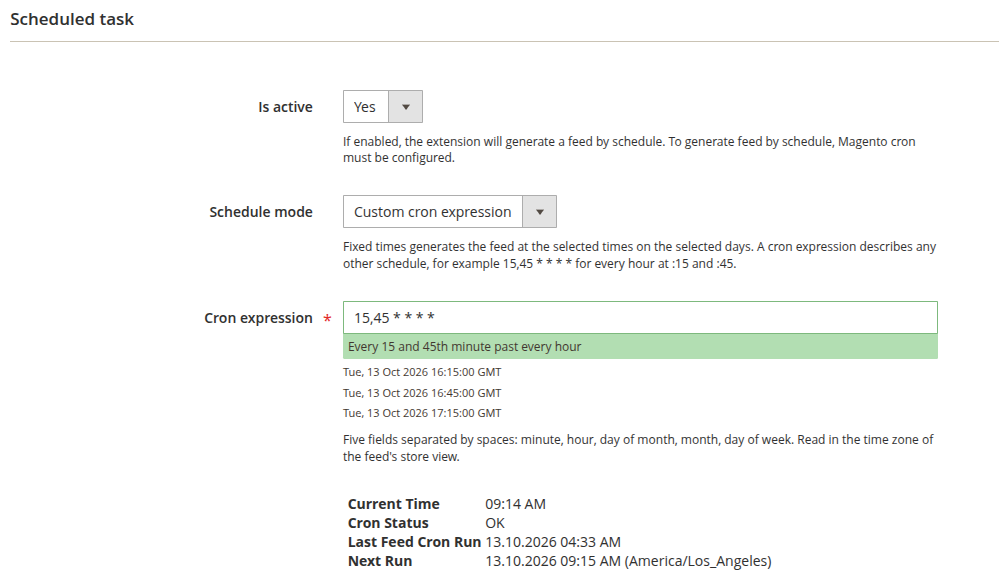
- Is active (Yes/No): turn the schedule on. Magento cron must be running for this to do anything - see the note below.
- Schedule mode: how you describe when the feed is generated.
- Fixed times: pick times of the day and days of the week. This is the default, and the right choice for a feed generated a few times a day.
- Custom cron expression: describe any other schedule with a cron expression - every 30 minutes, twice an hour, every two hours on weekdays only.
- Time of the day (Fixed times): when the feed should be generated. Pick several time frames if you want, and pick them outside your peak traffic hours.
- Days of the week (Fixed times): which days it runs. Select several, or all of them for a daily feed.
- Cron expression (Custom cron expression): the schedule, as five fields separated by spaces - see Cron expression below.
- Current time: the time in your store's default timezone (Stores -> Configuration -> General -> General -> Locale Options -> Timezone), shown here so you do not schedule against the wrong clock. This trips people up more often than anything else on the page.
- Cron status: whether Magento cron is running at all. If this says it is not, nothing on this page will happen.
- Last feed cron run: when the extension's export job last ran. The job checks every minute whether a feed is due, so a recent time here tells you cron is alive; when this feed was last generated is shown at the top of the feed page.
- Next run: when this feed will next be generated, with the timezone it is read in. It reflects the saved schedule, so after changing the schedule, save the feed to see the new time.
- Not scheduled: Is active is set to No - the schedule is off.
- Never: no day of the week is selected - Fixed times with no day ticked.
- Never: the cron expression is empty, not valid or never matches - for example,
0 0 31 2 *(February 31st).
The two modes read time differently. Fixed times are read in the store's default timezone, the one Current time shows. A cron expression is read in the timezone of the feed's Store view, so a feed for a store in another country runs on that store's clock.
Cron expression
A cron expression has five fields, separated by spaces:
| Field | Allowed values |
|---|---|
| Minute | 0-59 |
| Hour | 0-23 |
| Day of month | 1-31 |
| Month | 1-12 |
| Day of week | 0-7 (0 and 7 are both Sunday) |
Each field takes * (every value), a number, a list (15,45), a range (1-5), a step (*/15, or 0-30/10 for a step inside a range), or a list of those. Names such as MON or JAN, a sixth field for seconds, and shortcuts such as @daily are not accepted.
When both Day of month and Day of week are set, a day matching either of them counts, as in standard cron: 0 3 1 * 0 runs at 3:00 on the 1st of every month and on every Sunday.
Examples:
15,45 * * * *- every hour at :15 and :45.*/30 * * * *- every 30 minutes.0 */2 * * 1-5- every two hours on the hour, Monday to Friday.0 6 * * *- every day at 6:00.* * * * *- every minute.
The expression is checked when you save the feed. If a field is wrong, the save is refused and the message names the field and its allowed values - 61 * * * *, for example, is refused because a minute only goes up to 59.
While you type, a line under the field describes the expression in words and lists its next three runs. Those three times are in GMT, not in the store's timezone - Next run below is the one in the feed's own timezone. The line only checks that there are five fields, so it can show an expression as valid that the save then refuses; the save is the check that counts.
* * * * * regenerates the feed as soon as the previous generation finishes. For a large catalog that keeps the server busy around the clock; pick a schedule that matches how often the marketplace actually reads the file.
When a run is skipped
A feed is generated by one process at a time. If a scheduled time comes while the feed is still being generated - a large feed on a short schedule, or a generation you started by hand - that time is skipped, and the feed is generated again at its next scheduled time.
A run that fails or that you stop is not started again straight away either: the feed waits for its next scheduled time.
On the night clocks change, a time in the hour that is skipped does not run that day, and a time in the hour that repeats can run twice.
The extension registers its jobs under the feed cron group, not the default group. If you run Magento cron with explicit group flags - a common setup on managed hosting platforms such as Hypernode - you need a dedicated entry for the feed group:
* * * * * /usr/bin/php /var/www/magento/bin/magento cron:run --group=feed >> /var/www/magento/var/log/magento.cron.log 2>&1
Replace /var/www/magento with the actual path to your Magento installation.
Without that entry the feed jobs are never picked up and scheduled generation silently does nothing - even though bin/magento mirasvit:feed:cron works perfectly when you run it by hand. That contradiction is the tell: if manual runs work and scheduled ones do not, this is why.