Troubleshooting
The problems below account for most of the support tickets we get. Each one starts with the symptom you actually see, so scan the headings and jump to yours.
Blank page when navigating to Catalog -> Feeds
The required PHP library zf1/zend-reflection is missing.
Solution:
Install the missing library via composer:
composer require "zf1/zend-reflection"
Category filter returns the wrong products (empty feed, or the whole catalog)
Before version 1.15.8, only the IS ONE OF and IS NOT ONE OF operators on Category read the list of category IDs as a list. Every other operator produced the wrong product set without reporting anything: IS matched no products, so the feed came out empty, and IS NOT excluded nothing, so the entire catalog was exported.
Solution:
Update to 1.15.8 or later, then regenerate the feed - every operator on Category now means the same thing, so saved filters start returning the expected products.
On an earlier version, change the condition to IS ONE OF / IS NOT ONE OF:
- Navigate to your feed settings.
- Update the category filter condition.
- Regenerate the feed.
A category filter matches the categories a product is assigned to. A product in a subcategory is not matched by its parent category unless it is assigned to the parent as well.
Feed generated but contains no products
The generation finishes with Feed file was generated., but the Count row shows 0, the Products in feed value on the feed page shows 0 products, and the generated file contains no products.
A count of 0 means the export ran to completion and found nothing to export - the feed itself is working. Work through the three causes below in order.
Solution:
1. The product filter matched no products
- Open the feed and click Preview Feed. The preview runs the same filter and writes to a separate preview file, so it does not overwrite your generated feed.
- If the preview is empty as well, the filter is the cause.
Two filter mistakes account for most empty feeds: a Category condition on a version before 1.15.8, where every operator except IS ONE OF / IS NOT ONE OF matched the wrong products (see Category filter returns the wrong products above), and a condition left with an empty value (see A filter condition with an empty value matches no products below).
2. The selected store view has no products
- Check the Store view field on the feed. A feed only exports products assigned to the website that this store view belongs to.
- Open Catalog -> Products and confirm that products are assigned to that website. A feed scoped to a store view whose website has no products assigned stays empty no matter how the filter is configured.
3. Fast mode filtering excluded the products
When Enable fast mode filtering is set to Yes, the extension narrows the product list with a database query before your filter rules are evaluated. For some conditions that query can leave out products the rules would have kept, and the feed comes out empty.
- Set Enable fast mode filtering to
Nofor this feed and regenerate. If the products appear, fast mode is the cause - see Reports configuration for that setting. - A Stock Availability condition is answered from the stock index in fast mode, and from the product's own stock row when fast mode is off, so a stale index can leave products out on its own. Reindex and regenerate:
bin/magento indexer:reindex
- If the admin shows a One or more indexers are invalid banner, resolve that first.
Missing or incorrect required attribute [price]
Solution:
Try adding a currency directly to the price attribute in the Content settings of the feed, then regenerate it.
Before:
<g:price>{{ product.final_price }}</g:price>
After:
<g:price>{{ product.final_price }} EUR</g:price>
Alternatively, you can define the currency directly in Google Merchant Center.
Missing two out of three attributes [GTIN, Brand, MPN]
The attributes may not be set in your product data.
Solution:
Create a Dynamic attribute that ensures at least one of these values is provided. Then, use it in the <g:identifier_exists> tag.
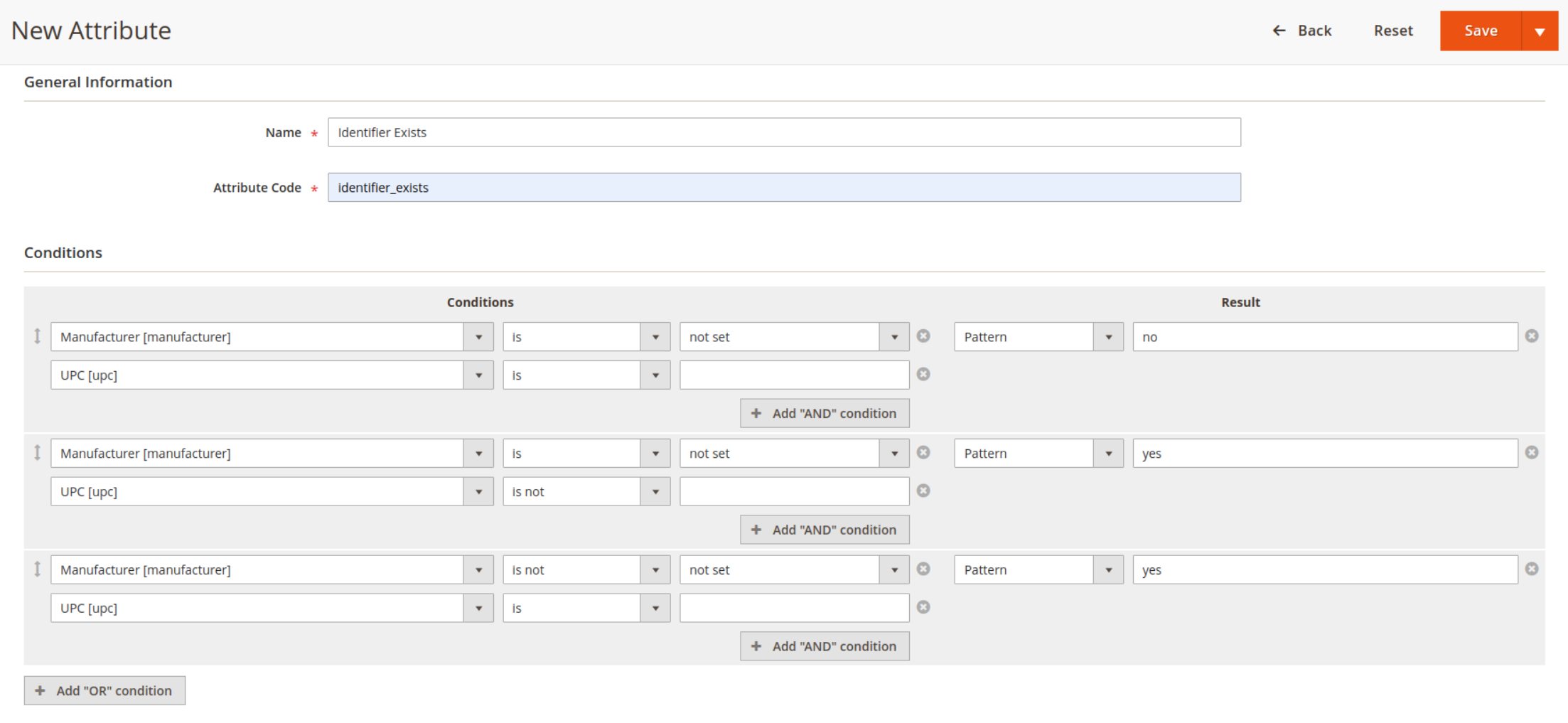
Also, you can add this dynamically to your feed.
Example:
<g:identifier_exists>{% if product.gtin or product.brand or product.mpn %}yes{% else %}no{% endif %}</g:identifier_exists>
Ensure that your feed correctly includes at least one of these attributes before regenerating.
Feed not generating automatically, but works when run manually
If bin/magento mirasvit:feed:cron (or mirasvit:feed:export) works correctly by hand but the feed is never generated on schedule, the most likely cause is a split-group crontab that omits the feed group.
The extension registers its cron jobs under the feed group. If your crontab runs separate entries for --group=default, --group=index, and --group=consumers (a common pattern on managed hosts like Hypernode), the feed group is simply never invoked.
Solution:
Add a dedicated entry for the feed group to your crontab:
* * * * * /usr/bin/php /var/www/magento/bin/magento cron:run --group=feed >> /var/www/magento/var/log/magento.cron.log 2>&1
Replace /var/www/magento with the actual path to your Magento installation.
You can verify the group name by checking vendor/mirasvit/module-feed/src/Feed/etc/crontab.xml.
Export stuck at a certain step?
- Check if server resources (memory, CPU) are sufficient.
- Ensure correct permissions for the export directory.
- Check the message tab for more details.
A filter condition with an empty value matches no products
Cause:
is not, is not one of, and does not contain don't behave the way their names suggest once the value is left blank:
- [attribute] is not (empty) and [attribute] is not one of (nothing selected) both mean "attribute has a value" - they keep only products where that attribute is set to something.
- [attribute] does not contain (empty) means "exclude every product," with no exceptions - it matches nothing at all, regardless of whether the attribute has a value or not.
If a filter has a does not contain condition with no value, and that filter is the only rule (or sits inside an ALL combination), it excludes the entire catalog and the feed comes out empty. This is true whether or not Enable fast mode filtering is on - both evaluate these conditions the same way.
Solution:
- Go to Catalog -> Advanced Product Feeds -> Filters and check every filter used by your feeds for a does not contain condition with no value entered.
- If the intent was "only products with this attribute filled in" rather than "exclude everything," change the operator to is not and leave the value empty. That's the correct way to say "attribute is not empty."
- Save the filter and regenerate the feed.
Google Merchant Center upload is unavailable / disabled
The Google Merchant Center section on the feed edit page shows an install banner, and the Submit to Google Merchant Center button is disabled.
Cause:
The integration depends on the optional google/shopping-merchant-datasources Composer package, which is not installed by default and requires PHP 8.1+.
Solution:
From your Magento root, run:
composer require google/shopping-merchant-datasources:^1.2
bin/magento setup:di:compile
bin/magento cache:clean
If you are on PHP 7.4 or 8.0, upgrade PHP first. See the Google Merchant Center page for the full setup walkthrough.
Google Merchant Center upload fails with "NOT_FOUND"
This typically happens once, immediately after creating a brand-new data source - Google's read replicas have not yet replicated the create operation.
The extension automatically retries the fetch trigger up to three times with exponential backoff, so transient NOT_FOUND errors resolve themselves. If the error persists across multiple manual submissions:
- Open the feed and clear the Data source name field (under the Google Merchant API tab).
- Save the feed.
- Click Submit to Google Merchant Center again - the extension will register a new data source.