Configuration settings
The module Facebook Pixel & Conversion API requires a prior configuration before it is fully ready to use.
Navigate to Store -> Settings -> Configuration -> Mirasvit Extensions -> Facebook marketing to open the module's settings.
Facebook pixel
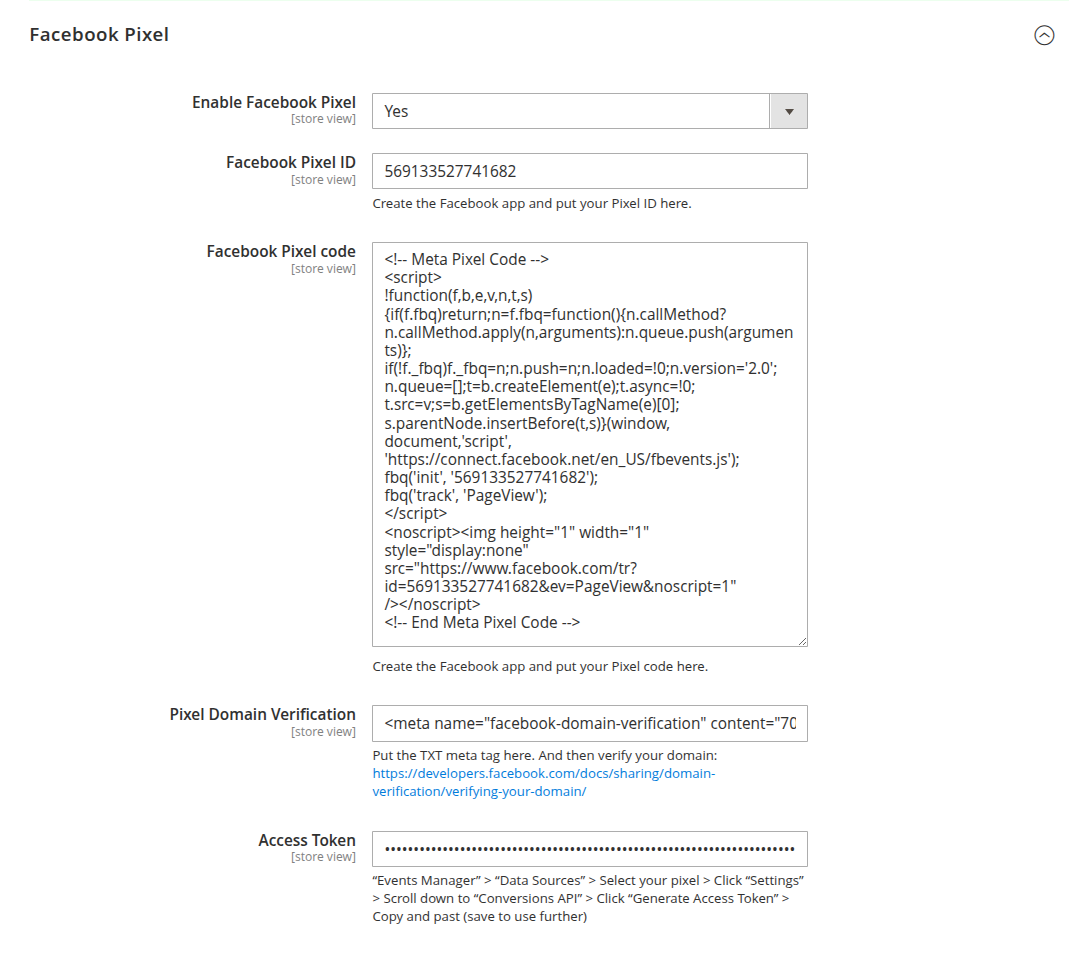
-
Enable Facebook pixel: set it to yes to allow integration of Facebook's tracking code into your website.
-
Facebook pixel ID: field for a unique identifier assigned to the Facebook Pixel that you create within your Facebook Ads Manager account. Follow the Facebook manual to get the Pixel ID.
-
Facebook pixel code: paste here a piece of JavaScript code provided by Facebook for your Meta Pixel. This code snippet contains your unique Facebook Pixel ID and is responsible for tracking user interactions on your website, such as page views, clicks, and conversions.
-
Facebook pixel noscript code: paste here the
<noscript>fallback snippet provided by Facebook. It ensures visitors with JavaScript disabled are still counted, giving you a more complete view of your audience. -
Pixel domain verification: paste here a meta tag to verify ownership of your store domain where you've installed the Meta Pixel.
-
Access token: a field for a unique identifier provided by Facebook that allows you to securely connect your server directly to Facebook's Conversions API.
-
Send Purchase event on order status: select the order statuses that confirm a purchase, for example
ProcessingorComplete. Use it when orders are confirmed after checkout, such as cash on delivery, so unconfirmed or fake orders are not reported to Meta as purchases.- Leave it empty to send the Purchase event when the order is placed, in the browser and through the Conversions API.
- If statuses are selected, the Conversions API Purchase event is sent once, when a storefront order first reaches one of them. A later change to another selected status does not send it again.
- The browser Purchase event fires on the checkout success page only if the order already has one of the selected statuses. Otherwise, the purchase is reported by the Conversions API only.
noteOnly orders placed on the storefront after the statuses are selected are sent. Orders created in the admin panel are not sent.
Shared Marketing tracking settings
Event-level behavior - the product identifier, customer group tracking, attribute mapping (brand, variants, custom dimensions), the on-page debug toolbar, and the option to suppress tracking for selected visitors - is configured once for all Mirasvit tracking extensions under Marketing tracking, not in the Facebook marketing section. See Shared tracking settings.