Advanced reviews settings
Use for configuring the display of reviews and their behavior.
The Advanced reviews settings are located at Stores -> Configuration -> Mirasvit extension -> Advanced reviews, and consist of the following sections:
General settings
Сonfigure review-related features and display preferences.
Visibility and features
Set preferences for how reviews are visible and what additional information reviewers can provide.
- Enable advanced reviews: turn on advanced features for a richer review experience.
- Allow guest reviews: allow visitors without an account to leave reviews.
- Allow pros and cons in reviews: let reviewers add a list of positive and negative points in their feedback.
Display options
Control how reviews are sorted and what additional details are shown.
- Default review sorting: set the order in which reviews are displayed (e.g., by newest or highest rated).
- Show product details in reviews: display additional product info in reviews for configurable products from verified buyers.
- Show reviewer location: display the location of the reviewer to provide context for their feedback. If enabled, the GeoLite2 database will be used. Requires configuration in the IP Geolocation section.
- Display "Verified buyer" badge: show a badge next to reviews from customers who have purchased the product.
- Verified buyer order statuses: select the order statuses that qualify customers for the "Verified Buyer" badge. Reindex with
bin/magento mirasvit:review:reindex --verify --forceafter changing this setting. - Match guest reviews by email: when enabled, guest reviews are matched to orders using the reviewer's email address to determine "Verified Buyer" status. This is a lower-trust signal than matching by customer account, so enable it only if you have a significant guest-checkout share. Reindex with
bin/magento mirasvit:review:reindex --verify --forceafter changing this setting. - Set date format: set the format for displaying dates on comments. Examples for available formats:
- Apr 29, 2025
- Tuesday, April 29, 2025
- 4/29/25
- Apr 29, 2025, 2:07:56 AM
- Tuesday, April 29, 2025 at 2:07:56 AM Pacific Daylight Time
- Tuesday, April 29, 2025 at 2:07:56 AM PDT
- 4/29/25, 2:07 AM
- Show review summary in block title: display an average rating and total reviews number near the title of the reviews block on the product page.
- Enable review JSON-LD: adds schema.org review markup to product pages for Google Rich Results. Disable this if another extension already handles structured data for reviews.
Review media settings
Configure settings for media files attached to reviews.
- Allow photo attachments: enable customers to attach photos to their reviews.
- Show photo gallery: display a gallery of all review photos for the product on the product page.
- Maximum photos per review: set the maximum number of photos a reviewer can attach to a review. Use
0for unlimited (default value is 5). - Maximum file size (MB): set the maximum size, in megabytes, for a single review photo. Use
0for unlimited (default value is 5); a server-side upload limit still applies.
AI-Powered review features
Enable and configure AI-powered features for generating and aggregating reviews.
AI providers (OpenAI, Claude, Gemini, Grok) and their API keys are configured globally, not in this section. This section shows a summary of how many providers are enabled and links to the global settings at Stores -> Configuration -> Mirasvit Extensions -> Developer -> AI Configuration.
- Enable review aggregation: summarize the last 10 customer reviews into a single AI-generated summary (minimum of 5 reviews).
- Show AI-generated info hint in summary: add an info icon to indicate that the review summary is AI-generated.
- Enable AI autowrite: allow AI to generate review content in the admin panel using OpenAI (ChatGPT).
Review reminder settings
Configure automated review reminders to encourage customer feedback after purchases.
- Enable review reminders: automatically send reminders to customers asking them to leave a review.
- Delay sending reminders (days): set the number of days after a purchase before sending a reminder (e.g., 1-30 days after purchase).
- Delay sending reminders (hours): set the number of hours after a purchase before sending a reminder (e.g., 1-24 hours after purchase).
- Reviews section identifier: the anchor added to product links in reminder emails so they lead the customer straight to the reviews section. For example, setting it to
reviewsproduces a link likeyourwebsite.com/product#reviews. - Choose email template: select the email template to use for review reminder messages.
- Send reminder for orders with status: send reminders only for orders with specific statuses.
- Cancel reminders for orders with status: disable reminders for certain order statuses.
- Sender email: specify the sender address for reminder emails.
- Do not send reminders for customer groups: choose which customer groups should not receive reminders.
- Send reminder email copy to: comma-separated emails for sending copy of the review reminder email. Leave empty for disabling this feature.
- Send reminder email copy method: select the method for sending copies of reminder emails (e.g., BCC, CC).
- Reminder email logs lifetime (days): set how long reminder email logs are kept before being deleted. Leave empty to disable log deletion.
- Sandbox mode: enable sandbox mode to send all review reminders to a test email address for testing purposes.
- Test email: use this field to enter an email address for testing purposes.
Admin notification settings
Set up notifications for admins regarding new reviews and pending actions.
- Enable admin notifications: notify the admin when there are pending reviews that need to be moderated.
- Enable email alerts for new reviews: receive email notifications whenever a new review is submitted.
- Email recipients: enter a comma-separated list of email addresses who should receive new review notifications.
Review Grouping
Pool the reviews of related products onto a single product page, so a new or low-traffic product isn't left with an empty review block. These settings cover grouping by native product relations. To pool products that are not linked by a relation, create a group under Marketing -> Advanced Reviews -> Review Groups (see How to group product reviews).
All three relation options are set to No by default — an upgraded store keeps showing each product's own reviews until you turn grouping on.
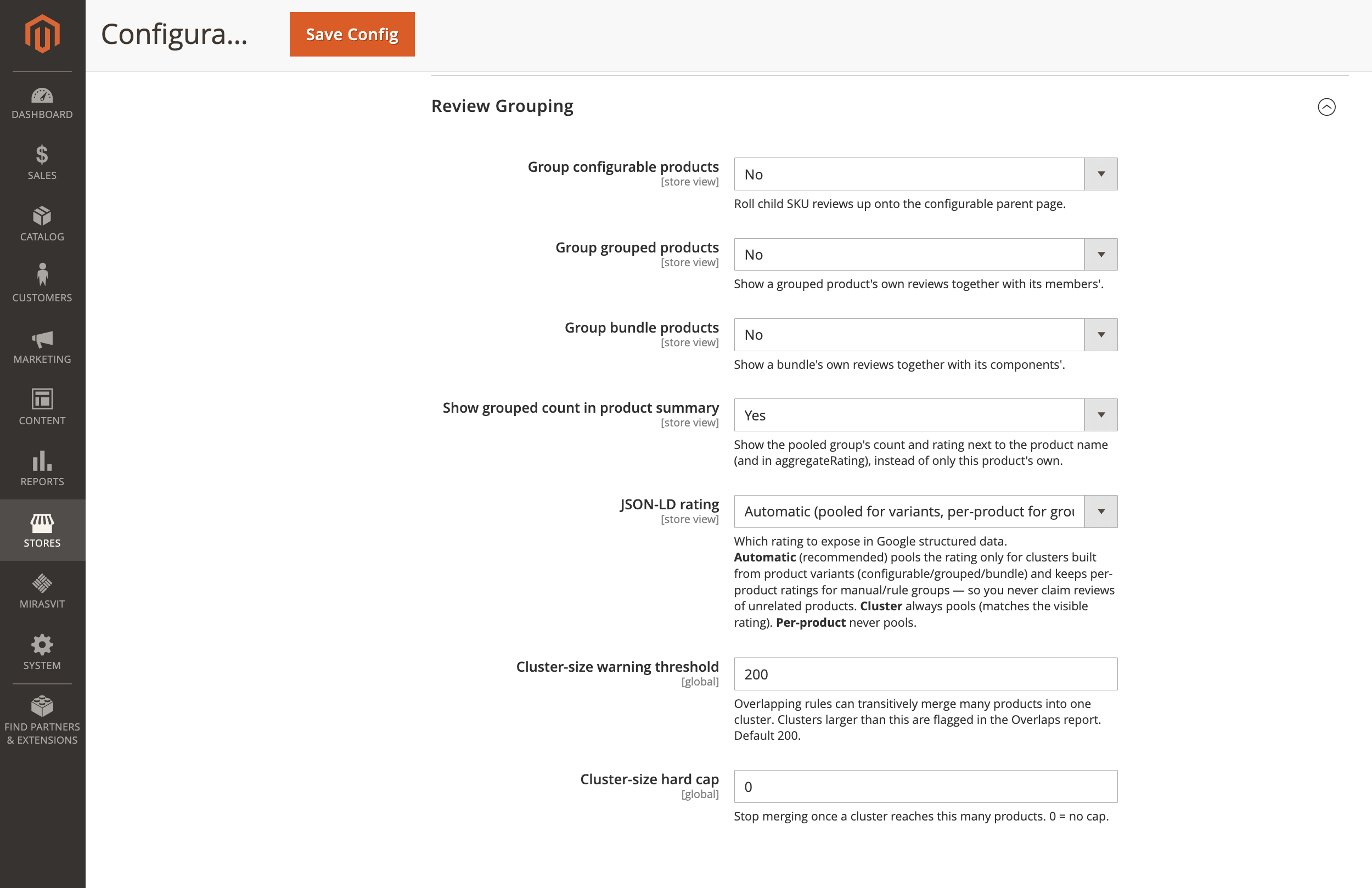
- Group configurable products: pool reviews across a configurable product and its child SKUs. Default
No. - Group grouped products: pool reviews across a grouped product and its members. Default
No. - Group bundle products: pool reviews across a bundle and its components. Default
No. - Show grouped count in product summary: show the pooled count and star rating next to the product name (and in the
aggregateRatingstructured data), instead of only the current product's own. DefaultYes. - JSON-LD rating: choose which rating to expose in Google structured data.
- Automatic: pools the rating only for clusters built from product variants (configurable / grouped / bundle) and keeps per-product ratings for manual or rule groups, so structured data never claims reviews of unrelated products. Recommended, and the default.
- Cluster: always pools, matching the rating shoppers see on the page.
- Per-product: never pools; always reports the product's own rating.
- Cluster-size warning threshold: overlapping groups and rules can transitively merge many products into one pool. Pools larger than this are highlighted in the Review Overlaps report. Default
200. - Cluster-size hard cap: stop merging once a pool reaches this many products.
0means no cap. Default0.