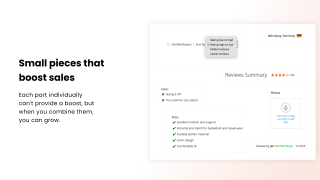
Advanced Reviews for Magento 2

View Demo

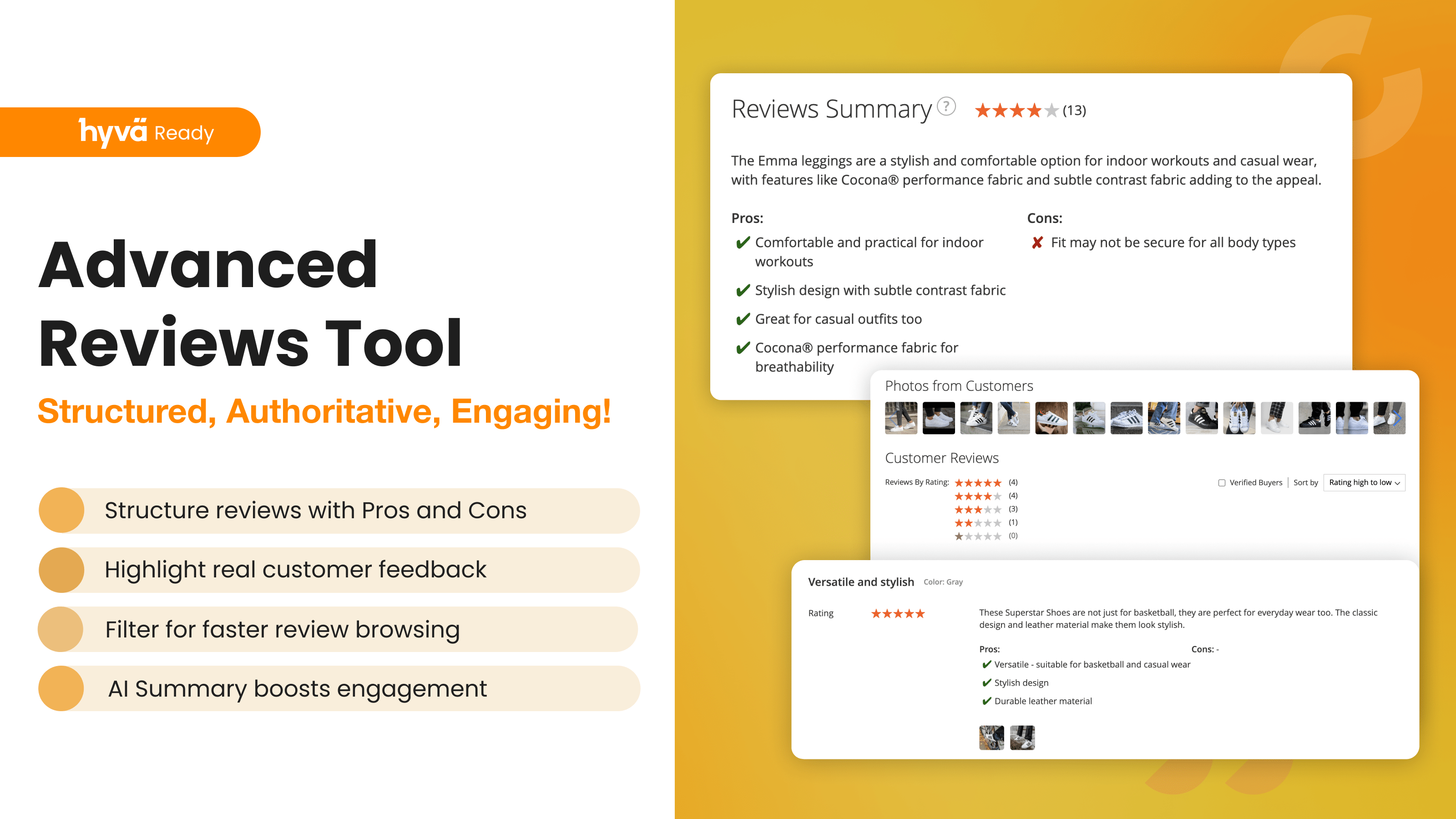
Advanced Reviews adds an AI summary, photos and separate pros and cons fields to Magento 2 product reviews, and sends review request emails after each order to bring in new ones.

A Verified Buyer badge or a buyers-only rule shows shoppers which reviews to trust, and review grouping fills the review block of variants and similar products, on Luma and Hyvä.

  • AI summary of reviews with pros and cons
  • Review request emails included
  • Verified Buyer badge or buyers-only reviews
  • Photos, pros and cons in every review
  • Shared reviews for variants and product groups
  • Hyvä support built in
Hyvä
Magento Cloud
GraphQL
WCAG
Mage-OS
Compatible with:
Community:
2.3.* - 2.4.9
Enterprise:
2.3.* - 2.4.9

Product reviews that shoppers read and buyers trust

Magento's built-in reviews give you a star rating and a text box. Shoppers have to scroll through every review to find out what people think, and anyone can post one, whether they bought the product or not.

Advanced Reviews turns the review section into something shoppers use to decide, and gets more of your buyers to write one:

  • An AI summary with pros and cons at the top of the reviews, written from the latest reviews
  • Review request emails after an order, included in the extension, with no separate module to buy
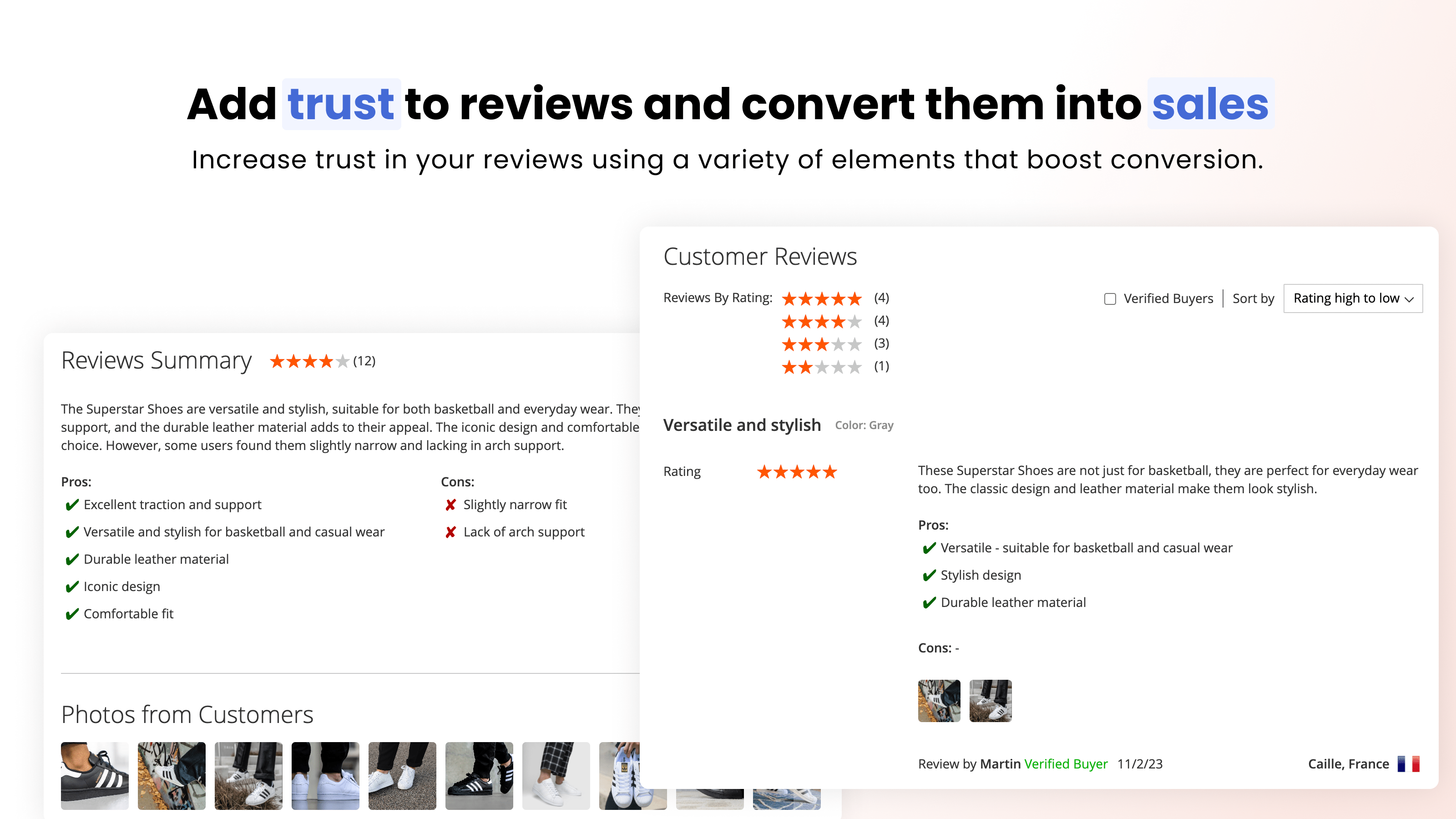
  • A Verified Buyer badge and filter, or reviews accepted only from customers who bought the product
  • Photos, pros and cons in every review, plus comments and replies from your store
  • Shared reviews for product variants and product groups, so a new SKU doesn't start with an empty review block

Everything runs on top of Magento's native reviews, on Luma and Hyvä.

Review request emails, included

Most happy customers never come back to leave a review. They just need to be asked at the right time. The extension sends a review request email after an order and lists each product from it with its photo and a "Review Product" button.

  • Timing: send the email a set number of days and hours after the order, 3 days by default.
  • Order status: choose the statuses that trigger the email (Complete by default) and the ones that cancel it, such as Canceled or Closed.
  • Who gets it: exclude customer groups, for example wholesale or staff accounts.
  • Your email: choose the email template and the sender, and get a copy of every reminder in your own inbox.
  • Control: a log of sent reminders, a sandbox mode that sends everything to a test address, and no duplicate emails if the scheduled task runs twice at the same time.

Setup takes a few settings, described in the review reminder guide.

An AI summary of what customers say
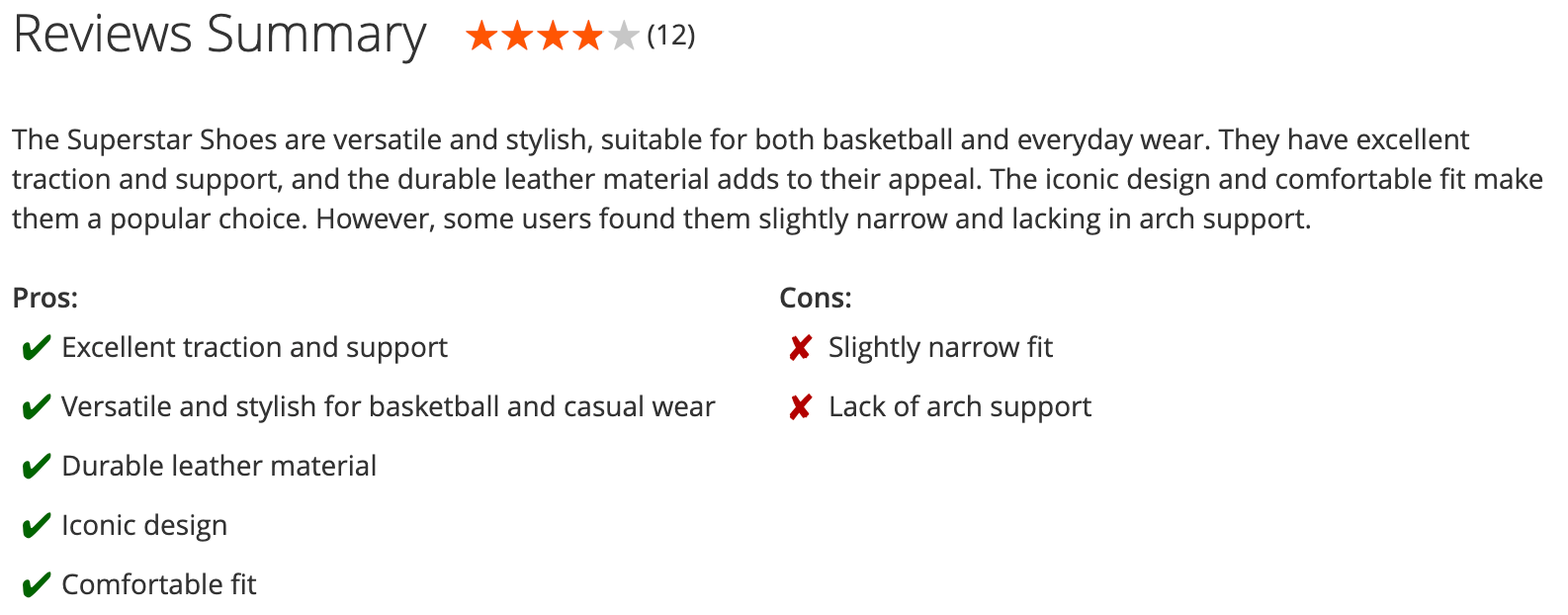
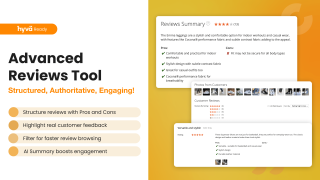
AI summary with pros and cons above the product reviews

Once a product has 5 reviews, the extension writes a short summary of the latest 10, with the pros and cons customers mention most. It appears at the top of the review section, so a shopper gets the gist without reading every review.

The summary is updated when new reviews come in. It is generated with the AI provider you choose (OpenAI, Claude, Gemini or Grok) using your own API key, and you can show a note that the text was written by AI.

See the AI summary setup in the manual.

Reviews from real buyers

Shoppers trust a review more when they know the author bought the product. You decide how strict to be:

  • Verified Buyer badge: added to reviews from customers with an order for the product, in the order statuses you choose. Guest reviews get the badge too when the email matches a guest checkout order.
  • Reviews only from buyers: the review form is offered only to signed-in customers who bought the product. Everyone else sees your notice with sign-in and registration links. The rule also covers photo uploads and reviews sent through the GraphQL API (used by headless storefronts), so it can't be bypassed with a direct request.
  • Variants count: buying a variant of a configurable product or an item of a grouped product counts as buying the product itself.
  • Editing: customers can edit their own reviews in "My Product Reviews". An edited review goes back to Pending, so nothing is published without your approval.

On the storefront, a Verified Buyers filter shows only reviews from customers who bought the product.

A review form for useful feedback
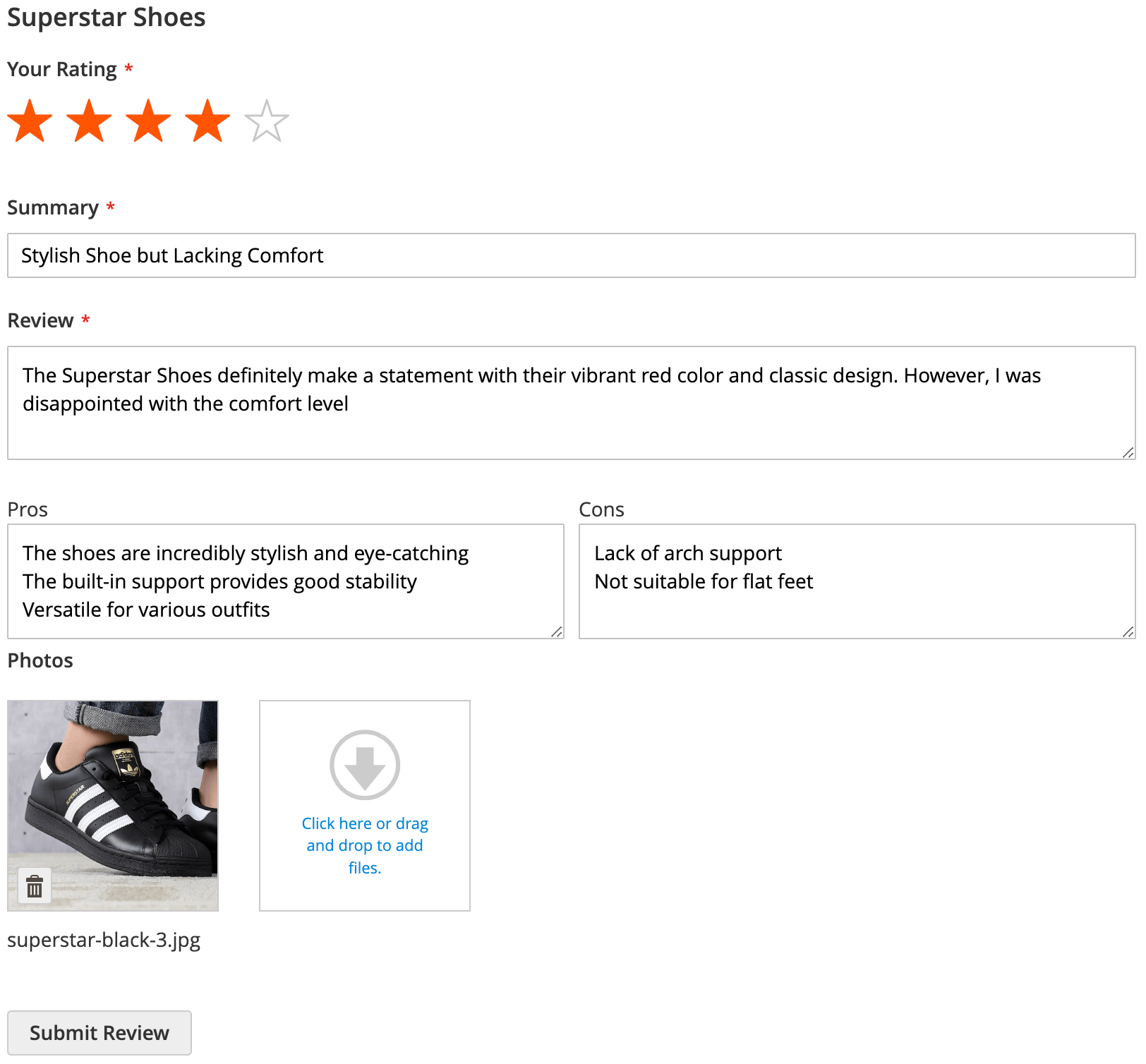
Review form with rating, summary, pros, cons and photos

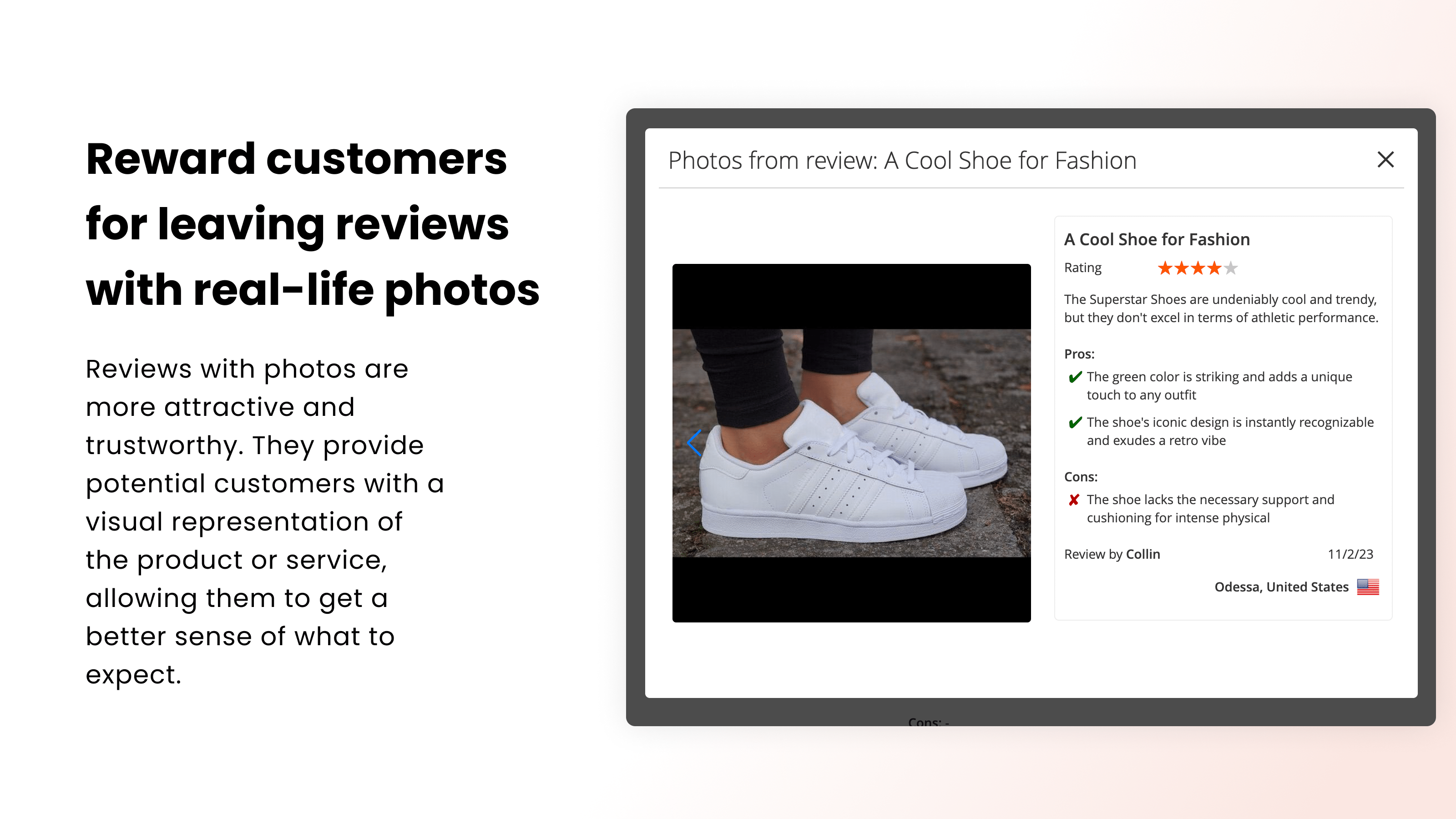
The review form asks for an overall rating, a short summary and the review itself, with separate fields for pros and cons. Customers can attach photos (up to 5 per review and 5 MB per file by default, both adjustable), and guests leave an email address, so their reviews can be matched to orders.

Reviews of configurable products can show the options the customer bought, such as the size or color, and where the reviewer is from (city and country, detected from the IP address). A shopper looking at a dress can see that the review came from someone who bought size M in the same region.

Pros and cons in every review
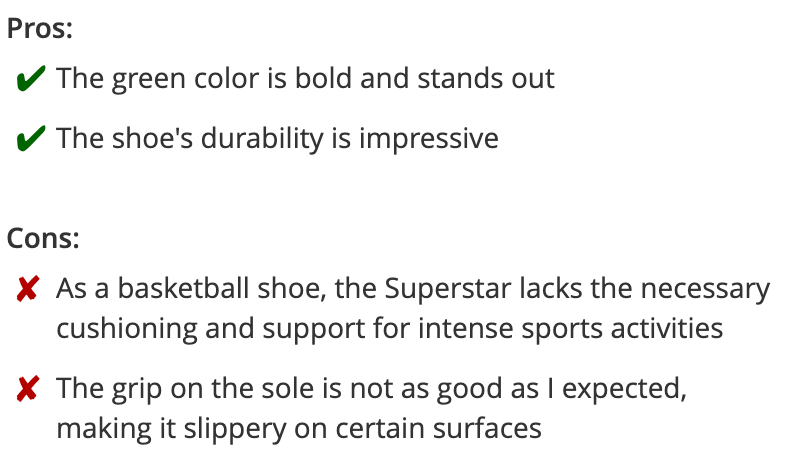
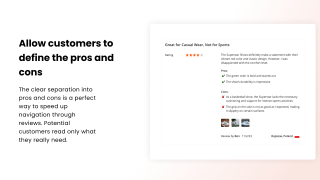
Review with separate pros and cons

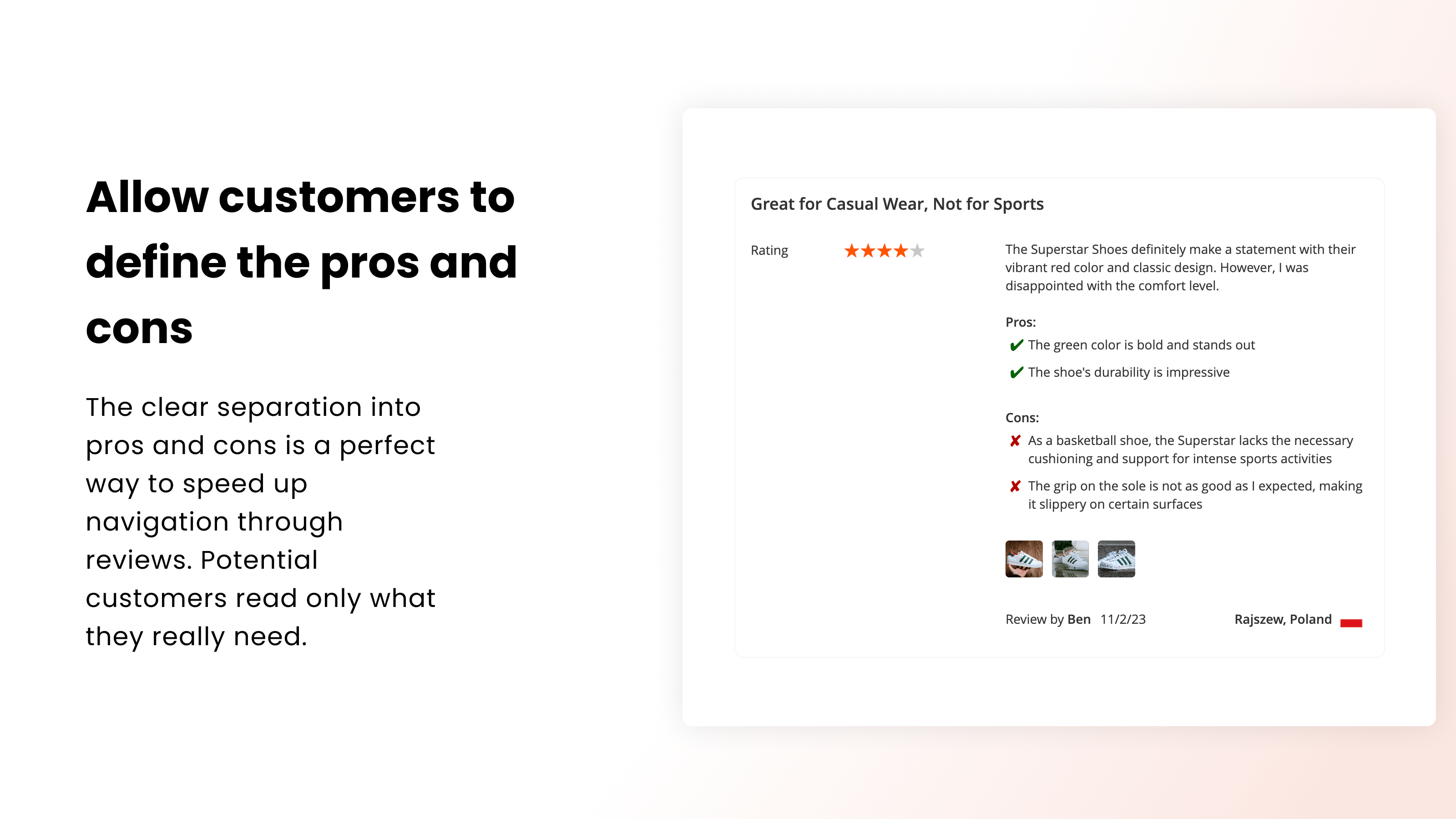
When pros and cons are written in separate fields, they're easy to scan, and shoppers see the trade-offs in a second instead of searching the text for them. The AI summary uses them too.

Find the right reviews faster
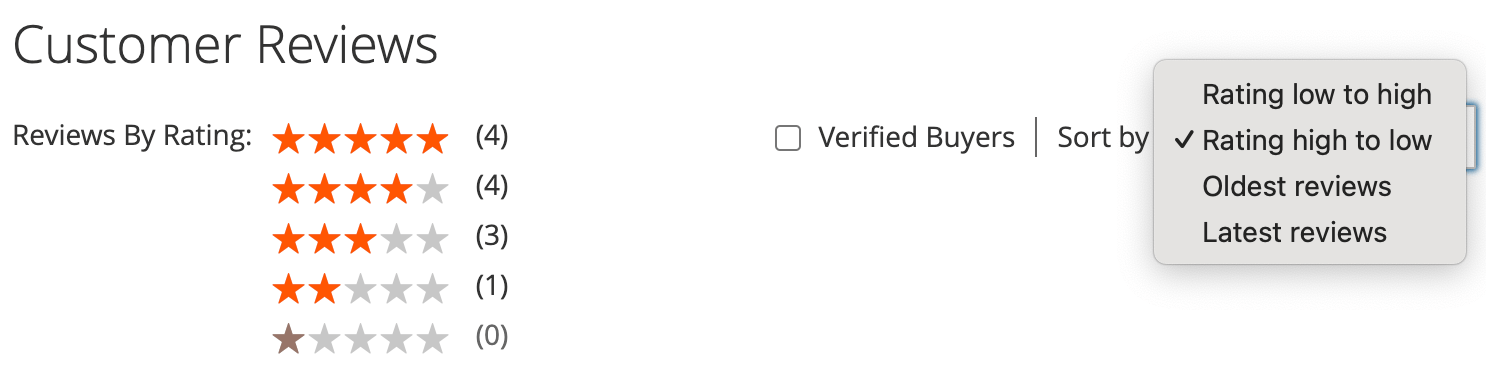
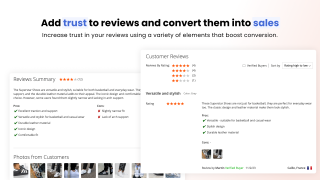
Review filters and sorting on the product page

On products with many reviews, shoppers can narrow the list:

  • sort by newest, oldest, highest or lowest rating
  • filter by star rating, by Verified Buyers, or by tags such as "Fits true to size"
  • on a product that shares reviews with others, show only the reviews of this product

Each review can also get Helpful and Not helpful votes, so the most useful ones stand out.

Comments and replies from your store

Customers can comment on a review, and you can reply from the admin panel. Your replies carry a "store rep." badge, with your full name, first name or first name and initial, so shoppers see that the store answered.

When someone replies, the author of the comment gets an email, sent at once or as an hourly or daily digest. Every email has a one-click unsubscribe link.

Share reviews across variants and product groups

A product with no reviews looks risky, even if the same item in another color has twenty. Review grouping shows the reviews of related products together:

  • a configurable product and its variants, a grouped product and its items, or a bundle and its parts
  • your own review groups, with products picked by hand or matched by attribute rules, for example every size of the same model

Each shared review says which product it was written for. For structured data, the extension pools the rating only for variants of the same product by default, so Google never shows a rating built from reviews of different products.

Review tags, assigned by hand or by AI

Tags label what a review is about: "Great value", "Runs small", "Arrived damaged". Public tags appear on reviews and as a filter for shoppers. Internal tags are visible only to you, for sorting and reporting.

A tag can be assigned automatically. Describe in plain words which reviews it should cover, such as "mentions the product arriving damaged", test the wording on your 10 latest reviews, and new reviews are tagged every 15 minutes. The extension can also read your existing reviews and suggest tags worth creating.

Show reviews anywhere, and as stars in Google

Three widgets put reviews on any page: a photo gallery, a masonry grid for a testimonials page, and an overall rating block. Each can show only reviews with certain tags, for example a "What customers say about the fit" block on a landing page.

On product pages, the extension adds review structured data (JSON-LD) with the aggregate rating and up to 20 reviews, which Google can use to show star ratings in search results. If another SEO extension already adds this markup, you can switch it off.

Moderation without the spam
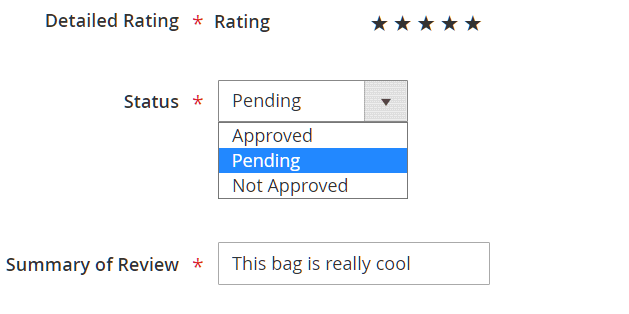
Pending reviews in the admin panel

Bots are stopped before they reach your moderation queue: the review form works with Magento's built-in reCAPTCHA for reviews and also has a hidden field that only bots fill in. Everything else goes through Magento's review approval.

You can get an email and an admin notification about every new review, approve reviews from the grid, and see each reviewer's email.

Built for Hyvä and large catalogs

Hyvä templates ship with the extension, so there is no separate compatibility package to install. Luma and Hyvä use the same templates, and the review list, form, AI summary, photo gallery, widgets and "My Product Reviews" look and work the same on both. Reviews are also available over GraphQL.

On large catalogs, the review list runs the same number of database queries whether it shows 5 reviews or 25 (40 instead of 112 for 25 reviews), and the rating summary query takes under 2 ms instead of 89 ms. The storefront and admin are translated into 15 languages.

This product includes GeoLite2 data created by MaxMind.

No hidden fees
Our developers install the extension on your store and configure it for your setup, free of charge.
Lifetime access to source code
Access to free support and updates for 1 year
Updates and support prolongation - $102

Pay today $169 for the first year.

Then $102 for updates and support services per year.

Cancel anytime.

30 days money back guarantee
See it in action!
Pick a quick tutorial to learn about various aspects of this extension
Customer Reviews 5
Earn points for your review about this extension modules. $1 = 10 points
Write Your Own Review

check-circle You submitted your review for moderation.

Lukasz Verified Buyer
From Gdańsk, Poland
Using the module for 19 days
Good extension.
Works well with hyva theme. Nice frontend view.
Also installed:
Blog MX,  Advanced SEO Suite,  Improved Sorting,  Mass Product Actions,  Order Management,  Admin Bookmarks,  Product Labels and 16 more
Javier Verified Buyer
From Málaga, Spain
Using the module for 5 months
Un imprescindible
Todos los usuarios están acostumbrados a este diseño de reviews de productos. Este módulo lo consigue. Solo tuve que trabajar algo las traducciones. Imprescindible.
Also installed:
Elastic Search Ultimate,  Improved Sorting,  Advanced SEO Suite,  Google PageSpeed Optimizer,  Full Page Cache Warmer,  Google Tag Manager,  Layered Navigation and 9 more
dennis Verified Buyer
From Seongnam-si, South Korea
Using the module for 2 days
Continuous feature additions are expected.
I purchased it because I liked its clean frontend UI and the ongoing addition of necessary features. Although some of the features I desire are not yet developed, I'm willing to wait for them.
Also installed:
Help Desk MX,  Advanced Product Feeds,  Full Page Cache Warmer,  Admin Bookmarks,  Reward Points,  Extended Shopping Cart Rules,  Advanced SEO Suite and 17 more
wrc Verified Buyer
From Istanbul, Turkey
Using the module for 16 days
It is very functional and is constantly being improved.
Mirasvit quality as always.. The comment extension is one of the most important extension for magento store. It speeds up decision making for other users. I definitely recommend it. Thank you so much Mirasvit!
Also installed:
Health & Performance Monitoring Suite,  Full Page Cache Warmer,  Reward Points,  Follow Up Email,  Advanced Reports,  Help Desk MX,  Advanced SEO Suite and 30 more
Stephen
From United States
Strong sales driver
Another great extension from Mirasvit. I really liked the ability for the automatic generation of a summary with the splitting of pros and cons.
Manual & Support
Need more help?

Save time by starting your support request online and we'll connect you to an expert.

Frequently asked questions
chevron-down chevron-right

Do I need a separate extension to send review reminder emails?

No. Review request emails are part of Advanced Reviews. You set the delay after the order, the order statuses that send or cancel the email, the customer groups to skip, the template and the sender. Each email lists the products from the order with a "Review Product" button.

The setup is described in the review reminder guide.

chevron-down chevron-right

How does the AI review summary work, and which AI providers are supported?

When a product has at least 5 reviews, the extension summarizes the latest 10 into a short text with pros and cons and shows it above the reviews. The summary is updated as new reviews arrive.

It works with OpenAI, Claude, Gemini or Grok. You choose the provider and model in the Mirasvit AI settings and use your own API key, so the AI costs are billed by the provider directly.

chevron-down chevron-right

Can I allow only customers who bought the product to leave a review?

Yes. With "Allow reviews only from buyers" switched on, the review form is shown only to signed-in customers with an order for that product, in the order statuses you choose. Guests see a notice with sign-in and registration links. The rule also applies to photo uploads and to reviews sent over GraphQL.

If you prefer to accept all reviews, the Verified Buyer badge and filter still show shoppers which reviews come from buyers.

chevron-down chevron-right

Is Advanced Reviews compatible with the Hyvä theme?

Yes. Since version 1.8.0, the Hyvä templates ship with the extension, so there is no separate compatibility package. If you installed the old mirasvit/module-review-hyva package, remove it before upgrading.

chevron-down chevron-right

Does it support GraphQL for a headless storefront?

Yes. Reviews, including their photos, pros and cons and location, are available over GraphQL, and review submission through GraphQL follows the same rules as the storefront form, such as reviews only from buyers.

chevron-down chevron-right

Can customers add videos to their reviews?

Customers can attach photos to a review, up to 5 per review and 5 MB per file by default. You can change both limits. Video uploads aren't supported.

chevron-down chevron-right

Can a product show reviews from its variants or from similar products?

Yes. Review grouping shows the reviews of a configurable product and its variants, a grouped product and its items, or a bundle and its parts together. You can also create your own review groups, with products picked by hand or by attribute rules. Each shared review says which product it was written for, and shoppers can switch to this product's reviews only.

chevron-down chevron-right

Can I move reviews from another review platform?

Advanced Reviews works on top of Magento's native reviews, so reviews already stored in Magento, including ones you added with an import, appear with all the extension's features. The extension doesn't include its own importer for third-party review platforms.

chevron-down chevron-right

Can customers edit their reviews after posting?

Yes, if you turn on "Let customers edit their own reviews". Customers edit the rating, text, pros and cons and photos in "My Product Reviews", and the edited review goes back to Pending until you approve it. Guest reviews can be edited only by the store.

chevron-down chevron-right

Which languages does the extension support?

The storefront and admin texts are translated into 15 languages: Arabic, Czech, German, Spanish, French, Italian, Japanese, Dutch, Polish, Brazilian Portuguese, Portuguese, Swedish, Turkish, Ukrainian and Chinese. The AI summary is written in the language of the reviews it summarizes.

Changelog
Version 1.8.4Oct 9, 2026
Customers no longer receive the same review reminder email twice.
A review reminder that fails to send is now retried a few times before being marked as failed, so a brief mail outage no longer loses it.
Version 1.8.3Oct 2, 2026
The Previous and Next buttons on the review edit page could skip to an unrelated review — in Marketing > Advanced Reviews, opening a review and pressing Previous or Next was meant to step to the review just before or just after it, but the buttons picked from all earlier or later reviews in whatever order the database happened to return them, so they could land on a review several places away. They now always open the adjacent review, and they look up only that one review instead of loading every earlier one to find it.
Upgrading no longer stops on the old Hyvä package — If mirasvit/module-review-hyva was still installed, composer update refused to resolve and named no way out until you removed it by hand. Composer now removes it by itself during the upgrade.
Version 1.8.2Sep 30, 2026
Verified-buyer purchase details shown on a review are no longer cut off when the text is long.
On Adobe Commerce, reviews now group correctly across configurable, grouped, and bundle products.
Version 1.8.1Sep 22, 2026
The extension now speaks all fifteen of its languages everywhere it writes to the screen — dozens of phrases had never been collected for translation, so they stayed in English on every non-English store no matter how complete the language files looked. That covered the whole photo-upload area of the review form and the messages it shows when a photo is the wrong type or too large, the AI tag-suggestion screen in the admin, the star ratings on a Hyvä storefront, and the settings for structured data and for matching guest reviews to customer accounts. A further nine phrases were listed but still carried their English text as their translation, so they read as done and were not. All of them are translated now — including the four labels 1.8.0 shipped in English as a stopgap: Published, Pending approval, Not approved and the review page's rating label.
An unrecognised sort order in a review-list address returned a 500 instead of a page of reviews — the sort value was taken from the address and passed straight to the database, so anything the Sort by dropdown does not offer — a hand-edited or mistyped link, an old link from before a sort option was renamed, a crawler guessing at parameters — brought down the review list, the product page it sits on and the crawlable /review/product/list/id/<N>/ page with it. Only the orders the dropdown actually offers are accepted now; anything else quietly falls back to newest-first and the page renders as usual. A sort order arriving in the address as a list rather than a single value (?sorting[]=…) took the same three pages down through a different route and now falls back the same way. The same check is applied to the default sort order set in the admin, so a stale value saved there can no longer break the storefront either.
The star-rating filter beside it could be broken the same way — a rating parameter that was not a plain number (?rating=zzz, ?rating[a]=5) returned a 500 on the review list, the product page and the crawlable review page, and a rating outside the one-to-five scale quietly returned an empty list with no explanation on screen. Whole stars the rating bar actually offers still narrow the list; anything else is ignored and the page renders its reviews as usual.
A malformed page-size or page-number in the address returned a 500 — ?limit[]=1 and ?p[]=1 reached Magento's own pager, which cannot read a list where it expects a number, on all three review pages. A real page-size choice is honoured as before; a value that is not one is ignored.
The Gallery and Masonry Grid widgets returned a 500 when their Sort Order held a value the module does not sort by — a sort order saved before an option was renamed, or written by hand into layout XML, reached the database as an unknown column and brought down every page carrying the widget. Both widgets now fall back to newest-first, using the same list of allowed sort orders as the storefront review list.
The Rating column in Marketing > Advanced Reviews was empty for every review — the grid listed each review with a blank rating, so the column could not be read at a glance and there was nothing on screen to check a sort or a filter against. Ratings appear in the column again, and the rating is now also selected by the grid's own query, so the column keeps its values if the per-row reload behind it is ever taken out.
Deleting a review reminder showed a confirmation message with a raw %1 in it — every language but English kept an older wording that expected the reminder's ID to be dropped into the sentence, and nothing was supplying it, so admins on a non-English locale were told the reminder with ID "%1" had been deleted. The message reads properly in all fifteen languages now.
The "This product only" filter could be offered as a control that returns nothing — on a grouped or configurable product whose review list is drawn entirely from reviews written on its child products, the checkbox still appeared but emptied the list every time it was ticked, because the product had no reviews of its own to keep. The checkbox is now shown only when the product has its own reviews to narrow to. It is also greyed out — the way the Verified Buyers checkbox beside it already is — when the product does have its own reviews but none of them are inside the tag, rating or verified-buyer selection currently on screen, and it stays clickable while ticked so it can always be switched back off.
Two overlapping runs of the same scheduled job could do the same work twice — Magento starts a scheduled job again on its next tick whether or not the previous run has finished, and on a large catalogue all four of this module's jobs can run long. The review-reminder job was the costly one: two overlapping runs picked up the same pending reminders and sent the same review-request email to the customer twice. Automatic tag classification paid the AI provider twice for the same reviews, and the reindex and rating-aggregation jobs ran over the whole review set concurrently. Each job now skips its run if another one is still going and picks the work up on the next tick. Running a job by hand with bin/magento mirasvit:review:cron reports Skipped — another instance of this job is already running in that case, instead of printing "Done" for work that never happened, and a run without --code now names the job it is executing rather than repeating the option.
Version 1.8.0Sep 17, 2026
Hyvä support now ships with the extension — The companion package mirasvit/module-review-hyva is gone: everything it contained is part of Advanced Reviews itself. That is the twelve Alpine templates — the review list, a single review, the summary and its pros/cons, the photo gallery, the review form with its image uploader, the "My Product Reviews" page and the three widgets — plus the star renderer and the review-config view model behind them. The module picks the Hyvä templates on a Hyvä storefront and the Luma ones everywhere else without either theme having to be detected, and on a Luma store the Hyvä half simply stays dormant. If the package is installed on your store, remove it before you upgrade — the first item under Improvements has the command.
"My Product Reviews" is one page on both storefronts, rendered by the server — a customer's own reviews are now a card list carrying the product image, the rating, the review and a badge saying where it stands with moderation — Published, Pending approval or Not approved — drawn the same way on Luma and on Hyvä. On Hyvä the page no longer fetches its own reviews back over GraphQL after loading, so the list is there as soon as the page is, with no wait for private content and no failure when a review's product has since gone; on Luma this replaces Magento's five-column table, which is the surface that read worst on a phone. A photo on a review opens the same lightbox the product page uses, rather than dropping the reader on a bare image file with no way back, and a review left on a product that has no page of its own — a configurable variant, a grouped child, a bundle selection — now links to the product page a shopper can actually reach instead of a 404. The products on the page are loaded in one query rather than one per review.
⚠️ Remove the companion packages before upgrading — Advanced Reviews, Comments and Vote were each shipped with a separate Hyvä package, and all three retire together. If your store has any of them, run this first:
⚠️ The Hyva_MirasvitReview module is gone, not renamed — Everything it did now happens inside Mirasvit_Review, with the Hyvä templates living beside their Luma counterparts. setup:upgrade removes the old name from app/etc/config.php for you. You only need to act if you referenced it yourself — in a custom di.xml, a layout ifconfig, or a deployment script that enables modules by name.
If you overrode a Hyvä review template in a theme, move the override — every Hyva_MirasvitReview::<name>.phtml is now Mirasvit_Review::<name>-hyva.phtml, so for example Hyva_MirasvitReview::review.phtml becomes Mirasvit_Review::review-hyva.phtml. The markup is unchanged; only the module it belongs to is, and the -hyva suffix keeps it beside the Luma file of the same name. Luma overrides are untouched.
If you extended the Hyvä star renderer, it takes the view-model registry differently — Hyva\MirasvitReview\ViewModel\StarRating is now Mirasvit\Review\ViewModel\StarRating, and it no longer receives Hyva\Theme\Model\ViewModelRegistry through its constructor; the template hands it over with ->withRegistry($viewModels) instead. A Hyvä type in the constructor made setup:di:compile fail outright on stores without the Hyvä theme package, which this module now has to support on its own. The rendered stars are unchanged.
One set of templates now serves both storefronts — the review list, a single review, the review form and its photo uploader, the AI summary, the pros-and-cons list, the photo strip and its lightbox, the Masonry Grid, the Overall Rating widget and the review card were each written twice, once per theme, and are written once now. The behaviour behind them is plain JavaScript loaded as a file: no jQuery/RequireJS component on Luma, no Alpine component on Hyvä, no Knockout component on the review form, and no inline script needing a Content Security Policy nonce. Each theme still reads only its own stylesheet, so nothing looks different for that reason alone — but the two storefronts can no longer drift apart, which is what most of the fixes below turned out to be.
Reviews read in the same order on both themes — Hyvä put the rating row above the review title and the author line above the review text, where Luma put both below. Both now read title, rating, review, author, which is the order the review card already used on Luma and Hyvä alike. This changes how a review is laid out on a Hyvä storefront.
Output escaping tightened in the templates that came from the Hyvä package — eighteen values across five of them reached the page unescaped, review text and reviewer-supplied fields among them, and are escaped now.
Smaller storefront polish — on Hyvä, muted text (the review count beside a block title, the reviewer's country, the four labels in the photo uploader) was being drawn in the theme's green accent colour and is grey now, and the Show More control under a long AI summary is styled the same on both themes.
The wording this release adds ships in all fifteen locale files — four of the new strings ("Published", "Pending approval", "Not approved" and the review page's rating label) carry their English text for now and are queued for a translation pass; they render today exactly as they always would.
The Masonry Grid widget stacked every review in one narrow column on Luma — the grid never laid itself out, because the layout library it uses registered itself with RequireJS instead of publishing itself to the page, so positioning threw and the cards were simply revealed where they stood. Hyvä, which has no RequireJS, was never affected. The Testimonials page tiles on both themes now.
"Load More" on the Masonry Grid added nothing, on either theme — the grid drew its first page as review cards and then asked for the next page in the review list's format, so nothing in the reply matched what it was appending and the whole response was dropped. It now asks for the shape it draws — 20 cards become 40 — and its spinner is centred in the button instead of sitting half outside it.
The star picker on the Luma review form could not be clicked — the control was drawn into a box with no height and then clipped, so a shopper on a Luma theme had a rating to give and not one star on screen. It measures five clickable stars again, filling as they are picked.
The crawlable review list page returned a 500 on both themes — /review/product/list/id/<N>/ failed again, for reasons other than the one fixed in 1.7.3: the page inherits the product page's layout, so Magento's own review form was rendered in place of this module's, a Hyvä theme block was handed to a template that could not run there, and seven places in the list and form templates assumed a child block that this page does not build. The page answers 200 with its reviews on it, on Luma and on Hyvä.
Review photos were missing from some review lists, and a customer's own review page failed outright — the three blocks that render a review, its summary and its photo strip were declared once per page that lists reviews, and on a Hyvä storefront the duplicate declarations left the review list with no parent at all, so pages answered 200 with nothing on them. They are declared once now and reached by name, and the photo strip is found on all four routes that list reviews on both themes.
A customer's own review page was empty on Hyvä — the Hyvä theme strips the core block this page was attached to, so the page rendered its wrapper and nothing else. The module builds the block itself now. On both themes, photos a shopper attached to a review no longer disappear from that review's own page while it waits for approval, and the page can be opened at all while the review is unapproved — the lightbox used to answer "Reviews with IDs … not found" for the author's own pending review. A review is never shown a helpful/not-helpful vote control on its own author's page; votes under other people's comments are untouched.
With "Allow reviews only from buyers" switched on, a Hyvä storefront showed everybody the form and then refused the submission — the notice explaining why, with its sign-in and registration links, existed only on Luma, and the check that reveals the form to a qualifying buyer could not run on Hyvä at all. Both themes now refuse a guest in the page itself and reveal the form only to a customer who bought the product.
The Photos field was missing from the review form on a Hyvä product page — the uploader rendered nothing at all, so the form looked complete and simply had no way to attach a photo, while Luma kept its own. The customer's review-edit form had the quieter version of the same fault, rendering the Luma uploader on a Hyvä storefront.
The Verified Buyers checkbox now accounts for the whole of the current selection — greying it out only considered "this product only", so with a tag or a rating narrowing the list to reviews from unverified buyers the checkbox stayed enabled and ticking it returned nothing. The tag and rating narrowings are applied to the count behind the control as well as to the list, so the two cannot disagree; the checkbox stays clickable while it is ticked, so it can always be switched back off.
The two themes disagreed about the Verified Buyers checkbox — Luma always rendered it and greyed it out when nothing matched; Hyvä rendered it only when something did. Both now hide it when a product has no verified-buyer review at all, where a permanently dead control is only noise, and grey it out when the current selection momentarily holds none. Hyvä gains the greyed state it never had.
The tag filter label showed in English on every non-English Hyvä storefront — Luma's "Filter by tags" and Hyvä's "Filter by Tags" were two different phrases for one control, and only the first has translations. Both use it now.
The AI review summary vanished on Hyvä whenever a product had no approved reviews — the whole review block sat behind a check for reviews, so a product carrying a summary written from reviews that were since unapproved or deleted showed nothing at all on Hyvä, while Luma showed the summary as it always had. The summary, the photo strip and the block around them render regardless now.
A long AI summary could be clamped with nothing to open it — when less than forty pixels were cut off, both themes hid the Show More control and left the text clipped, so up to a line of summary was lost for good. There is now either a control or nothing hidden, never neither, and the fold measures everything inside it — the pros-and-cons list included — rather than two named parts of it. Expanded, it no longer fades out the last line the reader just asked to see, and the gradient stays inside the card instead of running past its edge.
The review count beside a block title could not be translated on Hyvä — it was assembled as a new translation key for every possible number, so no locale could ever carry it. It is one key with the count as an argument, like every other counted string in the module.
Magento 2.3.7: the tag suggestion screen in the admin was fatal — it escaped its output through a template variable that Magento only added in 2.4.0, fourteen times over, on a screen no test opens, so on 2.3.7 the screen failed on its first line. It uses the escaping available on every supported version again.
Paging a review list dropped the sort order and the filters — page two of a five-star, newest-first list was page two of the unsorted, unfiltered list, on both themes. The links carry only the page now and the query is read from the controls still on screen. On Hyvä the pager also pointed at the product page, so turning a page fetched and threw away a whole product render; both themes ask the review endpoint. The filter row is re-rendered with the list it describes, where Hyvä used to swap the reviews out from under a toolbar still describing the previous query.
A Hyvä store let a customer past the photo limit when editing a review — the uploader counted only the photos added in that session, not the ones already on the review, so an edit form could take more than the per-review limit allows. Both themes count the same way now, and both read the form key from the cookie, so an upload from a cached page is not refused.
A refused review lost everything the shopper had written, on Hyvä — when server-side validation sent a review back, the draft could not be printed into the full-page-cached product page and the mechanism that restored it ran only on Luma. The draft, and a signed-in shopper's first name in the nickname field, come back on both themes. Validation messages for the star rating now appear next to the stars, which on Luma previously refused the submission with no message at all.
One review was published with two different ratings in its structured data — the same review was sent to search engines as "80" on a Luma storefront and "4" on a Hyvä one, with no scale declared on the Hyvä side. It is 4 out of 5 on both now, with the scale stated.
The photo lightbox on Luma showed a photo with no idea whose review it came from — the review panel beside the photo was fetched, filled and then hidden by a stylesheet rule, on every page the lightbox opens from. It is laid out the same on both themes now, and the author line inside it fits on one line instead of wrapping when a reviewer's location is shown.
Reasons to choose Mirasvit
Client focusing and satisfaction

These are our primary. A major portion of our new clients come from referrals from our existing clients. Our professional team of developers, marketers and support staff have invested the best knowledge and experience in the field into our work, so you know you can come back to us again and again.

Remarkable support

One year free and high quality support. We go to great lengths to provide maximum satisfaction with every module you have purchased in our store. By helping you with installation, configuration, answering your every question, we do all our best to eliminate any possible problems.

Risk-free Investment

30-days money back guarantee. If you are not satisfied with our product review Magento performance for any reason, we provide a full refund.

Constant improvements and upgrades

We constantly add new features to all our modules, and are always interested in hearing your opinion and implementing your suggested features in our future developments.

Comprehensive Documentation

We provide an expanded user guide for every aspect of our review extension, so you can find answers for all your burning questions.

Unencrypted source code of our products

You can customize Magento 2 review extension according to your needs and requirements.

Usability and Performance

The Module is easy to install and upgrade, just follow our step-by-step user guide. Additionally, the extension is ready to use with the Hyvä theme.

Ready for Magento Cloud

No core modifications. The advanced reviews has been tested in a Magento Cloud environment and is fully compatible with it.

Loading...