Magento 2 SEO Extension

View Demo

From meta tags to the sitemap, the Magento 2 SEO Extension gives you full control over every SEO-related feature in your store.

It automates the SEO work you'd otherwise do by hand - templated meta tags, rich snippets, redirects, sitemaps, cross-links and a built-in SEO audit - across every page type. That is why 2,435+ Magento stores rely on it.

  • Boost your store's Google search rankings
  • Get cited by AI search engines (GEO)
  • Enhance the search results with rich snippets
  • Make your URLs SEO- and human-friendly
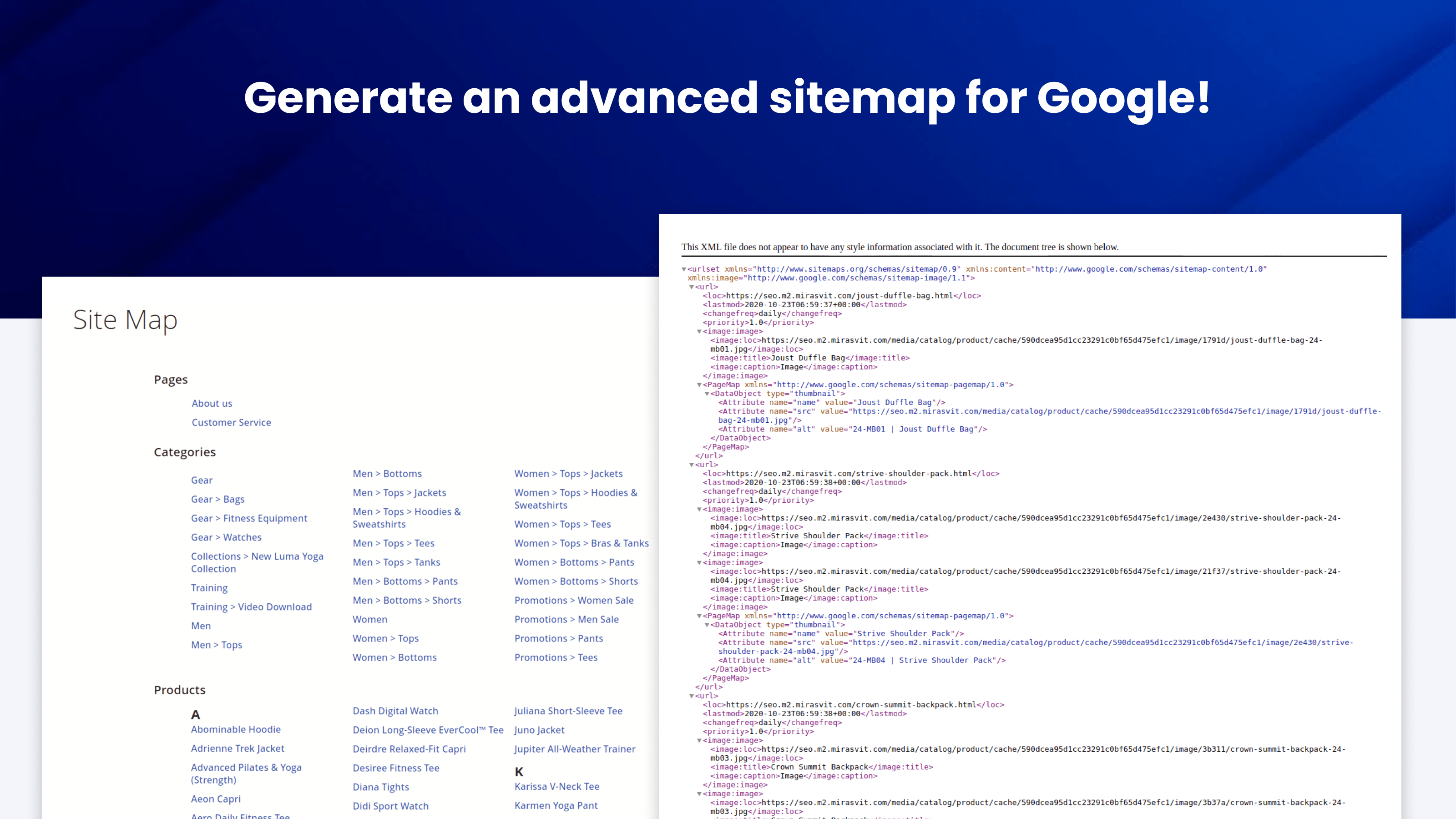
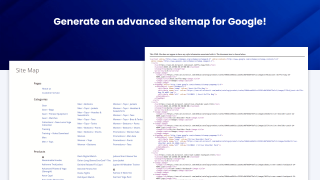
  • Generate an advanced sitemap for Google
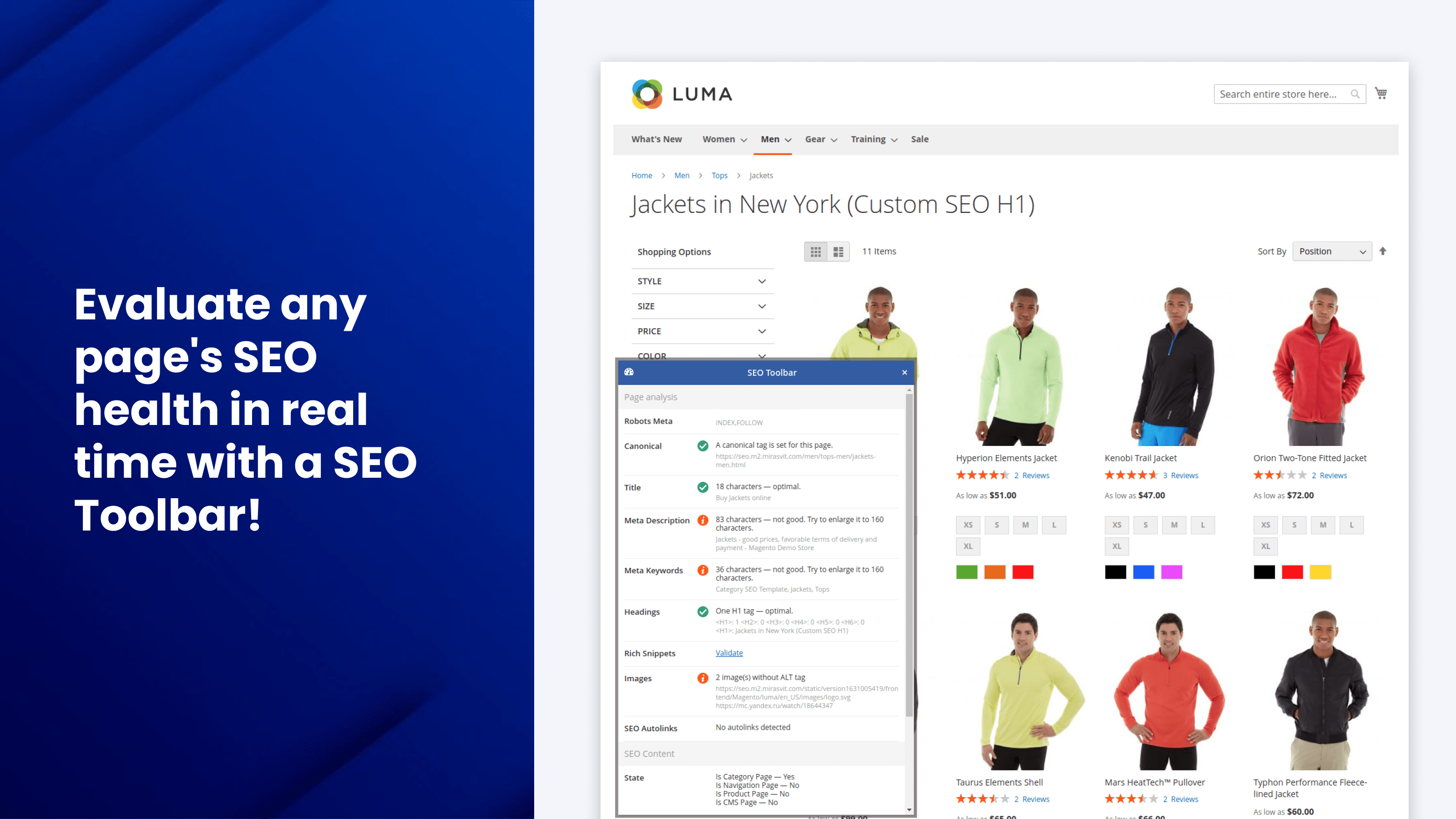
  • Check any page's SEO health in real time
Integration with GPT

The extension includes integration with GPT, enabling automatic correction of common meta tag errors.
Marketplace Approved
Hyvä
Magento Cloud
GraphQL
WCAG
Mage-OS
Compatible with:
Community:
2.3.* - 2.4.9
Enterprise:
2.3.* - 2.4.9
Problem

SEO is labor-intensive both in planning and execution. You can hire a SEO specialist for help, but that can become quite expensive.

Solution

The Advanced SEO Suite gives you full control over every SEO-related feature to elevate the search engine rankings of your store!

What benefits do you get for your store?

Get More Organic Users
Reduce Manual Work
Increase Store Traffic
Grow Store Revenue
Faster Store Indexation
Attractive products in the SERP

Key SEO Features

SEO Templates

Generate meta tags, descriptions, and H1s for any page with one SEO template rule - no manual work per product.

Per-URL Overrides

Overwrite meta tags, descriptions, and H1 tags for any specific store URL when the template isn't enough.

Rich Snippets

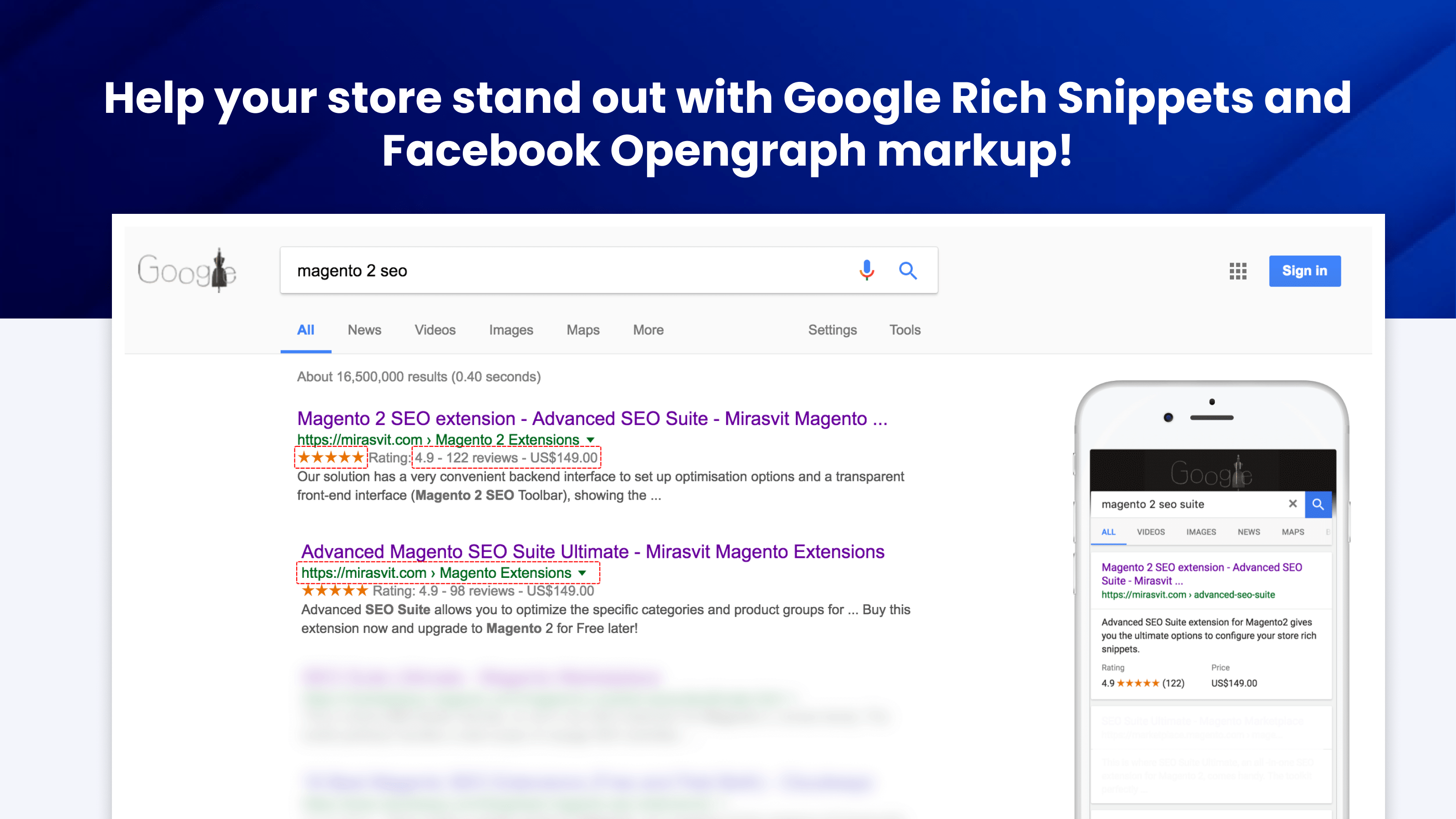
Show stars, prices, and stock in Google search results to stand out and win more clicks.

Social Previews

Format category and CMS pages for Facebook Opengraph and Twitter with rich, shareable previews.

Automatic Crosslinks

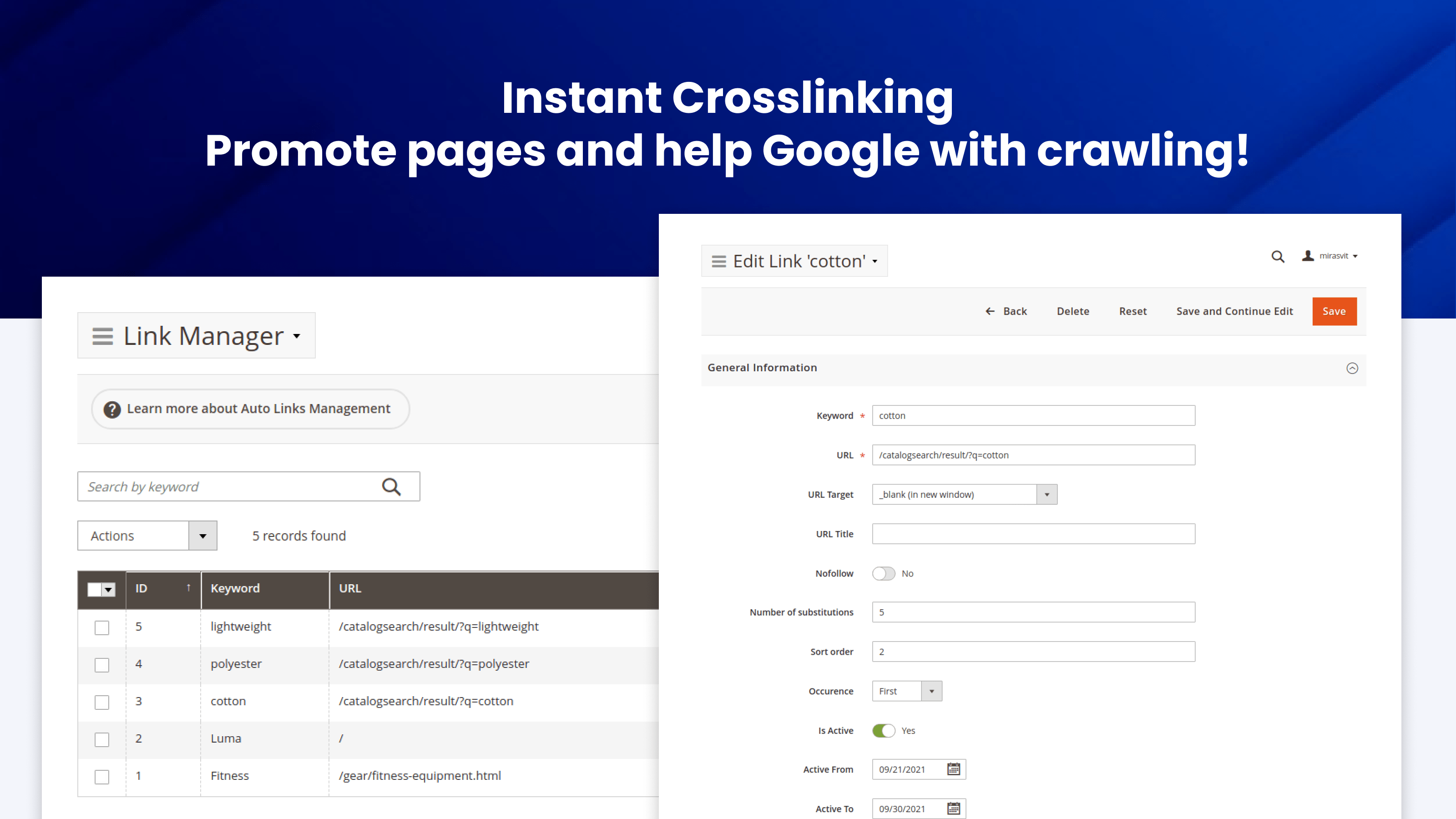
Add crosslinks to pages across your store to spread link equity and help Google crawl deeper pages.

Smart Redirects

Set up 301, 302, or 307 redirects for any site URL and preserve rankings after every URL change.

SEO-Friendly URLs

Make your product and image URLs clean and keyword-rich - no .html suffixes, no IDs, no duplicates.

Canonical & hreflang

Define canonical, language, and relationship tags for any page to kill duplicates and serve the right locale.

SEO Toolbar

Evaluate any page's SEO health in real time as you browse - meta tags, headings, images, structured data.

HTML & XML Sitemaps

Advanced frontend HTML sitemap for shoppers and XML sitemap for Google - faster indexation of new pages.

The Advanced SEO Suite extension offers a comprehensive set of components essential for achieving highly effective SEO.

It includes the following key components:

SEO Templates & Rewrites
SEO Friendly URLs
Rich Snippets & Opengraph
Cross Links
HTML & XML Sitemap
SEO Audit
Instant SEO Toolbar
AI Meta Fixer (GPT, Claude, Gemini)

Works with Magento Open Source and Adobe Commerce 2.4.x, Hyvä, and MageOS. Includes GraphQL and a full REST API for headless storefronts, and an admin available in 15 languages.

Unparalleled Value for Any Store

The Magento 2 SEO Extension gives you control over every SEO-related feature on your site, with automation that turns days of manual work into minutes.

Higher Search Rankings

The more thoroughly your store meets the requirements of modern Magento 2 search engine optimization, the more authority it will have among Google and other search engines, and the higher your search rankings will be.

Improved Search CTR

Rich snippets and social previews make your listings stand out in search results, so more people click through to your site.

Saved Money

There's no need to hire an SEO specialist just to list their standard recommendations. The module's SEO features are a complete package for any online store, so you can treat them as a checklist.

Saved Time

We built it with automation in mind, so the manual work takes not days, but minutes.

Flexible SEO Templates

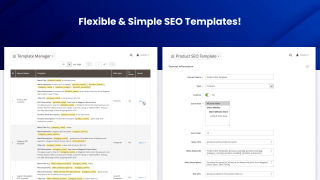
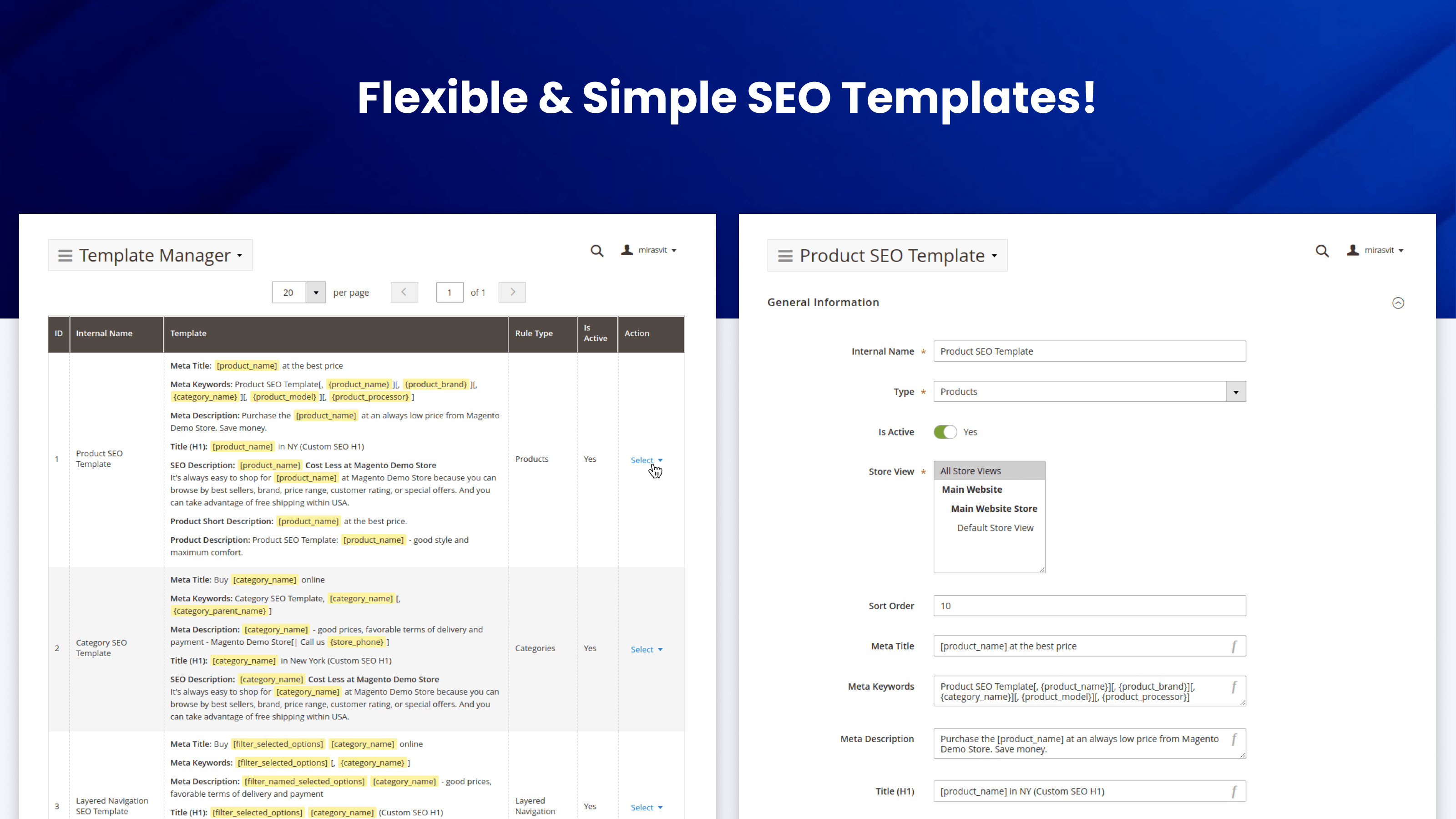
The module includes advanced SEO templates. This feature lets you specify content patterns for meta titles, descriptions, keywords, and H1 tags.

Unique metadata to any page automatically

The SEO extension for Magento 2 automatically populates the relevant pages with meta information if it's not there already.

You can use the templates to generate meta tags for:

  • Product pages
  • Category pages
  • Search results pages
  • CMS pages
  • Layered navigation results
  • Landing pages (with the Mirasvit Landing Page module)
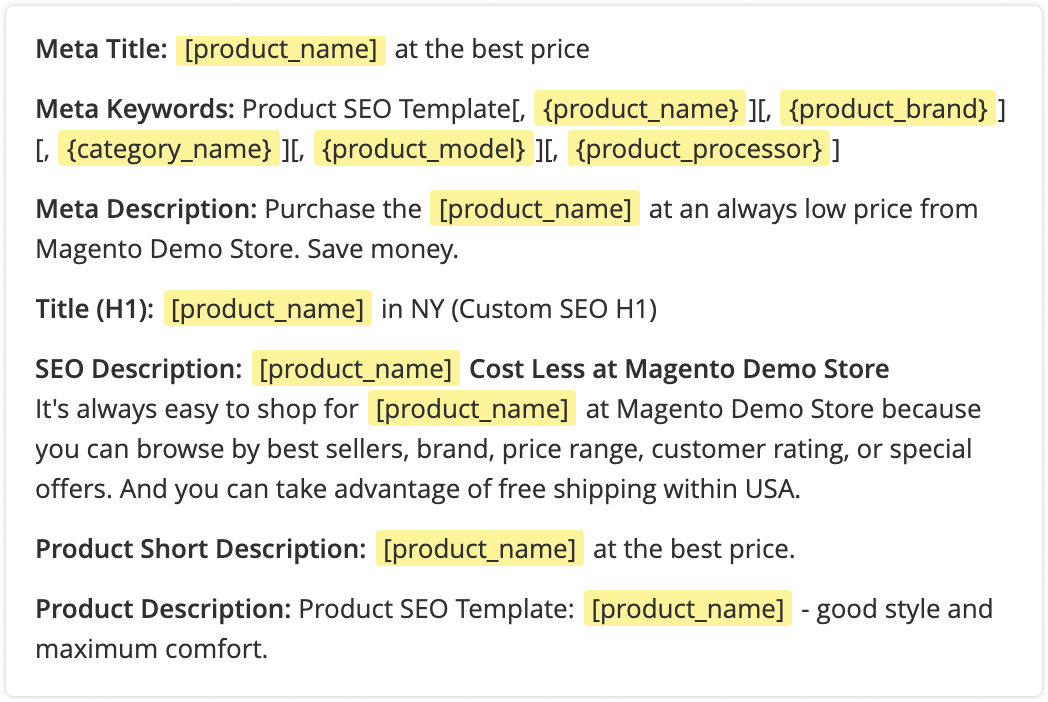
An example of an SEO template created with the Mirasvit Advanced SEO Suite Magento 2 module - the best SEO suite for Magento 2.

Powerful Rules

You can add variables with store, product, and page data to the templates, for instance:

[filter_selected_options] | [category_name] ★★★★★ | great prices, favorable shipping and payment terms | [store_name] | Call us on [store_phone]!

Also, use conditions to fine-tune the pages to which the templates apply, and set the priority of each template. You can even halt other rules from processing so that our Magento 2 SEO plugin applies a template, even if there are other fitting rules with a higher priority.

Preview SEO Templates

Save time when adjusting automated SEO elements so they turn out as planned. While still editing the template, you can see how the page will look once the SEO template is applied.

The Template Preview function shows what the stencil looks like on the five entities to which the template may be applied.

If you edit a product page SEO template, you will see five examples on product pages. The same is for categories and CMS pages.

The Preview option highlights variables so you can easily spot them when looking at the preview output of the SEO-optimized content in your store.
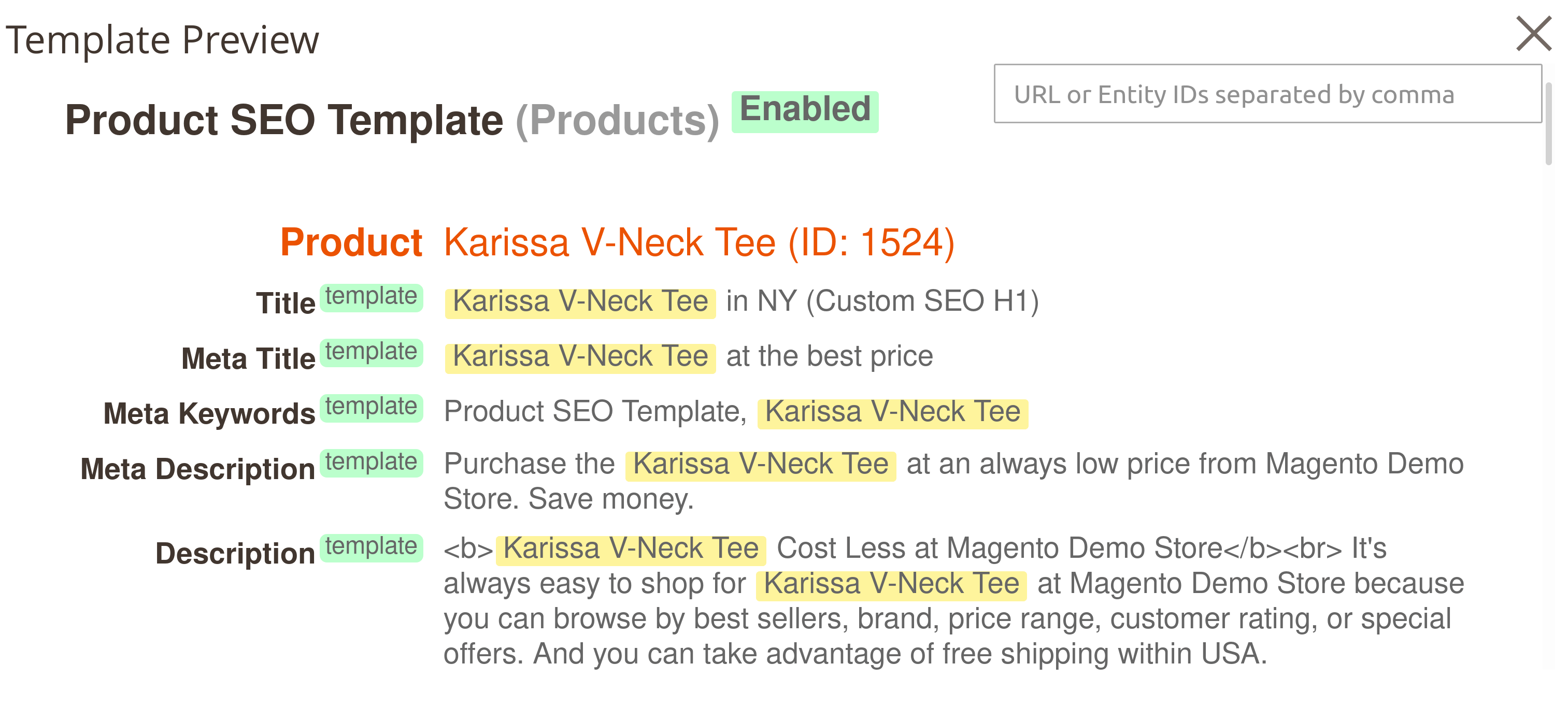
An example of an SEO template preview

Simple Interface

Creating SEO templates has never been so simple. Just write a template for each field:

  • Meta title
  • Meta keywords (if necessary)
  • Meta description
  • H1 tag
  • SEO description
  • Short and full product descriptions (for product pages)

Then your templates will generate content for all necessary pages in your store
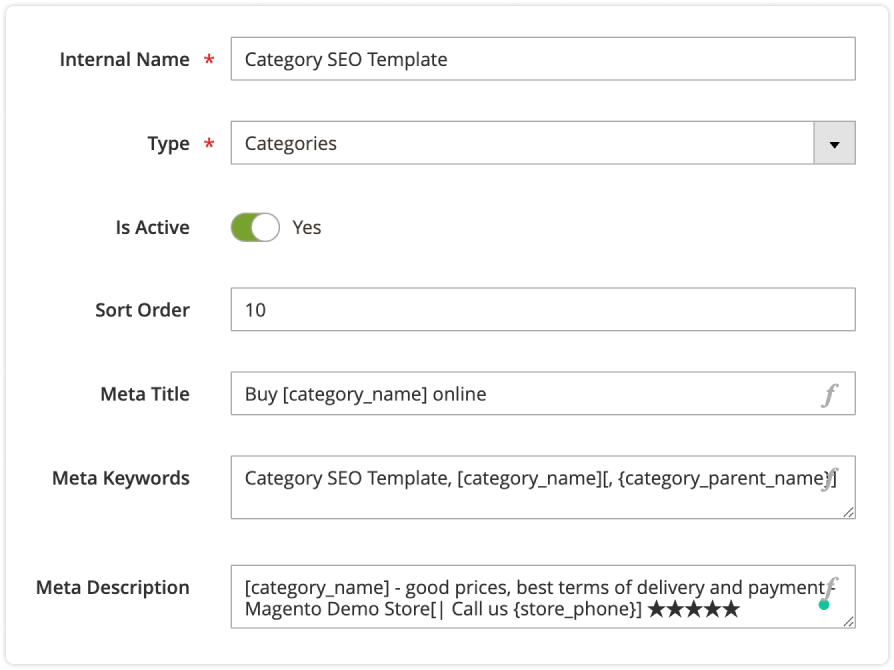
Setting up a SEO template in Mirasvit Magento 2 SEO Suite Ultimate.

Manual Rewrites

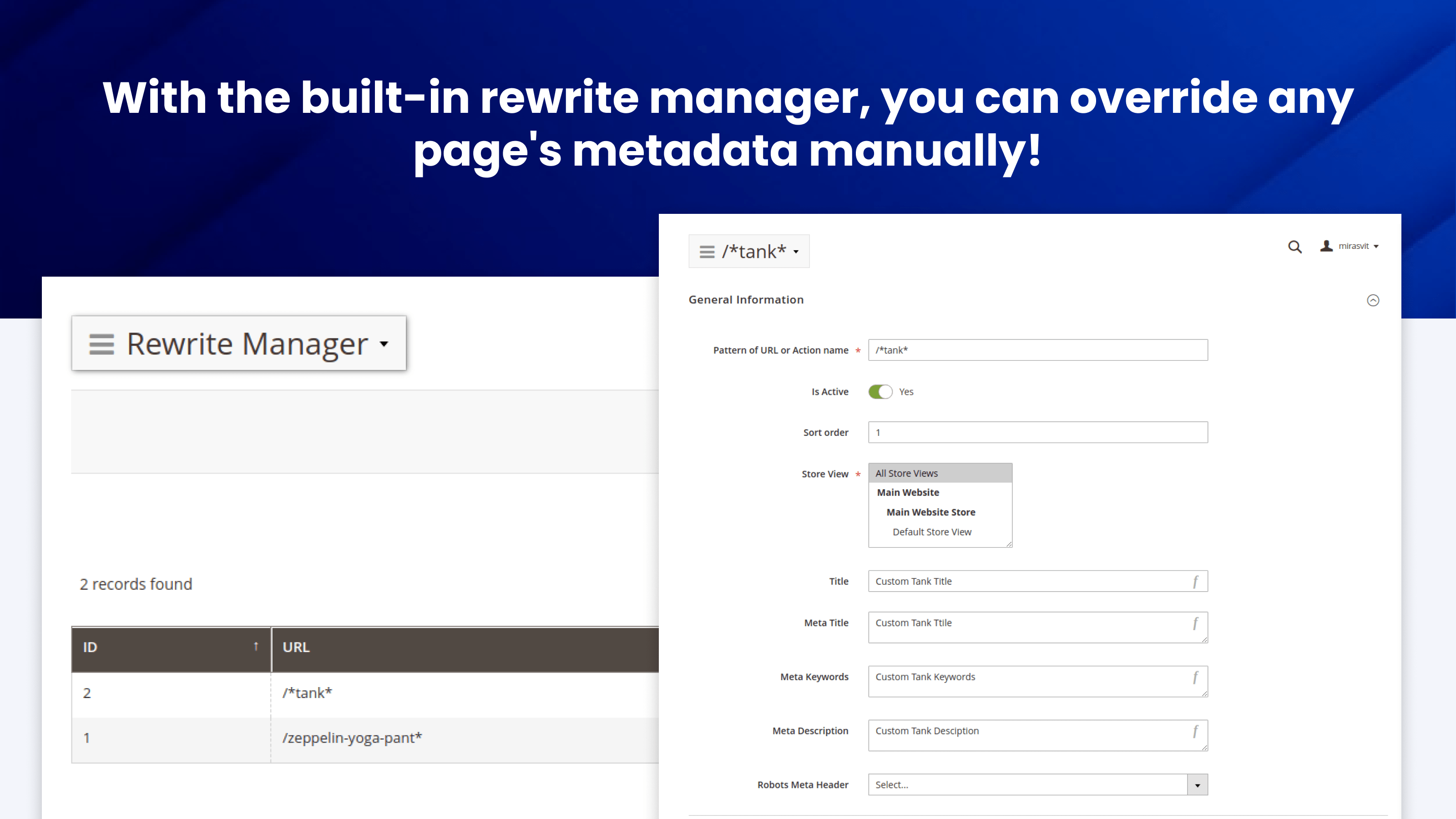
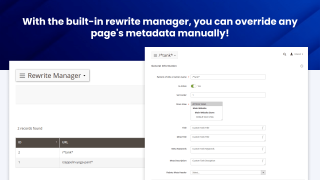
Some pages, like unique categories or your bestsellers, need a personal touch. With the built-in rewrite manager, you can override any page's metadata manually.

The extension will only apply the rewrites to the URLs you specify, and rewrites have a higher priority than the templates, so you won't need to reconfigure anything else!

Rich markup

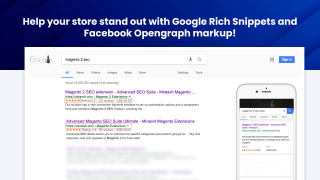
Help your store stand out with Google Rich Snippets and Facebook Opengraph markup

Rich Snippets

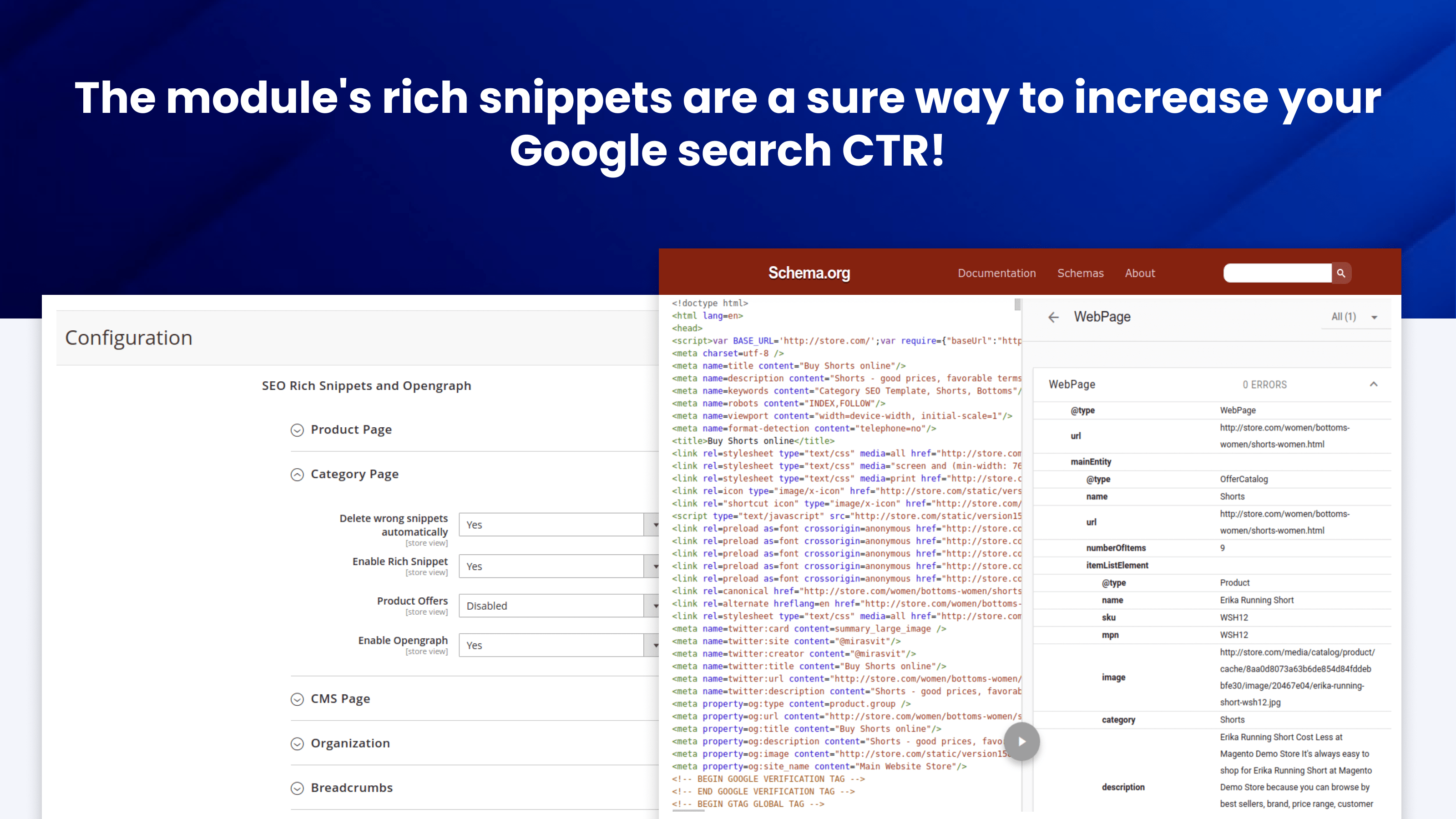
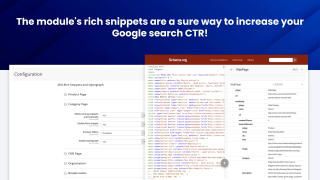
The module's rich snippets are a sure way to increase your Google search CTR. They add details like product images, payment methods, and shipping options directly to the search results.

The extension supports these snippet categories in particular:

  • Organization
  • WebPage
  • OfferCatalog
  • AggregateRating
  • Review
  • Offer
  • AggregateOffer
  • BreadcrumbList
  • Product

The snippets use JSON-LD format that Google recommends, so you don't have to worry about compatibility.

You can also enable structured data for CMS pages with the WebPage, Article, or BlogPosting schema types.
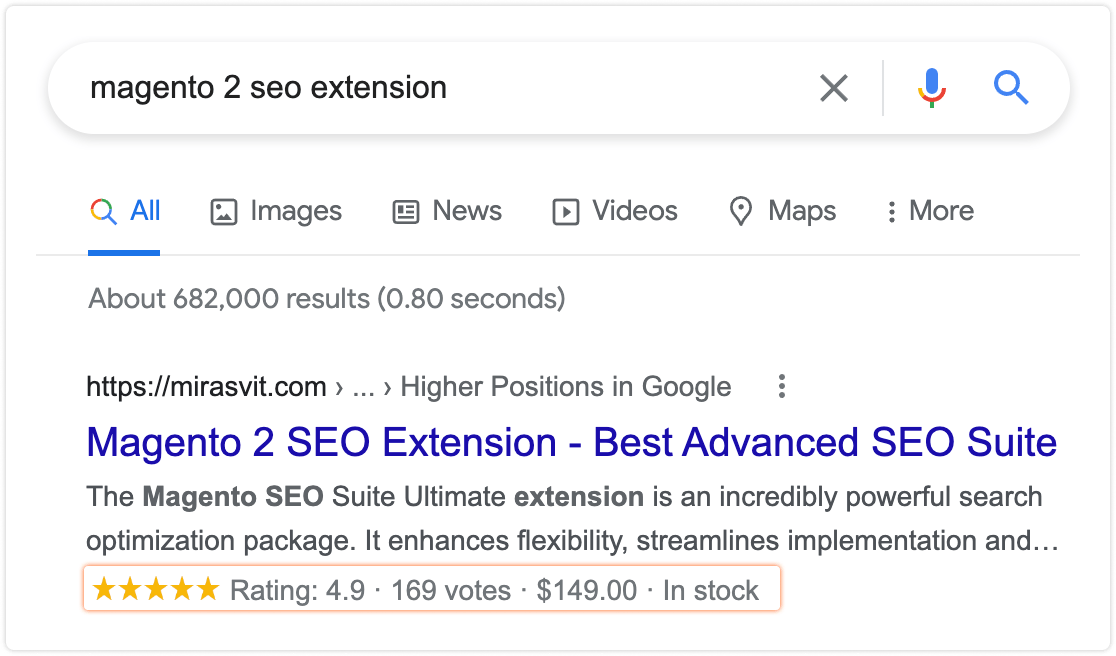
Rich snippets added by Mirasvit SEO Suite Ultimate Extension for Magento 2
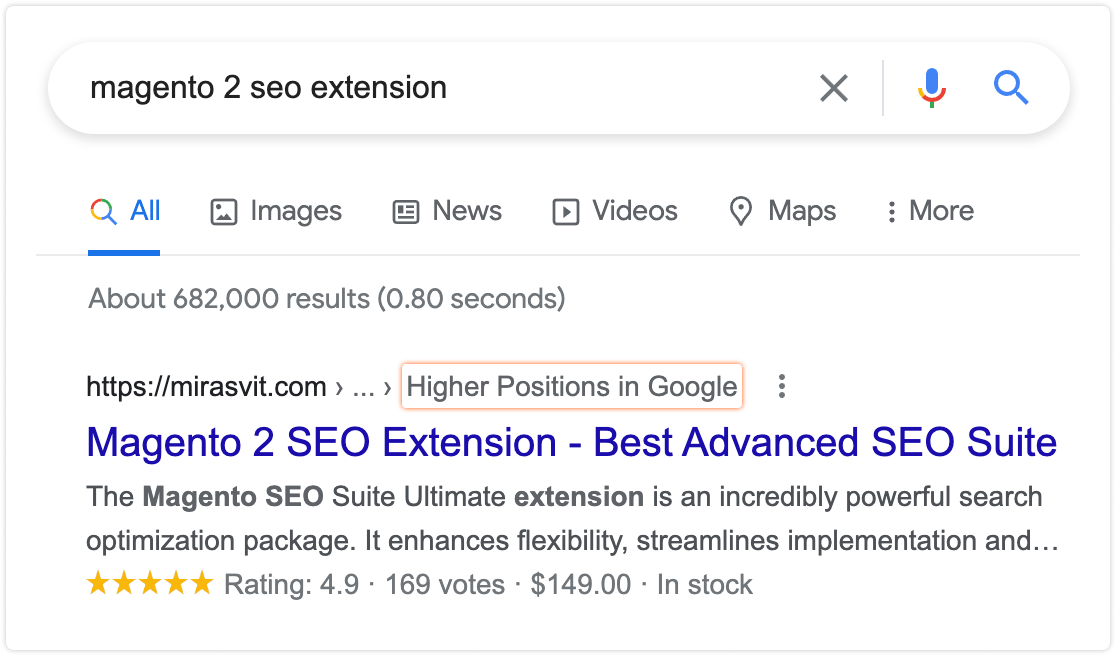
Breadcrumbs added by Mirasvit Magento 2 Advanced SEO Suite.

Breadcrumb Rich Snippet

You can add breadcrumbs to Google search results pages!

Breadcrumbs snippets help search engines better understand your website's structure and display extra navigation for search results.

Company Rich Snippet

Business details in search results make your store much more trustworthy and attractive to shoppers.

The extension's SEO toolkit lets you add your store's contact information to search results in no time, helping you secure more leads and further improving your search CTR.

Opengraph

Our Magento 2 SEO plugin lets you set Opengraph tags for category and CMS pages. Facebook, Whatsapp, and other social networks and messengers use Opengraph to structure page previews.

With Opengraph, your category and CMS pages will always look attractive when shared!

A category page with Opengraph enabled by the Mirasvit Advanced SEO Suite Magento 2 module - the best SEO suite for Magento 2.

Get cited by AI search (GEO)

Search is moving to AI answer engines. Advanced SEO Suite gives them the structured data they need to read, trust, and cite your store.

Shoppers increasingly ask ChatGPT, Perplexity, Google AI Overviews, and Gemini instead of scrolling a results page. Getting surfaced in those answers is Generative Engine Optimization (GEO).

GEO runs on the same schema.org structured data that already wins your Google rich results - so the work pays off twice.

The suite generates it for you: Product, Offer, ratings and reviews, breadcrumbs, Organization, and CMS Article markup - the machine-readable layer AI engines read to understand what you sell and quote back to buyers.

  • Accurate stock and price. Complete Offer availability and price data means AI engines read your in-stock products correctly, instead of guessing "out of stock" and dropping you from the answer.
  • Findable and unambiguous. Clean semantic URLs, canonical and hreflang tags, and XML and HTML sitemaps let AI crawlers discover your pages and attribute them to the right product.
  • Kept valid over time. The scheduled SEO audit catches broken or missing structured data as your content changes, so your AI signals do not quietly rot.

Want AI shopping agents to browse and buy your catalog directly, through llms.txt, MCP, and the Universal Commerce Protocol? That is the job of our Magento 2 Agentic Commerce module.

Optimisation of store structure

Let Google easily understand the content you have in your store.

SEO-friendly URLs

Our extension's SEO Toolkit lets you make your URLs as appealing to both human visitors and search engines as possible. You can:

  • remove the parent category path from category URLs to clean out the category structure.
  • rewrite the product URLs with templates to make the links much more informative
  • toggle the trailing slash at the end of the URLs.
  • make layered navigation URLs SEO-friendly and human-readable.
  • make product image URLs more visibly pleasing as well. For instance, www.site.com/media/product/6991f8e/6789af8e.jpg will become www.site.com/media/product/argus-all-weather-tank.jpg
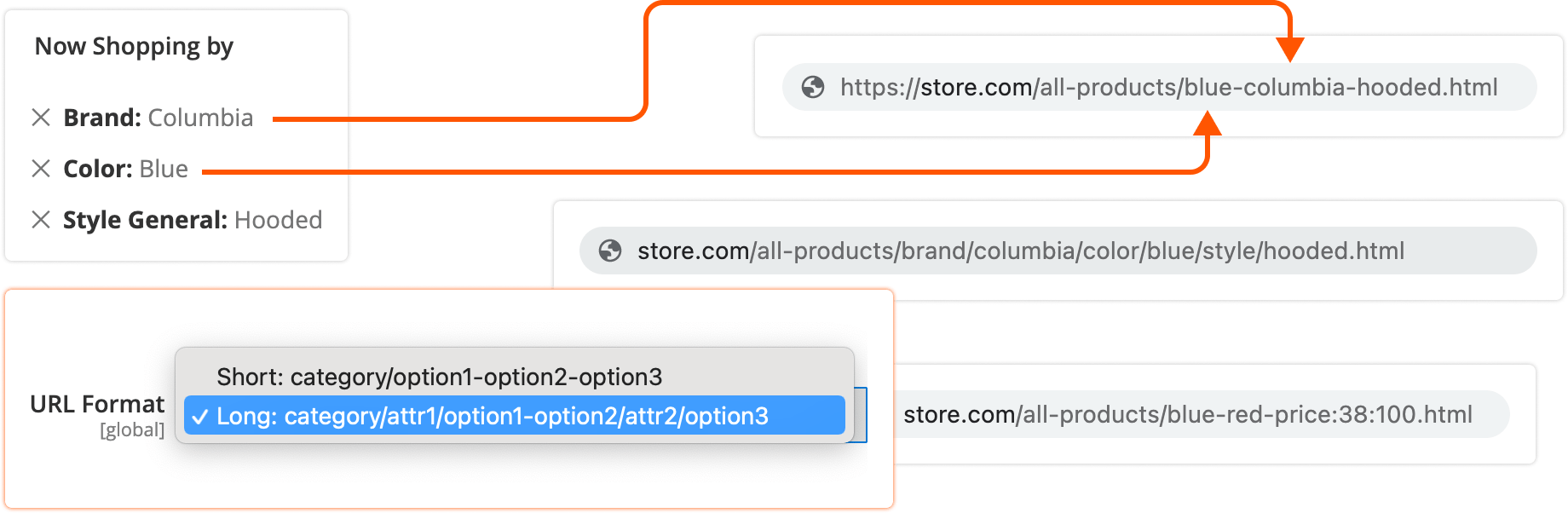
seo-friendly

Canonical URLs

Prevent duplicate content issues.

If you have pages with very similar content, search engines may penalize all of them for duplicated content. With the Advanced SEO Suite, Magento can prevent that from happening by adding canonical tags.

Canonical tags added with Mirasvit Magento 2 SEO Suite Ultimate extension in the site source code.

This is particularly useful for:

  • Configurable products
  • Grouped products
  • Bundled products
  • Cross-domain content (great for store views with different domains)
  • And many other page types

Relationship Tags

The module supports the relationship tags:

  • alternate - directs to an alternative page version, for example a printed page
  • hreflang - indicates to search engines that your website has a version in another language. Search engines will direct the customers to their preferred language version straight from the search results.
  • next and prev - treat pages as a part of a series, consolidating their links and sending visitors to the first page. This is most valuable for pagination: search results won't display the individual URLs for each page, but group them as a sequence

Automatic Redirects

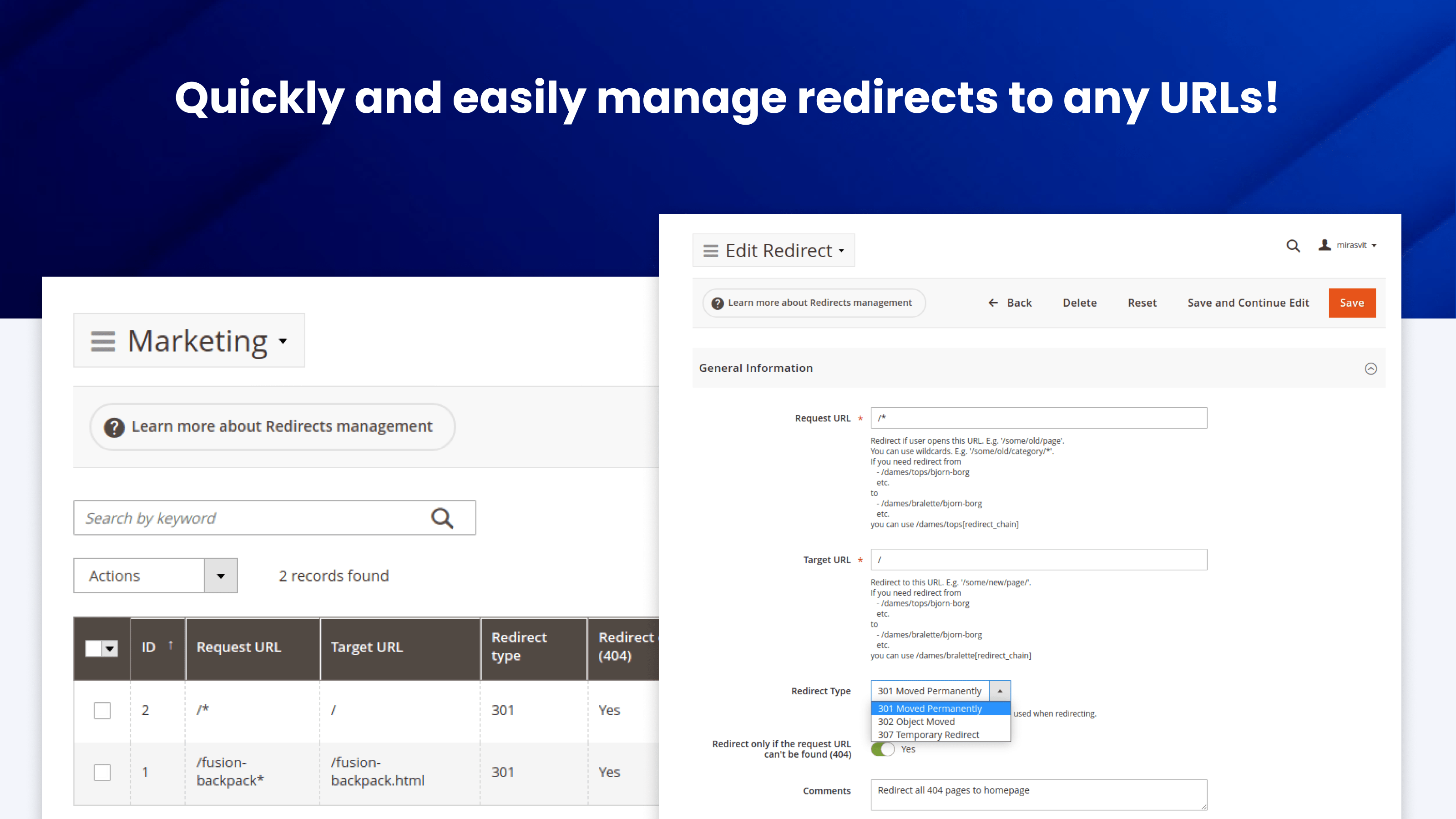
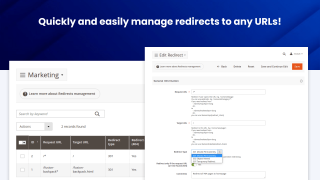
Mirasvit Advanced SEO Suite lets you quickly and easily manage redirects to any URLs.

Redirects are vital for SEO. If you change your URL structure, you have to tell the search engines to go to the new page URLs in order to preserve the search rankings you've already achieved.

Redirects are important for your customers. For example, if your visitors encounter too many 404 pages too often, they'll be more likely to leave your site. You can redirect all 404 pages to your homepage - or even your promotions page - to resolve this issue.
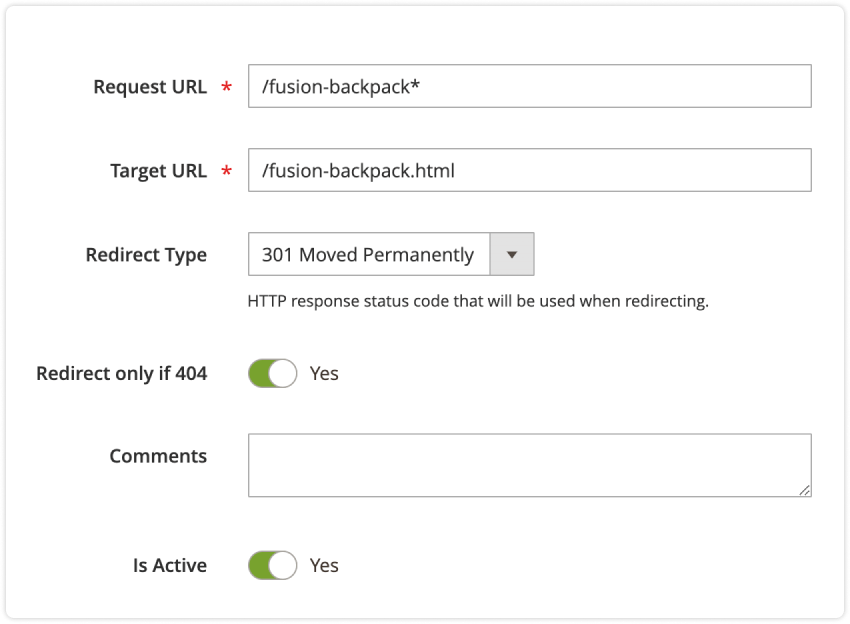
Setting up redirects in Mirasvit SEO Suite Ultimate extension for Magento 2.

Handy SEO Toolbar

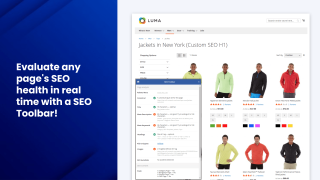
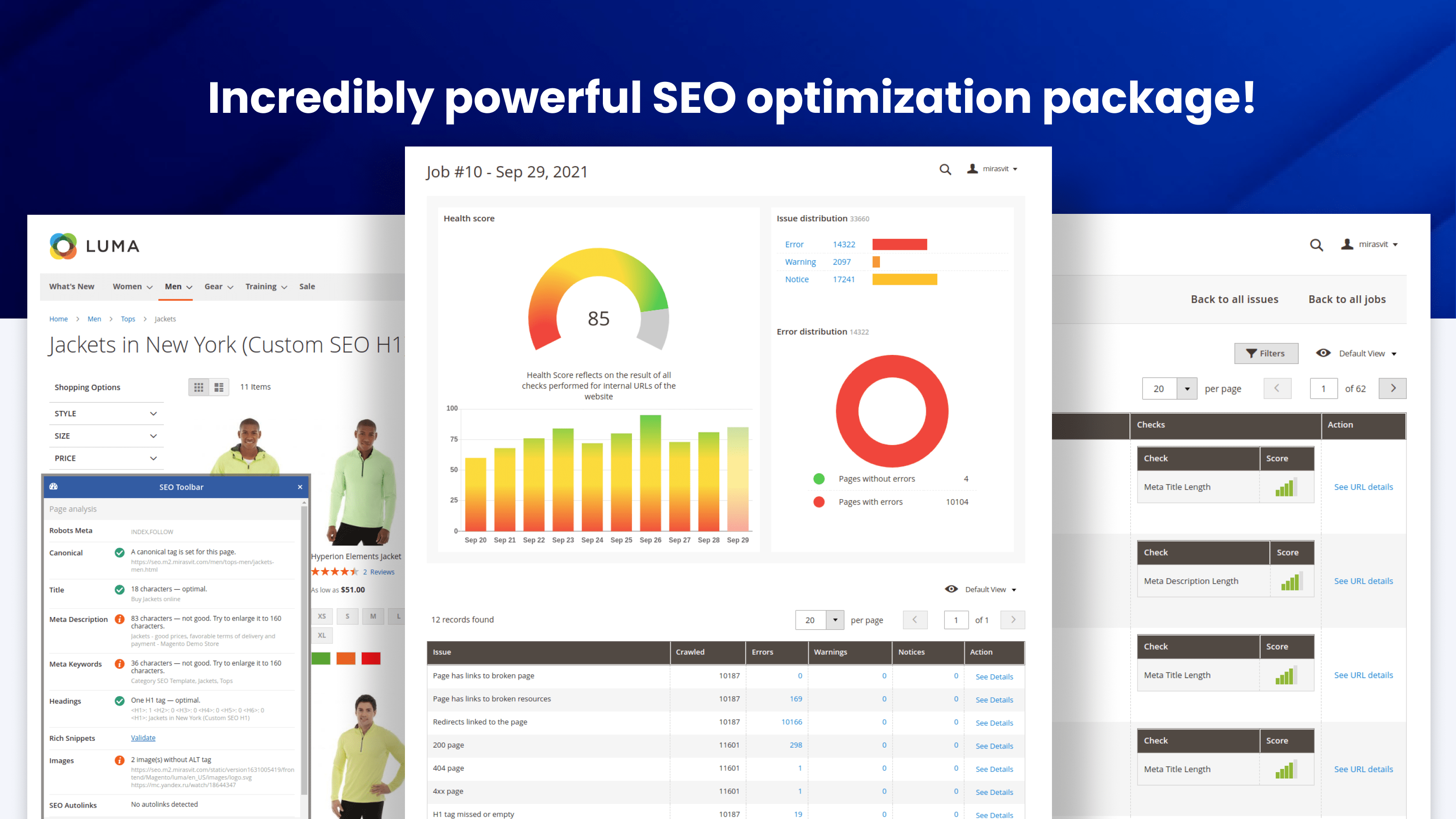
The Magento 2 SEO Extension includes a frontend interface (Magento 2 SEO Toolbar) that evaluates page optimization in real time, right on your live storefront.

This SEO toolkit is a unified spot for reviewing all the key variables, such as:

  • Robots meta header
  • Canonical tag
  • The number of heading tags on the page
  • Meta tags (title, description, keywords) length and density
  • Rich snippets and Opengraph
  • Any templates or rewrites you applied

Because it runs on the live page, you can see exactly which meta tags, templates, and rewrites are applied to any URL - and why - at a glance, without digging through the admin.

If you've configured the variable properly, you'll see a check mark. Should there be any issues, the toolbar will tell you how to fix them.
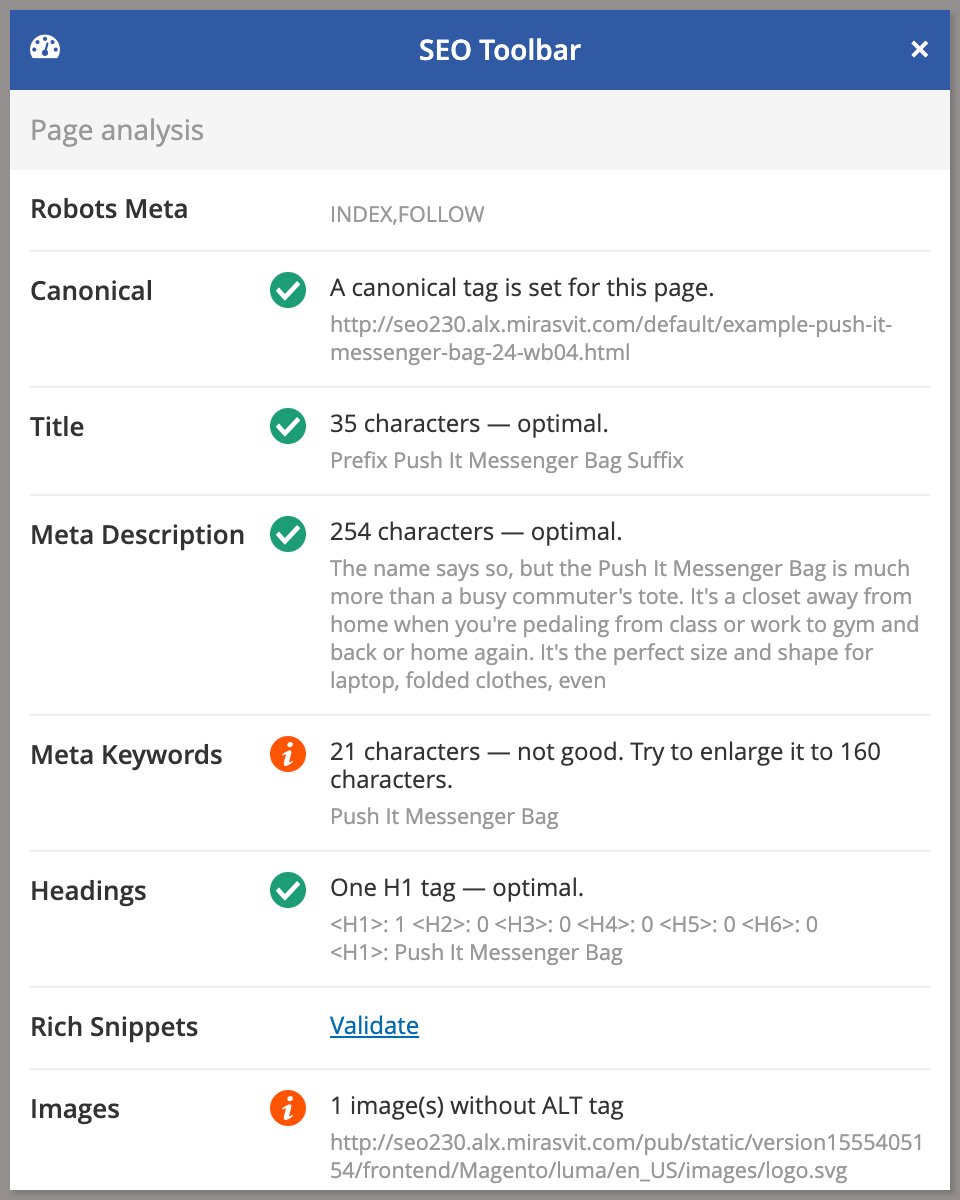
SEO Toolbar in Mirasvit Magento 2 Advanced SEO Suite extension.

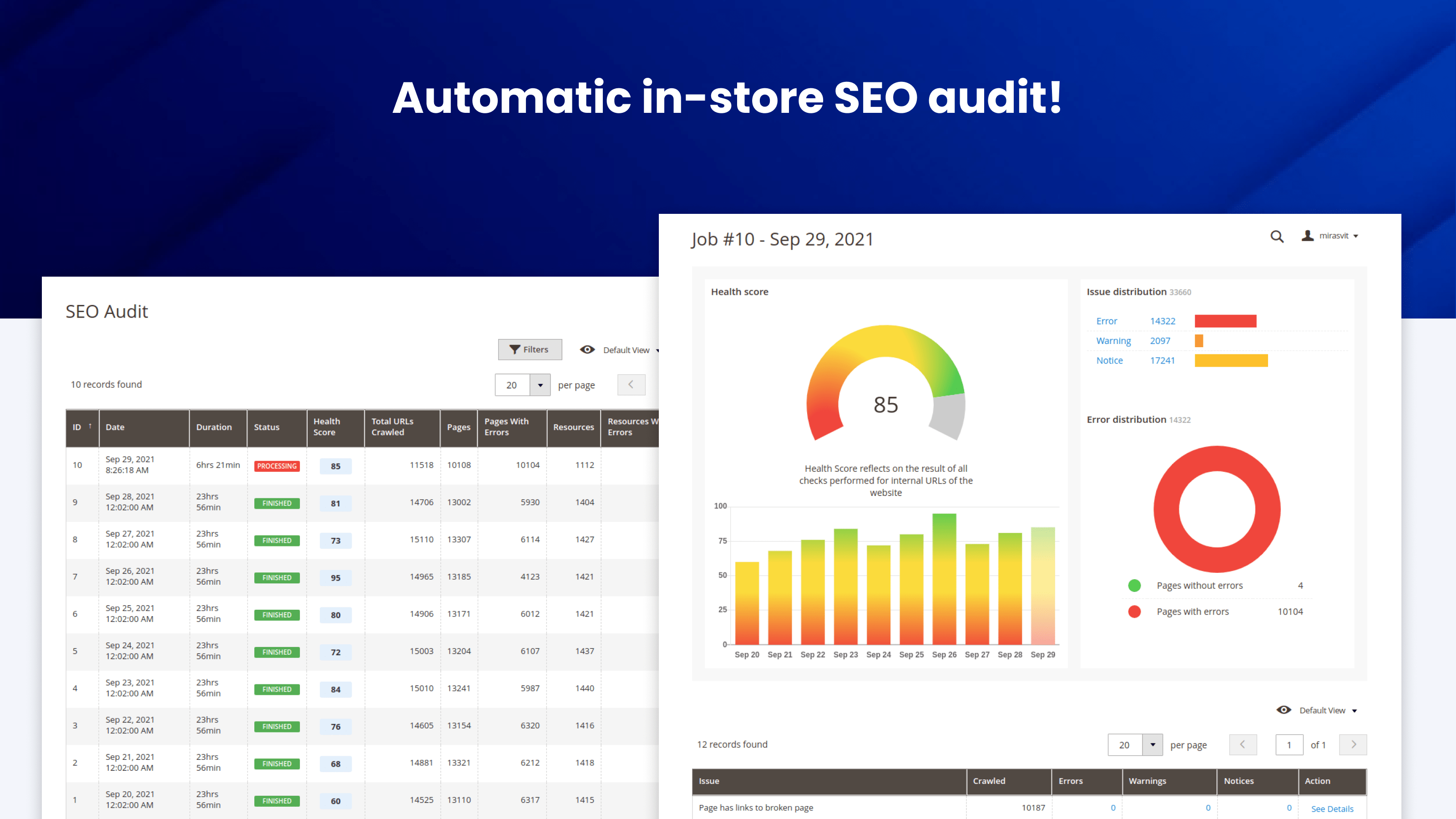
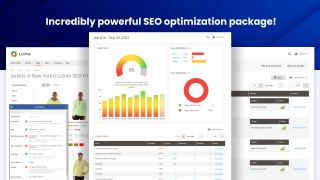
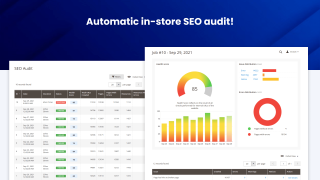
Automatic in-store SEO audit

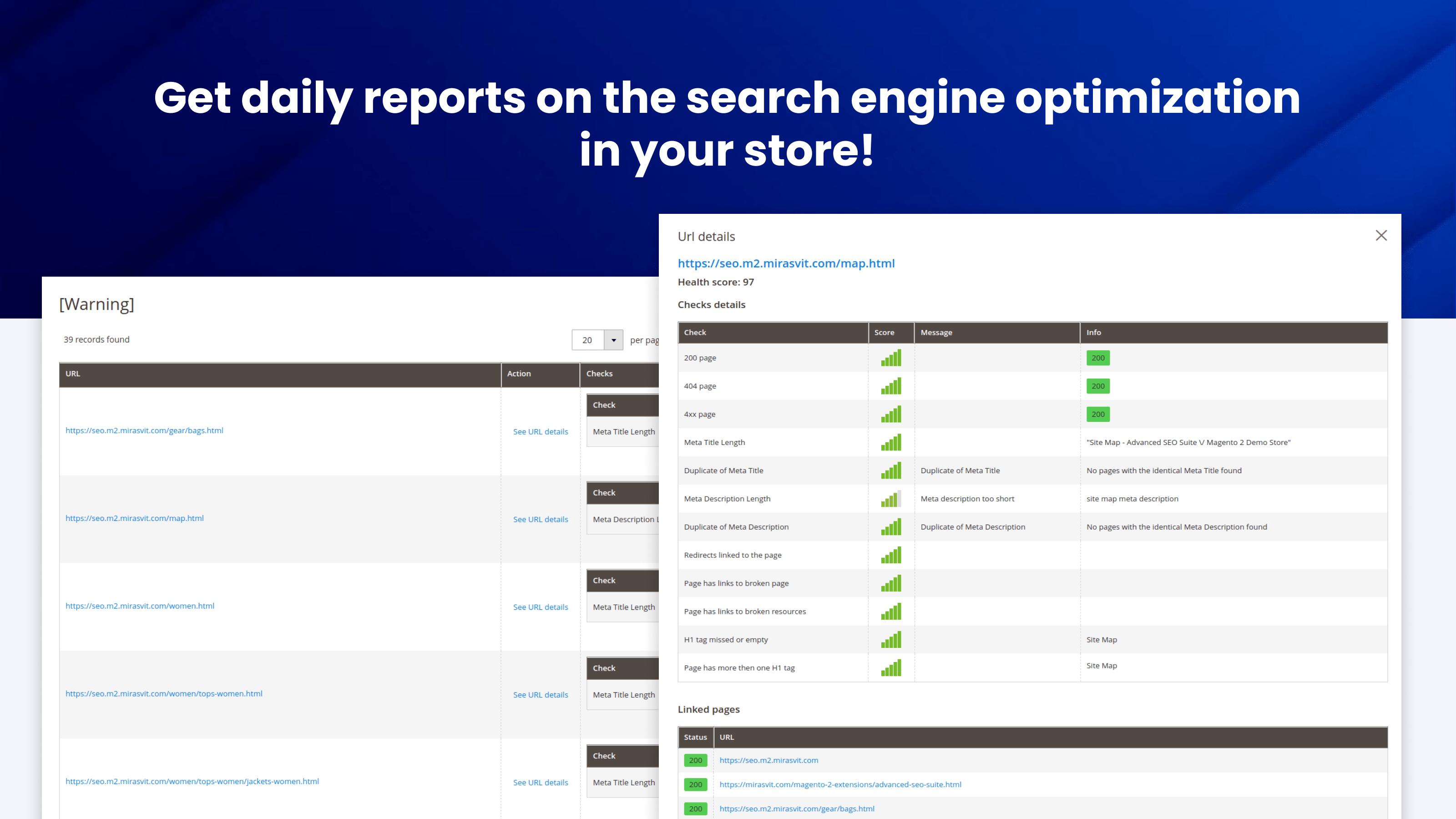
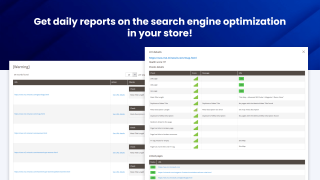
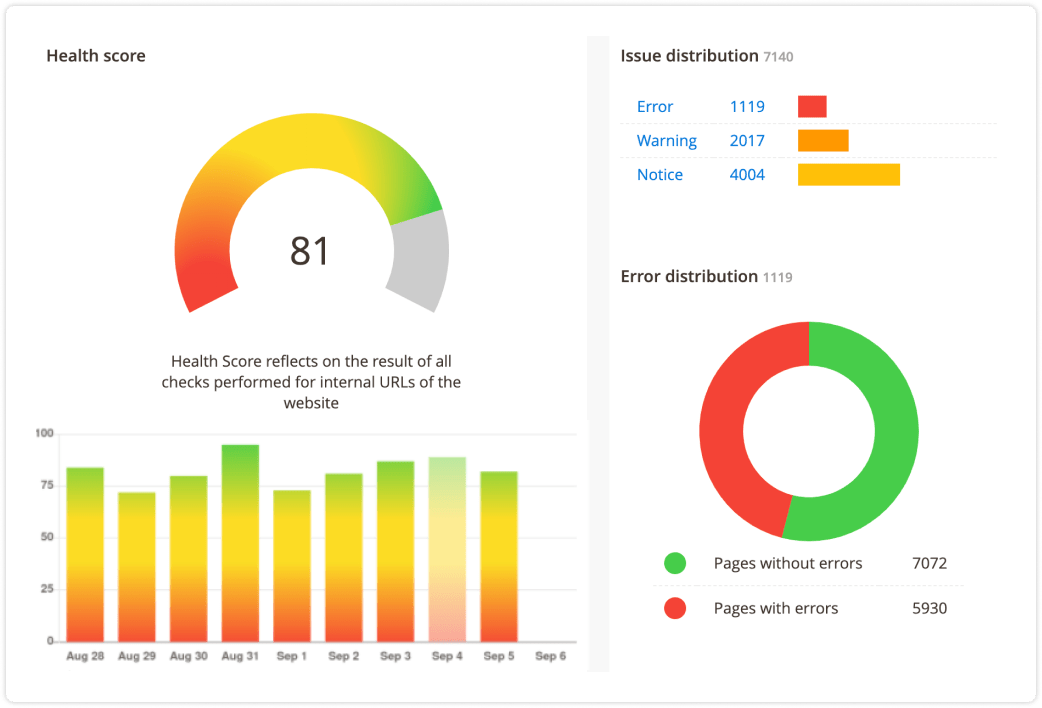
Get daily reports on the search engine optimization in your store

The module runs a built-in crawler that checks every page against SEO requirements, adapting the checks to each page type, then reports every problem it finds with an overall audit score.

Because it re-audits on a schedule, it catches SEO regressions as your content changes - so the optimizations you set up don't quietly break over time. On large catalogs the crawler works in batches on a schedule, so it won't overload your store.

A typical audit flags issues like:

  • Missing or duplicate H1 tags
  • Meta titles or descriptions that are too long or empty
  • Broken links and 404s
  • Missing image alt attributes
  • Missing or conflicting canonical tags
  • Incorrect robots meta directives
seo-health-report

In addition to SEO audits, our SEO extension for Magento offers built-in AI meta-tag fixing with GPT, Anthropic Claude, and Google Gemini, enabling the manual or automatic correction of common meta tag errors such as duplicated meta titles and descriptions, filling empty meta tags, and adjusting their length.

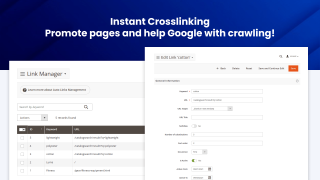
Instant Crosslinking with Magento 2 SEO module

Promote pages and help Google with crawling

Cross-linking is crucial for search engine optimization: it lets you add more weight to certain pages, and it helps search engines understand your site's structure even better, improving their crawling efficiency.

You'll be able to handle cross-linking with ease. Just specify the pages you need to link, keywords, relevant URL, and our Magento 2 SEO plugin will do the rest on its own.

You can limit the number of auto-links per page to comply with the recommended frequency.

Cross-links can target a product or category by its ID, so the link keeps working even after the product or category URL changes.
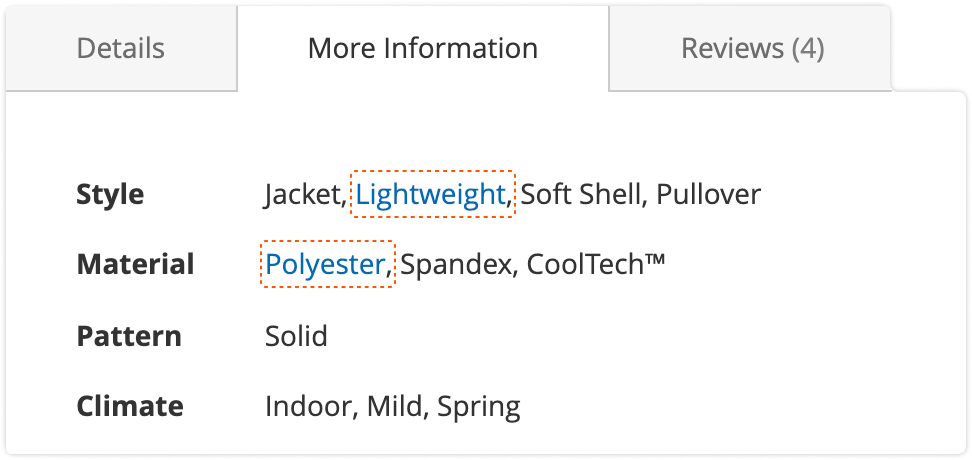
Crosslinking a page in Mirasvit Advanced SEO Suite Magento 2 module - the best SEO suite for Magento 2.

SEO Toolkit for Advanced Sitemaps

Sitemaps are critical for a search engine to find all your pages

HTML Sitemap

Advanced SEO Suite adds an easily-configurable fronted sitemap.

For instance, you can specify which links to add to a sitemap or exclude.

XML Sitemap

The Advanced SEO Suite also lets you optimize the Google XML Sitemap automatically. Among other things, you can add title and caption tags to product images according to their templates, and add or remove specific links from the file.

For large catalogs, you can split the XML sitemap into a separate file per content type (products, categories, CMS pages, blog posts) with an index file, so search engines crawl it more easily and you can monitor indexing coverage per type in Google Search Console.
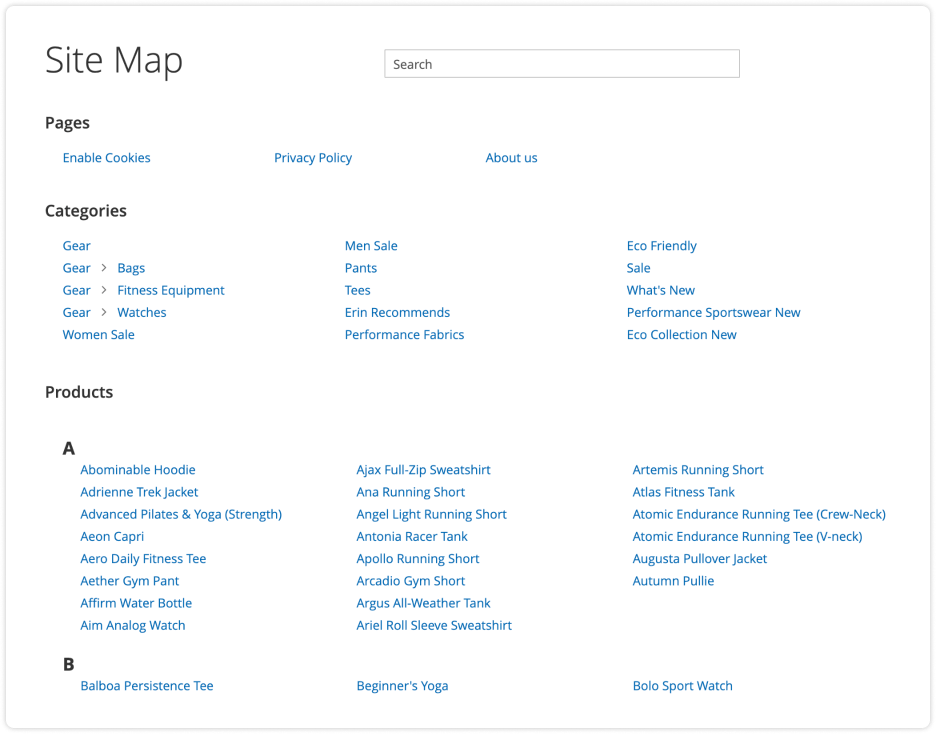
HTML sitemap in Mirasvit SEO Suite Ultimate extension for Magento 2.

Still weighing this against other Magento 2 SEO extensions? Our comparison of the main SEO suites puts them side by side on price, AI capabilities and where each one is the better pick, including where it is not us.

No hidden fees
Lifetime access to source code
Access to free support and updates for 1 year
Updates and support prolongation - $108

Pay today $179 for the first year.

Then $108 for updates and support services per year.

Cancel anytime.

30 days money back guarantee
See it in action!
Pick a quick tutorial to learn about various aspects of this extension
Customer Reviews 199
Earn points for your review about this extension modules. $1 = 10 points
Write Your Own Review

check-circle You submitted your review for moderation.

BBMC Verified Buyer
From Carol Stream, United States
Using the module for over 2 years
Probably the most complete Magento SEO package available
Advanced SEO Suite covers virtually every on-site SEO function we need in one extension family. URLs, redirects, internal cross-links, social metadata, rich snippets, sitemaps, site structure and many other optimization areas are all included.

What makes it particularly useful is the level of targeting available. Magento SEO often becomes difficult when you need rules that account for categories, products and large numbers of variables, and this suite gives you the tools to manage those situations systematically.

Mirasvit has also been very aggressive about adding AI-related functionality and keeping its extensions current with new Magento technology.

The downside of having so much capability is that properly configuring everything can require significant work. I strongly recommend pairing it with Mirasvit AI Assistant, which makes managing and optimizing large amounts of SEO content substantially easier.
Also installed:
Help Desk MX,  Knowledge Base,  Full Page Cache Warmer,  Advanced Product Feeds,  Follow Up Email,  Reward Points,  Promo Banners and 27 more
Tbb Verified Buyer
From Barcelona, Spain
Using the module for 3 months
A complete SEO toolkit for Magento 2: well structured and with broad coverage
As an agency, we evaluated Advanced SEO Suite for Magento 2 projects with demanding SEO requirements.

What stood out most was the breadth of the module. It brings together many features that are often handled by separate extensions: meta tag templates, canonicals, hreflang for multi-store setups, HTML and XML sitemaps, rich snippets, redirects, layered navigation SEO and SEO-friendly URLs. Having these tools in one place makes maintenance easier and reduces the friction of integrating several overlapping modules.

The multi-store support is especially useful when managing several languages or markets from the same Magento instance. Hreflang and canonical settings help keep store views properly connected and reduce the risk of duplicate-content issues.

Meta tag templates are also very practical. They allow patterns to be defined using category or product data, which saves a lot of manual work on large catalogues and helps keep metadata consistent.

Redirect management is another strong point. It is useful to have redirects managed from one place rather than spread across different systems or extensions.

Overall, Advanced SEO Suite is a well-rounded SEO extension for serious Magento 2 projects, with broad coverage and a coherent admin experience.
Also installed:
Advanced Reports,  Reward Points,  Affiliate,  Automatic Related Products,  Full Page Cache Warmer,  Google PageSpeed Optimizer,  Google Shopping Feed and 9 more
Efex Verified Buyer
From United States
Using the module for over 1 month
Best Magento 2 SEO Extension – Packed with Features and Top-Notch Support
We've been using the Mirasvit Magento 2 SEO Extension for several months, and it has exceeded our expectations in every way. The extension offers a comprehensive suite of SEO tools that have made a noticeable difference in our search engine rankings and site visibility. From customizable metadata templates to canonical URL management and rich snippets, it covers everything we need—and more.

One of the standout features is support for the latest Google Structured Data markups, including carousel (beta), which most other SEO extensions still don’t offer. Staying ahead with cutting-edge features like this gives us a real advantage in search appearance and CTR.

Just as impressive is Mirasvit’s dedication to ongoing improvement. They are constantly releasing updates, fixing bugs, and refining the extension. Their support team is incredibly responsive—every time we’ve opened a ticket, we received a detailed, helpful reply within hours. It’s clear they care about their customers and the quality of their product.

If you're serious about SEO on Magento 2, look no further. This extension is a must-have, and the team behind it is truly outstanding.
Javi Verified Buyer
From Málaga, Spain
Using the module for over 2 years
Indispensable
Para mí este módulo ayuda tanto a la puesta en marcha de una Magento para con Search Console y el SEO en general que la instalo en todas mis Magento. Es un indispensable...
Also installed:
Elastic Search Ultimate,  Improved Sorting,  Google PageSpeed Optimizer,  Full Page Cache Warmer,  Google Tag Manager,  Advanced Reviews,  Layered Navigation and 9 more
Eva Verified Buyer
From Vilnius, Republic of Lithuania
Using the module for 5 months
great product
Easy to use. My IT recommended as one of the best extensions for magento with Hyva.
Also installed:
Advanced Product Feeds,  Google Tag Manager,  Facebook Pixel & Conversion API,  GDPR,  Elastic Search Ultimate,  Automatic Related Products
Frequently asked questions
chevron-down chevron-right

How do canonical URLs help prevent duplicate content issues?

If you have pages with multiple versions, search engines may penalize all of them for duplicate content. With the Advanced SEO Suite, Magento can prevent that from happening by adding canonical tags to main page versions.

This is particularly useful for:

  • Configurable products
  • Grouped products
  • Bundled products
  • Cross-domain content (great for store views with different domains)
  • And many other page types

You can also define exceptions with a different or completely omitted canonical tag manually.

chevron-down chevron-right

What are the benefits of using Magento 2 SEO extension?

The Advanced SEO Suite gives you control over every SEO-related feature on your site - meta templates, rich snippets, redirects, sitemaps, cross-links, a live SEO toolbar and an automated SEO audit - in a single module trusted by 2,435+ Magento stores.

No expert assistance required: the module's extensive feature list doubles as a checklist. Just configure the extension, and Google will fall in love with your site! If you're not sure where to begin, you can use a built-in SEO toolbar to check your pages' SEO health.

No need to spend days tweaking the module, either: implementing most features is as easy as flipping a switch. If they require more input from you, you can utilize the intuitive patterns they come with that streamline their configuration.

That said, the module's simplicity doesn't affect its functionality in any way. If need be, you can fine-tune your SEO settings in detail.

chevron-down chevron-right

How can built-in SEO Toolbar save you money?

The module includes a frontend interface (Magento 2 SEO Toolbar) that helps you treat standard SEO recommendations as a checklist. There's no need to hire an SEO specialist for the job.

The SEO toolbar shows you what still needs improving and evaluates page optimization in almost real time, right on the live page - so you can check things like your Magento alt tags at a glance.

chevron-down chevron-right

What's the best SEO setup for a Magento 2 store?

Cover the fundamentals in one place: templated meta titles, descriptions and H1s so every page has unique metadata; rich snippets and Open Graph so your listings stand out in search and social; clean, keyword-rich URLs with correct canonical and hreflang tags; XML and HTML sitemaps; and 301 redirects for any URL change. The Advanced SEO Suite handles all of these, and its built-in SEO audit tells you what is still missing.

chevron-down chevron-right

Does the extension support hreflang and multi-language SEO?

Yes. You can add hreflang tags to point search engines to the right language or regional version of a page, so shoppers land on their preferred version straight from the search results. The module also supports alternate, next and prev relationship tags.

chevron-down chevron-right

Can I run it alongside my current SEO extension?

It is best to run one SEO suite at a time. Two extensions writing meta tags, canonical tags or redirects for the same pages can conflict and produce duplicate or contradictory output. Disable the overlapping features of your current extension (or remove it) before enabling the Advanced SEO Suite.

chevron-down chevron-right

Will the built-in SEO audit crawler slow down a large catalog?

No. The audit crawler processes pages in batches on a schedule rather than all at once, so it keeps site load under control even on large catalogs. It re-audits over time, which is how it catches SEO regressions as your content changes.

chevron-down chevron-right

Does it generate correct rich snippets for configurable and grouped products, and on Hyvä?

Yes. The module outputs valid structured data for configurable, grouped and bundled products, and it is compatible with the Hyvä theme.

chevron-down chevron-right

What is GEO (Generative Engine Optimization) and does this extension support it?

GEO is optimizing your store to be read and cited by AI answer engines like ChatGPT, Perplexity, Google AI Overviews and Gemini, the same way SEO optimizes for classic search. It runs on structured data: the schema.org markup that describes your products, prices, availability and reviews. Advanced SEO Suite generates that markup (Product, Offer, ratings, breadcrumbs, Organization, CMS Article) automatically, which is exactly what AI engines parse to understand and quote your catalog.

chevron-down chevron-right

Will AI search engines show my products as out of stock?

Not when the structured data is complete. The extension emits full Offer data, including availability and price, so AI engines read your in-stock products correctly. Many default Magento stores omit the availability field, which makes AI assistants guess "out of stock" and drop those products from their answers.

chevron-down chevron-right

Can AI shopping agents buy from my store through this extension?

This extension makes your catalog discoverable and citable by AI search. Letting AI agents browse and transact directly, through llms.txt, MCP and the Universal Commerce Protocol, is handled by our separate Magento 2 Agentic Commerce module.

Changelog
Version 2.13.2Sep 24, 2026
Configurable product pages render faster when rich snippets publish a single price. With the single-price option on, the snippet describes one representative variant — the cheapest one a shopper can actually buy — but the extension was assembling the full offer markup for every variant and then throwing all but that one away. On a 933-SKU catalogue this cost about 694ms of page time. Only the wasted work is gone: the published markup is identical, verified variant by variant across every configurable product on the test store in both single-price and price-range modes.
The Rich Snippet Extender's save step is now documented as also keeping a copy of the condition tree in the admin session, so that a form rejected by validation can be filled back in. Documentation only — nothing changes in the admin or on the storefront.
SEO Audit cron jobs no longer run on top of each other. Magento's scheduler can start a second copy of a cron job while the previous one is still running, and both SEO Audit jobs run every ten minutes over work that can take longer than that on a large site. Two copies arriving together could both start a new audit job, and overlapping check runs evaluated the same URLs side by side, doubling the load for nothing. Each job now takes a lock when it starts; a copy that finds the previous run still going exits straight away and leaves the work to it.
< and > written as HTML entities no longer cut your og:description short. A description using &lt; and &gt; as symbols rather than markup — a size guide reading &lt;40cm, a spec sheet with &gt;, a comparison written with math signs — had everything from that character onwards dropped out of the Open Graph description shared to Facebook, LinkedIn and the rest. The symbols now survive as plain text, and real HTML is still stripped as before.
Categories set to "Static Block Only" no longer publish a product rich snippet. Such a category renders a CMS block instead of a product list, yet the markup still described a catalogue of products that were nowhere on the page — markup a search engine can treat as not matching the visible content. The snippet is now left off for those categories; categories displaying products, or products and a static block, are unchanged.
Disabled categories no longer supply the name behind [product_category_name]. The variable used in your meta title and description templates took the product's last assigned category without checking whether it was still enabled, so a retired or seasonal category kept naming itself in the meta tags of every product left in it — including when the category itself was active but its parent had been switched off, which is how a whole promotional branch is usually retired. The variable now uses the first category that is enabled, sits in the current store's category tree, and has no disabled parent above it; a category whose stored tree path is broken is skipped rather than used.
Version 2.13.1Sep 14, 2026
Business image URL for the Organization rich snippet — A new Business image URL field under Stores → Configuration → SEO → Rich Snippets → Organization publishes a photo of the business itself as the snippet's image, alongside the store logo. The two are different signals to search engines: the logo is the brand mark, the photo is what the place looks like. Leave it empty and your markup is exactly what it was before — there is no fallback to the logo.
primaryImageOfPage and mainEntityOfPage structured data — Three new switches, all shipping off so upgrading changes no store's markup: Add mainEntityOfPage link points the Product node at the page the product is sold on, Emit WebPage schema (primary image) adds a WebPage node on product pages carrying the product image as primaryImageOfPage, and Include primaryImageOfPage adds the same property to CMS pages. Article and blog pages get a WebPage node of their own to carry it, because schema.org allows the property only there and validators flag it anywhere else. On a product page opened with a variant selected, all three follow the selected variant, so the page and the product always name the same URL. Checked against validator.schema.org on both Luma and Hyvä: 0 errors, 0 warnings.
Product pages do one less URL lookup when the new structured-data options are off. The page URL used by mainEntityOfPage and the AEO graph was being built on every product page whether or not anything published it; it is now resolved only when one of those switches is on.
⚠️ Unused legacy classes have been removed. A long list of classes left over from the Magento 1 code base and from the old admin-grid layer — among them Seo\Helper\Analyzer, Seo\Model\Observer, the Seo\Model\SeoObject\* cluster, the Magento 1 template-runner screens, SeoAudit\Api\JobManagementInterface and Seo\Api\Service\Image\GenerateImageFileServiceInterface — had no caller anywhere in the extension and none in any other Mirasvit module. Nothing in the admin or on the storefront changes. You only need to act if your own code or a third-party extension referenced one of them by name.
The extension's CSV files round-trip cleanly between environments. Redirect and cross-link exports now quote their own fields to RFC 4180 and export rows that have no store assignment with an empty store cell instead of dropping them, so a file exported from one install imports into another without shifting columns or losing rows.
Bulk imports now tell you what they did with the rows they could not take literally. The redirect and cross-link importers count the rows that carry no id and say plainly that uploading the same file again will create them a second time; the content-rewrite importer names any column header the table does not have instead of failing on it; and all three name the rows they refused and why.
⚠️ The HTML sitemap no longer ships with three page IDs excluded. ignore_cms_pages used to default to 1,2,6 and the home page and 404 page are now recognised by identifier instead. If you had saved your own list in the admin it is untouched and still applies — see the matching item under Fixed for what this was doing.
Starting a new SEO Audit now re-checks every page, not just the ones that finished last time. A new audit only put previously finished URLs back in the queue, so any page that had been left mid-flight — still being crawled, still processing, or stopped by an error — kept its old status and was skipped by that audit and by every audit after it. Those pages stayed invisible in your audit results indefinitely, with nothing to indicate they had been passed over. All pages are now re-queued at the start of an audit, so a single failed or interrupted crawl no longer removes a page from your reports for good.
The SEO Audit crawler now finds the sitemaps listed in your robots.txt. Sitemap discovery through robots.txt could never enqueue anything at all — every Sitemap: directive was silently ignored, and a sitemap was only ever crawled if some page happened to link to it. Directives are now picked up wherever they sit in the file, including the one-per-store lines a multi-store install writes.
The audit now checks the images and videos declared in your sitemap. Image and video addresses were dropped by the sitemap reader on every valid sitemap — the only sitemaps they ever worked on were malformed ones — so those files were never checked at all. And a sitemap whose fetch came back empty killed the whole crawl job rather than being skipped; it is now skipped like any other unreachable URL.
The audit no longer reports broken links and resources that aren't broken. Three faults in how the crawler read a page: links marked rel="nofollow noopener" (what most themes and CMSs emit) or rel="NOFOLLOW" were crawled anyway and their failures reported as defects of your store; every <picture> with more than one image candidate produced a guaranteed phantom "broken resource", while its real images went unchecked; and third-party assets written as //cdn.example.com/… were checked over plain HTTP on an HTTPS store.
Thin-content scores are now correct on stores with HTML minification on. The word count read the page's text with no separator between elements, so <p>alpha</p><p>beta</p> counted as one word. With Magento's HTML minification enabled — which strips the whitespace between tags on every page of a production store — a fully written product description collapsed to a handful of "words" and the whole catalogue scored as thin content. Non-breaking spaces are now counted as word separators too.
The schema-quality score no longer improves as more structured data breaks. Failures were counted once per schema type while the total counted every occurrence, so a category page listing three broken products scored better than a single broken product page. The score now counts failing occurrences, while the summary in the grid still groups by type so the cell stays readable.
Audit results no longer report one page's structured data against another's. The crawler remembered parsed JSON-LD against an internal object identifier that PHP reuses as soon as the previous page is released — which is exactly what the crawl loop does — so a page with no structured data at all could be reported as carrying the previous page's, and a page that had its own could be failed because its predecessor had none. Results are now keyed to the page's own content.
The audit's Job Details screen no longer returns an error page. Opening it without a job — from the admin menu, or from a bookmark that lost its job id — answered HTTP 500, and so did opening a job whose crawl recorded errors before it counted a single page. Both now show the screen, or send you back to the grid with a message saying the job no longer exists.
Google no longer rejects offers over an invalid priceValidUntil date. Products with a special price published the date with a trailing space, which is not valid ISO 8601 — Google rejects the date and the offer carrying it, quietly withdrawing the product from your listings while the page carries on selling it. Products without a special price were never affected.
Each variant's condition is now published with the variant it describes. For configurable and grouped products, every child offer published the parent's itemCondition, so a merchant selling refurbished variants beside new ones published a single condition across all of them — and itemCondition is a claim about the goods that Google surfaces in results and in Merchant Center. Anywhere the page had no "current product" — GraphQL, listings, widgets, the AI context service — the condition disappeared from the markup entirely.
Clearing one social account no longer removes all the others from your Organization snippet. An emptied field was published as an empty entry in sameAs, and Google rejects the whole property over one invalid member — so clearing Twitter silently stopped Facebook, Instagram and LinkedIn from being published. Empty and whitespace-only values are now left out.
A custom Organization locality now reaches the snippet. The admin field wrote the city to one setting and the snippet read a different one, so setting Locality address to Custom lost the city from your Organization rich snippet entirely.
Per-store-view settings for rich snippets and canonicals are honoured again. The breadcrumb snippet, individual reviews and paginated canonical options, plus the HTTPS noindex pages list, were read at Default scope on every store view — so enabling one on a single store view did nothing, and enabling it at Default forced it on everywhere regardless of the per-store value. All four now read the store they are rendering for.
Rich snippet extenders work for admin roles that were granted them. The five extender screens named a permission that no acl.xml declares, and Magento answers an unknown permission by falling back to "full administrator only" — so a role granted exactly the Extender checkbox was denied the screens that checkbox names, with nothing on screen explaining why. Full administrators were unaffected, which is why this went unnoticed.
The Rich Snippet Extender form reports problems instead of erroring. Saving an extender that another admin had just deleted answered HTTP 500 and lost the contents of the form; deleting one from a stale or bookmarked id did the same; and a post missing a required field showed a raw PHP warning with a file path and line number instead of saying which field was missing. All three now show a message and take you back to the grid.
Turning on the trailing-slash rule no longer breaks every existing link into your store. The bulk migration renamed every stored URL without leaving a 301 behind it, so inbound links, indexed results and bookmarks to the old addresses started returning 404 the moment the setting was saved — and the storefront looked perfect, because the new URLs worked. The damage was entirely in traffic that stopped arriving. Each rename now leaves the redirect it was always meant to.
Deleting a product no longer wipes the redirect that disabling it created. The delete handler removed the product's automatic redirect even when redirect-on-delete was switched off, so a discontinued product that had been disabled and was 301ing to its category quietly went back to a 404 once it was deleted for good.
Product pages no longer fail on the {product_final_price_range} variable. On configurable and grouped products the variable caused a fatal error while the meta template was being assembled — and it was evaluated on every such page whether or not you used it in a template. Two more faults in the same place: a product whose cheapest variant is free produced no range at all, and any price below one whole unit (an accessory, a small-denomination currency, a deep discount) printed the literal word EMPTY in the merchant's meta title or description.
The "Remove parent category path" tool runs, and explains itself when it refuses. The button in SEO settings had never worked on any store with nested category URLs — it answered with an exception every time it was pressed. When it does refuse, it now names the setting that is actually blocking it (Create shorter category URLs) instead of a different one, so changing the field the message pointed at is no longer a dead end.
Per-store-view autolink template overrides are applied. Autolink template paths were read from Default scope on every store, so a multi-store install got all-stores-or-none while the admin showed the per-store value as saved and in force.
The hreflang locale code warning now appears. The validation that checks what you typed into Hreflang locale code could never fire, so an invalid code was accepted without a word and shipped into your hreflang tags.
Brand canonical URLs are no longer mangled. With an absolute canonical set on a brand page (Mirasvit Brand), the page published something like http://store/https://example.com/brand/x — a canonical pointing at an address that does not exist.
Redirect imports are now all-or-nothing, and refuse values your store cannot use. Previously a single row the database rejected left the rows before it committed and the rows after it unwritten, with a raw SQL error on screen naming neither the row nor the fact that half the file had landed — so the obvious recovery, fix the file and upload it again, duplicated everything that had already imported. The whole file now imports in one transaction and names the row that stopped it. On top of that: a redirect type outside 301/302/307 used to be stored as-is and then made the redirected address serve a PHP error page to visitors — it now imports as a permanent redirect and says so; an is_active cell that is not a flag no longer produces a redirect that shows as enabled in the grid and fires on no storefront; and a non-numeric id cell no longer breaks the import.
Imported redirects and cross-links that name unknown store views are refused, not published everywhere. Both importers dropped the store views this install does not have and fell back to "all store views" or to no store view at all — so a file exported from staging either published a redirect or a keyword replacement across every storefront, or left a row that is listed in the grid and fires on nothing, with no explanation either way. Unknown store views are now named and the row refused before anything is written; a row that names one real and one unknown store view keeps the real one, and a file with no store column still goes to every store view exactly as before.
A redirect assigned to no store view is included in the export again. Such a row is invisible on every storefront and shows an empty Store View column in the grid, so the export was the only place left to see it — and it was the one place that silently dropped it.
A quote or comma in a redirect comment no longer corrupts the export. A comment reading he said "hello", then left produced a line with extra columns, so re-importing the file read a fragment of the comment as the active flag and the flag as the store scope. Fields are now quoted properly, and export-then-import round-trips.
One unassigned cross-link no longer makes the whole export fail, and multi-store cross-links export whole. A single cross-link with no store row — from a migration, from direct SQL, from a partly-failed delete — made the cross-link export answer HTTP 500 for the entire table, naming nothing. Separately, a cross-link assigned to several store views was loaded as belonging to just one of them, so it exported with a single store and the admin grid's Store View column showed one instead of all of them.
Content rewrites keep their store scoping through an import. A rewrite assigned to more than one store view was imported as "all store views", so moving rewrites between environments took a per-store meta or robots override and published it site-wide, silently, with the row counted as a success. (This started with the PHP 8 upgrade rather than with any change of ours; single-store rewrites round-tripped correctly, which is why it went unnoticed.)
Bulk imports report a missing file instead of an error page. Submitting the redirect, cross-link or content-rewrite import form without a file — a keyboard Enter, a double submit, a browser restoring the form from history, JavaScript blocked by another extension — answered HTTP 500 with Magento's error page. All three now say that no file was selected.
The redirect CSV export downloads instead of opening in the browser tab. The file was sent without the headers that tell the browser to save it, so it rendered as text on screen.
Your Customer Service page is in the HTML sitemap again. The sitemap shipped excluding three CMS pages by their internal numeric ID — on a standard install those are the 404 page, the home page, and Customer Service. On any store whose CMS pages were created in a different order, it was three other arbitrary pages. Nothing in the admin explained it; the field simply listed three numbers. The home and 404 pages are now recognised by what they are, and the shipped default is empty.
The XML sitemap excludes the home and 404 pages for the right store. On a multi-store install the exclusion was resolved against whichever store happened to be current when the sitemap ran — from the command line that is the admin store — so the wrong store's home page came through as a bare store-root entry.
Product videos now appear in the XML sitemap. They never reached it on any install: the video markup namespace was declared on every generated sitemap and nothing was ever written into it, even though the video data had already been collected one step earlier.
Autolink keywords containing $ no longer garble the page. A keyword such as Save $1 now produced a broken nested link, Save $100 rendered as Save 0, and 1 for $2 duplicated the link text into itself — and prices and pack sizes are among the most natural autolink keywords. Keywords starting with a digit also no longer gain stray spaces around them.
Autolinks no longer un-escape angle brackets in your content. Every pass over a page ended by turning &lt; and &gt; back into < and > — even on stores with no keywords at all — so a code sample in a CMS block or a size guide reading &lt;40cm came back into the delivered page unescaped.
The AI meta generator no longer overwrites rewrites you wrote yourself. The guard was inverted: it protected the rows the AI had created and replaced the ones a person had typed, resetting the meta title, description, active flag and sort order — an unrecoverable loss, from a cron nobody watches, on exactly the pages you cared enough to hand-write. An existing rewrite is now left alone, and only rewrites the AI created are refreshed when Re-generate SEO rewrites is on. Two things start working as a result: that setting had no effect at all before (so the cron paid for a fresh prompt per already-fixed page on every tick), and reset, the only way to undo an AI run, deleted nothing.
The AI pass now reads the page it is describing. Building the request address destroyed the page's query string, so for a filtered category the AI fetched and described the unfiltered page and stored the result against the filtered address. A related fault matched product parameters by arithmetic coincidence and built the context for the wrong product, and attributes whose value is a translated phrase were dropped from the context instead of being read.
The audit grid no longer accuses pages of having no meta title when it cannot read the row. An unreadable stored value was reported as a missing meta title — a fault that was never measured. Such a row now renders an empty cell.
Selecting nothing before a redirect mass action shows a message, not an error page. The "An item needs to be selected" guard — the one that stops an empty selection deleting the whole grid — produced an exception page instead of the admin message it exists to show.
Canonical rewrite conditions are no longer lost when something other than the admin form saves them. The condition tree was discarded on every save that did not come through the Save button, and written back empty.
The SEO template preview matches the storefront. A product named Ryker LumaTech&trade; Tee previewed as the literal &amp;trade; — the preview disagreeing with the storefront, which is the one thing it exists to show.
Storefront redirect lookups are escaped through the database adapter. The URL matching behind every redirect built its query with addslashes(), which is not the database's own escaping and knows nothing about the connection's character set. No incorrect behaviour was found or is claimed to be fixed — the pattern is now correct rather than merely correct-in-practice.
A price filter written as price=100 with no range separator no longer produces a PHP warning while the page is rendered.
A product URL template no longer causes a fatal error when it is processed for the admin store.
bin/magento mirasvit:seo-audit:job --run with no running job now exits with its message instead of crashing on the next line.
Version 2.13.0Aug 31, 2026
Hyvä and GraphQl support now ship with the extension — The two companion packages, mirasvit/module-seo-hyva and mirasvit/module-seo-graph-ql, are gone: everything they contained is part of Advanced SEO Suite itself. That is the Alpine SEO toolbar and HTML sitemap templates, the Open Graph layout, the breadcrumb de-duplication that stops Google Search Console reporting two BreadcrumbList blocks on a page, the fix that keeps SEO autolinks alive in a product's short description, and the mstSeoContent query used by headless and PWA storefronts. There is no longer an extra package to find and keep in step, and on a Luma store the Hyvä part simply stays dormant. If either package is installed on your store, remove it before you upgrade — the first item under Improvements has the two commands.
⚠️ Remove the companion packages before upgrading — If your store has either one installed, run this first:
⚠️ mstSeoContent now answers on every store — Previously the GraphQl schema arrived with an optional package, so the query existed only where that package had been installed, and returned incomplete data where the package was present but the SEO page-state service was not. Both now ship together and apply everywhere, which fixes that — but it is a change in behaviour on upgrade for anyone querying /graphql.
⚠️ The five Hyvä modules are gone, not renamed — Hyva_MirasvitSeo, Hyva_MirasvitSeoAutolink, Hyva_MirasvitSeoMarkup, Hyva_MirasvitSeoSitemap and Hyva_MirasvitSeoToolbar no longer exist in any form. Everything they did now happens inside the extension's own modules, with the Hyvä templates living beside their Luma counterparts. setup:upgrade removes the old names from app/etc/config.php for you. You only need to act if you referenced one yourself — in a custom di.xml, a layout ifconfig, or a deployment script that enables modules by name.
⚠️ If you restyled the SEO toolbar or the HTML sitemap, check them after upgrading — Each was two implementations, a Luma one and an Alpine one for Hyvä, and each is now a single template that renders the same on both. Their styling moved out of the module's LESS and into the templates, and the sitemap's search box is plain JavaScript in the page rather than the RequireJS component Mirasvit_SeoSitemap/js/sitemap. Both look and behave as they did; you only need to act if you overrode that LESS, those templates, or that JavaScript component.
Much faster product pages on stores with many reviews — The review rating figures used in product structured data were looked up review by review, and twice over, so a product page issued four extra database queries for every approved review it showed. All of them are now fetched in a single query and reused, which on a product with 410 reviews removes about 1,640 of the page's 2,045 queries and roughly 1.8 seconds of render time. The published markup is unchanged.
Fewer repeated database reads on every storefront page. The list of SEO content and meta templates was re-read several times while rendering a single page (canonical tags, meta templates, content rewrites); it is now read once per page and reused. Pages look exactly the same — only the load on your database is lower.
Lighter blog pages on stores that also run Mirasvit Blog. While building a blog page's meta and SEO content, the module looked up which post or author the page was about from scratch several times over, and each lookup went to the database again instead of reusing the one the blog itself had already made. Both are now resolved once per page, roughly halving the blog-related queries, with byte-for-byte identical page output.
Values coming from your settings are now escaped consistently on the admin configuration and import/export screens and in the storefront toolbar, so they can never be read as page markup.
The SEO toolbar now stands a chance on Luma stores that have turned inline scripts off in their Content Security Policy: its inline script is issued through Magento's secure renderer, so it receives a nonce and is allowed to run on uncached pages instead of leaving the toolbar permanently collapsed. Full-page-cache hits still need Magento-level support that a template cannot provide. Stores on the default policy see no change at all.
The SEO toolbar can no longer be opened by anyone who knows the trick. Adding ?debug=seo to any storefront address switched the toolbar on for that visitor, skipping both the on/off setting and your IP allowlist — so an anonymous visitor could read the toolbar's internal SEO diagnostics on a store that had deliberately restricted it. Access is now governed only by Stores → Configuration → SEO → SEO toolbar and the IP allowlist. ⚠️ If you used ?debug=seo to check pages, enable the toolbar for your own IP address instead.
The toolbar's diagnostics are no longer written into every visitor's page. With the toolbar switched on, its full page analysis was embedded in the page source for everyone, and the IP allowlist only decided who was shown the panel — so any visitor could read it by viewing the page source. The toolbar is now added to the page, and its data collected, only for visitors whose IP address is on the allowlist.
The toolbar's Headings row no longer reports headings that aren't on the page. Heading tags written inside a theme's stylesheet or JavaScript — even in a comment — were counted as real headings, and one could drag kilobytes of CSS into the row as its "heading text". Style and script blocks are now ignored, so the row lists only the headings a visitor actually sees, with the correct counts per level.
The toolbar's SEO Content rows no longer print <br /> as visible text. On Hyvä storefronts the state details ran together as Is Category Page — No<br />Is Landing Page — No… with the tags on show; the line breaks work as line breaks again on both themes.
Admin grids filtered by more than one store view now list every matching row. In the Redirects, Canonical rewrites and SEO autolinks grids only the last store view in the filter was actually applied, so rows belonging to the others were quietly left out and the grid looked emptier than it was — with no error to say why. Filtering by a single store view was, and still is, unaffected.
Disabling any Mirasvit SEO module no longer breaks admin login. The AI helper module declared which modules it must load after in a form Magento does not accept, which corrupted module load order and made the admin panel fail with an access-rights merge error as soon as one of the Mirasvit SEO modules was switched off. The declaration is now valid and load order is respected.
Preselected configurable variants are now described correctly in structured data. When a configurable product page is opened with a variant chosen through the address (for example ?size=M&color=red), the page's structured data described the parent product — its name, SKU and identifier — and quoted the parent's aggregate "from" price, while also listing every other variant. Google Merchant Center compared the feed price against that landing page and rejected the item as a price mismatch. The page now describes the variant the shopper is actually looking at, with that variant's own name, SKU, price and address, and no longer lists the other variants. Where the structured data has to fall back to a single offer (only one variant is in stock, or single price mode is on), that offer is now taken from the cheapest variant a shopper can actually buy instead of from the parent product. Pages opened without a variant selection are unchanged.
The Hreflang locale code and Hreflang x-default settings can now be filled in at Default and Website scope, not only on individual store views. Both settings were hidden at the higher scopes, so the fixes suggested by the hreflang report could not be applied where they belonged.
Sitemap generation no longer crashes with Call to undefined method Magento\Sitemap\Model\SitemapItem::getVideos(). When a plain core sitemap item reached the sitemap row builder — as happens when a third-party module registers its own sitemap item provider — the module asked it for product videos unconditionally, but the core item has no such capability, so generation aborted with a fatal error. Videos are now requested only when the item can supply them and their absence is treated as "no videos", so core and third-party items are written normally.
Images stored in remote media storage (S3, MinIO) no longer show a placeholder the first time they are viewed. On such a store, every non-catalog image — blog posts, banners — was served as the catalog placeholder for exactly one visitor and then appeared correctly after a refresh, because a resize step that only understands catalog product images failed and took the whole response down with it, even though the real file had already been fetched. The image is now served as soon as it is available; catalog images are unaffected.
CMS pages assigned to All Store Views are now included in hreflang alternate-group output. Such a page was silently dropped from its group and ended up with only a self-referencing hreflang tag (or none at all), so search engines weren't told about its language and store variants. It now links to every store view in the group, while any store view that has its own explicit page still takes priority.
The country in your Organization structured data now outputs the ISO country code (for example US) instead of the localized country name (for example United States), which is what Google's Rich Results validator expects. A custom country you entered yourself is used as-is, exactly as before.
A product review with no rating votes no longer publishes the previous review's rating in your structured data. Such a review inherited whatever rating was calculated for the review before it, so search engines were shown a score that review never received; it is now published without a rating, and aggregate rating counts no longer include it.
Category and landing pages now put the correct image address in their rich snippets. The store's base URL and store code were being prepended to an image address that was already a complete media URL, producing a doubled, invalid link (for example .../en/https://cdn.../image.jpg). The full media URL is now used directly and it respects your Base URL for User Media Files setting, so those pages stay eligible for rich results.
Category and landing page rich snippets no longer emit invalid empty offer data. When Product Offers was turned off or the category was empty, the page still output an OfferCatalog block with an empty item count and an empty item list, which could cause Google to reject the snippet. The block is now included only when there are offers to list.
SEO-friendly product image names are generated again — With "SEO-friendly URLs for Product Images" enabled, product images kept their original, non-descriptive filenames instead of getting readable, keyword-rich names, because an internal path error meant the module never found the image files on disk. Friendly names are now produced correctly, and the product's thumbnail — previously always left with its original filename even when the rest of the gallery was renamed — is renamed along with the others.
The main product image is identified correctly even when its source file is missing from disk. With "SEO-friendly URLs for Product Images" enabled, such a product could end up with no image flagged as the main one in the gallery; the main image is now matched using the same friendly-name logic as the rest of the gallery and falls back to the original filename when the file is absent.
Social and link previews now show the same product description as your rich snippets. The og:description tag was always taken from the product's short description, even when your Rich snippets Item description setting (Stores → Configuration → Rich snippets and OpenGraph → Product) was set to use the full or meta description. It now follows that same setting, so search engines and social/messaging previews describe the product identically.
OpenGraph and Twitter Card meta tags no longer double-encode HTML entities. A title or description that already contained an encoded character — for example a meta title stored as Cleaning Supplies &amp; Equipment — was encoded a second time, so the preview showed the raw &amp;. Each character is now escaped exactly once; plain, un-encoded titles are unaffected.
bin/magento mirasvit:seositemap:generate now exits with a non-zero status when a sitemap fails to generate, instead of always reporting success. The command used to catch every generation error, print it and still exit 0, so a cron job or deployment script that checks the exit code read a total failure — an unwritable target folder, a bad sitemap path, a store with no base URL — as success, and the store kept serving a stale or missing sitemap.xml with no signal anywhere. Failures are now reported as errors and a fully successful run still exits 0. ⚠️ If you have a wrapper that relied on this command always succeeding, it will now correctly fail when generation fails.
Generating the XML sitemap no longer resizes and reprocesses every product image. On large catalogs this could exhaust server memory (over 14 GB observed) and slow generation down badly, as each image was decoded and re-saved. Image URLs are now built directly without touching the source files, so generation is faster and far lighter on resources. The optional SEO-friendly image URL setting is unaffected.
Product image "alt" text in the XML sitemap now behaves correctly. With friendly image alt enabled but the alt template left blank, every product produced an empty alt attribute; it now falls back to the product name. When the feature is turned off, products are no longer loaded and no image alt is written at all, and the alt lookup no longer grows memory without bound during a large multi-store sitemap run.
The scheduled SEO audit crawl no longer restarts and loses its progress when a run crosses midnight. mirasvit:seoaudit:job --run decided when to start fresh based on the calendar day, so a crawl started in the evening was thrown away a few hours later; it now restarts only after it exceeds its configured maximum lifetime.
Searching the HTML sitemap on a Hyvä storefront now finds results regardless of capitalisation. The typed query was compared against lower-cased link text without being lower-cased itself, so a search typed with a capital letter — a product name as it appears on the page — returned nothing. Luma was unaffected.
The frontend HTML sitemap no longer shows a "Nothing to show" warning the moment the page loads. The warning appeared on every visit, even when the sitemap had plenty of links to display; it now stays hidden until a visitor's search actually returns no matches.
The "Other" section of the HTML sitemap now shows readable link titles instead of raw web addresses. Links pulled in from other Magento sources displayed their full URL as the clickable text; they now show a title derived from the page address, falling back to the URL only when no title can be worked out.
Category and product pages no longer log a PHP deprecation warning on PHP 8.5 (Magento 2.4.9). The breadcrumb title feature made a call on every breadcrumb render that PHP 8.5 no longer allows, so a busy store filled its log on every category and product view. Behaviour on older PHP versions is unchanged.
Version 2.12.8Jul 27, 2026
Sitemap health check command — A new bin/magento mirasvit:seositemap:validate command inspects the sitemap files already generated in your pub folder and reports the problems that generation itself never complains about: a file that isn't valid XML, and URLs that are empty, relative instead of absolute, still contain an unresolved {{...}} template placeholder, or are listed twice. It prints a pass/fail summary per sitemap file with the number of URLs checked, supports --format=json for scripts, and exits with a non-zero status when anything fails — so you can run it right after mirasvit:seositemap:generate in a cron job or deployment script and find out about a broken sitemap before Google does. Problems are also recorded in the module's degradation report.
The Store description used by the AI helper can now be set per website and store view. The setting was already being read per store view, but the admin form only ever showed it at Default scope, so stores with several store views could not describe each one separately for the AI. It now sits in its own AI helper store context group under Stores → Configuration → SEO audit and is editable at every scope; descriptions you already saved are kept unchanged.
SEO Audit crawls and AI meta generation no longer fail on PHP 8.5. The crawler stopped on its very first URL and the scheduled audit was logged as an error, and AI meta content requests failed the same way, because of a function PHP 8.5 no longer allows. Behaviour on older PHP versions is unchanged.
"Delete wrong snippets automatically" for CMS pages now works on every CMS page, not just the homepage. With the setting enabled (Stores → Configuration → Rich snippets and OpenGraph → CMS page), Magento's invalid native Product markup was still left in place on regular CMS pages such as About Us or Contact, which could keep those pages from qualifying for rich results.
Version 2.12.7Jul 23, 2026
The AI meta-fix job no longer gets stuck reprocessing the same pages forever. Previously, an audited URL that could never be fixed was picked up on every run, so the queue never emptied and fresh pages had to compete with it. Each URL's failed attempts are now tracked, and a URL is dropped from the queue after 3 unsuccessful tries, so the backlog drains and new pages are processed. ⚠️ Adds a meta_fix_attempts column to the mst_seo_audit_url table (applied automatically on setup:upgrade).
Running mirasvit:seo:trailing-slash --apply no longer floods Varnish with cache-purge requests and finishes much faster. On large catalogs the command previously triggered a separate cache purge for every URL rewrite it changed (thousands of purges per second on a 30,000-product catalog). Rewrites are now updated in bulk and the affected products and categories are purged from cache once at the end.
Reasons to choose Mirasvit
Client focusing and satisfaction

These are our primary. A major portion of our new clients come from referrals from our existing clients. Our professional team of developers, marketers and support staff have invested the best knowledge and experience in the field into our work, so you know you can come back to us again and again.

Remarkable support

One year free and high quality support. We go to great lengths to provide maximum satisfaction with every module you have purchased in our store. By helping you with installation, configuration, answering your every question, we do all our best to eliminate any possible problems.

Risk-free Investment

30-days money back guarantee. If you are not satisfied with our extension performance for any reason, we provide a full refund.

Constant improvements and upgrades

We constantly add new features to all our modules, and are always interested in hearing your opinion and implementing your suggested features in our future developments.

Comprehensive Documentation

We provide an expanded user guide for every aspect of our extension, so you can find answers for all your burning questions.

Unencrypted source code of our products

You can customize extension according to your needs and requirements.

Usability and Performance

The Module is easy to install and upgrade, just follow our step-by-step user guide. Additionally, the extension is ready to use with the Hyvä theme.

Ready for Magento Cloud

No core modifications. The extension has been tested in a Magento Cloud environment and is fully compatible with it.

Loading...