Account additional fields
Account additional field settings located at Marketing -> Affiliate -> Additional Fields.
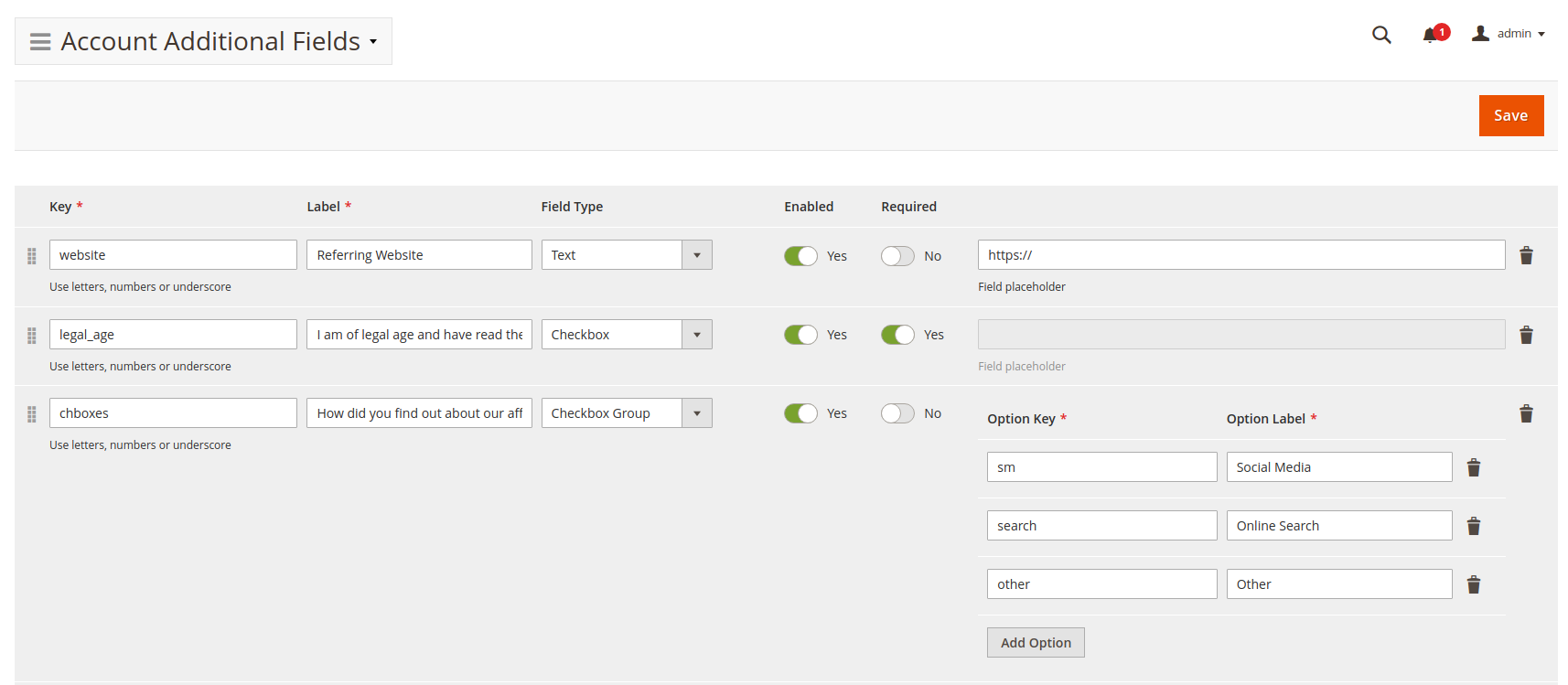
This page contains a list of additional account fields, which could be added, changed, or removed. These fields are used on the Sign In to Affiliates and Affiliate Account Settings pages.
Fields parameters
Each field record has the next parameters:
- Key: index of the name of the additional field. It is submitted with the form as part of a name/value pair.
- Label: caption for the field.
- Enabled: sets whether the field will be used for Account settings.
- Required: sets whether a user must specify a value for the field before the form can be submitted.
- Field Type: a type of form control.
Based on Field Type, the following options are available for each type:
- Text
- Textarea
- Checkbox
- Checkbox Group
- Radio Button Group
- Select
Text is an input field where the user can enter text data.
- Field Placeholder: placeholder text
Textarea is a multi-line text input control.
- Field Placeholder: placeholder text
Checkbox is allowing single values to be selected/deselected.
Checkbox Group are checkboxes, allowing several values to be selected from provided options.
- Option Key: represents the option value to be submitted with the form.
- Option Label: caption for the option.
Radio Button Group are radio buttons, let a user select only one from provided options.
- Option Key: represents the option value to be submitted with the form.
- Option Label: caption for the option.
Select is a drop-down menu of options.
- Option Key: represents the option value to be submitted with the form.
- Option Label: caption for the option.