How to configure Webhook integration
To create a Webhook notification, follow the same steps as for creating email notifications:
- Create a new channel.
- Select or create new recipients.
- Configure the notification.
In the first step, when creating a channel:
- Select HTTP Request as the Channel Type.
- Choose the method (
GETorPOST) that you will use to send messages. - Configure additional data:
- Add the URL that will be used for requests.
- Set the key and value for headers, if required.
- Provide basic authorization data, if required.
- In the Body, set the variable
%payload%, which will be replaced with the message.
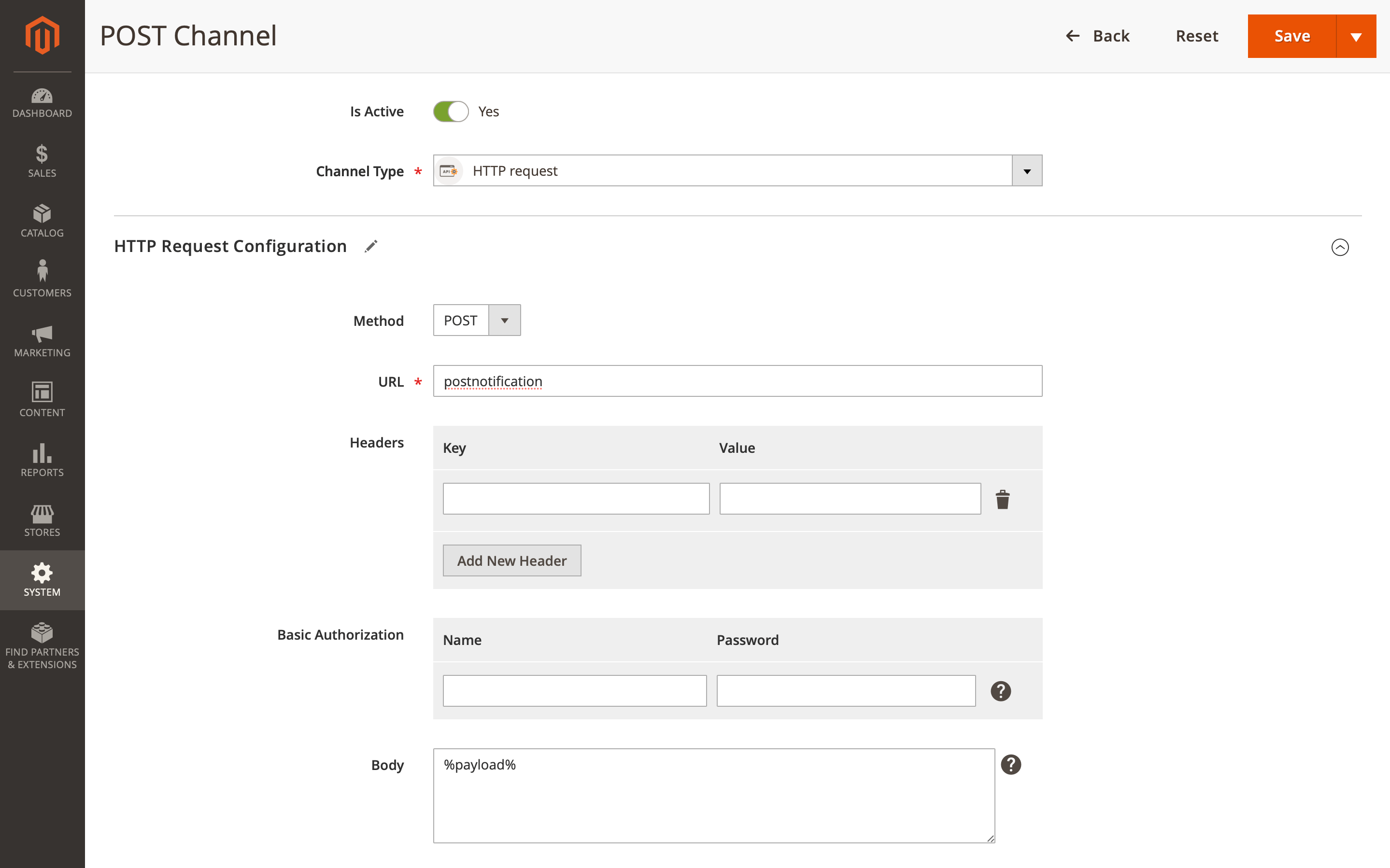
Use test message to verify that the WebHook notifier is working correctly.
Examples
Use these examples to build your requests.
GET method
The Body must be in JSON format to ensure proper parsing of the data into GET request parameters. The %payload% from the Notification template should be in JSON format as well.
Example 1: %payload% as a part of a JSON
- Body:
{
    "success": true,
    "data": %payload%,
    "info": "OK"
} - Notifiction template:
{
    "total": {{order.grand_total}},
    "status": "{{order.status}}",
    "qty": {{order.summary_qty}},
    "count": {{order.summary_count}}
} - Result (URL params string):
?success=1&data[total]=63.71&data[status]=pending&data[qty]=2&data[count]=2&info=OK
Example 2: %payload% as the body
- Body:
%payload% - Notifiction template:
{
    "sku": "{{product.sku}}",
    "name": "{{product.name}}",
    "qty": {{product.qty}},
    "info": "OK"
} - Result (URL params string):
?sku=24-MB01&name=Joust+Duffle+Bag&qty=2&info=OK
POST method
The Body by default, should be in JSON format. The %payload% from the Notification template should be in JSON format as well. If the body is not in JSON, the Content-Type header must be explicitly specified.
Example 1: %payload% as a part of a JSON
- Body:
{
    "success": true,
    "data": %payload%,
    "info": "OK"
} - Notifiction template:
{
    "total": {{order.grand_total}},
    "status": "{{order.status}}",
    "qty": {{order.summary_qty}},
    "count": {{order.summary_count}}
} - Result:
{
    "success": true,
    "data": {
      "total": 63.71,
      "status": "pending",
      "qty": 2,
      "count": 2
    },
    "info": "OK"
}
Example 2: %payload% as the body
- Body:
%payload% - Notifiction template:
{
    "sku": "{{product.sku}}",
    "name": "{{product.name}}",
    "qty": {{product.qty}},
    "info": "OK"
} - Result:
{
    "sku": "24-MB01",
    "name": "Joust Duffle Bag",
    "qty": 2,
    "info": "OK"
}