Configuration Settings
Unlock the full potential of your support experience with flexible Knowledge Base configuration options.
Located at Content -> Knowledge Base -> Settings, these settings empower you to tailor the module to your business needs,
maximize customer satisfaction, and drive efficiency in your support processes.
General Settings
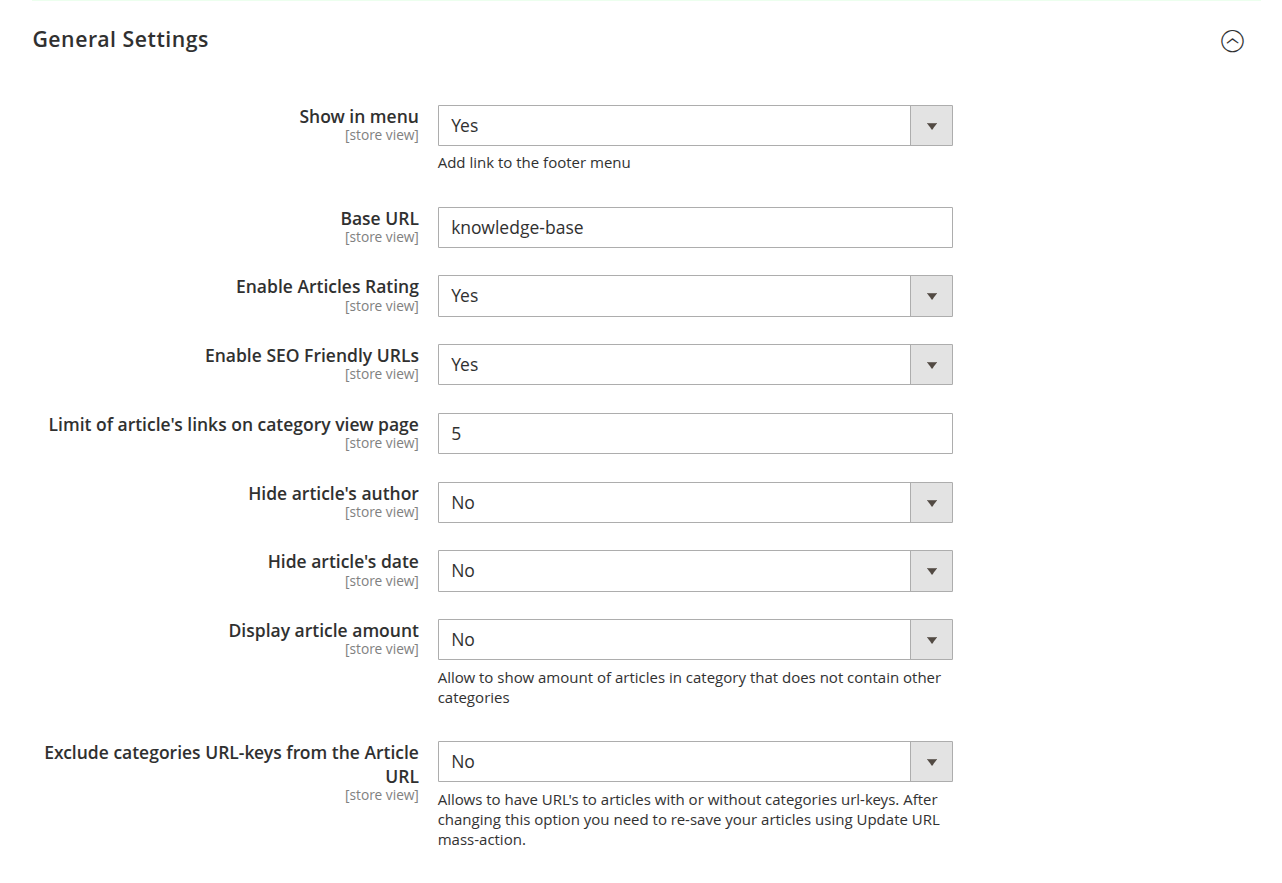
-
Show in menu: seamlessly add a Knowledge Base link to your site's footer menu, making help content accessible from anywhere and reducing customer effort.
-
Base URL: define a clean, branded frontend URL for your Knowledge Base. For example, setting it to
knowledge-basecreates a user-friendly link likehttp://example.com/knowledge-base.html, boosting trust and easy navigation. -
Enable articles rating: invite customers to rate articles, gathering real-time feedback to fine-tune your content strategy. Higher engagement means better insights and stronger customer loyalty.
-
Enable SEO-friendly URLs: boost your Knowledge Base’s visibility in search engines effortlessly. Clean, keyword-rich URLs enhance organic traffic and position your site as a trusted information source.
ExampleAn article with URL key mars under planets becomes
http://example.com/knowledge-base/planets/mars.html. -
Limit of article's links on category view page: control how many articles are shown per page for a smooth, clutter-free browsing experience that keeps readers engaged.
-
Hide article's author: keep the focus on your brand and content by optionally hiding the article's author information.
-
Hide article's date: maintain the timeless relevance of your content by hiding publication dates — perfect for evergreen articles.
-
Display article amount: show the number of articles available in each category without subcategories, giving users a quick overview of the content’s depth.
-
Exclude categories URL-keys from the article URL: streamline URLs even further by removing category keys. Simpler URLs improve click-through rates and offer a cleaner, more professional appearance.
NoteAfter changing this option, it’s recommended to regenerate URLs for existing articles.
Comments

Strengthen your Knowledge Base community and turn readers into active contributors by enabling comments:
-
Provider: Choose the best commenting system for your audience and encourage meaningful engagement on your articles.
Four options are available:
-
Disable comments: turns off commenting on articles entirely.
-
Facebook: tap into the familiarity and trust of Facebook to allow users to comment with their social profiles, increasing visibility and interaction.
-
Disqus: leverage the powerful Disqus platform to manage comments efficiently. When selected, enter your Disqus shortname to link your Knowledge Base with your Disqus account. Learn more about shortnames here.
-
Comments: use Magento’s built-in comment system to keep everything self-contained and fully integrated within your store environment. When selected, two additional options become available:
- Admin verification required: when set to Yes, a comment is published on the frontend only after an admin approves it.
- Enable Google reCaptcha: when set to Yes, protects the comment form with Google reCaptcha to prevent spam submissions.
-
FAQ
Automatically surface relevant Knowledge Base articles as an FAQ section on product, category, and CMS pages, cutting support requests by answering common questions right where customers are shopping.
-
Enable FAQ Section: displays the FAQ section on product, category, and CMS pages that have Knowledge Base articles linked to them. See Articles for how to link an article to a product, category, or CMS page.
-
Minimum Linked Articles: sets the minimum number of articles that must be linked to a product, category, or CMS page before the FAQ section is displayed there.
-
Excerpt Size (characters): sets the maximum length of the article excerpt shown in the FAQ section.