How to share reports
The Advanced Reports extension offers the convenience of accessing report data without the need to log into the admin panel.
Get real-time data that is always up-to-date, share valuable stock information with your vendors, or import report data into Google Sheets using the direct link. Whenever you visit the link, the extension will provide you with the most recent report data.
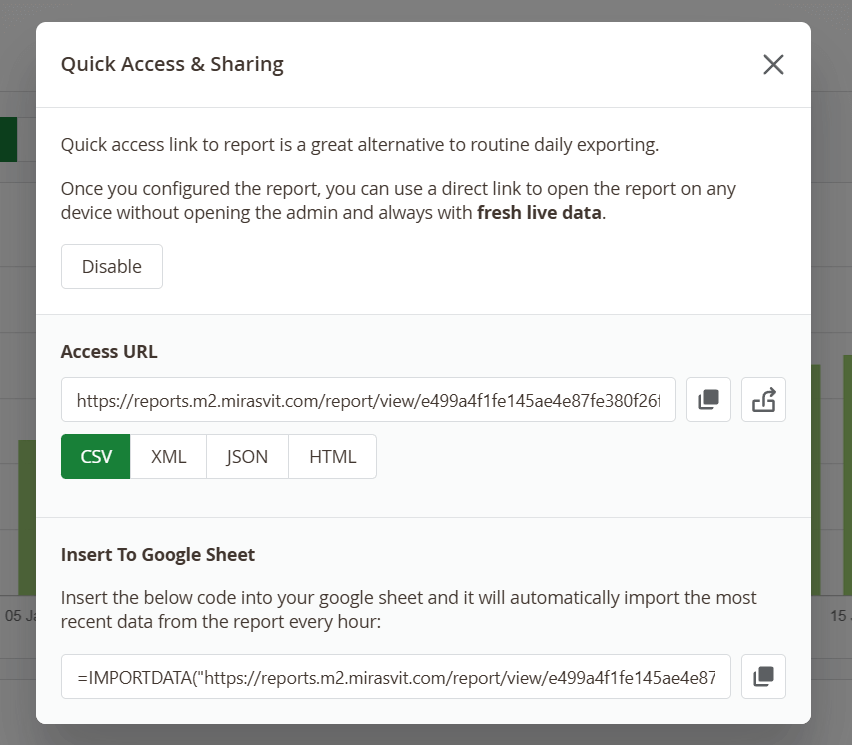
Once the report is configured, click the Share button to open the configuration popup for Quick Access and Sharing. Ensure that you have saved the report, as the extension generates reports, accessible by quick links, based on the stored report's settings (state).
Choose the desired report format and either copy the link or visit it using the appropriate buttons.
Alternatively, you can copy and insert the ready-to-use code into Google Sheets. Simply copy the IMPORTDATA link provided by the Advanced Reports extension within the report and paste it into a new Google Sheets spreadsheet. Reports inserted to Google Sheets through the IMPORTDATA function will be automatically updated every hour.
On the shared page itself, the report's name is a link back to that report in the admin panel. It is there for colleagues who have an admin login of their own: following it opens the live report, ready to filter, adjust or export. Anyone who is not signed in to the admin is taken to the login page instead, and the link respects your User Permissions — it opens only for administrators who are allowed to see that report.
Because that link points at your admin panel, its address appears on the shared page. If you would rather it did not, turn sharing off for that report — which removes the page and the link together.
If any adjustments need to be made to the report after sharing the direct link, simply modify and save it. The link to the report will remain the same, ensuring that anyone with access to the link will receive the updated report.
To prevent unexpected changes to reports, control who can edit and share reports by utilizing the User Permissions settings.