How to restrict access to a specific report
The Advanced Reports extension provides the ability to configure Access Restrictions for admin users using Magento ACL.
Access to each report created in the extension can be restricted separately, even for custom reports.
You can also define who will be able to edit and share reports as well as restrict access to Config Builder to avoid unexpected reports behavior due to changes in custom configs.
All that can be adjusted in System -> Permissions -> User Roles under the Role Resources tab.
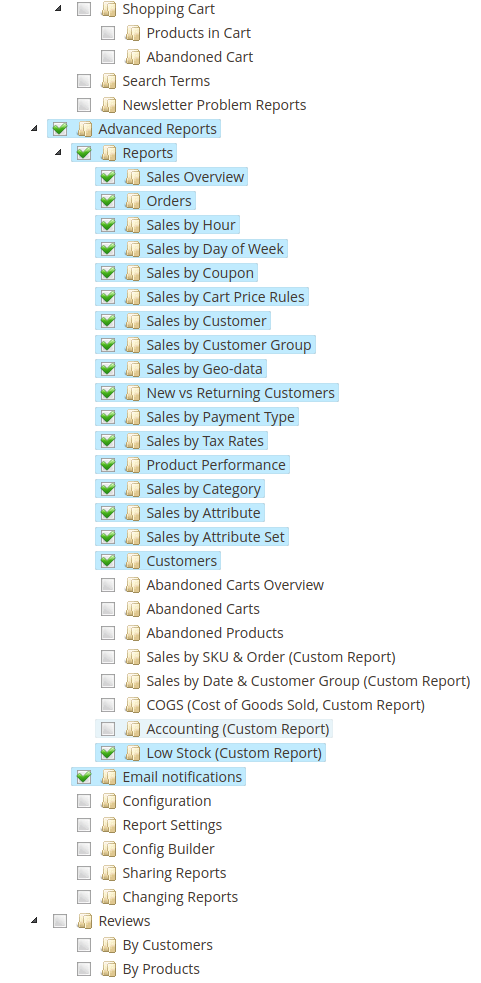
Under Advanced Reports, access can be restricted separately for:
- Reports: viewing reports.
- Shared Reports: managing reports shared by other admin users.
- Config Builder: access to the Config Builder tool.
- Sharing Reports: sharing a report with other users.
- Changing Reports: editing and saving reports via the Report builder.
- Email notifications: access to the Email Notifications section.
- Configuration: access to the extension's Stores -> Configuration -> Advanced Reports general settings.
- Import/Export reports settings: access to the Import/Export reports settings section.
- Report Settings: saving per-report column display preferences (e.g., column visibility and order set via the report's column chooser).
The Advanced Dashboard has its own, separate resource in the same Role Resources tab, so access to it can be granted or revoked independently of the resources above.