Inventory
This page shows current on-hand and salable quantities by source (warehouse/store). Use it to track availability, spot stockouts or overstock, and plan replenishment.
Inventory list
Navigate to Stores -> Inventory Planner -> Inventory to access to view the full list.
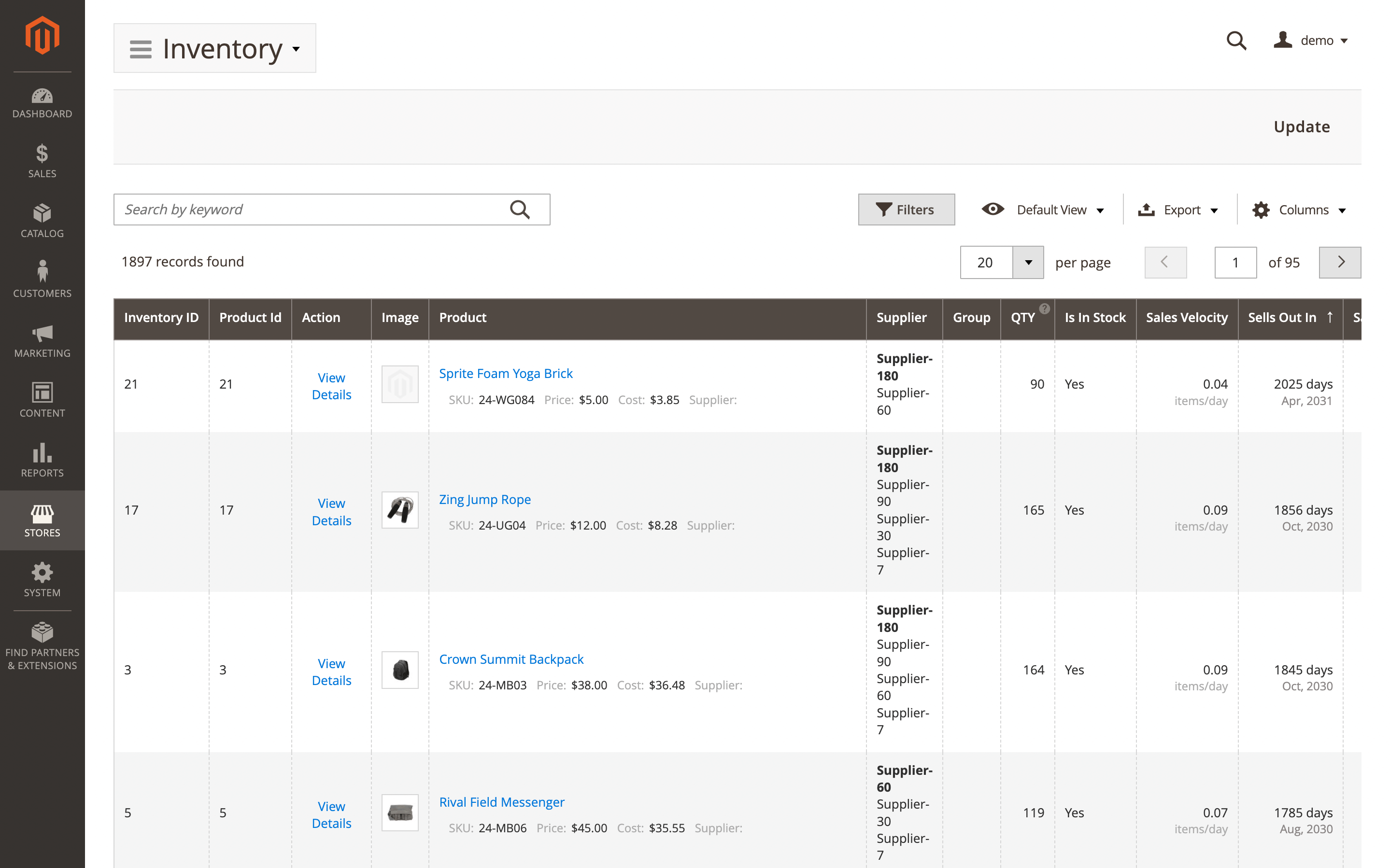
Here, you'll find two groups of fields: default product attributes and attributes added by the extension.
- Product ID: internal numeric identifier for the product.
- Product: product name and SKU.
- Image: product thumbnail.
- Other default product attributes that can be managed via the Columns dropdown (e.g., SKU, price, status).
- Inventory ID: unique identifier of the inventory record.
- Action: quick actions (view, edit, etc.).
- Supplier: primary vendor for this product.
- Group: planning or merchandising group/tag used for reporting.
- Qty: actual on-hand quantity across all stocks/sources.
- Is in stock: stock status.
- Yes: product is available for sale.
- No: product is not available for sale.
- Sales velocity: average units sold per day.
- Sells out in: projected days until stockout at current sales velocity.
- Saleable qty: quantity available to sell after reservations.
- Stock value: current inventory value for this product, calculated as on-hand quantity multiplied by unit cost. Blank when the product has no cost set.
- Replenishment qty: suggested order quantity to meet targets.
- Replenishment in: estimated days until replenishment is required.
- Overstock quantity: units above the overstock threshold.
- Last sold at: date/time of the most recent sale.
- 7 days sales: units sold in the last 7 days.
- 30 days sales: units sold in the last 30 days.
- 90 days sales: units sold in the last 90 days.
- Total sales: cumulative units sold to date.
- Lead time: average supplier lead time in days.
- Quantity at each warehouse: on-hand quantity broken down by source/warehouse.
- Saleable qty at each warehouse: sellable quantity by source/warehouse.
- Days of stock: estimated days the current stock will last at the current sales velocity.
The Total Stock Value (filtered): figure below the grid shows the sum of stock values across all products matching the current filter, across all pages. It updates automatically when filters or search terms are applied.
Use the Update button (top-right) to refresh all data immediately.
Inventory item details
Use the View details option in the Action column to view details of a specific record. Next data will be available.
Overview
Show the summary snapshot of product key stock metrics.
- Product information: core identifiers and product state.
- Sku: unique product code (stock keeping unit).
- Name: title displayed on the storefront and in admin.
- Type: product kind (simple, configurable, bundle, etc.).
- Status: catalog state (enabled/disabled).
- Inventory status: overview of on-hand, salable quantity, and stock state.
- Qty: on-hand units across all sources.
- Saleable qty: units available to sell after reservations.
- Status: in/out of stock indicator.
- Sales analytics: recent sales, pace, and depletion estimates.
- Last 7 days sales: units sold in the past 7 days.
- Last 30 days sales: units sold in the past 30 days.
- Last 90 days sales: units sold in the past 90 days.
- Average daily sales: average units sold per day.
- Estimated days until out of stock: projected days until inventory reaches zero.
- Sales velocity: current sales rate (units per day).
Orders
Lists customer orders containing this product. The table includes:
- Order #: unique order identifier.
- Date: order creation date.
- Qty ordered: total units ordered.
- Order status: current fulfillment/payment state.
Invoices
Shows billed items and amounts for completed or partially completed orders, useful for revenue tracking vs stock movement. The table includes:
- Invoice #: unique invoice identifier.
- Order #: related order identifier.
- Date: invoice creation date.
- Qty invoiced: total units billed on this invoice.
- Order status: current status of the linked order.
Shipments
Displays items shipped to customers, reflecting inventory decreases and delivery status. The table includes:
- Shipment #: unique shipment identifier.
- Order #: related order identifier.
- Date: shipment creation date.
- Qty shipped: total units dispatched in this shipment.
- Order status: current status of the linked order.
Credit memos
Records returns and refunds that may add items back to stock or adjust financials. The table includes:
- Credit memo: unique credit memo identifier.
- Order: related order identifier.
- Date: credit memo creation date.
- Qty refunded: total units refunded on this credit memo.
- Order status: current status of the linked order.
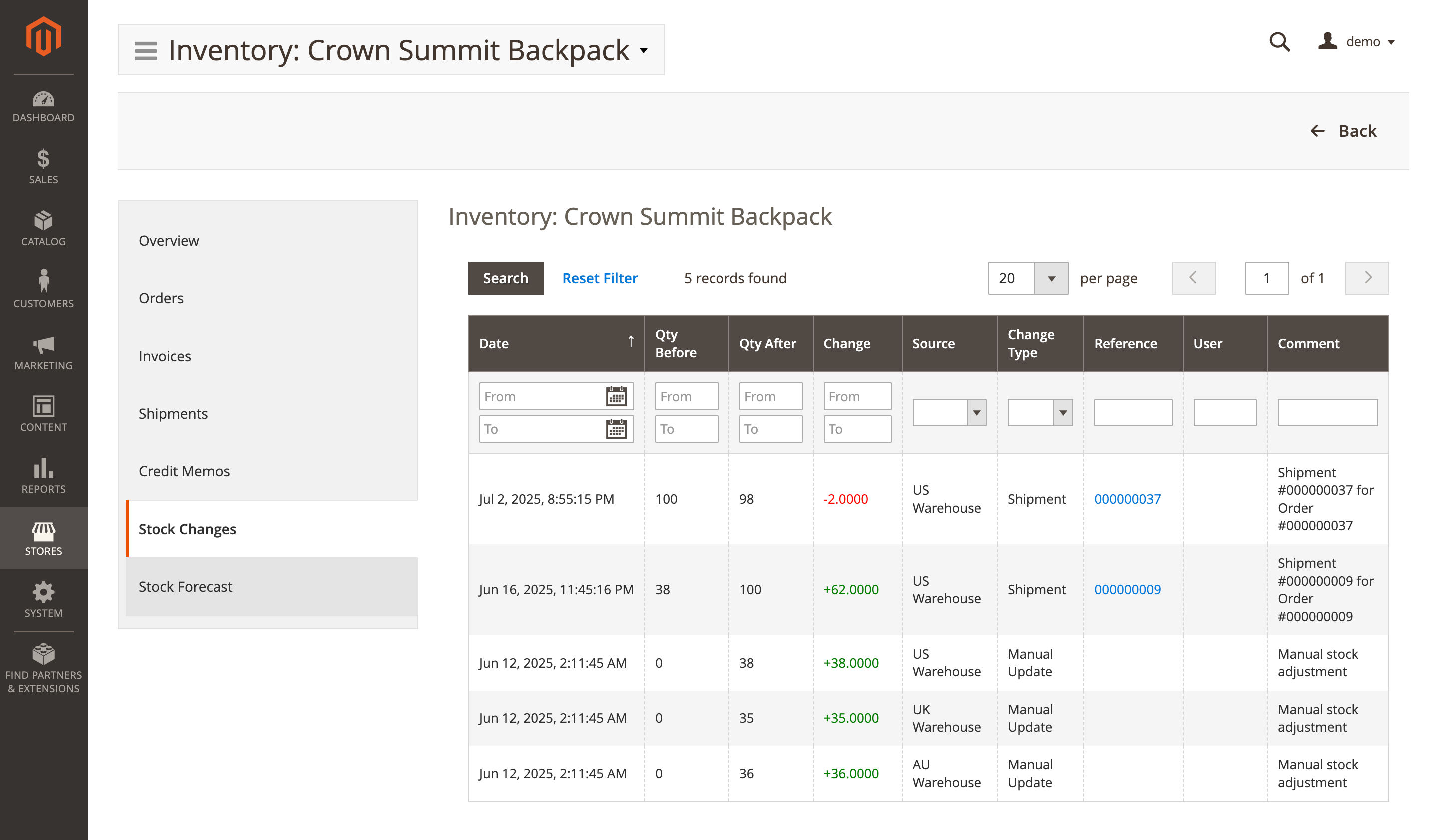
Stock changes
Audit trail of stock changes - orders, invoices, shipments, credit memos, imports and manual updates - with who/when/what changed. The table includes:
- Date: timestamp of the adjustment.
- Qty before: on-hand quantity before the change.
- Qty after: on-hand quantity after the change.
- Change: delta between after and before quantities.
- Source: warehouse/source affected.
- Change type: reason or operation (shipment, manual update, etc.).
- Reference: related document (order, shipment, etc.).
- User: user who made the change.
- Comment: optional note explaining the adjustment.
Stock forecast
Projected demand for the next 12 weeks, the week the product runs out, and recommended replenishment based on sales history and lead time. Next data available:
- Recommended reorder date: suggested date to place the next purchase order.
- Recommended order quantity: suggested number of units to order.
- Period: forecast window used for projections.
- Projected sales: expected units to be sold during the period.
- Remaining stock: on-hand units expected at period end.
- Status: readiness indicator.