Prompts
Prompts are reusable message templates that AI clients can discover and invoke. When a user selects a prompt, the MCP server returns a pre-built message that the AI uses as context for the conversation. Prompts are part of the MCP specification and appear as slash commands in compatible AI clients.
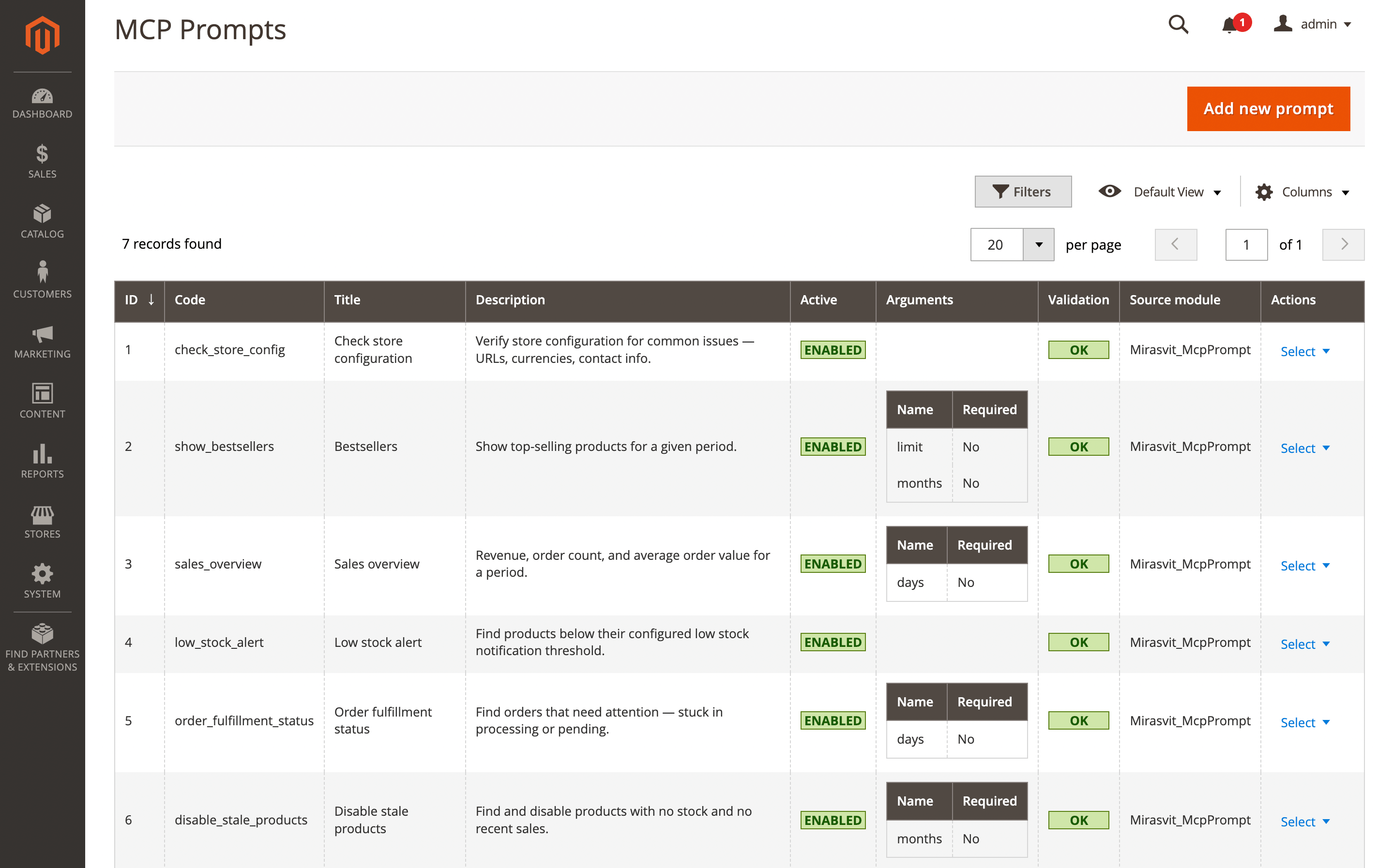
Most AI clients use the format /<mcp_server_name>:<prompt_code> for MCP-served prompts. For example, if your MCP server is named magento, the bestsellers prompt would be invoked as /magento:show_bestsellers. To see all prompts provided by your MCP server, type / followed by the server name (e.g. /magento) — the autocomplete will list all available prompts from that server. You can also type part of the prompt code (e.g. /show) and the client will match it automatically.
The Prompts grid is available at System → AI Agent Connector → Prompts.
Pre-defined vs custom prompts
The extension ships with several pre-defined prompts for common Magento tasks:
| Prompt | Description | Required tools |
|---|---|---|
| check_store_config | Verify store configuration — URLs, currencies, contact info | Store Info, Database Reader |
| show_bestsellers | Top-selling products for a given period | Database Reader |
| sales_overview | Revenue, order count, and average order value | Database Reader |
| low_stock_alert | Products below their configured low stock threshold | Database Reader |
| order_fulfillment_status | Orders stuck in processing or pending | Database Reader |
| disable_stale_products | Find and disable products with no stock and no recent sales | Database Reader, REST API |
| fix_missing_url_rewrites | Find products without URL rewrites and regenerate them | Database Reader, REST API |
Pre-defined prompts are read-only. You cannot edit their content, arguments, or dependencies. You can only toggle them active/inactive. To customize a pre-defined prompt, use the Duplicate action — this creates an editable copy.
Custom prompts are fully editable. You can create them from the admin panel or through the REST API.
Pre-defined prompts are updated automatically when you run bin/magento setup:upgrade. If a pre-defined prompt is removed from a future version, it will be deleted from the database during upgrade.
Prompt form
Click Add new prompt on the Prompts grid (or open an existing row) to open the form. Available from System → AI Agent Connector → Prompts.
The form header provides four buttons: Save, Back (cancel), Delete (custom prompts only), and Duplicate — the latter creates an editable copy of any prompt, which is the only way to customize a pre-defined prompt.
A validation banner may appear at the top with warnings about the prompt — see Prompt validation.
Fields are grouped into four collapsible fieldsets, all expanded by default.
General
- Title: display name shown in the admin grid, in the client's prompt picker, and in the chat after a prompt is invoked. Required. Not used as an identifier — rename freely.
- Code: unique identifier that clients use to invoke the prompt. This is the string after
/in the slash-command autocomplete (e.g./bestsellersmatches the prompt whose code isbestsellers). Required, must be unique. Use lowercase and underscores — avoid spaces and punctuation. Changing the code on an existing prompt breaks any saved references. - Active (Yes/No): enables or disables the prompt. Disabled prompts are hidden from clients — they don't appear in
prompts/list, slash autocomplete, or the Copilot welcome-screen selector. For pre-defined prompts this is the only editable field.
Content
- Description: short summary shown in the client's prompt picker and autocomplete. One or two sentences. Helps users pick the right prompt before invoking it.
- Content: the prompt template — the actual text sent to the AI at invocation time. Use
{{argument_name}}to reference arguments declared below; placeholders are substituted with the user-provided values and unfilled optional placeholders are removed from the final text. Be specific — include table names, column names, filter conditions, API endpoints, and the expected output format. Required. See Create effective prompts for patterns.
Arguments
Arguments are optional parameters exposed to the client so users can parameterize a prompt — a number of days, a SKU, a category ID, and so on. Stored as a sortable list of rows; drag the handle on the left to reorder.
Required arguments must appear before optional ones. The system automatically reorders them on save, moving required rows to the top while preserving relative order within each group. This matters because many clients pass user input positionally.
Each row has three fields:
- Name: the placeholder name used inside the Content template. If the name is
limit, then{{limit}}in the content is replaced with the user-provided value. Required. Use single-word, lowercase, underscore-separated names. Must match the placeholders in Content exactly — mismatches trigger a validation warning. - Description: explains the argument's purpose and accepted values. Visible to both the user and the AI client. Include the default value inline, e.g.
"Number of days to look back (default 7)". - Required (Yes/No): whether the argument must be filled for the prompt to be invoked. Default No. Keep as few arguments required as possible — prefer optional arguments with clear defaults stated in the Content.
Some MCP clients split user input by spaces and map tokens positionally to declared arguments. Multi-word values like "last month" may be truncated to "last". Design arguments to accept single-word values — numbers, codes, or short identifiers. If a prompt declares any arguments, some clients require the user to provide at least one value before invoking the prompt, even when all arguments are optional.
Dependencies
-
Required tools: multi-select listing the MCP tools the prompt needs to run. If the authenticated user's role lacks access to any listed tool, the prompt is hidden entirely — no slash autocomplete, no welcome-screen card, no entry in
prompts/list. Common selections:- Database-only prompts —
System / Database Reader - Read-then-write prompts —
System / Database Reader+System / REST API - Config-aware prompts —
System / Store Info+System / Database Reader
Leave empty only for prompts that need no tools (e.g. a pure writing-style prompt).
- Database-only prompts —
-
Source module: module that provides this prompt. Used for cleanup — if the named module is uninstalled or disabled, the prompt is automatically hidden from
prompts/list. Set automatically for pre-defined prompts duringsetup:upgrade; leave empty for custom prompts unless you want to tie the prompt to a module's lifecycle.
Prompt validation
The extension validates prompts automatically:
- Unused arguments — An argument is declared but its
{{placeholder}}is not found in the content. - Undeclared placeholders — A
{{placeholder}}appears in the content but no matching argument is declared.
Validation results appear in the Validation column of the Prompts grid ("OK" or "Needs attention") and as warning messages on the prompt edit page.
Tool-dependent filtering
Prompts can declare required tools in the Required tools field. When the MCP server builds the prompts/list response, it checks whether the authenticated user has access to all listed tools. If any tool is inaccessible (due to role permissions or OAuth scopes), the prompt is excluded from the list.
This ensures users only see prompts they can actually use.
Module-aware filtering
Each pre-defined prompt records which Magento module provides it. If that module is disabled, the prompt is automatically hidden from prompts/list — even if it still exists in the database.
REST API
Prompts can be managed through the Magento REST API. All endpoints require admin authentication and the Mirasvit_McpPrompt::prompts ACL resource (or prompts_edit / prompts_delete for write operations).
| Method | Endpoint | Description | ACL |
|---|---|---|---|
| GET | /V1/mcp/prompts | List all prompts | prompts |
| GET | /V1/mcp/prompts/:id | Get prompt by ID | prompts |
| POST | /V1/mcp/prompts | Create a custom prompt | prompts_edit |
| PUT | /V1/mcp/prompts/:id | Update a prompt | prompts_edit |
| DELETE | /V1/mcp/prompts/:id | Delete a custom prompt | prompts_delete |
Create request body:
{
    "title": "My Prompt",
    "content": "Show top {{limit}} products",
    "description": "Custom report",
    "arguments": "[{\"name\":\"limit\",\"description\":\"Number of products\",\"required\":false}]",
    "requiredTools": "builtin_system_dbreader",
    "isActive": true
}
The code is auto-generated from the title with a unique suffix if needed.
Update for pre-defined prompts only allows changing isActive. All other fields are ignored.
Delete is blocked for pre-defined prompts.
Adding prompts from custom modules
Any Magento module can ship pre-defined prompts by placing a prompts.yaml file at etc/mcp/prompts.yaml. The extension discovers these files from all installed modules during setup:upgrade.
Example etc/mcp/prompts.yaml:
- code: my_custom_report
  title: Custom report
  description: Generate a custom sales report.
  content: |
    Generate a sales report.
    Query the sales_order table for orders in the last {{months}} months.
    Include order count, total revenue, and average order value.
  arguments:
    - name: months
      description: "Number of months (default 3)"
      required: false
  required_tools: builtin_system_dbreader
  is_active: true
The module field is set automatically from the module name — do not include it in the YAML.
When a module is uninstalled and setup:upgrade is run, any prompts from that module are automatically removed from the database.