
Magento MCP Server: AI Agent Connector for Magento 2
The Magento MCP server gives AI assistants access to your real Magento store data, so your team can ask questions and complete tasks without switching between admin grids and exports. It works with Magento 2 and Adobe Commerce and connects to ChatGPT, Claude, Gemini, or any other MCP-compatible AI client.
- Works with ChatGPT, Claude, Gemini, Copilot Studio, and other MCP clients
- Ask questions and run tasks in plain English, no code needed
- Reaches the REST API of every installed extension
- Bulk edits in one prompt instead of grids and mass actions
- Read-only access through admin role permissions
- Used on 200+ stores, including ours
The Challenge with Store Management
Lacking the Full Picture
Jumping between admin screens, grids, and reports to piece together what's happening in your store.
Hours of Manual Work
Exporting data to spreadsheets, filtering reports, and copying information between screens.
AI Without Context
General-purpose AI assistants can't see your store data, so their advice stays generic.
AI Agent Connector is a Magento 2 MCP server. MCP (Model Context Protocol) is the open standard AI assistants use to connect to other software, and this extension links the AI assistants your team already uses (ChatGPT, Claude, Gemini) directly to your Magento store, so you can ask questions and run tasks in plain English on your real products, orders, customers and inventory.
Sign in with your Magento admin account (OAuth 2.1). No API keys to copy.
AI Agent Connector in Plain Terms
What it does
Your team asks Claude, ChatGPT or another AI assistant about the store, and the assistant answers from live Magento data instead of guessing. It can also make the changes you ask for, within the permissions you give it.
What you need
Magento Open Source or Adobe Commerce 2.4, plus a paid plan of the AI client your team uses (for example Claude Pro or ChatGPT Plus). We can install the extension for you for free.
What it can touch
Only what the admin role allows. You can give the assistant a read-only role, limit the database tables it sees and restrict which IP addresses can connect. Details are in Control What the AI Can Change.
Who uses it
200+ Magento stores, and our own team at Mirasvit uses it across the company to run mirasvit.com. Typical tasks: sales analytics, finding an order from a partial name or email, investigating payment issues, and drafting replies to support tickets.
How It Works: From Question to Confirmed Change
You Ask
Send a request to your AI assistant (ChatGPT, Claude, Gemini or any other MCP client) the way you'd ask a colleague.
Reduce prices by 15% for all Summer products that haven't sold in 30 days
AI Analyzes
The AI breaks down your request and queries your Magento store directly. It searches products, checks order history, and filters data.
GET /V1/products
SQL query
You Review
The AI shows what it found before it changes anything. Every tool is marked as read-only or write, so Claude, ChatGPT and other clients ask you to confirm before a write. The admin role decides what the AI can change at all.
Found 23 products matching your criteria:

Beach Towel  -  $29.99  -  0 sold
Flip Flops  -  $24.99  -  0 sold
Tropical Swim Shorts  -  $45.00  -  0 sold
... and 20 more
AI Executes
Once you confirm, the AI performs the update and reports the results. One prompt replaces a grid filter, a mass action, and an export.
✓ Updated 23 products. Average discount: $12.50. Total savings for customers: $287.50
The extension is pretty awesome. I've been using it intensely these last few days, and now I wonder how I did without it. I'm using Claude daily to manage my site via the connector.
Jiten Poria, Leicester, England, United Kingdom
AI Agent Use Cases for Magento Store Management
Click any prompt to see how the AI responds with real store data.
Complete Store Management Through AI
Product Management
Create, update, and remove products with all their attributes, change prices and descriptions, search by any field, and edit products in bulk. Works with simple, configurable, and bundle products. Add a product photo through your assistant from a URL, or send it from your phone or computer with an upload link (how it works).
Order Management
Check order details, update statuses, find an order by customer, date range, or a partial name or email, and get a summary of pending or problem orders. Create shipments from the chat.
Inventory Control
Update quantities for one product or many, check availability across sources, and find items that need reordering. Set thresholds and see stock status across your whole catalog.
Content
Update product descriptions, edit CMS pages and blocks, and refine meta titles and descriptions for SEO. Blog posts work too if your blog extension has a REST API. Content changes across hundreds of products take one request.
Reports & Analytics
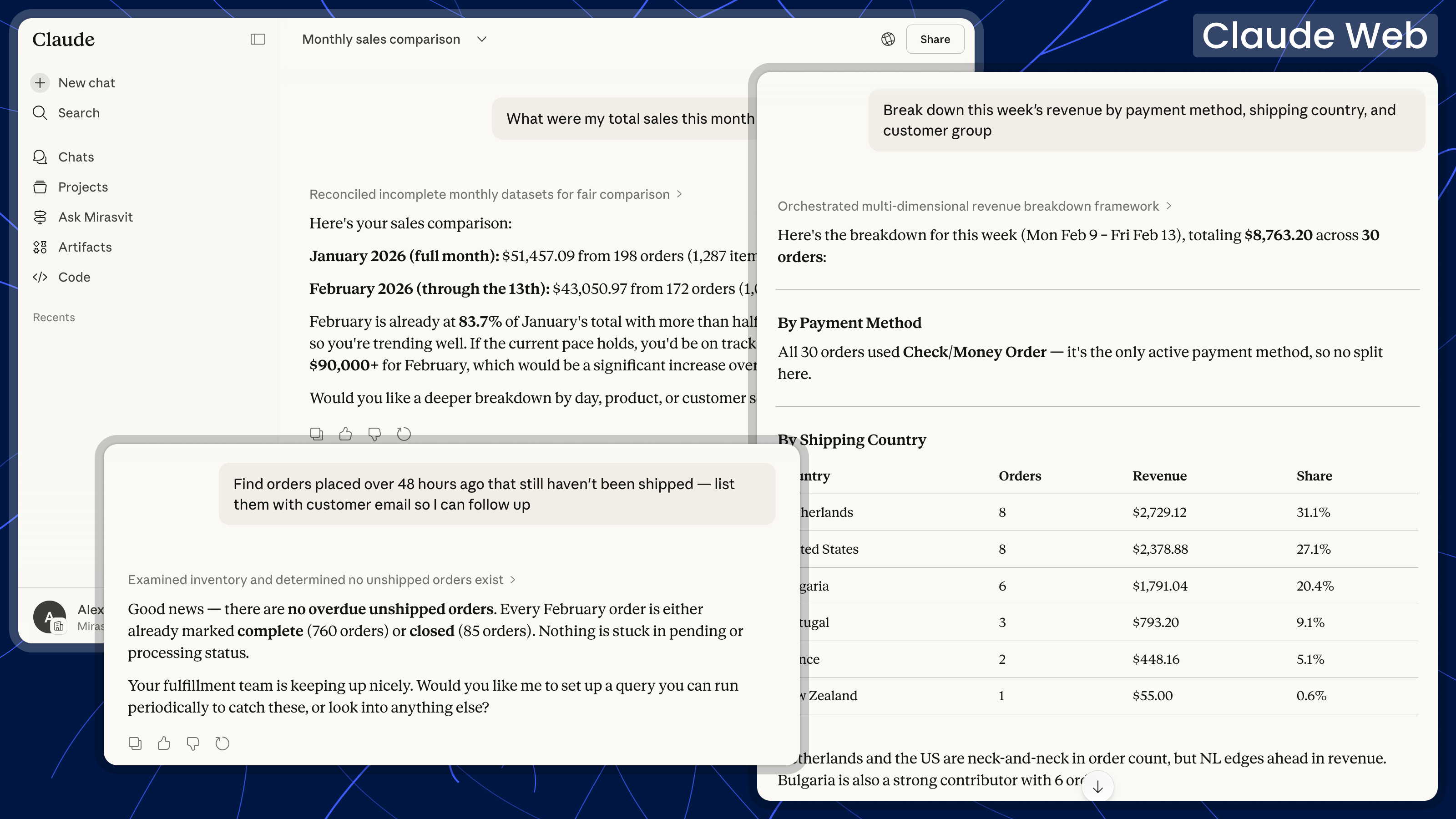
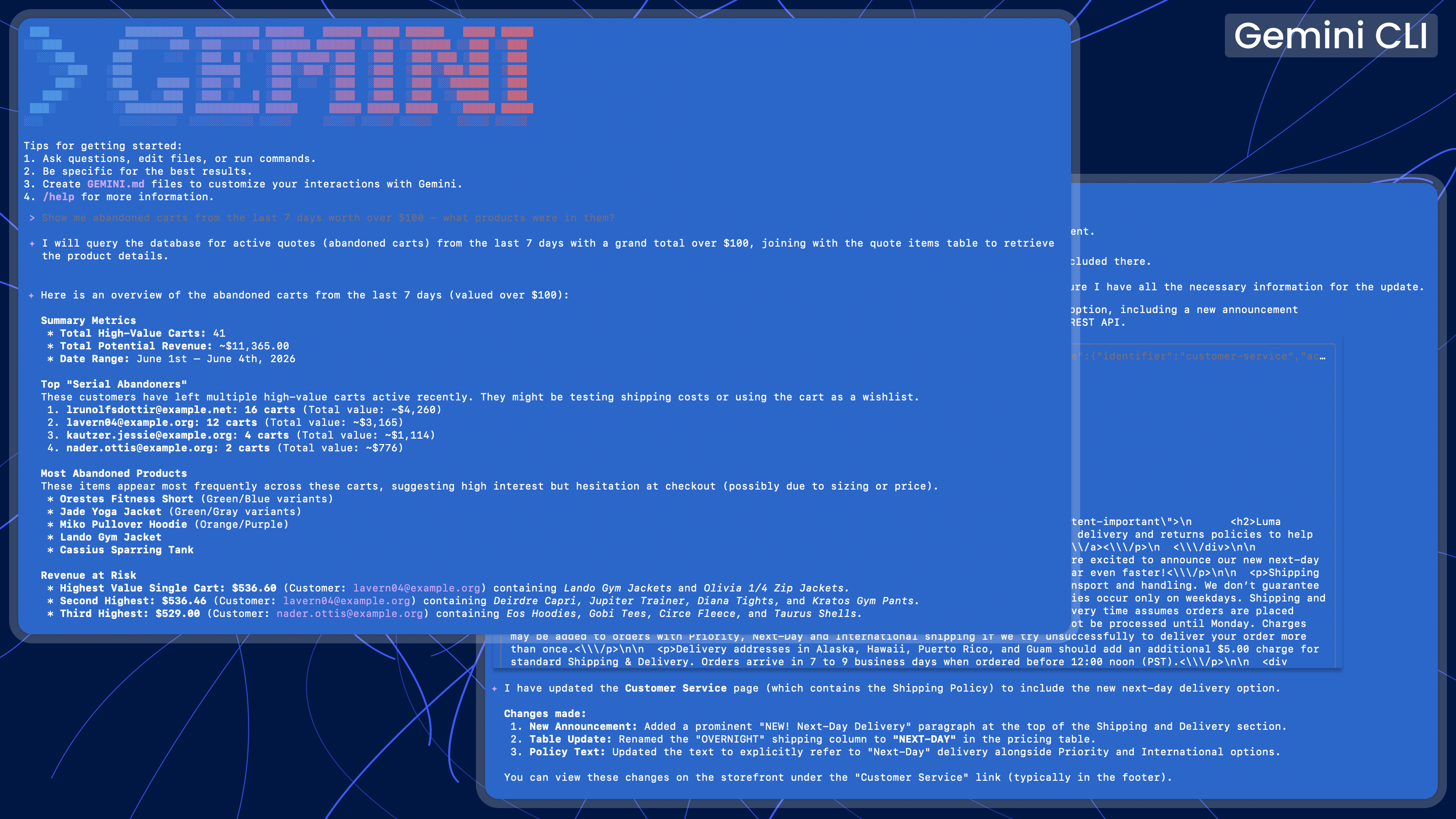
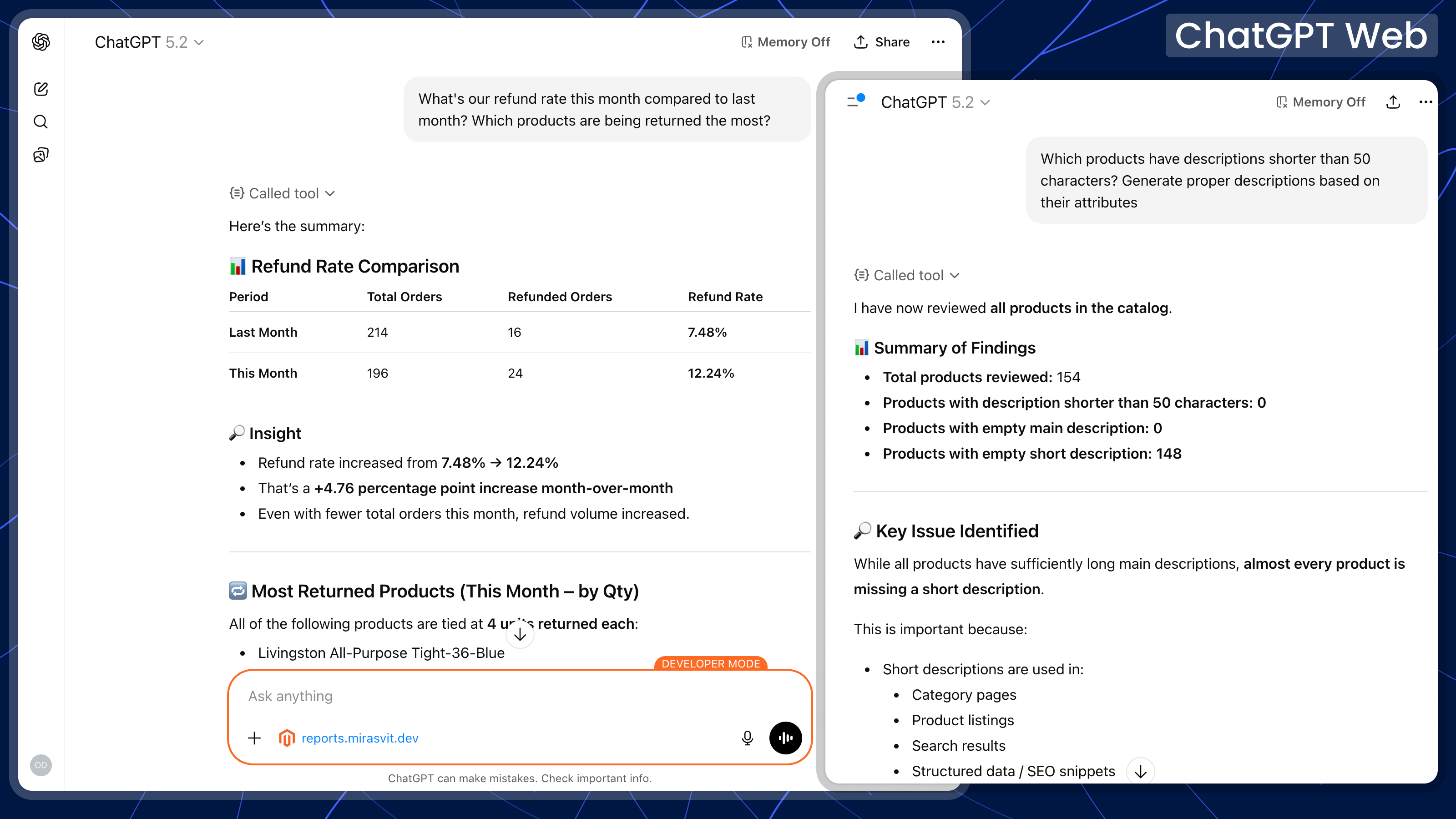
Ask about sales for any date range, best-selling products, revenue trends, and customer metrics, and compare periods. The answer comes back in the chat as a table you can copy, with no report to build first.
Store Configuration
Check configuration values, see which modules are enabled, and find out how a feature is set up without hunting through admin menus. Configuration is read-only: the AI reports values, it doesn't change them.
For Every Role
Everyone on your team can work with store data without learning the admin interface or writing queries.
- Store Owner/Manager: Get answers to business questions (daily revenue, top products, order counts) without waiting for reports.
- Developer: Query store data while coding, read the exception log, check cron health, and refresh caches and indexers without opening the admin panel.
- Marketing Team: Check campaign performance, find products for promotions, and update descriptions without learning the admin panel.
- Support Team: Find an order from a partial name or email, check shipment status, investigate payment issues, and draft replies to tickets.
- Operations: Monitor stock levels, find low-inventory items, and update quantities without manual checks.
AI Agent Connector vs the Traditional Admin
How a request to your AI assistant compares to the usual admin panel workflow:
| Task | With AI | Traditional Admin |
|---|---|---|
| Workflow | Describe what you want in plain English | Learn the admin layout, click through screens, fill forms |
| Data Access | Ask for exactly what you need: "orders over $500 today" | Build reports manually with filters and exports |
| Bulk Operations | Describe the change: "reduce prices 20% for category X" | Select items one by one or use mass actions with limited options |
| Effort | One request instead of several screens and exports | Multiple page loads and screen transitions |
| Context | Follow-up questions work naturally | Start over for each new query |
What Is MCP? How the Magento 2 & Adobe Commerce MCP Server Works
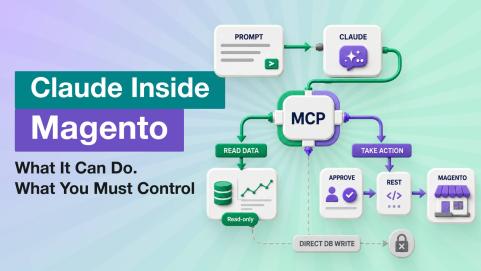
This part is for whoever will set it up. AI Agent Connector is built on the Model Context Protocol (MCP), the open standard that lets AI assistants talk to business applications. The server runs inside your Magento and gives the assistant a set of tools, each one a separate permission in the admin role.
Available Tools
REST API of Any Installed Extension
Magento's REST API plus the endpoints of every installed extension, found automatically with no extra setup, within the role's permissions. Mirasvit Advanced Reports and Help Desk add built-in guides for the AI.
GraphQL API
Runs queries and mutations against your store's GraphQL API (Magento 2.4.4 or later).
Database Reader
Read-only SQL queries for data the APIs don't expose, with the tables each admin role can see set by you.
Media Upload
Uploads product and category images from a URL or through a short-lived upload link.
Store Diagnostics
Reads and searches Magento logs and error reports, checks cron health, and manages caches and indexers.
Store & Extension Info
Websites, store views, currencies, customer groups, the Magento version and edition, installed packages, outdated Mirasvit extensions, and Mirasvit manuals.
Ready-Made Prompts
Seven built-in prompts start common checks with one click in your AI client: sales overview, bestsellers, low stock, stuck orders, stale products, missing URL rewrites, and a configuration review. Your team can add its own prompts from the admin (how to create prompts).
Control What the AI Can Change
Before you give an AI assistant access to your store, here is what you control.
- Which tools the AI can use: each tool is a separate permission in the admin role. Nine tools only read data; five can change it (REST API, GraphQL, Media Upload, Cache, and Indexer).
- Read-only access: give the AI a role without those five tools. Reports, database queries, and diagnostics keep working (role setup).
- Database access: queries are read-only, and you choose which tables each role can see.
- Who can connect: the AI client signs in with a Magento admin account through OAuth 2.1 and a consent screen that lists the tools. You can also restrict access to allowed IP addresses. Personal access tokens for clients without OAuth support are off by default.
- Revoking access: see when each connection was last used, and revoke one token or all of them from the admin.
- Where your data goes: the server runs inside your Magento, with no Mirasvit proxy in between. Store data goes only to the AI provider you connect, under that provider's data policy.
- Change history: every write an AI agent makes, successful or failed, is recorded in the Change Journal with the time, admin user and role, tool, target, and result. Passwords and keys are masked, and the agent cannot read the journal. Request logging to a file is also available and off by default.
How to Connect Magento 2 (or Adobe Commerce) to Claude, ChatGPT, Gemini & Other MCP Clients
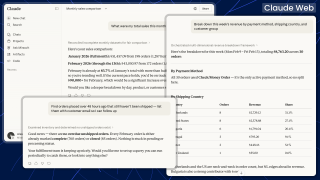
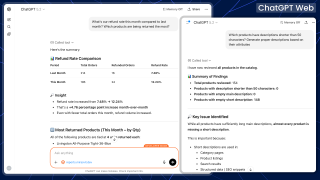
Install the extension with Composer (or let us install it for free), add your store's MCP server URL to the AI client, and sign in with your Magento admin account. It works with:
One AI Assistant, Every System: MCP Orchestration
The Magento MCP server gives your AI assistant a complete view of what's happening inside your store: products, orders, customers, inventory. That's a big part of the picture, but not the whole one. Your business also lives in Google Analytics, Search Console, Mixpanel, Notion, your helpdesk, your warehouse system.
Modern AI clients like Claude and ChatGPT can connect to several MCP servers at once. Plug in two or three, and your assistant can answer questions that no single tool could, because the data was always split across them.
Magento MCP + Google Analytics 4 MCP
"Which of our 10 best-selling products are losing organic traffic month over month?"
Magento MCP + Search Console MCP
"For pages that lost ranking last week, which ones generate orders, and what's the revenue at risk?"
Magento MCP + Mixpanel MCP
"Show me the funnel from product-page view to purchase for our 20 highest-margin SKUs."
Magento MCP + Notion MCP
"Draft a launch checklist in Notion based on what's missing in our new product's catalog data."
Each MCP server stays focused on its own domain: simple to install, easy to grant or revoke access, no shared credentials. The orchestration happens inside the AI client. The result is one conversation that joins data from every system you run, instead of switching between five admin panels and a spreadsheet.
Comparing MCP servers for Magento first? Our comparison of Magento 2 MCP servers puts the free open-source options and ours side by side: where the server runs, how agents sign in, what protects write operations, and where another option is the better fit.
Want shoppers' own AI assistants to find your products and build carts, rather than your team's agent to run the store? That is the job of our shopper-facing Agentic Commerce extension.
Give your AI assistant access to your Magento store
Book a 15-minute live demo or try the backend demo.
Prefer an agent that works inside the admin panel itself, with no client to connect and no AI plan per user? See AI Copilot for Magento 2.
For now, I’ve completely moved my analytics to chatgpt (Mirasvit also offers a Mixpanel integration). I also use it for stock management and my morning routine of checking new orders.
Save time by starting your support request online and we'll connect you to an expert.
What is the Model Context Protocol (MCP)?
MCP (Model Context Protocol) is an open standard that lets AI assistants connect securely to applications and data sources. Our Magento MCP server implements it and gives ChatGPT, Claude, Gemini, and other MCP clients tools for Magento's REST API, GraphQL, read-only database queries (including store configuration values), and store diagnostics.
How do I connect Magento 2 to Claude?
Install AI Agent Connector with a single Composer command, then add your store's MCP server URL to Claude on the web, Claude Desktop, or Claude Code and sign in with your Magento admin account (OAuth 2.1). Claude discovers the available tools automatically and starts working with your live store data. The same flow works for ChatGPT and any other MCP-compatible AI client.
How do I connect Claude Code to Magento?
Run claude mcp add --transport http magento https://your-store.com/mcp, then sign in with your Magento admin account when Claude Code opens the OAuth page. No API keys or integration tokens to copy. Step-by-step instructions are in the Claude Code guide.
Can I use ChatGPT with my Magento 2 store?
Yes. In ChatGPT, turn on developer mode and add the store as an app with its MCP server URL, then sign in with your Magento admin account. ChatGPT can then query products, orders, customers, and inventory from your real data. If you want shoppers to find and buy your products through ChatGPT instead, see Agentic Commerce for Magento 2.
Can I integrate Magento with Microsoft Copilot Studio?
Yes. Copilot Studio supports custom MCP connectors, so the Magento MCP server connects the same way as for Claude or ChatGPT. After installation and OAuth authorization, your Copilot agents can read and update Magento data with the standard tool set.
Is this an Adobe Commerce MCP server?
Yes. Magento Open Source and Adobe Commerce share the same codebase, so the server installs the same way on Open Source, Adobe Commerce on-premise, and Adobe Commerce on Cloud, version 2.4.x (the GraphQL tool needs 2.4.4 or later). Adobe's own MCP servers help developers build and run storefronts; this extension gives your team's AI assistant access to the live store's orders, catalog, and inventory.
Can I give the AI agent read-only access to my store?
Yes. Each tool is a separate permission in the admin role, and only five of them can change data (REST API, GraphQL, Media Upload, Cache, and Indexer). Give the AI a role without those five, and it can still run reports, database queries, and diagnostics but can't change anything. See how to configure role permissions.
Is the Magento MCP server secure?
The AI client signs in with a Magento admin account through OAuth 2.1, and the admin role decides which tools it can use, including which database tables it can read. You can restrict access to allowed IP addresses and revoke any token from the admin. There is no Mirasvit proxy: data goes only to the AI provider you connect. Every write the AI makes is recorded in the Change Journal, with the admin user, role, and result, and request logging to a file is also available.
How does AI Agent Connector compare to a traditional Magento admin extension?
A traditional admin extension adds new screens, grids, or buttons, and every task still goes through the admin. With AI Agent Connector, your team works in a chat with Claude, ChatGPT, or Gemini, and the AI calls the same REST API and GraphQL endpoints behind the scenes, so there's no new interface to learn.
How is this different from a standalone AI platform for Magento?
A standalone AI platform is a separate product with its own interface and workflows. AI Agent Connector takes a different approach: it connects your Magento store to the AI assistant your team already uses (Claude, ChatGPT, Gemini, Copilot Studio) through the open MCP protocol, so you keep working in a familiar client with live store data.
Why pay for an MCP extension when free ones exist?
You get an AI client that registers itself through OAuth 2.1 (no hand-made tokens), access to the REST API of every installed extension, ready-made setups for Claude, ChatGPT, Codex, Gemini, and Copilot Studio, and our support. With free installation, we install it, check that it works, and help you connect your first AI client. It runs on 200+ stores, including our own. If you only need read-only reports, a free module may be enough: our comparison of Magento 2 MCP servers shows where each option fits.
mirasvit/module-mcp-tool 1.1.18 or newer.mirasvit/module-mcp-tool 1.1.16 or newer.mirasvit:mcp:revoke command, the admin Revoke all and Disable actions and the automatic cleanup on admin user deletion all left the personal access token active - the command even reported that all tokens had been revoked - so a token you believed was cancelled would start working again as soon as MCP was re-enabled for that usermirasvit:mcp:revoke and the MCP token cleanup command ended in an error on 2.4.5 and 2.4.6, which ship an older console library than the commands expected/mcp/... addresses now return a clear JSON "not found" response instead of leaving the request hangingPKCEService::generateCodeVerifier() method, which had no callers and relied on a framework method absent from Magento 2.4.5. Generating a code verifier is the AI client's job; the server's side of PKCE is unchangedBlog
 Oleksandr Drok
 Andriy Kovalenko
We are committed to being open and transparent with our customers. When you purchase our module, you automatically receive one year of free support service and free updates.
Why is this important?
- Seamless Installation and Configuration: We understand that setting up a new module can take time to configure according to your specific needs. That’s why we offer a full year of free support. Our experienced team is here to assist you with installation, configuration, and any questions you might have. We're eager to share our expertise to ensure you get the most out of your purchase.
- Stay Updated with Magento (Adobe Commerce) Releases: Magento releases new versions approximately every three months. These updates can sometimes introduce compatibility challenges. To keep your store running smoothly, we provide a year of free access to the latest versions of our modules, ensuring that you can upgrade Magento and our modules without encountering any obstacles.
- Subscription Included: Renewing your subscription ensures continued access to the latest updates and support from our team. This means you can be confident that any issues you encounter with the extension will be resolved quickly and efficiently. You can cancel your subscription at any time without any additional fees.
These are our primary. A major portion of our new clients come from referrals from our existing clients. Our professional team of developers, marketers and support staff have invested the best knowledge and experience in the field into our work, so you know you can come back to us again and again.
One year free and high quality support. We go to great lengths to provide maximum satisfaction with every module you have purchased in our store. By helping you with installation, configuration, answering your every question, we do all our best to eliminate any possible problems.
30-days money back guarantee. If you are not satisfied with our Magento ChatGPT Integration performance for any reason, we provide a full refund.
We constantly add new features to all our modules, and are always interested in hearing your opinion and implementing your suggested features in our future developments.
We provide an expanded user guide for every aspect of our Claude Magento Integration, so you can find answers for all your burning questions.
You can customize MCP for Magento according to your needs and requirements.
The Module is easy to install and upgrade, just follow our step-by-step user guide. Additionally, the extension is ready to use with the Hyvä theme.
No core modifications. The AI Store Management has been tested in a Magento Cloud environment and is fully compatible with it.