
Magento 2 AI Agent: Copilot for the Admin Panel
Mirasvit Copilot is a Magento 2 AI agent embedded directly in the admin panel. Ask questions, pull data, and take action using natural language. No SQL, no code, and no AI subscription for each user: one provider key covers the whole store.
- 14 built-in tools: data, operations, diagnostics, and documentation.
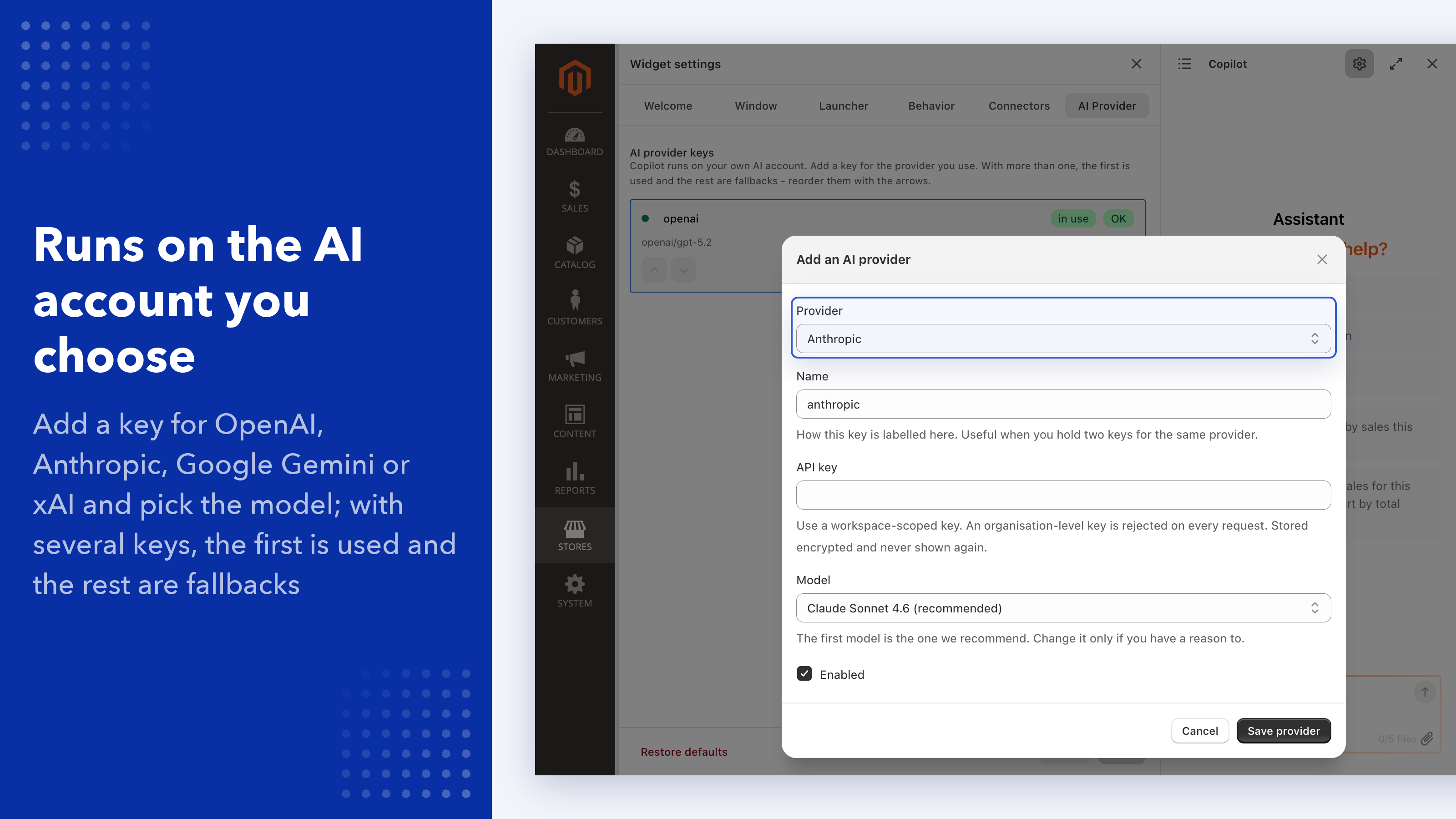
- One AI key per store: OpenAI, Anthropic, Gemini, or xAI, with fallback.
- Works on your admin page: reads, sorts, and filters it.
- Magento diagnostics: cron, indexers, caches, and error logs.
- Checkable answers: ask how any number was counted.
- Tool-level ACL: control which tools each admin role can use.
- Skills and prompts: ready-made playbooks you can extend.
- Knows your extensions: dedicated skills for installed Mirasvit modules.
Ask about yesterday's orders, let Copilot read the report you already have open, or have it check why a cron job stopped overnight.
Book a call to walk through it on your own store.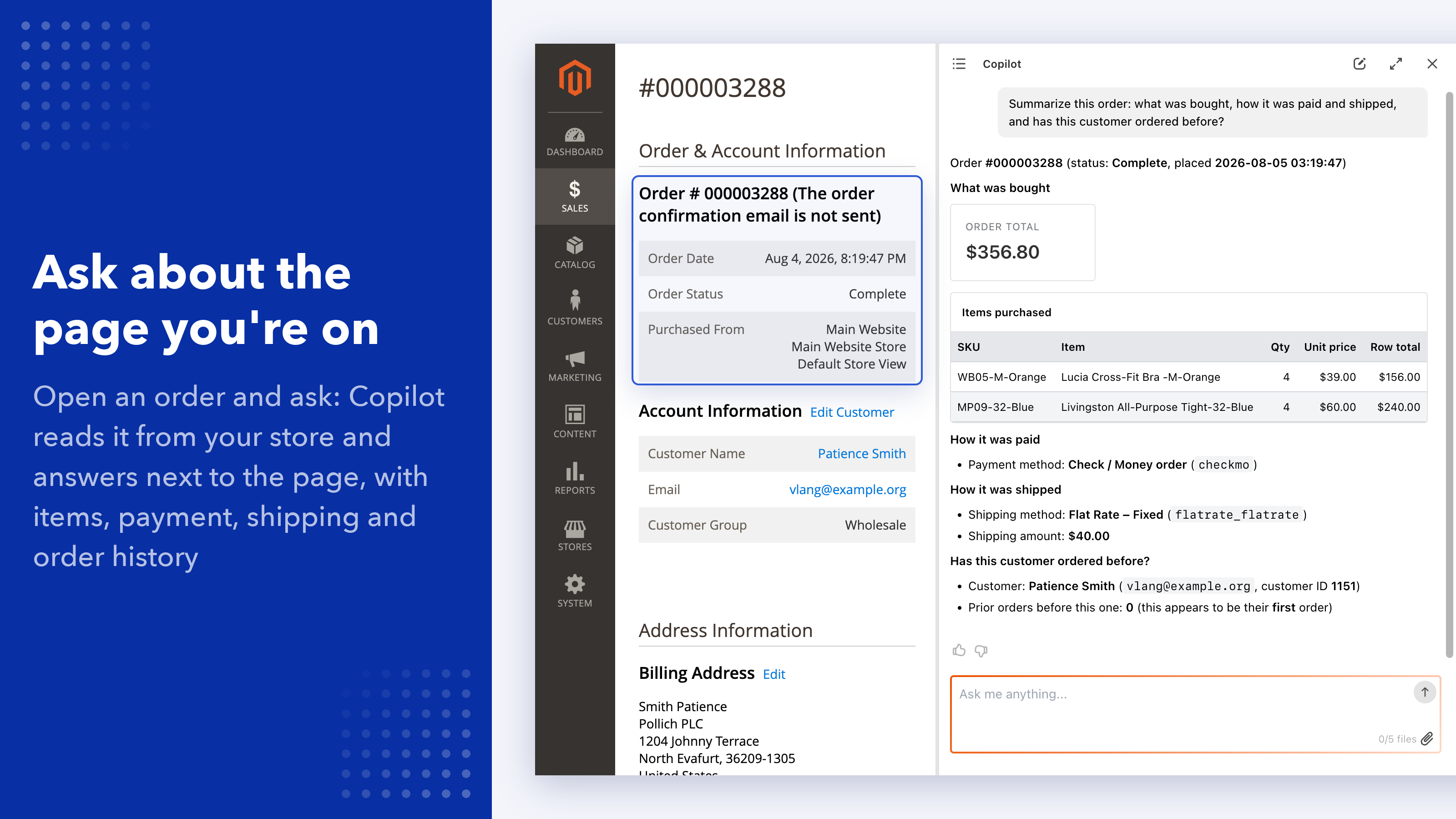
The Challenge with Running a Store from the Admin Panel
Answers Across Screens
A simple question about yesterday's orders or a missing invoice means opening grids, filters, and reports one by one.
Waiting for a Developer
A cron job that stopped or an indexer that fell behind usually sits in the queue until someone with server access looks at it.
AI That Cannot See Your Admin
A chat app on the side does not know which page you are on, which extensions you run, or what your role is allowed to do.
Copilot is an AI agent inside the Magento 2 admin panel. Your team asks in plain English, and Copilot answers from live store data, works with the page you have open, checks cron, indexers, and logs, and takes action within each admin's own permissions.
Activate it with one click: your Mirasvit license connects the store. One AI provider key covers the whole team.
Copilot in Plain Terms
What it does
Anyone on your team opens the chat in the admin panel and asks about the store. Copilot answers from live Magento data, reads the report or order on screen, and makes the changes you ask for, within that person's permissions.
What you need
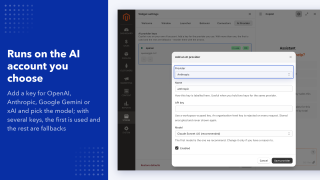
One API key from OpenAI, Anthropic, Google Gemini, or xAI covers the whole store, and a second one adds automatic fallback. Activation needs no key, and nobody on your team needs an AI client or a ChatGPT or Claude plan (how activation works).
What it can touch
Only what the signed-in admin's role allows. You choose the tools for each role, can set a role or the whole store to read-only, and every write lands in the Change Journal. Details are in Security and access control.
Who uses it
Installed on 200+ Magento stores and used every day by hundreds of admins, from analysts to content teams. Typical tasks: yesterday's numbers before a call, an order a customer is asking about, and why a cron job stopped overnight.
Copilot acts in your admin panel, not just on your database
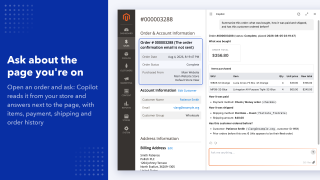
Most AI tools for Magento stop at reading data. Copilot also acts on the screen you are looking at. Ask about "this report" or "this order" and it reads the page in front of you: the grid you filtered, the form you opened, the numbers already there.
Acts on the page
Sorts, filters, and reads what is displayed on the screen. Working on the page saves nothing.
Takes you there
Ask for a product, order, customer, or report and Copilot opens the right screen instead of describing where to click.
Reads your files
Attach a CSV export, a PDF, or a screenshot, and Copilot works with it alongside your store data.
This is the line an external AI client cannot cross. A chat app connected to your store over an API has no session in your admin panel: it can query data, but it cannot see the report you are looking at or work with the grid you have open. Copilot sits in the same interface your team already works in.
What Can You Do With Copilot?
The same chat handles everything from a quick count to a multi-step operation, grouped below by complexity.
Instant Answers
One question, one number. No reports to open, no grids to filter.
How many orders yesterday?
What's today's total revenue?
Current stock level for SKU-123?
Filtered Selections
Find specific records by combining conditions, without building a grid filter or asking a developer.
Show orders without an invoice from the last week
Find products with inactive status not visible in the catalog
List orders still waiting for payment after 3 days
Analytics Without BI
Aggregations, comparisons, and breakdowns that usually require a BI tool or a custom report.
RFM snapshot by customer for the last 90 days
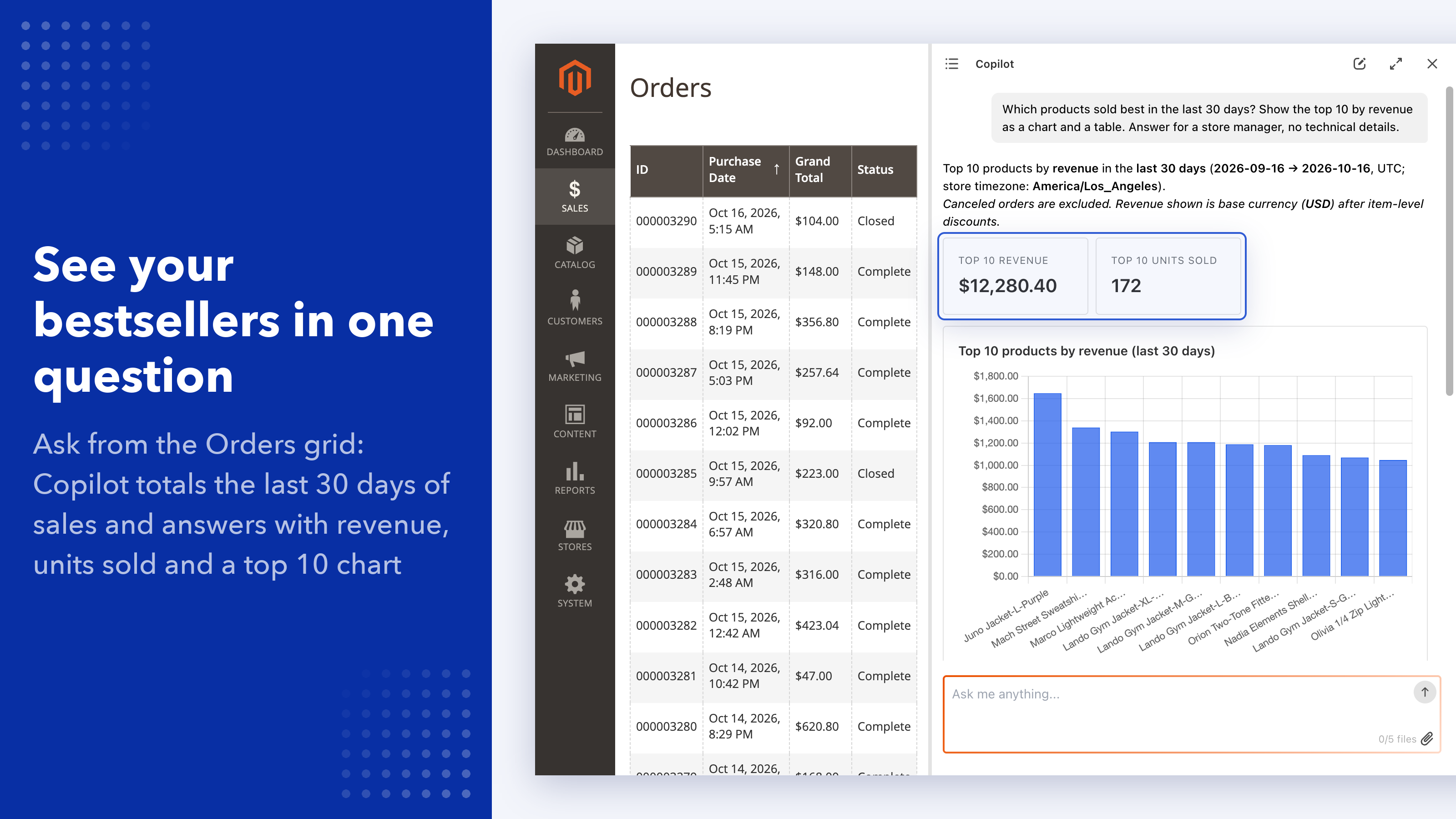
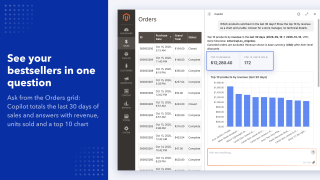
Top SKUs by revenue for the last 30 days
Queries with zero results over the last 30 days
Store Health Checks
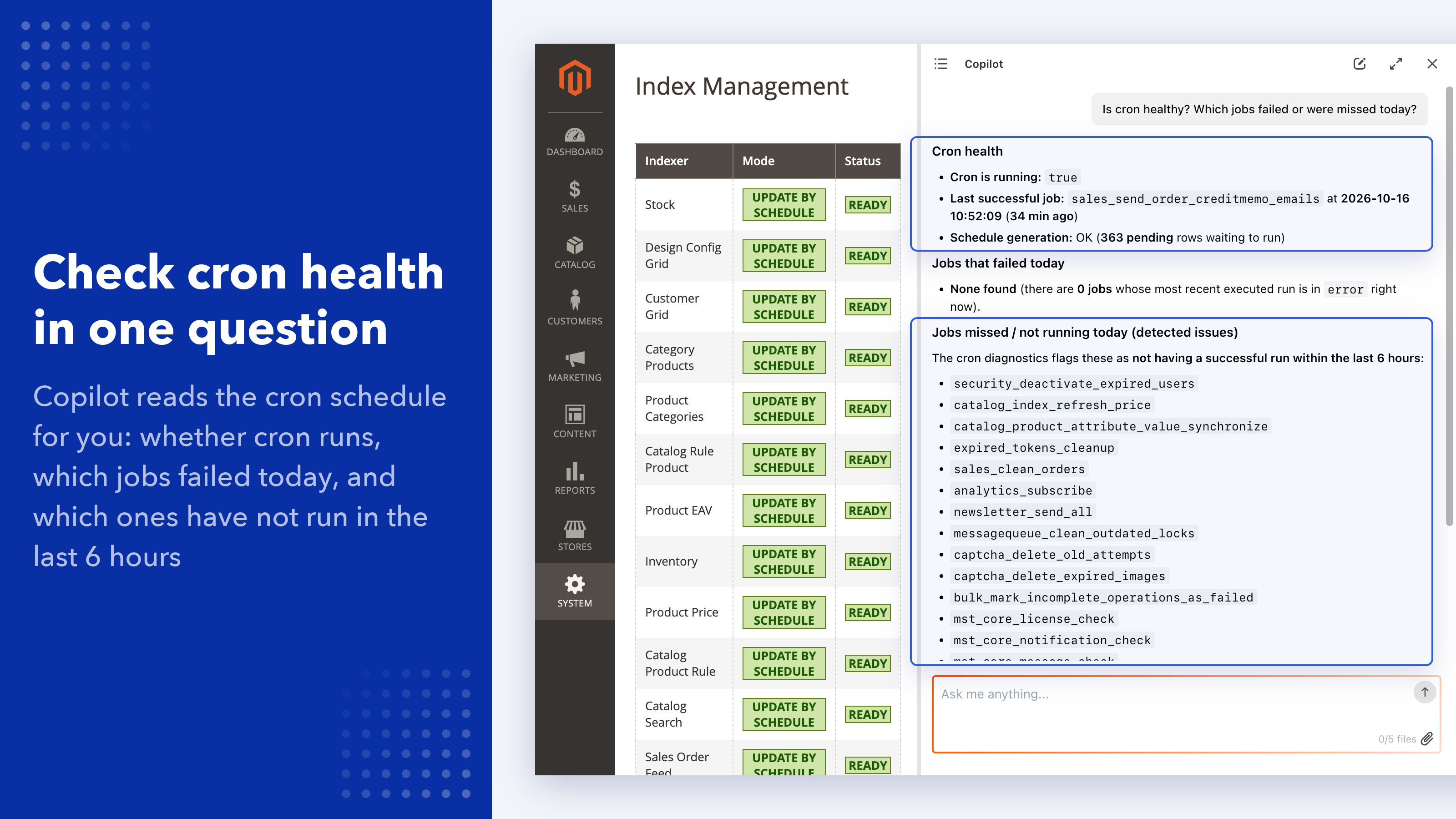
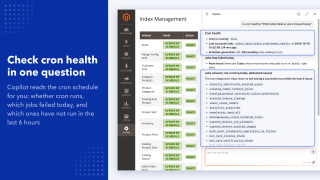
Cron, indexers, caches, and error logs. Copilot looks instead of telling you where to look, so the question does not have to become a developer ticket.
Why did a cron job fail last night?
Which indexers are behind, and by how much?
What does the last error in the log mean?
Take Action
Changes go through Magento itself, limited to what your role is allowed to do.
Create an invoice for order #100025
Update the status of order #100030 to complete
Add a shipment tracking number to order #100042
Multi-Step Operations
Copilot chains read, analyze, and act in one conversation, and asks for your confirmation before anything irreversible.
Find products with zero sales in 30 days, show me the list, then disable them
Check all orders from this week, find those without an invoice, and create invoices for them
Identify duplicate orders by email for the last 90 days and show the breakdown
Every answer can be checked
An AI answer you cannot check is a guess you have to trust. Copilot gives you two ways to check it, without leaving the chat:
- Just ask. It is an agent, not a report, so "how did you calculate this?" and "which orders did you count?" are valid follow-ups in the same conversation.
- Compare with your own reports. Totals across orders come back in your base currency, so they line up with what your reports show instead of mixing currencies.
If a number ever looks wrong, ask which records it counted, instead of filing it under "the AI got it wrong".
Asking questions in plain English is super easy, and the answers come back instantly with the RIGHT data. It saves our team a lot of time compared to running direct queries.
Matthew, United States
Copilot or AI Agent Connector: which one for which job
Both run on the same Mirasvit tool set and follow the same role permissions. The difference is where the AI lives and who uses it.
Choose Copilot when
- the people asking are your whole team, not just developers: managers, support, content
- the question is about the page you are on: this report, this order, this form
- the task takes seconds or a few minutes: a number before a call, a quick check, a fix on the open screen
- you want one provider key for the store, not an AI client and a paid plan for each person
- you hand the store over to a client and want the assistant under your own name
Choose AI Agent Connector (MCP) when
- the people using it already work in Claude, ChatGPT, Codex, or Gemini
- the job is long or runs in bulk: five minutes or more, hundreds of products at once
- you want Magento next to other systems in one conversation, such as Google Analytics, Search Console, or Notion
- you work from the AI client, outside the admin panel
Our comparison of Magento 2 MCP servers covers the alternatives.
Other extensions add a general chat window to the admin panel that answers questions about store data, usually by generating SQL. That kind of chat usually does not know which extensions you run, cannot act on the page you are viewing, and has no view of cron, indexers, or logs.
The two are not rivals, and plenty of stores run both. One merchant who uses both puts it simply: Copilot for everyday and moderately complex tasks, because it always knows which page they are on, and the connector with a coding agent only for jobs that take five minutes or more.
Magento 2 AI agent tools: data, operations, diagnostics, knowledge
Copilot ships with 14 built-in tools. It picks the right one for each request, chains several when the question needs it, and comes back with a single answer. You just ask.
Data
Read-only access to your database, your catalog and storefront content, and your store's own structure: websites, currencies, customer groups. Anything you could get from a report, without building one.
Operations
Magento's own API, so Copilot can create an invoice, update a status, or change a product, limited to what the signed-in user is allowed to do.
Diagnostics
Cron, indexers, caches, and error logs. Ask why a job did not run or what broke last night and Copilot looks, instead of telling you where to look. No SSH, no developer.
Knowledge
Your installed extensions, their versions, their documentation, and the official manuals. Copilot answers about your store as it is configured, not about Magento in general.
Grows with Your Store and Your Team
Skills: playbooks for the work you actually do
A skill tells Copilot how to handle one kind of question: how to pull a sales summary, where to check store configuration, how to consult a manual. Copilot ships with a catalog of them, and you can switch them on and off or add your own.
The catalog grows with your store. Install another Mirasvit extension and it brings its own dedicated skills, each with its own instructions and manual. With Advanced Reports, Copilot creates, edits, and explains reports and dashboards; with Help Desk MX, it summarizes a long ticket thread or finds the pattern across a week of requests. It also knows which modules your store actually runs, so it will not suggest features you do not have.
Ready-made prompts, one click each
Routine checks should not need retyping. Built in: store configuration check, sales overview, bestsellers report, low stock alert, stuck order finder, stale product disabler, and missing URL rewrite fixer. Your team can add its own.
Your rules, your tools, your name
- House rules. Store-specific conventions go into a system prompt once and apply to every conversation.
- Your own tools. Endpoints your other extensions add are available to Copilot under the same role permissions, and developers can register custom tools that Copilot uses like the built-in ones.
- Your name on it. Rename the assistant, restyle the widget, and choose the questions it suggests first. Useful when an agency hands a store over to a client.
Security and access control
Copilot never gets more access than the person using it, and you decide what each role can do. A role, or the whole store, can also be set to read-only, and you choose which roles see Copilot at all.
Tool-Level ACL
Assign each admin role the tools it is allowed to use. Every tool has its own permission, diagnostics included.
No Permissions of Its Own
Copilot acts as the admin who is signed in. There is no service account and no shared token, so it can never reach anything that user could not reach on their own.
Read-Only by Design
Database access is read-only, and it is enforced rather than assumed: anything that would change data is rejected before it runs. You can also limit which tables a role may read.
Asks Before Anything Irreversible
Copilot asks before deleting anything or taking a step that cannot be undone. Everyday edits follow the role's permissions, so set a role to read-only if it should only look.
AI Spend Has Its Own Permission
Adding or changing an AI provider key is a separate permission from restyling the widget, so only the people you choose decide what the store spends on AI.
Every Change Is Logged
Every write Copilot makes through its tools, successful or failed, lands in the Change Journal: when, which admin and role, what changed, and the result. Passwords and keys are masked, and the agent cannot read the journal.
Put an AI agent inside your Magento admin panel
Try the backend demo, or book a 15-minute call and we will walk through it on your own store.
Prefer to work from Claude, ChatGPT, or Codex instead? See AI Agent Connector (MCP) for Magento 2.
it's crazy how quickly things have changed. Today, I can't imagine getting through my workday without asking Copilot for help.
It saves our team a lot of time compared to running direct queries. Thanks a lot!
Save time by starting your support request online and we'll connect you to an expert.
What is Mirasvit Copilot?
An AI agent inside the Magento 2 admin panel. Ask questions, pull data, run checks, and take action through natural language, without SQL or code.
Do I need an OpenAI key or a ChatGPT subscription to use Copilot?
You need one API key from an AI provider for the whole store: OpenAI, Anthropic, Google Gemini, or xAI. Nobody on the team needs a ChatGPT or Claude subscription or an AI client. Connecting the store itself needs no key: you activate Copilot with one click and your Mirasvit license identifies the store. You can add a second key from another provider as an automatic fallback, and your provider bills its usage directly. Keys are stored encrypted outside Magento's configuration. See AI providers in the manual.
Copilot or AI Agent Connector (MCP): which one do I need?
Copilot works inside the admin panel for the whole team: it sees the page you are on, needs one provider key per store, and nobody has to install anything. AI Agent Connector (MCP) connects the AI client you already use, such as Claude or ChatGPT, to the store, which suits developers, long or bulk jobs, and conversations that combine Magento with other systems; each user needs that client and a plan for it. Many stores run both.
What can Copilot do that a general AI chat cannot?
Three things. It acts on the admin page you are on, so it can read the report or order in front of you, and sort or filter it without saving anything. It looks at platform health: cron, indexers, caches, and error logs. And it knows which extensions your store runs, so its answers match your setup instead of Magento in general.
What tools does Copilot include?
14 built-in tools across four areas: data (database, catalog, store structure), operations through Magento's own API, diagnostics (cron, indexers, caches, logs), and knowledge (your installed extensions, their versions, and documentation). You can also add your own tools, and endpoints added by your other extensions are available too.
How do I know an answer is correct?
Because it is an agent, you can just ask: "how did you calculate this?" or "which orders did you count?" Totals across orders come back in your base currency, so they line up with your own reports.
Can Copilot take actions, or does it only read data?
Both. Database access is read-only and enforced as such. Changes go through Magento's API, limited to what the signed-in user is allowed to do, and Copilot asks for your confirmation before deleting anything or taking a step that cannot be undone. If a role should only look, set it to read-only.
How does tool-level ACL work?
You decide which tools each admin role may use, and which roles see Copilot at all. Beyond that, Copilot has no permissions of its own: it acts as the admin who is signed in, with no service account or shared token, so it can never reach anything that user could not reach on their own. A role, or the whole store, can also be set to read-only, and every write Copilot makes is recorded in the Change Journal.
What are Skills, and can I add my own?
A skill is a playbook for one kind of question, such as pulling a sales summary or checking store configuration. Copilot ships with a catalog, you can switch individual skills on or off, and you can add your own. The catalog also grows on its own: install another Mirasvit extension and the skills covering it become available.
Does Copilot work with other Mirasvit extensions?
Yes, and it does more than read their tables. With Advanced Reports it creates, edits, and explains reports and dashboards. With Help Desk MX it works with tickets, summarizes threads, and spots patterns across requests. Each extension brings its own dedicated skills, each with its own instructions and manual.
What languages does Copilot support?
The interface is translated into 30+ admin locales and follows your admin language. You can ask questions in other languages as well, though English is what we test against.
mirasvit/module-mcp-tool no longer stops Copilot from answering.mirasvit/module-mcp-tool 1.1.16 or newer.mst_copilot/general/openai_key is no longer read, and any value you had saved is left in the database untouchedMirasvit_Copilot::widget_config resource is replaced by Mirasvit_Copilot::widget_settings and Mirasvit_Copilot::provider_settings; an upgrade grants both to every role that had the old one, so existing roles keep the access they already hadmirasvit/module-core 1.7.15 or newerMirasvit_Copilot::use_copilot ("Use AI Copilot") ACL resource under System → Permissions → User Roles → Role Resources → AI Copilot to roles that should see the widgetBlog

 Andriy Kovalenko

We are committed to being open and transparent with our customers. When you purchase our module, you automatically receive one year of free support service and free updates.
Why is this important?
- Seamless Installation and Configuration: We understand that setting up a new module can take time to configure according to your specific needs. That’s why we offer a full year of free support. Our experienced team is here to assist you with installation, configuration, and any questions you might have. We're eager to share our expertise to ensure you get the most out of your purchase.
- Stay Updated with Magento (Adobe Commerce) Releases: Magento releases new versions approximately every three months. These updates can sometimes introduce compatibility challenges. To keep your store running smoothly, we provide a year of free access to the latest versions of our modules, ensuring that you can upgrade Magento and our modules without encountering any obstacles.
- Subscription Included: Renewing your subscription ensures continued access to the latest updates and support from our team. This means you can be confident that any issues you encounter with the extension will be resolved quickly and efficiently. You can cancel your subscription at any time without any additional fees.
These are our primary. A major portion of our new clients come from referrals from our existing clients. Our professional team of developers, marketers and support staff have invested the best knowledge and experience in the field into our work, so you know you can come back to us again and again.
One year free and high quality support. We go to great lengths to provide maximum satisfaction with every module you have purchased in our store. By helping you with installation, configuration, answering your every question, we do all our best to eliminate any possible problems.
30-days money back guarantee. If you are not satisfied with our Magento Admin AI Agent performance for any reason, we provide a full refund.
We constantly add new features to all our modules, and are always interested in hearing your opinion and implementing your suggested features in our future developments.
We provide an expanded user guide for every aspect of our Magento Diagnostics AI, so you can find answers for all your burning questions.
You can customize Natural Language Admin according to your needs and requirements.
The Module is easy to install and upgrade, just follow our step-by-step user guide. Additionally, the extension is ready to use with the Hyvä theme.
No core modifications. The Checkable AI Answers has been tested in a Magento Cloud environment and is fully compatible with it.