Mirasvit Latest Updates — March 2026
-
 Andriy Kovalenko
- Our News & Updates
- Mar 3, 2026
- 16 min read

In March, our developers delivered 15+ new features that improve different parts of your day-to-day store operations. Before we dive into the full list, we want to share the latest progress in our AI-focused extensions.
Last year, we released AI Copilot extension and have been steadily refining it into a practical assistant for everyday Magento tasks directly inside the admin panel. This month, we're also launching a new product, AI Agent Integration (MCP Server), built for a different workflow: it brings your store into the AI assistant you use, which is especially useful when that same AI workspace is also linked to other tools and services.
The difference comes down to where you work. Copilot is the simplest way to use AI directly inside the Magento admin. MCP Server is built for working from your AI assistant's interface, with clear role-based control over what can be read or changed.
Up next is the new module's full overview, followed by the rest of the release highlights.
Table of Contents
- AI Agent Integration (MCP Server) — NEW MODULE
- Advanced SEO Suite
- Follow Up Email
- Customer Segmentation Suite
- Affiliate
- Advanced Product Feeds
- Blog MX
- Help Desk MX
- Google PageSpeed Optimizer
- Custom Form Builder
- Product Attachments
- Fraud Detection
- Surcharge / Additional Payment Fee
AI Agent Integration (MCP Server) — NEW MODULE
🔥 AI-Powered Magento Management via MCP
AI Agent Integration (MCP Server) is a brand-new module that lets AI assistants like ChatGPT, Claude, or Gemini connect directly to your Magento store through secure OAuth 2.1 authentication. Instead of copying data out of the admin panel or building a custom integration, you can ask questions and run approved admin actions from your chat workspace, with strict control over what the assistant is allowed to read or change.
The module provides four built-in tools your AI assistant can use:
- Store Info: store structure and configuration
- Database Reader: read-only SQL with security controls
- REST API: Magento REST endpoints
- GraphQL Query: GraphQL queries and mutations
Depending on what you allow via roles, this can cover quick reporting (orders from last week with refunds over $100), operational checks (which products are low in stock), content work at scale (update meta descriptions for a collection), troubleshooting with real store context (why totals look different in checkout), or even multi-step admin flows (create a Sale category and add products created this month).
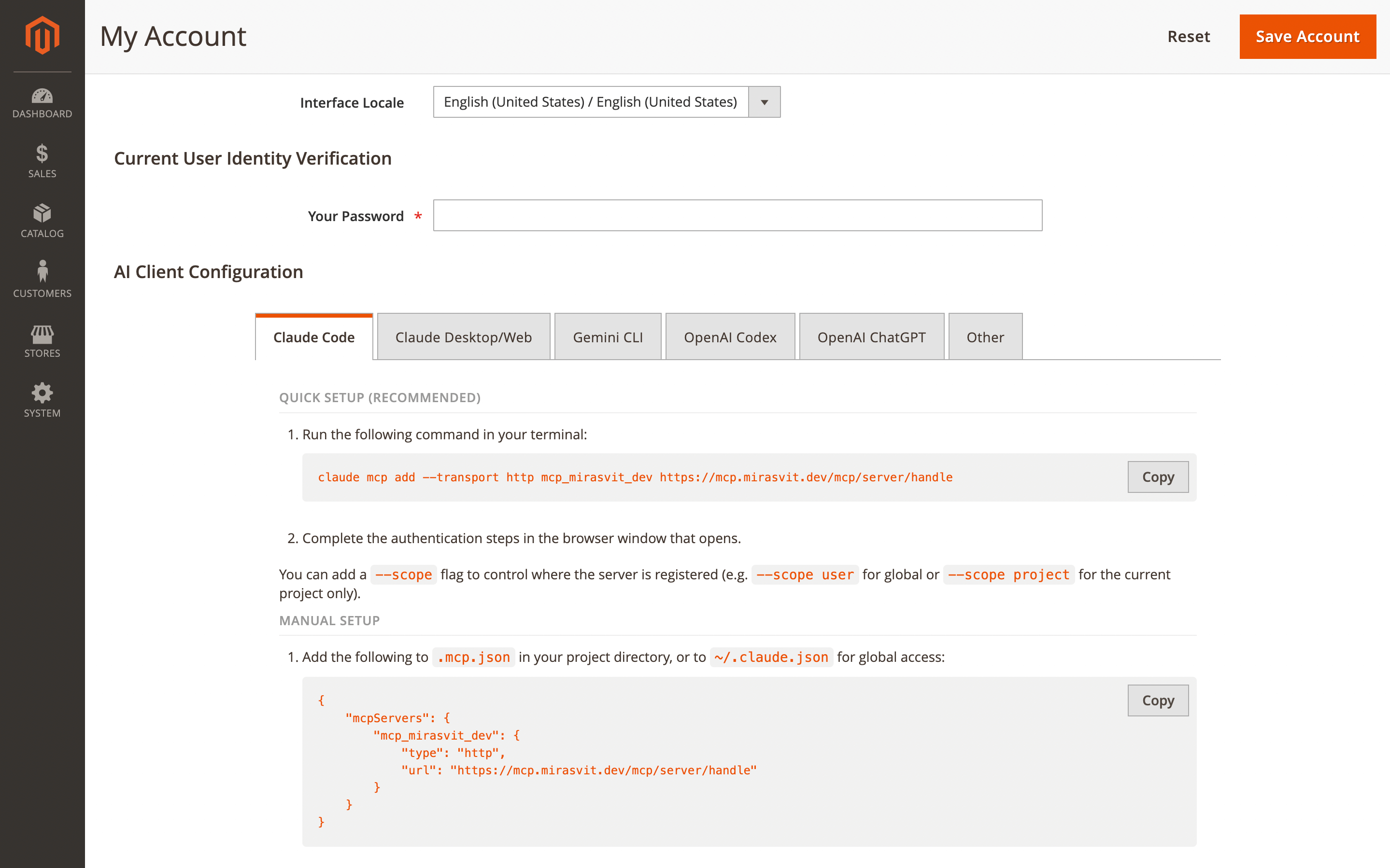
To get started, enable the server in Stores > Configuration > Mirasvit Extensions > MCP Server and manage access in System > AI Agent Connector > MCP Users.
For each admin user who should connect, open System > Permissions > All Users > UserName > MCP Info, enable MCP Access, then follow the AI Assistant Configuration instructions to complete OAuth authorization in your AI client.
Security is a core part of the design (OAuth 2.1 with PKCE, role-based ACL filtering, IP restrictions, and sensitive data protection). This requires Magento 2 with REST API access enabled and proper admin role permissions (ACL limits what can be read or changed).
If your store is behind Cloudflare or another WAF, MCP endpoints may need an exception from bot protection. PHP 8.1+ is required (compatible with PHP 8.4).
Advanced SEO Suite
The Advanced SEO Suite brings six improvements across rich snippets, SEO templates, rewrites, and redirects.
🔥 CMS page schema types
CMS pages often miss out on rich results simply because search engines get too little context from them. That includes pages like About Us, Contact Us, and content landing pages.
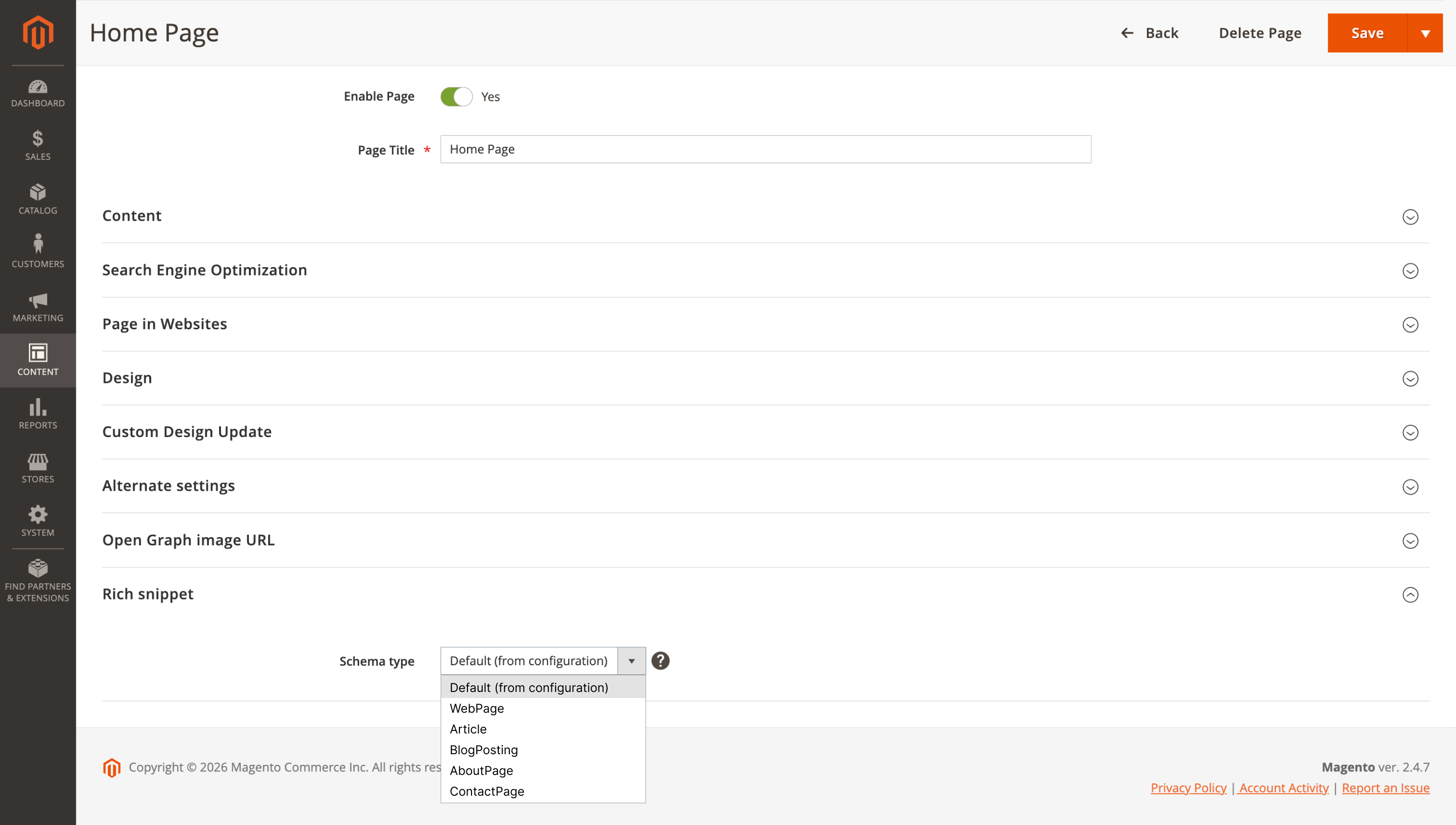
This feature adds JSON-LD structured data support for CMS pages, with selectable schema types: WebPage, Article, BlogPosting, AboutPage, or ContactPage. Use a global default for consistency across your content, then override it only when a specific page needs different markup.
Example: mark About Us as AboutPage, and set an FAQ or guide as Article to help it qualify for richer snippets.
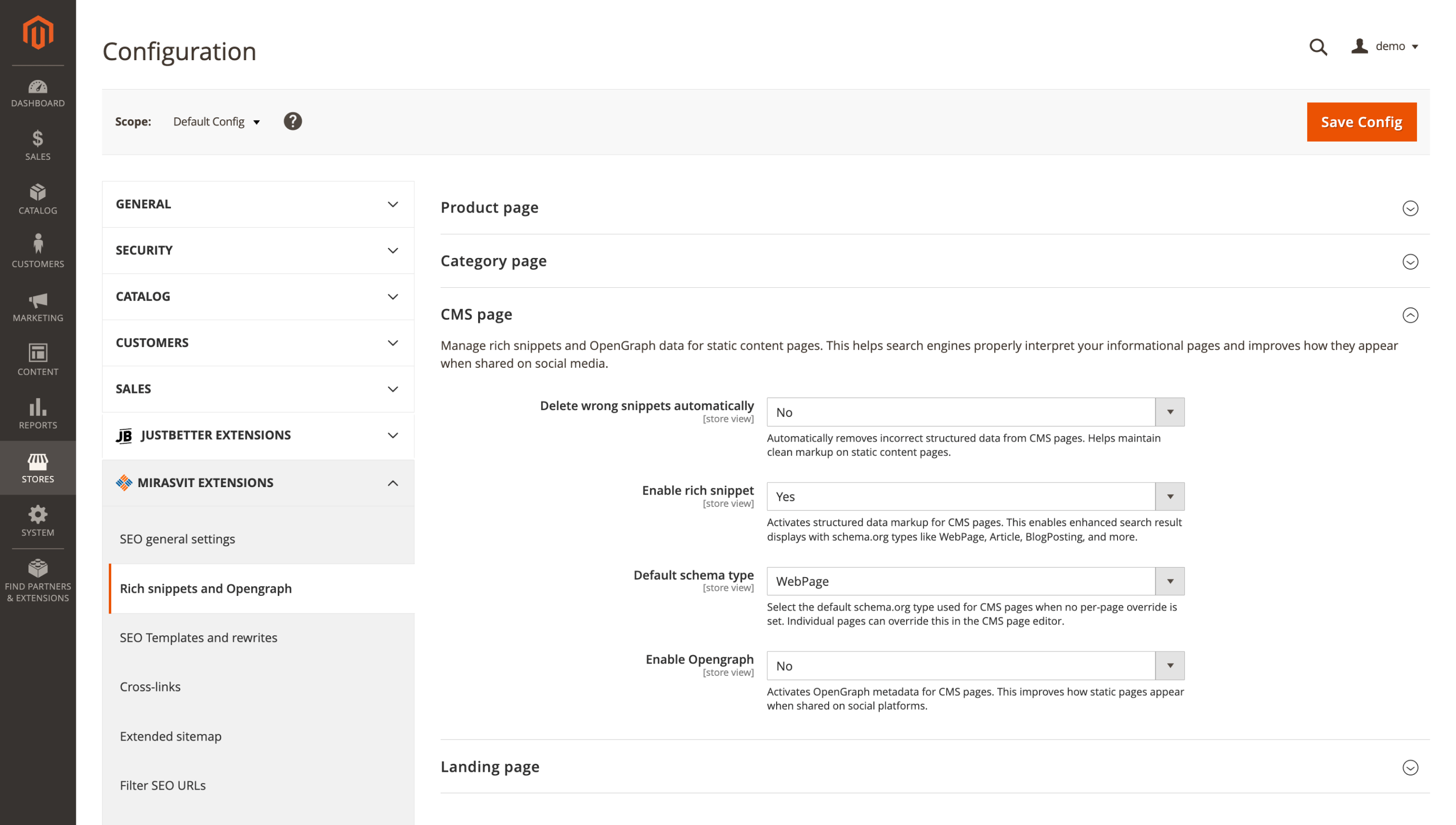
You'll find the CMS page rich snippet settings under Stores > Configuration > Mirasvit Extensions > Advanced SEO > Rich snippets and Opengraph > CMS page: set Enable rich snippet to Yes, choose the Default schema type, and enable Opengraph if required.
If a specific page needs a different schema, update it in Content > Pages > YourPage > Rich snippet. The markup is applied immediately after you enable it.
🔥 LandingPage SEO integration
Landing pages built with the Mirasvit LandingPage module are supported by SEO Templates and Rich Snippets, which helps you keep meta tags and structured data consistent across campaigns.
SEO Templates adds a Landing Pages type and supports landing page variables like [landing_name], [landing_page_title], [landing_meta_title], and [landing_meta_description]. Rich Snippets also includes a Landing page section with support for Product offers, Aggregate product, and OpenGraph.
This works especially well for campaign pages like "Summer Sale Dresses" or "Best Running Shoes Under $100", where you want strong snippets in search and consistent metadata across many similar pages.
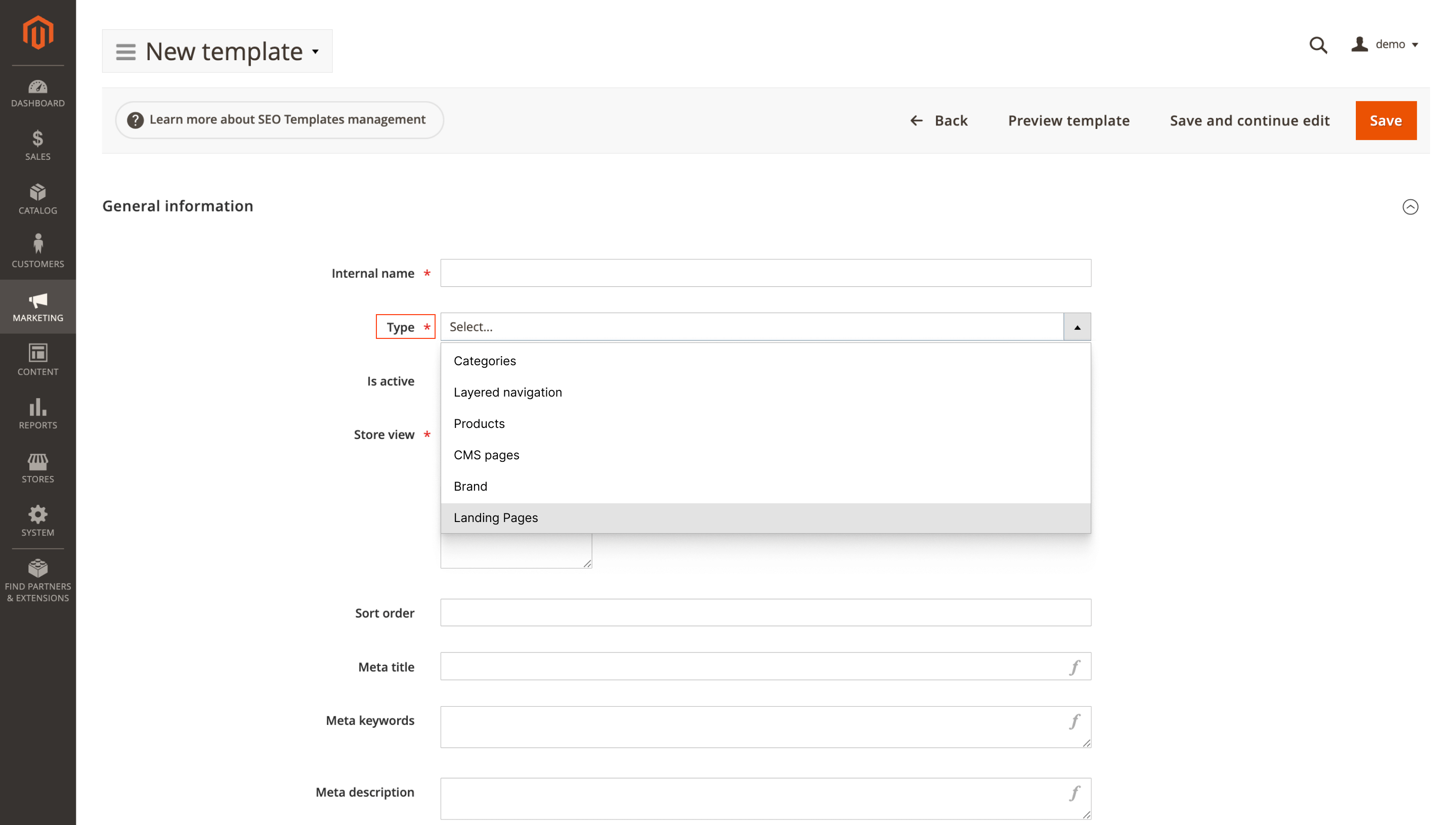
Set up the template in Marketing > Templates (Type = Landing Pages), and finish the rich snippet settings in Stores > Configuration > Mirasvit Extensions > Advanced SEO > Rich snippets and Opengraph > Landing page.
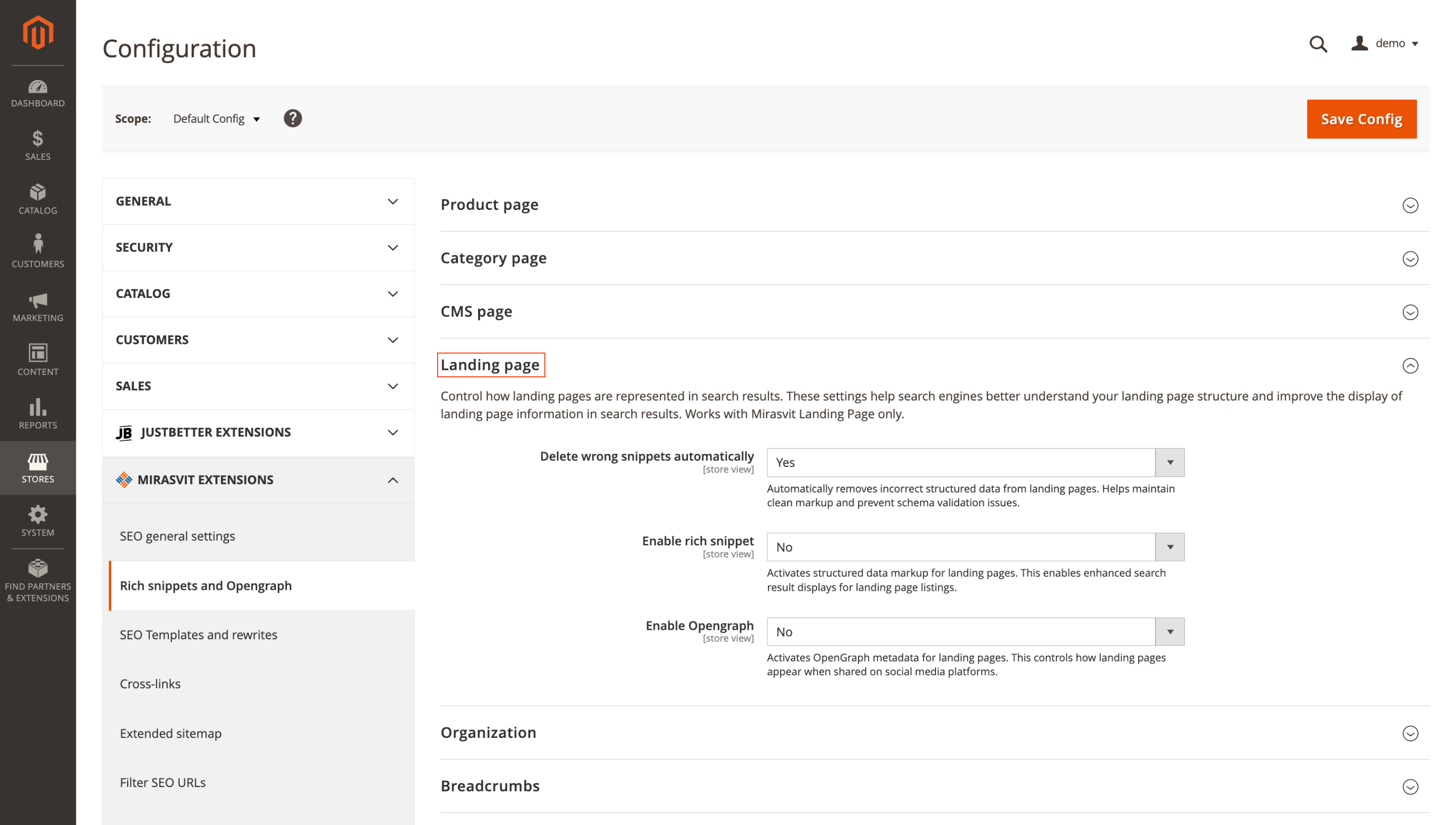
This feature requires the Mirasvit LandingPage module to be installed and active (it is a submodule of the Layered Navigation extension).
🔥 Rich snippet extender variables
Rich Snippet Extenders no longer force you to hardcode every JSON-LD value. Template variables let your structured data pull real product, category, and store details automatically.
You can insert variables like [product_name], [product_sku], [product_brand], [category_name], [store_name], and [store_phone] (and more). The extender editor also includes a sidebar panel that lists all available variables and groups them by scope, which makes the options easier to navigate.
In an electronics catalog, you can add brand and GTIN once, and the snippet will populate them automatically for each product.
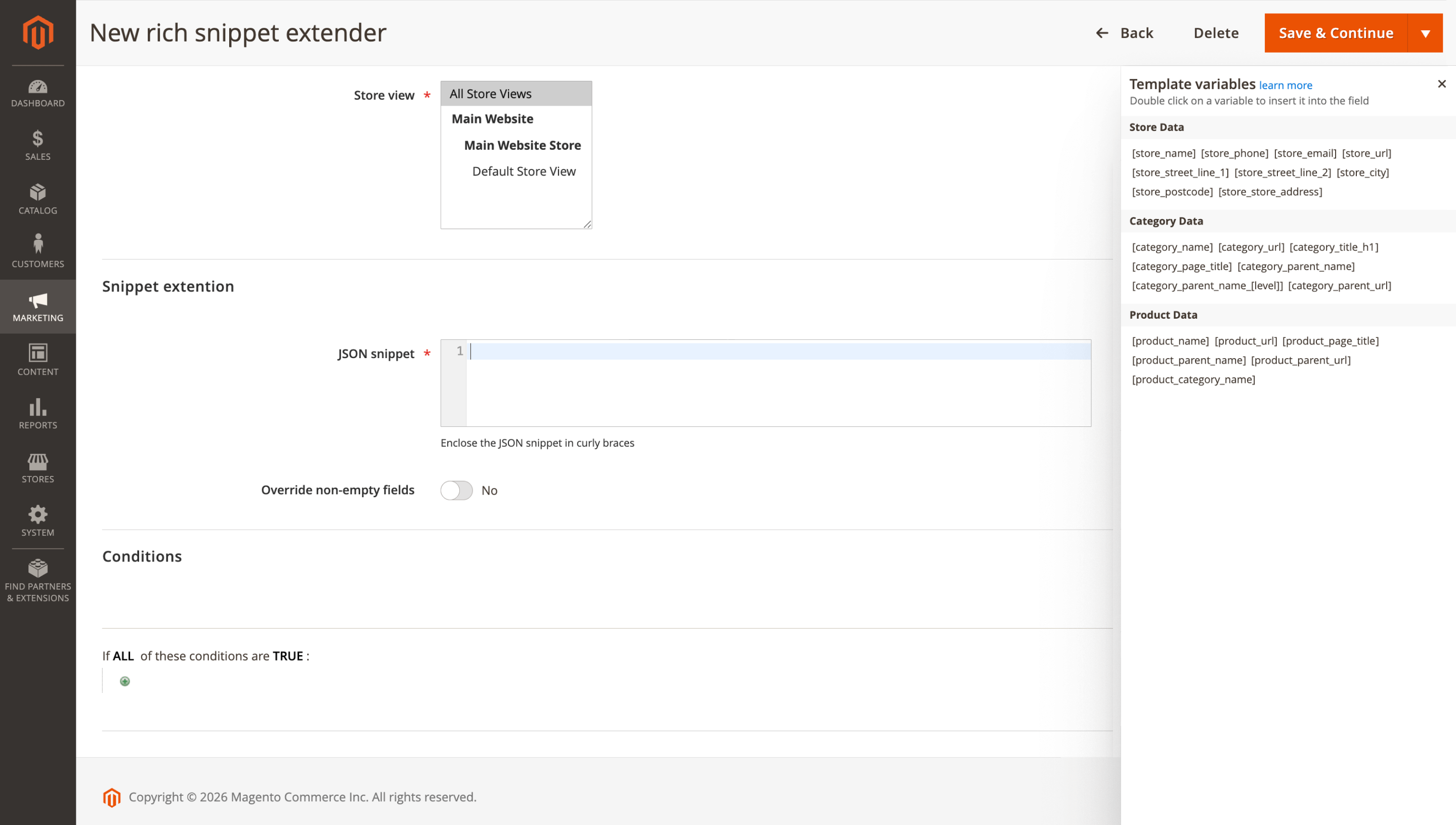
Open Marketing > Rich snippet extenders and click Add extender. Select the entity type (Product or Offer), then insert variables into the JSON snippet field (such as [product_brand] and [product_sku]). Add conditions if you need to target specific pages, choose the store view scope, and save.
Available variables depend on page context, product variables appear only on product pages, and category variables on category pages.
🔥 SEO Rewrite Title as breadcrumb label
In this release, SEO Rewrites get a small but useful improvement for storefront consistency: the Title field can also replace the label of the last breadcrumb item on matched pages. This way, breadcrumbs follow the same wording as your rewritten page title instead of falling back to the original product or page name.
Breadcrumbs follow the rewrite, so a product renamed from "Nike Air Max 2026" to "Red Running Shoes for Men" will show "Red Running Shoes for Men" as the last breadcrumb label too.
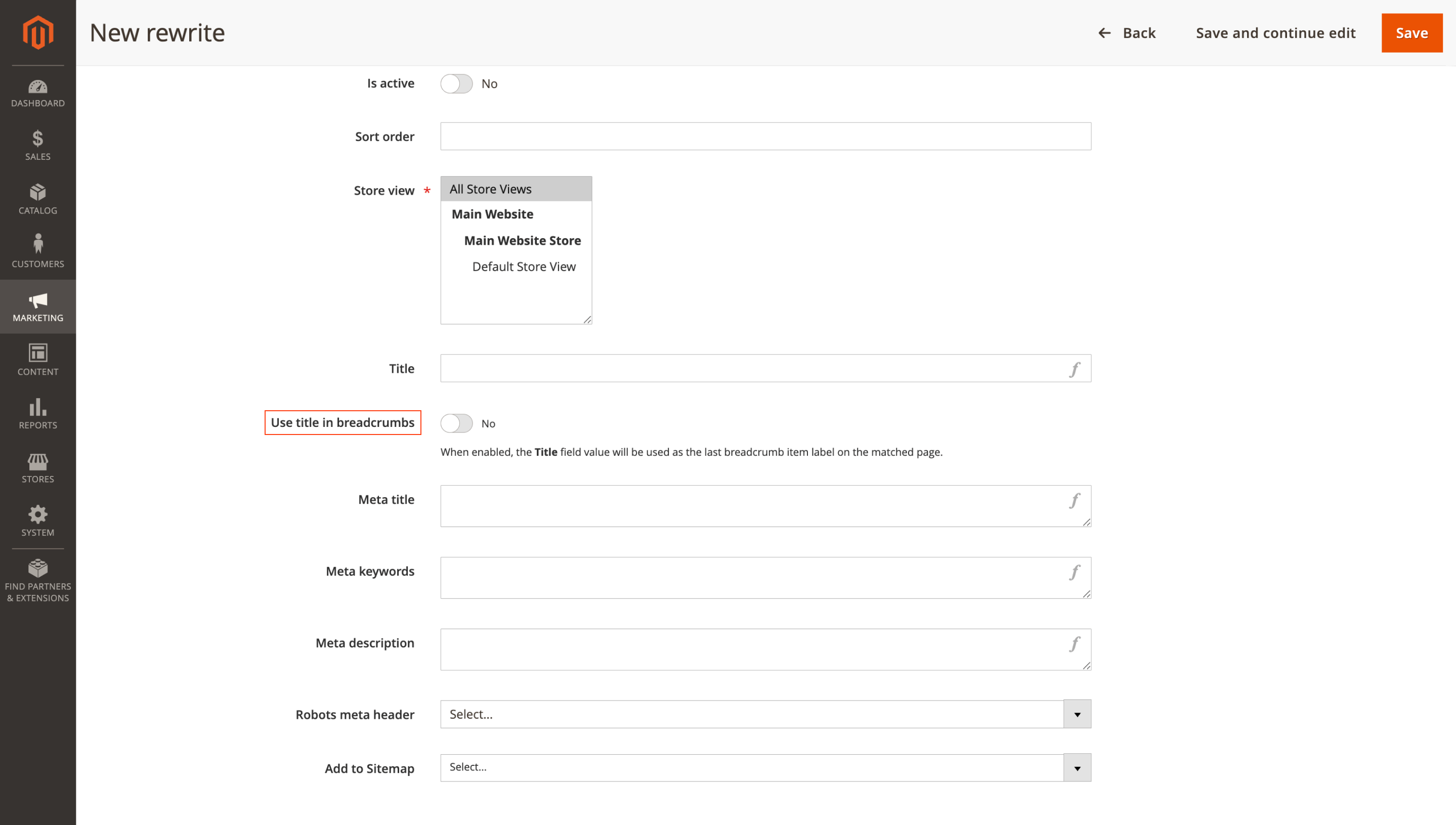
To use it, go to Marketing > SEO Rewrites > Add rewrite, create or edit a rewrite, and fill in the Title field with the breadcrumb label you want.
If needed, review breadcrumb behavior in Stores > Configuration > SEO > Product breadcrumbs. The change is applied only when the SEO Rewrite matches the page URL.
🔥 Wildcard redirect_chain rules
When you restructure category URLs, redirects often turn into a long, fragile list, especially if you need to preserve subpaths. This feature lets you combine wildcards with [redirect_chain] in a single redirect rule, so one setup can handle an entire URL branch instead of dozens of separate redirects.
Example rule:
- From:
/dames/tops[redirect_chain] - To:
/dames/bralette[redirect_chain]
The URL tail is preserved automatically, so /dames/tops redirects to /dames/bralette, and /dames/tops/bjorn-borg redirects to /dames/bralette/bjorn-borg.
Add the rule in Marketing > Redirects > Add redirect: use [redirect_chain] in Request URL and Target URL, choose the redirect type (301, 302, or 307), set Is Active to Yes, and save. Test a couple of old URLs after saving to confirm everything redirects as expected.
🔥 Product type template condition
A new Product type condition is available in the SEO Templates conditions builder, so you can apply metadata templates only to the product types you select. This is especially helpful when your catalog includes different product structures and one meta pattern does not fit them all.
A practical pattern looks like this:
- Configurable products:
[product_name]— Available in[X]options - Simple products:
[product_name] — [product_brand]
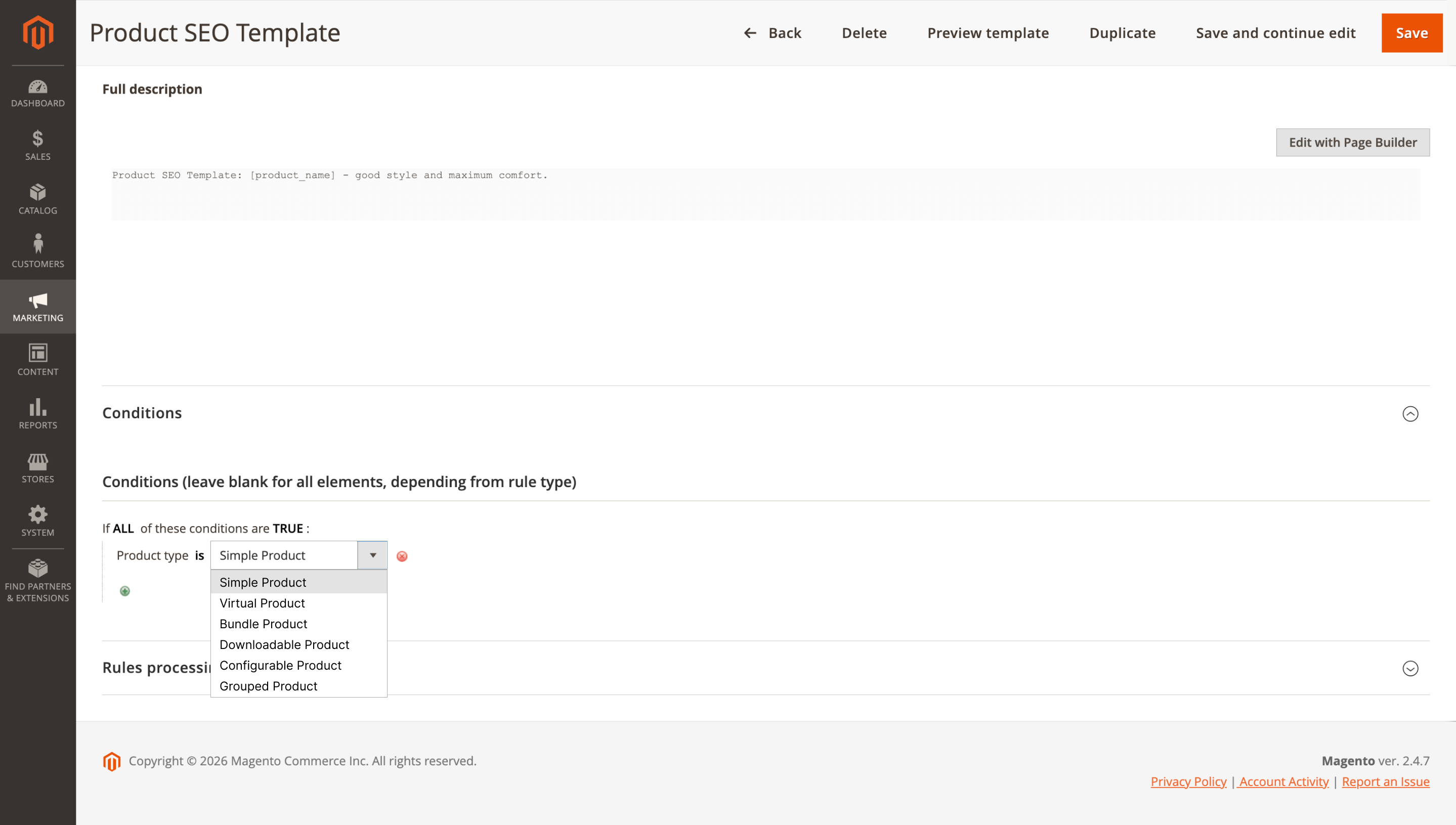
Set it up in Marketing > Templates > Add template > Conditions. Choose Type = Products, then add Product type in Conditions and select the required types (Simple, Configurable, Bundle, Grouped, Virtual, Downloadable). After that, configure meta title, meta description, and other fields using template variables, set the sort order, and save.
Templates with a higher Sort Order value are applied first (higher priority). If needed, use Stop further rules processing to prevent lower-priority templates from overriding the result.
Follow Up Email
🔥 Wishlist campaign triggers
Wishlist events are available in the Follow Up Email module, giving you a way to build automations around one of the strongest signals of purchase intent. Previously, campaigns could react to cart abandonment, orders, product views, reviews, newsletter subscriptions, and other actions, but wishlist activity was missing.
You get two new triggers: Wishlist / New product added to wishlist and Wishlist / Wishlist was shared. It works well for simple follow-ups, like a reminder a few days after a product is wishlisted, or a purchase-ready email when a wishlist is shared before holidays.
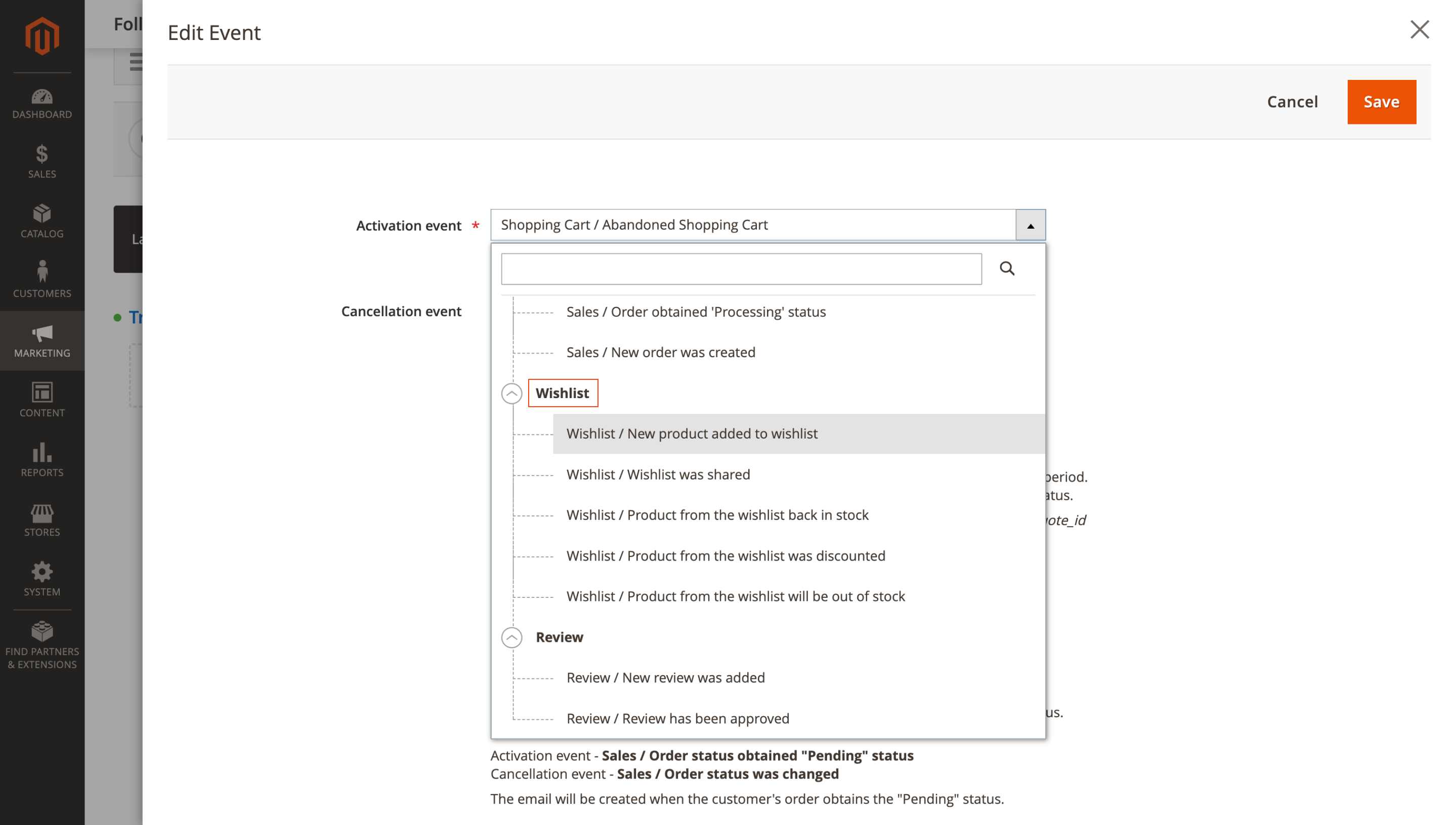
Manage this in Marketing > Follow Up Email > Manage Campaigns: create or edit a campaign, add a trigger, then select one of the new wishlist events in Event. Add a cancellation event, such as Order Obtained Pending Status, to stop emails after purchase, then set the template, delivery delay, and other campaign settings, enable the trigger, and save.
Wishlist events work only for registered customers, and Magento cron must be running for timely email delivery.
Customer Segmentation Suite
🔥 Last Order child filters
This update expands the Last Order condition in the Customer Segmentation Suite extension with child filters, so you can segment customers by recency and order status in a single rule. That makes audiences like win-back (last completed order 60+ days ago) or recent buyers (completed order within the last 7 days) much easier to build without workarounds.
Three child conditions are available:
- Date Range: filter by an exact period (Jan 1–Jan 31)
- Days Ago: set how much time has passed since the last order (≥ 30 days)
- Status: choose the order status, Complete is a common choice
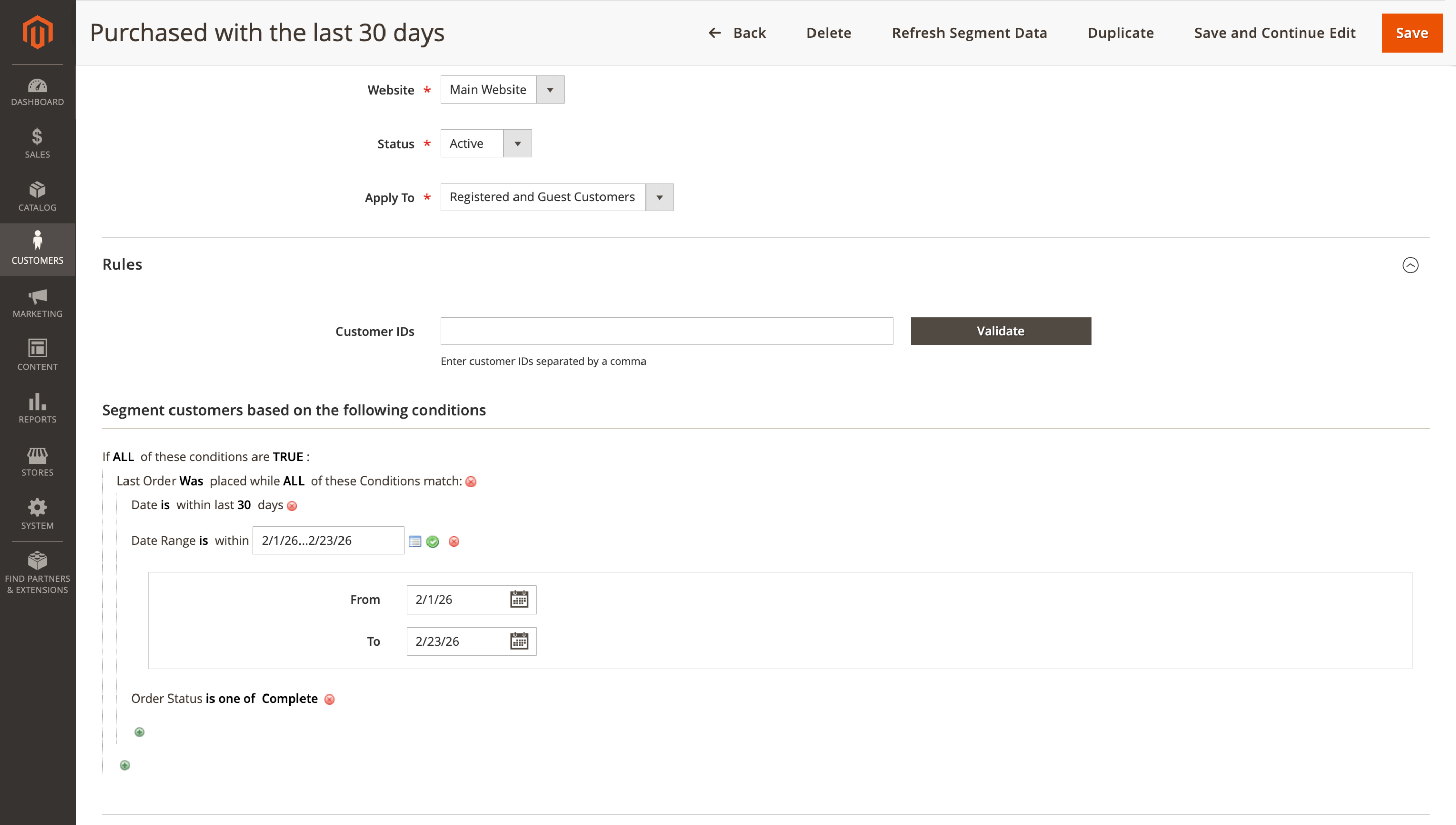
Set it up in Customers > Customer Segments > Segments > YourSegment > Rules: add the Last Order condition, attach the child conditions you need, save the segment, then refresh it manually or via cron.
Automatic segment refresh requires Magento cron (default: daily at 02:00). If you prefer, you can also refresh a segment via CLI: bin/magento mirasvit:customer-segment:refresh [segment_id].
Affiliate
🔥 Affiliate group performance conditions
A new option in the Affiliate module brings performance-based conditions to Affiliate Groups, so partners can move between tiers automatically. When someone hits your thresholds, cron reassigns them to the matching group and keeps commissions aligned without manual reshuffling.
Groups can be set to update automatically using conditions such as:
- Number of orders from referred customers (all)
- Number of orders from referred customers (with commission)
- Sales amount from referred customers (all)
- Sales amount from referred customers (with commission)
This works well for tiered programs. For example, you can run Bronze (0–10 referral orders, 5%), Silver (11–50 orders, 8%), and Gold (51+ orders, 12%), and affiliates move up automatically as they hit the thresholds.
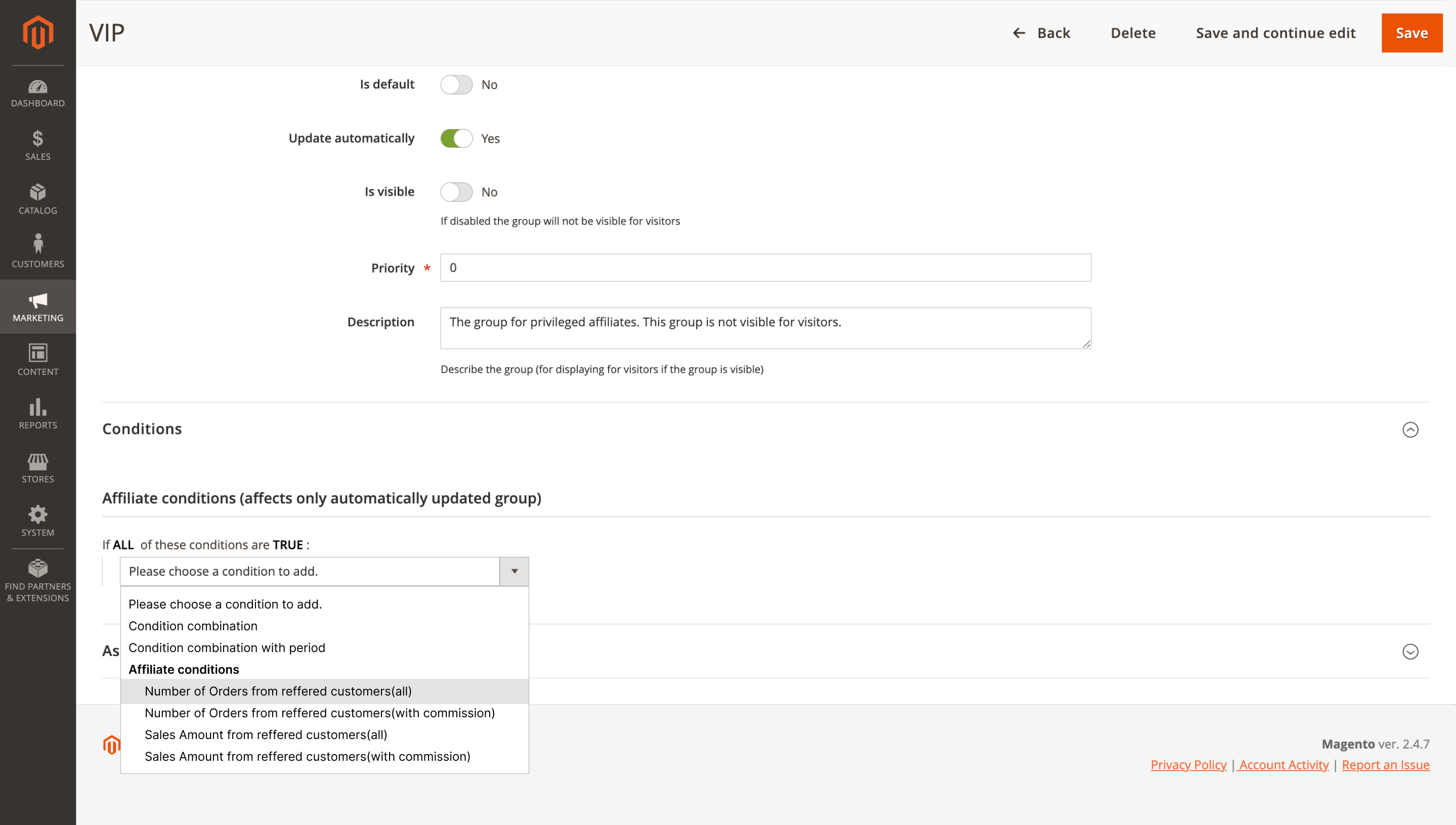
Set it up in Marketing > Affiliates > Groups: create or edit a group, set Update Automatically to Yes, and configure conditions (for example, Number of orders from referred customers (all) > 50). Use Priority to resolve conflicts when multiple groups match (higher value wins), set Is Visible if you show groups on the storefront, and save. Automatic reassignment is handled by cron.
Conditions are applied only to auto-updating groups (they are ignored for default groups), only one group can be set as the default, and Magento cron must be running for automatic updates.
Advanced Product Feeds
🔥 MageWorx options min_price/max_price
Option-based pricing is great for upsells, but it can make feed prices misleading when surcharges are not included in exports. The Advanced Product Feeds extension now detects MageWorx Advanced Product Options Suite pricing and calculates min_price and max_price correctly, including option modifiers.
Say you sell a $10 T-shirt with a +$5 premium color option. The feed will export min_price: $10 and max_price: $15, instead of showing $10 only.
Manage feeds in Catalog > Advanced Product Feeds > Feeds as usual. When your template uses price attributes like { product.price } or { product.final_price }, the correct min/max values are calculated automatically. After updating the extension, edit the feed and click Generate to regenerate it.
This requires MageWorx Advanced Product Options Suite to be installed and active, with custom options and price modifiers configured on products.
Blog MX
🔥 Blog post schema type selection
Blog posts in the Blog MX extension get more control over structured data: you can choose whether a post uses BlogPosting or NewsArticle schema and fill optional properties when needed. That extra context helps search engines understand your content and can improve rich search appearance.
A post like "Spring 2026 Trend Guide" benefits from complete author, publish date, and image data, which can support enriched snippets and, when eligible, visibility in Google's Top Stories.
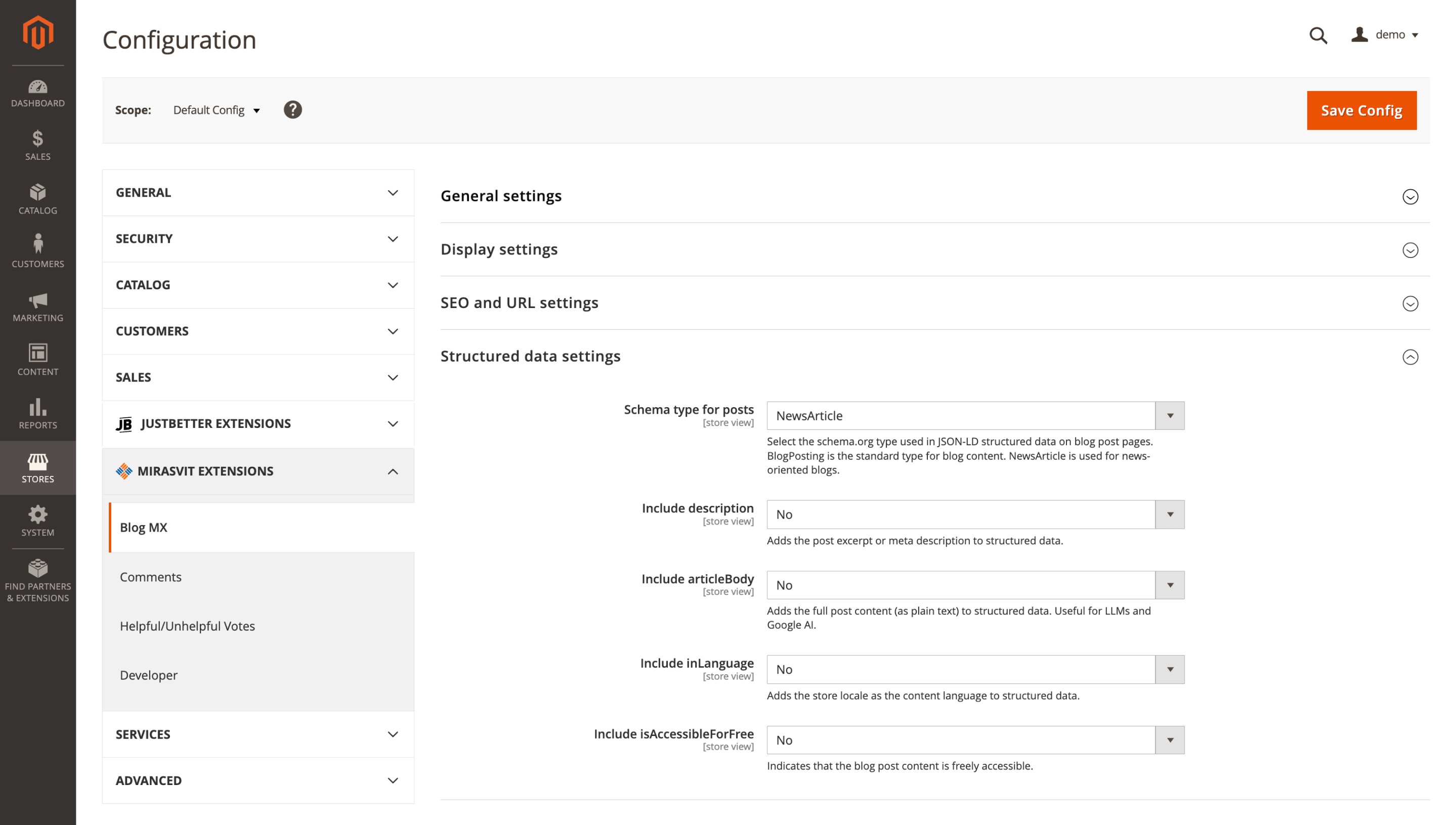
Set it up in Stores > Configuration > Mirasvit Extensions > Blog MX > Structured data settings: select the schema type, configure optional properties as needed, then save the configuration and clear cache.
To use this feature, update the module to the latest version. For complete structured data, make sure author information is filled in for each blog post.
Help Desk MX
The Help Desk MX module includes two updates this month: admin-side API access for automation and integrations, plus a small customer-facing improvement that makes ticket references easier.
🔥 Admin REST API Endpoints
New admin REST API endpoints open full programmatic access to helpdesk management, so you can run admin-level actions outside the Magento UI. This supports workflows like syncing tickets with an external CRM, auto-creating tickets from monitoring systems, or building custom support analytics dashboards, which reduces manual work and makes deeper integrations possible.
To start using the endpoints:
- Update the module to the latest version.
- Create or adjust an admin API role with helpdesk permissions in System > Permissions > User Roles.
- Use standard Magento REST authentication (token or OAuth) and call the endpoints via /rest/V1/.
Proper API role permissions are required.
🔥 My Account ticket Request ID column
Support conversations move faster when the requester can quote an exact case number. A Request ID column is now shown directly in the My Account tickets grid, so the ID is visible at a glance instead of being buried inside each ticket.
After you update the module, the column appears automatically, no additional setup is required.
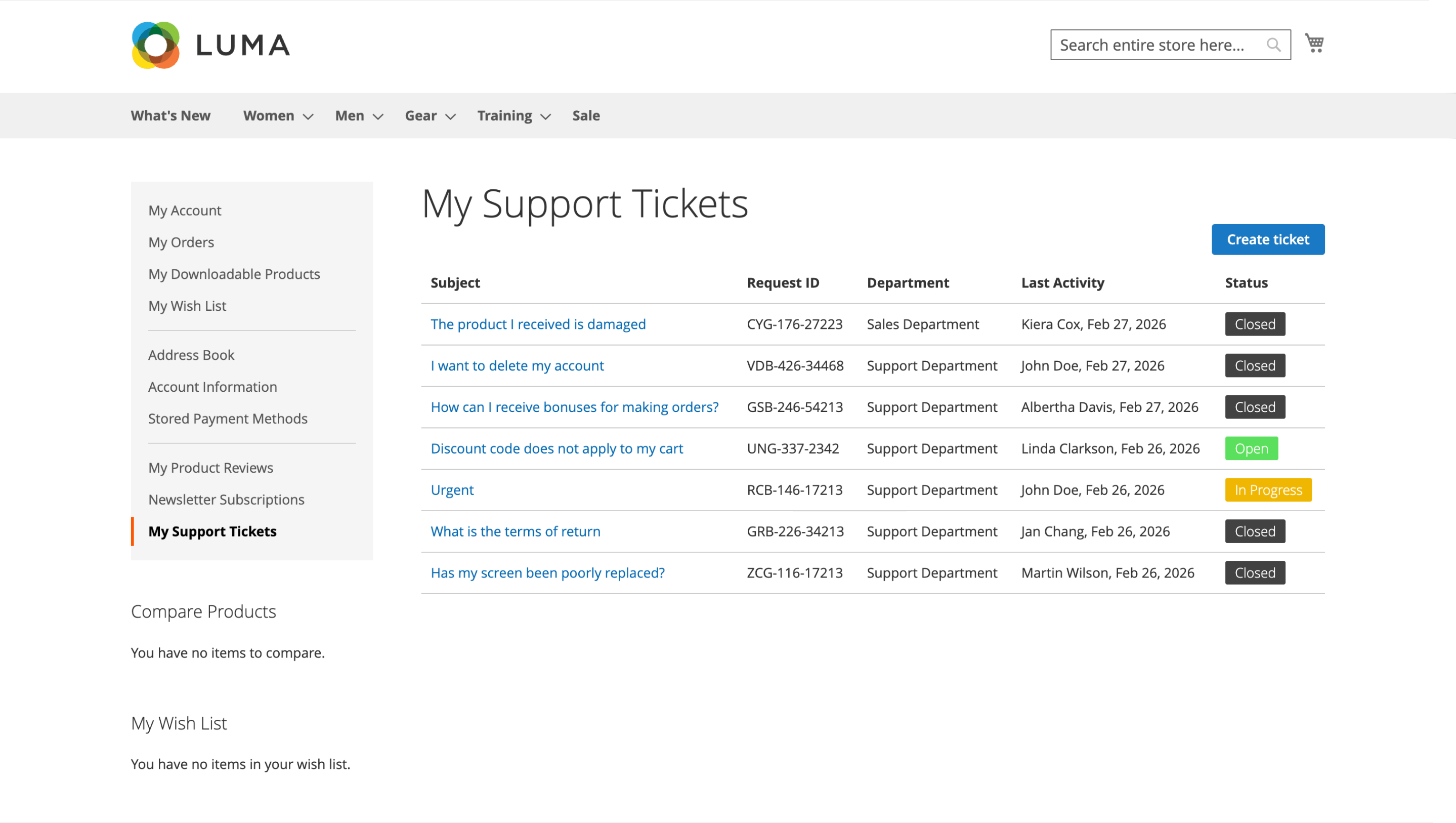
If the tickets section is not visible in the customer account, check Stores > Configuration > Mirasvit Extensions > Helpdesk > Customer Account Settings and make sure Show Help Desk section in customer account is enabled.
Google PageSpeed Optimizer
🔥 Higher-quality responsive image resizing
Responsive images are meant to speed up your store, but they should not make product photos look worse. In the Google PageSpeed Optimizer extension, the resizing algorithm has been improved to keep responsive images much closer to the original quality, with better clarity and fewer blur or compression artifacts on product shots, banners, and high-resolution lifestyle images.
You'll notice it most on mobile, where resized images often take the biggest hit. With the updated algorithm, desktop and mobile versions retain sharper details while still staying optimized for faster loading, which supports a more polished storefront and can positively affect conversion.
Open the settings in Stores > Configuration > Mirasvit Extensions > Google PageSpeed Optimizer > Image optimization > Responsive images.
After updating the module, adjust your responsive image rules (file patterns, desktop width, mobile width), save the configuration, then click Generate to recreate responsive images with the new algorithm and flush Magento cache.
To benefit from the improvement, existing responsive images must be regenerated. The required system libraries are jpegoptim, optipng, gifsicle, webp, imagemagick.
Custom Form Builder
🔥 Per-form sender email identity
Custom Form Builder module includes a new sender email identity setting per form, so notifications do not all come from one generic inbox. For instance:
- Contact Us: [email protected]
- Price Match: [email protected]
- Warranty Claim: [email protected]
That makes emails easier to understand for customers and helps replies reach the right team faster.
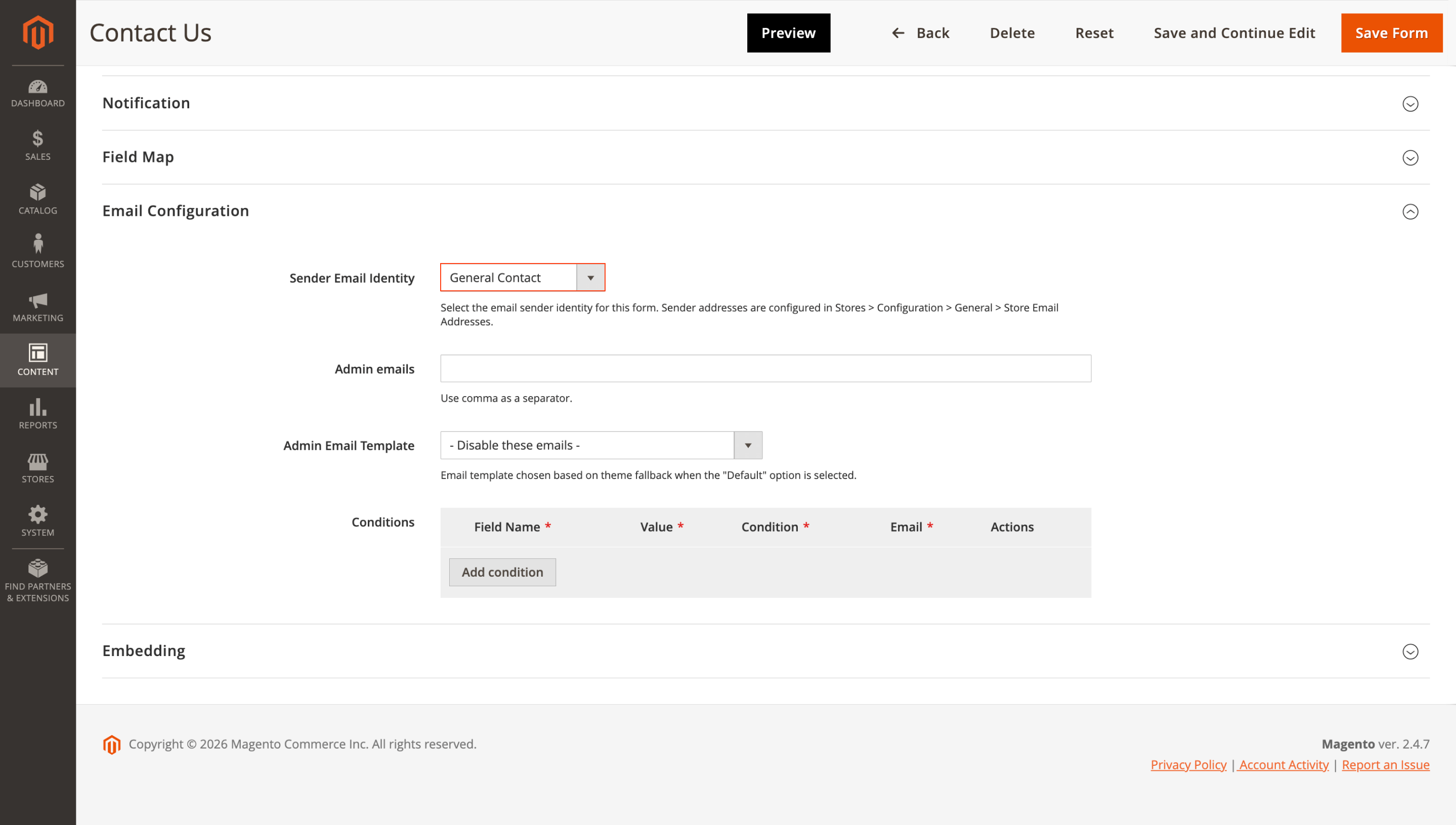
To use this feature, go to Content > Form Builder > Forms > YourForm > Email configuration and select Sender email identity. Sender addresses are managed in Stores > Configuration > General > Store Email Addresses, so add them there first, then save your changes.
Product Attachments
🔥 Product attachment import/export
In this release, the Product Attachments extension gets an Import tool, so you can manage product documents in bulk and migrate them between environments instead of creating records one by one in the admin. It supports bulk creation, updates, and product assignments, which is useful during initial catalog setup, staging-to-production moves, and large documentation updates.
For a large catalog, the difference is immediate: you can import manuals and spec sheets for hundreds of products in one operation rather than setting up hundreds of separate records manually.
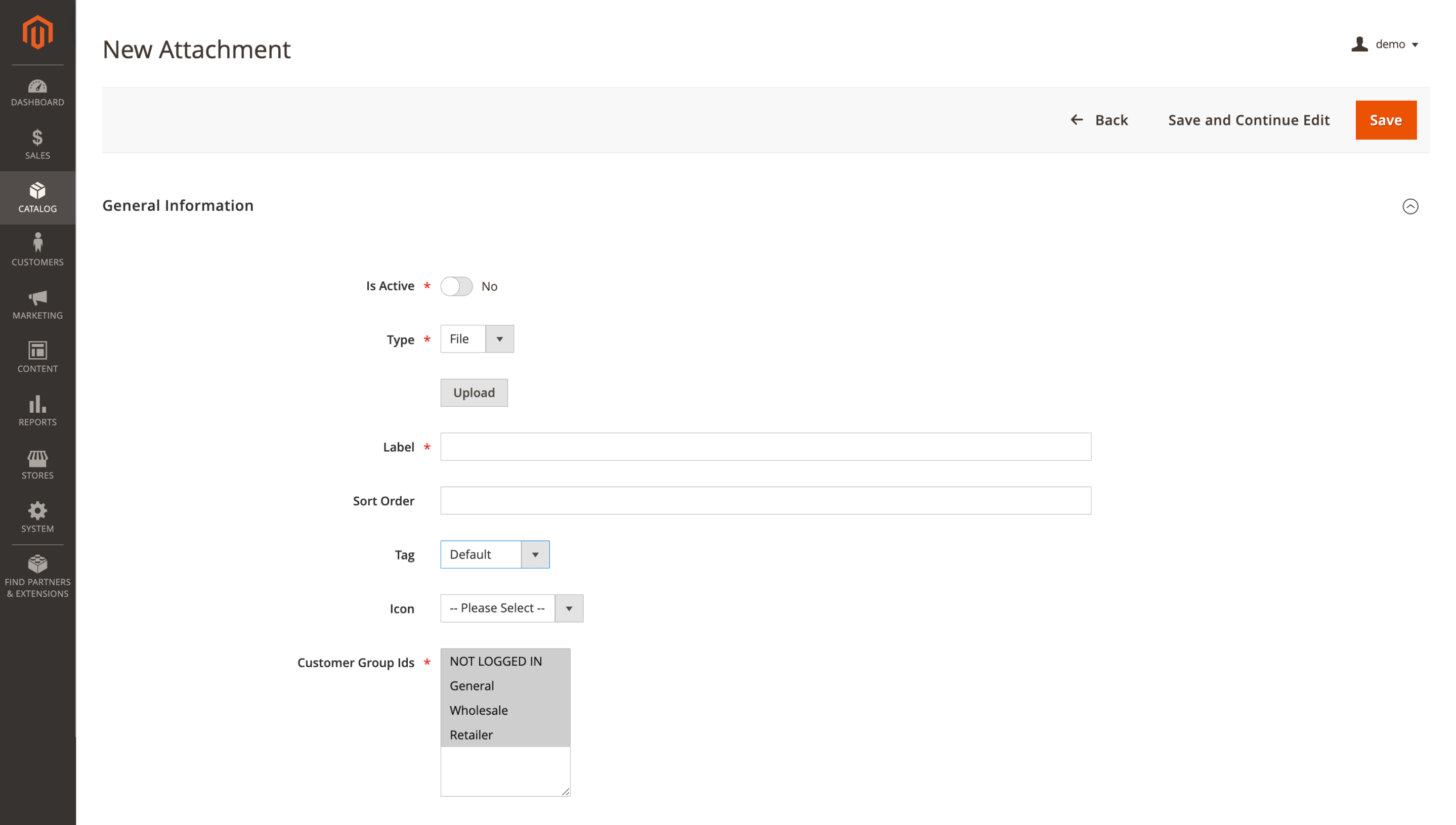
To get started, open Catalog > Attachments > Manage Attachments and use Add Multiple for bulk management. Prepare the import file (name, type, file/URL, product assignments), run the import, then verify the assignments.
Make sure the extension is updated to the latest version to access Import/Export functionality.
Fraud Detection
🔥 GeoLite2-City database refresh
Location-based fraud checks can drift over time as IP ranges get reassigned and geolocation data changes. The Fraud Detection module ships with an updated GeoLite2-City.mmdb database, which improves the accuracy of indicators like Customer Location and Distance and helps reduce false positives.
In practice, this means fewer legitimate orders getting flagged simply because a customer's ISP changed their IP range or the mapping data was outdated.
After updating the module, the refreshed GeoLite2-City.mmdb database is included automatically and works without additional configuration. The only requirement is the geoip2/geoip2 composer package.
Surcharge / Additional Payment Fee
🔥 Kustom checkout surcharge tax data
In the Surcharge & Extra Fee module, taxable surcharges now appear correctly in Klarna's Kustom checkout when your catalog is set to prices including tax. The surcharge amount and its tax portion are transmitted properly, so Magento and Klarna show matching totals and customers do not see confusing differences at the final step.
This matters for common fees like a small COD handling surcharge: fewer discrepancies at checkout, less friction, and cleaner tax calculations.
To use the fix, update the extension to the latest version and make sure the surcharge is marked Taxable in Stores > Surcharges > YourSurcharge > General Information. The change works automatically with Kustom checkout and does not require additional settings.
This applies only to Kustom (Klarna) checkout and only to taxable surcharges when catalog prices are configured to include tax.
That wraps up the March highlights. If you'd like to explore more ways to improve your store, browse our Magento 2 extensions and see which tools best match your current priorities.
Mirasvit Support Engineer
Promote your products and achieve higher sales by using the power of marketplaces and comparison shopping engines with magento data feed extension. You can automatically generate and deliver feeds of your product catalog to those services with Magento Product Feeds extension.
This tool is unbelievably quick to use and is also outstandingly flexible. It's compatible with all major shopping and advertising services, including Google Shopping.
Feeds go straight to Google Merchant Center through Google's API, and AI profiles can rewrite titles, map Google categories and fill in missing attributes before your catalog ever reaches a marketplace.
Simply install the module, generate your very own product feed, present your catalog to a wider audience, and boost your sales right now!
Turn store events into email: abandoned cart reminders, review requests, win-backs, birthday greetings and order follow-ups, each triggered automatically and each reported with the revenue it brought in.
From meta tags to the sitemap, the Magento 2 SEO Extension gives you full control over every SEO-related feature in your store.
It automates the SEO work you'd otherwise do by hand - templated meta tags, rich snippets, redirects, sitemaps, cross-links and a built-in SEO audit - across every page type. That is why 2,435+ Magento stores rely on it.
A help desk built into your Magento admin. Customer emails and contact forms become tickets, routed to the right department and agent, with workflow rules, satisfaction surveys, reports and AI tools. Every ticket shows the customer's orders and earlier tickets.
Blog MX runs your blog inside Magento, with Page Builder posts, comments, and SEO checks in the admin you already use. Every post, category, author, and tag can differ per store view.
Every order in your Magento store gets a fraud risk score from 0 to 100 and lands in Accept, Review or Reject. Risky orders can go on hold automatically, and a known fraudster can be locked out of checkout.
Custom rules use order, customer, address and payment data, including the 3D Secure result. Everything runs inside Magento, with no external fraud service and no per-order fees.
Run your own affiliate program in Magento 2, without paying an affiliate network a cut of every commission. Affiliates promote your store with referral links, product links, banners, widgets and coupons, and earn per sale, click, lead or banner impression.
You set the rates by program, affiliate group and first or repeat order, see how each commission was calculated, and pay affiliates through PayPal, Skrill, your own method or store credit.
Add customer segments to Magento Open Source and Adobe Commerce: describe a group of customers with rules based on orders, carts, wishlists and viewed products, and the extension keeps the list of registered customers and guests who match.
Use a segment in cart price rules, newsletters, Follow Up Email and Reward Points, or move its customers to a customer group automatically.
Google PageSpeed Optimizer speeds up Magento 2 for Core Web Vitals: it bundles and delays JavaScript, applies critical CSS per page type, converts images to WebP and lazy-loads them without delaying the main image.
Built-in PageSpeed Insights monitoring shows how each change affects the desktop and mobile score of your pages. Works with Luma and Hyvä themes.
Build contact forms, product enquiries, applications and surveys in a drag-and-drop editor, without coding. Route each submission to the right team, send the customer a copy, and keep every answer in the Magento admin with statuses, notes and CSV export.
Attach PDF manuals, datasheets, certificates and links to Magento 2 products, categories and CMS pages, and show each file only to the customer groups and store views it's meant for.
Add files one by one, from the page you're editing, in a multiple upload or by CSV import, and see how often each file is downloaded.
Keep your base prices low and add an extra fee only to the orders that cost more to serve: Cash on Delivery and card payments, small orders, heavy parcels, bulky products or express shipping.
Each fee rule has its own conditions, rate and label. Charge a fixed amount, a percentage or a rate per product, item or unit of weight, set minimum and maximum limits, and show every fee as a separate line in the cart, checkout, emails and invoices.
The Magento MCP server gives AI assistants access to your real Magento store data, so your team can ask questions and complete tasks without switching between admin grids and exports. It works with Magento 2 and Adobe Commerce and connects to ChatGPT, Claude, Gemini, or any other MCP-compatible AI client.