Mirasvit Latest Updates — December 2025
-
 Andriy Kovalenko
- Our News & Updates
- Dec 1, 2025
- 11 min read

In the latest module updates, we improved several everyday store workflows: how customers move through the catalog, how you control data exports, and which products they see first.
The largest set of changes landed in the Layered Navigation for Magento 2 extension. As a result, brand pages adapt better to each store view, and mapping filters to categories and working with grouped options in the admin take less time and produce fewer errors, even in stores with strict CSP settings.
In Advanced Product Feeds for Magento 2, it is easier to catch feed issues in time. During rule import, the module validates data more strictly, highlights templates and feeds with invalid settings, and prevents you from saving empty or obviously broken configurations. As a result, you see most issues on the configuration screen rather than after data has already been sent to marketplaces and aggregators.
The Improved Sorting for Magento 2 module updates give you more control over which products customers see first in search and promo blocks. Sorting scenarios from the extension can now be applied both to PageBuilder blocks and to autocomplete in fast mode, so promo, high-margin, or new items move higher without additional development.
In the rest of this article, you'll find detailed descriptions of all changes and short tips on how to enable them in your store.
Table of Contents
- Improved Sorting
- Layered Navigation
- Elasticsearch Ultimate
- Backend Search
- Custom Form Builder
- Extended Shopping Cart Rules
- Affiliate
- Order Management
- Advanced Product Feeds
Improved Sorting
This update brings two enhancements to the Improved Sorting for Magento 2 module.
🔥 Product sorting in PageBuilder blocks
You can now apply advanced sorting options to product blocks you add via PageBuilder. In the block settings, simply choose the desired scenario in the Sort By field to define the order of products in the block.
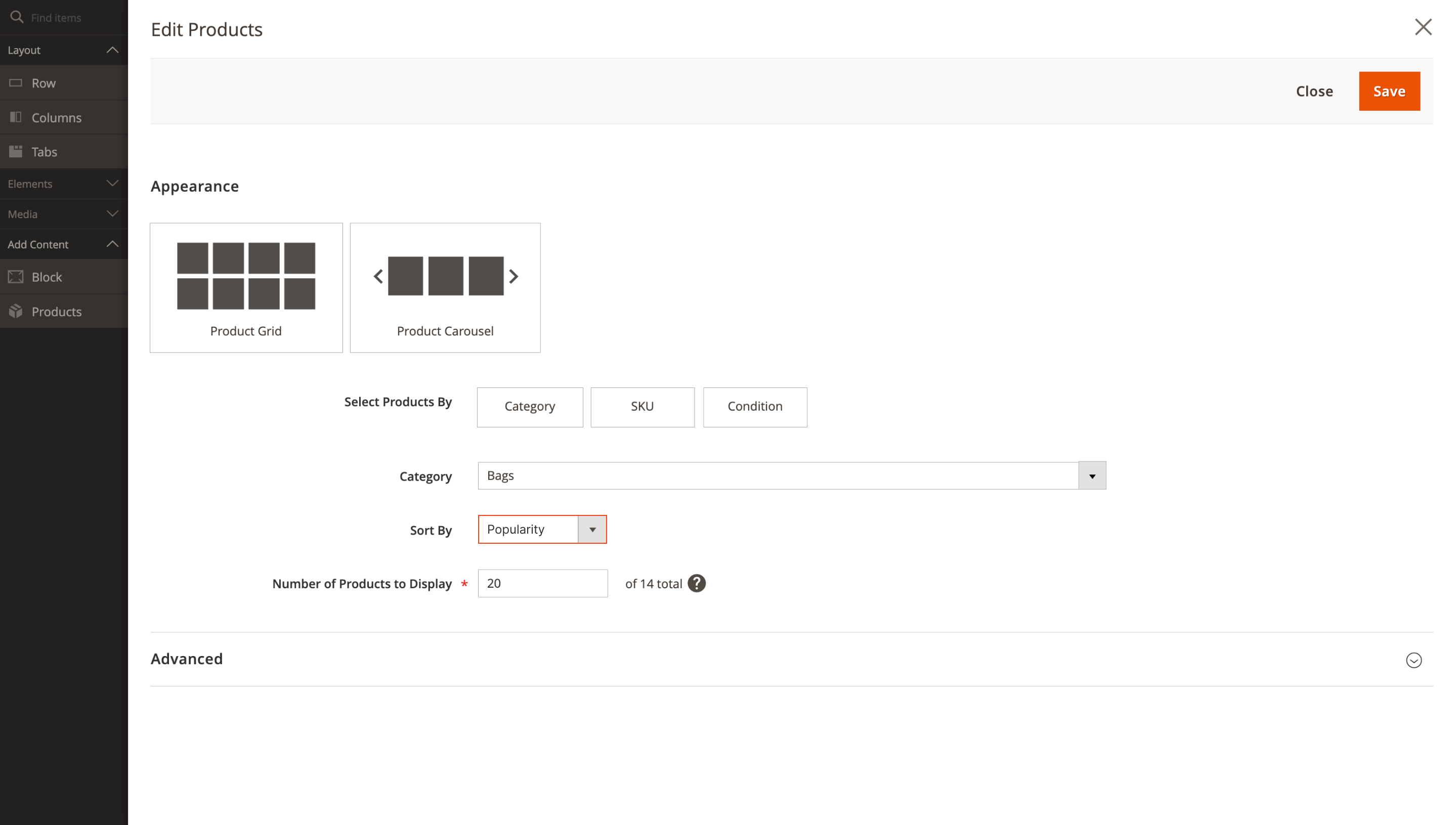
As a result, you can quickly build promo blocks without involving developers: bestsellers, discounted items, or new arrivals appear at the top, and customers immediately see the offers you want to focus on in the current campaign.
🔥 Consistent product sorting in autocomplete fast mode
Suggestions now show products in the same order as the main search results, even when fast mode is enabled in Search Autocomplete. Previously, in this mode autocomplete ignored your sorting rules, so the sequence of items in the suggestions dropdown could differ from the search results page.
In the updated version, the default search criterion and global prioritization factors also apply to the dropdown list, so the search box and results page stay in sync, and customers immediately see the products that are a priority for your store.
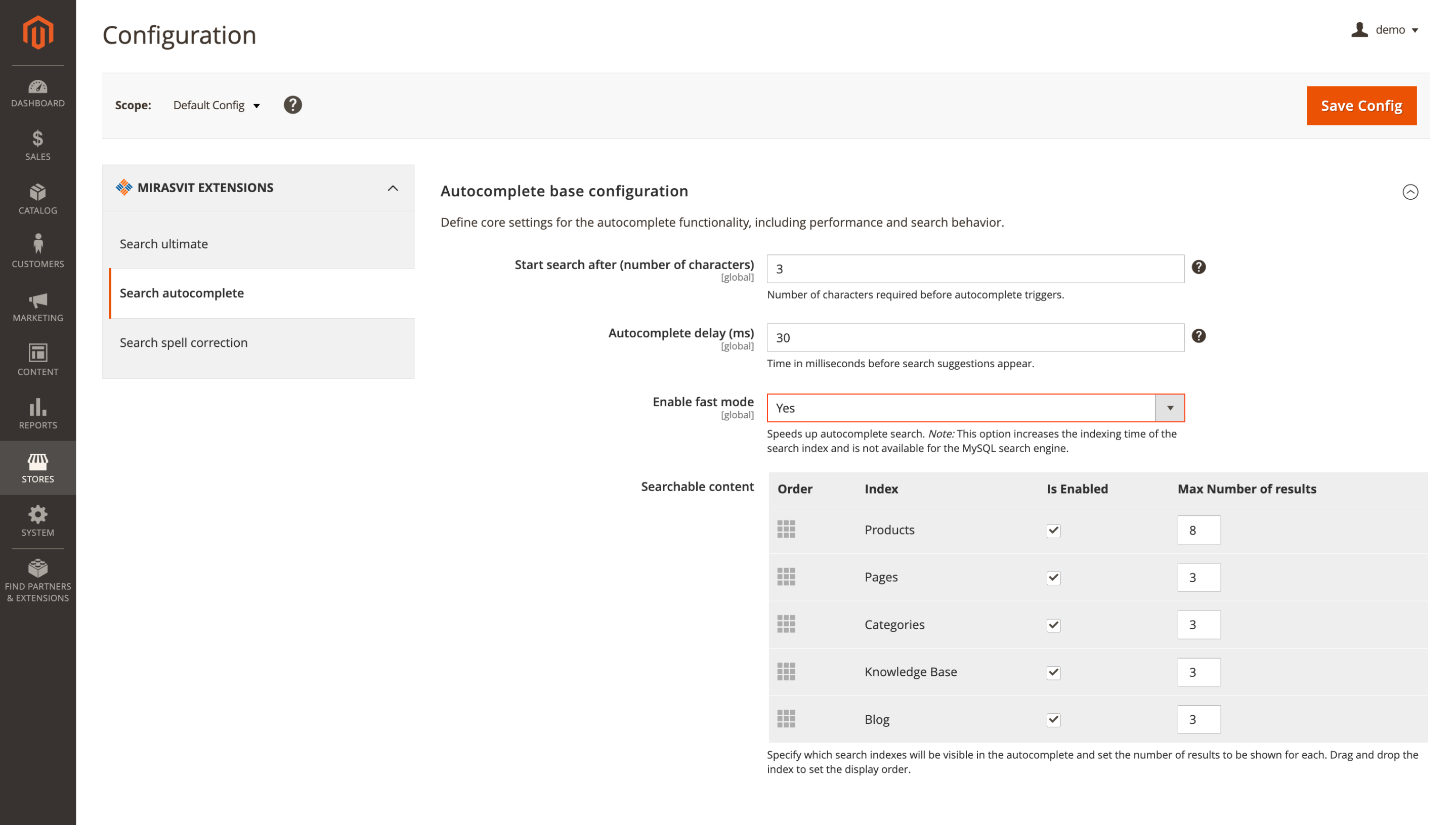
To make sorting work in autocomplete, set Enable fast mode to Yes in Search Autocomplete and run a reindex.
Layered Navigation
The Layered Navigation for Magento 2 extension received five improvements around brand pages, filter management, and CSP compatibility.
🔥 Brand page URL key per store view
The URL structure of brand pages is now more flexible: you can set a separate URL key for each store view. This is useful if you have multiple languages or storefronts, as brand URLs can adapt to a specific store while staying logical for customers and clear for search engines.
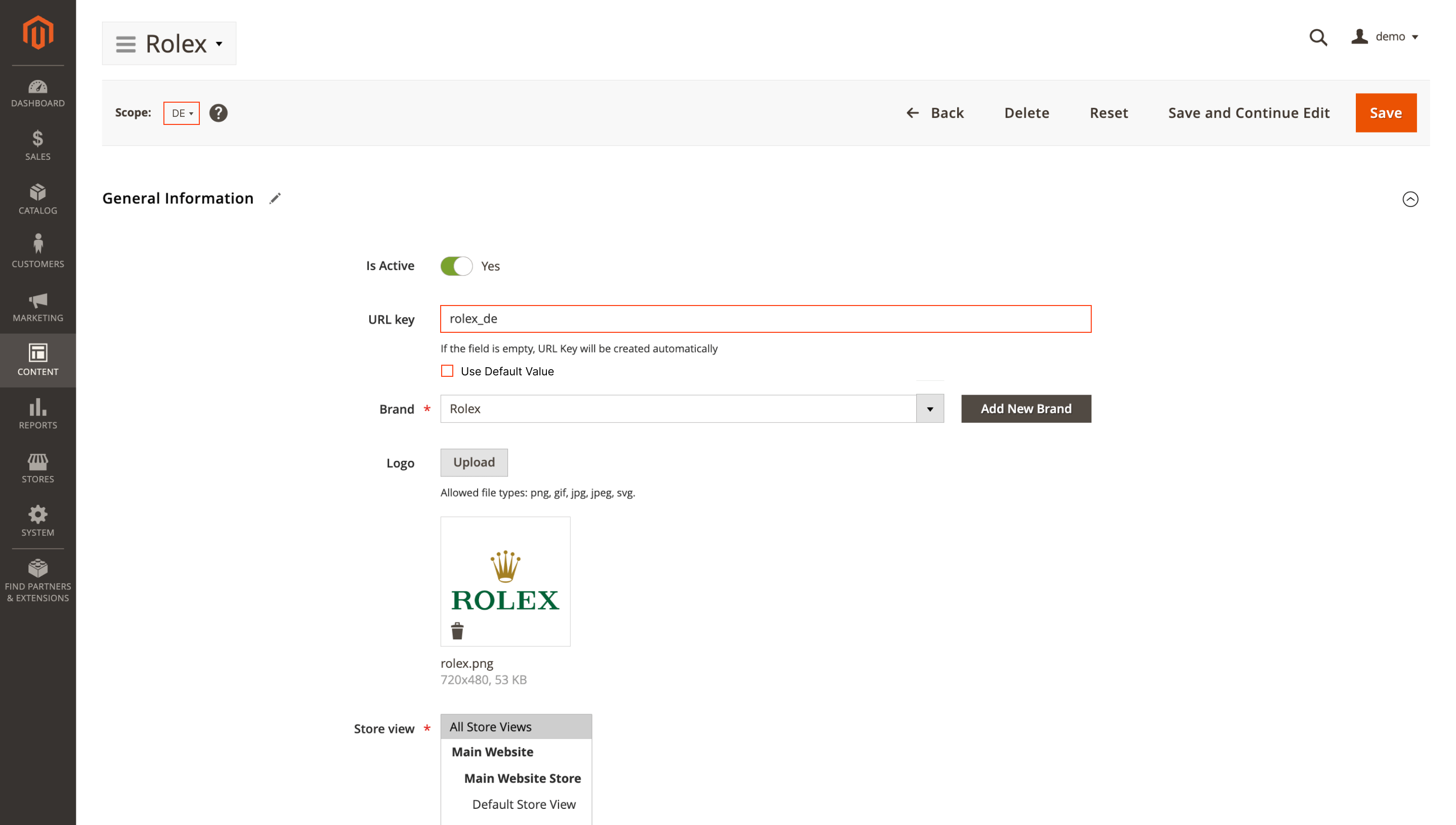
To configure the URL for a particular store, switch to the required store view in the admin panel and set the value in the URL key field on the brand page.
🔥 Minimum product count for More From Brand block
When a brand has only one or two products, the More From Brand block on the product page looks almost empty and does not really help sales. The Minimum Number of Brand Products setting lets you define the minimum number of items required for this block to appear at all.
If a brand has enough products, the customer sees a full selection from that line. If the count is below the threshold, the block simply does not appear, and the page stays clean and focused.
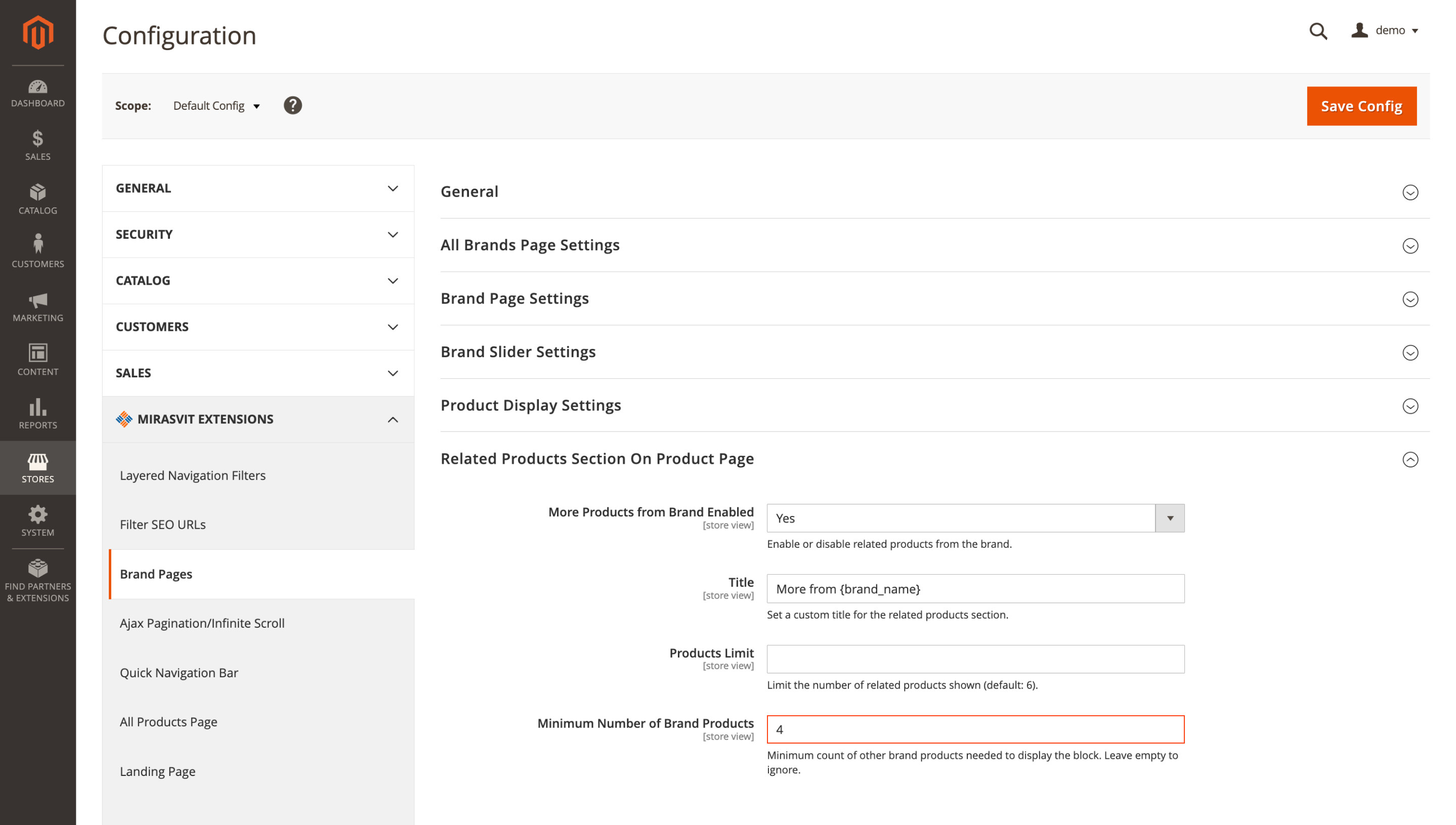
To use this option, go to Content > Brand Pages > Brand Settings > Related Products Section On Product Page > Minimum Number of Brand Products.
🔥 Category tree for the Categories attribute
Managing where in the catalog a particular filter appears is now easier. In the attribute edit form, the standard multiselect in the Categories field has been replaced with a category tree (JStree).
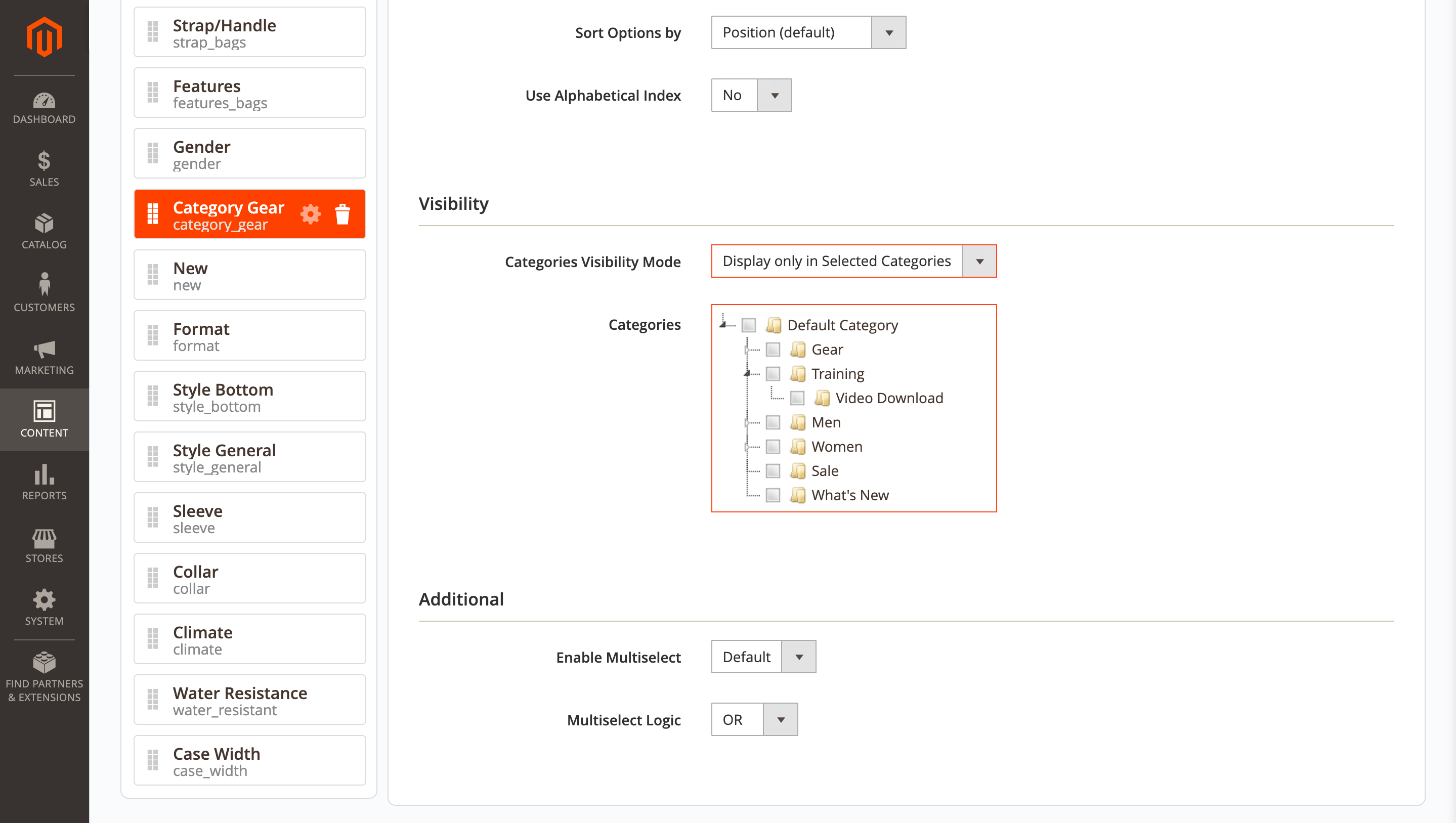
The category structure is displayed hierarchically: you expand the necessary branches, select parent or child categories, and immediately see where the filter will be available and where it will be hidden. This reduces configuration time and helps avoid mistakes in large catalogs.
🔥 CSP compatibility
If you harden your store's security with Content Security Policy (CSP), the Layered Navigation extension will still work correctly in that configuration.
The module supports a nonce for <script> tags, so you can enforce stricter content security rules without risking CSP warnings or broken navigation elements.
🔥 Attribute and title filters in Grouped Options grid
On the Grouped Options page in the admin panel, it is now easier to work with large lists of grouped values: you can narrow the list by the Attribute and Title fields instead of scrolling through dozens of rows manually.
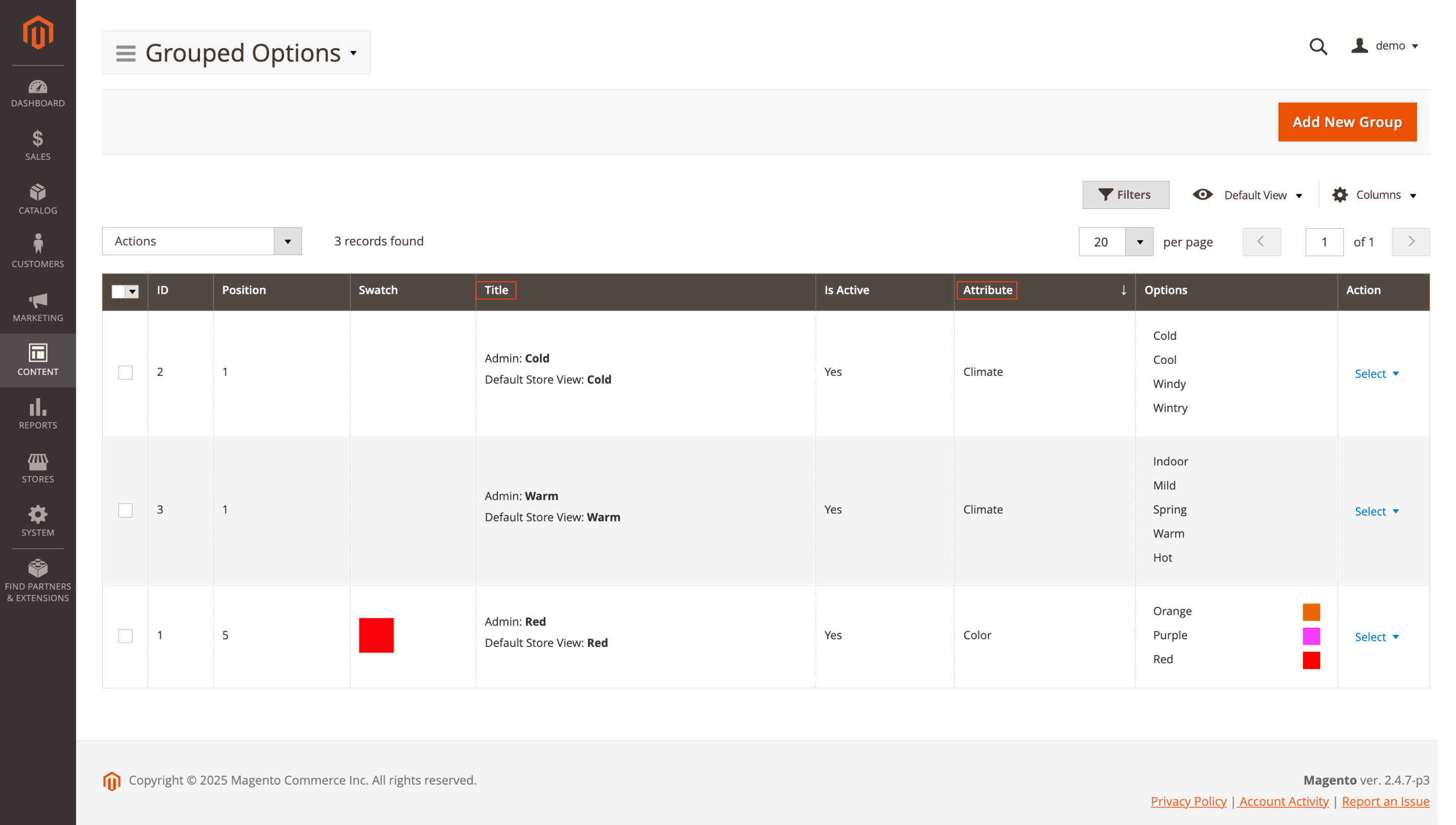
This is especially useful for catalogs with many option groups. You can find the records you need in a few seconds, so updating them takes less time and reduces the risk of errors.
Elasticsearch Ultimate
🔥 Advanced sorting rules in autocomplete fast mode
The Elasticsearch for Magento 2 extension now supports the Improved Sorting module in autocomplete fast mode.
Advanced sorting rules are applied to the results in the dropdown: autocomplete takes into account the base search criterion and global prioritization factors, so customers immediately see the products that matter most to your store at the top.
To start using fast mode, go to Stores > Configuration > Mirasvit Extensions > Search Autocomplete > Autocomplete Base Configuration, set Enable fast mode to Yes, save the configuration, and run a reindex.
🔥 Multilingual synonyms validation
Synonym handling when you create or edit search rules has become more accurate. The updated validation logic correctly processes the full range of Unicode characters, so you can safely work with multiple languages, diacritics, and mixed entries within a single rule.
Support for this is built into the module; you only need to update it to the latest version.
Backend Search
🔥 M2E Pro marketplace orders in admin search
Orders from M2E Pro marketplaces no longer fall out of the picture: the Backend Search for Magento 2 extension now finds them together with regular orders.
The following types are now included in admin search:
- M2EPro Amazon Order
- M2EPro Ebay Order
- M2EPro Walmart Order
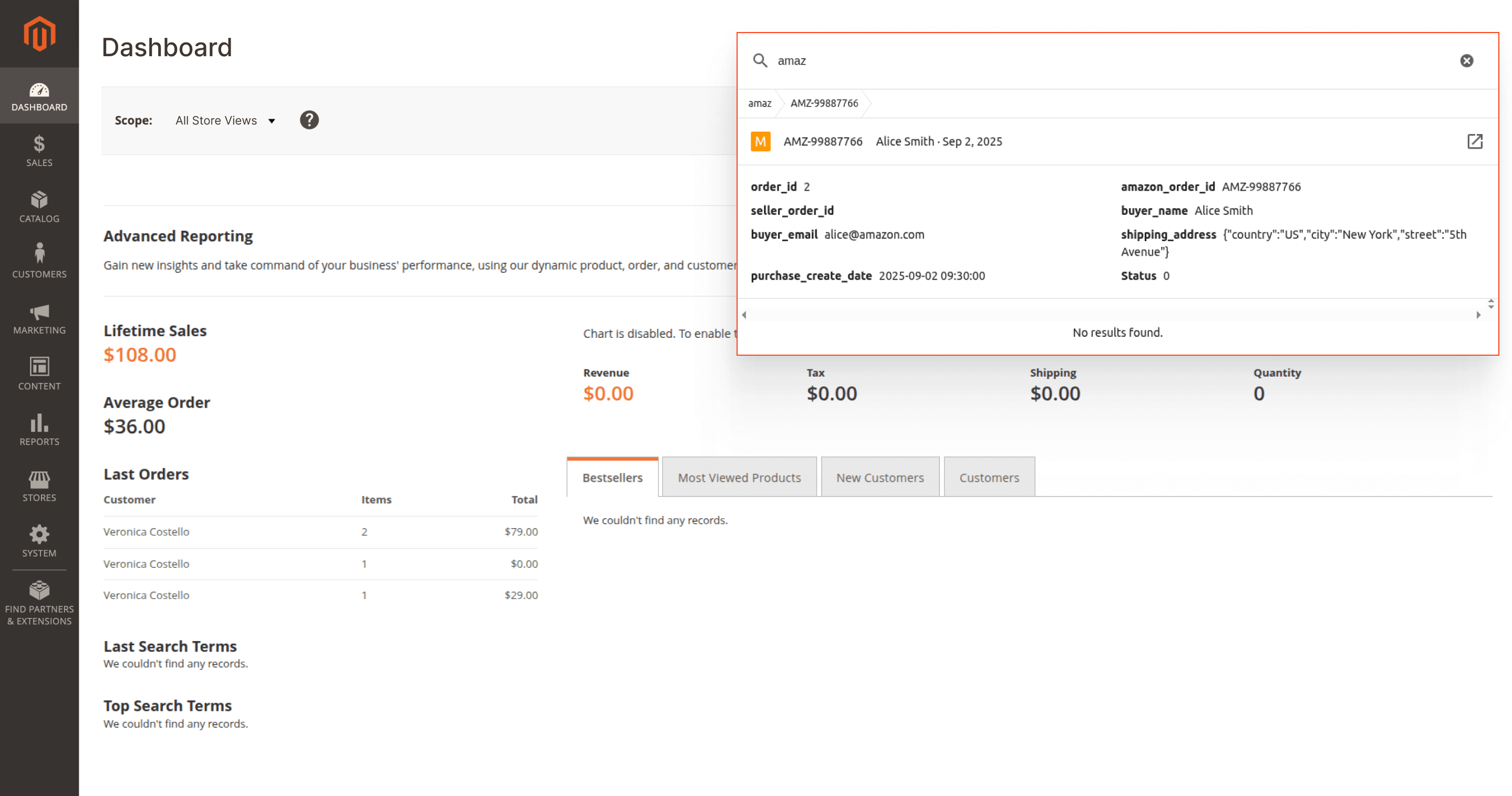
This is especially convenient if you sell on several marketplaces and handle all orders in a single admin panel: you can quickly locate the needed order from Amazon, eBay, or Walmart, check the details, and respond to the customer without switching between interfaces.
🔥 OpenSearch client detection in admin search
Search has become more stable for installations that use OpenSearch as the search engine. The module more accurately detects which client to use for processing a query, reducing the risk of incorrect results or errors in the admin search.
Both features work out-of-the-box once you update the module to the latest version.
Custom Form Builder
🔥 Inline HTML for help text and choice options
Support for safe HTML markup has appeared in the Custom Form Builder for Magento 2 extension for help text and choice options, so you can highlight important phrases, add links, and emphasize key parts directly inside the form without custom development.
The list of supported elements includes a, span, i, b, strong, em, q, code, mark, abbr, sub, and sup. You can use them in the following parts of the form:
- In Help text for all fields (Text input, Text area, Select, Choice list, File, Autocomplete), you can make hints next to fields clearer by adding links, highlights, and short explanations.
- In options for Choice list, you can emphasize parts of the text or add a link directly in the answer choice, for example, a checkbox
I accept the terms of servicewith a link to the license agreement.
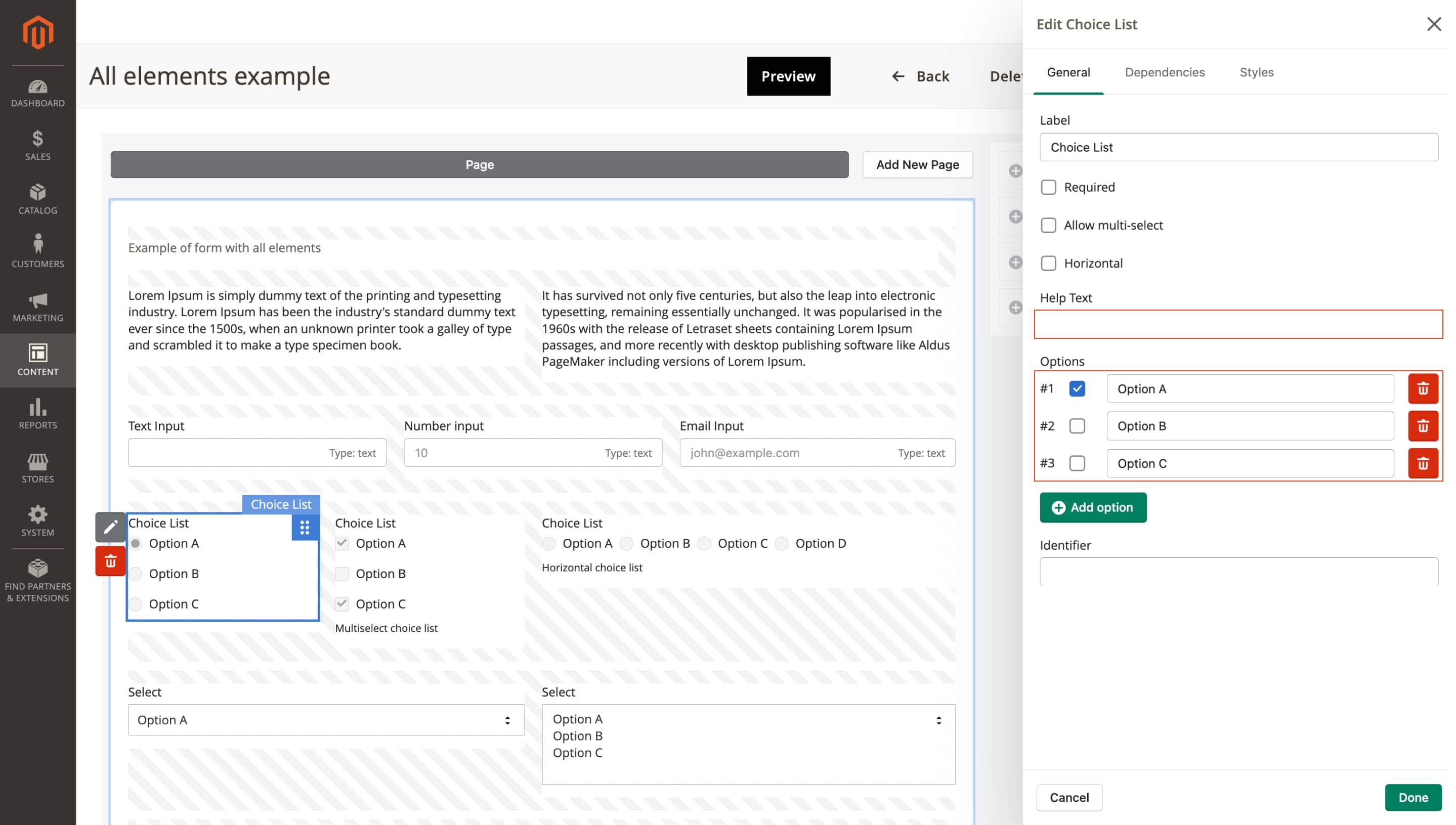
This update helps keep your forms clean and easy to understand without involving developers, place legally important links and key hints exactly where users will notice them, and generally make working with forms more transparent and convenient for your customers.
Extended Shopping Cart Rules
🔥 Free Shipping for custom cart rules
In the Extended Shopping Cart Rules for Magento module, the standard Magento 2 Free Shipping method now applies to all custom cart rules.
This lets you include free shipping in any advanced promo scenarios configured in the module, such as:
- Discount for every X spent in the cart
Buy product A, get product Bpromotion- Discount on the most expensive or the cheapest item in the cart
- Rule that applies only to a specific customer segment, product category, or their combination
- Conditions that take into account the customer's purchase history, customer attributes, or product attributes
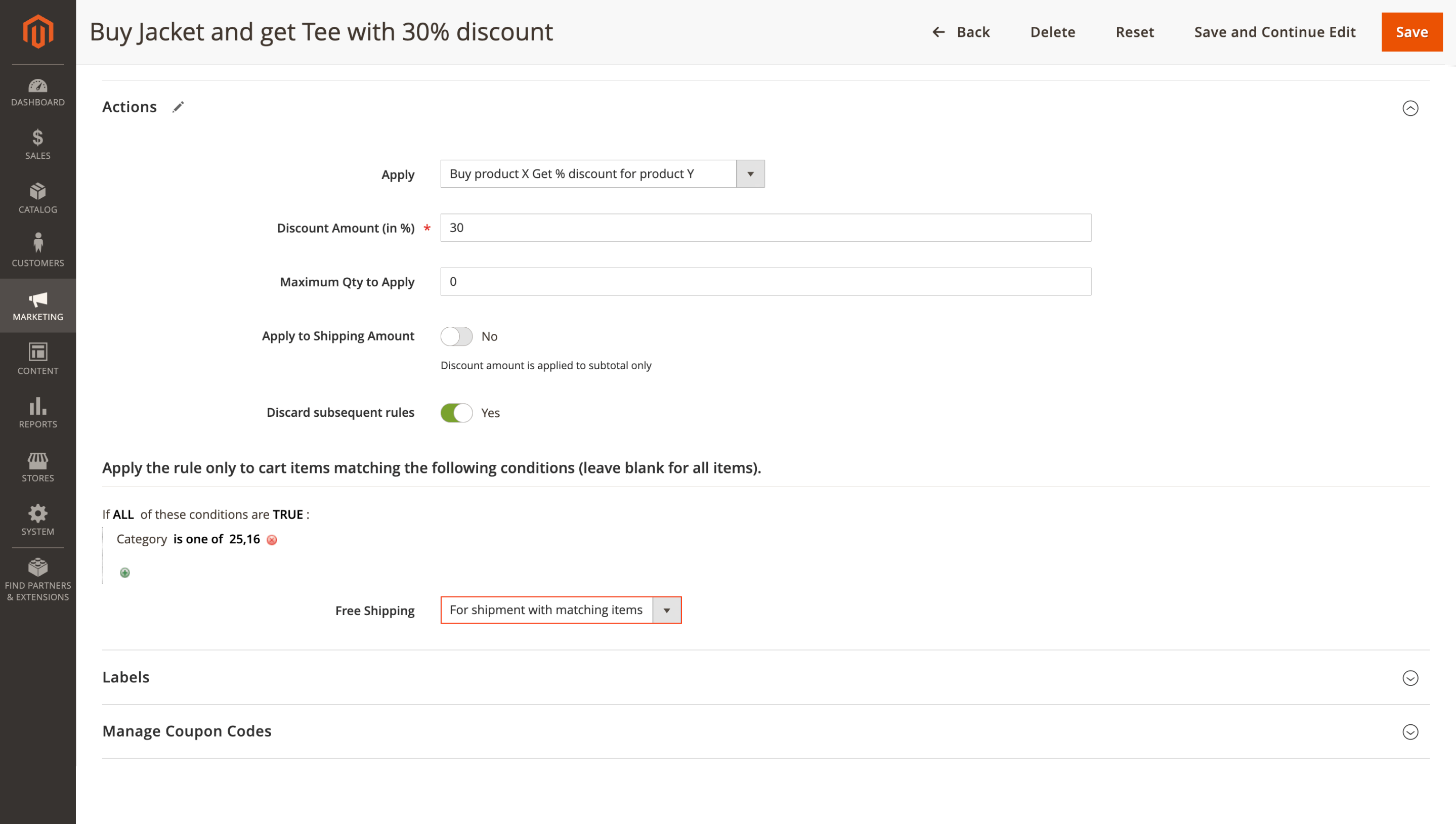
To use Free Shipping, go to the Magento settings and configure the trigger conditions (for example, a minimum order amount): Stores > Configuration > Sales > Shipping Methods > Free Shipping.
With this setup, you can:
- Run targeted promotions with free shipping
- Motivate customers to increase their cart value
- Manage marketing campaigns flexibly without involving developers
- Increase conversion and average order value with personalized rules
Any advanced cart rule can now automatically assign free shipping, which is convenient and flexible and supports sales growth.
Affiliate
🔥 Affiliate balance and On Hold columns
In the Affiliate for Magento 2 extension, we have grouped the key metrics of an affiliate account into a single block at the top of the card. The statistics, which previously included only Clicks, Leads, Impressions, and Sales and were shown after the Programs section, have been extended with the Balance and On Hold columns.
Now you can see at a glance how much money is already available for payout and how much is still on hold, without scrolling the page or hunting for these values in different places.
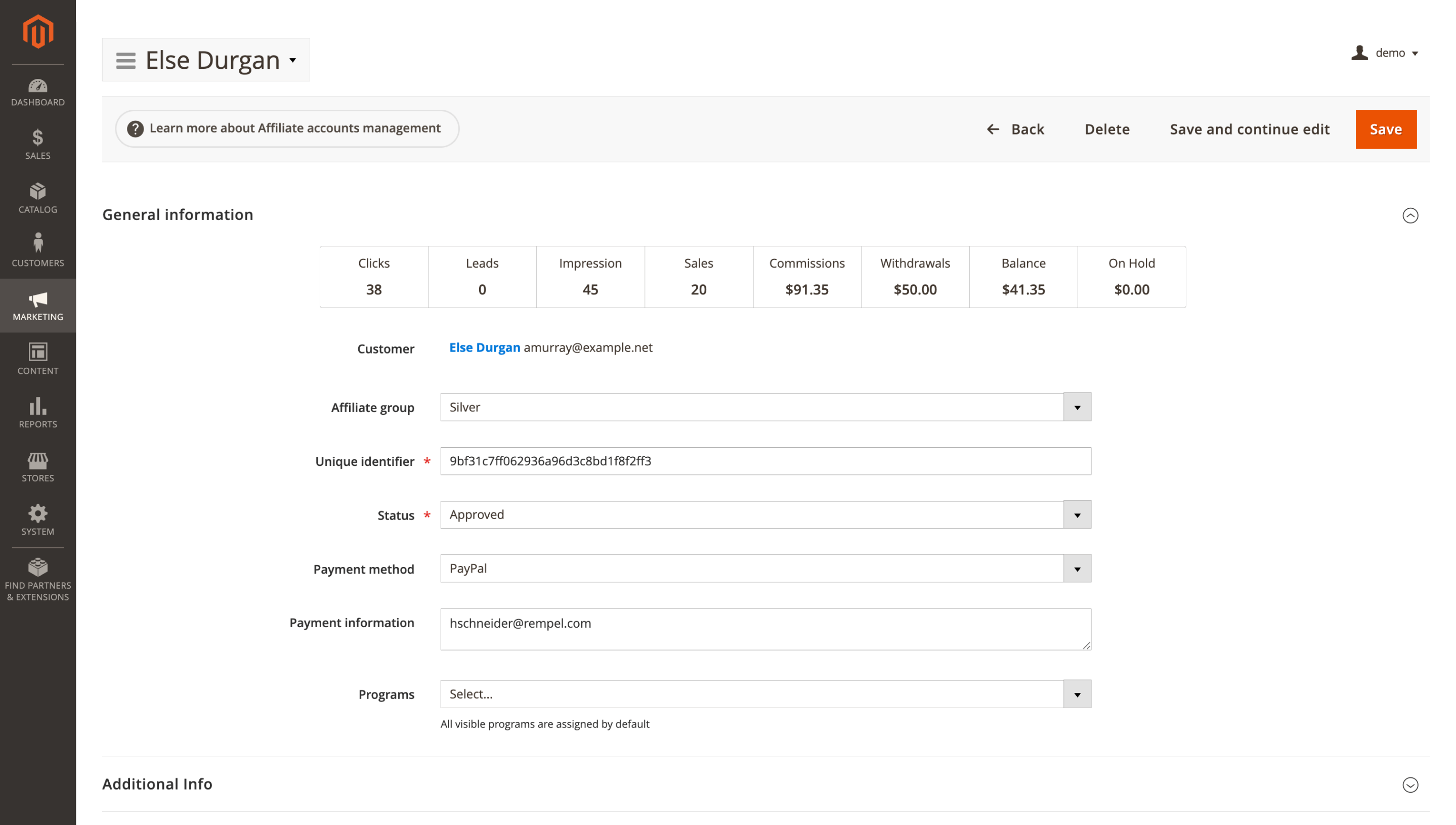
To view the updated block, open an affiliate account under Marketing > Affiliates > Accounts. The statistics will appear immediately in the General Information section.
🔥 Additional Info block for extra account fields
The separate Additional Info block organizes all data from Additional account fields and separates it from the basic account details. Instead of a single long General Information section, you have two clear areas: the standard account fields and additional parameters specific to your affiliate program.
This is especially helpful when you have many additional fields: it is easier to scan the information without getting lost in a long list, and you immediately see which values are system ones and which you added for your own processes.
To see the updated structure, open an affiliate account in Marketing > Affiliates > Accounts. The Additional Info block is located right after General Information.
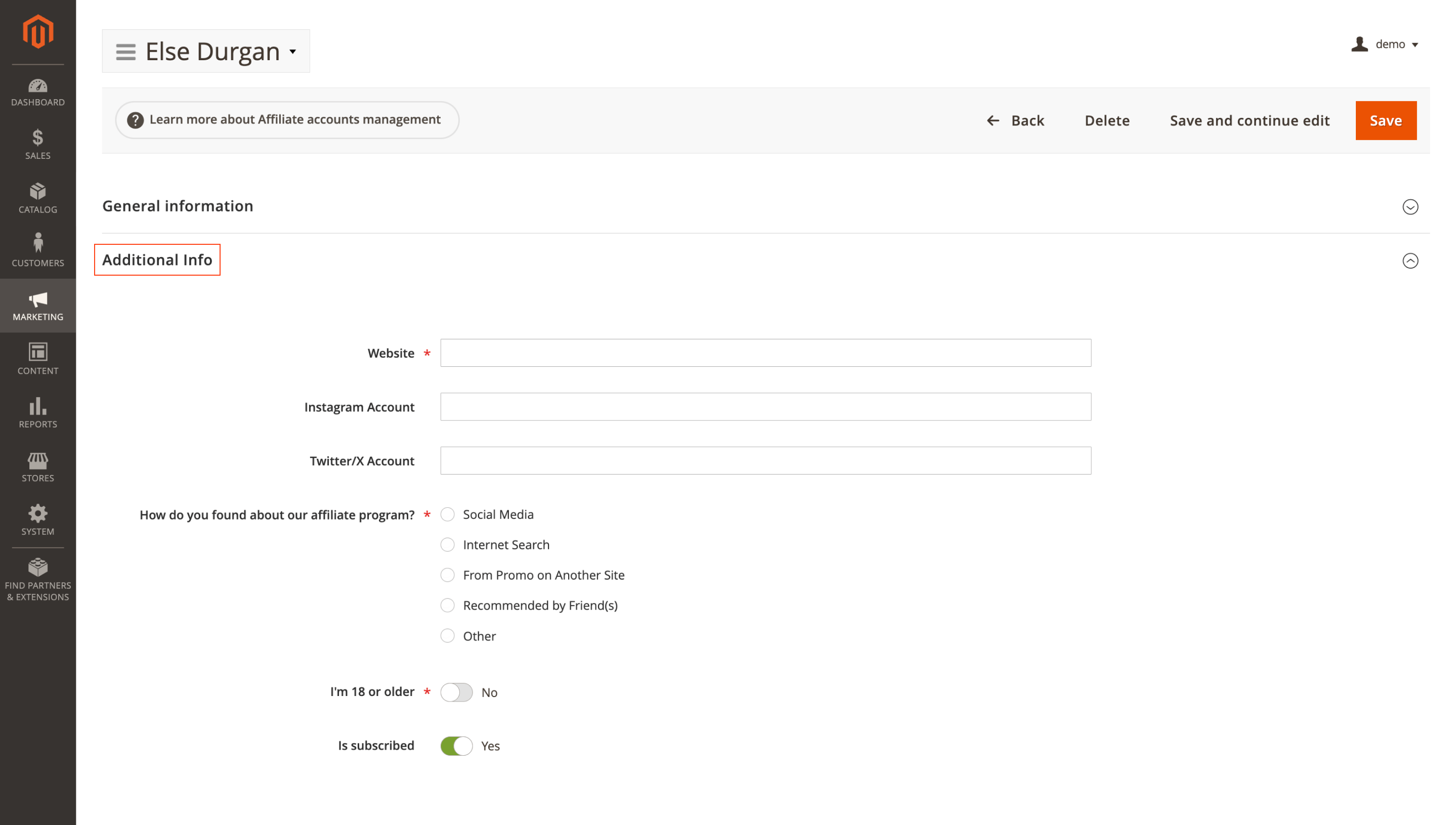
You can configure additional fields in Marketing > Affiliates > Additional account fields.
Order Management
🔥 Centralized quote handling
In the Order Management for Magento 2 extension, cart (quote) handling has been moved to a dedicated QuoteService that is used across all extension processes.
Carts are created, retrieved, and saved through a single mechanism, so order processing becomes more stable and predictable.
The service covers the main scenarios:
create(): creates a new quotegetQuote(Order $order): returns the cart associated with a specific ordersave(Quote $quote): saves the changes made
As a result, you encounter technical issues less often, and maintaining and evolving your order-processing flows becomes easier.
Advanced Product Feeds
🔥 Feed validation and quality control
In the latest version of Advanced Product Feeds for Magento 2, it is easier to keep exports under control: you see potential issues earlier and can quickly tell which feeds are ready and which still need work.
The module performs more checks during validation rule import: links to non-existent templates have been removed, and error handling has been added. If there is an issue in the data, you receive a clear message instead of an interrupted process, so you can find and fix the problematic spot faster.
Thanks to the new Validation Rules column in the template list, you can immediately see where rules are already configured and where they are still missing.
The Quality Control block on the feed edit page has become more prominent and is duplicated in the feed list, which makes it easier to review the overall status: which feeds are ready and which still require attention.
On the New Feed page, a Custom Feeds section appears next to Popular Feeds, collecting your own templates so you can quickly start from an existing preset. The Save and Continue button becomes active only after a template has been selected, and Validate stays visible at all times and shows a clear message if validation is currently unavailable.
Together, these changes reduce the risk of accidental empty saves and help you catch potential issues before the export runs.
That's all for the December updates we wanted to share. Make the most of the new features; they will help streamline your store's daily work and improve overall performance.
If you're already using our Magento 2 modules and run into any difficulties, or if you haven't yet chosen a module and would like advice on what best fits your current goals, reach out to our support team, and we'll be happy to help.
Mirasvit Support Engineer

Publication of your products in the comparison shopping engines will allow you to attract more new buyers to your store. This extension allows you to automatically generate a feed with products for all common comparison shopping engines (Google Product Search, Shopping.com, Nextag.com, Twenga.co.uk, etc.).
Run your own affiliate program in Magento 2, without paying an affiliate network a cut of every commission. Affiliates promote your store with referral links, product links, banners, widgets and coupons, and earn per sale, click, lead or banner impression.
You set the rates by program, affiliate group and first or repeat order, see how each commission was calculated, and pay affiliates through PayPal, Skrill, your own method or store credit.
Fast, relevant store search lifts conversion rate and revenue.
It powers search for thousands of Magento stores, from catalogs of a hundred products to millions of SKUs.
The Elasticsearch extension returns relevant results within milliseconds, across products, categories, CMS pages, and 15+ other content types.
Give customers search that helps them find and buy the products they want - faster and with fewer dead ends.
AJAX layered navigation for Magento 2 with multi-select filters, price sliders and SEO-friendly filter URLs.
The same extension adds brand pages, an "All Products" page, landing pages, smart filters and infinite scroll, with Hyvä support built in.
Magento's native cart price rules can't give a different product free with a purchase, discount the cheapest item in the cart or every second item, or sell a product for a fixed price in a promotion.
Extended Shopping Cart Rules adds 14 new actions to the same cart price rules, conditions by order history and customer attributes, and promo banners that tell shoppers how to get the discount.
Improved Sorting lets you decide which products shoppers see first on category pages, search results and catalog widgets. Combine signals like sales, rating, stock, margin and newness into one sort order, pin chosen products to the top, and push out-of-stock items and products without images to the end.
Build contact forms, product enquiries, applications and surveys in a drag-and-drop editor, without coding. Route each submission to the right team, send the customer a copy, and keep every answer in the Magento admin with statuses, notes and CSV export.
This Magento 2 order management extension lets you fix a placed order without canceling it and re-entering everything.
Edit items, prices, taxes, discounts, the coupon, shipping and payment methods, the shipping address and customer details, even on invoiced orders: if the total goes up, the customer gets a link to pay the difference. Merge or split orders, add product, billing and shipping columns to the orders grid, tag orders by rules and set custom numbers for orders, invoices, shipments and credit memos.
Admin Quick Search for Magento 2 adds one search box to the Magento admin panel that finds orders, customers, products, invoices, shipments, settings and Help Desk tickets as you type.
The default admin search needs exact values and pauses after every character. Ours matches any fragment and returns results while you type, because requests go straight to Elasticsearch or OpenSearch.
Find an order by the customer's phone, postcode, street or company, by the SKU of an ordered item or by a comment. Amazon, eBay and Walmart orders imported by M2E Pro are in the same search. Used by 500+ Magento stores.