
Mirasvit Latest Updates — January 2026
-
 Andriy Kovalenko
- Our News & Updates
- Dec 31, 2025
- 9 min read

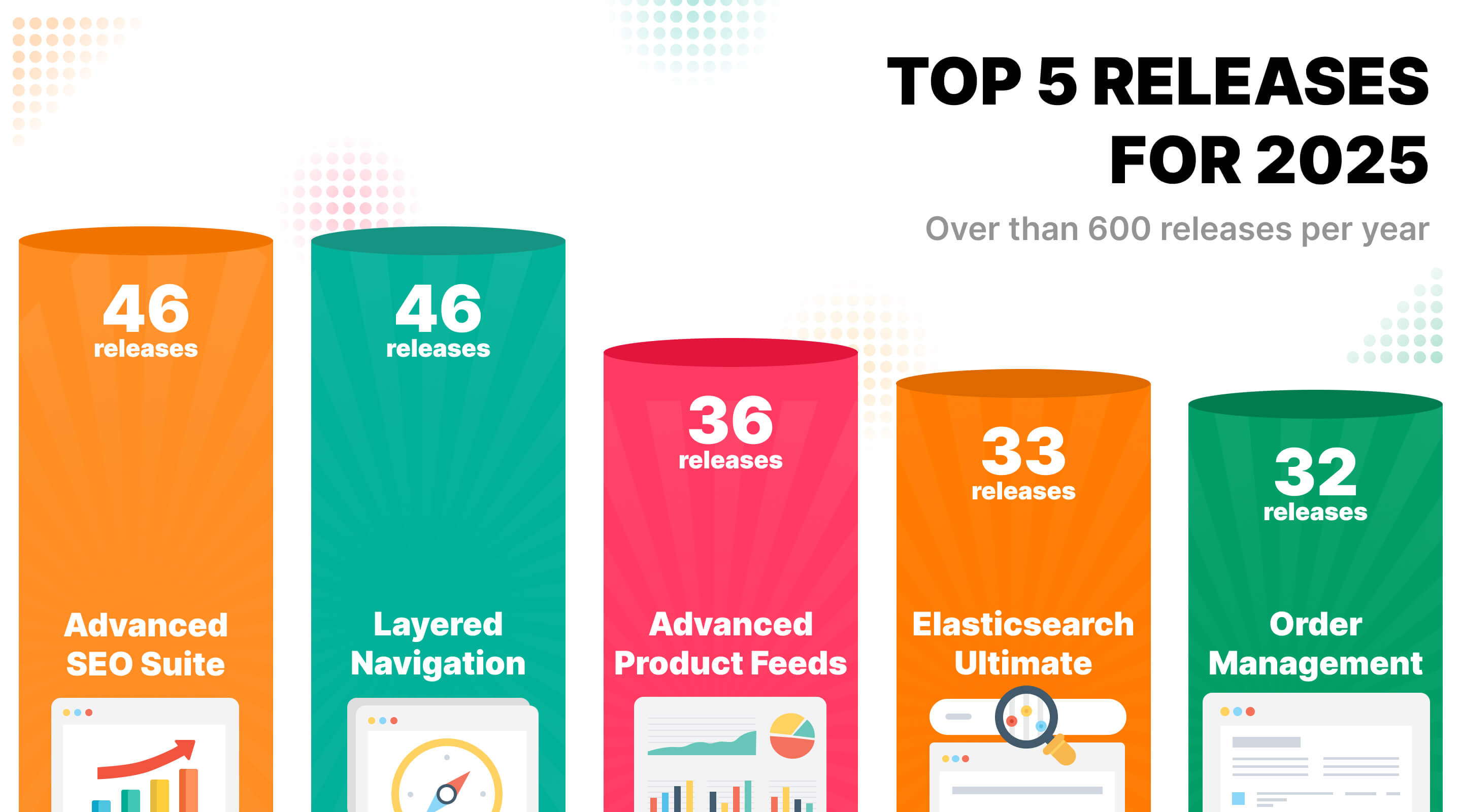
Before we get into the January release, here's a quick look at what 2025 brought to Mirasvit.
We delivered over 150 new features across 30+ extensions, focusing on what matters most to store owners: faster order processing, smarter SEO, better marketing automation, and an improved customer experience.
The year's key highlights include: AI-powered SEO content generation with multiple provider options, mass order actions that save hours of admin work, advanced structured data for better search visibility, comprehensive accessibility compliance for EAA requirements, and deeper Hyvä theme integration across the entire extension lineup.
Now, let's look at what January brings to your store. The focus is on practical changes that speed up daily work, strengthen search visibility, and give you more control over how products appear across the catalog.
The Order Management extension comes with mass actions for invoices and shipments in the orders grid, so you can process batches of orders in a few clicks during high-volume periods and reduce delays in fulfillment and shipping notifications.
In Advanced SEO Suite, the new Aggregate Product format and the option to exclude zero-priced products keep category and landing page price ranges in search closer to what customers actually see on the page. The SEO AI Helper also supports Claude and Gemini alongside OpenAI, so you can choose the provider that fits your workflow.
The Improved Sorting module gains product pinning on category pages, so selected items stay visible first regardless of customer sorting or ranking factors. This helps you keep featured, seasonal, or high-margin products at the top without extra merchandising rules.
Next, we'll go through the changes one by one and share brief tips on how to enable them.
Table of Contents
- Order Management
- Advanced SEO Suite
- Fraud Detection
- Improved Sorting
- Customer Segmentation Suite
- Elasticsearch Ultimate
- Product Labels
- Product Attachments
Order Management
🔥 Mass invoice and shipment actions in the orders grid
In the updated version of the Order Management for Magento 2 extension, you can create invoices and shipments for multiple orders at once from the orders grid.
Select the orders you need to process, click the Actions dropdown, and choose Create invoice or Create Shipment. What previously took 30+ minutes during busy periods can be handled in under a minute.
This is especially valuable during sales events, holiday rushes, or any high-volume period when every minute counts. Your team processes orders faster, and customers receive shipping notifications sooner.
To use this feature, navigate to Sales > Orders, select multiple orders using checkboxes, and choose the desired action from the Actions dropdown.
Advanced SEO Suite
The Advanced SEO Suite module includes five improvements that help you fine-tune search visibility and structured data across key page types.
🔥 SEO AI Helper: Claude and Gemini support
SEO AI Helper has expanded beyond OpenAI (ChatGPT) and supports Anthropic Claude and Google Gemini as additional AI providers.
This gives you more flexibility when generating SEO rewrites and resolving meta field issues, especially if you already use one of these providers or want to compare results across models for your niche.
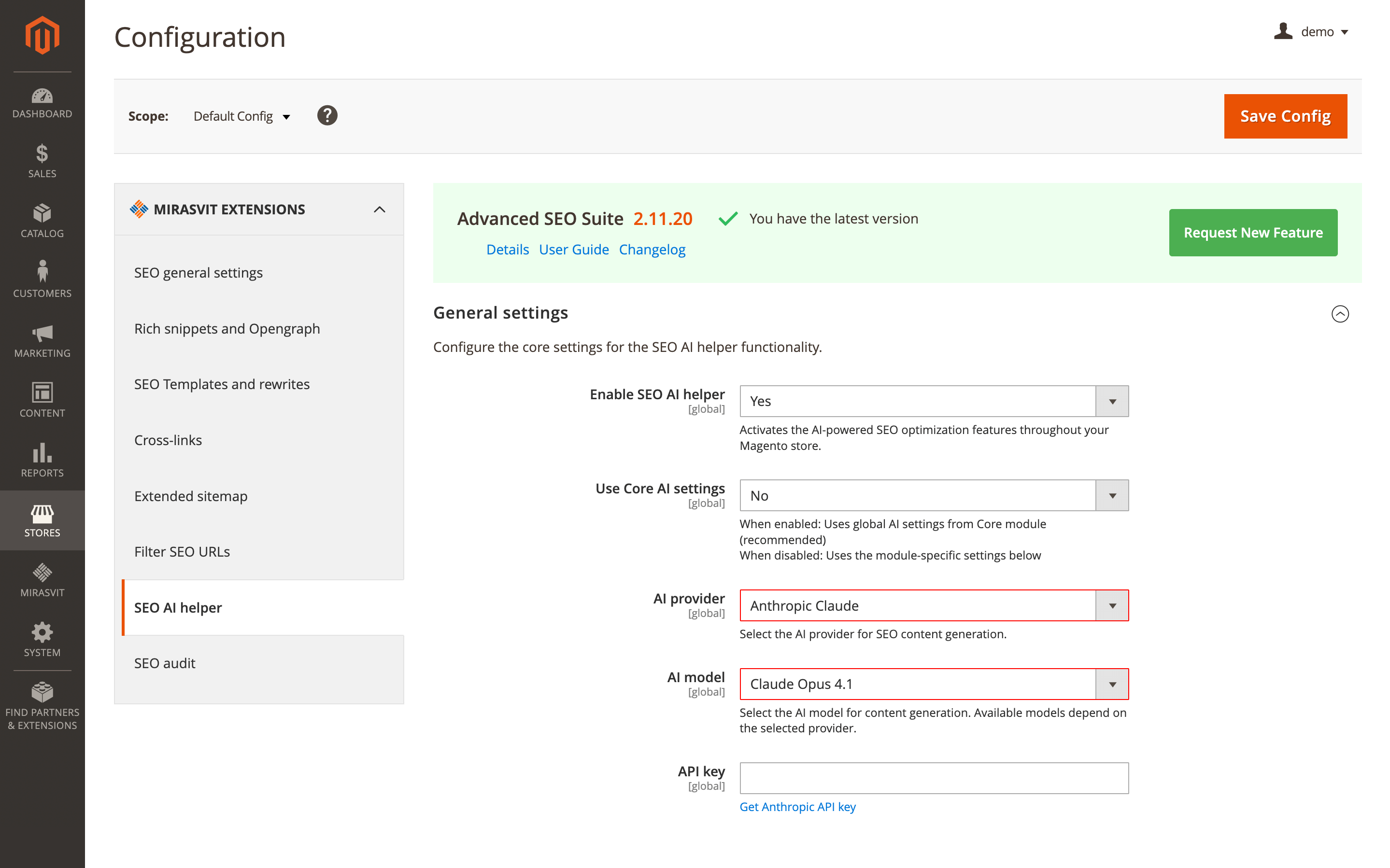
To configure it, go to Stores > Configuration > SEO AI helper, enable the feature, select an AI provider and model, enter the corresponding API key, and save the configuration. Available models depend on the provider you choose.
The Mirasvit_SeoAudit and Mirasvit_SeoContent must be enabled, and a valid API key is required.
🔥 Zero-priced product exclusion in Aggregate Product price ranges
This update adds a configuration option that excludes zero-priced products from Aggregate product structured data calculations on category and landing pages. It helps keep the price range in Google search results more accurate when you use free samples or promo items.
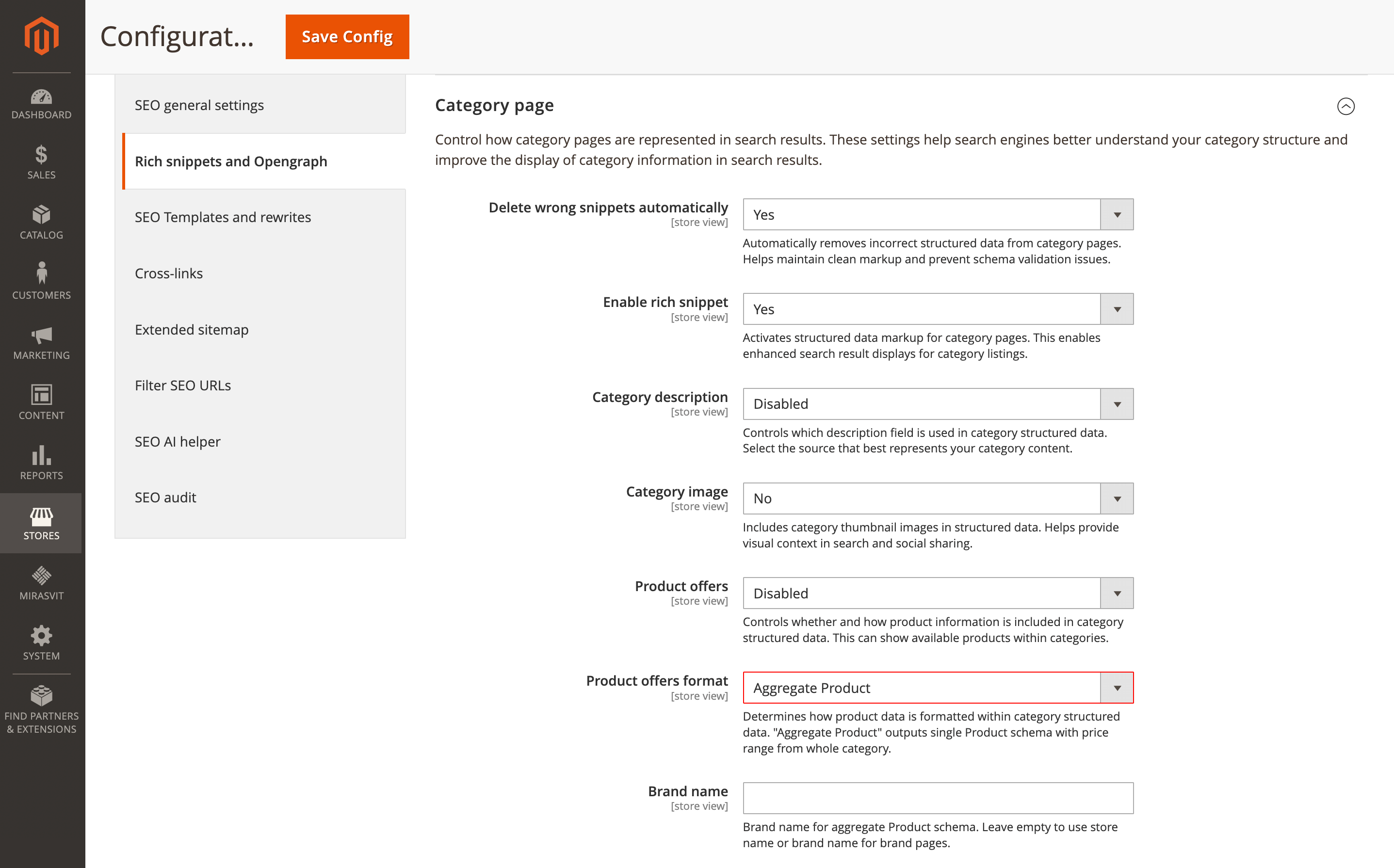
For example, if a category has 100 products and 5 of them are free samples priced at $0, the price range could show $0 to $500. With zero-priced products excluded, it can show $25 to $500, which better reflects actual purchasable items.
Configure this in Stores > Configuration > Rich snippets and Opengraph, open the Category page or Landing page section, set Product offers format to Aggregate product, enable Exclude products with price 0, and save the configuration.
🔥 Aggregate Product schema on category and landing pages
This release introduces a new Aggregate product format for structured data on category and landing pages. Instead of outputting offers for individual products, it generates a single Product schema that reflects the whole page, including the price range across all listed items.
You can also include an aggregated rating, set a brand name, and exclude zero-priced products when needed.
For example, a Winter Jackets category with prices from $99 to $599 can appear in Google with a clear range like Winter Jackets, $99 to $599 and aggregated star ratings, which makes the listing easier to scan and more compelling for shoppers.
Configure this in Stores > Configuration > Rich snippets and Opengraph, open the Category page section (or Landing page), set Enable Rich Snippet to Yes, enable Product Offers for the current page or the entire category/landing page, then set Product offers format to Aggregate product. Adjust optional settings such as Brand name, include aggregate rating, and Exclude products with price 0, then save the configuration.
🔥 Organization schema display scope on CMS pages
Organization structured data is no longer limited to the homepage. A new Display scope setting lets you decide where this markup should appear: homepage only, all CMS pages, or only selected CMS pages.
This is useful when you want Organization schema on trust-building pages like About Us and Contact, without adding it to every policy page.
Configure this in Stores > Configuration > Rich snippets and Opengraph, open the Organization section, enable rich snippet, then set Display scope and, if needed, select the CMS pages.
The Specific CMS pages option requires the selected CMS pages to exist and be enabled.
🔥 Sitemap exclusions aligned with SEO rewrite rules
URLs you exclude in SEO rewrites no longer appear in your XML or HTML sitemaps. The sitemap generation logic follows the same exclusion patterns, so you can manage URL visibility from one place and keep indexing signals consistent.
For example, if you exclude all /checkout/* URLs in SEO rewrites, those pages will also be excluded from the sitemap, reducing the risk of search engines trying to crawl and index checkout URLs.
To configure this, go to Stores > Configuration > Extended sitemap and set Include SEO rewrites in sitemap to Yes. Then review your SEO rewrites under Marketing > SEO Rewrites and set Add to Sitemap to Yes, No, or Default as needed. Regenerate your sitemap to apply the changes.
Please note: your SEO rewrites must have the appropriate robots directives, and sitemap regeneration is required after configuration changes.
Fraud Detection
🔥 Skip fraud checks by order status
The Fraud Detection for Magento 2 extension includes a new option for handling trusted orders: you can choose specific order statuses that bypass fraud checks entirely. Verified orders move through processing without delays, while fraud protection stays in place for new or unknown customers.
For example, if you use a VIP Customer status for repeat buyers, adding it to the skip list lets those orders proceed immediately instead of waiting for fraud evaluation.
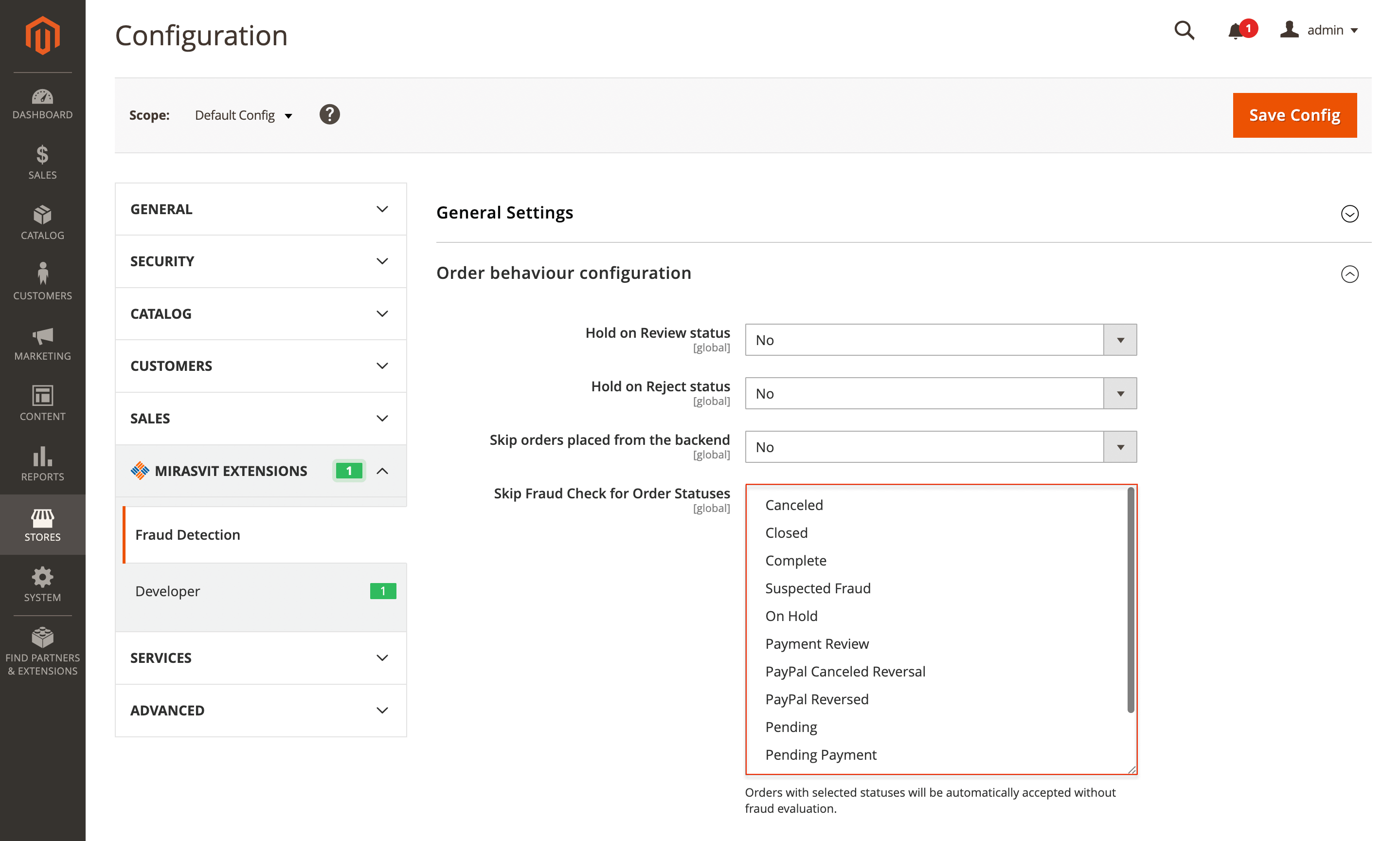
Configure this in Stores > Configuration > Mirasvit Extensions > Fraud Detection > Order behavior configuration > Skip fraud check for order statuses.
The selected statuses must exist in Stores > Order Status, and the setting applies to new orders only.
Improved Sorting
🔥 Product pinning at the top of category pages
The Improved Sorting module gains product pinning for category pages, keeping featured items visible first, even when customers change sorting or when ranking factors would normally reorder the list.
This works well for new arrivals, high-margin products, and seasonal picks, without building complex merchandising rules.
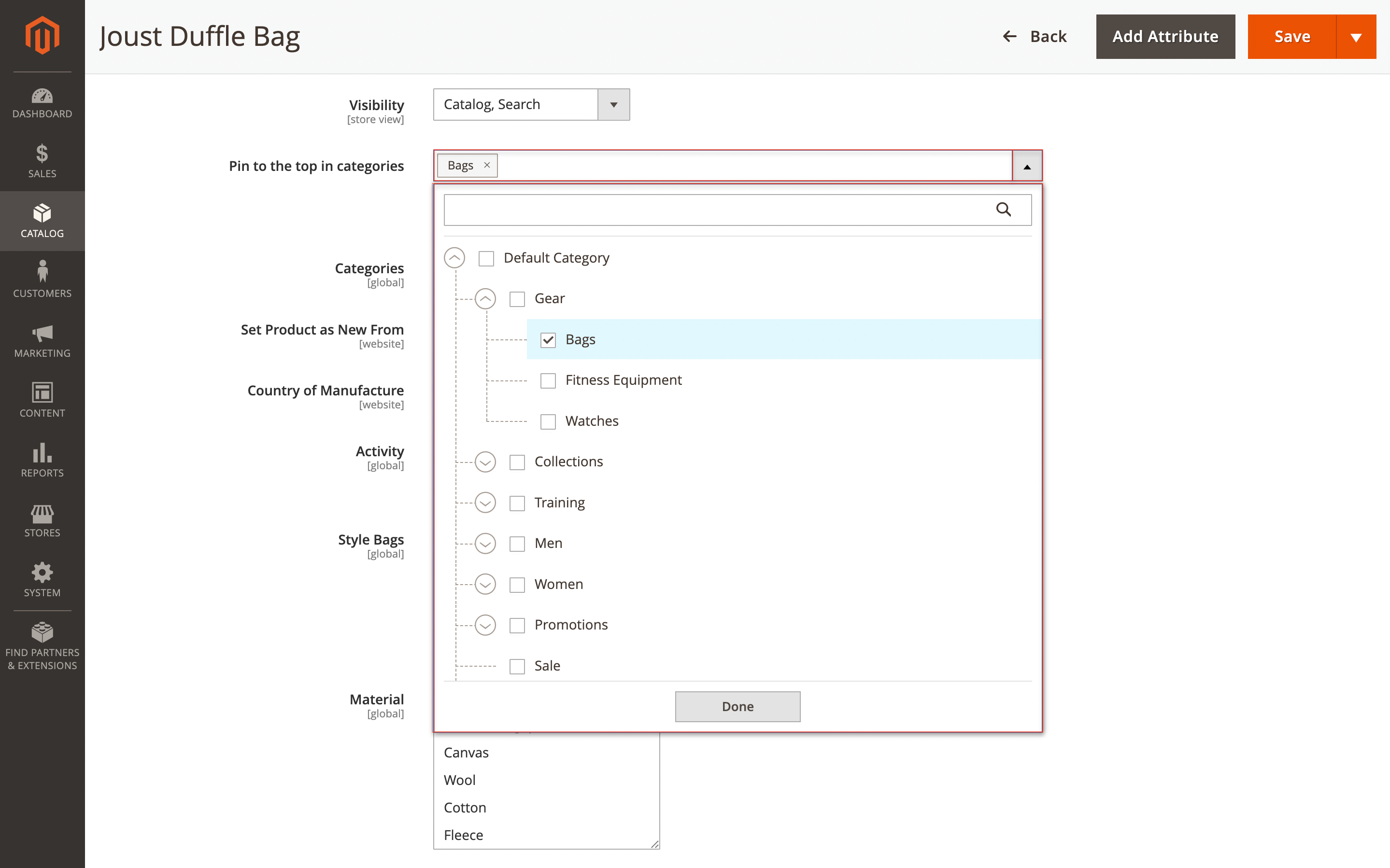
You can pin products in two ways: from the product edit page by selecting the categories where the item should be pinned, or from the category edit page by checking Pin to top for specific products in the grid.
Pinned items appear at the top of the first page, keep their pinned order, and are not affected by customer-selected sorting or global ranking factors.
The product still needs to be assigned to the category; pinning does not add it automatically.
Customer Segmentation Suite
🔥 One-click customer segment duplication
In this release, the segments grid in the Customer Segmentation Suite module includes a Duplicate action, so you can copy a segment with all its conditions and settings instead of recreating it manually.
This is especially helpful when you build segment variations for different regions, campaigns, or customer groups and want to avoid mistakes in complex rules.
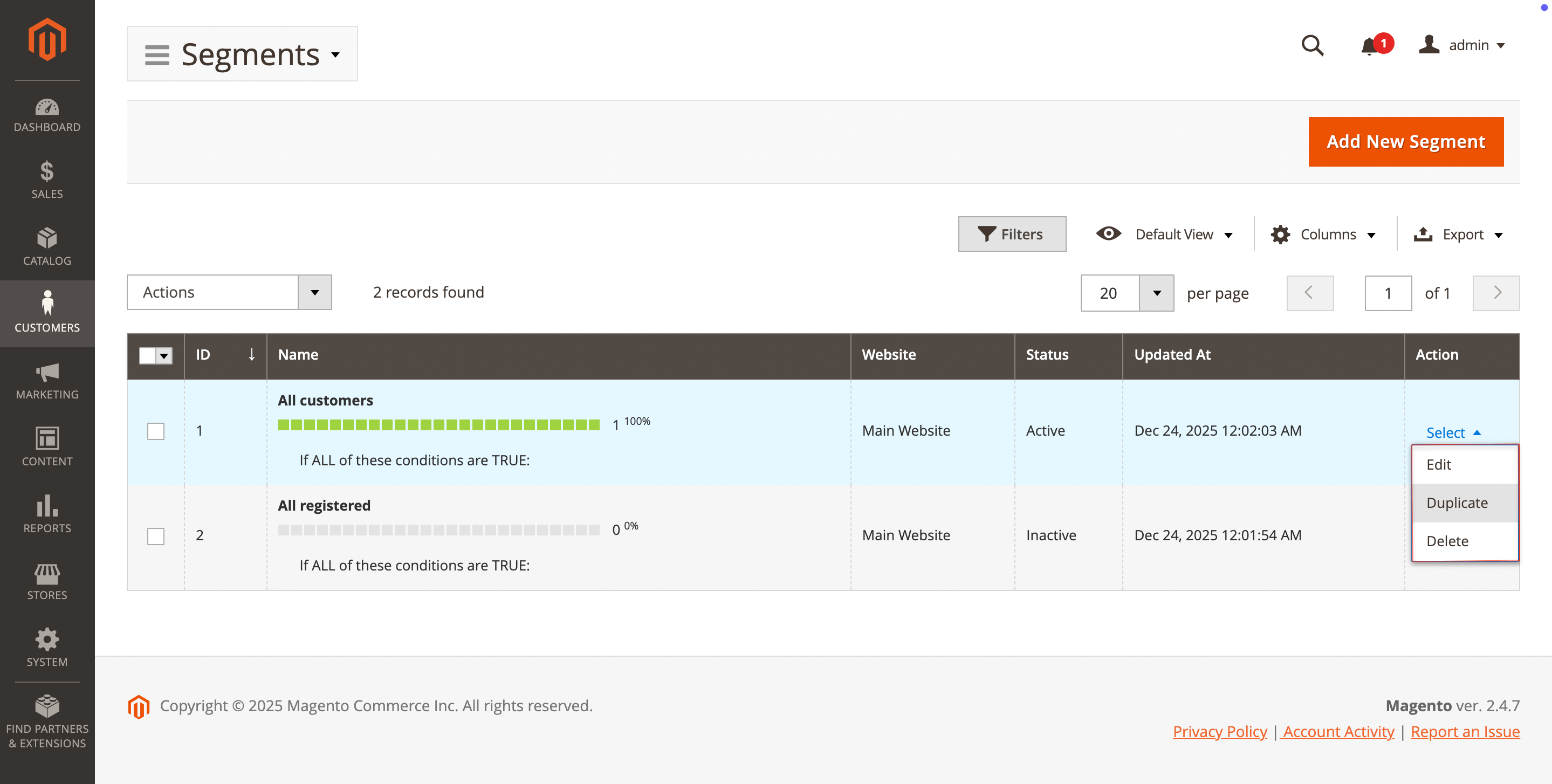
For example, if you already have a High-Value Customers (USA) segment with detailed purchase history conditions, you can duplicate it and only adjust the country to create a Canadian version in seconds.
To use this new option, go to Customers > Customer Segments > Segments, open the Select dropdown in the Action column, and choose Duplicate.
Elasticsearch Ultimate
🔥 Secure View all results link in autocomplete
In the Magento 2 Elasticsearch Extension, the View all X results link in the search autocomplete dropdown uses improved URL generation, so it reliably leads customers to the full results page over a secure URL.
This makes the search experience more consistent for shoppers and reduces edge-case issues caused by store configuration differences.
For example, when someone types blue shirt and sees 47 matches in autocomplete, clicking View all 47 results takes them securely to the search results page.
No configuration is required; the improvement works automatically after you update the module.
Product Labels
🔥 Hyvä 1.4 compatibility
This release brings Hyvä 1.4 support to the Product Labels module, so you can upgrade your theme while keeping labels displayed correctly on the storefront.
Label placement stays consistent, styling matches the theme, and all label features continue working as expected, which helps shoppers spot promos and key product highlights.
Update Product Labels to version 2.5.4 or later, install the separate Hyvä compatibility module, and rebuild Tailwind CSS.
Product Attachments
🔥 Canonical URL headers on attachment downloads
The latest update to the Product Attachments extension adds a canonical HTTP Link header to attachment file responses.
This helps search engines treat one attachment URL as the authoritative version, even when the same file is accessed through different URL variations or tracking parameters, reducing duplicate indexing for manuals, datasheets, and other downloads.
For example, a product manual PDF might be reachable through multiple URL patterns across store views or with UTM parameters. The canonical header points search engines to the preferred URL, so customers are more likely to land on the right version from search results.
No configuration is required. Update the extension to version 1.1.19 or later.
This applies to all attachment types (PDF, images, documents, and more) and works for both direct downloads and preview mode.
That's all for the January updates. If you're planning what to tackle next, browse our Magento 2 extensions to find the tools that match your priorities.
Mirasvit Support Engineer