Mirasvit Latest Updates — February 2026
-
 Andriy Kovalenko
- Our News & Updates
- Feb 2, 2026
- 8 min read

This month, we focused on making store behavior more predictable in the places where small issues turn into daily friction. Across the lineup, you get more reliable storefront search, sharper indexing control for filtered pages, and a set of practical admin and UX refinements, from faster navigation in the backend to cleaner storefront edge cases and steadier integrations.
The largest set of changes landed in the Search Ultimate extension, where search relevance stays consistent across content types and common setup moments are easier to catch before they waste time.
In the Advanced SEO Suite, indexing rules for filtered category pages become more flexible, helping you keep valuable landing pages visible in search while reducing clutter from overly narrow combinations.
And the Advanced Reviews extension adds more freedom to your AI-powered review workflows, letting you choose the provider that fits your needs and switch later without being locked into one option.
Below, you’ll find the full list of updates, along with short tips on how to enable each one in your store.
Table of Contents
- Search Ultimate
- Blog MX
- Advanced SEO Suite
- Layered Navigation
- Advanced Reviews
- IP Geolocation Redirect
- Backend Search
- Advanced Product Feeds
- RMA
- Reward Points
- Checkout Extra Fee & Surcharge
- Automatic Related Products
Search Ultimate
The Search Ultimate module brings three practical improvements that help you keep search behavior consistent across different content types.
🔥 Misspell correction by search index
Misspell correction is no longer a single global rule. It can be applied per search index, so product corrections stay in product search and do not spill over into categories, CMS pages, or blog posts.
You get cleaner control over relevance: for each index, the extension can keep the original query or apply a correction only when it actually improves results. In practice, it reduces “unexpected” matches, helps shoppers reach the right content faster, and can support higher conversion from search.
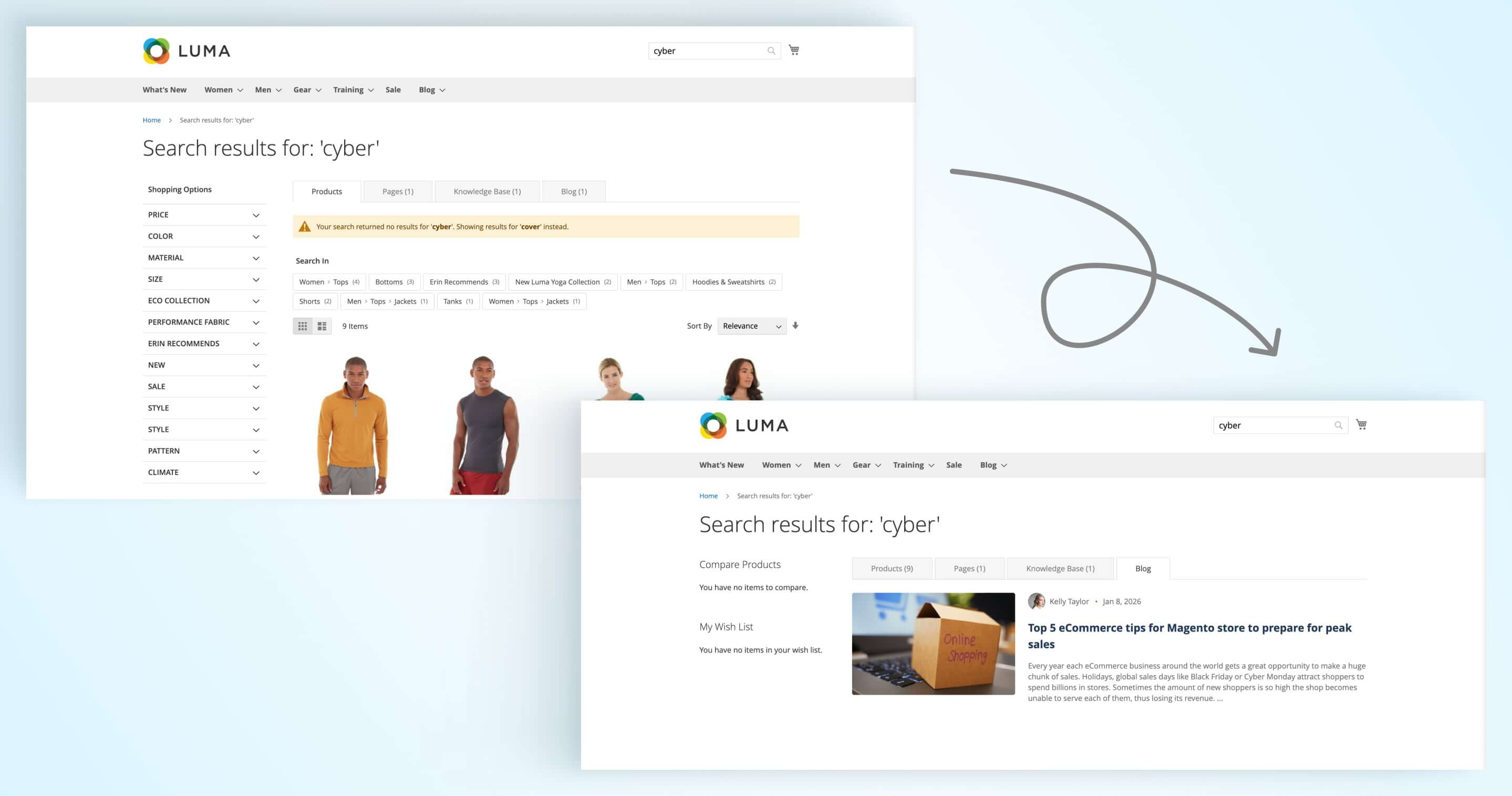
To use this feature, go to Stores > Configuration > Mirasvit Extensions > Search spell correction > Auto-correct misspelled queries.
🔥 Catalog Search reindex reminder for Products Boost Rules
When you set up Products Boost Rules, you now get a clear reminder that a Catalog Search reindex is needed for the changes to take effect.
This small UI hint helps prevent a common setup pitfall: you configure ranking rules, expect to see an immediate impact in search results, and lose time troubleshooting when nothing changes yet. With the notice in place, admins can apply the reindex at the right moment and move on with confidence.
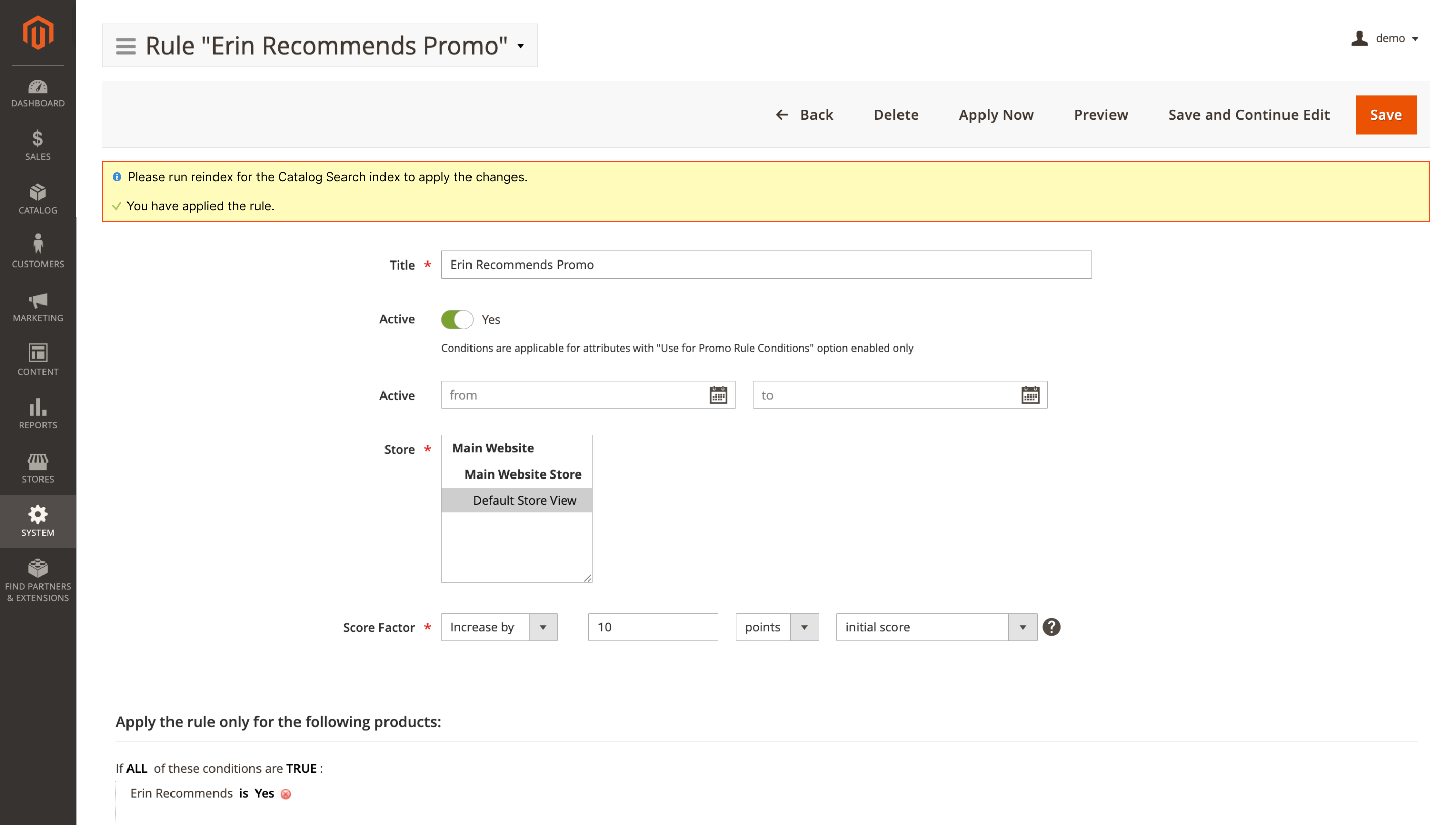
The notice appears automatically after you update the extension.
🔥 No search bar on CMS-only categories
CMS-only categories now look cleaner on the storefront: the category search bar is hidden automatically on pages that are built for content rather than product listings.
This keeps landing pages and content-focused categories focused and removes a UI element that would not help shoppers there anyway.
It applies automatically after you update the extension.
Blog MX
🔥 Posts widget cards with excerpts template
The Blog MX extension introduces a new template for the Posts widget: Posts as cards with an excerpt. Use it to display posts in a clean card grid with images and short previews, without custom development.
The layout works well for homepages, category pages, and blog landing sections where you want to surface fresh content and keep the block easy to scan.
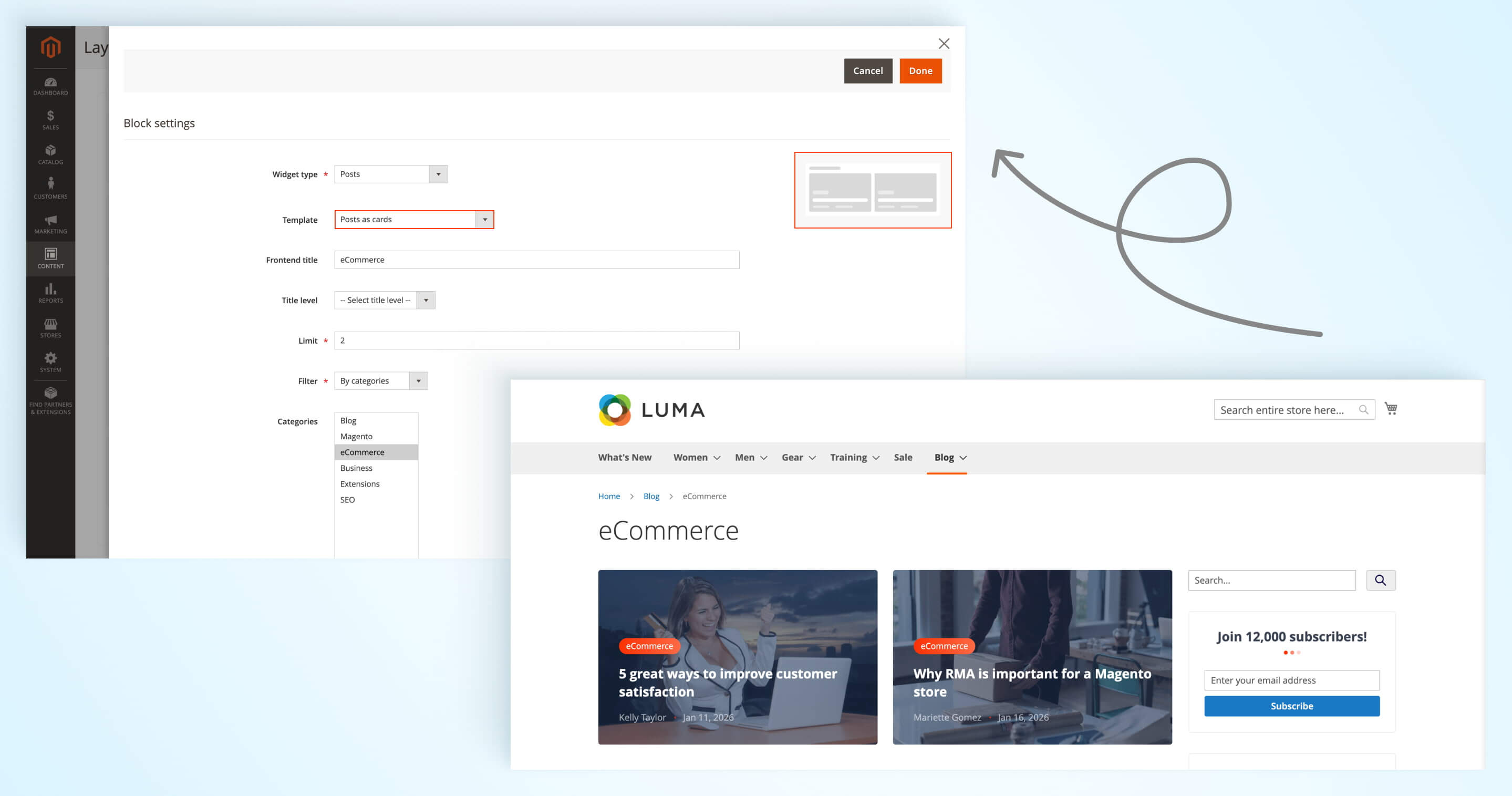
Go to Content > Widgets, create or edit a widget of type Mirasvit Blog Posts, then select Posts as cards with excerpt in the Template dropdown.
Advanced SEO Suite
🔥 Robots meta tag patterns by applied filter values count
Filtered category pages can get overly specific fast. With this update in the Advanced SEO Suite module, robots meta tag patterns can now react to the total number of applied filter values, so you can decide which filtered pages should stay indexable and which should not.
This helps you automate a common SEO decision: keep valuable filtered landing pages indexable, but stop overly narrow combinations from generating thin pages in search. For example, you can add noindex once the total number of applied filter values goes above a threshold, such as more than three.
Set up the rule in Stores > Configuration > Mirasvit Extensions > Advanced SEO > SEO Templates: create a new template for the robots meta tag and use the new filter values count variable in your conditions.
Layered Navigation
🔥 Clickable brand link before the product title
The Layered Navigation extension includes a new option to show the brand name as a clickable link right before the product title on product pages. This makes the brand more visible and gives shoppers a quick path to browse all products from the same brand.
It is a simple navigation boost that supports discovery and cross-sells, especially for shoppers who land on a product from search and want to explore similar options.
Enable it in Stores > Configuration > Mirasvit Extensions > Layered Navigation > Brand Page by switching on Show Brand Link Before Product Title.
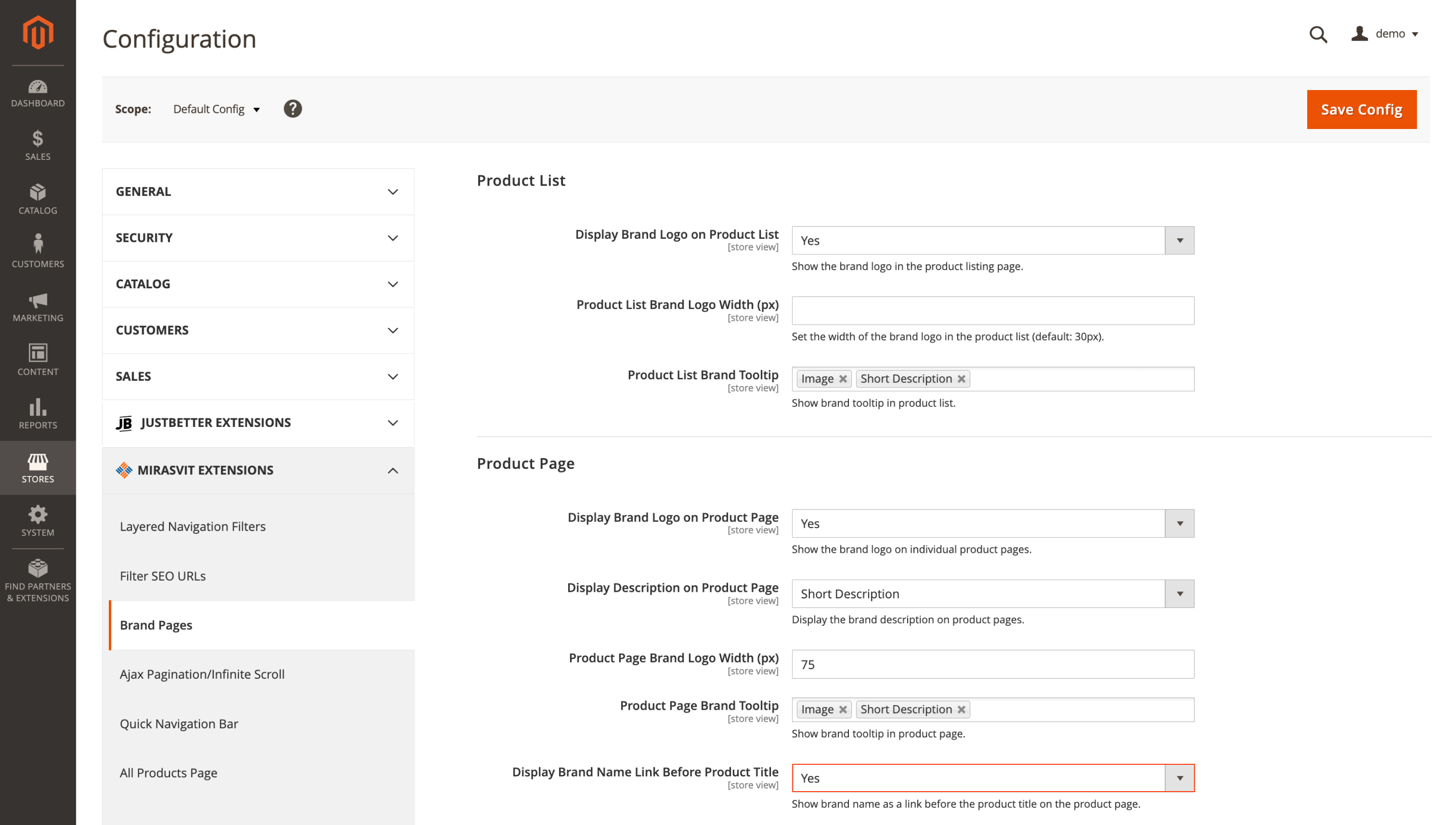
This option requires a properly configured brand attribute in the extension.
Advanced Reviews
🔥 AI provider choice for review features (OpenAI, Claude, Google Gemini)
The Advanced Reviews extension expands its AI features with support for multiple providers through our Core AI service. You can connect OpenAI, Anthropic Claude, or Google Gemini and choose the option that fits your budget, performance expectations, or regional availability.
That flexibility also protects you long term: if pricing changes or a provider has temporary issues, switching to another one does not require a separate extension update.
Head to Stores > Configuration > Mirasvit Extensions > Core > AI Service to add your provider credentials. You will need the Mirasvit Core module installed.
IP Geolocation Redirect
🔥 GeoLocation in Core with automatic weekly GeoLite2 updates
Location-based redirects stay accurate without you having to babysit the GeoIP database. In the IP Geolocation Redirect extension, the lookup has been moved to the Core module, which can also update the GeoLite2 database automatically every week.
That keeps redirects and location-based popups reliable over time, even as IP ranges change, so customers land on the right store view and see the right experience.
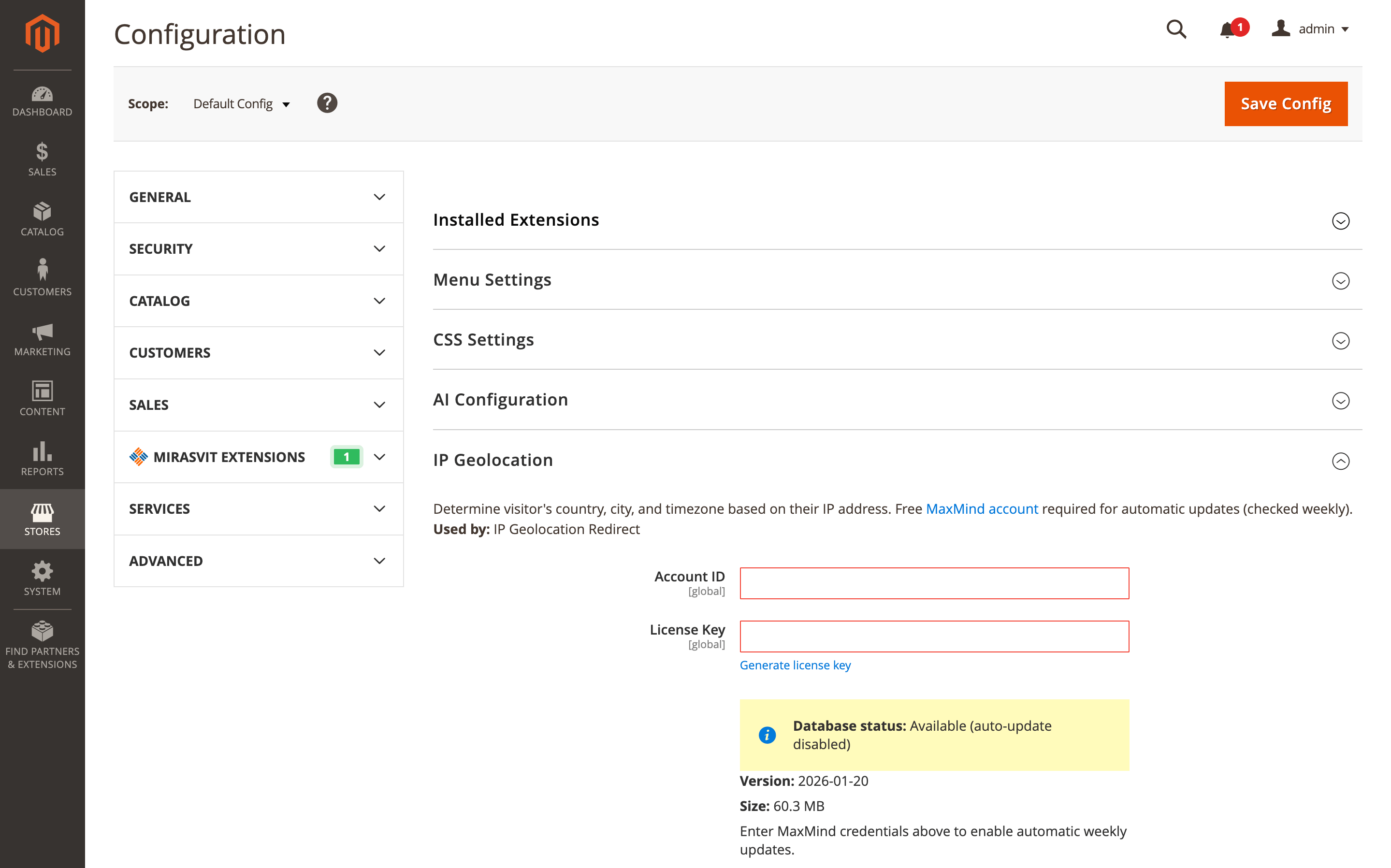
Enable automatic updates in Stores > Configuration > Mirasvit Extensions > Core > IP GeoLocation by entering your MaxMind account credentials. A free MaxMind account is required.
Backend Search
🔥 System configuration search in admin search
Tracking down a specific setting in Magento admin can take more clicks than it should. The Backend Search module now lets you search through system configuration settings right from the admin search bar.
Type a keyword, and matching configuration options will appear in the results, so you can jump to the right place without digging through nested menus. This is especially handy in stores with lots of custom settings and multiple extensions.
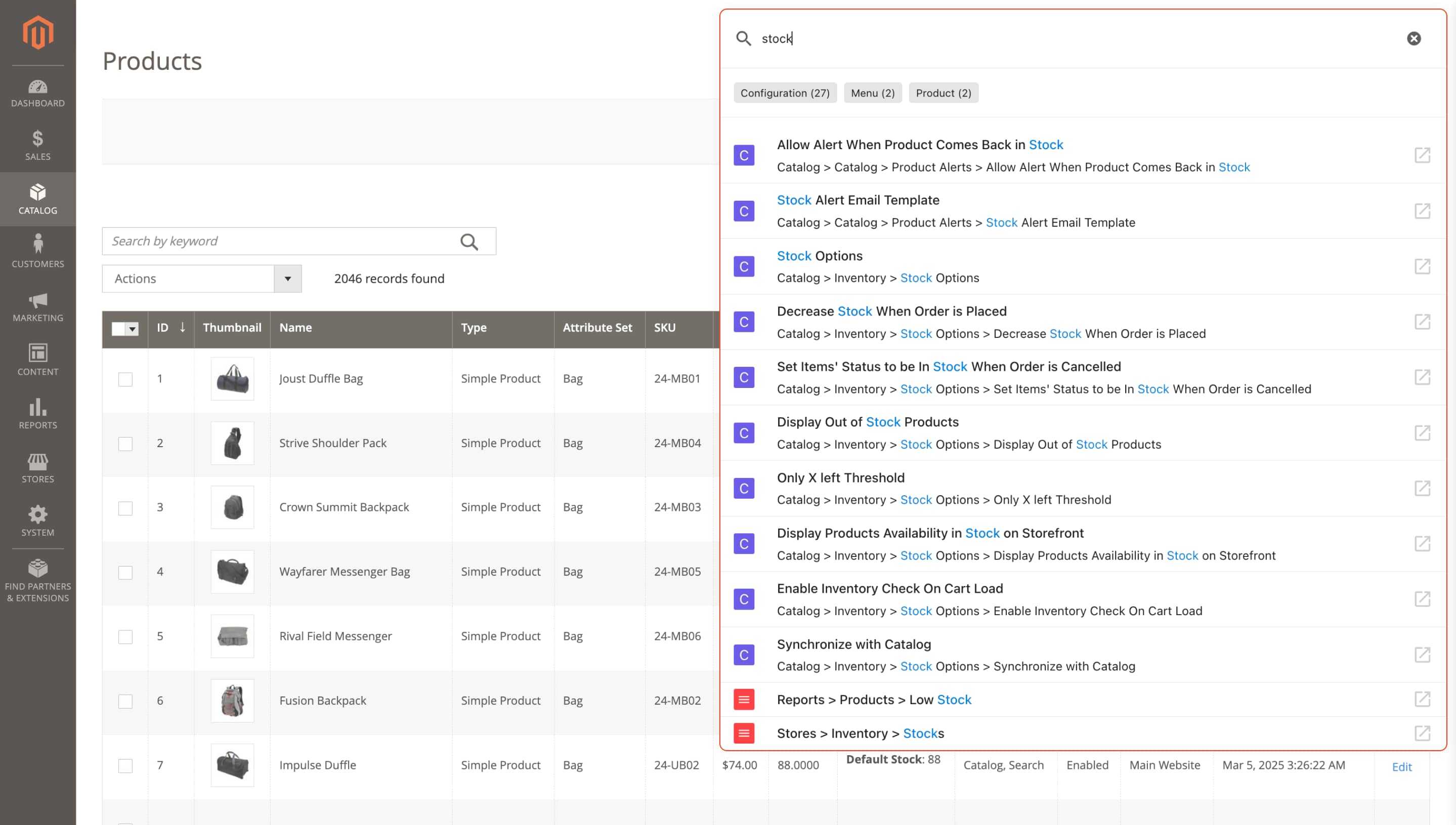
Update the module, then use the admin search bar to look up configuration keywords.
Advanced Product Feeds
🔥 Array sorting inside feed templates (sort/rsort)
Feed templates got a small but practical upgrade in the Advanced Product Feeds module: you can sort array values right in the template, so the output order stays consistent without extra workarounds.
This is helpful when a channel expects values in a specific sequence, for example, when you want category names listed alphabetically or variant prices arranged from lowest to highest.
In your feed template, add the modifier after an array variable, for example: {product.categories|sort}. For descending order, use |rsort.
RMA
🔥 File attachments in RMA GraphQL
If your storefront is headless or PWA, you can finally let customers attach files to return requests through GraphQL. We added attachment support to the RMA module’s GraphQL API, so shoppers can upload images or documents when they create an RMA, just like on a classic Magento storefront.
That extra context often speeds up approvals and cuts down on back-and-forth, especially when a photo of a defect makes the case clear.
No additional settings are required. Attachments are available through the RMA GraphQL mutations and apply to GraphQL-based frontends.
Reward Points
🔥 Sortable Rewards Balance column in the customer grid
In the Reward Points extension, the Rewards Balance column in the admin customer grid is now sortable, so you can instantly bring the highest balances to the top of the list.
This is handy when you need a quick shortlist for VIP outreach, segmented campaigns, or loyalty program reviews, without exporting the list to a spreadsheet.
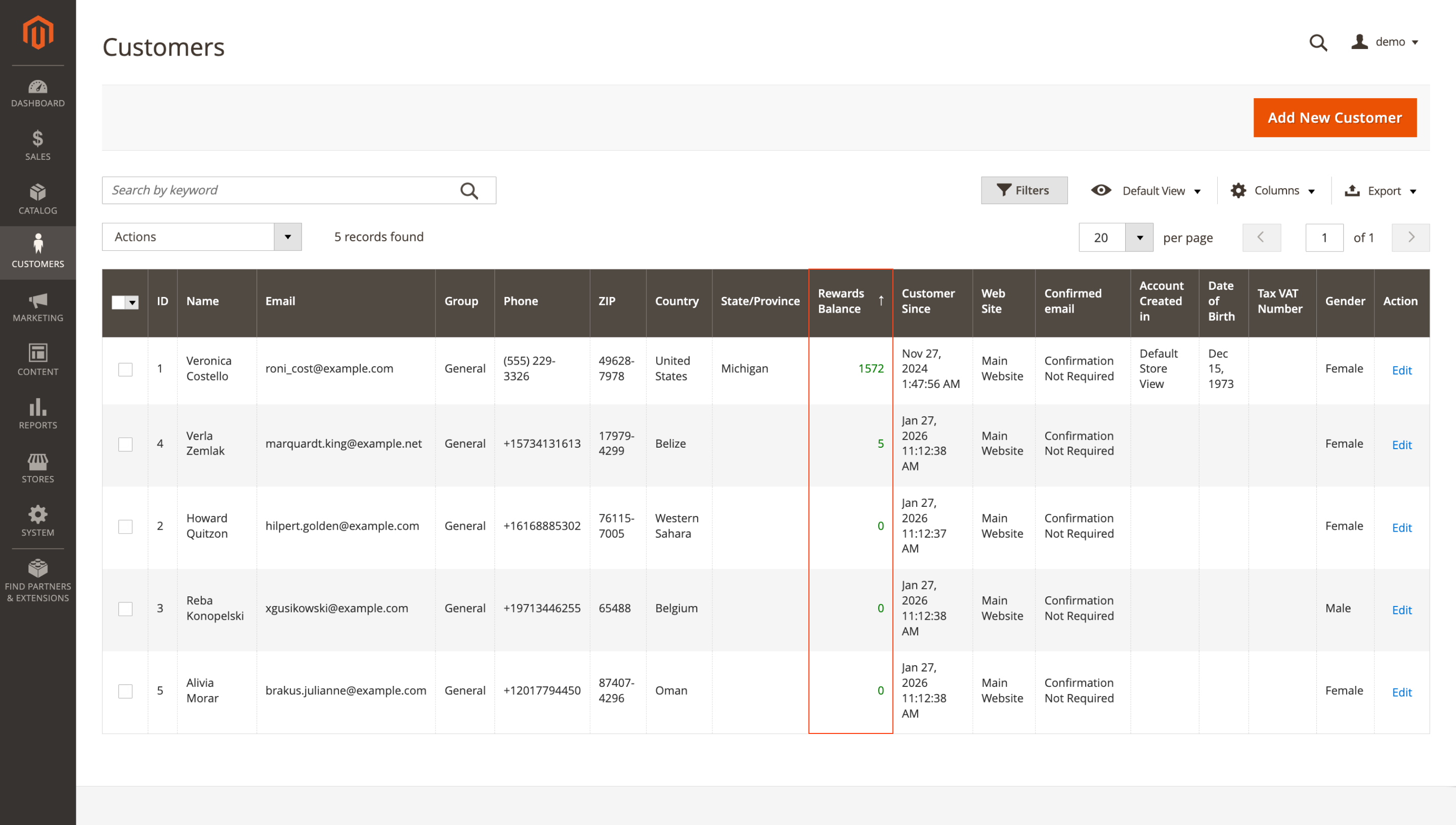
To sort the grid, go to Customers > All Customers and click the Rewards Balance column header.
Checkout Extra Fee & Surcharge
🔥 Kustom (Klarna) Checkout compatibility
Kustom (Klarna) Checkout is now supported in the Checkout Extra Fee & Surcharge extension, so additional fees can be applied without checkout errors or calculation issues.
No extra settings are needed. Install the updated extension, and the compatibility takes effect automatically.
Automatic Related Products
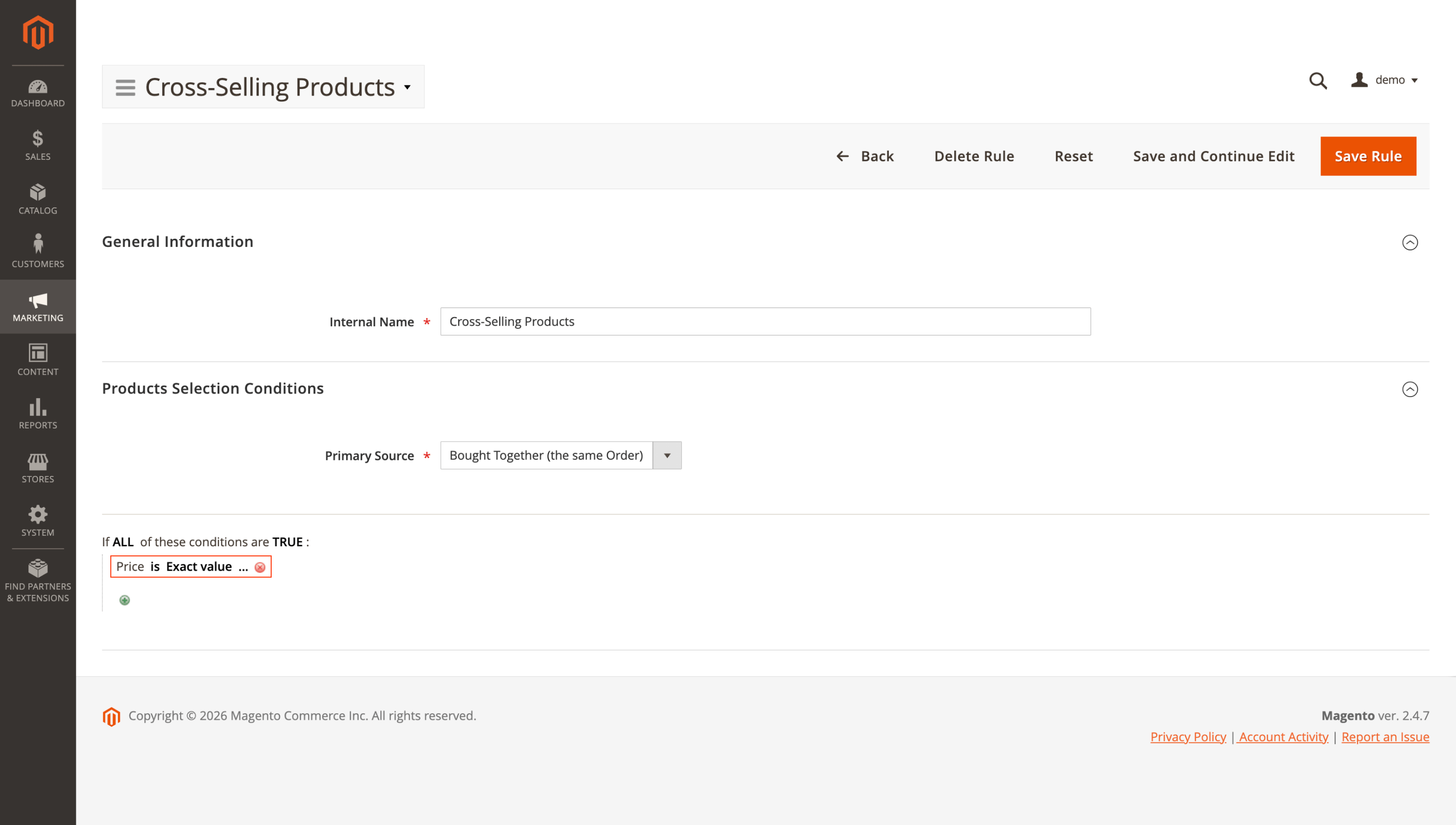
🔥 Price condition enabled by default
Price-based related product blocks are easier to build with this update. The Automatic Related Products module includes the Price attribute in rule conditions by default, so you can start using price logic right away without enabling the attribute manually.
For example, in a Cross-Selling Products rule, you can keep the primary source as Bought Together (the same Order) and add a Price condition to limit recommendations to items at a specific price point, so the block stays focused and predictable.
To start using the new option, simply update the extension to the latest version.
That wraps up the February updates. Browse our Magento 2 extensions to find tools that match your priorities, or reach out to the support team if you have questions.
Mirasvit Support Engineer
Promote your products and achieve higher sales by using the power of marketplaces and comparison shopping engines with magento data feed extension. You can automatically generate and deliver feeds of your product catalog to those services with Magento Product Feeds extension.
This tool is unbelievably quick to use and is also outstandingly flexible. It's compatible with all major shopping and advertising services, including Google Shopping.
Feeds go straight to Google Merchant Center through Google's API, and AI profiles can rewrite titles, map Google categories and fill in missing attributes before your catalog ever reaches a marketplace.
Simply install the module, generate your very own product feed, present your catalog to a wider audience, and boost your sales right now!
From meta tags to the sitemap, the Magento 2 SEO Extension gives you full control over every SEO-related feature in your store.
It automates the SEO work you'd otherwise do by hand - templated meta tags, rich snippets, redirects, sitemaps, cross-links and a built-in SEO audit - across every page type. That is why 2,435+ Magento stores rely on it.
Boost customer loyalty with reward points, unlimited tiers and a built-in referral program - all in one module. Reward shoppers for purchases, referrals and social shares to drive repeat sales and turn one-time buyers into brand advocates.
Blog MX runs your blog inside Magento, with Page Builder posts, comments, and SEO checks in the admin you already use. Every post, category, author, and tag can differ per store view.
Fast, relevant store search lifts conversion rate and revenue.
It powers search for thousands of Magento stores, from catalogs of a hundred products to millions of SKUs.
The Elasticsearch extension returns relevant results within milliseconds, across products, categories, CMS pages, and 15+ other content types.
Give customers search that helps them find and buy the products they want - faster and with fewer dead ends.
AJAX layered navigation for Magento 2 with multi-select filters, price sliders and SEO-friendly filter URLs.
The same extension adds brand pages, an "All Products" page, landing pages, smart filters and infinite scroll, with Hyvä support built in.
The Automatic Related Products extension fills related, up-sell and cross-sell blocks for you. It picks products by rules you set, using what your customers actually buy and view, and shows how much revenue each block brings, so you keep the blocks that sell and change the ones that don't.
Show each visitor the store view and currency that fit their country, browser language or IP address.
Redirect to any page, ask before switching, or restrict access by country, while search bots and cached pages keep working as usual.
Keep your base prices low and add an extra fee only to the orders that cost more to serve: Cash on Delivery and card payments, small orders, heavy parcels, bulky products or express shipping.
Each fee rule has its own conditions, rate and label. Charge a fixed amount, a percentage or a rate per product, item or unit of weight, set minimum and maximum limits, and show every fee as a separate line in the cart, checkout, emails and invoices.
Admin Quick Search for Magento 2 adds one search box to the Magento admin panel that finds orders, customers, products, invoices, shipments, settings and Help Desk tickets as you type.
The default admin search needs exact values and pauses after every character. Ours matches any fragment and returns results while you type, because requests go straight to Elasticsearch or OpenSearch.
Find an order by the customer's phone, postcode, street or company, by the SKU of an ordered item or by a comment. Amazon, eBay and Walmart orders imported by M2E Pro are in the same search. Used by 500+ Magento stores.
Advanced Reviews adds an AI summary, photos and separate pros and cons fields to Magento 2 product reviews, and sends review request emails after each order to bring in new ones.
A Verified Buyer badge or a buyers-only rule shows shoppers which reviews to trust, and review grouping fills the review block of variants and similar products, on Luma and Hyvä.