Mirasvit Latest Updates - November 2026
-
 Andriy Kovalenko
- Our News & Updates
- Nov 2, 2026
- 15 min read

November's release is the largest of the year, and most of it comes down to trust. Your chatbot waits for cookie consent and checks a shopper's email before it reads their orders. Old email links stop opening customer accounts. Hyvä Checkout finally shows your consent checkbox.
Search Ultimate gets its biggest update in a long time. Hyvä stores now get the full autocomplete Luma stores already had, and products that need options no longer show an Add to Cart button that can't work.
Layered Navigation turns every query-string filter URL into its SEO-friendly address and switches on its bot protection by default. The eChat assistant can wait for cookie consent and sit right inside your Contact page. The Follow Up Email module puts an expiry date on links that sign customers in without a password.
Further down: Bestseller and Trending labels that follow real sales, Sign in with Apple, Parquet feeds for your data team, and WebP images for stores on Amazon S3.
Behind the scenes, 18 extensions now include their Hyvä support and the whole line moves to Mirasvit Core 2.0. Composer handles the old packages for you. The few steps that still need your attention are in one checklist near the end.
Table of Contents
- Search Ultimate
- Layered Navigation
- eChat
- Follow Up Email
- Product Labels
- Social Login
- Advanced Product Feeds
- Google Page Speed Optimizer
- Reward Points & Referral Program
- GDPR
- RMA
- Improved Sorting
- Agentic Commerce
- MCP Server & AI Copilot
- Help Desk MX
- Fraud Detection & Prevent Chargeback
- Facebook Pixel & TikTok Pixel
- Before You Update
- More From This Release
Search Ultimate
Hyvä stores used to get a simpler autocomplete than Luma stores. The Search Ultimate extension now runs one autocomplete on both themes. Hyvä shoppers get recent searches, loading placeholders, the "Sort & Filter" sheet on mobile and the price slider. The script is also lighter, because it no longer needs RequireJS, Knockout or Alpine.
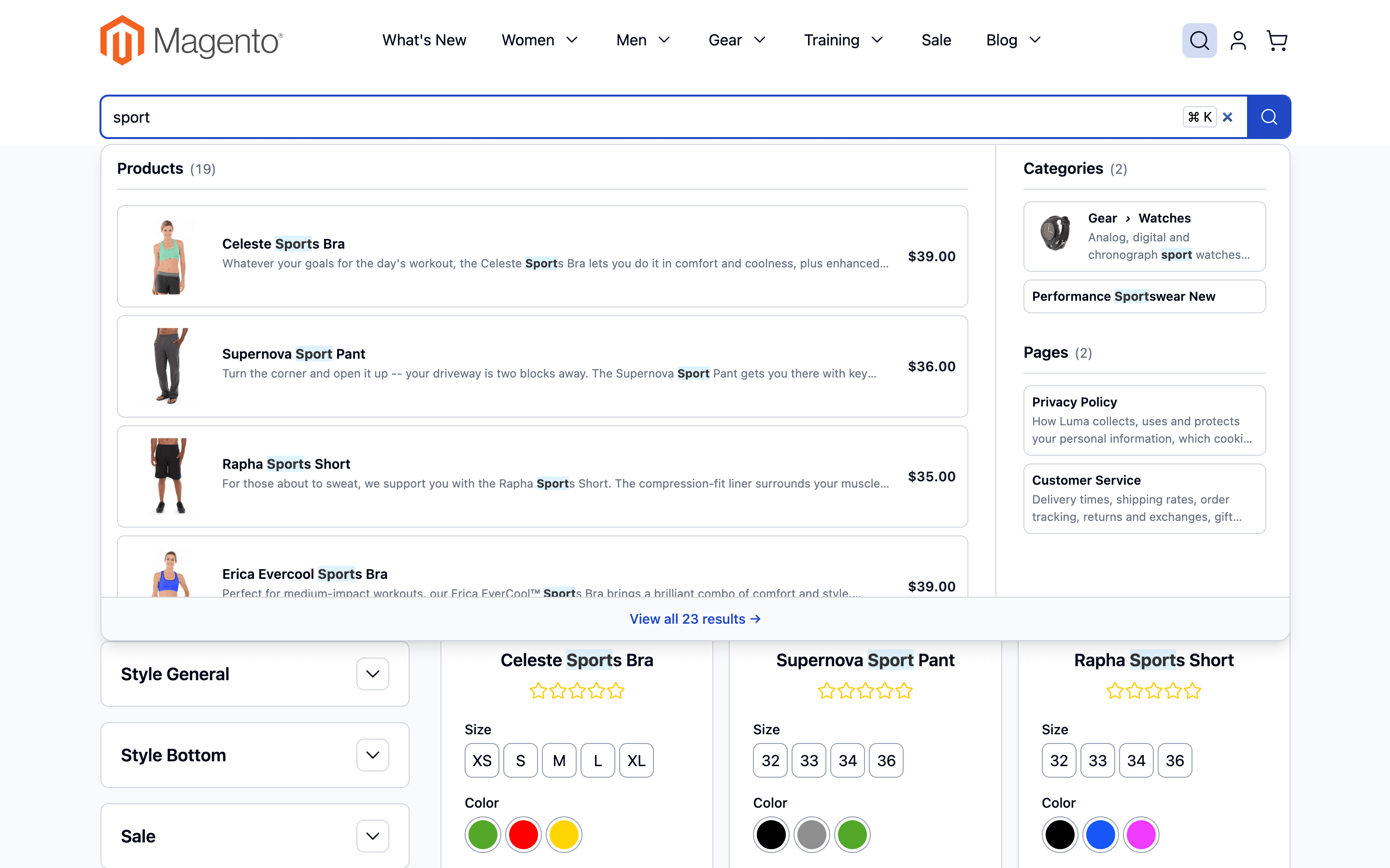
Several smaller changes remove friction right before a purchase:
- "Choose options" instead of a broken button: configurable, bundle, grouped and gift card products now link to the product page, where the shopper picks a size or color. Before, they showed an Add to Cart button that couldn't work.
- Back returns to the search: after opening a product, pressing Back reopens the autocomplete with the same query and filters, in every layout.
- Add to cart without leaving the results in the full-size layout.
Merchandisers get a new Price (Indexed) condition for boost rules under System → Search Management → Product Boost Rules. It uses the price shoppers actually see, with special prices and catalog rules applied, so you can push gifts under $50 up in a "gift" search.
Two changes cut server load. Dead URLs that you show as search results are now cached and marked noindex, so crawlers hitting them cost almost nothing. A search with no results now runs at most 5 engine searches instead of about 30.
Layered Navigation
One filtered page can live at many addresses: /lamps.html?color=56, /lamps.html?color=56&manufacturer=1234, and so on. With SEO-friendly filter URLs on, the Layered Navigation module now redirects all of them permanently (301) to the friendly URL the sidebar links to. Search engines see one page instead of a pile of duplicates, the page cache stores one copy, and old links keep their filters.
The bot protection added last month, Max Applied Filters, shipped empty, so it stayed off on every store that didn't fill it in. It now defaults to 100. Real shoppers never come close to that, but a bot stacking hundreds of filter values does. Stores that set their own value keep it.
Smart Filter cards, the shortcut tiles above a product list, can now link to a subcategory, new arrivals, products on sale, in-stock items or a minimum rating. "On sale" and "New this week" cards at the top of a category work as a small promotion with no banner needed. Build them under Content → Layered Navigation → Smart filters.
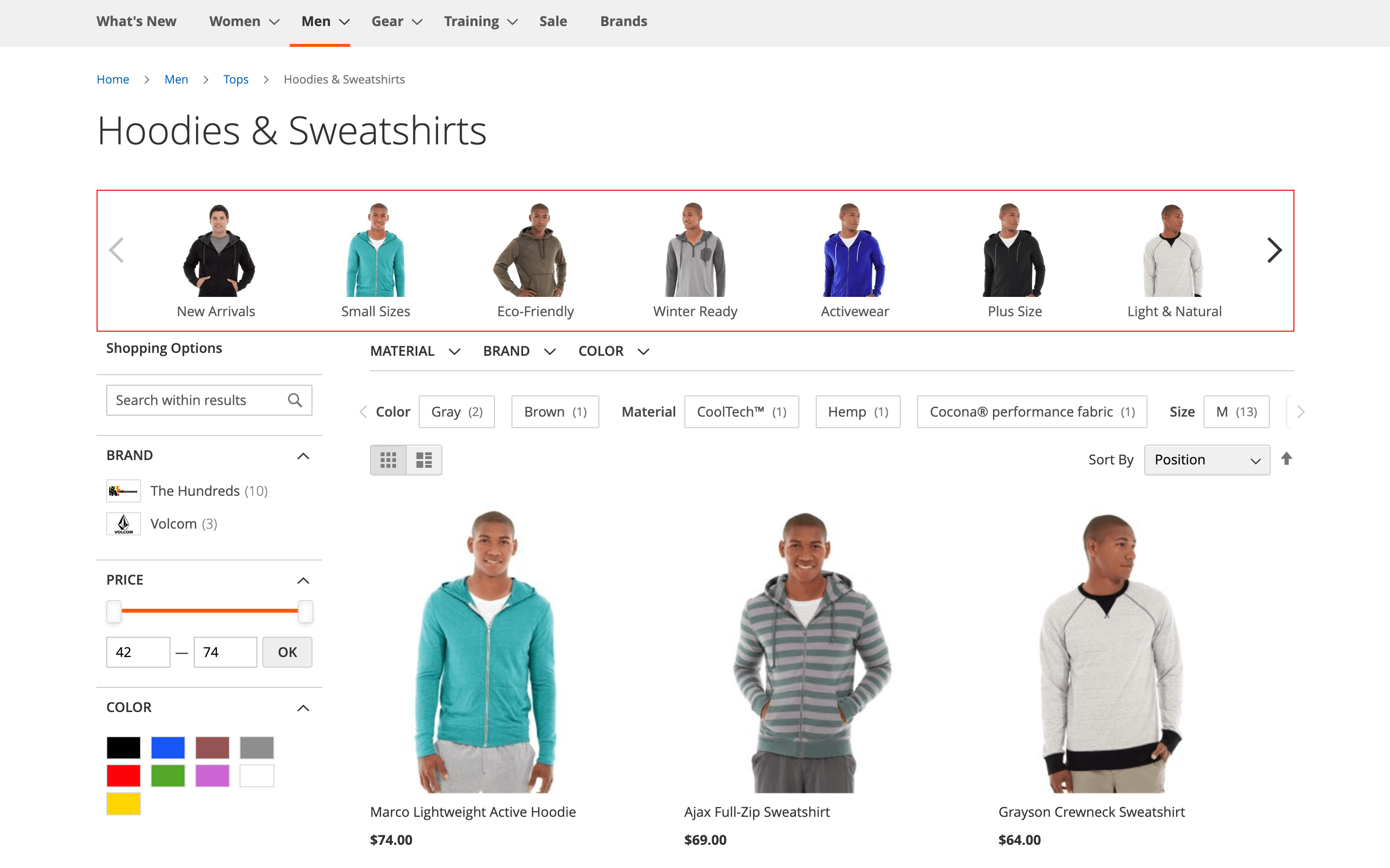
A few more changes:
- Hide a category from the filter: a new Show in Category Filter switch on the category keeps it out of the category filter. That's handy for a gift card or clearance category.
- Clear All now appears next to sidebar filters too.
- Brand pages manage their products in paged grids, so brands with thousands of products no longer time out in the admin.
- Hyvä support is built in, and the brand slider loads about 23 KB less JavaScript on every theme.
eChat
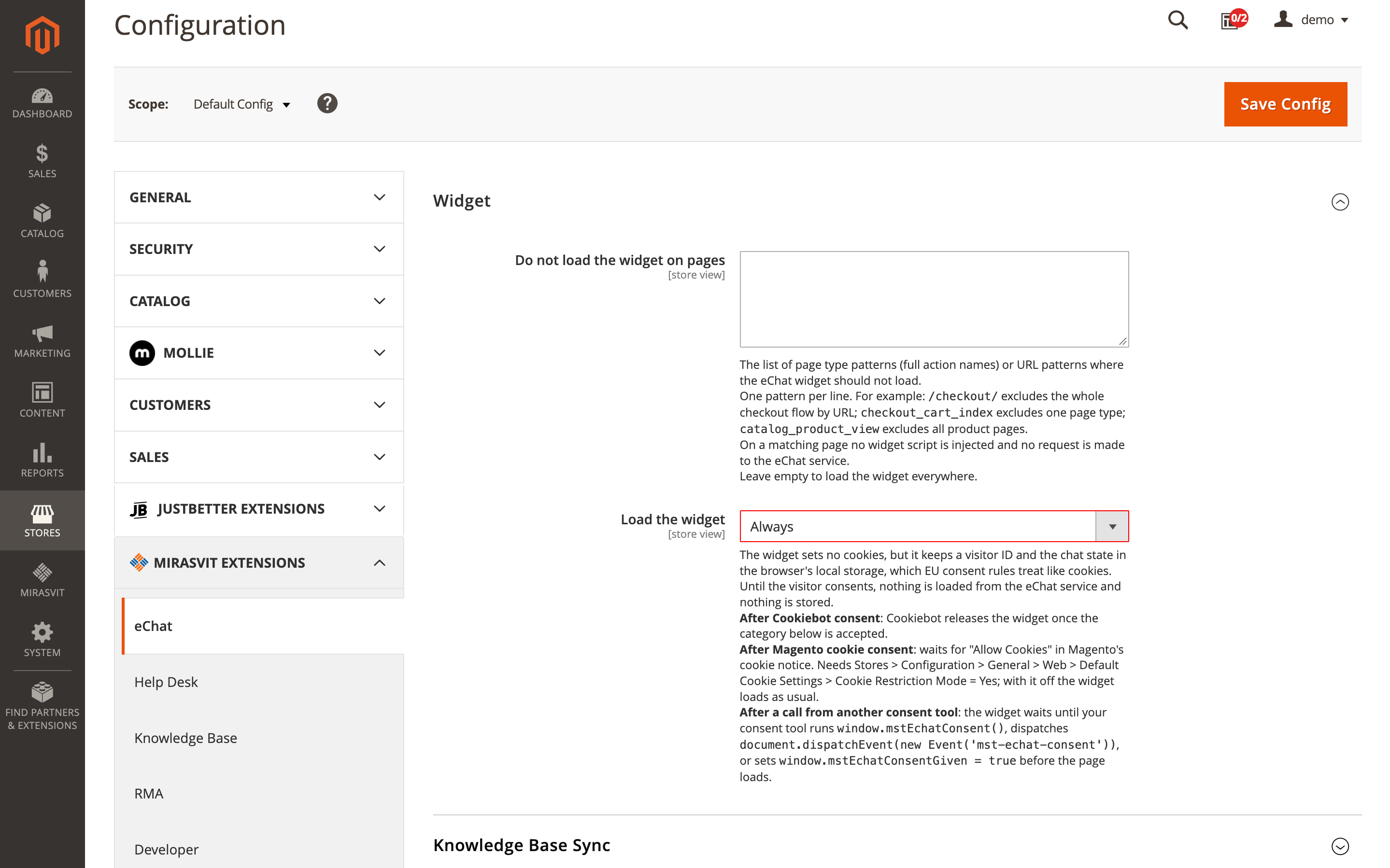
A chatbot that loads before the visitor accepts cookies is a problem for any store selling in the EU. In the eChat extension, a new Load the widget setting now decides when the chat appears. It can wait for Cookiebot, Magento's own cookie notice, or a signal from any other consent tool.
Until the visitor agrees, the page sends nothing to eChat and stores nothing in the browser. The default stays Always, so nothing changes until you pick a mode under Stores → Configuration → Mirasvit Extensions → eChat → Widget.
Customer data gets a firmer guard too. Before the assistant looks up anyone's orders, invoices or tickets, the store now checks their email, and no chat tool can skip that check. A shopper who verified within the last hour isn't sent a new code in every chat.
The chat can also sit inside your content. Add the eChat: Inline Chat widget to a Service Center or Contact page under Content → Widgets, and the assistant becomes part of the page. When a shipping extension saves a tracking URL, the assistant hands that link to customers who ask "Where is my order?"
Large catalogs benefit as well. The nightly knowledge base sync now uploads products in batches instead of one at a time. Before, a 700,000-product catalog needed more than a day; now it fits overnight, in its own cron group so other scheduled tasks aren't held up.
Follow Up Email
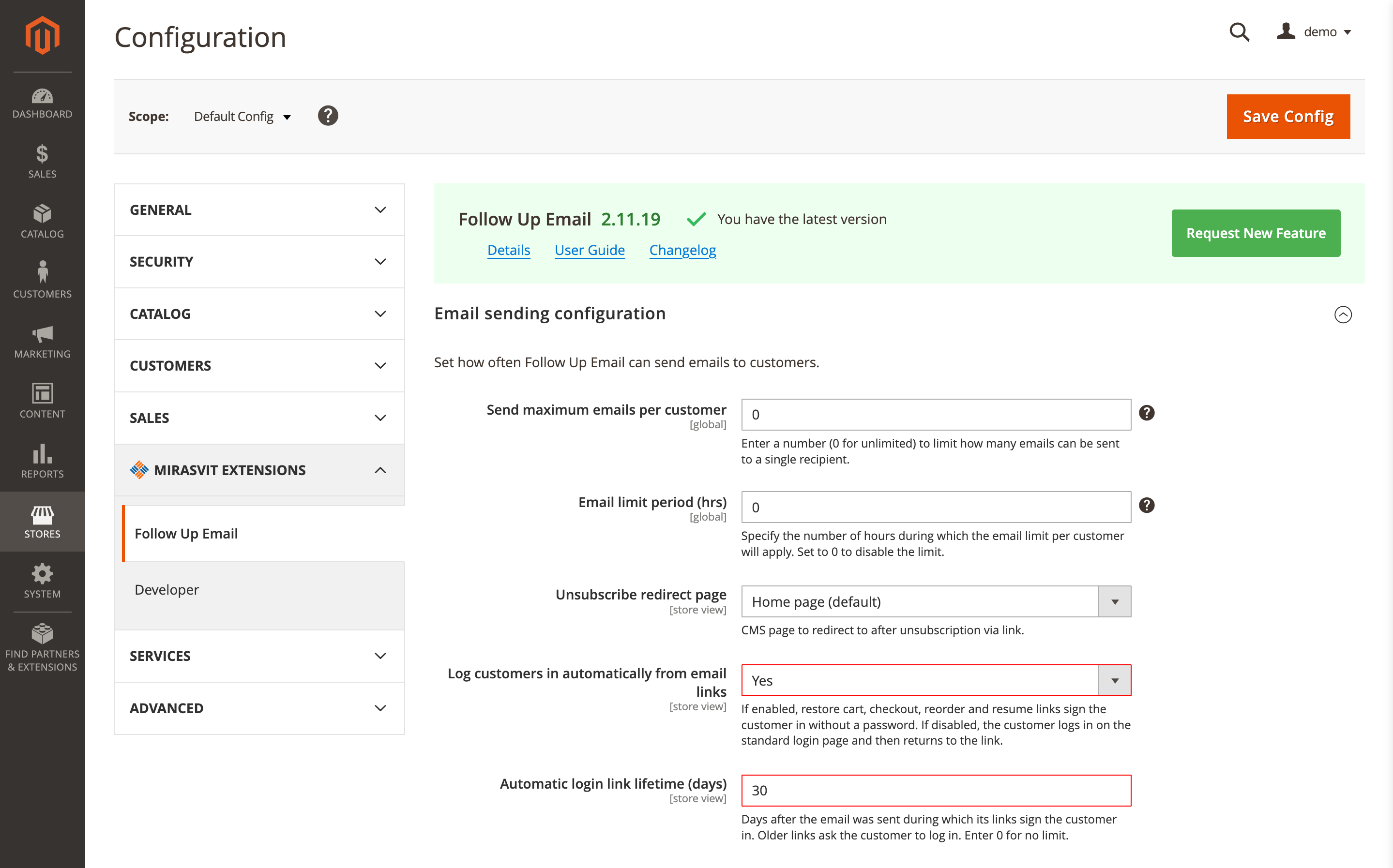
Restore cart, reorder and checkout links in emails from the Follow Up Email module sign the customer in without a password. Until now that lasted forever, so a forwarded email or one opened six months later still opened the account.
Links now sign customers in for 30 days after the email was sent. After that, the customer signs in as usual and goes straight back to finish what they started. If you'd rather nobody gets signed in from an email at all, set Log customers in automatically from email links to No under Marketing → Follow Up Email → Settings → Email sending configuration.
On a shared family computer where someone else is already signed in, an email link no longer switches accounts. Their session and cart stay as they were.
Emails also stopped going missing. An email used to be marked as sent before it actually went out, so if sending was interrupted, it never arrived. Now it's marked only after it's sent, and an interrupted one is picked up again after an hour.
For targeting, a new Order: Created (days ago) audience condition lets you send a review request only for orders placed in the last two weeks.
Product Labels
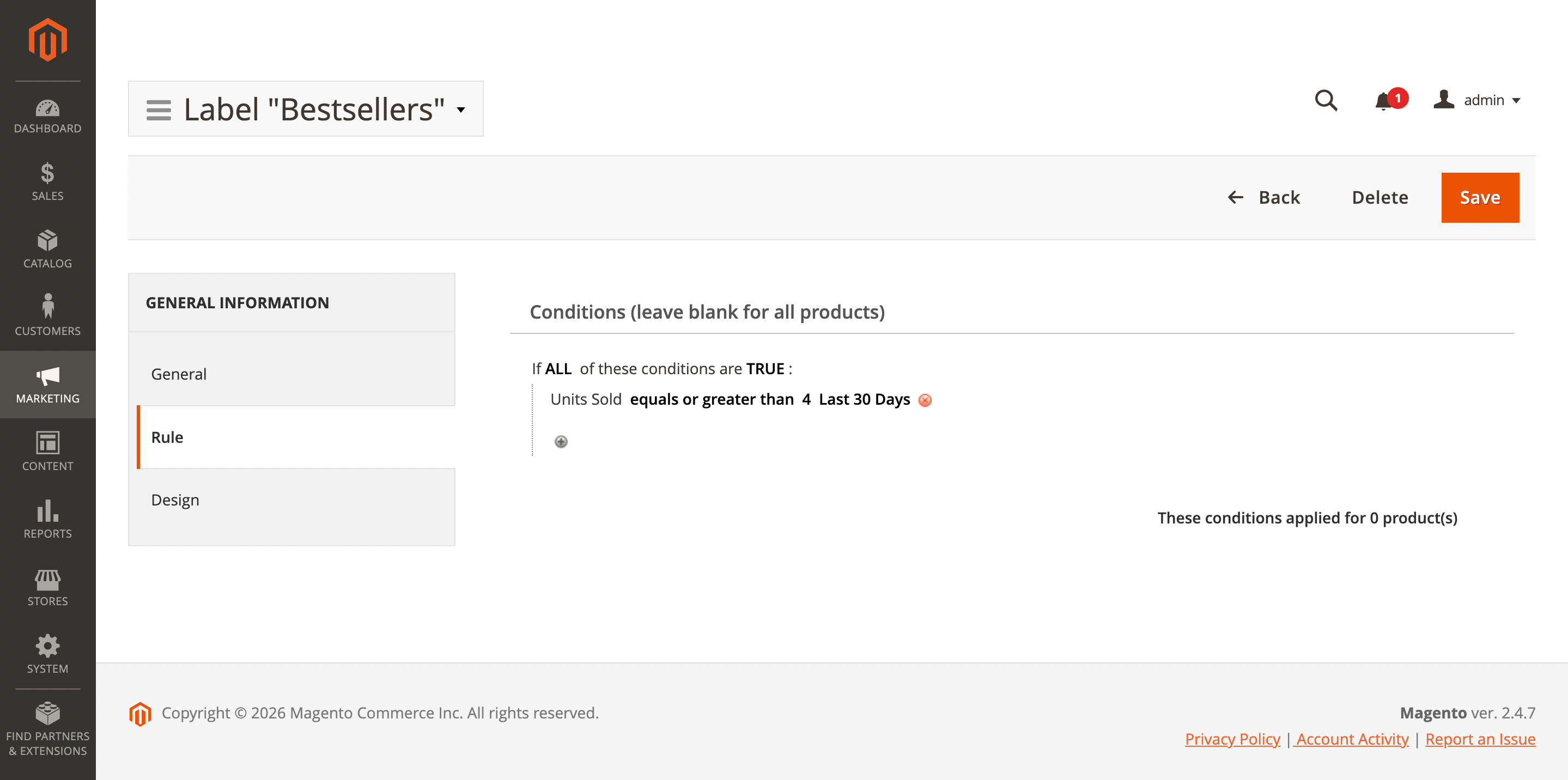
Bestseller and Trending badges used to be set by hand and forgotten. In the Product Labels extension, labels can now follow real sales and engagement. New Product Popularity conditions cover units sold, orders, revenue and views over the last 7, 30 or 90 days, plus reviews, average rating and wishlist adds.
A label can also show the number itself. A title such as [units_sold_30d] sold this month turns into "120 sold this month" and refreshes daily. Set it up under Marketing → Promotions → Product labels → Catalog label with a rule-based label.
Social Login
iPhone shoppers expect a Sign in with Apple button, and the Social Login extension now has one on Luma and Hyvä. Customers who hide their email from the store get an account with Apple's relay address. You'll need Magento 2.4.4 or later and an Apple Developer account.
A new report under Reports → Customers → Social Login shows how many customers linked each provider and the orders and revenue they brought, so you can see which buttons earn their place.
Advanced Product Feeds
Product data isn't only for marketplaces any more. The Advanced Product Feeds extension adds a Parquet feed type, the columnar format that data warehouses and analytics tools read natively. Each column keeps its type, and the preview shows the schema and rows before you publish.
Scheduling gets precise too. Set Schedule mode to Custom cron expression and enter something like */15 8-18 * * 1-5 to refresh prices every 15 minutes during business hours. A plain-language preview shows when it will run.
Feeds with category mapping also export much faster. The mapping used to cost more than 20 database queries per product and is now loaded once per export. Filters gain an is not condition for multiselect attributes, and image resizing works on S3.
Google Page Speed Optimizer
If your store keeps media on Amazon S3 or similar storage, image optimization in the Google Page Speed Optimizer module did nothing, and it didn't log an error either. Pages kept serving the original images.
That's fixed. Images on remote storage are optimized and converted to WebP as pages request them, then uploaded back to the bucket. Check that Enable Image Optimization and Use WebP images are on under Stores → Configuration → Mirasvit Extensions → Google Page Speed Optimizer → Image optimization, browse a few pages, and give cron time to catch up.
Reward Points & Referral Program
Three loyalty settings in the Reward Points & Referral Program extension make the program easier to tune:
- Referral link landing page: send invited friends straight to the Create an Account page, or any page you choose, instead of the homepage.
- Expiry per rule: birthday points can expire in 30 days while other points keep the usual period, and purchase points can have their own expiry.
- One reminder per customer: when several transactions are about to expire, the customer gets one email with the total instead of one email each.
Hyvä and the GraphQL API are now part of the extension, and headless stores get new queries for points on orders and points a product earns.
GDPR
The GDPR extension now passes the visitor's cookie choice to Microsoft Clarity, alongside Google Consent Mode and Microsoft UET. Before, Clarity had no idea what the visitor picked in the cookie bar, so stores either blocked it entirely or wired up the consent signal themselves.
Switch on Microsoft Clarity consent mode, and the choice reaches Clarity right away, with no page reload. Remember to add the _clck and _clsk cookies to your Statistics group.
RMA
Custom fields in the RMA extension can now be placed on individual items, not just on the return as a whole. When you create a field under Sales → RMA → Custom fields, set Attach to to Item, and the field repeats for every product in the return. That's useful for serial numbers, condition notes or a separate return reason for each item.
Attaching files got easier. Customers can drag files in, see thumbnails, and remove a file before sending. A file of the wrong type or size is refused right away with a reason, not after a failed submit. On Hyvä, image attachments open in a gallery.
The return form also explains what to fix instead of reloading without a word, and RMA reports can now be grouped and filtered by customer.
Improved Sorting
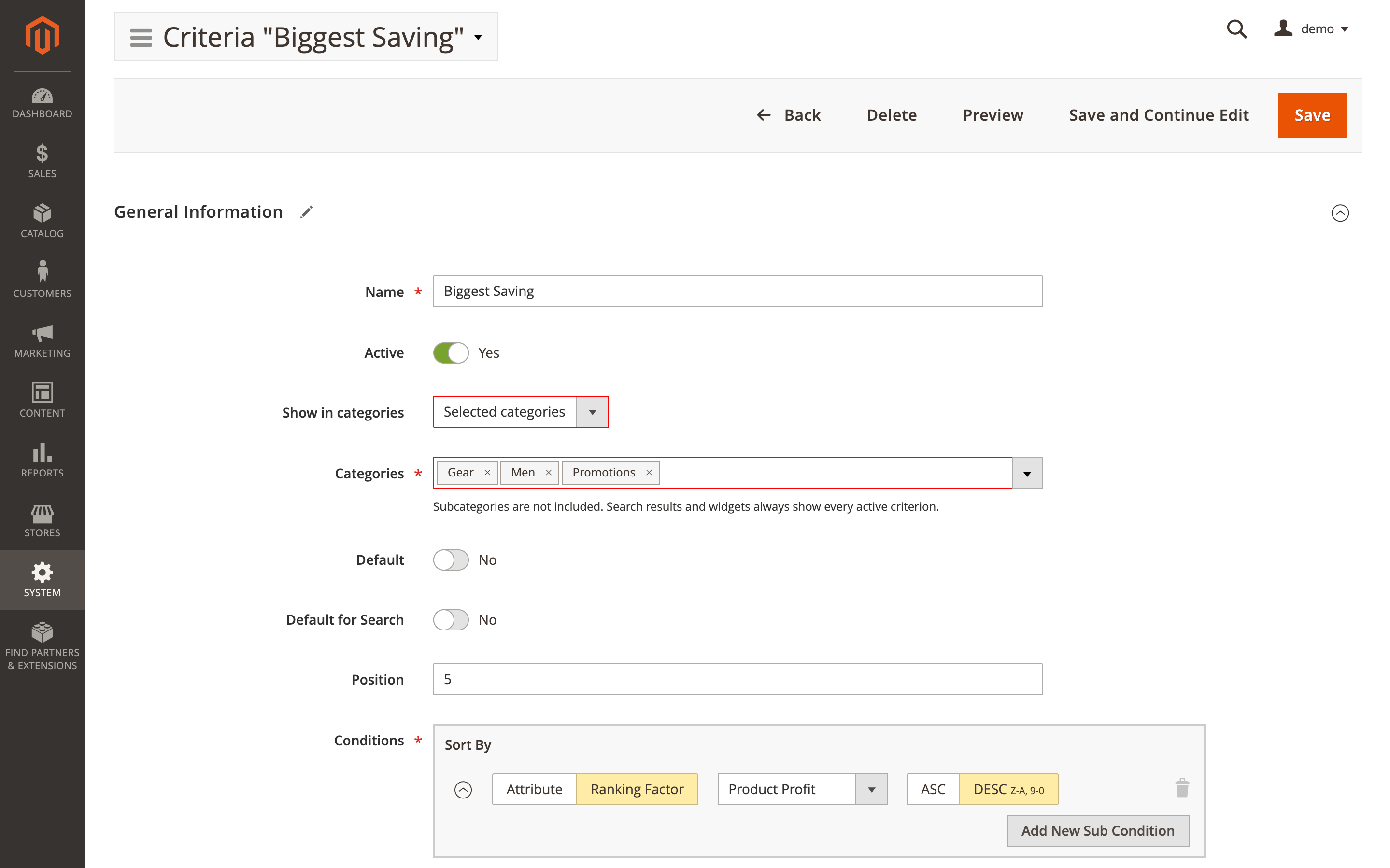
"Biggest discount" belongs in a sale category, and "Newest" means little among spare parts. The Improved Sorting extension now lets you show a sorting option only where it fits. Open a criterion under System → Sorting Criteria, set Show in categories to Selected categories, and tick the categories. Subcategories aren't included automatically.
Agentic Commerce
AI shopping assistants get more precise answers from the Agentic Commerce extension. A request like "red jackets in size M" now filters by color and size instead of returning every jacket, and agents can tell a shopper that an item is on backorder rather than out of stock.
On stores that show prices only to signed-in customers, agents used to read every price as 0 and could call products free. Turn on Hidden Guest Price, and they get a "login required" message you write instead.
MCP Server & AI Copilot
The MCP Server now has a Rules for AI Agents field. Write "Never remove product images" once, and every connected agent receives it. A Change Journal lists every change agents make, and headless stores can set a Public Base URL so AI clients can connect at all.
A read-only setting now really means read-only, both for AI clients and for AI Copilot.
Help Desk MX
An integration that only needed to read tickets used to get full access, including replying and deleting. The Help Desk MX extension adds separate View Tickets (API) and Ticket Drafts (API) permissions, so an AI tool can draft replies while a person sends them. On a store with 130,000 tickets, the admin order page also opens about five seconds faster.
Fraud Detection & Prevent Chargeback
A lookalike domain such as tu-chemmitz.de can receive email but usually has no website. A new rule condition in the Fraud Detection & Prevent Chargeback extension, Email domain web presence, checks exactly that, so a rule can send such orders to review. A slow website counts as "Inconclusive", never "No", so genuine buyers aren't flagged.
Facebook Pixel & TikTok Pixel
If your prices include tax, revenue in Meta and TikTok ads reports never matched your orders. The Facebook Pixel and TikTok Pixel extensions each have a new Include tax in event value setting, off by default. Note the day you switch it on, because reported conversion value jumps from that date. Facebook Pixel can also send the Purchase event once an order reaches a status you choose.
Before You Update
Composer removes the old Hyvä and GraphQL companion packages on its own. Here's what still needs your attention.
Update Mirasvit extensions together. Seven extensions now require Mirasvit Core 2.0: Advanced Product Feeds, Advanced Reviews, Advanced SEO Suite, AI Assistant, Follow Up Email, Geo IP Redirect and Help Desk MX. Composer installs Core 2.0 and its new companion packages with them. Run bin/magento setup:upgrade afterwards.
Add the new cron groups. If your server starts cron per group, add --group=mst_echat for eChat and --group=mst_affiliate for Affiliate. Without the second one, commissions stop being calculated.
Rebuild Tailwind on Hyvä. These extensions now include their Hyvä support: Layered Navigation, Search Ultimate, Promo Banners, Form Builder, Social Login, Full Page Cache Warmer, Affiliate, Store Credit, GDPR, Geo IP Redirect, Help Desk MX, Product Finder, Product Kits, Automatic Related Products, Reward Points, RMA, Shipping Restrictions and Surcharge. After updating, run bin/magento hyva:config:generate and rebuild your theme's styles.
Move template overrides. If your theme overrides a Hyva_Mirasvit* template, move it to the matching Mirasvit_* path. An override left at the old path is ignored, and nothing warns you.
A few more things to check:
- Hyvä versions: Automatic Related Products and Shipping Restrictions need Hyvä theme module 1.3.14 or later. Shipping Restrictions also needs Hyvä Checkout 1.3.1 or later.
- Blog MX: Meta discontinued Facebook Comments, so stores using it switch to Disable comments. Choose Mirasvit Comments to keep comments on your blog.
- Follow Up Email: links in emails older than 30 days now ask customers to sign in. Set Automatic login link lifetime (days) to
0to keep the old behavior. - Search Ultimate: run a search reindex so the "Choose options" links appear.
- RMA: back up your database before
setup:upgrade. - Promo Banners: impression counts may rise. A banner now counts once any part of it is visible, and tall banners on Hyvä weren't counted before.
- AI Assistant: its settings now apply at the Default Config scope only.
More From This Release
A few more changes worth knowing about:
- Full Page Cache Warmer: a Server cache TTL field stops it from re-warming pages that Varnish plugins, LiteMage or a CDN still have cached.
- Advanced SEO Suite: optional CollectionPage markup for category images, and much faster grouped product pages.
- Affiliate: a sale waiting period closes sales whose orders never complete.
- Promo Banners: pop-ups close with Escape on every theme, and impressions are counted accurately.
- Knowledge Base: search shows how many articles matched, and article URLs now use Magento's own URL rewrites.
- Order Management: the Add Products window opens fresh for each order.
- Advanced Reviews: review AI features can use their own AI provider.
- Headless stores: Promo Banners, Store Credit, Help Desk MX, Product Kits, Automatic Related Products, Reward Points and RMA now include their GraphQL API.
Looking for something we didn't mention? Our full extension catalog has the rest of what we make for Magento.
Mirasvit Support Engineer
Promote your products and achieve higher sales by using the power of marketplaces and comparison shopping engines with magento data feed extension. You can automatically generate and deliver feeds of your product catalog to those services with Magento Product Feeds extension.
This tool is unbelievably quick to use and is also outstandingly flexible. It's compatible with all major shopping and advertising services, including Google Shopping.
Feeds go straight to Google Merchant Center through Google's API, and AI profiles can rewrite titles, map Google categories and fill in missing attributes before your catalog ever reaches a marketplace.
Simply install the module, generate your very own product feed, present your catalog to a wider audience, and boost your sales right now!
Turn store events into email: abandoned cart reminders, review requests, win-backs, birthday greetings and order follow-ups, each triggered automatically and each reported with the revenue it brought in.
Get an innovative approach to search for products in your online store and increase your website conversion rate from search results by more than 50%!
- The search results are incredibly relevant
- Search autocomplete works ultra-fast
- Typing errors are automatically corrected while searching
- Supports multiple content type searching
- Provides outstanding search results for any language
- Support for category name, custom options, and associated products searching
- Create your own vocabulary of stopwords and synonyms
- Hyphens and slashes are supported in search queries
- Support for responsive themes
A help desk built into your Magento admin. Customer emails and contact forms become tickets, routed to the right department and agent, with workflow rules, satisfaction surveys, reports and AI tools. Every ticket shows the customer's orders and earlier tickets.
Boost customer loyalty with reward points, unlimited tiers and a built-in referral program - all in one module. Reward shoppers for purchases, referrals and social shares to drive repeat sales and turn one-time buyers into brand advocates.
Product Labels adds sale, new, stock and brand labels to product images by rules and product attributes, so they appear and disappear as prices, stock and the catalog change.
Labels can show the real discount or the stock left, use one of 12 editable templates or your own image, and appear on category, search and widget listings and on the product page, on Luma and Hyvä.
Every order in your Magento store gets a fraud risk score from 0 to 100 and lands in Accept, Review or Reject. Risky orders can go on hold automatically, and a known fraudster can be locked out of checkout.
Custom rules use order, customer, address and payment data, including the 3D Secure result. Everything runs inside Magento, with no external fraud service and no per-order fees.
AJAX layered navigation for Magento 2 with multi-select filters, price sliders and SEO-friendly filter URLs.
The same extension adds brand pages, an "All Products" page, landing pages, smart filters and infinite scroll, with Hyvä support built in.
Improved Sorting lets you decide which products shoppers see first on category pages, search results and catalog widgets. Combine signals like sales, rating, stock, margin and newness into one sort order, pin chosen products to the top, and push out-of-stock items and products without images to the end.
Google PageSpeed Optimizer speeds up Magento 2 for Core Web Vitals: it bundles and delays JavaScript, applies critical CSS per page type, converts images to WebP and lazy-loads them without delaying the main image.
Built-in PageSpeed Insights monitoring shows how each change affects the desktop and mobile score of your pages. Works with Luma and Hyvä themes.
Shoppers sign in and register with Google, Facebook, PayPal, Amazon, Yahoo, X or LinkedIn: no form to fill in and no new password. Works on Luma, Hyvä and headless storefronts through GraphQL.
Your site is not the only place to advertise and sell your products. Facebook offers humongous marketing opportunities. Taking advantage of them is a smart choice for any business.
Magento 2 Facebook Feed lets you easily generate product feeds for Facebook Dynamic Ads or Facebook Store.
The Magento MCP server gives AI assistants access to your real Magento store data, so your team can ask questions and complete tasks without switching between admin grids and exports. It works with Magento 2 and Adobe Commerce and connects to ChatGPT, Claude, Gemini, or any other MCP-compatible AI client.
More and more shoppers ask AI assistants to find and choose products for them.
Magento 2 Agentic Commerce makes your store readable to those assistants. It publishes a UCP merchant profile, an MCP server, and llms.txt, so ChatGPT, Claude, and other agents can search your catalogue, quote your real prices, build a cart, and send the shopper to your checkout. The Agent Activity dashboard shows which orders and revenue came from agents.