Magento 2 Full Page Cache vs Varnish: When Benchmarks Meet Real Stores
-
 Andriy Kovalenko
- E-commerce Tips & Best Practices
- Sep 24, 2026
- 10 min read

When a category page is served from Magento's built-in cache, it still goes through PHP. On our internal QA cluster, the same page took 158 ms with the built-in Full Page Cache and 1.8 ms with Varnish. That's an 88x difference on the same page, already warm.
That wasn't the only thing we tested. Alongside our own benchmark, we gathered data across 12 real Magento stores (catalogs ranging from 3,000 to 100,000 products), where we manually switched file-based cache and Varnish back and forth. And three claims commonly used to argue for Varnish's advantage didn't hold up across those 12 stores.
So this article isn't about Varnish being the better choice, period. It's about which claims about Varnish are true and which aren't, and which signal should actually drive the decision, instead of guessing upfront based on catalog size.
Table of Contents
- What Native Full Page Cache Is, and How Varnish Is Structurally Different
- Why the Gap Is Real Even on a Warm Cache
- Three Common Claims About Varnish That Didn't Hold Up on 12 Real Stores
- Two More Myths About Varnish People Still Believe
- Where "Varnish Is 2–4x Faster" Actually Comes From
- The Real Cost of Varnish Isn't the Config, It's the Integration
- Hit Rate Decides Whether Any of This Even Matters
- Multi-Node: The Failure Mode Nobody Talks About
- The Verdict: Decide by Signal, Not by Architecture
What Native Full Page Cache Is, and How Varnish Is Structurally Different
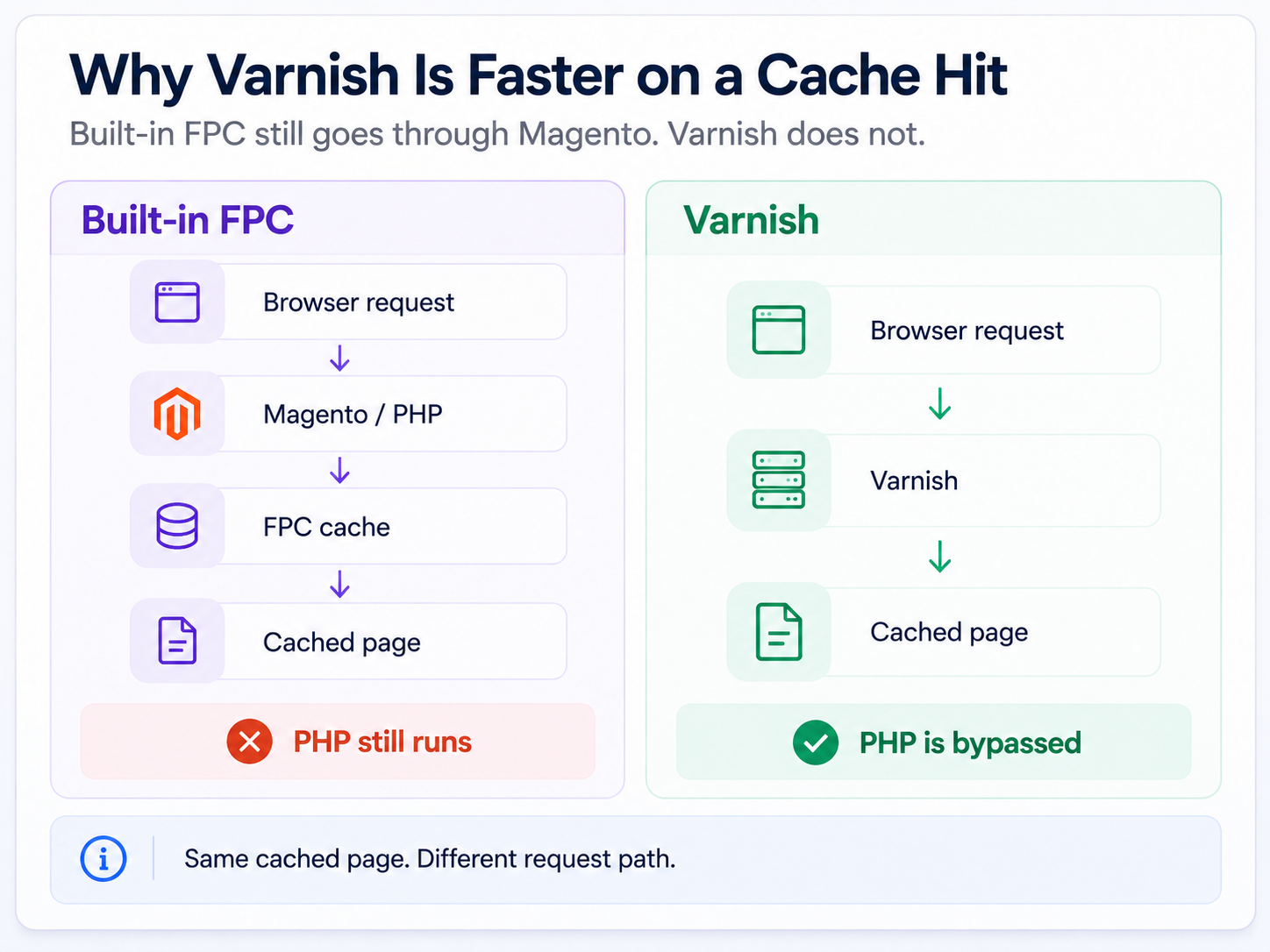
The built-in Full Page Cache sits near the very start of request processing. After Magento initializes its core components, it checks whether a cache entry exists for that page's key: if it does, it returns the ready response; if not, it builds the page from scratch.
By default, cached page copies are stored on the file system. Redis isn't a separate architecture here, just another storage location for the same data, at roughly the same speed. Moving FPC to a Redis backend makes sense when the server's disk is slow, or when there are multiple app nodes (more on that later).
The problem with file-based FPC isn't the cache itself, it's what happens before it. Code bootstrap and the database connection run every single time, before the cache is even checked, even when the response ends up coming straight from cache. We covered the mechanics of the built-in cache in more detail in Cache Management: Benefits, Problems, Solutions.
Varnish works completely differently. It's a separate process that sits in front of Magento as a reverse proxy: it reads, writes, and checks the cache itself, builds the page key from its own config (currency, store view, logged in or not), and returns a response without touching PHP at all.
Adobe Commerce's own documentation on caching describes the same principle: Varnish is the recommended backend for production. That's why it's structurally faster, not because someone tuned the settings better.
Why the Gap Is Real Even on a Warm Cache
The 50–200 ms gap we see on cached pages across real stores has a simple explanation. Before serving a cached page, file-based FPC still spins up PHP and checks whether the cache exists, and that check itself takes time. Varnish never spins up PHP at all.
Where that range comes from. All 12 stores ran the same stack (Magento 2.4.9, PHP 8.3), measured with ab (1,000 requests at concurrency 10, using the mean) on category and product pages. The design was the same store before and after: file-based FPC and Varnish were manually switched back and forth on all 12 (eight were already on Varnish from the start, up to four were switched to Varnish specifically for this check). The range is wider than the single number below, because these are different stores on different hardware, not one controlled benchmark.
Our QA test on a separate cluster (Magento 2, PHP 8.3, Varnish 6.6.1) gave us the same structural explanation, in exact numbers:
| Metric | Built-in FPC (file) | Varnish |
|---|---|---|
| TTFB, category (warm cache) | 158.4 ms | 1.8 ms |
| TTFB, product (warm cache) | 145.7 ms | 2.2 ms |
| RPS as load grows from 50 to 250 concurrent requests | 41.8 → 36.2 (drops) | 650–690 (stable) |
| p95 latency under the same load growth | 1,766 ms → 7,943 ms (4.5x worse) | stays low |
| Average system load at 250 concurrent requests | 26.71 | 12.59 (53% lower, at ~19x the traffic) |
Being honest about the setup. This test ran on a shared internal QA cluster, not an isolated benchmark box, so the absolute RPS numbers reflect this particular server, not a typical figure for any Magento store. Our load-testing client also hit its own ceiling at around 650–690 requests per second for Varnish, well before server load itself climbed. So Varnish's real ceiling is most likely higher, we just didn't find it in this test. What is reproducible, and doesn't depend on the specific hardware, is the relative difference between the two architectures: 88x on TTFB, and RPS that doesn't grow for file-based FPC as load increases.
The reason built-in FPC's RPS doesn't grow with load is the same one: every request still occupies a PHP-FPM worker, even when the response comes ready from cache. The worker pool is limited, so throughput is capped by that, not by how fast the cache itself can be read.
Three Common Claims About Varnish That Didn't Hold Up on 12 Real Stores
Here's which of the usual arguments for Varnish held up on those 12 stores, and which didn't.
Hole punching. The common claim is that Varnish handles private content (a mini-cart, a customer's name) better, because it can punch holes in a cached page for dynamic blocks, while file-based FPC can't. We found no difference across the stores we checked: private content loads through AJAX the same way in both architectures. The page itself comes from cache, and individual elements load separately, regardless of which cache sits in front.
Stampede protection. In theory, after a full cache flush, if 200 requests hit the same URL at once, Varnish should let one request through to PHP and hold the rest until the cache fills. In practice, if the requests are truly simultaneous, all 200 go to Magento in both setups. The difference only shows up when there's a gap of a couple of seconds between requests, and some of them get the already-cached response.
Invalidation speed. No difference here either. Magento itself controls invalidation: when a product's price or stock changes, both the product page and its category pages drop out of cache, instantly and identically for file-based FPC and Varnish.
That doesn't mean Varnish has no real advantages, just not the ones usually cited.
Two More Myths About Varnish People Still Believe
Myth 1. Varnish is magic and fixes everything. No. If your catalog has 100,000 products and your hit rate is 5%, switching to Varnish won't change anything for most visitors, because their pages simply never make it into cache in the first place. Varnish makes what's already cached faster. It doesn't increase the share of pages that get cached.
Myth 2. Varnish is hard to configure. Also no. Magento generates the Varnish config itself, and setting up a standard VCL out of the box is a matter of minutes. The real complexity isn't in Varnish itself, it's in what it runs into, covered in the next section.
Where "Varnish Is 2–4x Faster" Actually Comes From
This number still gets repeated in FPC-vs-Varnish comparisons, usually citing Amasty's research. We checked the original source.
The test ran in 2014, on Magento Community 1.8.1.0 and 1.9.0.0, PHP 5.4.4, Varnish 3.0.2. Magento 1 had no built-in Full Page Cache at all: in that test, "Full Page Cache" meant Amasty's own paid extension, compared against Varnish through a third-party integration module, Nexcess Turpentine.
So this isn't a comparison of two caching architectures. It's a comparison of one vendor's product against a third-party module on a 12-year-old stack. The "2–4x" figure was never about Magento 2, and never about built-in FPC versus Varnish as such.
We also checked four other sources that quote similar figures for Magento 2, and none of them disclose a methodology solid enough to trust. The most honest of them, the createhosting.co.nz test, openly admits to weak hardware (a 2 GB VPS) and just five concurrent users, and the rest either contradict themselves or repeat a number from another site without checking it.
That makes the data from 12 live Magento 2 stores, plus our own QA benchmark above, most likely the only material on this topic with a fully disclosed methodology.
The Real Cost of Varnish Isn't the Config, It's the Integration
The default Varnish config for Magento works right out of the box (we covered the step-by-step setup and VCL separately in How to Configure Varnish Cache for Magento 2). The real work during rollout happens in three places, and none of them is Varnish itself.
First, HTTPS. Varnish can't terminate SSL, so it has to sit behind a separate TLS terminator.
Second, and more important, the visitor's real IP address. If it isn't forwarded correctly through the whole chain, every log in Magento starts showing Varnish's own IP address instead of the real visitor's.
The consequence goes unnoticed until someone complains: bot blocking by IP breaks, geo-detection breaks, and any system that restricts admin access to a list of allowed IPs stops working entirely, because every request now appears to come from the same address.
Third, bulk admin operations. A single CLI command that touches many URLs at once (a bulk reindex, a mass price update, a store-wide slug change) can fire off a purge request for every affected URL in one go. File-based FPC just marks those entries stale and moves on; Varnish has to process the whole burst of purges as it happens, and on a large catalog that burst can be big enough to affect the server while it's running. We've hit this ourselves during routine maintenance, not under attack traffic.
That's the real operational cost of Varnish: not writing the config, but threading the real client IP through everything in Magento that depends on it, and accounting for what a bulk operation does to a proxy that has to process every purge as it happens.
Hit Rate Decides Whether Any of This Even Matters
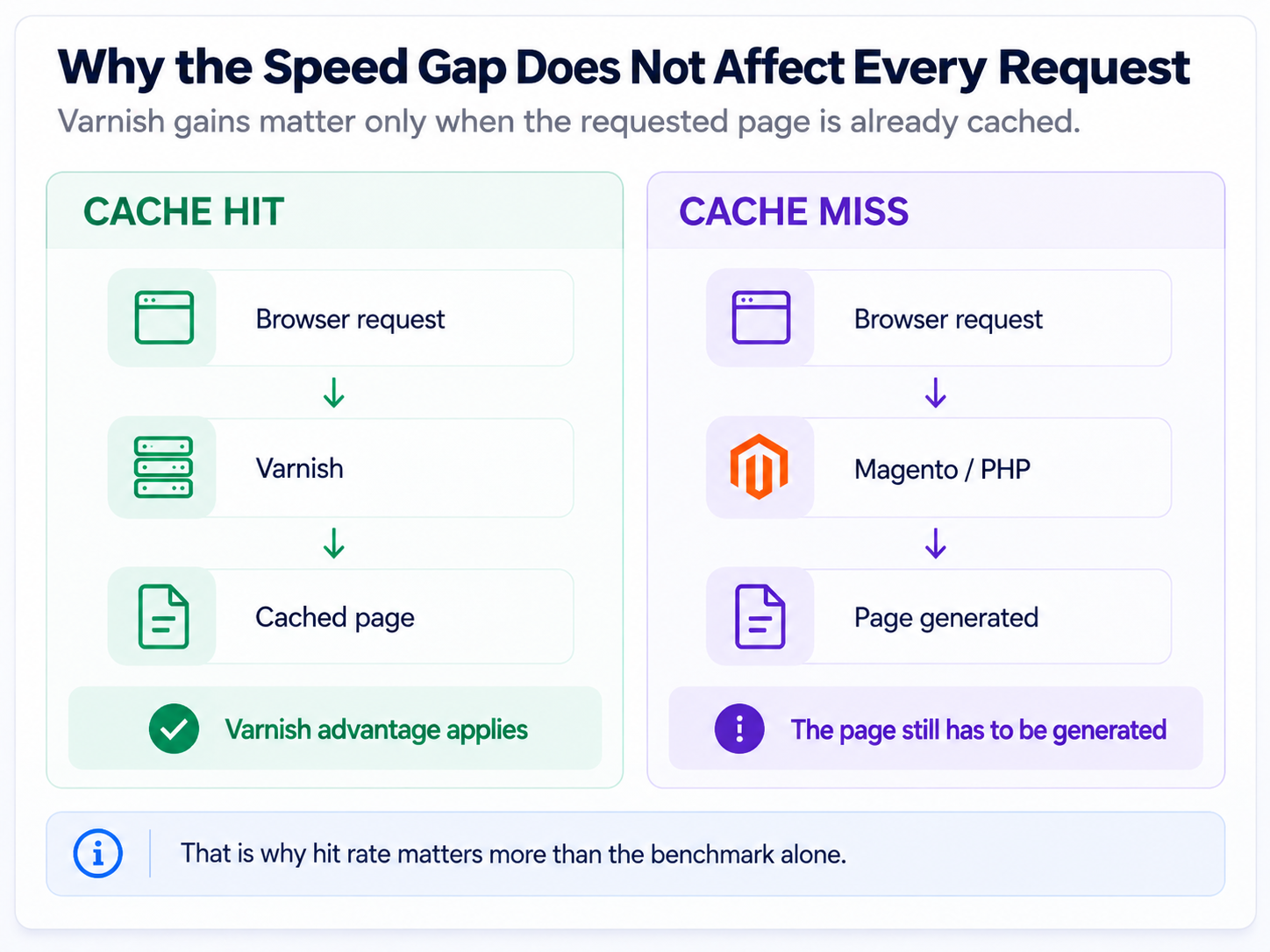
The 88x difference from the test above only shows up when a request actually hits the cache, and not every request does. That's the single most important number in this article.
According to our Cache Warmer's own reports across a portion of the stores we checked, real hit rate ranges from 5% to 67%, heavily dependent on catalog size and traffic. This isn't a census of all 12 stores, and it's not an even distribution: we can't say exactly which store lands at 5% and which at 67%, only that the spread is genuinely that wide in practice. For the full mechanics of measuring and improving it, see our guide to Magento's cache hit rate.
MageDelight also calls hit rate the key metric for cache monitoring, not raw milliseconds - the difference here is that what follows is real numbers from live stores, not just a general principle. So the first question to start with isn't FPC versus Varnish. It's your own hit rate, and why it looks the way it does.
Multi-Node: The Failure Mode Nobody Talks About
If a store runs on multiple app nodes and the file-based cache isn't shared, each node keeps its own local copy. That's not just more cache misses, it's a real risk of showing different visitors different content for the same product.
We've seen this happen in practice: a customer saw an incorrect price or stock status on the site, because different nodes were serving different data. It usually surfaced through a customer complaint, not through monitoring. Varnish wasn't in the stack yet at that point. The fix was moving FPC to a shared Redis backend.
So if there's more than one app node, a shared cache is mandatory, whether it's file-based or Varnish. Otherwise the problem isn't speed, it's data correctness.
The Verdict: Decide by Signal, Not by Architecture
Cache Warmer isn't part of this comparison. It simulates a visitor: it opens pages and, in doing so, fills or warms whichever cache layer the store owner already chose. It works the same regardless of whether that's file-based FPC or Varnish, and it has zero effect on which one you should pick. If you're choosing a warmer for either one, here's how the main Magento 2 cache warmers compare.
Instead of a hard threshold based on SKU count, the decision comes down to specific signals. And there's a counterintuitive part here: what actually decides it is traffic, not how often content changes or how complex the pages are, even though that feels like it should matter too.
| Signal | What to do |
|---|---|
| Multiple app nodes (even just two) | A shared cache is mandatory either way: Redis for FPC, or Varnish in front of the nodes. Otherwise you risk content mismatches, not just cache misses. |
| Low hit rate (<10%) on a large catalog | Varnish alone won't save you. First figure out why the cache isn't being used (traffic, number of filters); otherwise an 88x win won't reach almost anyone. |
| You need HTTPS and have someone to handle the integration | Varnish is justified: the config itself isn't the issue, the real time cost is TLS termination and forwarding the real IP. |
| Shared or limited hosting with no control over the reverse proxy, or traffic low enough that the gap isn't noticeable to visitors | Built-in FPC is enough. |
There are two practical ways to feel this out without waiting for a full audit. The simplest: just browse your own site. If it feels like pages are dragging, that's already a reason to take real measurements and diagnose the issue, instead of switching architectures on a guess. The more precise one: response times climbing specifically during peak load. We don't have a documented case with numbers behind this particular signal, though, so treat it as a rule of thumb, not a proven example.
And to be honest about the other side of this: if everything is working fine right now, switching to Varnish just in case usually doesn't break anything, but it doesn't deliver a noticeable benefit either. It just adds operational complexity for no real benefit.
To sum up: cache doesn't make a slow store faster - what it does is hold up under load, when a lot of visitors hit it at once. Without monitoring the signal from the table above, any cache optimization, file-based or through Varnish, is just guessing.
FAQ
Is Varnish always faster than Magento's built-in Full Page Cache?
Only on a cache hit. Our QA test showed an 88x gap in TTFB on a warm category page (158.4 ms with the built-in cache vs. 1.8 ms with Varnish), and that structural gap held up across 12 real stores too. But it only applies to requests that actually hit the cache: on a large catalog with a 5% hit rate, most visitors never touch that fast path at all, so the 88x number never reaches them.
Why is a cached page still slower on the built-in Full Page Cache than on Varnish?
Because file-based FPC still goes through PHP bootstrap and a database connection before it even checks whether a cache entry exists, on every single request. Varnish sits in front of Magento as its own process and returns the cached response without touching PHP at all, which is why the gap shows up even when both caches are fully warm.
Do Varnish's hole punching and stampede protection actually help a Magento store?
Across the 12 stores we manually switched between file-based FPC and Varnish, we found no real-world difference on either count. Private content (mini-cart, customer name) loads through AJAX the same way in both setups, and a true simultaneous stampede hits Magento in both architectures alike; stampede protection only shows up when requests are a couple of seconds apart. Invalidation speed was identical too, since Magento itself controls it either way.
Where does the claim that Varnish is 2–4x faster than Magento come from?
It traces back to a 2014 test on Magento 1.8/1.9 with PHP 5.4.4, comparing Amasty's own paid Full Page Cache extension against Varnish through the third-party Turpentine module, since Magento 1 had no built-in Full Page Cache at all. That's not a comparison of Magento 2's native cache against Varnish, and the four other sources that repeat similar figures for Magento 2 don't disclose a methodology solid enough to trust either.
What's a good Magento 2 cache hit rate, and why does it matter more than picking a cache engine?
Across the stores we checked, real hit rate ranged from 5% to 67% depending on catalog size and traffic, and that number decides whether a fast cache engine even matters. An 88x TTFB advantage on a cache hit means nothing to a visitor whose page was never cached in the first place, so hit rate is the number to diagnose before comparing architectures.
If my Magento store runs on multiple app nodes, do I need Varnish?
You need a shared cache, which isn't necessarily the same thing. If each node keeps its own local file-based cache, different visitors can see different data for the same product, a correctness bug, not just a performance one. That can be solved either by moving the built-in FPC to a shared Redis backend or by putting Varnish in front of all the nodes; the choice between the two still comes down to the other signals (HTTPS needs, hit rate, hosting control), not the multi-node setup itself.
Mirasvit Support Engineer
Magento 2 store loads quickly only if its pages are in the cache. Our extension automatically adds pages to the cache and thus, speeds up your store!
Whenever your customer or Google visits a page, its most recent variant will be loaded in a fraction of a second from the cache.
This extension runs an automated crawler that monitors cache status. Once the cached page is cleared, the crawler visits this page and warms up the cache for it!
Keep Learning

![7 essential ways to improve your Magento 2 site speed [Updated]](https://mirasvit.com/media/blog/resized/989/magento-performance-.png)