Mirasvit Latest Updates - October 2026
-
 Andriy Kovalenko
- Our News & Updates
- Oct 1, 2026
- 11 min read

October's release reaches most corners of a Magento store: checkout protection, reviews, blog content, email, caching, catalog feeds and the new channel of AI shopping assistants.
Fraud protection takes the biggest step. When your team catches a fraudster in the Fraud Detection & Prevent Chargeback extension, that person stays shut out of checkout, so a second card won't bring a second order.
The Advanced Reviews module lets you limit reviews to verified buyers, and a shopper whose problem got solved is free to go back and raise the rating.
A WordPress blog moves into Magento with one export file and the Blog MX module, keeping its publish dates and URLs. AI shopping assistants, for their part, get your real return and shipping terms from the Agentic Commerce extension instead of guessing.
Plenty of smaller changes pull their weight too. Marketing emails carry the one-click unsubscribe that Gmail and Yahoo ask of bulk senders. A wiped page cache fills back up on its own. A cap on stacked filters keeps bots from crawling endless combinations, and catalog feeds come out in JSON for partners who need it.
Whatever needs your attention during the update sits in one checklist near the end, so nothing catches you by surprise.
Table of Contents
- Fraud Detection & Prevent Chargeback
- Advanced Reviews
- Blog MX
- Agentic Commerce
- Follow Up Email
- Full Page Cache Warmer
- Layered Navigation
- Advanced Product Feeds
- Automatic Related Products
- Advanced SEO Suite
- Knowledge Base
- eChat
- More From This Release
Fraud Detection & Prevent Chargeback
A chargeback is rarely the end of it. The person behind it comes back with a new card, sometimes as a guest, and every attempt leaves your team one more order to review and cancel. Lock Customer, new in the Fraud Detection & Prevent Chargeback extension, closes that loop.
After you've marked someone as a fraudster, checkout refuses them before an order, invoice or stock reservation appears. That holds whether they sign in, buy as a guest or go through the API.
There are three places to apply it: the order page, the customer's profile and the order grid. In the grid, one mass action handles a whole batch of suspicious orders, and a new column shows who's already blocked.
For fraud that follows a pattern, rules take over the job. Point one at a freight-forwarding address that keeps producing chargebacks, and everyone shipping there is stopped automatically.
Mistakes happen, and a real customer may write in asking why they can't buy anything. The new Locked Customers page answers that at a glance: who restricted the account, when, for what reason, and every order attempt refused since. Lifting the block takes one click on the customer's profile.
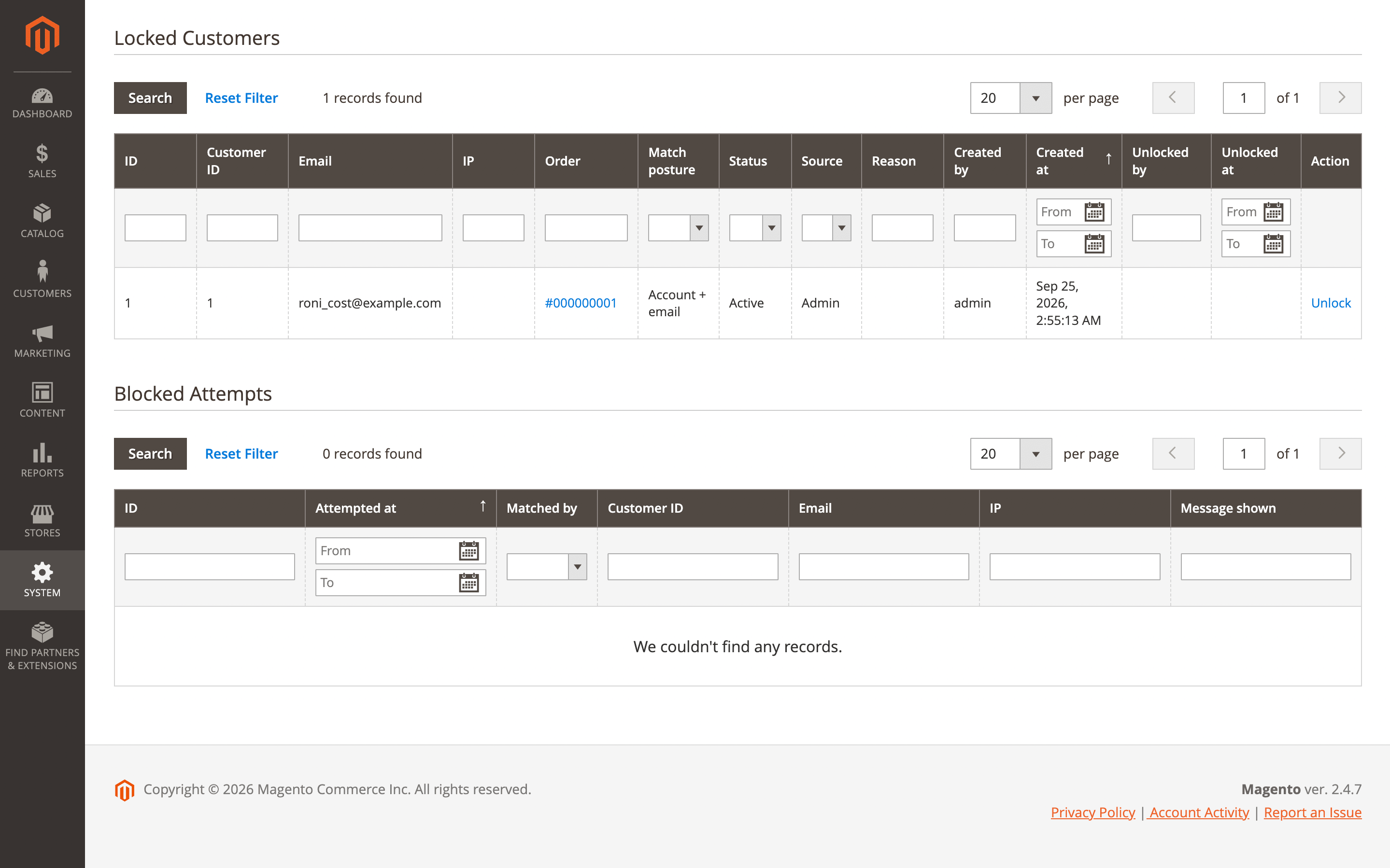
Switch the feature on under Stores → Configuration → Mirasvit Extensions → Fraud Detection → Lock Customer. There you also write the message a blocked shopper sees and decide how far the restriction reaches: the account alone, or its email and IP address as well.
Nothing changes after the update until you switch the feature on. IP matching is optional for a reason: on a shared office network, honest shoppers would lose access along with the person you meant to stop.
Advanced Reviews
Only people who bought the product get to review it once you turn on Allow reviews only from buyers in the Advanced Reviews module. The form opens to signed-in customers with an order for that item, and you decide which order statuses count, so a review may wait until the order is completed.
The same check runs on the server, which keeps bots and competitors from slipping past it by posting directly.
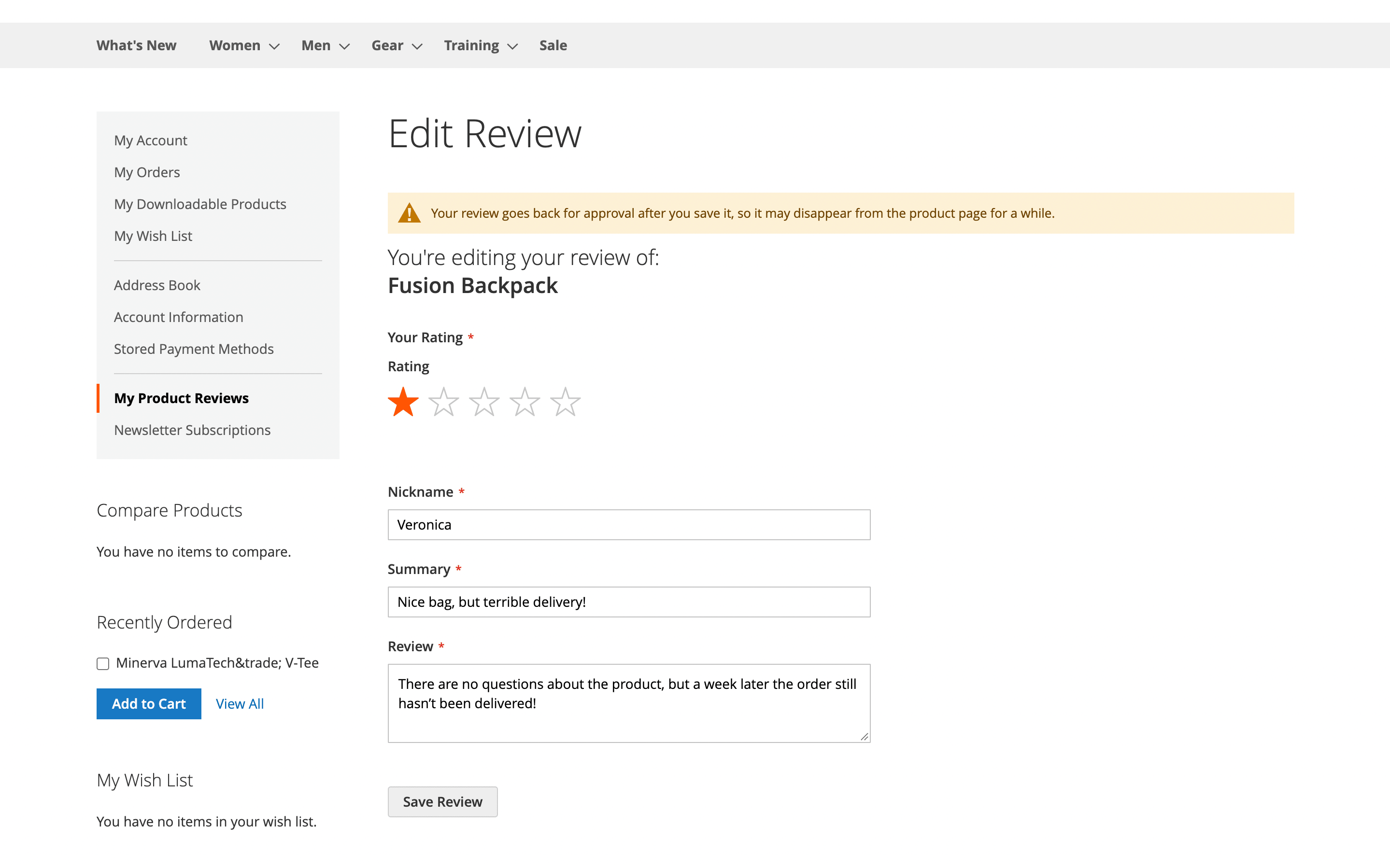
A second setting deals with reviews that are already live. A shopper gave three stars over a late delivery, and then your support team sorted things out. That shopper opens the review in their account and changes the rating themselves. The edited review returns to moderation and keeps its original date and Verified Buyer badge.
Both settings are off by default, under Stores → Configuration → Mirasvit Extensions → Advanced Reviews.
The My Product Reviews page in the customer account has been redesigned. Each review sits on its own card with its status: published, pending or not approved. The page fits a phone screen, so checking whether a review went through takes a second.
Blog MX
Years of WordPress posts fit into one export file, and that file is all the new importer in the Blog MX module asks for. Upload it under Content → Blog MX → Import, and a preview lists what's inside before anything is written: the number of posts, categories, tags and authors.
Each post arrives with its original publish date, URL key and meta title, so the blog doesn't start over in search. Captions, shortcodes and other WordPress formatting become regular HTML, and whatever is already on your Magento blog stays untouched.
Every run goes into an import history with its own report. Say 500 posts landed in the wrong store view: Roll back removes exactly what that run created and nothing else. Agencies moving large blogs have a command-line version of the same import.
One change is visible to readers: tags appear as links under each post and lead on to related articles.
Agentic Commerce
"Can I return this?" AI shopping assistants hear that question as often as your support team does. The Agentic Commerce extension gives them your actual policy to quote, so the answer no longer rests on a guess.
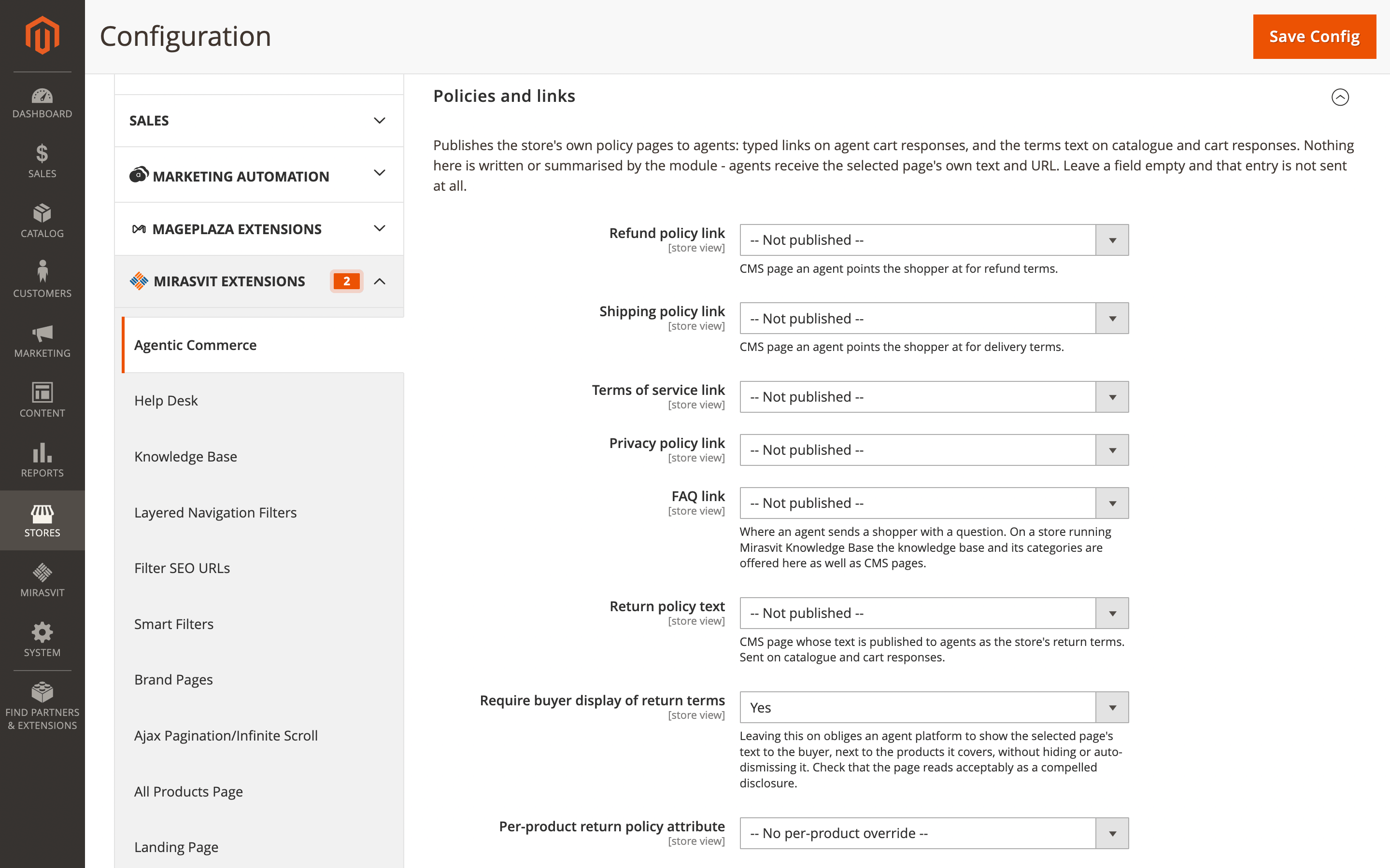
It shares your returns, shipping, terms, privacy and FAQ pages with AI agents, using CMS pages you already have. Return and warranty terms go out word for word, and by default the agent platform is asked to show them to the buyer.
Choose the pages under Stores → Configuration → Mirasvit Extensions → Agentic Commerce → Policies and links. Until you pick one, nothing is shared.
Three more changes make orders placed through agents cleaner:
- Safe retries: a dropped connection no longer creates a duplicate cart or doubles a quantity, because a repeated request gets the original answer.
- Signed responses: an agent can check that prices and stock really came from your store.
- Lighter search results: responses to agents are 72% smaller, which leaves room to compare more of your products in one conversation.
Follow Up Email
Gmail and Yahoo expect bulk senders to support one-click unsubscribe, and mail without it is more likely to land in spam. Campaigns sent by the Follow Up Email module include it automatically.
Gmail, Apple Mail and Outlook show their own Unsubscribe button next to the sender name, and someone who has lost interest presses it instead of reporting you as spam.
Customers who buy several products at once get a break too. Switch on Send one email per order in a campaign's event settings, and a five-item order triggers one follow-up rather than five.
Full Page Cache Warmer
141,390 out of 150,427. On one store, that's how many pages the warmer still counted as cached a full day after Redis had been wiped. Deploys, hosting maintenance and server restarts clear the cache without telling Magento, and shoppers used to get slow pages until someone noticed.
The Full Page Cache Warmer extension now spots such a flush within a minute and warms the affected pages again. It works with Redis, Varnish, LiteMage, NitroPack and file cache, and there's nothing to set up. For deploy scripts, a new command resets the warm status in one step.
Layered Navigation
Bots can crawl filter combinations one after another for hours, and every page they open makes your server work. A single new field in the Layered Navigation module, Max Applied Filters, puts a ceiling on that. A request that stacks more filters than you allow goes to the unfiltered page before any product or search query runs.
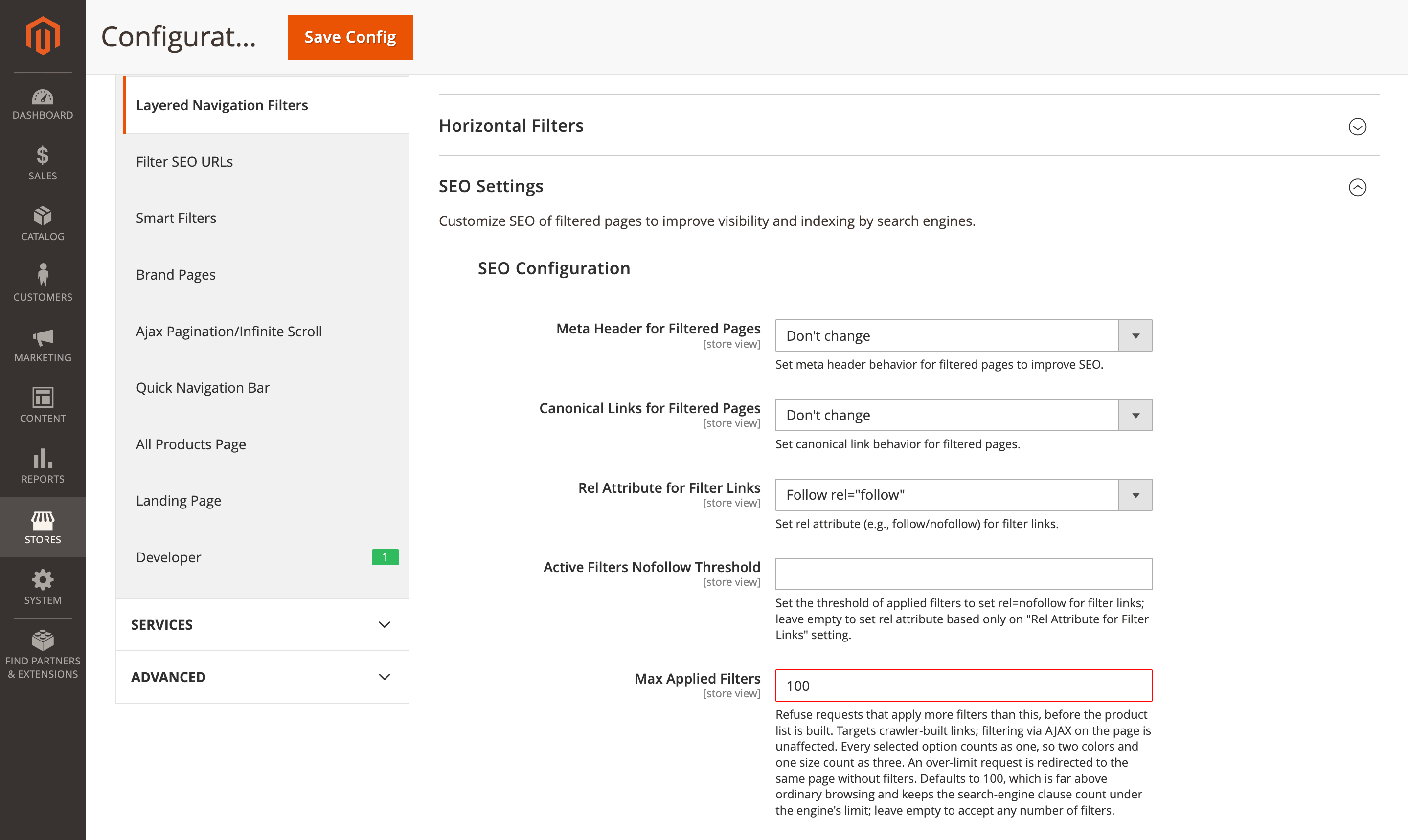
You'll find the field under Stores → Configuration → Layered Navigation → SEO Settings → SEO Configuration. We'd start with 5–8, keeping it above anything a real shopper would combine.
Advanced Product Feeds
When a marketplace or data partner asks for product data in JSON, the Advanced Product Feeds extension can produce it directly. Choose JSON as the type of a new feed, as one document or as JSON Lines, and prices go out exactly as you set them.
Owners of big catalogs will feel the admin speed up. A filter preview that took 19 seconds opens in about a third of a second, and counting products no longer freezes the page.
Did an outside script start your exports through a storefront URL? That URL has been removed for security. Use the
bin/magento mirasvit:feed:exportcommand instead.
Automatic Related Products
If the Revenue column in the Automatic Related Products module drops after you update, nothing is broken. A block is credited only with the products it showed that the shopper went on to buy. One click on a block used to earn it the whole order, shipping included. The new figure gives you a much clearer picture of which blocks deserve their spot on the page.
Click tracking is optional now. Turn it off for a store view, and order and revenue data keep working. One store saved over 4,000 background requests a day that way.
Advanced SEO Suite
Heavily reviewed products are where the Advanced SEO Suite speeds up the most. On a product with 410 reviews, the page renders about 1.8 seconds sooner.
New optional structured data also helps Google pick the right image for your product and CMS pages in search results. Turn it on under Stores → Configuration → Mirasvit Extensions → Rich snippets and OpenGraph.
Before You Update
Most of this month's changes need nothing beyond the update itself. Here are the exceptions.
Remove the old Hyvä packages first. Five extensions include Hyvä support themselves: Advanced Reviews, Advanced SEO Suite, Blog MX, Knowledge Base and Product Labels.
If their old companion packages are still installed, the update either fails or quietly keeps the previous version. Remove the ones you have:
composer remove mirasvit/module-review-hyva mirasvit/module-comment-hyva mirasvit/module-vote-hyva
composer remove mirasvit/module-seo-hyva mirasvit/module-seo-graph-ql
composer remove mirasvit/module-blog-mx-hyva
composer remove mirasvit/module-kb-hyva mirasvit/module-kb-graph-ql
composer remove mirasvit/module-cataloglabel-hyva
Rebuild Tailwind on Hyvä. After updating the Advanced Reviews, Blog MX, Knowledge Base or Product Labels module, run bin/magento hyva:config:generate and rebuild your theme's styles. Skip it, and product labels, for one, end up under the product image instead of on it.
A few more things to check:
- In the Knowledge Base extension, comment reCAPTCHA has to be switched on again (details below).
- The Advanced Product Feeds module no longer accepts export requests through a storefront URL.
- Revenue in the Automatic Related Products extension will drop, as explained above.
- The Google Page Speed Optimizer module stops bundling JavaScript on checkout by default, unless you saved your own value for that setting.
- The HTML sitemap in the Advanced SEO Suite may start listing a few CMS pages, such as Customer Service, that it used to hide.
Knowledge Base
Comment forms in the Knowledge Base extension are protected by Magento's built-in reCAPTCHA from this release on. It uses the same keys as your Contact Us form and product reviews, and you can choose v2 checkbox, v2 invisible or v3.
Your previous setting won't carry over. After updating, choose a reCAPTCHA type under Stores → Configuration → Security → Google reCAPTCHA Storefront → Enable for Knowledge Base Comments, or comment forms will stay open to spam.
eChat
Picture your chatbot recommending a product you stopped selling, complete with an old price and a dead link. The eChat module's sync takes care of that: disabled and deleted products leave the bot's knowledge, and so do out-of-stock ones if your store hides them. If a sync stops halfway, nothing is removed.
Running the chat costs less, too, because the knowledge base receives only the product data the assistant can answer from. And on busy days, customers won't run into "Too many requests" errors anymore.
More From This Release
Six more extensions picked up changes you'll notice:
- Google Page Speed Optimizer: clears out leftover image records by itself. One store had collected 11.7 GB of them for about 14,000 images.
- Improved Sorting: keeps category pages cached through scheduled reindexes, so they stay fast all day.
- Mixpanel Analytics: adds Session Replay, letting you watch recorded storefront sessions next to your funnel data, with personal details masked.
- AI Copilot: connects in one click through your Mirasvit license, with no OpenAI key to paste.
- Order Management: asks for required options when you add a configurable or bundle product to an existing order, so no broken order lines slip through.
- Google Analytics 4 with GTM: sends the shipping and payment method with each purchase, so GA4 can show revenue by delivery and payment option.
Need something that isn't on this list? Our full extension catalog has everything else we make for Magento.
Mirasvit Support Engineer
Promote your products and achieve higher sales by using the power of marketplaces and comparison shopping engines with magento data feed extension. You can automatically generate and deliver feeds of your product catalog to those services with Magento Product Feeds extension.
This tool is unbelievably quick to use and is also outstandingly flexible. It's compatible with all major shopping and advertising services, including Google Shopping.
Feeds go straight to Google Merchant Center through Google's API, and AI profiles can rewrite titles, map Google categories and fill in missing attributes before your catalog ever reaches a marketplace.
Simply install the module, generate your very own product feed, present your catalog to a wider audience, and boost your sales right now!
Turn store events into email: abandoned cart reminders, review requests, win-backs, birthday greetings and order follow-ups, each triggered automatically and each reported with the revenue it brought in.
From meta tags to the sitemap, the Magento 2 SEO Extension gives you full control over every SEO-related feature in your store.
It automates the SEO work you'd otherwise do by hand - templated meta tags, rich snippets, redirects, sitemaps, cross-links and a built-in SEO audit - across every page type. That is why 2,435+ Magento stores rely on it.
A knowledge base and FAQ for your Magento 2 store: articles in categories and tags, with search, ratings and SEO-friendly URLs.
Show the same answers in FAQ blocks on product, category and CMS pages, suggest them in the Help Desk contact form before a ticket is created, and give search and AI engines a page with structured data for every answer.
Blog MX runs your blog inside Magento, with Page Builder posts, comments, and SEO checks in the admin you already use. Every post, category, author, and tag can differ per store view.
Magento 2 store loads quickly only if its pages are in the cache. Our extension automatically adds pages to the cache and thus, speeds up your store!
Whenever your customer or Google visits a page, its most recent variant will be loaded in a fraction of a second from the cache.
This extension runs an automated crawler that monitors cache status. Once the cached page is cleared, the crawler visits this page and warms up the cache for it!
Every order in your Magento store gets a fraud risk score from 0 to 100 and lands in Accept, Review or Reject. Risky orders can go on hold automatically, and a known fraudster can be locked out of checkout.
Custom rules use order, customer, address and payment data, including the 3D Secure result. Everything runs inside Magento, with no external fraud service and no per-order fees.
AJAX layered navigation for Magento 2 with multi-select filters, price sliders and SEO-friendly filter URLs.
The same extension adds brand pages, an "All Products" page, landing pages, smart filters and infinite scroll, with Hyvä support built in.
The Automatic Related Products extension fills related, up-sell and cross-sell blocks for you. It picks products by rules you set, using what your customers actually buy and view, and shows how much revenue each block brings, so you keep the blocks that sell and change the ones that don't.
Advanced Reviews adds an AI summary, photos and separate pros and cons fields to Magento 2 product reviews, and sends review request emails after each order to bring in new ones.
A Verified Buyer badge or a buyers-only rule shows shoppers which reviews to trust, and review grouping fills the review block of variants and similar products, on Luma and Hyvä.
More and more shoppers ask AI assistants to find and choose products for them.
Magento 2 Agentic Commerce makes your store readable to those assistants. It publishes a UCP merchant profile, an MCP server, and llms.txt, so ChatGPT, Claude, and other agents can search your catalogue, quote your real prices, build a cart, and send the shopper to your checkout. The Agent Activity dashboard shows which orders and revenue came from agents.