
Magento 2 Customer Analytics: Funnels, Retention and Customer Profiles
Know what your shoppers do, not just what they bought.
Every product view, search, cart action and checkout step lands in Mixpanel, tied to the customer who made it.
From day one you get your funnel step by step, the shoppers worth winning back by name with what they've spent before, and a week-by-week view of how many buyers come back.
Install, paste your Mixpanel token, done. Then ask Claude or ChatGPT about any of it in plain English.
- Conversion rate at every funnel step
- Funnels sliced by product, category, channel, or customer group
- Cart abandoners by name, with lifetime spend
- Week-by-week repeat purchase rate
- Acquisition channels ranked by buyer value
- Impressions and clicks on any block you mark up
- Ask your questions in plain English through AI
On a short call we can look at your funnel together and set up the first reports on your own data.
Book a call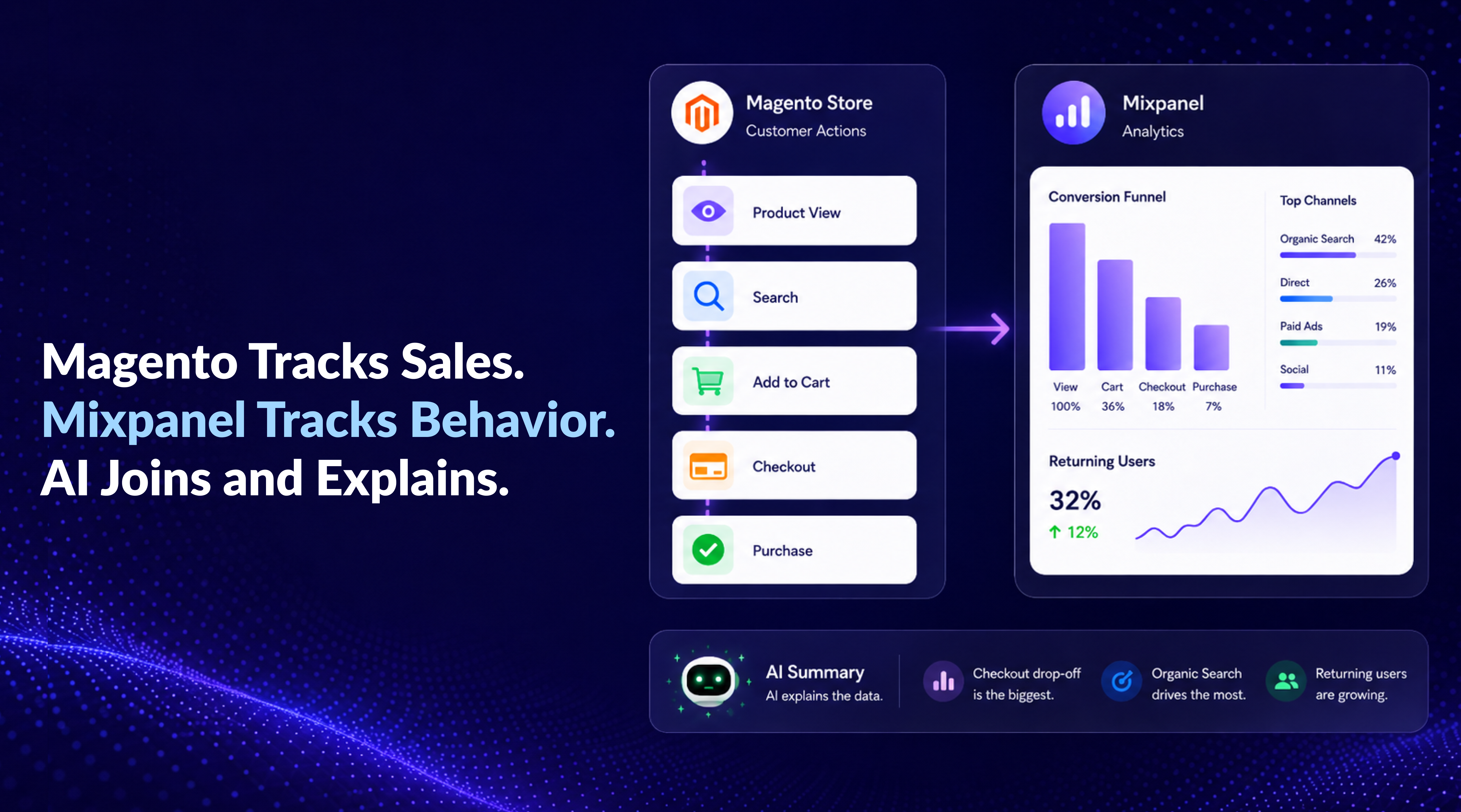
The Challenge Every Store Owner Knows
Where do buyers drop off?
You see total revenue, but not which step of the checkout loses people, or which products get viewed but never bought.
Which channels pay back?
First-touch attribution shows clicks and first orders. It doesn't tell you which source pays back over the lifetime of a customer.
What did this customer do?
Magento shows you the order. It doesn't show you the path that led to it, or the visits where they almost bought and didn't.
Install the extension, paste your Mixpanel project token, and the whole shopping journey starts flowing the same day: every product view, search, cart action and checkout step, tied to the customer who made it. By tomorrow you can pull up your funnel step by step, the shoppers worth winning back, and how many of last month's buyers came back for more. Then ask Claude or ChatGPT about any of it in plain English.
It works out of the box: your events are already named, ordered and mapped for you.
GA4 tracks traffic. Mixpanel tracks usage.
That's the whole difference, and most stores keep both running side by side.
GA4: traffic
How users find your site. Where the visits come from, which campaigns drove the traffic, how SEO and channels are performing overall.
Mixpanel: usage
What users do once they're on your site. On-site behavior, funnel drop-off, customer-level history and retention.
Keep GA4 for traffic (our Magento 2 Google Analytics 4 and GTM extension sends it the full set of ecommerce events), add Mixpanel for usage. They don't overlap; they complement each other.
Think of a statue in a museum: GA4 shows you one side of it; Mixpanel lets you walk around and see the rest. Together you finally see the whole thing.
Track any block on your storefront, without code
This is the part no tag manager setup gives you for free. Add data attributes to an element and the module starts sending both impressions and clicks for it to Mixpanel. A banner, a cross-sell block, a size chart, a tab nobody opens: you can finally tell whether it earns its place on the page.
No template edits, no custom JavaScript, no tag to maintain after the next Magento update.
- Which banners actually get seen, and which never enter the viewport?
- Do shoppers who open the size chart buy more, or return less?
- Is that cross-sell block earning its place, or just filling space?
We built this because we needed it ourselves
Everything changed once Magento 2 could talk to AI. AI could finally answer store questions on demand, but sales data alone turned out to be only half the picture. To explain why customers buy, or don't, AI needs the web side too. Mixpanel was the obvious answer: we've used it on our own store for years, and whenever a question comes up about a campaign, the funnel, or a sudden drop in conversion, it's the tool we open first.
Here's one from this very store. We had a cross-sell block sitting in what looked like a prime slot on our product pages. Mixpanel showed zero impressions and zero clicks: shoppers weren't ignoring the block, they were never even seeing it. Without that data it would still be there today, quietly earning nothing. We replaced it. That single answer is the reason the feature above exists.
The questions your store can answer from day one
Nothing to model, nothing to tag. The journey arrives as clean events and every shopper arrives as a profile, so building each report below in Mixpanel takes a couple of clicks.
Where exactly are you losing buyers?
Your funnel is already in the right order: product view → add to cart → checkout → purchase. You see how many shoppers make it through each step, and how many leave.
Filter the same funnel by customer group, by store view, or by where the traffic came from. The step that's hurting your sales stops being a guess and shows up clearly on the chart.
- Which checkout step loses the most people?
- Do new visitors drop off more than returning ones?
- How long does it usually take a shopper to go from first visit to first order?
Cart abandonment, with names attached
Most reports give you a single number: your cart abandonment rate. Here you get the list of who abandoned, and how much they've spent with you in the past.
Filter the list by what they had in the cart, by how much they've spent with you overall, or by how they found your store. Send it to your email tool, or ask your AI to draft a win-back message for the top names.
Who almost bought
Shoppers who started checkout but didn't finish, with cart value, the items in the cart, and what they've spent at your store before.
What they almost bought
The products that get added to carts the most but rarely get bought. Usually a sign of an unclear description, a surprise shipping cost, or an outdated price.
One profile per customer, everything they did
Everything a shopper does before and after logging in is tied to the same profile, automatically. One person, one timeline. You can finally see what each customer did before they bought, or before they walked away.
What you know about them
- Total spend: what they've paid you so far
- Number of orders: first-time, returning, or one of your best
- Customer group: retail, B2B, wholesale
- First and last order date: new, going quiet, or at risk of leaving
What they did on your store
- Every product they looked at, on every visit
- Every cart they started, abandoned, or finished
- Every product they saved to a wishlist
- Every search they typed, including the ones with no results
- Every refund on their account, straight from your Magento admin
Which traffic sources actually pay off?
Not the ones that bring the most clicks. Not the ones that bring the most first orders. The ones that bring customers who come back and buy again.
Every shopper is tagged with how they first found your store, and your Magento order data is layered on top. So you can see what each source is really worth based on the money those customers spend over time, not just the first-order number every other tool gives you.
- Which paid ads bring shoppers who buy again later?
- Which referral source brings the most money per customer over a year?
- Which channel looks great on the surface but only brings one-time buyers?
Do your customers actually come back?
Of the people who bought from you this week, how many will buy again next week? In a month? In three months? Most dashboards don't show you this. Here you see it clearly, week by week.
A "30% repeat-purchase rate" can mean two very different things: customers who buy twice and disappear, or customers who stick with you for years. The week-by-week view shows you which one it really is.
Everything below is live the moment you switch it on
This is the work you don't have to do: no event naming, no data layer to design, no mapping to maintain.
Shopper actions tracked
- Product views, including the variant selected
- Category and listing views
- Cart views, add to cart, remove from cart
- Wishlist adds
- Checkout started, shipping selected, payment selected
- Purchase, including orders your team places in the admin
- Search, with the query and the number of results
- Registration and login
- Refunds, sent from the server when a credit memo is created
- Impressions and clicks on any element you mark up
Every customer, enriched
- Name and email
- Registration date
- Customer group
- Lifetime spend
- Number of orders
- First and last order date
Details that save you a support ticket
- Values can be tracked in the currency your store view displays, not only the base currency
- Views from known search engine bots are never sent, so your numbers stay clean
- A debug panel on the page shows every event as it fires, so you can verify tracking yourself. See the debug panel guide
- Hyvä works out of the box, with no separate compatibility module and no paid add-on
Behavior analytics vs traffic analytics
Before you pick an extension, the real decision is which kind of analytics your store needs. Here is how the two compare on the things ecommerce owners actually use.
| What you compare | Mixpanel | Google Analytics 4 |
|---|---|---|
| Level of detail | Every customer action stored as it happened | Aggregated, and high-cardinality rows collapse into "(other)" |
| Spotting funnel drop-off | Built-in funnel, steps you can change anytime | Funnel explorations, sampled on large volumes |
| Cart abandonment report | Dedicated report: who, what, how much | No built-in report, you set it up |
| Anonymous + signed-in journey | Merged into one customer profile automatically | Needs User-ID setup, often partial |
| One profile per customer | Full history, plus lifetime spend and order stats | User timelines, but no profile properties like lifetime spend |
| Grouping by behavior | Any combination, e.g. "viewed but didn't buy" | Limited audience rules |
| Do customers come back? | Week-by-week retention on real buyers | User cohorts in Explorations, sampled on large volumes |
| Tracking any block you choose | Impressions and clicks from data attributes, no code | A custom tag and trigger per element |
| Ask AI about your store | Hosted MCP server, connect Claude or ChatGPT in a few clicks | Experimental MCP server, needs Python and a Google Cloud project |
| Cost for a typical Magento store | Free up to 1M events/month, which covers most small and mid-size stores | Free, but with sampling and data limits |
Install it today and by next week you'll know which step of your checkout loses the most buyers.
Or see it running on a live store first: open the demo.
Already running AI Agent Connector? Then one chat covers both web activity and sales data.
Save time by starting your support request online and we'll connect you to an expert.
What does this extension actually do?
It connects your Magento store to Mixpanel and starts sending the things shoppers do: product views, searches, cart actions, wishlist adds, checkout steps, purchases, registrations, logins, newsletter subscriptions, refunds. Each customer also gets a profile in Mixpanel with their lifetime spend, number of orders, customer group, and first and last order date. You install the extension, paste your Mixpanel token, and your store starts answering questions you couldn't answer before.
I already use Google Analytics 4. Do I have to replace it?
No. GA4 and Mixpanel answer different questions, and most stores keep both running. GA4 is good at where the traffic comes from: channels, campaigns, SEO. Mixpanel is good at what shoppers do once they're on your site: funnel drop-off, retention, customer-level history. Keep GA4 for marketing reports; add Mixpanel for the product and customer side GA4 was never built for.
How hard is the setup?
Install the extension, paste your Mixpanel project token in the admin, and the whole journey starts flowing the same day. No code edits, no event mapping, no analyst needed.
Customer profiles take one more field: paste a Mixpanel service account as well, which is free to create in your Mixpanel organization settings, and each customer gets lifetime spend and order stats on their profile, refreshed daily. Skip it and you still get all the event tracking, just without the profile properties.
I already have Google Tag Manager. Can't I just send events to Mixpanel myself?
You can, and it is a documented route. The cost is that you build and maintain it: a custom tag per event, your own mapping of Magento data into the shape Mixpanel expects, and a re-check every time your theme or Magento is updated.
Here the events, the customer properties and the identity stitching are already defined and maintained for you, and they run on the same data layer our Google Tag Manager and Facebook Pixel extensions use. One tracking layer, several destinations, no duplicated tagging.
How is this different from connecting Magento to Mixpanel with an automation tool?
Connector-based setups work at the level of records your admin already has: orders, customers, invoices, credit memos. That is useful, but it is the result, not the behavior.
What they cannot see is the storefront: which products were viewed, what was added to a cart and abandoned, where checkout was left, what shoppers searched for and found nothing. That part has to be collected in the browser, on your store, which is what this extension does.
What about visitors who browse before signing in? Do I lose that activity?
No. Anonymous browsing is tied to the customer profile the moment a visitor signs in or registers. Everything they did beforehand, from product views to searches to items added to cart, is merged into one timeline. So you finally see the whole journey, not two disconnected halves.
Are refunds tracked? My store has a lot of partial refunds.
Yes, both full and partial. Whenever a credit memo is created in the Magento admin, a refund event is sent to Mixpanel from the server with the refunded amount, the refund type and the line items. That means your customer profiles and revenue reports stay accurate, not just the gross-sales number.
One limit worth knowing: a refund that cannot be matched to a customer account, for example a guest order with no email on file, is skipped rather than sent as an anonymous event.
Will this slow down my store or break with a Magento update?
No, and there are specific reasons rather than a promise. The extension does not touch your storefront templates: it reads from the same data layer our Google Tag Manager and Facebook Pixel extensions already use, so theme and Magento updates don't break it. Tracking is compatible with Magento's Content Security Policy and with Full Page Cache, so cached pages are not personalized by mistake.
Browser events are sent asynchronously, and the server-side refund call is deferred until after the admin response is sent, so saving a credit memo never waits on Mixpanel.
Do I need to be a data analyst to use this?
No, that's the whole point. Mixpanel's report builders are point-and-click: you pick the events and it draws the funnel, the retention curve or the segment. Because the events and customer properties are already in place, there is nothing to model first.
And if you'd rather not build anything, you can ask an AI assistant such as Claude or ChatGPT your question in plain English.
Do I have to build reports from scratch?
No. The hard part is already done, and it is not the report: it's having the whole shopping journey arrive as clean, correctly ordered events, with every shopper as a profile carrying lifetime spend and order history. That is the part that normally takes a developer, a tagging plan and a few weeks of arguing about definitions.
With that in place, Mixpanel's funnel and retention builders are point-and-click: pick the steps, get the chart. A funnel or a retention curve is a couple of clicks, not a project.
And if you'd rather not open a report screen at all, the extension ships ready-made AI commands for our AI Agent Connector for Magento 2, so a full analysis can be run straight from a chat.
How does the AI part work? And what if I don't use AI?
Mixpanel has its own hosted MCP server, so you can connect Claude or ChatGPT to your Mixpanel project in a few clicks and ask about funnels, retention and segments in plain language. Nothing extra is needed from us for that.
Where our AI Agent Connector for Magento 2 comes in is the other half: with both connected, an AI assistant reads your Mixpanel behavior and your live Magento data in one conversation, so it can answer things like "show me cart abandoners with lifetime spend over $500 and draft a win-back email". If you don't use AI, the extension still works for tracking and reporting. The AI side is optional.
Do bots pollute the numbers?
Product and category views from known search engine crawlers, such as Google, Bing, Baidu and Yandex, are not sent to Mixpanel. Your funnels and product reports reflect people, not crawlers.
Will it work with my customized cart or one-step checkout?
In most cases yes. Tracking hooks into Magento's own cart and checkout events rather than into your templates, and compatibility with the popular ajax-cart popups and one-step checkout extensions is maintained as part of the shared tracking layer. If you run a heavily customized checkout, the on-page debug panel shows immediately which events fire and which don't.
EU or US data: which region do I pick, and can I exclude some visitors?
Both regions are supported. In the admin you choose whether server-side data goes to the EU region or the US region, matching the project you set up in Mixpanel. No extra steps, no extra cost.
You can also stop tracking for visitors you don't want measured, such as internal traffic or specific conditions, and each store view can stream into a different Mixpanel project or none at all.
Does this work with Hyvä?
Yes, out of the box. There is no separate compatibility module to install and no paid add-on to buy: the Hyvä storefront reads the same events the Luma storefront does, through the same shared tracking layer.
How much does Mixpanel itself cost?
Mixpanel's free plan covers up to 1 million events per month, which is enough for most small and mid-size Magento stores. Above that, Mixpanel charges per event on its Growth plan, roughly $0.28 per 1,000 events with volume discounts, and Enterprise pricing is quoted by their sales team. Check their pricing page for current numbers.
The Mirasvit extension itself is a one-time purchase with the usual Mirasvit support and updates.

 Andriy Kovalenko
 We are committed to being open and transparent with our customers. When you purchase our module, you automatically receive one year of free support service and free updates.
Why is this important?
- Seamless Installation and Configuration: We understand that setting up a new module can take time to configure according to your specific needs. That’s why we offer a full year of free support. Our experienced team is here to assist you with installation, configuration, and any questions you might have. We're eager to share our expertise to ensure you get the most out of your purchase.
- Stay Updated with Magento (Adobe Commerce) Releases: Magento releases new versions approximately every three months. These updates can sometimes introduce compatibility challenges. To keep your store running smoothly, we provide a year of free access to the latest versions of our modules, ensuring that you can upgrade Magento and our modules without encountering any obstacles.
- Subscription Included: Renewing your subscription ensures continued access to the latest updates and support from our team. This means you can be confident that any issues you encounter with the extension will be resolved quickly and efficiently. You can cancel your subscription at any time without any additional fees.
These are our primary. A major portion of our new clients come from referrals from our existing clients. Our professional team of developers, marketers and support staff have invested the best knowledge and experience in the field into our work, so you know you can come back to us again and again.
One year free and high quality support. We go to great lengths to provide maximum satisfaction with every module you have purchased in our store. By helping you with installation, configuration, answering your every question, we do all our best to eliminate any possible problems.
30-days money back guarantee. If you are not satisfied with our Product Analytics performance for any reason, we provide a full refund.
We constantly add new features to all our modules, and are always interested in hearing your opinion and implementing your suggested features in our future developments.
We provide an expanded user guide for every aspect of our AI MCP Commands, so you can find answers for all your burning questions.
You can customize No-Code Event Tracking according to your needs and requirements.
The Module is easy to install and upgrade, just follow our step-by-step user guide. Additionally, the extension is ready to use with the Hyvä theme.
No core modifications. The Identity Stitching has been tested in a Magento Cloud environment and is fully compatible with it.