Mirasvit Latest Updates - July 2026
-
 Andriy Kovalenko
- Our News & Updates
- Jul 2, 2026
- 21 min read

This month has been especially productive for our developers. They prepared updates for 20+ Magento modules, covering search, feeds, SEO, tracking, reviews, orders, content, support, and everyday admin workflows. On top of that, we are glad to introduce three new products.
Agentic Commerce prepares your catalog for AI shopping agents, so your products can appear in answers and buying paths created through assistants like Claude or ChatGPT.
Withdrawal Button gives customers a clear way to submit EU withdrawal requests, while your team gets a structured flow for review and refund handling.
The Mixpanel Analytics module sends storefront behavior events to Mixpanel, so you can see how shoppers move through product views, searches, carts, checkout, purchases, and refunds.
Let's take a closer look at what's new, where it helps, and how to use it.
Note: In all sections below, updating the module is the starting point; we only mention extra setup, reindexing, cache clearing, or required dependencies when they matter.
Table of Contents
- Agentic Commerce - NEW MODULE
- Follow Up Email
- Search Ultimate
- Advanced Product Feeds
- Advanced SEO Suite
- Order Management
- Automatic Related Products
- Blog MX
- Advanced Reviews
- Google Tag Manager, Facebook Pixel, and TikTok Pixel
- Mixpanel Analytics - NEW MODULE
- Withdrawal Button - NEW MODULE
- REST API coverage for external systems
- Reward Points & Referral Program
- Knowledge Base
- AI Assistant
- AI Copilot
- Product Kit
- GDPR
- Helpdesk
- Extra Payment
- eChat
- Backend Search
Agentic Commerce - NEW MODULE
🔥 Catalog discovery for AI shopping agents
The new Agentic Commerce module helps your store become visible where product discovery is starting to move: inside AI assistants. When a customer asks an agent to find or compare products, your catalog has to be readable in a format the agent understands.
The module publishes the discovery files, catalog endpoints, and protocol support that agents need to read your products, prices, and links. Your store keeps control of checkout, pricing, catalog rules, and customer relationships, while AI assistants get a way to recommend your products in conversation.
Agentic Commerce supports open agentic-commerce standards, including UCP, generic MCP, WebMCP, and OpenAI ACP. Magento 2.4.x compatibility is included for current stores.
Follow Up Email
The Follow Up Email extension now gives your campaigns more context from unfinished shopping sessions and multi-store results, not only from checkout fields and blended revenue totals.
🔥 Earlier guest email capture before checkout
Abandoned-cart recovery does not have to wait for the checkout email field. When a guest enters an email in a newsletter popup, login form, or another storefront field, the extension saves it to the session and cart.
A shopper may add products, leave the store, and never open checkout. With earlier email capture, that cart can still enter recovery instead of staying anonymous. Configure it under Stores > Configuration > Follow Up Email > AJAX data capturing and choose Always on, Off, or Disabled for EU visitors.
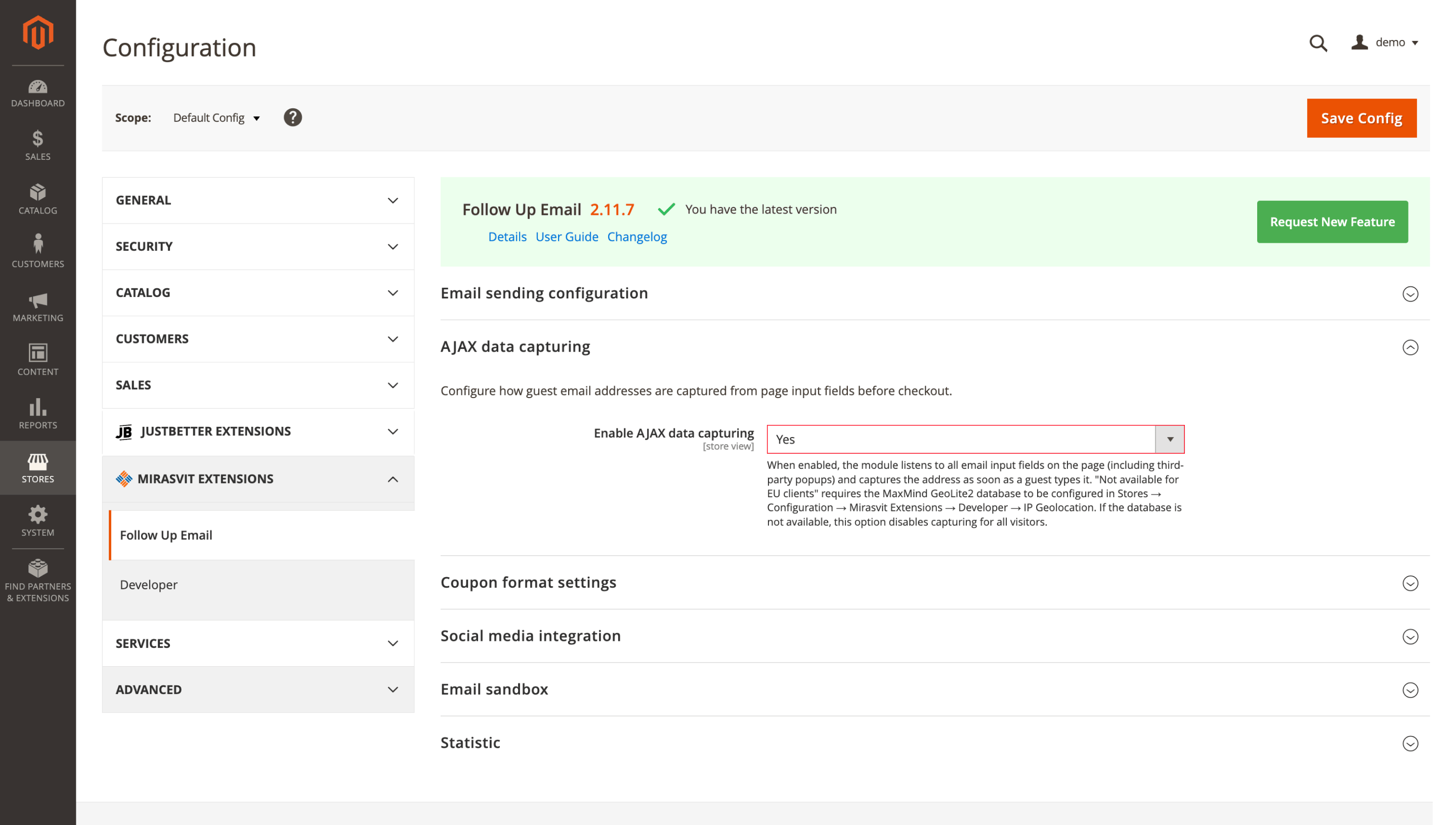
The EU option requires MaxMind GeoLite2 under Stores > Configuration > Mirasvit Extensions > Developer > IP Geolocation. The feature works on Luma and Hyvä.
🔥 Storefront-level revenue in Manage Campaigns
Multi-store campaign revenue is easier to read with the new store-scope picker in Manage Campaigns. Instead of one combined total, the dashboard can show revenue and order counts for a selected storefront.
All Store Views uses the website base currency for comparison. A specific storefront shows only its own orders in its display currency, and the selected scope stays in place when you change the date range or move through the page.
Run bin/magento setup:upgrade, then open Manage Campaigns and use the store-scope picker.
Search Ultimate
In the Search Ultimate module, we improved how storefront search handles URLs, content sources, language matching, reports, and ranking rules, so shoppers get cleaner and more consistent results.
🔥 Store-view search results URLs
Search results no longer have to use Magento's default /catalogsearch/result path. For each website or store view, you can set a cleaner URL such as /search.
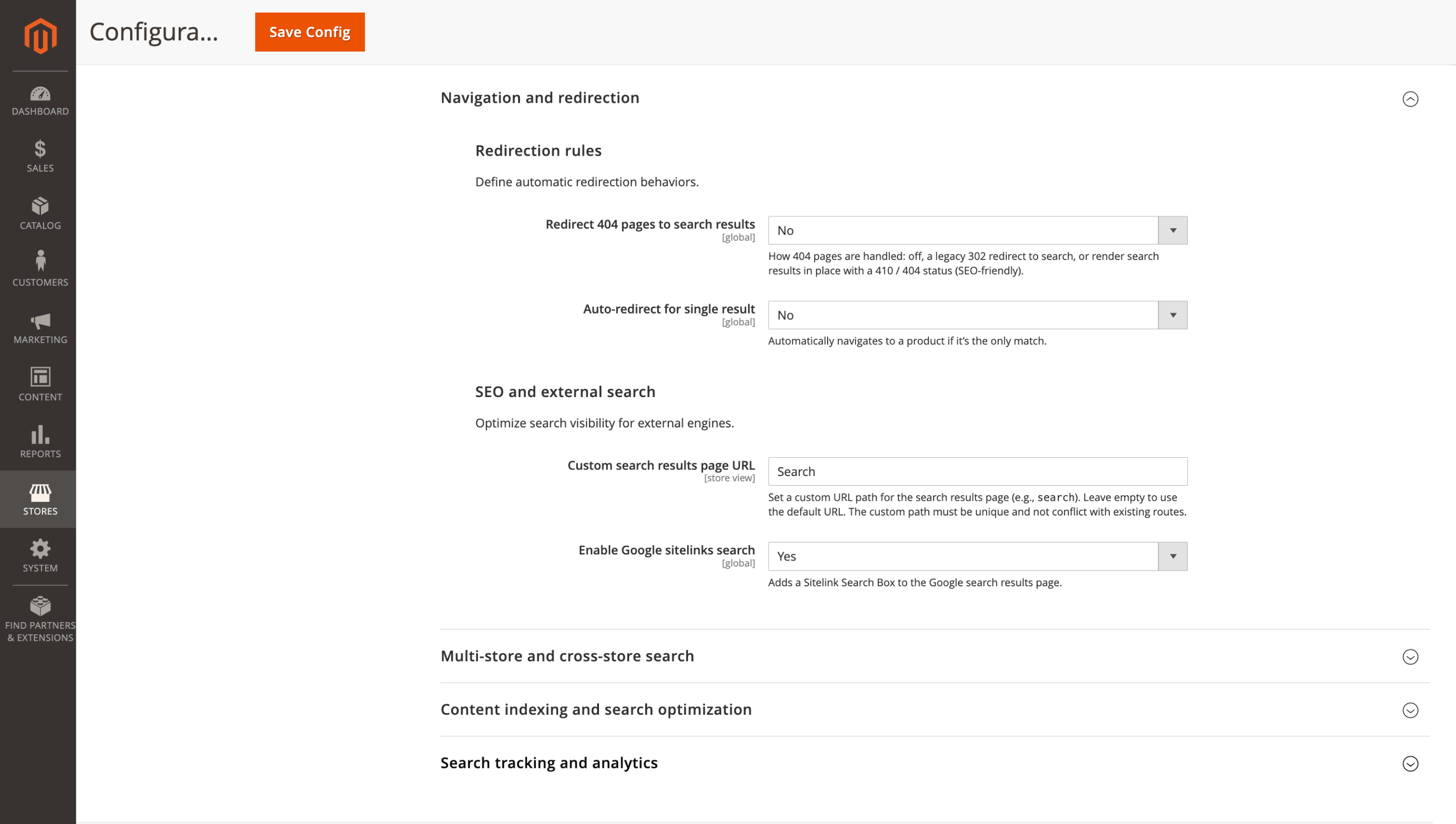
The chosen path carries through pagination, layered navigation, and filter links, so reports and shared links use the same readable search URL. Configure it under Stores > Configuration > Mirasvit > Search Ultimate > SEO and external search, set Custom search results page URL, save, and clear cache.
🔥 WordPress pages reach storefront search
WordPress search coverage expands from posts to standalone pages. Size guides, delivery details, brand information, buying guides, and other WordPress pages can appear in the main storefront search and autocomplete.
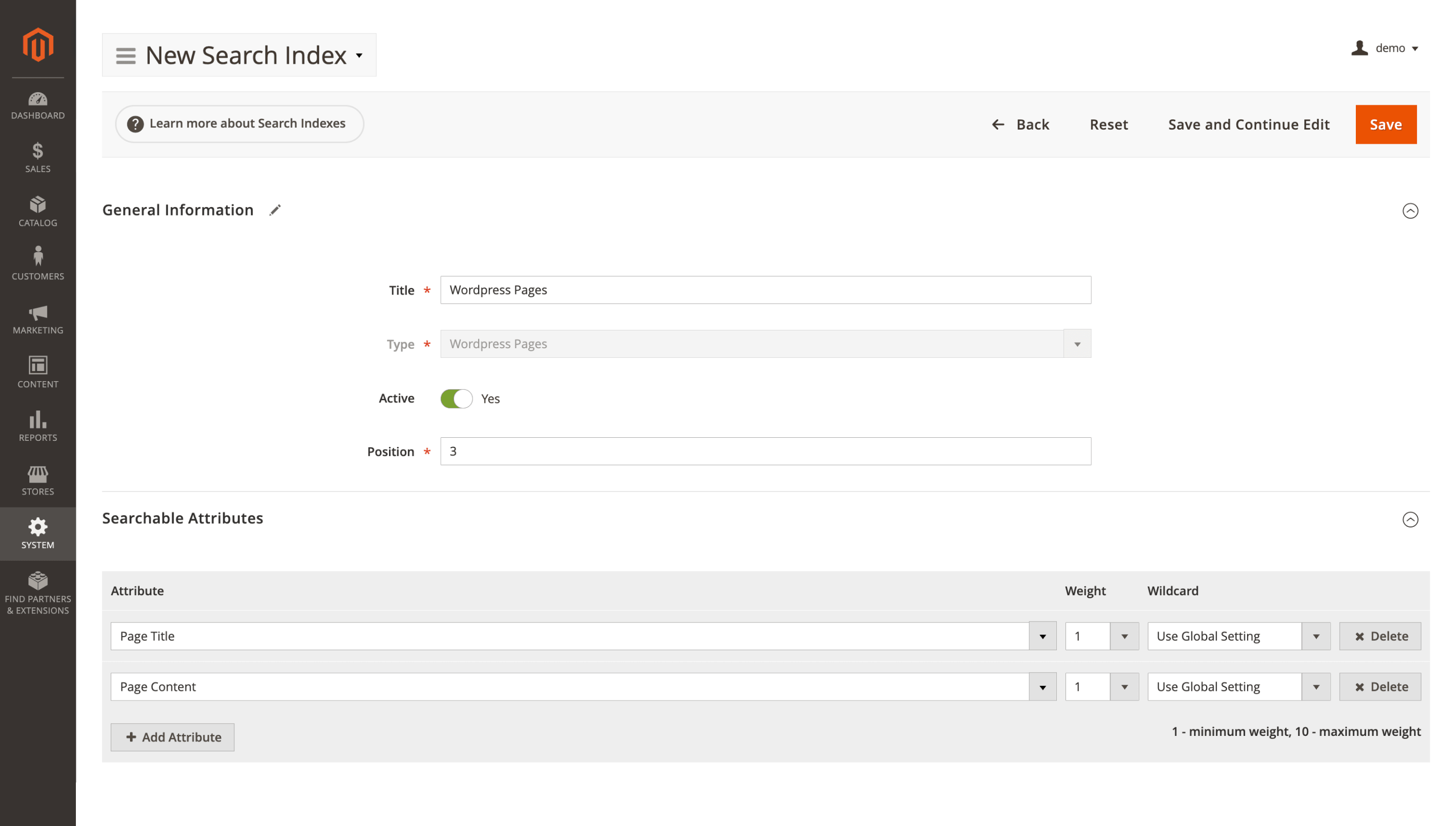
Create a WordPress Pages search index under System > Search Management > Search Indexes, then reindex search. The feature requires the WordPress integration.
🔥 DE/FR/ES/PT singular-plural matching
German, French, Spanish, and Portuguese get singular-plural matching in search. A shopper typing Lederjacken can reach products indexed as Lederjacke, instead of losing a relevant result because the word form differs.
Reindex search so the new language matching takes effect.
🔥 SEO-safe broken URL fallback
Broken URL handling gets a render-in-place mode. Instead of sending every missing page through a 302 redirect, the store shows relevant search results under the original URL and returns 410 Gone or 404 Not Found.
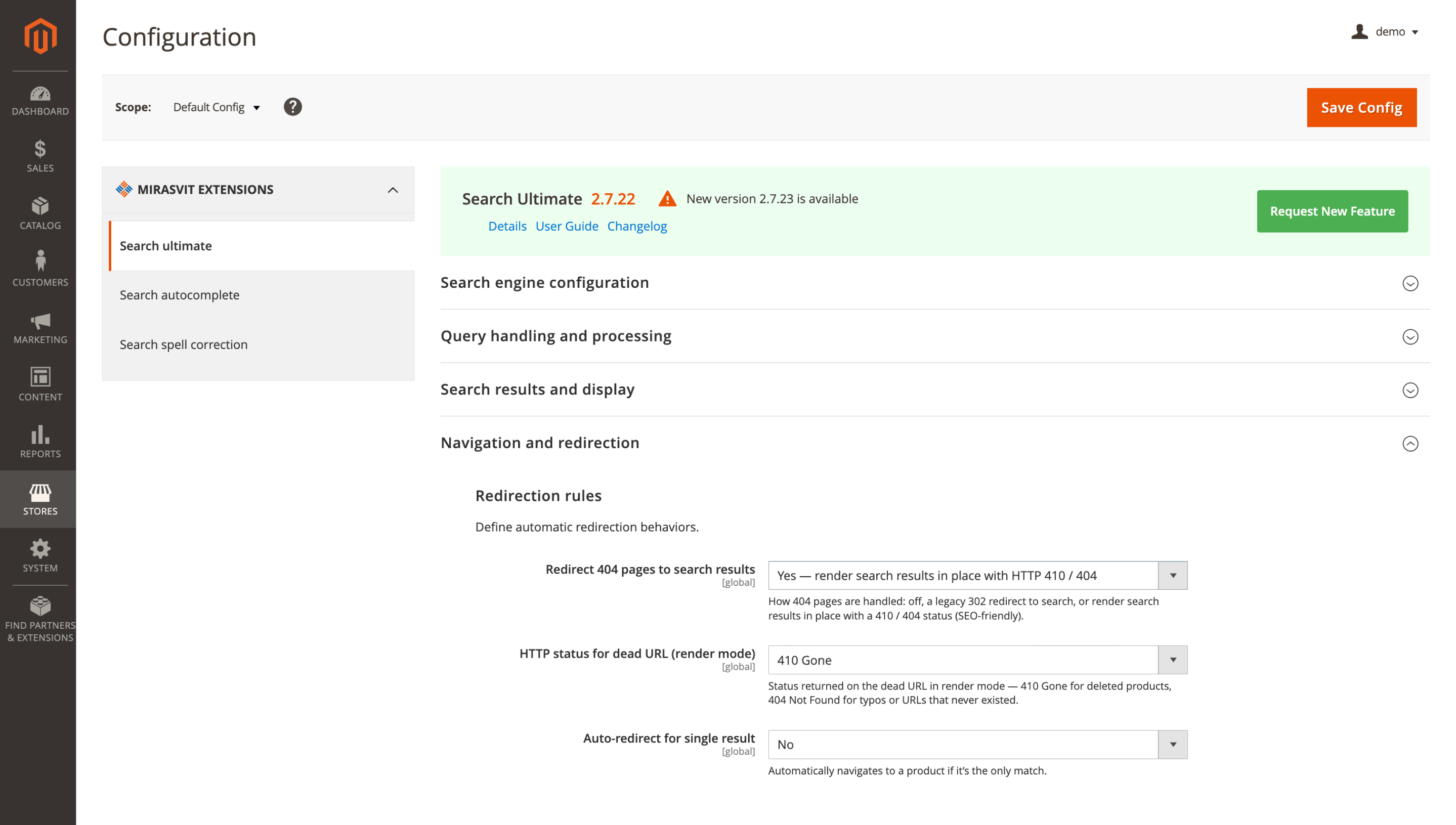
Shoppers still see a useful fallback, while crawlers get a clearer signal to drop outdated URLs. Set Redirect 404 to search to 2 in the configuration, then save and clear cache. Existing stores keep the legacy 302 behavior unless you opt in.
🔥 Stacked boosts across ranking rules
When a product matches several Score Boost Rules, the final ranking uses all matching boosts instead of only the last one. Additive boosts are summed, and multiplicative boosts are combined.
That makes layered merchandising rules work as intended: an in-stock product can receive one boost, a sale item another, and both signals still count. Review existing overlapping rules before relying on the combined logic, and reindex search if your rule changes require it.
🔥 Report breakdown by search source
Search reports add a Search Source dimension for separating queries by origin: main search bar, autocomplete, or in-category search.
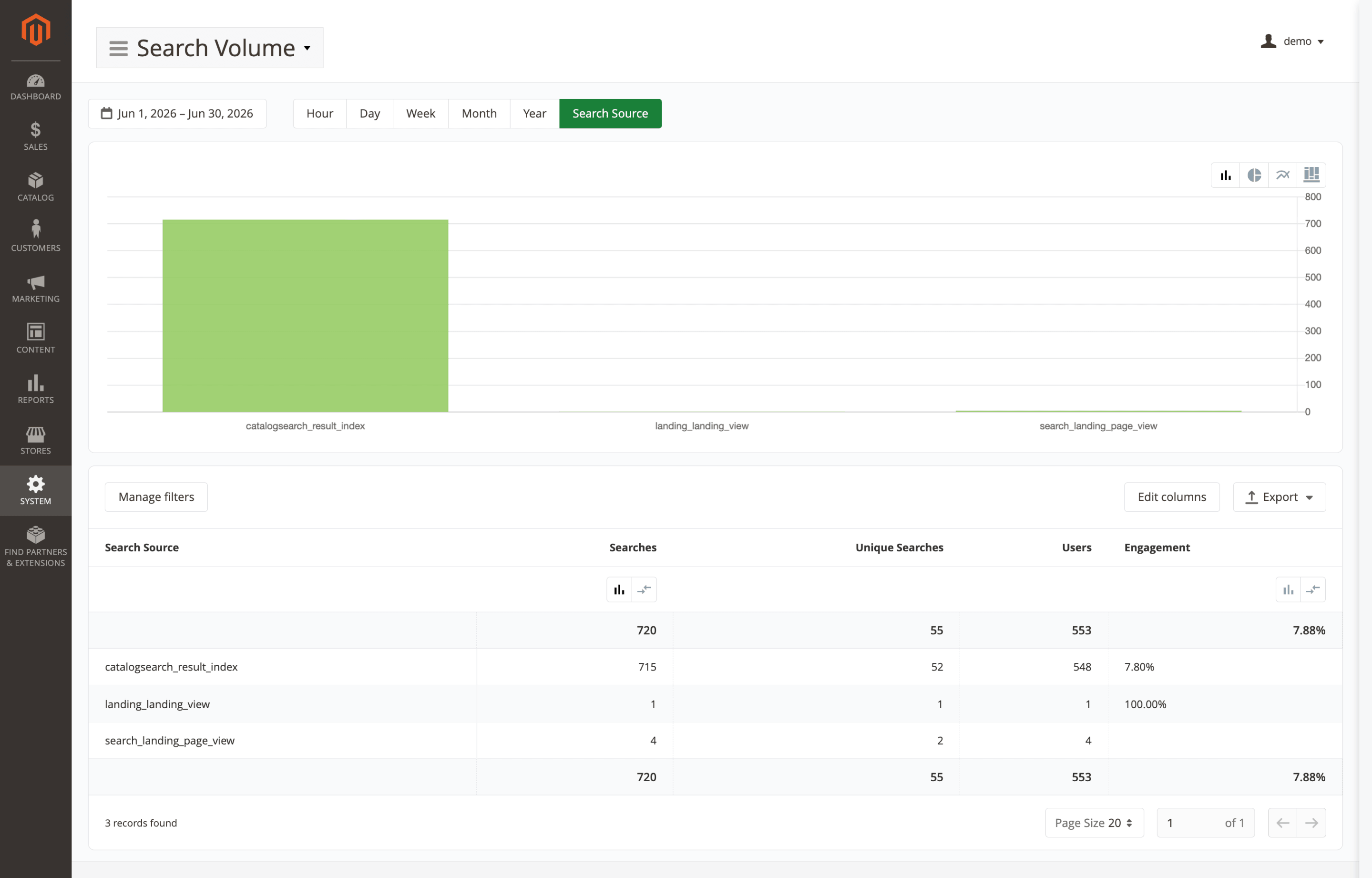
With that split, autocomplete queries can point to suggestion quality, while in-category searches show how shoppers narrow results inside a category. Open Search Reports and group or break down data by Search Source.
🔥 Full search logic inside categories
Category-page search now follows the same index logic as the main store search, including attribute weights, wildcard mode, and child-product data.
If your main search prioritizes product names, supports wildcard matching, or includes child product data, those same rules apply inside category search. Reindex search if your environment needs it.
Advanced Product Feeds
Channel exports are most fragile when promotions, marketplace settings, interrupted jobs, or Google API errors affect what appears outside Magento. The Advanced Product Feeds extension update gives those points clearer controls and safer recovery paths.
🔥 Google Shopping promotions from cart rules
Discounts from Magento Cart Price Rules can be exported as a separate Google Shopping Promotions feed. The template supports percentage discounts, fixed-amount discounts, free shipping, and free gifts.
Your Google Shopping listings can show active promotion details from Magento, not only the base product price, without maintaining a separate promotion file. Configure it under Catalog > Feeds > Add New Feed, choose Google Shopping Promotions, set Marketplace to Google Merchant Center, and submit the feed through the Google Merchant API. A Merchant Center account with Promotions available is required.
🔥 Running feed exports you can stop
A large or incorrect export no longer has to run until it finishes. You can stop it from the generation progress dialog in Catalog > Feeds or use bin/magento mirasvit:feed:stop --id=<feed_id> / bin/magento mirasvit:feed:stop --all.
The last generated file stays available at the public URL, so the live channel keeps using the previous successful feed. The stopped job is also recorded in feed history, including cron-started exports.
🔥 Marketplace-aware feed settings
Feed and template forms now show Google Merchant API settings only when Marketplace is set to Google Merchant Center. Meta, price-comparison, and other non-Google feeds stay cleaner and are less likely to be configured for the wrong channel.
Existing Google exports are auto-detected after bin/magento setup:upgrade, and bundled Google templates are pre-set. To review a feed, open it in Catalog > Feeds and check Marketplace.
🔥 Readable Google Cloud registration errors
If a Google upload fails because the Cloud project is not registered with Merchant Center, feed history explains the cause instead of showing only a raw API response.
The message points admins to Merchant Center > Settings > Developer registration, suggests retrying after about 5 minutes, and links to the Google guide and Mirasvit manual.
Advanced SEO Suite
July changes in the Advanced SEO Suite module focus on SEO signals that often drift after store work: internal links, sitemap coverage, and index directives.
🔥 Autolinks that follow product and category URLs
Autolinks no longer have to point to a fixed URL. The form adds Link Type and Entity ID, so the saved rule follows a Magento product or category record instead of an old static path.
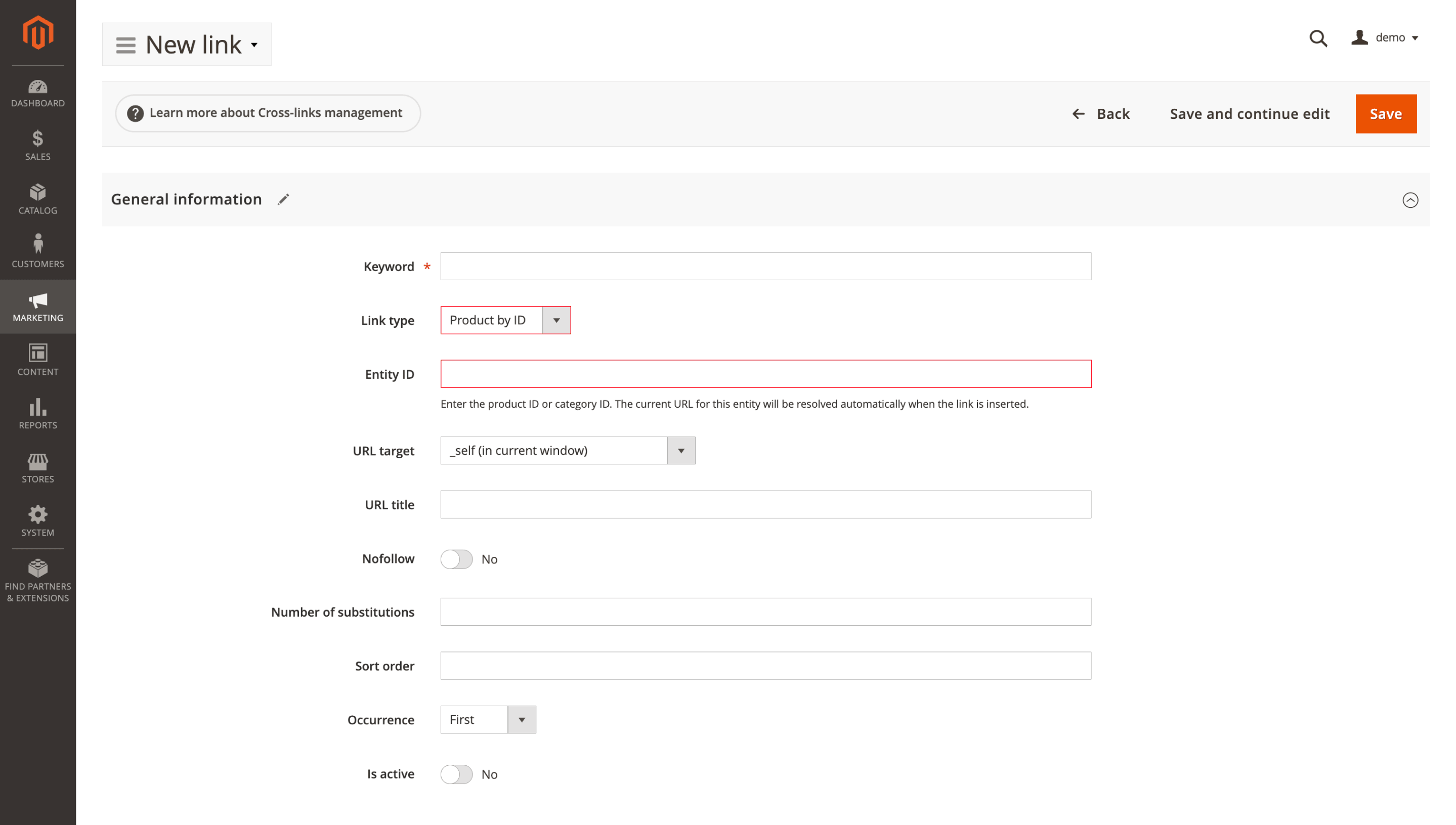
When a product or category URL key changes, Magento takes the current address from URL rewrites while the autolink keeps working. Set it under Mirasvit > SEO > Cross Links / Autolinks, choose product or category as Link Type, then select Entity ID. URL rewrites must exist for the target entity.
🔥 Third-party URLs added to XML sitemaps
XML sitemaps can pick up URLs from third-party extensions that use Magento's standard sitemap item provider. Those pages are added under an Other group instead of being skipped.
Brand pages, custom catalog sections, WordPress content, and niche landing pages created outside the default Magento structure can enter the sitemap without being mixed into product, category, CMS, or blog groups.
🔥 Blog tag and author sitemap coverage
Blog sitemaps now include tag and author archive pages, not only posts and categories. Topic hubs and author pages are no longer left out of the XML sitemap.
If Add hreflang to sitemap is enabled, hreflang alternates are added for these pages too. Regenerate the sitemap after updating. Blog MX must be installed.
🔥 Lighter category rich snippets on large catalogs
Category rich snippets in Entire Catalog mode still use products from the full category, but the JSON-LD output is capped at 500 items. Very large categories keep broader offer context without making the structured data too heavy.
Use Entire Catalog offers mode under Mirasvit > SEO > Rich Snippets category settings.
🔥 NOINDEX blog pages kept out of sitemaps
Blog pages marked NOINDEX are excluded from the XML sitemap. The rule covers posts, categories, tags, and author pages, whether the directive is set directly or inherited from blog defaults.
Your sitemap stays aligned with robots directives: pages intentionally kept out of the index are not sent to Google through the sitemap.
Order Management
With the Order Management extension update, busy admins spend less time waiting, translating labels, or opening orders only to check company and VAT data.
🔥 Order admin translations across 15 languages
Admin order details now follow the selected Magento admin locale in 15 languages. Order timeline labels, validation and diagnostic messages, item IDs, and SKU lines no longer stay in English for local teams.
That makes daily order review clearer for teams working in their own admin language.
🔥 Quicker Orders grid on large histories
The Orders grid loads visible rows first, then adds heavier row details such as tags, product thumbnails, and item information.
Large order histories no longer slow down the whole grid before the current page is usable. Your team can start working in Sales > Orders faster instead of waiting for data that is not visible yet.
🔥 Company and VAT data on the Orders grid
The Orders grid column selector adds four B2B fields: Billing Company, Billing VAT Number, Shipping Company, and Shipping VAT Number.
Company and tax details become visible and filterable from Sales > Orders, without opening each order separately. Open Columns, enable the fields you need, and run an order-grid reindex to backfill values for existing orders.
Automatic Related Products
The Automatic Related Products module now makes competing recommendation blocks easier to control from the grid, before you open each rule.
🔥 Priority blocks over weaker fallbacks
The new Ignore subsequent blocks option lets a priority block take the page position and hide lower-priority blocks assigned to the same place.
If a campaign block has products to show, it can occupy the slot while the generic fallback stays hidden. This keeps the page from stacking several recommendation sections where one strong block is enough. Enable it under Automatic Related Products > Product Blocks for the block that should take priority.
🔥 Block priority visible from the grid
The Product Blocks grid adds a Priority column with sorting and filtering. Block order becomes visible directly in the list instead of only inside each record.
Use it under Automatic Related Products > Product Blocks to sort or filter blocks by Priority.
🔥 Row-click editing and clearer duplicates
Rows in Product Blocks and Selection Rules now open for editing with one click, without the Select action menu.
Duplicated blocks and rules get a (copy) suffix automatically, so copies are easier to separate from originals before changing conditions or placement.
Blog MX
In the Blog MX extension, the improvements are about editorial control at scale: content becomes easier to manage by topic, storefront, publish timing, and reader context without digging through every post.
🔥 Post filtering by tag
Tagged content is easier to review as a group. The Tags filter in Blog MX > Posts lets editors isolate campaign, seasonal, or topic-based posts without scanning the full library.
Use it when you need to update, check, or unpublish a specific content group, such as posts tagged holiday-2026.
🔥 Store-view blog RSS control
RSS becomes a store-view setting instead of staying always available. Stores that do not syndicate blog content, or want to reduce scraper traffic, can close the feed without affecting other blog settings.
When Enable RSS feed is set to No, /blog/rss and /blog/rss/category return 404, and the RSS link is hidden. Configure it under Stores > Configuration > Blog MX > SEO and URL settings. The default value is Yes, so existing feeds stay active unless you turn them off.
🔥 Store-specific publish dates
Publish dates can match each market instead of using one global date for the same article. A regional campaign can keep one shared post record while showing the right public date on each storefront.
Open a post, switch to the relevant store-view scope, untick Use Default Value for Published On, set the date, and save.
🔥 Related posts matched by relevance
Related posts are selected by relevance before recency: shared tags first, then the same category, then your configured sort order. Readers see articles closer to the topic they are already viewing, not just the latest posts.
The Related Posts widget also keeps returning results on post and product pages when Use page context as filter is off, so the block does not appear empty.
🔥 Cleaner blog admin navigation
Several admin screens become faster to scan during content work. The category tree gets clearer expand markers, the Score column in Posts becomes sortable, and Edit Author opens the assigned author page in a new tab.
The author link appears only for admin users with permission to manage authors.
Advanced Reviews
The Advanced Reviews module gets more control over review markup and several smaller speed and usability improvements for stores with many product reviews.
🔥 Optional review JSON-LD markup
Review JSON-LD becomes optional on product pages. If your theme or SEO extension already sends review markup to Google, you can keep one source instead of duplicating the same structured data.
The setting Enable review JSON-LD stays enabled by default. To turn it off, go to Stores > Configuration > Mirasvit > Reviews > General, set Enable review JSON-LD to No, save, and clear cache.
🔥 Stored scores speed up review lists
Review lists use a stored total_rating value instead of recalculating each review's overall score during uncached product-page loads.
That removes a heavier grouped query from the page request, so long review sections put less pressure on the database. Existing reviews are filled during bin/magento setup:upgrade; later changes stay in sync through review saves or the review reindex. To refresh values manually, run bin/magento mirasvit:review:reindex or rely on the scheduled cron.
🔥 Indexed rating summaries speed product pages
Rating summaries get a dedicated database index, so Magento does not have to scan the full review table while preparing review data for a product.
In real store data, the rating-summary query dropped from about 89 ms per product to under 2 ms. This matters most on product pages and review gallery pages with many reviewed products. Run bin/magento setup:upgrade to add the index to rating_option_vote.
🔥 One-rating review filtering
The product-page Reviews By Rating filter switches to one active rating at a time. Clicking 5 stars shows only 5-star feedback; clicking 1 star replaces that choice instead of adding another selected option.
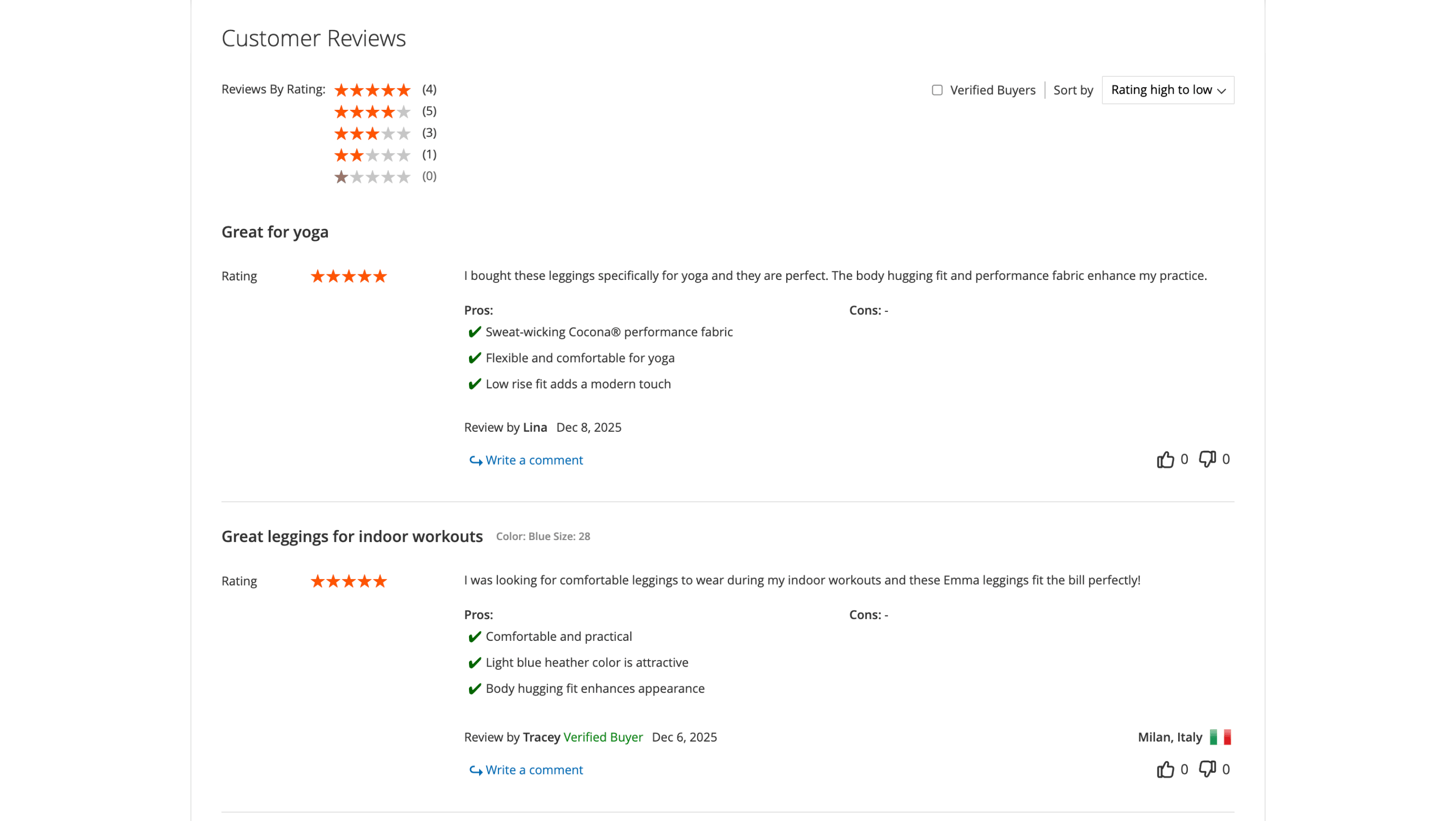
A second click on the active rating clears the filter and brings the full list back, so shoppers can move between positive and negative feedback faster.
Google Tag Manager, Facebook Pixel, and TikTok Pixel
🔥 Shared Tag Manager data layer for storefront tracking
The Google Tag Manager, Facebook Pixel, and TikTok Pixel extensions send storefront events through the shared Mirasvit Tag Manager data layer. One event stream replaces separate per-module tracking logic, so product, cart, checkout, and purchase data can be checked from one Debug Mode toolbar.
Native Hyvä support is built into the modules, so the old separate Hyvä compatibility packages should be removed. Make sure module-tm 1.1.0+ is installed. For Google Tag Manager, review the migrated settings under Stores > Configuration > Mirasvit > Tag Manager.
Mixpanel Analytics - NEW MODULE
🔥 Storefront events streamed to Mixpanel
Magento reports show orders, refunds, and revenue, but they do not always show the behavior that led to them. Our new Mixpanel Analytics module sends storefront events to Mixpanel, a product analytics platform, so product views, searches, cart actions, checkout steps, purchases, and refunds become available for funnel and cohort analysis.
From there, your team can follow the real shopping journey: which paths lead to revenue, where people abandon the flow, how segments behave differently, and what happens after purchase.
Withdrawal Button - NEW MODULE
🔥 Structured EU withdrawal requests
In EU stores, a withdrawal request needs more than a contact-form message. The store has to know which order it belongs to, who submitted it, and where the case should go next.
This release introduces the Withdrawal Button extension for that process. Customers submit the request from the storefront, and the admin receives it with the related order details already attached.
Review and refund handling starts from a structured request, not from scattered messages or missing order information.
REST API coverage for external systems
More Mirasvit data and settings can be used outside the Magento admin, so external tools, headless storefronts, internal dashboards, and automation workflows do not have to rely on manual exports or duplicate admin edits.
The REST updates cover these modules:
- Follow Up Email: work with Email Designer templates, themes, and campaign reports from external marketing tools.
- Advanced SEO Suite: manage autolinks, redirects, canonical rewrites, audits, content rewrites, rich snippet extenders, and sitemap providers through REST.
- Knowledge Base: connect help articles and related content with headless storefronts, CMS workflows, documentation portals, or internal tools.
- AI Assistant: manage prompts, automation rules, and system messages, read logs and history, render Liquid prompt templates, and check valid prompt scopes before saving.
- Helpdesk: REST list responses declare correct item types for tickets, messages, departments, fields, statuses, priorities, and tags, so generated schemas and client tools describe helpdesk data correctly.
Create or update a Magento REST API integration under System > Extensions > Integrations, grant the needed ACL permissions, and use standard Magento REST API authentication.
Reward Points & Referral Program
🔥 PayPal checkout compatibility for reward points
Reward points should stay available at checkout, including when customers choose PayPal. The Reward Points & Referral Program module adds compatibility with PayPal Complete Payments / PPCP, so shoppers can redeem earned points and finish the order through PayPal without checkout conflicts.
The only requirement is that the PayPal PPCP module is installed.
Knowledge Base
Article editing gets two practical improvements in the Knowledge Base extension: cleaner preview text through editable excerpts and easier product-link checks before publication.
🔥 Editable excerpts for cleaner previews
Article previews no longer have to be pulled from the main body. The editor adds an Excerpt field for the short text shown in listings, search results, or other preview areas.
Use it when an article starts with context, a long explanation, or wording that does not work well as a summary. The field is available in the article editor under Excerpt.
🔥 Clearer product links on help articles
The Related Products tab shows linked items with thumbnail, SKU, and status, so product connections are easier to verify before an article goes live.
Incorrect products, duplicate links, and disabled items stand out faster. Products are added from a searchable grid instead of a cramped selector. Open an article in Knowledge Base and use Related Products to add or review linked products.
AI Assistant
🔥 Prompt scope validation before saving
For prompts created or updated through the AI Assistant module API, developers can check valid placement scopes before saving. The GET /V1/assistant/scopes endpoint returns each available scope with its value and readable name, so prompt buttons can be validated for the right admin location without trial and error.
Call the endpoint with a token that has the matching AI Assistant ACL resources.
AI Copilot
🔥 Store-aware AI suggestions
Advice from AI is only useful when it matches the store you actually run. The AI Copilot module checks which Mirasvit extensions are installed before answering, so its suggestions stay closer to your real setup.
If you ask how to handle abandoned-cart emails, Copilot can point to the tools already available in your store instead of recommending features from extensions you do not use.
Product Kit
For multilingual stores and larger catalogs, the Product Kit extension update makes bundled offers easier to localize and faster to resolve on product pages when smart rules scan many candidate products.
🔥 Kit text translated across 15 locales
Product kit labels, admin controls, and storefront text ship with ready-made translations for 15 locales: Arabic, Czech, German, Spanish, French, Italian, Japanese, Dutch, Polish, Brazilian and European Portuguese, Swedish, Turkish, Ukrainian, and Simplified Chinese.
In multilingual stores, kit text follows the selected Magento locale without a custom translation file. All strings also remain available for the standard Magento i18n workflow.
🔥 Batched smart kit checks
Smart kits with many candidate products are checked in one batched lookup instead of a long sequence of separate validations.
This reduces product-page load pressure when kit rules scan a large catalog before showing the final kit block, especially for complex smart kits.
GDPR
🔥 Required mage-messages before cookie consent
The GDPR module treats Magento's standard mage-messages cookie as required, so important storefront messages are not blocked before cookie consent.
These messages confirm actions like newsletter signup or form submission. If they disappear, shoppers may think the action failed and repeat it. mage-messages is included in the required cookie list, while non-essential cookies still wait for consent.
Helpdesk
🔥 One-click support reference copying
In the admin view of the Helpdesk extension, the support reference gets a dedicated action beside it. Agents can send the exact value to chat, Slack, an order note, or another system without selecting text on the page.
When the same case reference moves between tools, agents can pass it on without manual selection and avoid small copying mistakes: extra spaces, missing characters, or wrong fragments from the screen.
Extra Payment
🔥 Extra-payment email control
Order editing can create an extra payment, but the customer email for that event does not always need to go out automatically. A dedicated toggle in the Extra Payment module controls this notification.
Keep the email enabled when the customer should be informed about the new payment request, or turn it off for internal back-office adjustments where an automatic message would only confuse them. Configure it under Stores > Configuration > Mirasvit > Extra Payment > Email Notifications.
eChat
🔥 General Contact email sent to eChat
When a store is registered with the eChat extension service, the request now includes the store's General Contact email.
Account and service notifications then go to the email already set in Magento, instead of depending on manual follow-up or an undefined contact. Check it under Stores > Configuration > General > Store Email Addresses > General Contact before or after registration.
Backend Search
🔥 Safer Backend Search config storage
The Backend Search module update moves configuration from the root var/ directory to var/mirasvit/, so deployment scripts that clean var/ are less likely to remove files needed for admin search.
After a release, admin search can stay available instead of waiting for cron to rebuild missing configuration. Existing installations are covered during upgrade because the previous location remains available as a fallback.
That's the full set of July updates we prepared. You can find full details about these and other products in our Magento 2 extensions catalog.
Mirasvit Support Engineer
Promote your products and achieve higher sales by using the power of marketplaces and comparison shopping engines with magento data feed extension. You can automatically generate and deliver feeds of your product catalog to those services with Magento Product Feeds extension.
This tool is unbelievably quick to use and is also outstandingly flexible. It's compatible with all major shopping and advertising services, including Google Shopping.
Feeds go straight to Google Merchant Center through Google's API, and AI profiles can rewrite titles, map Google categories and fill in missing attributes before your catalog ever reaches a marketplace.
Simply install the module, generate your very own product feed, present your catalog to a wider audience, and boost your sales right now!
Turn store events into email: abandoned cart reminders, review requests, win-backs, birthday greetings and order follow-ups, each triggered automatically and each reported with the revenue it brought in.
From meta tags to the sitemap, the Magento 2 SEO Extension gives you full control over every SEO-related feature in your store.
It automates the SEO work you'd otherwise do by hand - templated meta tags, rich snippets, redirects, sitemaps, cross-links and a built-in SEO audit - across every page type. That is why 2,435+ Magento stores rely on it.
A help desk built into your Magento admin. Customer emails and contact forms become tickets, routed to the right department and agent, with workflow rules, satisfaction surveys, reports and AI tools. Every ticket shows the customer's orders and earlier tickets.
A knowledge base and FAQ for your Magento 2 store: articles in categories and tags, with search, ratings and SEO-friendly URLs.
Show the same answers in FAQ blocks on product, category and CMS pages, suggest them in the Help Desk contact form before a ticket is created, and give search and AI engines a page with structured data for every answer.
Boost customer loyalty with reward points, unlimited tiers and a built-in referral program - all in one module. Reward shoppers for purchases, referrals and social shares to drive repeat sales and turn one-time buyers into brand advocates.
Blog MX runs your blog inside Magento, with Page Builder posts, comments, and SEO checks in the admin you already use. Every post, category, author, and tag can differ per store view.
Fast, relevant store search lifts conversion rate and revenue.
It powers search for thousands of Magento stores, from catalogs of a hundred products to millions of SKUs.
The Elasticsearch extension returns relevant results within milliseconds, across products, categories, CMS pages, and 15+ other content types.
Give customers search that helps them find and buy the products they want - faster and with fewer dead ends.
The Automatic Related Products extension fills related, up-sell and cross-sell blocks for you. It picks products by rules you set, using what your customers actually buy and view, and shows how much revenue each block brings, so you keep the blocks that sell and change the ones that don't.
Product Kits shows discounted product sets on the product page and in the cart, so shoppers add the whole kit in one click. Set a discount for each item with six discount types, and build kits by hand, by rules or from your order history.
This Magento 2 order management extension lets you fix a placed order without canceling it and re-entering everything.
Edit items, prices, taxes, discounts, the coupon, shipping and payment methods, the shipping address and customer details, even on invoiced orders: if the total goes up, the customer gets a link to pay the difference. Merge or split orders, add product, billing and shipping columns to the orders grid, tag orders by rules and set custom numbers for orders, invoices, shipments and credit memos.
AI Assistant writes the content your catalog needs, inside the Magento 2 admin: product and category descriptions, meta tags, blog posts, ticket replies, and newsletters. It works with OpenAI (ChatGPT), Anthropic (Claude), Google (Gemini), and Grok (xAI), and bulk work runs as rules you can target by conditions and test with a dry run first.
Add GA4 ecommerce tracking and Google Tag Manager to your Magento 2 store without editing theme code.
The extension sends 17 GA4 events, from product list views to refunds, comes with ready GTM containers for GA4 and Google Ads, and shows every event in a built-in debug toolbar.
Add the Meta Pixel to your Magento 2 store and send the same events from your server through the Conversions API, so Facebook and Instagram ads optimize on complete data.
The extension tracks 8 standard Meta events, from product views to purchase, merges browser and server copies by one event ID, and lets you check every event before you rely on it.
Are you running ads on TikTok and want to ensure every dollar spent is working effectively? Then you need data that helps evaluate campaign results and boost efficiency. Mirasvit's TikTok Pixel & API for Magento 2 does exactly that.
With this module, users' actions on your site will be tracked, and this data will be sent to your TikTok business profile. Based on this data, TikTok's algorithms will optimize the delivery of your ads.
As a result, each ad will reach those who are genuinely interested in purchasing your product. With TikTok Pixel by Mirasvit, you can:
Bring flexibility to payments in your store and offer your customers better service during their shopping experience.
This module is a supportive tool for organizing a convenient system of making any additional payments that might occur on purchases. Use this extension to ease order management in your store by tying extra payments to the orders.
Offer customers a convenient way to monitor in their accounts' additional fees regarding their orders and let customers make payments with the payment method that is the most convenient for them.
Admin Quick Search for Magento 2 offers a new way to navigate within the admin panel using an ultra-fast search feature.
To find something in the Magento admin, you typically have to use grid filters, which are very slow. Our solution returns results within milliseconds.
It can find almost every type of content available within your Magento admin, including orders, customers, pages, invoices, products, shipments, menu items, etc.
Search for customers by email, search for orders by address or purchased item, or find all orders of a customer – no problem. Blink, and we’ll bring the results.
Advanced Reviews adds an AI summary, photos and separate pros and cons fields to Magento 2 product reviews, and sends review request emails after each order to bring in new ones.
A Verified Buyer badge or a buyers-only rule shows shoppers which reviews to trust, and review grouping fills the review block of variants and similar products, on Luma and Hyvä.
Mirasvit CoPilot is a Magento 2 AI agent embedded directly in the admin panel. Ask questions, pull data, and take action using natural language. No SQL or code required.
Know what your shoppers do, not just what they bought.
Every product view, search, cart action and checkout step lands in Mixpanel, tied to the customer who made it.
From day one you get your funnel step by step, the shoppers worth winning back by name with what they've spent before, and a week-by-week view of how many buyers come back.
Install, paste your Mixpanel token, done. Then ask Claude or ChatGPT about any of it in plain English.
Since 19 June 2026, EU law requires online stores that sell to EU consumers to show a withdrawal button: a simple way for shoppers to cancel a purchase contract online.
The Withdrawal Button extension adds that function to Magento 2: the two-step cancellation flow Article 11a describes, an automatic email receipt, and an admin queue to handle every request.
More and more shoppers ask AI assistants to find and choose products for them.
Magento 2 Agentic Commerce makes your store readable to those assistants. It publishes a UCP merchant profile, an MCP server, and llms.txt, so ChatGPT, Claude, and other agents can search your catalogue, quote your real prices, build a cart, and send the shopper to your checkout. The Agent Activity dashboard shows which orders and revenue came from agents.