
Magento 2 GDPR Extension
Cookie consent and customer data requests for Magento 2. Visitors choose which cookie groups they allow, and Google Consent Mode v2 passes their choice to Google tags. Customers download, anonymize or delete their data from their account, and old orders are anonymized on a schedule.
- Cookie banner with required and optional cookie groups
- Banner only in selected countries and US states
- Google Consent Mode v2 built in
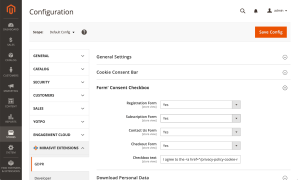
- Consent checkboxes on registration, checkout, newsletter and contact forms
- Consent records with date, time and IP
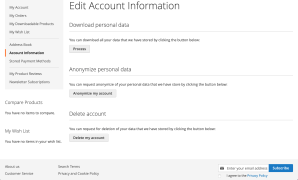
- Customers download, anonymize or delete their data
- Automatic anonymization of old orders, guest orders included
- Lock Screen until the visitor chooses
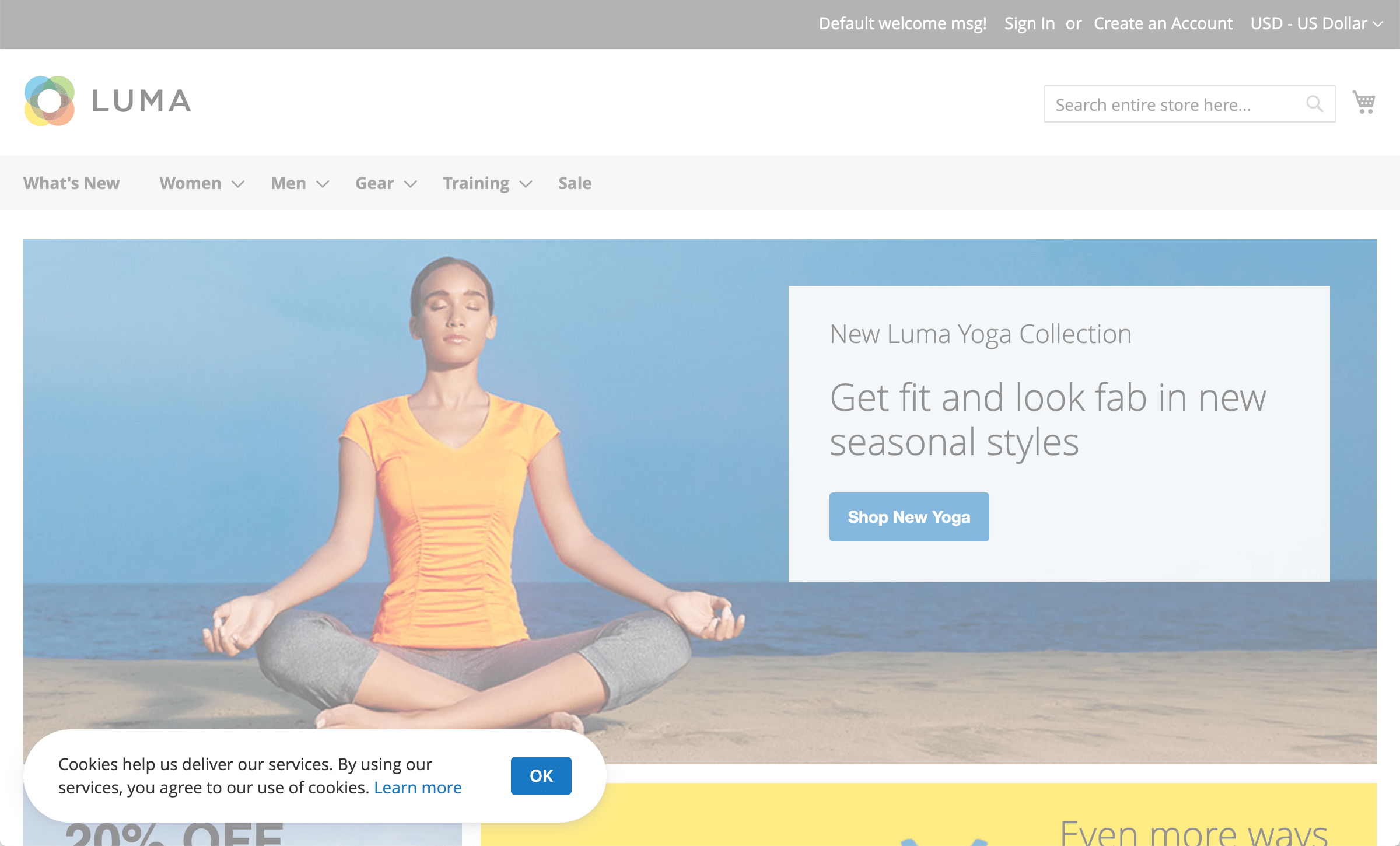
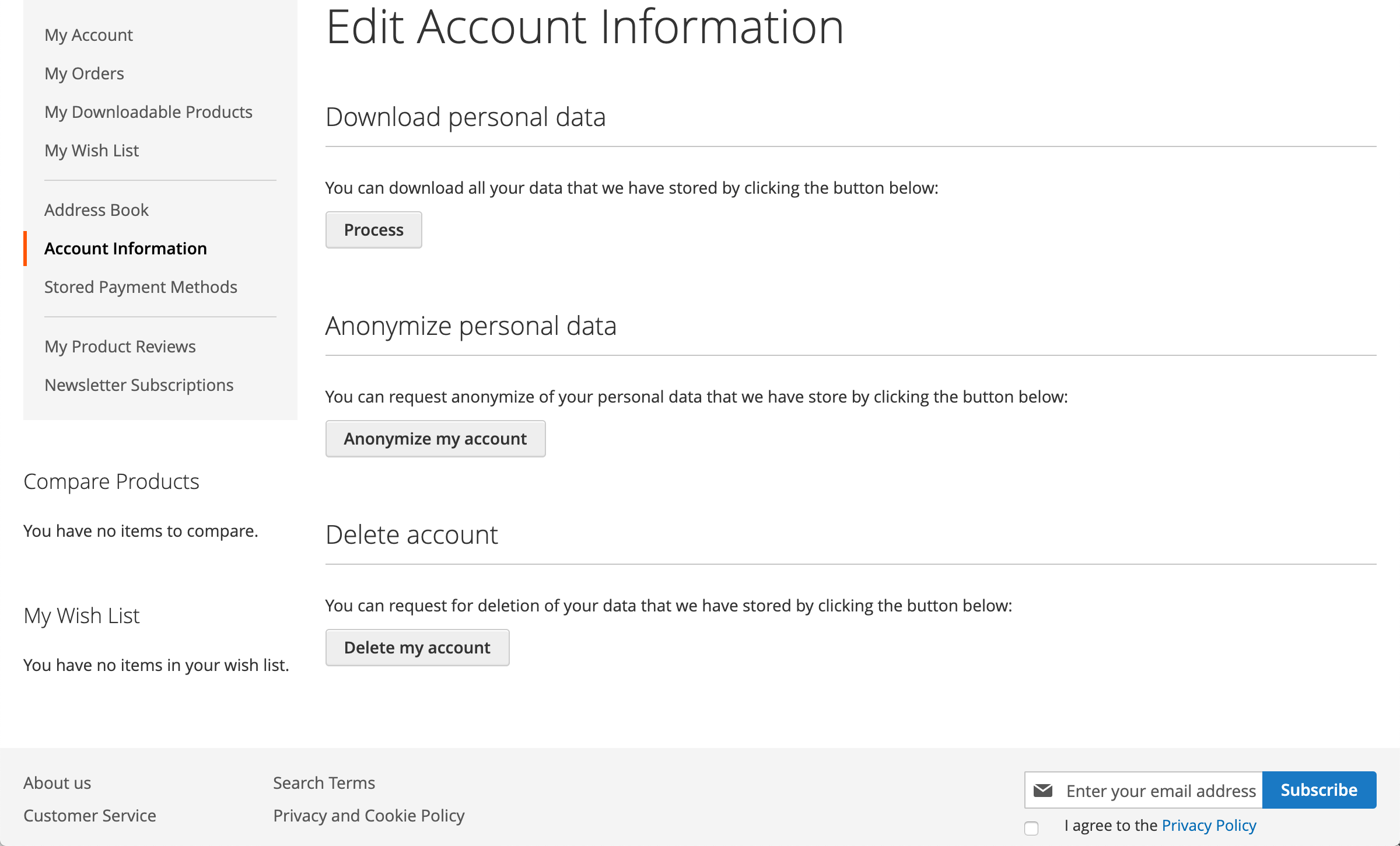
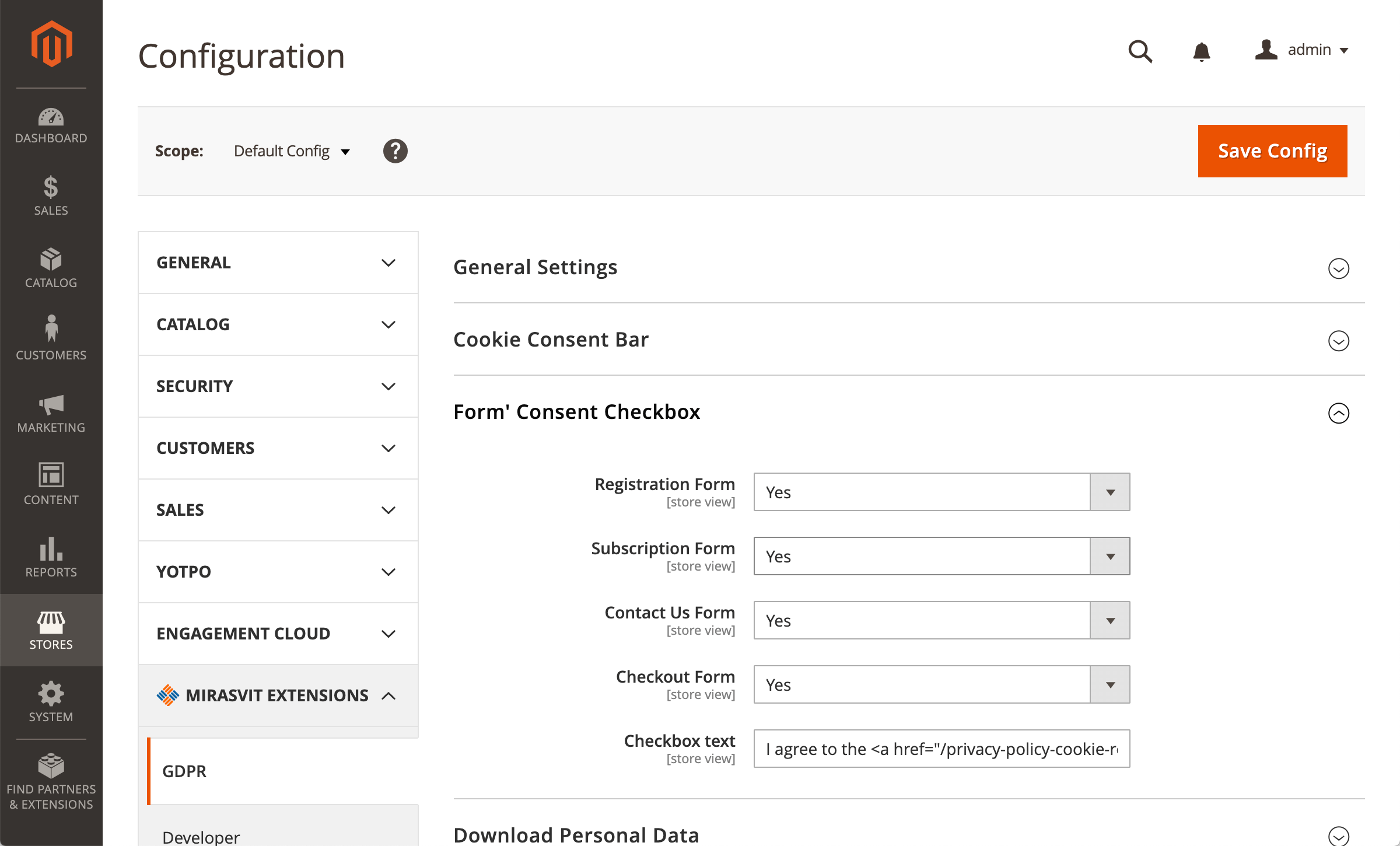
Out of the box, Magento can show only one generic cookie notice and has no tools for privacy requests. Visitors can't choose which cookies they allow, customers email you to get a copy of their data or delete their account, and old orders keep names and addresses for years.
The extension adds a cookie consent banner with cookie groups and Google Consent Mode v2, consent checkboxes on your forms, and a privacy dashboard where customers download, anonymize or delete their data themselves. On a schedule, it anonymizes old orders, guest orders included.
The General Data Protection Regulation (GDPR) is the EU law on personal data. It requires online stores to ask before storing non-essential cookies, to record consent, and to let customers see, download and delete the data you keep about them.
Beyond the EU, the same tools cover the requests other privacy laws ask for: the right to know and delete under the California Consumer Privacy Act (CCPA), Brazil's LGPD, and the CNIL guidance in France, where you can require a choice before the visitor browses the store. The banner, checkboxes and privacy dashboard come translated into 15 languages besides English, including German, French, Spanish, Italian, Dutch, Polish and Brazilian Portuguese.
Magento 2 GDPR extension features
- Cookie consent banner with required and optional cookie groups
- Banner only in the countries and US states you choose
- Google Consent Mode v2 signals from the visitor's choice
- Consent checkboxes on registration, checkout, newsletter and contact forms
- Privacy dashboard: download, anonymize or delete personal data
- Automatic anonymization of old orders, guest orders included
- Consent records with date, time and IP
- Works with Luma, Hyvä, Magento Open Source and Adobe Commerce 2.3–2.4.9
Cookie Notice and Cookie Consent Banner
Magento's built-in Cookie Restriction Mode shows one notice with an Allow Cookies button. This extension replaces it with a cookie consent banner: visitors can agree to all cookies, pick cookie groups in the settings, or decline the optional ones. By default, only essential cookies are allowed until they choose.
You split cookies into required groups (for example, Magento core cookies) and optional ones, such as statistics and marketing, and edit the cookie notice text and the link to your cookie policy. Lock Screen keeps visitors from using the store until they make a choice.
- The banner shows only in the countries and US states you select. The country comes from a GeoIP database shipped with the extension, so visitor IPs aren't sent to an outside service.
- You can have the banner ask visitors again when you add a cookie group or a cookie.
- Visitors can change their choice later from a footer button, a widget you place anywhere, or their account.
- Turn on the log of blocked cookies to spot cookies from a new extension and add them to a group. It records real traffic and doesn't scan your site.
Google Consent Mode v2
Google Consent Mode v2 is built into the extension, with no add-on to buy. Once you turn it on, the default state (denied or granted) goes to the data layer before your Google Tag Manager container loads, and the update follows as soon as the visitor makes a choice.
Cookie groups map to the seven consent signals: statistics to analytics_storage, marketing to ad_storage, ad_user_data and ad_personalization, functionality to functionality_storage and personalization_storage, essential to security_storage. Google tags then adjust what they collect. The extension doesn't stop the tags from loading.
To send full ecommerce events to GA4 and Google Ads under these consent signals, pair it with our GA4 and Google Tag Manager extension.
Consent Checkboxes and Consent Records
Add required consent checkboxes, such as accepting your privacy policy, to four forms: registration, checkout, newsletter sign-up and Contact Us. You can add several checkboxes per form, each with its own text and store views. None of them is ticked in advance.
Each consent is recorded in the admin with its type, date, time and IP, and customers see their current consents in their account. Cookie choices are recorded for signed-in customers; a guest's cookie choice stays in the guest's browser.
Let Customers Delete Their Account and Download Their Data
Customers open the privacy dashboard in their account and handle requests themselves, instead of emailing your support. Every action asks for their password again.
- Download: a CSV file with their account details, addresses and order details, available right away
- Anonymize: names, addresses and phone numbers in the account and orders are replaced right away; not available while the customer has open orders
- Delete account: the request waits for your approval. The admin shows a notice about pending requests, and you can approve or reject several at once. After approval, the extension anonymizes the orders and deletes the account.
Automatic Data Retention
The GDPR says not to keep personal data longer than you need it. Rather than cleaning the database by hand, set the periods once:
- Orders older than the period you set (730 days by default) are anonymized every night, guest orders included, so they stay in your sales reports without names and addresses.
- Accounts without orders for a set period (365 days by default) get a deletion request, which you approve like any other.
Need records for your accountant? Order Information Protection keeps recent orders, customer accounts and addresses from being anonymized or deleted at a customer's request for the number of days you set.
Among stores using the extension, few turn on automatic deletion, and many more turn on automatic anonymization. Agree on the periods with your legal advisor.
Still comparing GDPR and cookie consent extensions? Our comparison of the main Magento 2 GDPR and cookie consent extensions puts nine of them side by side, along with hosted cookie platforms. It compares price, scope (data rights or cookies only), what is blocked before consent and Consent Mode v2, and says where another option is the better fit.
Save time by starting your support request online and we'll connect you to an expert.
Does the extension make my Magento store GDPR compliant?
No extension makes a store compliant on its own. Compliance also depends on your privacy policy, the services you use and how you handle data. The extension gives you the tools for the GDPR requirements a store meets on the website: cookie consent, consent records, customer data requests and data retention. Check your setup with a legal advisor.
Does it support Google Consent Mode v2, and how do I set it up?
Yes, Consent Mode v2 is built into the extension. Turn it on in the cookie consent settings and choose the default state, denied or granted. The extension writes the default before your Google Tag Manager container loads and sends an update with the seven consent signals, including ad_user_data and ad_personalization, once the visitor chooses. See how to configure Google Consent Mode.
Will my GA4 and Google Ads numbers drop after I enable cookie consent?
Some drop is expected: visitors who decline statistics or marketing cookies send less data. To keep it to what consent requires:
- Map your cookie groups to the right signals (statistics to
analytics_storage, marketing to the three ad signals). A signal stays denied if its group isn't in the banner. - Show the banner only where you need it. In other countries the banner is hidden and the default goes to Google as granted.
- Pick the default state that fits your markets: denied for the EU, granted where consent isn't required up front.
Can customers delete their own account?
Yes. In the privacy dashboard in their account, customers request account deletion after entering their password again. The request waits for your approval in the admin; once approved, the extension anonymizes their orders and deletes the account. Downloading and anonymizing data happen right away, without approval. See how account removal works.
What data can customers download?
A CSV file with their account details (name, date of birth, gender, tax/VAT number and similar fields), their addresses and their order details. The email address of the account and the products in orders are not included.
What does the consent log record, and for whom?
Each consent from the checkboxes and the cookie banner is recorded with its type, date, time and IP. Cookie choices are recorded for signed-in customers, who also see their current consents in their account. A guest's cookie choice is kept in the guest's browser for a year and isn't written to the database.
How is it different from Magento's built-in Cookie Restriction Mode?
The built-in mode shows one notice with an Allow Cookies button. The extension adds required and optional cookie groups, a Decline button, Lock Screen, the banner only in the countries and US states you choose, Google Consent Mode v2, and the option to ask again when you add cookies. Until the visitor chooses, it allows only essential cookies.
Can I show the banner only to EU visitors or in specific US states?
Yes. Select the countries and US states where the banner appears. The visitor's location comes from a GeoIP database shipped with the extension, and it takes the Cloudflare visitor IP into account. Elsewhere the banner is hidden.
Are optional cookie groups unticked by default?
By default, optional groups in the cookie settings window start switched on. For EU stores, set Optional Groups Enabled to No, so visitors tick the optional groups themselves.
Does it cover the CCPA?
It covers the rights to know and delete: Californian customers download, anonymize or delete their data from their account, and you can show the banner only in the US states you choose. It doesn't add a "Do Not Sell or Share My Personal Information" link or Global Privacy Control support.
Can old orders be anonymized automatically?
Yes. Set a retention period (730 days by default) and every night the extension anonymizes older orders, guest orders included. Orders stay in your sales reports without names and addresses.
_clck and _clsk to your Statistics cookie group.* (for example _hj*) now shows a warning that * matches only a literal star and suggests the [*] wildcard to use instead.[*] wildcard now block and allow the right cookies on the storefront. Before, only the first [*] was treated as a wildcard.var/data.csv on the server. The file is now sent straight to the customer.mirasvit/module-gdpr-hyva package is retired, and nothing from hyva-themes/* is required to install this one.mirasvit/module-gdpr-hyva, so Composer removes the old companion package by itself when you upgrade — there is no composer remove step and no second package to keep in step.bin/magento hyva:config:generate, then npm run build in the theme's web/tailwind directory. The module's styles are now part of the theme build, as Hyvä recommends. Until you rebuild, the cookie bar and the settings dialog still open and close correctly, because the rules that show and hide them ship as a ready-made stylesheet.Mirasvit\GdprCookie\Model\CookieConsent and Mirasvit\GdprCookie\Model\ResourceModel\CookieConsent\Collection. Cookie consent is recorded through the shared consent storage instead. The database table and the stored consent history are untouched, but any custom code or third-party extension that referenced those two classes needs updating.Blog

 Andriy Kovalenko
We are committed to being open and transparent with our customers. When you purchase our module, you automatically receive one year of free support service and free updates.
Why is this important?
- Seamless Installation and Configuration: We understand that setting up a new module can take time to configure according to your specific needs. That’s why we offer a full year of free support. Our experienced team is here to assist you with installation, configuration, and any questions you might have. We're eager to share our expertise to ensure you get the most out of your purchase.
- Stay Updated with Magento (Adobe Commerce) Releases: Magento releases new versions approximately every three months. These updates can sometimes introduce compatibility challenges. To keep your store running smoothly, we provide a year of free access to the latest versions of our modules, ensuring that you can upgrade Magento and our modules without encountering any obstacles.
- Subscription Included: Renewing your subscription ensures continued access to the latest updates and support from our team. This means you can be confident that any issues you encounter with the extension will be resolved quickly and efficiently. You can cancel your subscription at any time without any additional fees.
These are our primary. A major portion of our new clients come from referrals from our existing clients. Our professional team of developers, marketers and support staff have invested the best knowledge and experience in the field into our work, so you know you can come back to us again and again.
One year free and high quality support. We go to great lengths to provide maximum satisfaction with every module you have purchased in our store. By helping you with installation, configuration, answering your every question, we do all our best to eliminate any possible problems.
30-days money back guarantee. If you are not satisfied with our extension performance for any reason, we provide a full refund.
We constantly add new features to all our modules, and are always interested in hearing your opinion and implementing your suggested features in our future developments.
We provide an expanded user guide for every aspect of our extension, so you can find answers for all your burning questions.
You can customize extension according to your needs and requirements.
The Module is easy to install and upgrade, just follow our step-by-step user guide. Additionally, the extension is ready to use with the Hyvä theme.
No core modifications. The extension has been tested in a Magento Cloud environment and is fully compatible with it.