
Magento 2 Agentic Commerce - Get Found by AI
More and more shoppers ask AI assistants to find and choose products for them.
Magento 2 Agentic Commerce makes your store readable to those assistants. It publishes a UCP merchant profile, an MCP server, and llms.txt, so ChatGPT, Claude, and other agents can search your catalogue, quote your real prices and shipping, build a cart, and send the shopper to your checkout. The Agent Activity dashboard shows which orders and revenue came from agents.
With this extension, you can:
- Be discoverable by AI assistants like Claude and ChatGPT
- Let AI agents build a cart your shopper pays for on your checkout
- See which orders and revenue came from AI agents
- Let AI agents quote shipping and apply coupons in the cart
- Speak the open agentic-commerce standards: UCP, MCP, and WebMCP
- Publish llms.txt and other agent discovery files automatically
- Get ready for Google's agent-readiness check in PageSpeed Insights
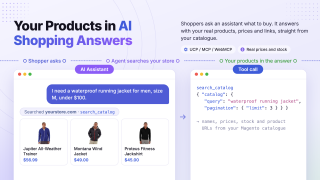
Shoppers Now Ask AI What to Buy
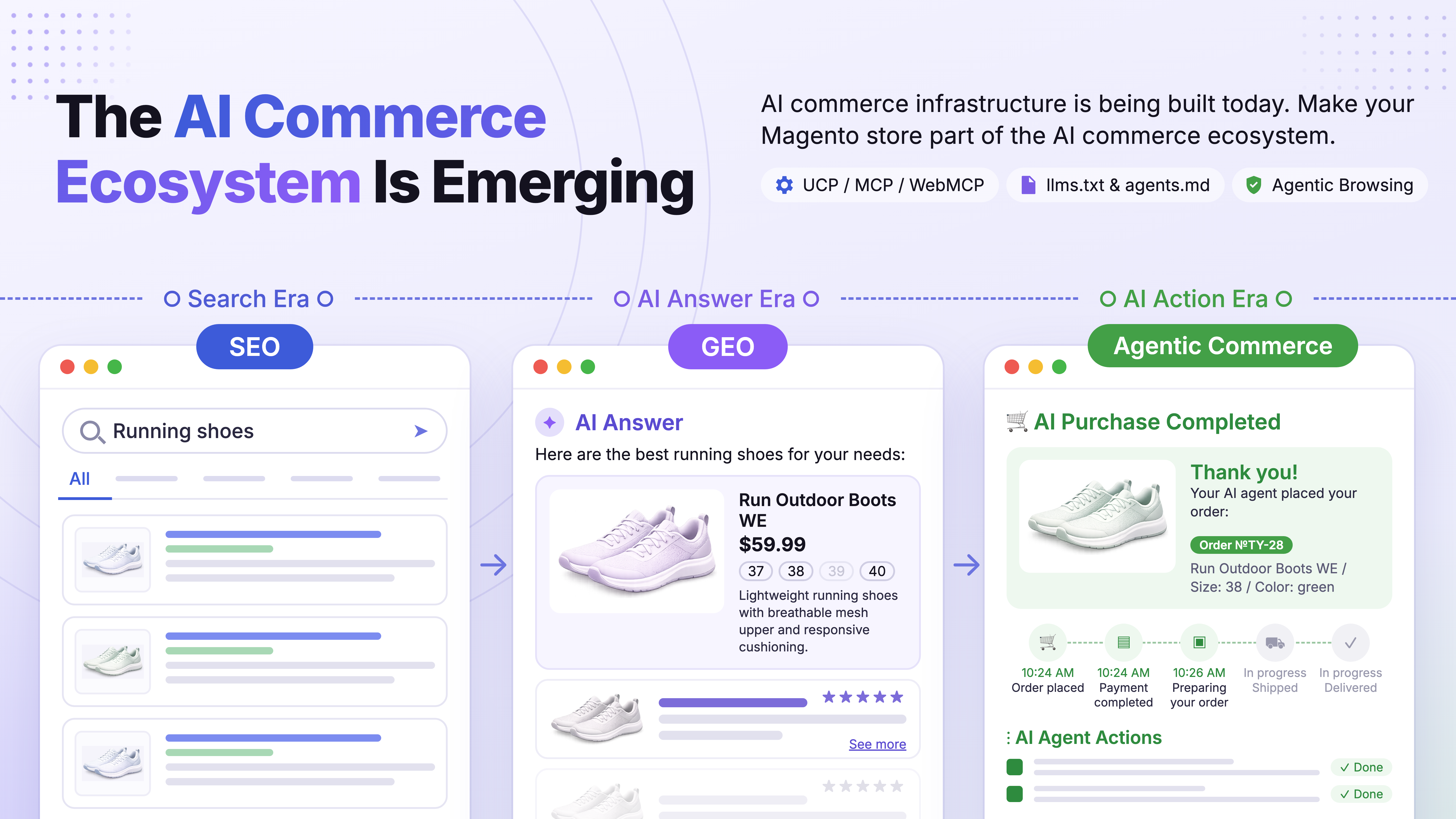
Shoppers ask AI, not search boxes
A growing number of customers ask an assistant to find, compare, and recommend products, then buy what it surfaces.
AI recommends only what it can read
An assistant can only recommend products it is able to read. If your catalogue isn't in a form it understands, your products don't appear in its answers.
Google already grades agent readiness
PageSpeed Insights now has an Agentic Browsing category that checks whether a page is ready for AI agents.
Magento 2 Agentic Commerce brings today's agentic-commerce standards together in a single extension, so AI agents can search your catalogue, compare products, build a cart, and send the shopper to your checkout. It runs on open, industry-backed protocols and handles the parts that trip up simpler integrations: configurable products and products with required options go into an agent's cart as the exact variant, at the right price.
It is built by the team behind our AI Agent Connector (MCP) and Advanced SEO Suite, and it keeps moving with the standards: 25 releases since launch in June 2026.
What benefits do you get?
Works Today with Claude and ChatGPT
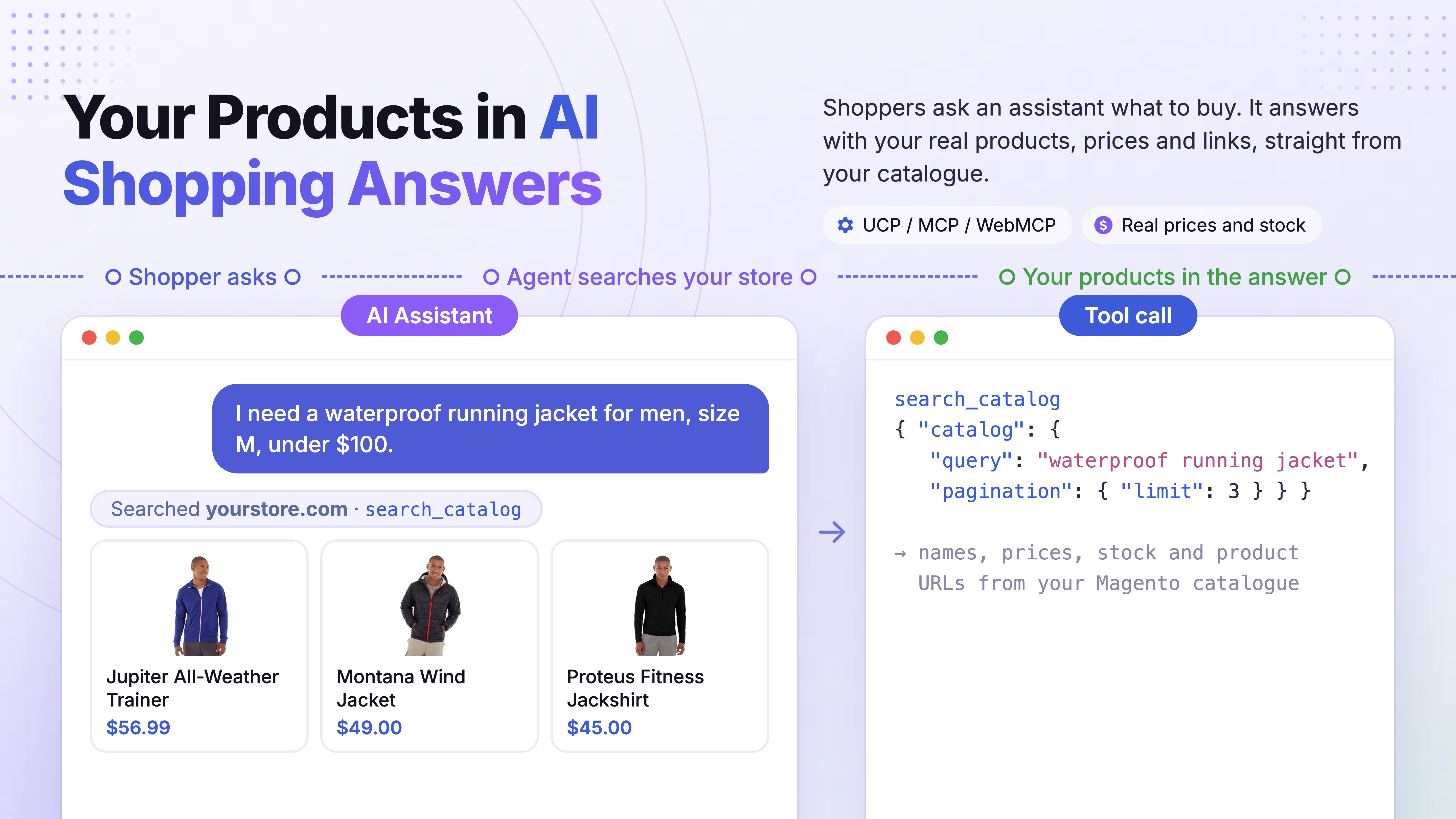
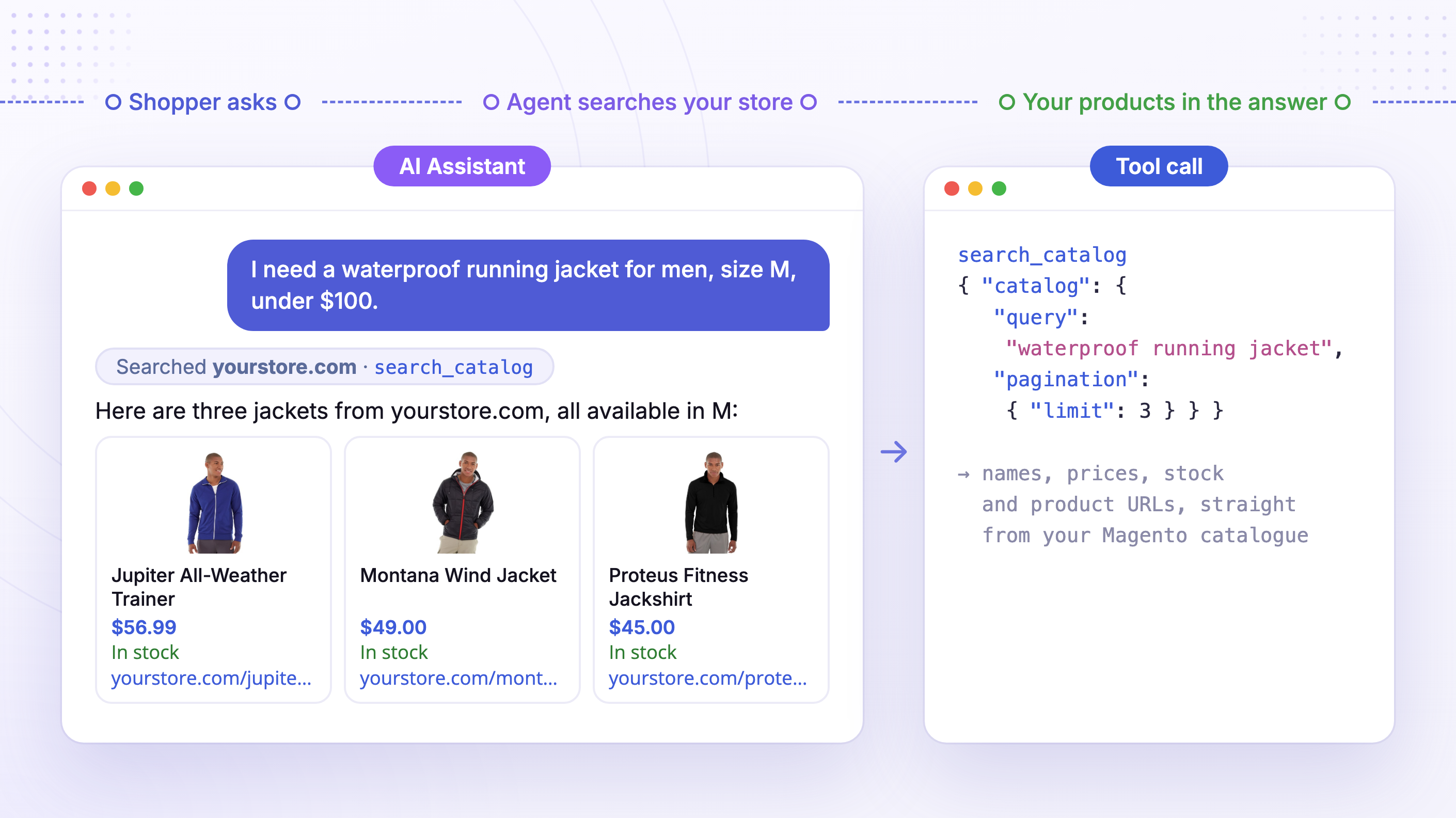
Connect your store to an AI assistant like Claude or ChatGPT today, and it will browse your catalogue, compare products, and recommend them to shoppers in a normal conversation.
The assistant replies with your real products: names, prices, and links, so the shopper finds what they need without leaving the chat.
Looking for a chatbot on your own storefront instead? That is our AI Chatbot for Magento 2.
Agents Build the Cart, Your Checkout Takes the Payment
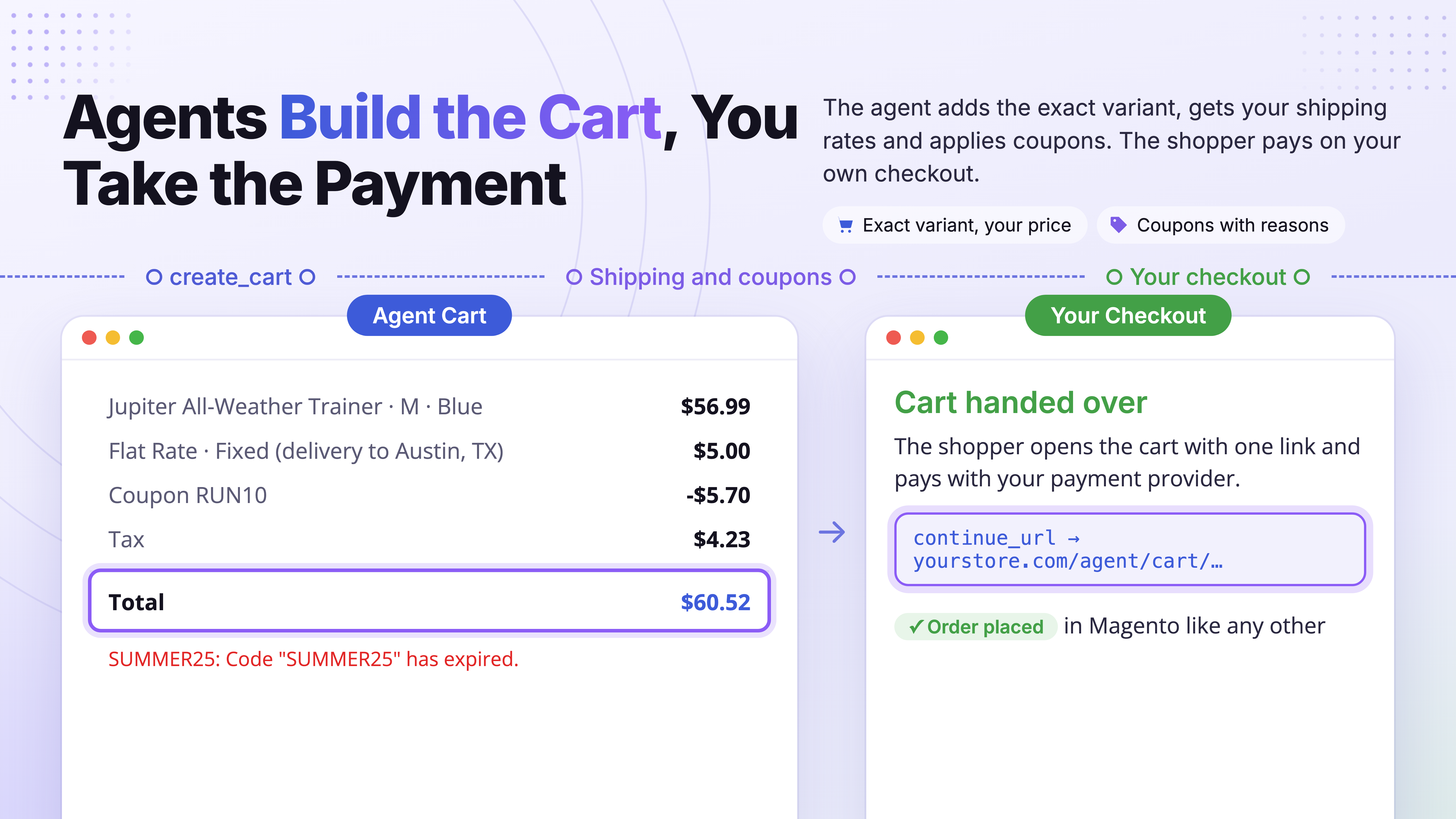
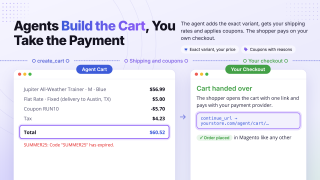
When a shopper decides, the assistant doesn't stop at a product link. It creates a cart in your store, adds the exact items and quantities, and updates or cancels it as the conversation goes on. The shopper opens the cart with one link and pays on your usual checkout.
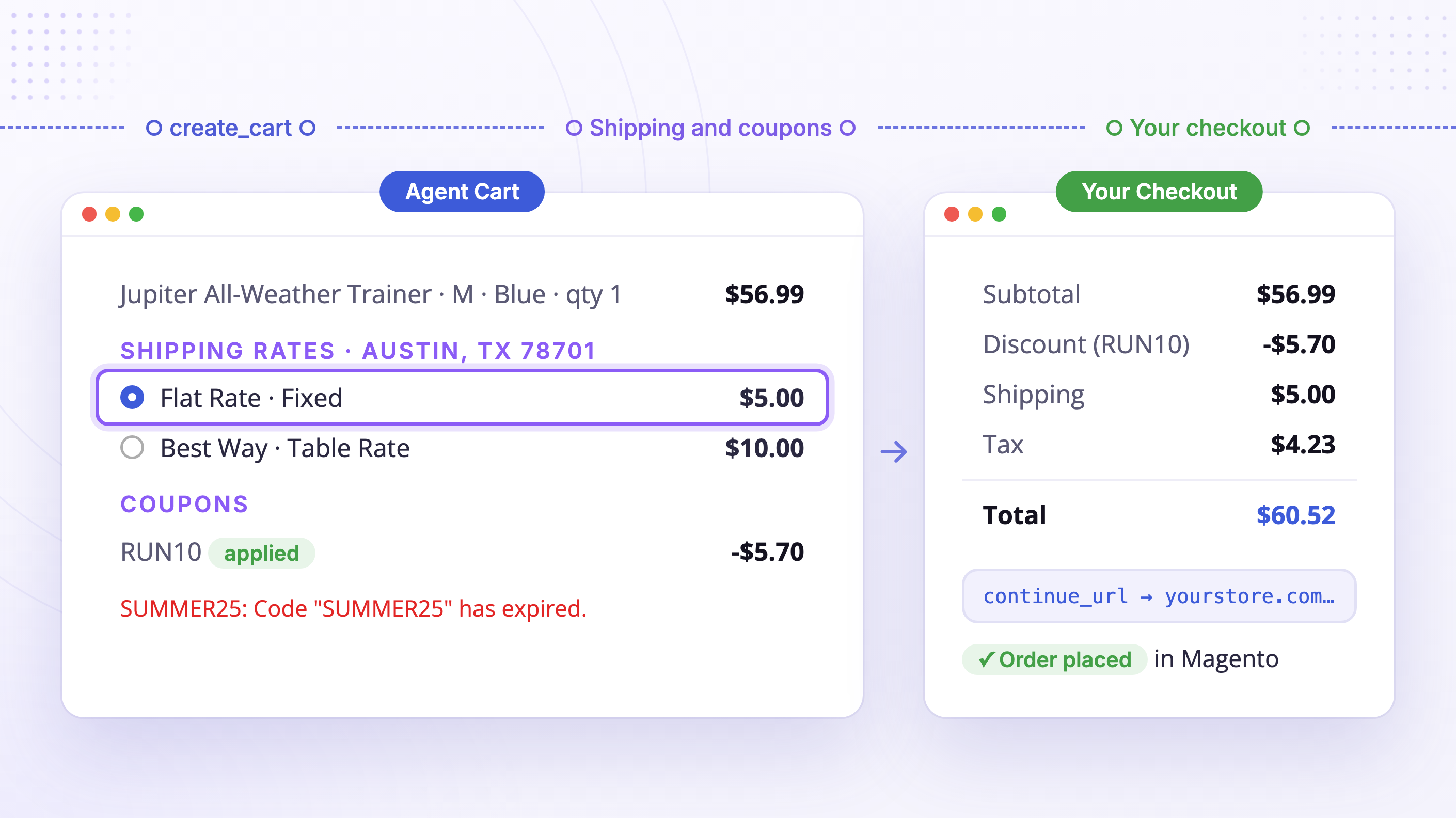
- Give the agent a delivery address and it gets the shipping rates your own carriers quote, then picks the option the shopper wants.
- Agents apply coupon codes and see every discount in the cart, with a clear reason when a code is refused (expired, used up, or the cart doesn't qualify).
- Cart totals include tax, discounts, and shipping once the address is known, so the agent quotes what the shopper will actually pay.
- An unused agent cart expires on its own.
- Your checkout, your payment provider, your conversion data: the order lands in Magento like any other.
Full checkout inside the conversation is on the roadmap and will build on the same setup.
Set Up Once, Discoverable Everywhere Agents Look
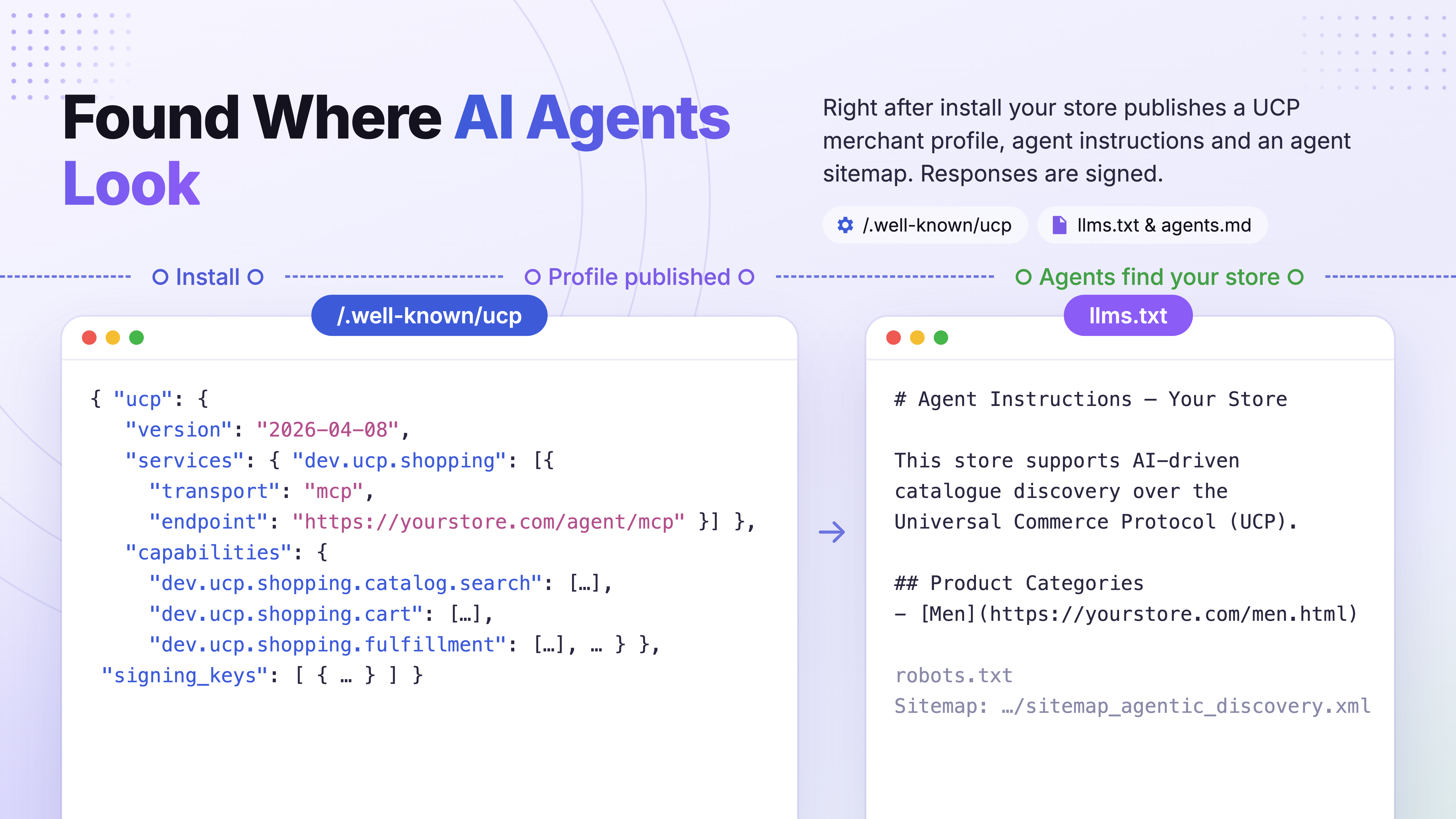
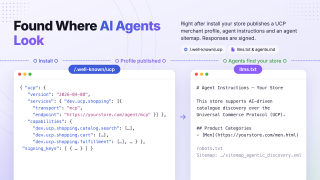
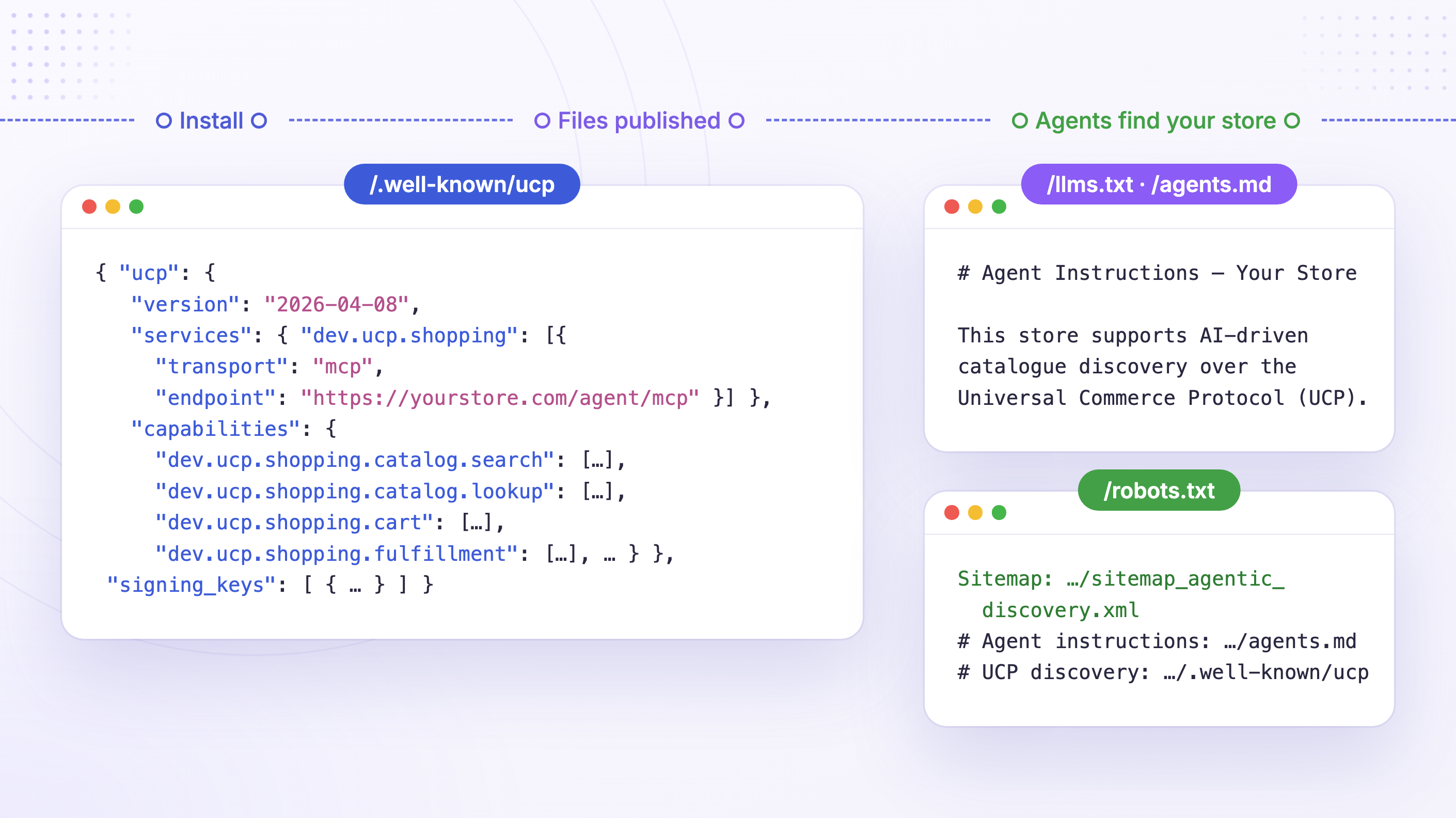
Your store automatically publishes everything an AI shopping agent needs to find it: a Universal Commerce Protocol (UCP) merchant profile at /.well-known/ucp that tells agents what your store supports, plus agent instructions in llms.txt and agents.md.
UCP is an open, industry-backed standard for how AI agents discover and transact with merchants, supported by major commerce, payment, and AI companies including Amazon, Mastercard, Meta, Microsoft, Shopify, Stripe, Visa, Walmart, and Google. Any agent that speaks UCP can read your store without pre-registration.
You Stay the Merchant
Being present in AI conversations does not mean giving up control. Agents read your catalogue and build carts; orders, payments, and customer accounts stay in your Magento checkout. The extension runs on your own server and domain, with no platform in between and no fee per agent sale.
See What Agents Do in Your Store
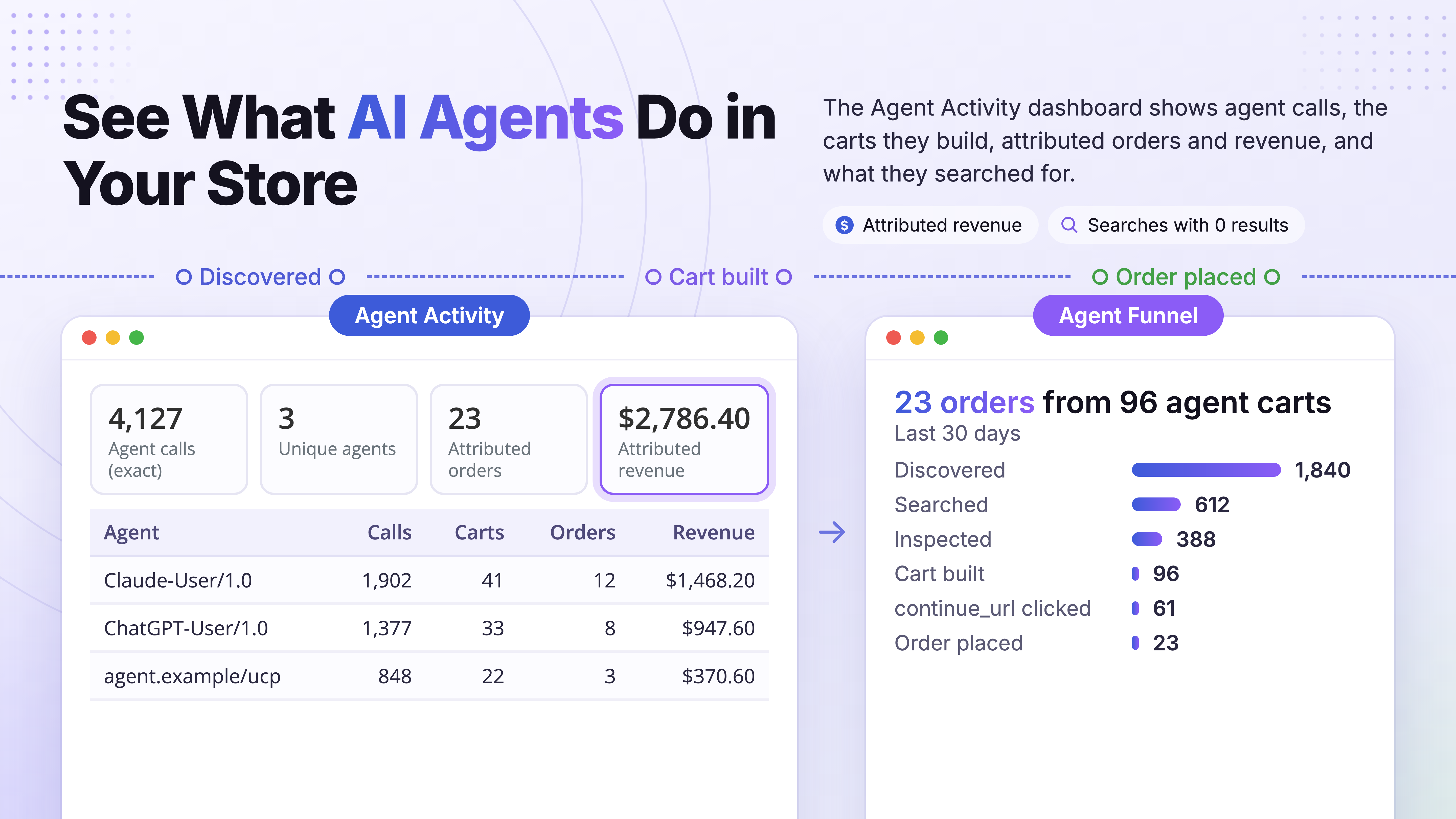
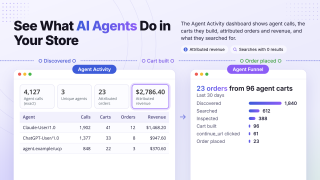
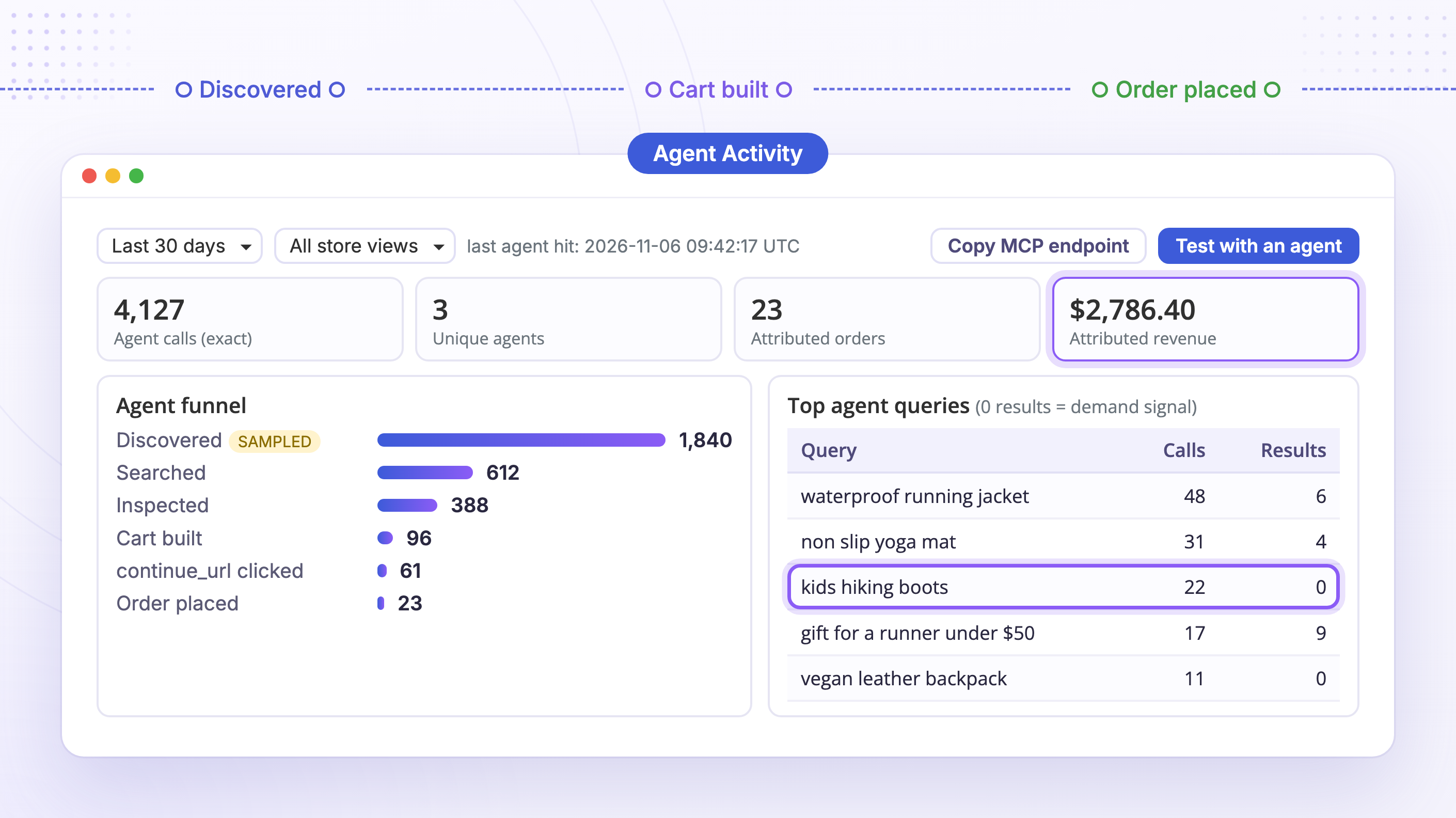
The Agent Activity dashboard (Marketing → Agentic Commerce → Agent Activity) shows how AI agents use your store, by period and store view:
Calls and agents
How many requests agents made, which endpoints they used, and how many different agents visited.
Attributed orders and revenue
Orders placed from agent-built carts are tagged, so you see the revenue the AI channel brings and which agent brought it.
Top agent queries
What agents searched for, including searches that returned nothing: demand your catalogue doesn't meet yet.
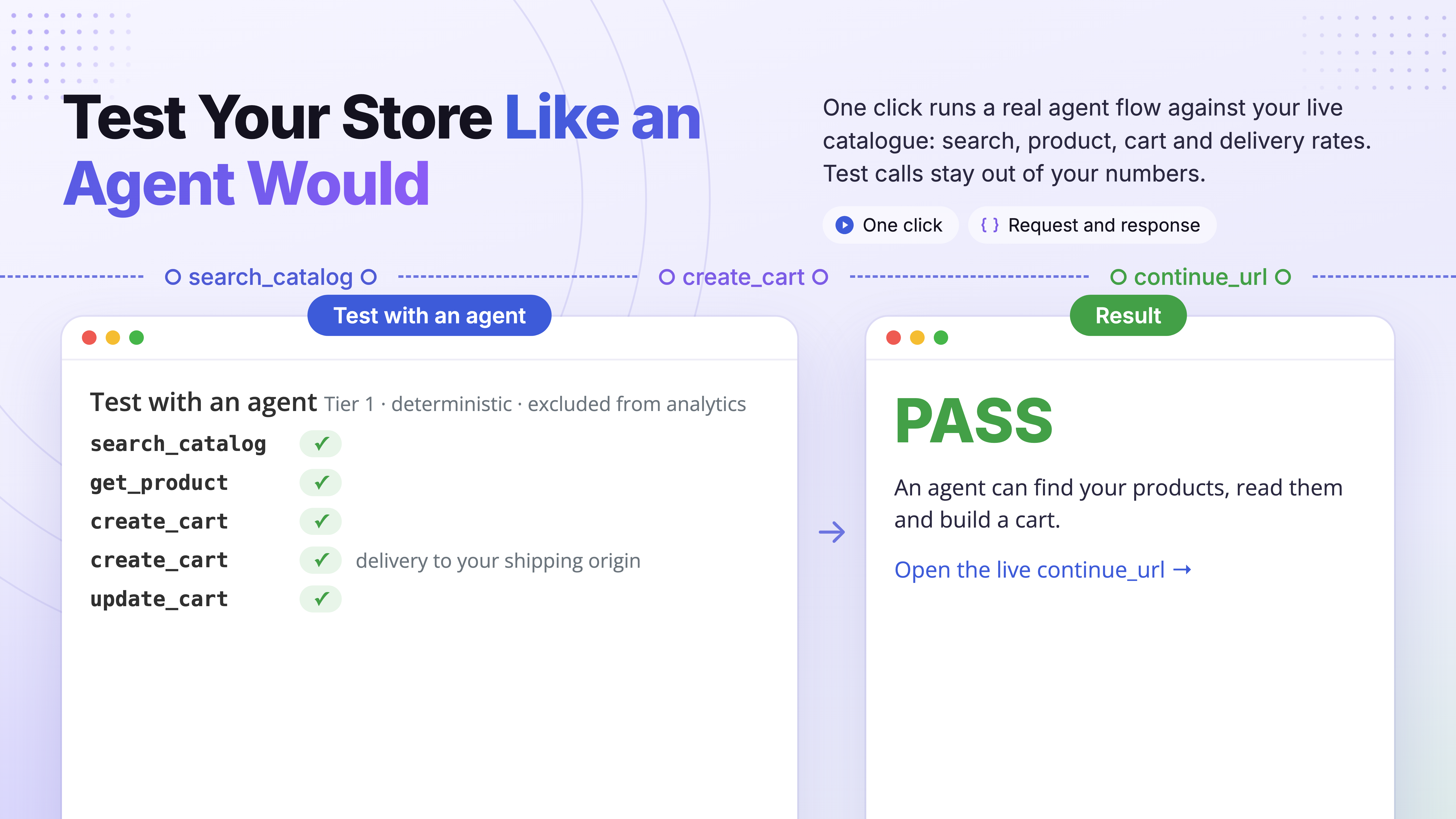
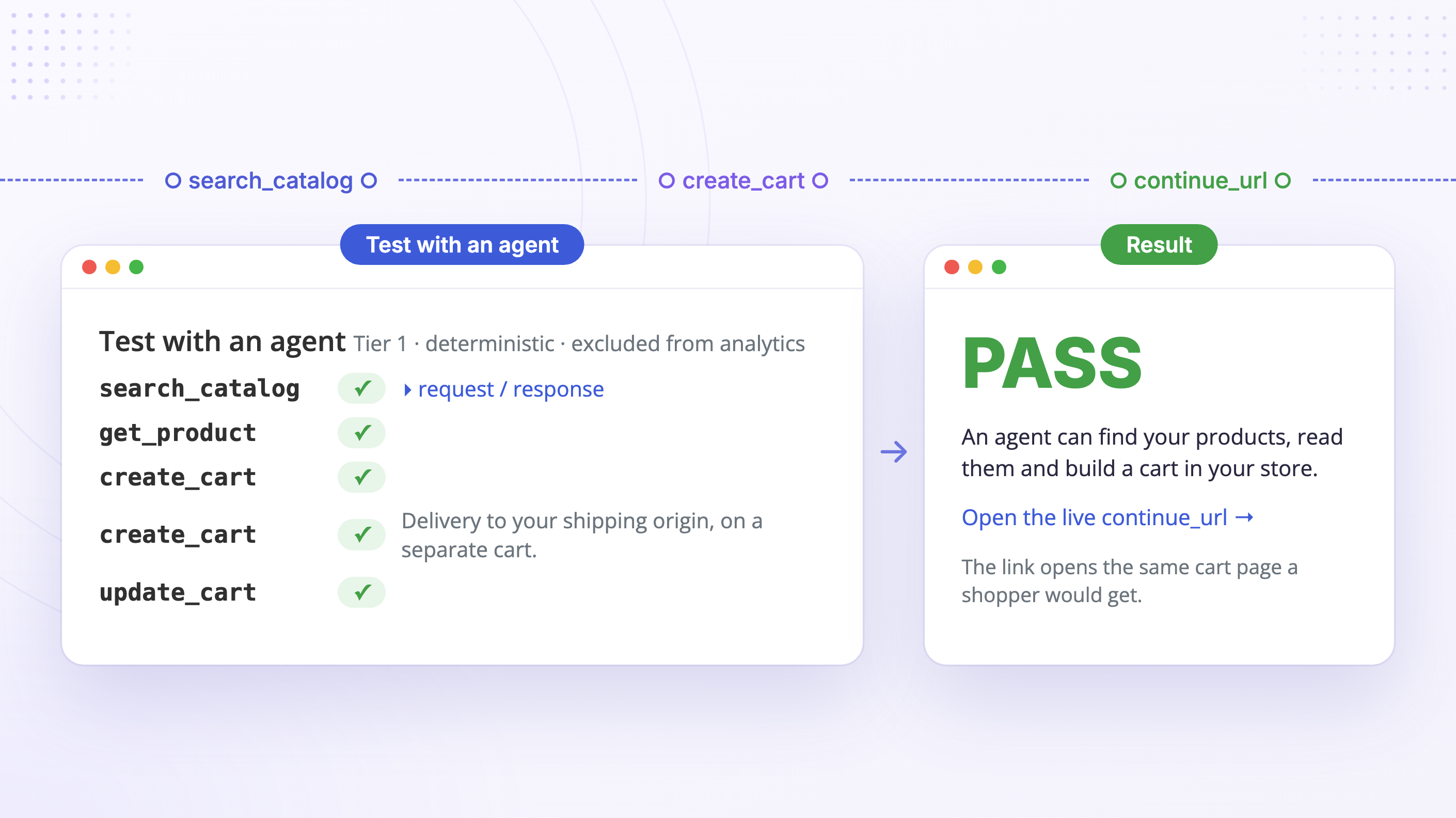
Test with an agent
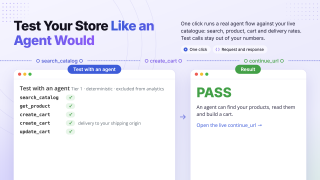
One click runs a real agent through your store: it searches the catalogue, fetches a product, and builds a cart step by step.
How Magento 2 Agentic Commerce Works
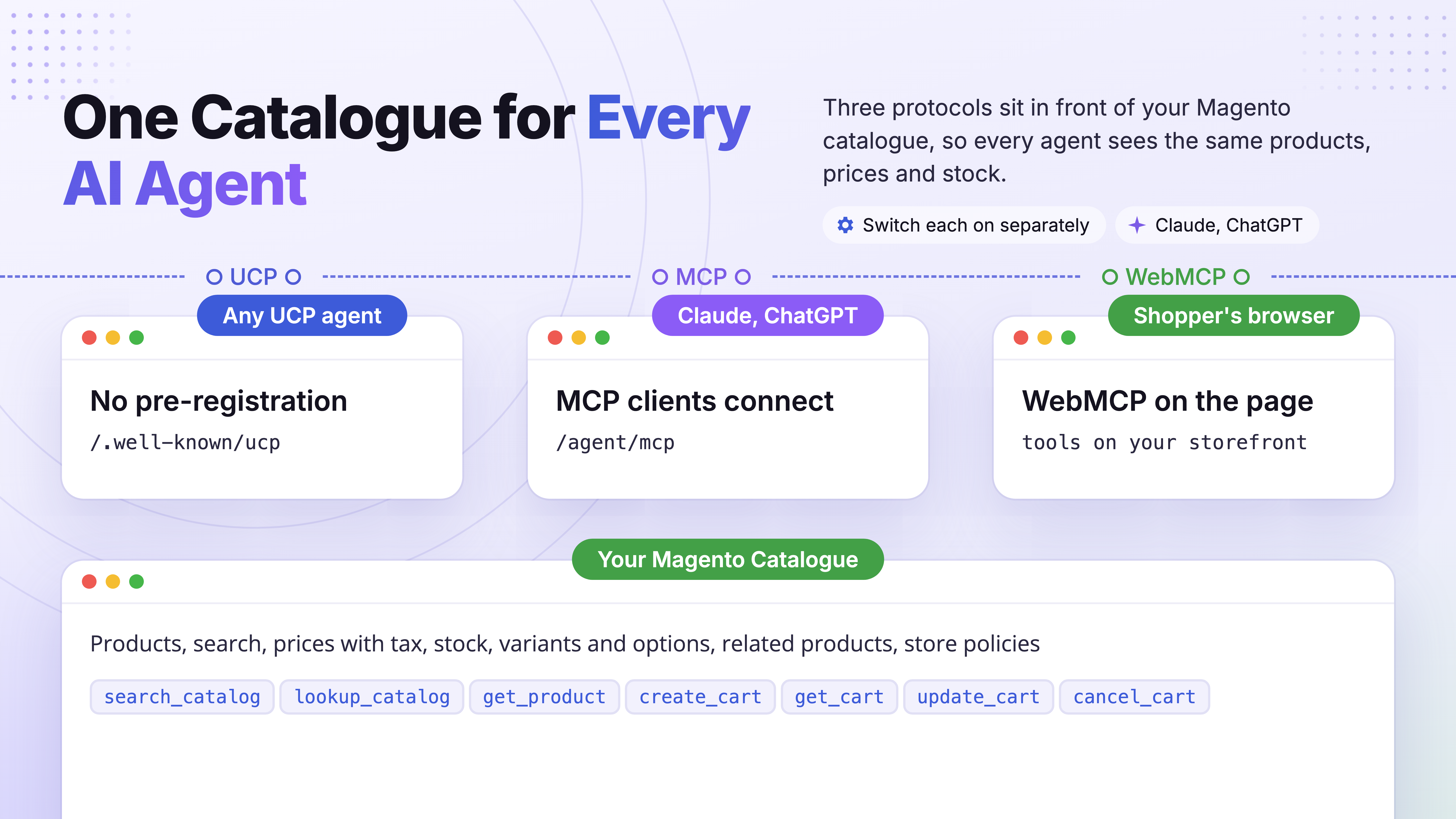
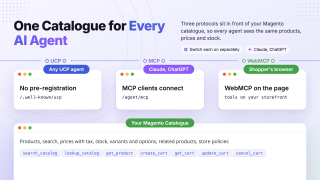
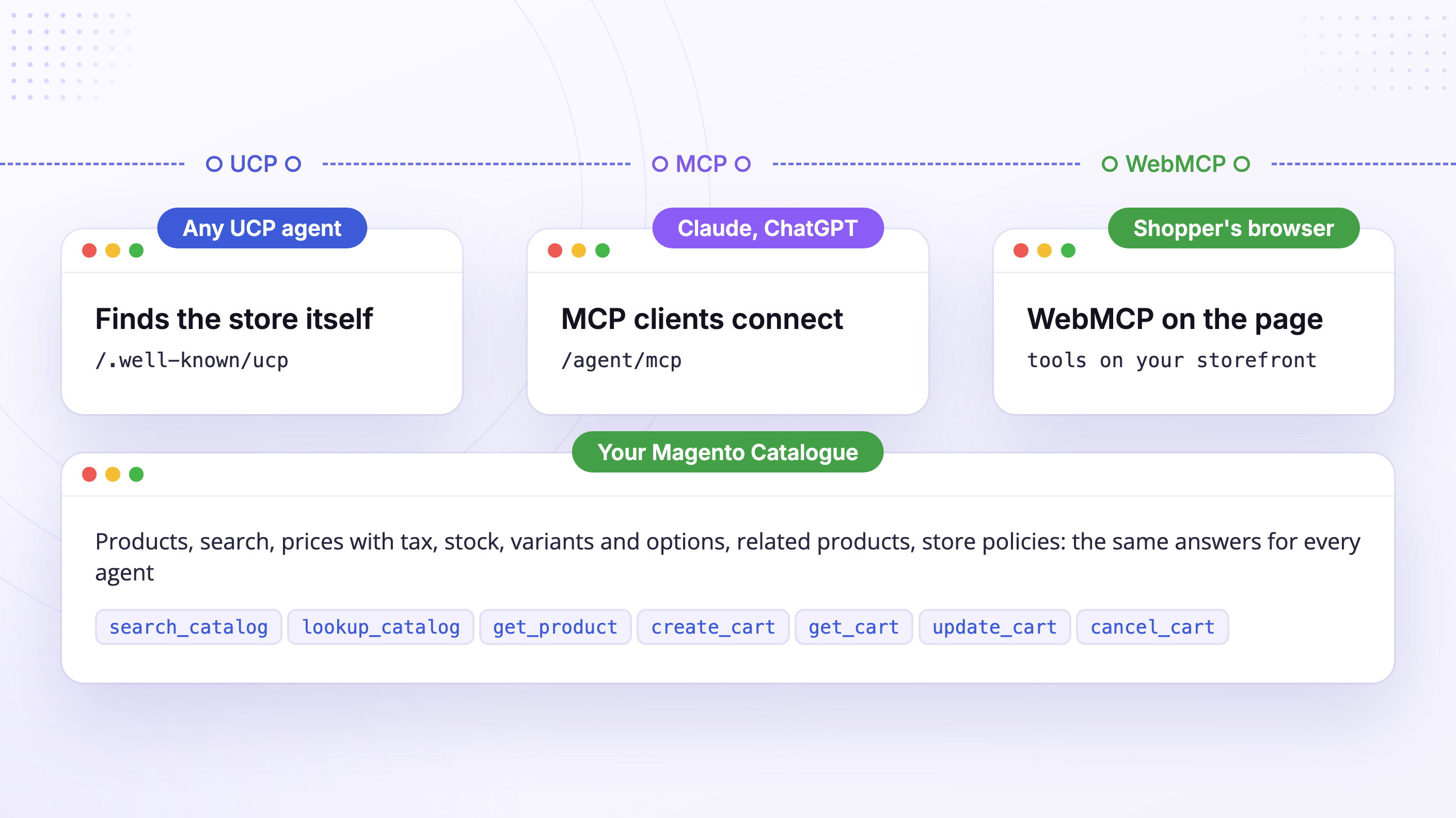
Your catalogue is exposed to agents once, drawing directly on the products and search you already manage in Magento. Three protocol adapters sit in front of it, so every AI client sees the same products and behaves the same way.
UCP
The open Universal Commerce Protocol. Lets any UCP agent discover your store with no pre-registration. This is our main focus.
Generic MCP
A storefront Model Context Protocol server exposing the same catalogue tools, so clients like Claude and ChatGPT can connect to your store directly.
WebMCP
In-browser MCP. Once you switch it on, your storefront exposes the same catalogue tools right on the page, so an AI agent working in the shopper's own browser can use your store directly. It is also what Google's PageSpeed Insights checks for in its Agentic Browsing audit.
Through these protocols, an agent can:
- search your catalogue and filter it the way shoppers do: by price, by colour or size, or by a measurement range such as height or weight;
- look up products by SKU;
- read full product details: variants, options, the attributes your product page shows, and whether an item is in stock or on backorder;
- suggest the related products, up-sells, and cross-sells you chose;
- create, update, and cancel a cart;
- read your return, shipping, and warranty terms.
Each protocol can be turned on or off separately from the Magento admin, so you can start with just UCP and add the rest when you need them.
Everything AI Needs, Published Automatically
Once installed, your store serves a complete agent-facing surface automatically:
llms.txt: agent instructions
Plain-language guidance that tells AI agents your store is agent-ready and how to read it. Also served at /agents.md.
UCP merchant profile
/.well-known/ucp lists the supported versions, capabilities, and the signing key an agent reads first. Every agent response is signed with that key, so an agent can verify it came from your store.
Agent-discovery sitemap
A dedicated sitemap for agents, announced in robots.txt alongside an agent block.
Public JSON read API
Product lists, single products, category listings, and search results at /agent/*.json, served by the module itself with no authentication required.
Your store policies
Pick your CMS pages, and agents receive links to your refund, shipping, terms, and privacy pages, plus the full text of your return and warranty terms, marked for the agent to show the buyer.
The product text you choose
Decide which attribute agents read for search results and which for product details, such as a short summary you keep in a custom attribute.
Every setting is covered in the Agentic Commerce setup guide.
Want to get cited in AI search answers (ChatGPT, Perplexity, Google AI Overviews) through rich structured data? That is the job of our Advanced SEO Suite.
Safe to Open to Agents
- A built-in rate limit stops any single client from flooding your store with agent requests.
- Agent requests skip Magento sessions and catalogue answers are cached, so agent traffic stays light.
- A retried request replays the first answer instead of acting twice.
- Agent cart tools only see carts an agent built, never a shopper's own cart.
- If you show prices only to signed-in customers, agents get a "login required" message you write, not a price of zero.
- Disabled products and products from another website are never sent to agents, and products hidden from search stay out of agent searches too.
- Prices come from the same pricing as your storefront: tax display, special prices, and catalog price rules.
Get Ready for Google's Agent-Readiness Check
Agent readiness is now something Google measures. PageSpeed Insights added an Agentic Browsing category (Lighthouse 13.3, May 2026) that grades how ready a page is for AI agents. Among its signals are an llms.txt file at the domain root and WebMCP tools registered on the page.
Magento 2 Agentic Commerce publishes llms.txt right after installation, with the links Lighthouse looks for.
WebMCP is one setting away: switch it on and add your Chrome origin-trial token. WebMCP is still a Chrome origin trial, and Lighthouse only sees it with the token.
Then run your storefront through PageSpeed Insights and see for yourself. The category is still marked experimental, and the remaining checks (accessibility tree, layout stability) depend on your theme.
Want your team's own AI agent to manage the store, rather than shoppers' agents to buy from it? See our comparison of Magento 2 MCP servers.
Be where buying decisions now happen.
Make your catalogue discoverable by the assistants your customers already use. Pairs naturally with AI Agent Connector (MCP) for Magento 2: shopper-facing discovery and admin-side AI in one stack.
Highly recommend it!
Save time by starting your support request online and we'll connect you to an expert.
What is agentic commerce, and why now?
Agentic commerce is shopping through AI assistants: shoppers ask an assistant like Claude or ChatGPT to find, compare, and recommend products instead of browsing websites themselves. Why now? In March 2026, Shopify switched on Agentic Storefronts for its merchants, putting their products in ChatGPT by default. Magento 2 Agentic Commerce brings the same capability to Magento, so your store can be ready now too.
Can Claude or ChatGPT really do this today, or is it just hype?
It works today. Connect your store to an AI assistant like Claude or ChatGPT and it will search your catalogue and reply with your real products: names, prices, and links. Your store speaks MCP, the standard these assistants already use to connect to tools.
Can shoppers actually buy through AI, or only find products?
Yes, up to the cart. AI assistants find, compare, and recommend your products, then build a cart in your store with the exact items, variants, and quantities, apply coupon codes, and quote shipping from your own carriers once the shopper gives an address. The shopper opens it with one link and pays on your checkout, so you capture the sale and own the payment. Full checkout inside the conversation is on the roadmap and will build on the same setup.
Do my shoppers need a special app or AI agent?
No. Your store exposes its catalogue over open protocols, so any compatible AI assistant can read it. There is nothing your customers need to install, and agents need no pre-registration.
How do I check that my store is agent-ready?
Run your storefront through Google PageSpeed Insights and open the Agentic Browsing category (added in Lighthouse 13.3). It checks for llms.txt, which the extension publishes right after installation, and for WebMCP tools, which you switch on in one setting together with a Chrome origin-trial token. There is also a built-in test: go to Marketing → Agentic Commerce → Agent Activity and click "Test with an agent" to watch a real agent search your catalogue, fetch a product, and build a cart step by step.
Do I need API keys, an AI subscription, or other extensions?
No. The extension has no AI model of its own and adds no chatbot to your store, so there are no API keys or per-conversation fees to pay. It makes your store readable to the assistants your shoppers already use, and nothing else needs to be installed.
Does it work with configurable products and products with options?
Yes. Agents see each configurable product with its variants, and products with required custom options (size, edition, engraving) are expanded into purchasable variants with their own prices. When an agent adds a variant to the cart, that exact choice carries through to your checkout.
Can I run agentic commerce on my own Magento server?
Yes. The extension runs inside your Magento installation (Magento Open Source, Adobe Commerce, Adobe Commerce Cloud, or Mage-OS) and publishes the UCP profile, the MCP server, and llms.txt on your own domain. There is no external platform between the agent and your store, and no fee per agent sale.
Is this based on real open standards, and how does it relate to your AI Agent Connector (MCP)?
Agentic commerce is still taking shape, so the boundaries between the emerging standards are not fixed yet. Rather than bet on one, we implemented the standards that have settled enough to build on: UCP (Universal Commerce Protocol), generic MCP, and WebMCP, so your store is ready whichever way the market settles. These are open, industry-backed standards (UCP alone is backed by Amazon, Mastercard, Meta, Microsoft, Shopify, Stripe, Visa, Walmart, and Google), not a proprietary format, so there is no lock-in. The same MCP standard also powers our admin-facing AI Agent Connector (MCP), but that is a separate, operator-side product, while this one is shopper-facing.
search_catalog, an attribute with the Price input type that you use for a size, weight or other measurement (for example height_mm) now takes a range: {"height_mm": {"min": 3.0, "max": 3.2}}, with either bound optional and both inclusive. It works for every such attribute with Use in Search Results Layered Navigation set to Yes, on Magento's own search and on ElasticSuite, and combines with category, price and option filters.price filter ({"min", "max"} in minor currency units, as the UCP specification defines it) used to be accepted and ignored, so agents got products at any price. It now filters exactly like price_min / price_max; when both are sent, price_min / price_max win.get_cart, update_cart and the cart handoff link now answer "cart not found" for a shopper's own storefront cart, the same as for an unknown cart. Carts created through create_cart are unaffected.3.175 instead of $3.18. Real money attributes (special_price, msrp, cost, and your own attributes with price or cost in their code, such as rental_price) keep the store currency.get_cart and replace them through update_cart. Those carts are now refused.get_product and the catalog tools failed with "Internal error" for any product with custom options. Custom options now load, and their prices still pass through the price rules of your other extensions.block_empty_useragent) let the test through.price_max of 0 used to return every product on Magento's own search; it now returns only free ones.create_cart and update_cart accept a delivery destination (at least a country and postcode, or a full street address when the agent has one). The cart answers with the destination and the shipping rates your store's own carriers quote for it, each with its title and price. A destination the store does not sell to, or that no carrier quotes, returns no options and an "undeliverable" warning. Until delivery is known, the cart says that its totals leave out delivery and that tax may change, instead of inventing a delivery or tax line. Only physical items count as shipped in a mixed cart, carriers are asked only when the cart changes, and addresses are never written to the log./.well-known/ucp now declares the shipping and discount extensions of the cart, so agents know they can use them. Shipping is declared only while at least one shipping method is enabled for the store.quote table — agentic_coupon_attempts, agentic_applied_discounts and agentic_buyer store the coupon attempt count, the discounts applied and the buyer details of agent carts. Run bin/magento setup:upgrade after upgrading.get_product, lookup_catalog and the product listings now load prices (including tier prices and catalog price rules), empty description fields and stock data for a whole batch of products at once, instead of querying the database again for every product and every variant. Large configurable products and long listings respond noticeably faster, especially on Mage-OS, where stock data was previously loaded only for the first product in a batch./agent/products.json and /agent/search.json answered 404. They now return an empty list, and that empty answer is not cached, so products appear as soon as the index is built./agent/products.json, /agent/search.json and /agent/collections/<url_key>/products.json was stored in the full page cache and served to every agent for up to 5 minutes after the store recovered. These errors are no longer cached, while a 404 for a product or category that does not exist stays cacheable. Unexpected errors are logged to var/log/agentic_commerce.log with a reference ID, and agents receive only that reference instead of internal error details./llms.txt, /agents.md, the agent sitemap or /.well-known/ucp showed Magento's HTML error page. These endpoints now answer a non-cached error in their own format (JSON, plain text or XML) with a reference ID that matches the entry in var/log/agentic_commerce.log.lookup_catalog and get_product reported a product as not found when the agent wrote its SKU in a different case, with or without accents, or with extra spaces. Numeric SKUs are now resolved correctly too: a number is treated as a product ID first and as a SKU when no product has that ID.llms.txt, agents.md) were left out of the list until the price index had a row for them, for example right after the product was created. They are now listed, with the price taken from the product itself./.well-known/ucp with the old public key, so agents could not verify responses until the cache expired. Rotation now refreshes the configuration and clears the cached UCP profile right away.search_catalog filter on a dropdown or multiple-select attribute (for example "color": ["Red"]) always returned no products, and a Yes/No filter of "No" returned the products set to "Yes". Both now return the matching products. Stores on standard Magento search are not affected.mst:agentic:search no longer fails on ElasticSuite with a cold cache - The bin/magento mst:agentic:search command answered "Catalog search failed" on ElasticSuite stores right after a cache flush, because it ran without a store area. It now runs in the storefront area, as mst:agentic:cart already did.search_catalog could only narrow results by category and price, so a request like "red jackets in size M" returned jackets of every colour and size. Filters now also accept any product attribute the store uses in search results layered navigation (Use in Search Results Layered Navigation), with the option labels as shoppers see them, for example "color": ["Red", "Blue"]. A product matches any label within one attribute, and must match every attribute given. A label the store does not have returns no products, and an attribute that is not filterable in search is refused with a message listing what filters accept.in_stock, backorder or out_of_stock) next to its availability, so an agent can tell the shopper that an item ships later instead of only that it can be bought.get_product also lists the product's related products, up-sells and cross-sells with their names and links, limited to products that are enabled, visible, in stock and sold in the current store, so an agent can suggest alternatives and add-ons the merchant chose.search_catalog failed when a category filter named a category that does not exist, served the first page again when an agent asked for the next one, and ignored the price filter. Unknown categories are now skipped (a filter with only unknown categories returns no products, as on standard Magento search), each page continues where the previous one ended, and price_min/price_max narrow the results, with the upper bound inclusive. A price range whose minimum is above its maximum returns an empty page, and a very large maximum price no longer causes an error. Stores on standard Magento search are not affected.Blog

 Andriy Kovalenko

 Oleksandr Drok
 We are committed to being open and transparent with our customers. When you purchase our module, you automatically receive one year of free support service and free updates.
Why is this important?
- Seamless Installation and Configuration: We understand that setting up a new module can take time to configure according to your specific needs. That’s why we offer a full year of free support. Our experienced team is here to assist you with installation, configuration, and any questions you might have. We're eager to share our expertise to ensure you get the most out of your purchase.
- Stay Updated with Magento (Adobe Commerce) Releases: Magento releases new versions approximately every three months. These updates can sometimes introduce compatibility challenges. To keep your store running smoothly, we provide a year of free access to the latest versions of our modules, ensuring that you can upgrade Magento and our modules without encountering any obstacles.
- Subscription Included: Renewing your subscription ensures continued access to the latest updates and support from our team. This means you can be confident that any issues you encounter with the extension will be resolved quickly and efficiently. You can cancel your subscription at any time without any additional fees.
These are our primary. A major portion of our new clients come from referrals from our existing clients. Our professional team of developers, marketers and support staff have invested the best knowledge and experience in the field into our work, so you know you can come back to us again and again.
One year free and high quality support. We go to great lengths to provide maximum satisfaction with every module you have purchased in our store. By helping you with installation, configuration, answering your every question, we do all our best to eliminate any possible problems.
30-days money back guarantee. If you are not satisfied with our Magento AI shopping agent performance for any reason, we provide a full refund.
We constantly add new features to all our modules, and are always interested in hearing your opinion and implementing your suggested features in our future developments.
We provide an expanded user guide for every aspect of our Magento MCP storefront, so you can find answers for all your burning questions.
You can customize Magento UCP integration according to your needs and requirements.
The Module is easy to install and upgrade, just follow our step-by-step user guide. Additionally, the extension is ready to use with the Hyvä theme.
No core modifications. The AI commerce for Magento has been tested in a Magento Cloud environment and is fully compatible with it.