AI Agents Can Already Buy From Magento, But First They Have to Find Your Store
-
 Oleksandr Drok
- E-commerce Tips & Best Practices
- Aug 13, 2026
- 15 min read

AI agents can already search for products, compare offers, and place orders. But before one buys from your Magento store, it first has to find you among thousands of other sellers.
A Google Shopping feed and SEO can get you into that search in the first place, but that's only step one. From there, the agent needs full structured data to actually understand and compare your products.
This isn't a mass sales channel yet. It's infrastructure that's still taking shape. ACP, UCP, and WebMCP are all developing in parallel, and there's no single settled standard.
Here's what you'll get: how agents find Magento stores, what role your product feed actually plays, what needs to be structured in your catalog, and how to spot the traffic your regular analytics can't see.
Table of Contents
- What Testing AI Agents on a Real Catalog Showed
- Where an Agent Looks for Products
- What Your Google Shopping Feed Actually Does
- Finding a Product Isn't the Same as Picking It
- What Structured Data Actually Means for Your Catalog
- Why Reading HTML Stays Fragile
- Reading a Product and Reliably Buying It Aren't the Same Thing
- How to See the Agents Your Regular Analytics Miss
- When It's Worth Preparing Your Store for AI Agents
- Starting Early Isn't About Sales Tomorrow
What Testing AI Agents on a Real Catalog Showed
We built ACP, UCP, and WebMCP support for Magento, then watched how different agents worked with real products: searching, comparing offers, reading specs, adding items to cart, and going as far into checkout as each protocol let them.
MCP, ACP, UCP, and WebMCP: don't mix them up. These aren't one standard but several protocols built for different jobs, and there's no unified approach yet. The ecosystem is still being built in real time. Our post on Claude in Magento is about MCP: giving AI access to run your own store from the inside, admin, orders, reports. This article is about the other side of the counter: a stranger's agent, brought to you by a shopper from outside. Its access is narrower: storefront only, product search, catalog reads, cart.
At first it looked like checkout would be the hard part. An agent has to move a cart through every state correctly and hold onto the right data all the way to order placement.
That part is genuinely a big engineering job. No shortcut there. But the protocols themselves map onto the platform's existing logic reasonably well, and they give an agent a structured way to work with the catalog and cart instead of opening pages in a browser and mimicking a human.
The step before that turned out to be far less settled. Even if your store is fully ready to hand an agent accurate data and walk it to checkout, the agent still has to find you first, among hundreds or thousands of sellers carrying the same product.
The protocols explain how an agent works with a store once it's connected: what it can read, what actions it can take, how to get to an order. What they don't explain is how the agent is supposed to learn your store is worth checking in the first place.
Even a fully configured catalog can stay invisible. If your store never makes it into that first search, the agent never touches your data and never uses the cart you built for it.
So the real question isn't whether the agent is ready to buy. It's discovery: where does it get that initial list of stores to work with?
Where an Agent Looks for Products
That initial list depends entirely on how a given agent is built. There's no single standard route yet, so different services can start their search in different places. Four channels actually work today:
- Plain web search. The agent queries Google, finds a handful of stores carrying the product, and checks each one individually: pulling current specs, finding similar models, comparing offers.
- Google Shopping or a marketplace. Instead of searching the open web, the agent pulls dozens of relevant listings straight from a catalog that already aggregates many sellers, then works directly with the stores it picked.
- A platform's centralized catalog. Shopify gives an agent one starting point for every store in its ecosystem, and the agent moves on to a specific seller from there.
- Agent-native site signals:
llms.txt, an agent sitemap, a UCP profile. Of the three, only the UCP profile is actually in use: a shopping agent reads it. The other two are closer to a gesture toward a standard than an established practice, and whether agents even need them is still an open question.
Magento doesn't have that centralized channel, so option three simply doesn't apply. What's left is plain search, SEO, Google Shopping, and agent-native protocols: the other three on the list. The principle hasn't changed, only who's reading the results. That reader might now be an agent instead of a shopper. Magento's traditional edge over Shopify, full control, doesn't come with a confirmed advantage here. In an agentic context, that edge just isn't proven yet, and agentic commerce itself is only one factor among many when an owner picks a platform.
What Your Google Shopping Feed Actually Does
If your products are already listed in Google Shopping, you don't need a separate feed for AI agents at this stage. The feed you have already handles the first job: putting your product somewhere an agent can start its search.
But the agent never reads that file directly. The feed goes into Google Shopping, Google processes it, and Google builds the results for a specific query. The agent sees those results, picks a handful of relevant listings, and only then goes to the stores themselves for fresher, more detailed data.
So the chain looks like this: feed → Google Shopping → search results → agent → store.
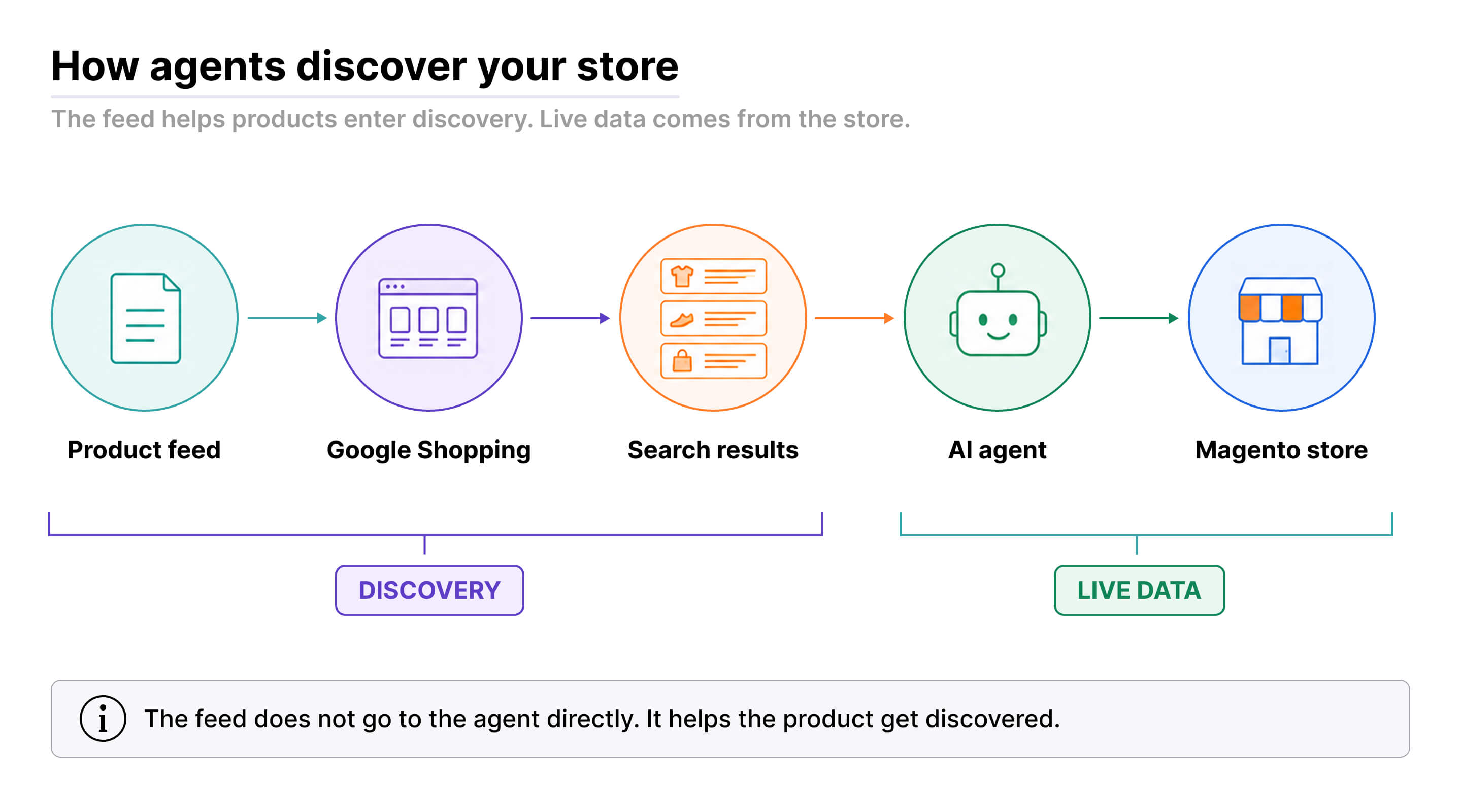
Feed quality determines how well Google understands your product and which queries it shows up for. A sloppy title, the wrong category, or missing attributes all cut your odds of landing in a relevant set of results. None of that reaches the agent directly. It only shows up in the outcome.
From our own feed product. Our Advanced Product Feeds has been generating Google Shopping feeds for years, and that groundwork already fits agentic discovery without a rebuild. You don't need a separate feed format for agents. What matters more is improving what Google actually receives: sharper titles, the right category, and filling in whatever attributes are missing.
The feed helps an agent find your product. After that, its job is done. To compare your offer against competitors and check current price or stock, the agent has to work with your store directly.
Finding a Product Isn't the Same as Picking It
Once discovery is done, the agent still has to decide which offer actually fits the shopper's request. It checks current price and stock, reads specs, compares variants, and factors in shipping.
The external feed is no longer the main source at this point, since its data can go stale. Past discovery, the agent can pull fresh information straight from the catalog.
A person usually compares a handful of products. An agent can analyze hundreds in parallel, match specs in far more detail, and rule out anything that doesn't meet the stated conditions. It's also less prone to an impulse pick.
A live example from testing. Claude took longer analyzing products and came back with thoroughly argued options. ChatGPT worked noticeably faster and simpler, in a friendlier format. The difference comes down to both the model and how the agent itself is built.
Data completeness matters most here. If one seller offers only a short description and another clearly lays out specs, available options, and current terms, the second seller's offer is far easier for the agent to analyze and compare.
That said, you don't control the final pick. Price, shipping, and other priorities depend on the shopper's request and on that particular agent's instructions. One will hunt for the cheapest offer, another will weigh delivery speed or some specific feature instead.
You can shape the quality of the information an agent gets. You can't order it to recommend your product. So once discovery is done, your job is to hand it data accurate and consistent enough to actually compare.
What Structured Data Actually Means for Your Catalog
Structured data here doesn't mean a feed and it doesn't mean schema.org markup on the page. It means product specs pulled out into separate attributes and exposed to the agent through the protocol.
Say your catalog has a few laptops, but RAM, screen size, and graphics card only show up in the description field. An agent can still find that, but it has to read each description, pull out the right specs, and normalize whatever wording each one used.
When that same data lives in dedicated attributes, comparison gets simpler. The agent pulls the graphics card value for products A, B, and C and matches identical fields, instead of rebuilding structure out of free text every single time.
Format consistency matters too. One description might write RAM as 16 GB, another as 16GB, a third spells it out in words. A dedicated attribute keeps values in one shape and cuts out a chunk of the busywork on the analysis side.
That doesn't mean you need an attribute for every last detail. Structure the specs that actually drive a decision. For a laptop, that can be dozens of them. For a mug, a handful will do: weight, size, glass type.
The logic is simple. If a shopper could use a spec to compare products, an agent needs it too, clean and consistent.
Why Reading HTML Stays Fragile
An agent can open a product page and read the HTML, but that's no guarantee it understands the data correctly. First it has to load the page, then locate the price, specs, stock, and variants inside it, and only after that figure out what each value actually belongs to.
During testing, an agent couldn't tell the old price from the sale price. To a person, the difference was obvious from the page's styling. In the HTML, though, both values just sat side by side. The agent saw two prices and had no way to know which one was current.
The problem grows once an agent is comparing dozens of products and has to rebuild the page structure from scratch every single time. That takes longer and opens up new places for it to get something wrong.
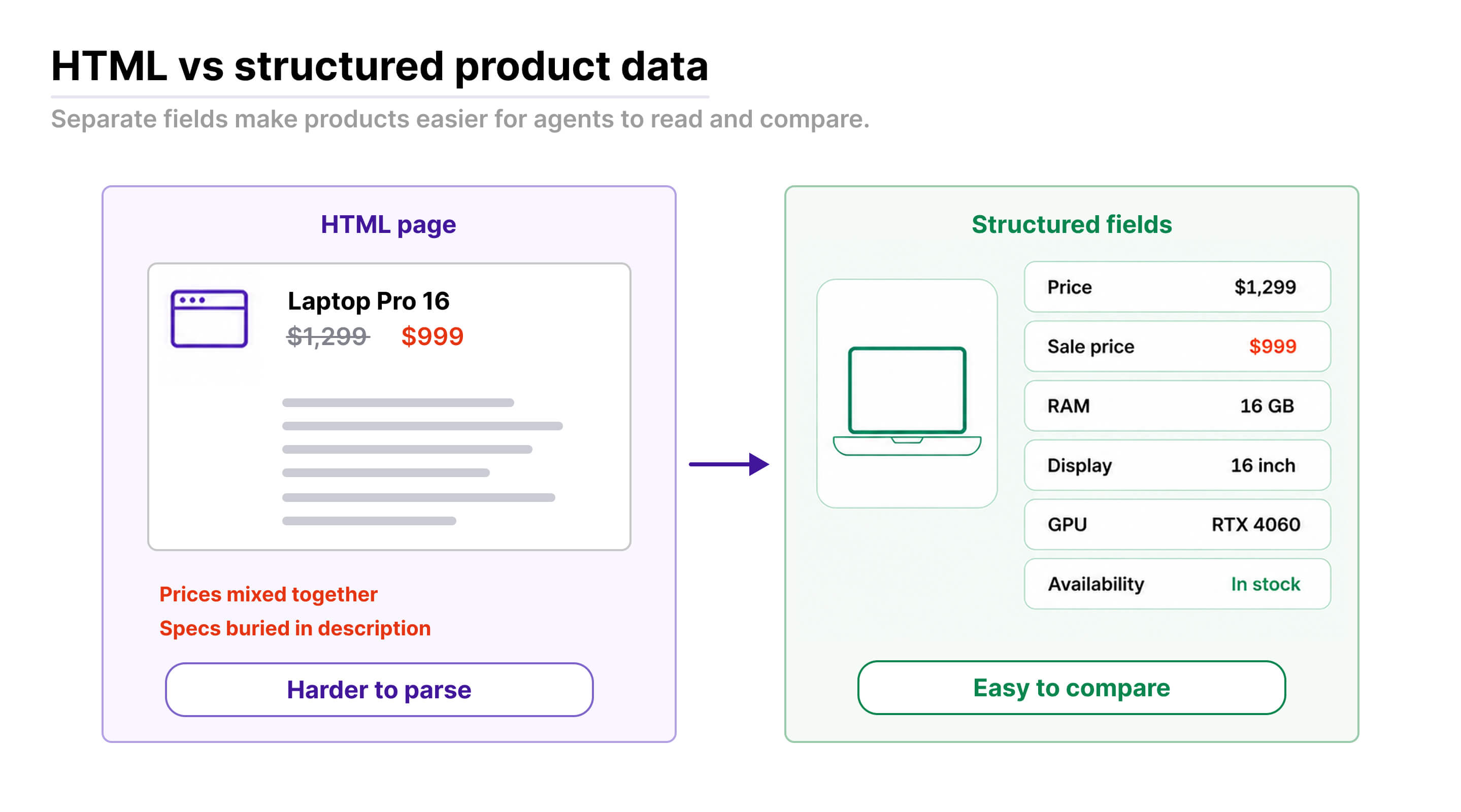
A protocol cuts that uncertainty way down. Instead of guessing values out of HTML, the agent gets current price, attributes, available variants, and stock straight in defined fields.
HTML was built for a person who sees the design and picks up on its visual cues. An agent can work with it too, but for accurate product comparison, structured data is still the more reliable route.
Reading a Product and Reliably Buying It Aren't the Same Thing
An agent can go beyond reading a page and actually walk through a purchase in the browser. That means opening the site, handling cookies, picking the right configuration, adding the item to cart, and moving into checkout. It works. It's just slow, tied to an interface built for a person with a keyboard and a mouse.
A protocol gives it a more direct path. Instead of faking clicks, the agent gets available actions in structured form and can work with the catalog, cart, and order without parsing a single page.
Inside the transaction itself, the hardest part is keeping purchase state correct. The cart is tied to a quote and a session, and it has to hold selected options, apply coupons, recalculate totals, and track changes at every step. All of that has to be maintained correctly through the whole interaction, or the agent loses state or ends up with the wrong result.
Standard products and predictable options fit this model reasonably well. Template-style customization, like a t-shirt with a print, translates into a set of clear fields an agent can work with.
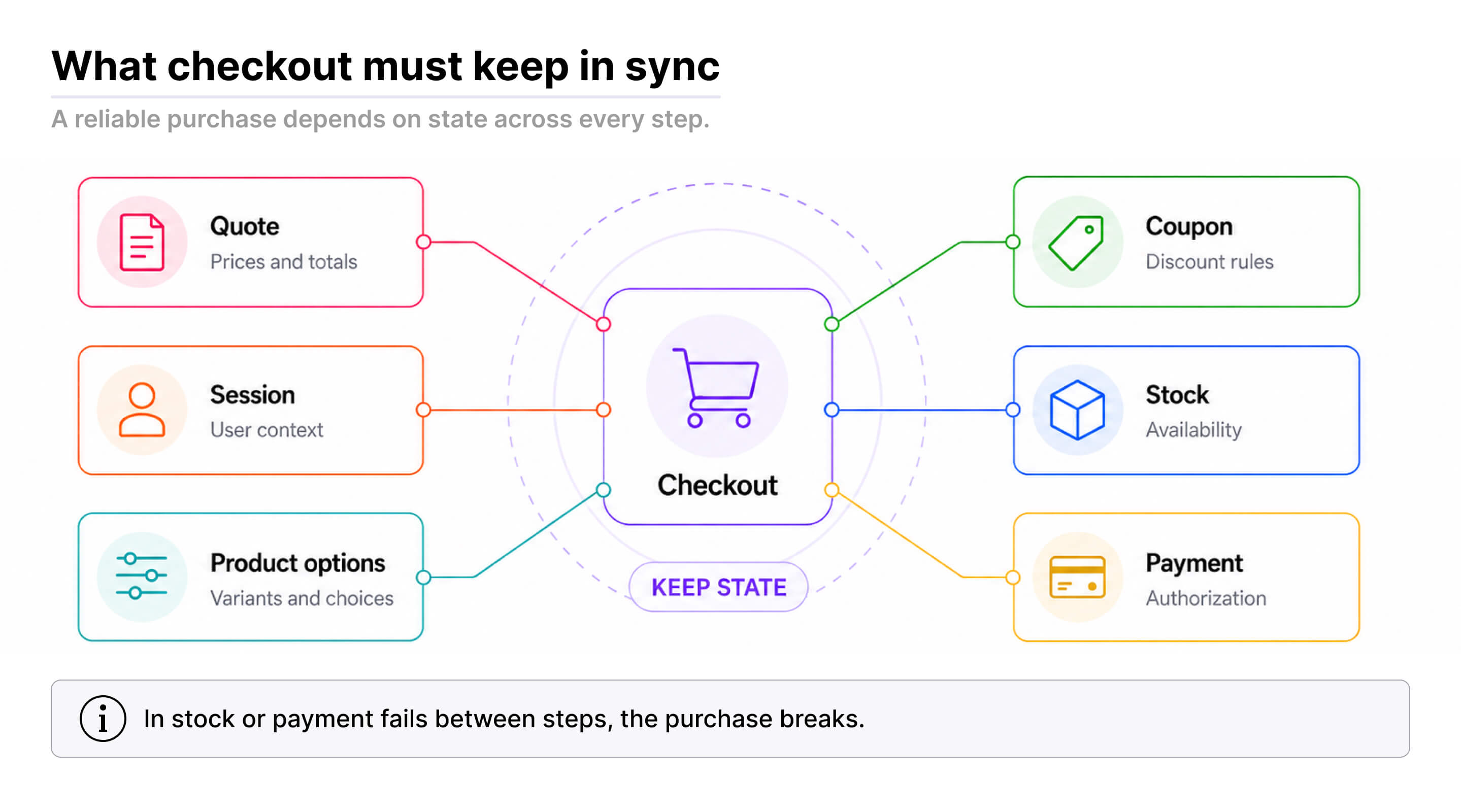
It gets harder with catalogs where the choice depends on a store's own custom logic. Matching a spare part to a specific unit can rest on interdependent options and compatibility rules that don't show up in a standard product description. A protocol alone isn't enough there. The logic has to be adapted separately.
So supporting agentic commerce doesn't mean every catalog and every purchase flow suddenly makes sense to an agent. The closer a process stays to a standard catalog and predictable actions, the more reliably it works.
Failures deserve a word of their own. If payment doesn't go through, or a product goes out of stock between "added to cart" and "bought," an agent will usually just retry or go buy somewhere else, and the store quietly loses the order. On top of that sits a question nobody's settled yet: how does a store tell a real shopper's agent apart from a training crawler that might be claiming the exact same name? There's no single standard for that yet either.
But working through dedicated endpoints changes more than the purchase flow itself. It also changes how you see that traffic at all.
How to See the Agents Your Regular Analytics Miss
GA4 and Mixpanel may not register an agent's activity at all. The reason is simple: it hits your store directly through dedicated endpoints instead of opening pages in a regular browser. JavaScript never runs, so standard client-side tracking sees nothing.
You have to look for that traffic in your logs. What to check:
- Which URLs or endpoints are getting hit: if an endpoint was built specifically for ACP, UCP, or WebMCP and something's calling it, that's already a strong sign of agent traffic.
- Whether agents are leaving signatures in headers.
- Whether robots.txt, Cloudflare, or other protective rules are blocking those requests in the first place. No entries in your store's logs doesn't always mean no agents ever showed up: the request might have been stopped before it got there.
Logs show more than the bare fact of a visit. From the endpoint and the arguments it received, you can tell what the agent searched for, whether it added something to cart, whether it tried to place an order. You can trace nearly the entire behavior inside your store.
You can actually feed that data into GA4 or Mixpanel through server-side tracking. It'll look different from browser data, though. There's no browser version, no extensions, none of the usual session parameters you're used to. It might be worth setting up a separate Google Analytics or Mixpanel account just for agent traffic.
For now, this kind of tracking mostly answers one question: are agents active on your catalog at all? It'll also show you what they're searching for, what they add to cart, and where they stop.
Dedicated analytics and tracking tools for this will probably show up eventually. Right now, without logs, you might not even know agent traffic has started hitting your store.
When It's Worth Preparing Your Store for AI Agents
Sell home appliances or anything else with a long list of clear specs? Agents will have an easier time working your catalog and comparing those listings.
The more variants and parameters a shopper has to weigh, the more useful an agent becomes to them. Those are exactly the categories where it's worth getting ready earlier.
For products where choice comes down to personal taste, this will move slower. For shoes, you can hand over size, type, color, and lace style, but none of those attributes will tell an agent whether a shopper likes the pattern or the shape. Same goes for clothing and anything else that resists being reduced to specs.
That doesn't make an agent useless there. It'll filter out anything that doesn't fit and hand back a shortlist, but the final call stays with the shopper for a long time yet.
There's a short list of things worth doing right now, and none of them depend on how fast agentic commerce actually takes off:
- check how visible your products are in search and Google Shopping;
- improve your feed;
- pull key specs out into dedicated attributes;
- bring those attributes into a consistent format.
But a ready catalog on its own won't get an agent talking to your store through a protocol. For that you need an actual technical integration: build it yourself, or use a ready module that gives an agent access to products, search, cart, and everything else it needs to act.
You don't need to guess which protocol wins out in the end. What matters more is getting your catalog and business logic into shape so they translate cleanly through whichever one you end up using.
Starting Early Isn't About Sales Tomorrow
You don't need to rush and rebuild your entire store. Starting early is about testing specific scenarios, finding the weak spots, and fixing them before they start costing you a noticeable number of orders.
We built ACP, UCP, and WebMCP support for Magento into our own Agentic Commerce extension, and we keep testing it against real catalogs. That's where everything above actually comes from.
It's hard to say exactly when this channel goes mainstream. But the shift has already started, and having your own experience means you won't be starting from zero once agents become an ordinary way to search and buy.
There's a harder question underneath all of this: if a shopper mostly talks to an agent, who actually owns that relationship going forward? The store still gets the order. A new intermediary has stepped in between it and the customer, and nobody has an answer yet. That question may end up mattering just as much as your catalog's technical readiness.
FAQ
How do AI agents find a Magento store to buy from?
Today there are four working channels: plain web search, Google Shopping or a marketplace catalog, a platform's centralized catalog (Shopify has one, Magento doesn't), and agent-native site signals like a UCP profile. Magento has no built-in centralized catalog, so discovery relies on search, SEO, Google Shopping, and agent-native protocols - the same channels that already drive human traffic, just read by an agent instead of a shopper.
Is 'agentic commerce' the same as an AI chatbot or connecting an assistant like Claude to my store?
No - they solve different problems, even though all three get called "AI agents." Agentic commerce means an external agent, acting for a shopper somewhere else, coming to your Magento store to search, compare, and buy through protocols like ACP, UCP, or WebMCP. An AI chatbot embedded in your store answers questions for the humans already shopping there. Connecting an assistant like Claude to your store over MCP is the reverse direction: giving you AI access to run your own store from the inside - admin, orders, reports - not customers buying anything.
Do I need a separate product feed for AI shopping agents?
Not a new one. If your products are already in Google Shopping, that feed already does the first job: putting you where an agent's search can find you. The agent never reads the feed file directly - it goes feed -> Google Shopping -> search results -> agent -> store. What's worth improving is feed quality itself: accurate titles, the right category, and complete attributes, since that's what determines whether you show up in a relevant set of results at all.
Why don't GA4 or Mixpanel show AI agent traffic on a Magento store?
Agents built on ACP, UCP, or WebMCP hit dedicated endpoints directly instead of opening pages in a browser, so JavaScript never runs and standard client-side tracking sees nothing. That traffic shows up in server logs instead - which endpoints get hit, what headers agents leave, and whether requests are being blocked by robots.txt or Cloudflare before they even arrive.
What product data do AI agents actually need to compare Magento products?
Specs that genuinely drive a buying decision, pulled out of description text into dedicated, consistently formatted attributes - not a new feed format and not schema.org markup. An agent can technically read a description, but it then has to parse out each spec and normalize inconsistent wording (16 GB vs 16GB vs spelled out) every single time, which is slower and more error-prone than reading a clean attribute field.
Is it worth preparing a Magento store for AI shopping agents right now?
It depends on the catalog, but a short list of steps is worth doing regardless of how fast agentic commerce grows: check product visibility in search and Google Shopping, improve the feed, and move key specs into structured, consistently formatted attributes. Categories with many comparable specs (electronics, appliances) benefit sooner than categories driven by personal taste (fashion, shoes). None of this requires guessing which protocol - ACP, UCP, or WebMCP - ends up dominant.
Head of Product at Mirasvit
Promote your products and achieve higher sales by using the power of marketplaces and comparison shopping engines with magento data feed extension. You can automatically generate and deliver feeds of your product catalog to those services with Magento Product Feeds extension.
This tool is unbelievably quick to use and is also outstandingly flexible. It's compatible with all major shopping and advertising services, including Google Shopping.
Feeds go straight to Google Merchant Center through Google's API, and AI profiles can rewrite titles, map Google categories and fill in missing attributes before your catalog ever reaches a marketplace.
Simply install the module, generate your very own product feed, present your catalog to a wider audience, and boost your sales right now!
More and more shoppers ask AI assistants to find and choose products for them.
Magento 2 Agentic Commerce makes your store readable to those assistants. It publishes a UCP merchant profile, an MCP server, and llms.txt, so ChatGPT, Claude, and other agents can search your catalogue, quote your real prices, build a cart, and send the shopper to your checkout. The Agent Activity dashboard shows which orders and revenue came from agents.
Keep Learning