Claude in Your Magento Store: Not Autopilot, but an Amplifier
-
 Oleksandr Drok
- E-commerce Tips & Best Practices
- Updated: Oct 5, 2026
- 17 min read
The first time a store owner watches AI pull together in a minute a report that used to take a day, the reaction is always the same: "what else can it do?" A few weeks later, the paths split. For one owner AI becomes part of the daily routine; another quietly drops it. The model is the same, they were both using Claude. The difference isn't the quality of the answers. It's how far each person worked out how to use it, and what it actually gives them.
Claude connected to your store isn't an autonomous worker you hand the keys to and walk away from. It's a tool, and it works as a multiplier: with it you do the same things, only many times more of them. For one person it's 2x, for another 25x, and which number you land on is up to you, not up to it. You bring the experience, the control, the decisions. The tool is the same for everyone; what differs is the people who pick it up.
Below I'll walk through how to end up on the side of the people it worked for: where AI genuinely impresses, where it gets weaker, what it sees in your data, and who answers for what it does. We build the MCP server that connects Claude to Magento, so these boundaries are described from the inside, not repeated from someone else's advice.
Table of Contents
- How Claude Sees Your Store
- Search the Admin Panel Can't Handle
- Analytics Deeper Than the Standard Reports
- Financial Reports: It Does the Math, You Verify the Numbers
- A Ready Product From a Single Photo
- The Result Depends on You, Not the Model
- Where AI Really Does Slip: Custom Logic
- You See Exactly What You Allowed
- Where Your Data Actually Goes
- What It Doesn't See: Code and Files
- It Inherits Your Rights, No More
- You Set the Criticality Line
- There Is No Red Line
- "This Isn't My Expertise": Why That's No Excuse
- Where to Start Today
How Claude Sees Your Store
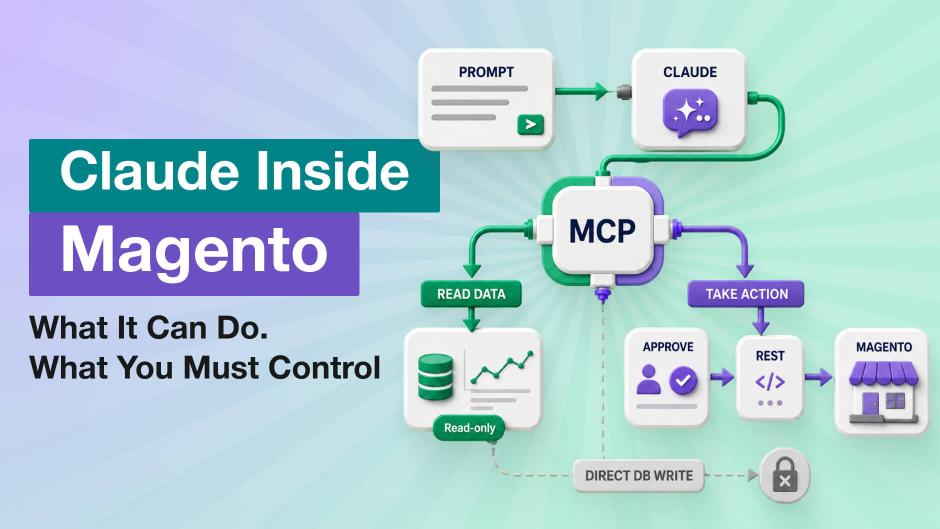
First, briefly, how this works. On one side is Claude: powerful, but on its own it knows nothing about your specific store. On the other is Magento with all your data. There's no link between them: the model can't read an order, check a status, or fix a category. MCP is what builds the bridge. It connects Claude to your store and gives the model access to it.
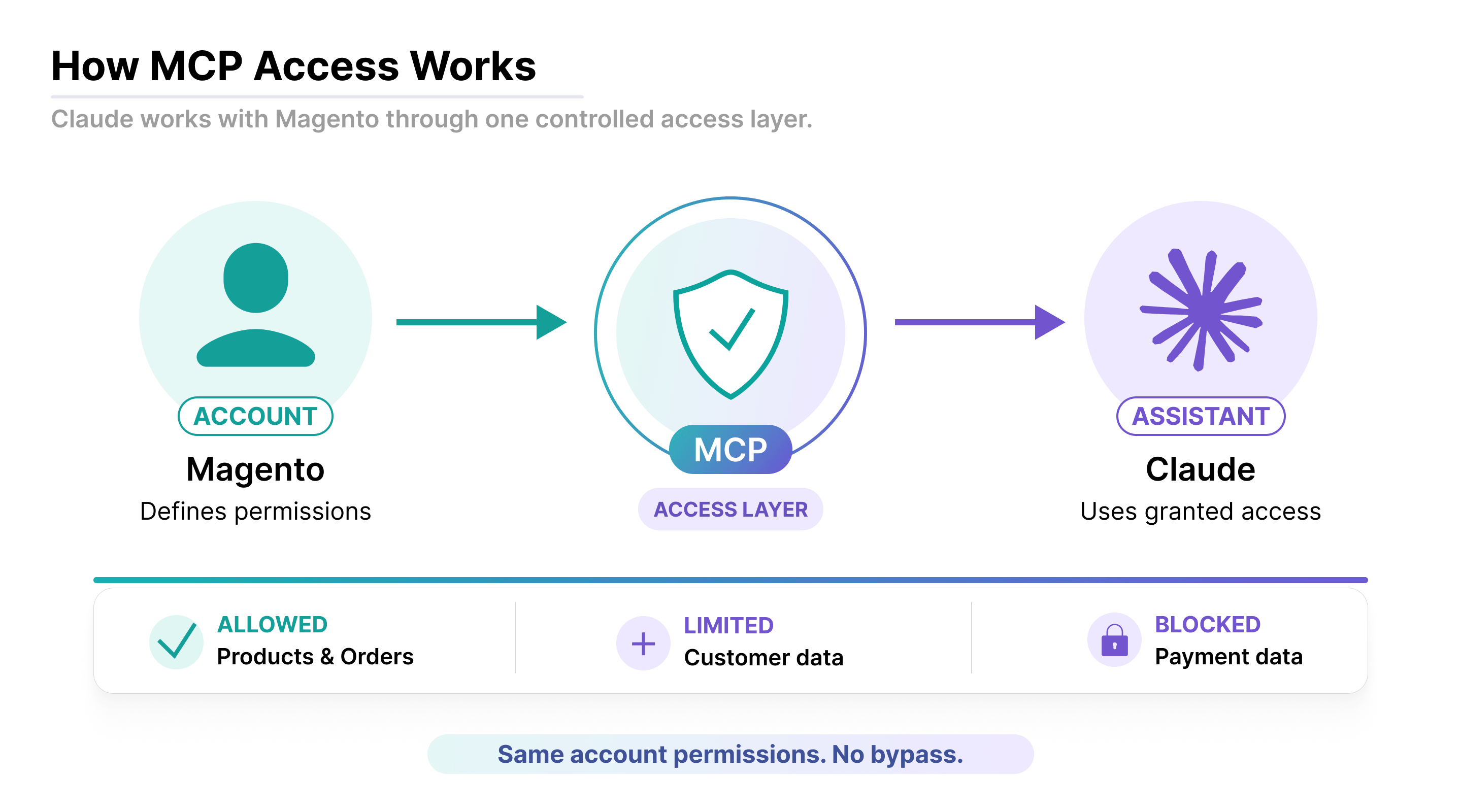
What MCP is. MCP (Model Context Protocol) is a standard way to connect an AI to an external system: a database, a service, a store. For Claude it's like a set of tools it knows how to use. Our MCP server gives it those tools for Magento: read data, build reports, and make changes when needed. More on each of these below.
If you are choosing an MCP server for your own store, our comparison of Magento 2 MCP servers covers the free open-source options as well as ours.
But the bridge only opens the door. What comes out the other side depends on what you give it: the task, the context, the right to act. And that's exactly why the most impressive part isn't what we prepare for a demo, it's what users think up on their own.
Search the Admin Panel Can't Handle
The best example is ordinary search. Here's a real case from one of our clients. A shopper at one of the stores was charged for a subscription more than a year after the order, and no one could find the transaction. All they had was a bank SMS from a screenshot: a date, an amount, and in the local currency at that. They dropped the screenshot into Claude. It converted the amount into the store's currency, pulled orders from the "a year ago" and "two years ago" windows, matched by amount, and dug into the candidates that were left: which subscription, whether it was active, which payment method. The transaction turned up, just not in the year the shopper had named. A minute of work. By hand that's 10–15 minutes of guessing, because the admin panel won't even search by transaction number directly.
We never positioned Claude as a search engine for the store. But admins started using it for exactly that: to find a product, an order, a payment. Not a report, not analytics, just the ordinary search they used to do with filters in the admin. Same tool, and the value you get from it is always whatever a particular person sees in it.
Analytics Deeper Than the Standard Reports
Search was the surprise. The strongest predictable side is plain analytics. The reason is simple: Claude knows the Magento database structure almost perfectly, down to the tables, the columns, and the relationships between them. It often guesses even custom tables from their names alone and sees how they tie to the core ones. So it builds fairly complex queries with almost no mistakes and assembles reports that are hard or slow to get through the standard admin.
You can ask for a familiar report from a template, or you can hand it an open task: dig through the database, find facts, anomalies, discrepancies. Then Claude runs its own reconnaissance across the data and comes back with a finished analysis.
Sometimes this grows into a real pipeline. For example: a report finds products with poorly filled attributes, then the AI prepares a file with the values filled in, then the import runs. That used to need a dedicated full-time person; now it's a single flow (though the import step, like any write, needs a check, which I'll come back to below).
There's a natural ceiling here. The database holds information about products and sales, but not about customer behavior. That's easily lifted: connect another MCP alongside it, say to Mixpanel or Google Analytics, and Claude merges your store data with behavioral analytics into one picture.
Financial Reports: It Does the Math, You Verify the Numbers
Financial reports deserve a separate word. Metrics like revenue, new vs returning, LTV, bestsellers, returns, or margin have widely known formulas, and Claude computes them without any fuss. But every report is still worth checking, because the owner knows their store's numbers better than any AI. If something doesn't add up, you tell it exactly how to build the report, and Claude adjusts its approach. That check is your contribution too: without it the report stays a draft.
One detail about the tool's honesty. If the products have no cost price, Claude won't invent a margin. It will say plainly that it can't build the report without cost price. That matters more than it sounds, because an AI that would rather guess than admit missing data is dangerous in a financial report.
A Ready Product From a Single Photo
Another scenario that reliably impresses: the owner gives it a product photo, and Claude creates a full product. The mechanics are simple. Claude looks at what's in the photo, finds information about the product online, and then through MCP creates the product, fills in the attributes, the name, the price, and attaches the image.
The first time is slow, sometimes up to ten minutes, while it works out how to talk to the platform properly (there are quirks). But after that a trick we recommend to everyone kicks in.
The trick: teach it once. After the first successful product creation, ask Claude to analyze the steps it just went through and turn them into an instruction for itself, a skill. Next time it will create a product faster and without mistakes: it'll call the right methods straight away and know where to read from and which attributes exist.
The Result Depends on You, Not the Model
And here's the most counterintuitive part. When an answer comes out weak, the problem usually isn't the model you picked. The base matters, of course, but it doesn't have to be the most expensive or most powerful one, because store tasks are rarely that hard. Fine-tuning the MCP isn't the deciding factor either: you set it up once. And the store's structure isn't the bottleneck on its own.
What really changes the quality is context, or more precisely the skills the agent has. A skill here is a ready instruction or accumulated experience: how to search for products properly, how to update them, where to look. Without such a skill Claude will still do the task, but with one it does it faster and with fewer mistakes. That's the work you put in: not a more powerful model, but your contribution to teaching it.
The numbers speak for themselves. Without a skill, Claude figures it out from scratch every time: what REST is available, how to pass the fields, what errors come up and how to handle them. Updating a dozen products that way takes about twenty minutes, and next time it's twenty again. With a skill the same task takes two. There it is in plain view: not a faster model, but the experience you invested turned twenty minutes into two. What's more, you can bake gate-checks into a skill: before updating a product, confirm it's active and that the new fields don't contradict the description.
Skills stack. It gets most interesting when they combine into an orchestration. An example from outside the catalog: working with the store's blog. There's an orchestrator skill that calls nine sub-skills in turn: one analyzes a post in Google Analytics, another in Search Console, others check facts, links, spelling and formatting, whether the text is still current. Each writes its own mini-report, and the orchestrator rolls them into a full one that becomes the basis for improving the post. Same principle: quality comes not from a more powerful model but from accumulated context.
Where AI Really Does Slip: Custom Logic
This boundary shows up best where you have non-standard mechanics.
A real case. One store with its own subscription module, I remember it well. The task: build an ARR forecast report. At first Claude didn't understand the data storage model, and the report drifted: it didn't account for the fact that subscriptions came in two types, monthly and annual, and counted them together. The moment it was pointed out, it caught on immediately and fixed the numbers.
The moral is twofold. On one hand, custom logic becomes a real limit: where you have non-standard tables and your own mechanics, Claude can get it wrong. On the other, it recovers from a single hint rather than needing a rewrite from scratch. And mostly, when it doesn't understand something, it doesn't make things up, it asks: which attribute exactly did you mean, or it offers to look first at which attributes even exist.
You See Exactly What You Allowed
Once the first excitement passes, clients ask the question everyone asks: what does the AI actually see in my data, and what can it do with it? I'll answer honestly, because we built these boundaries into the product deliberately. And it's simple: what Claude sees and does is exactly what you allowed, under your own account.
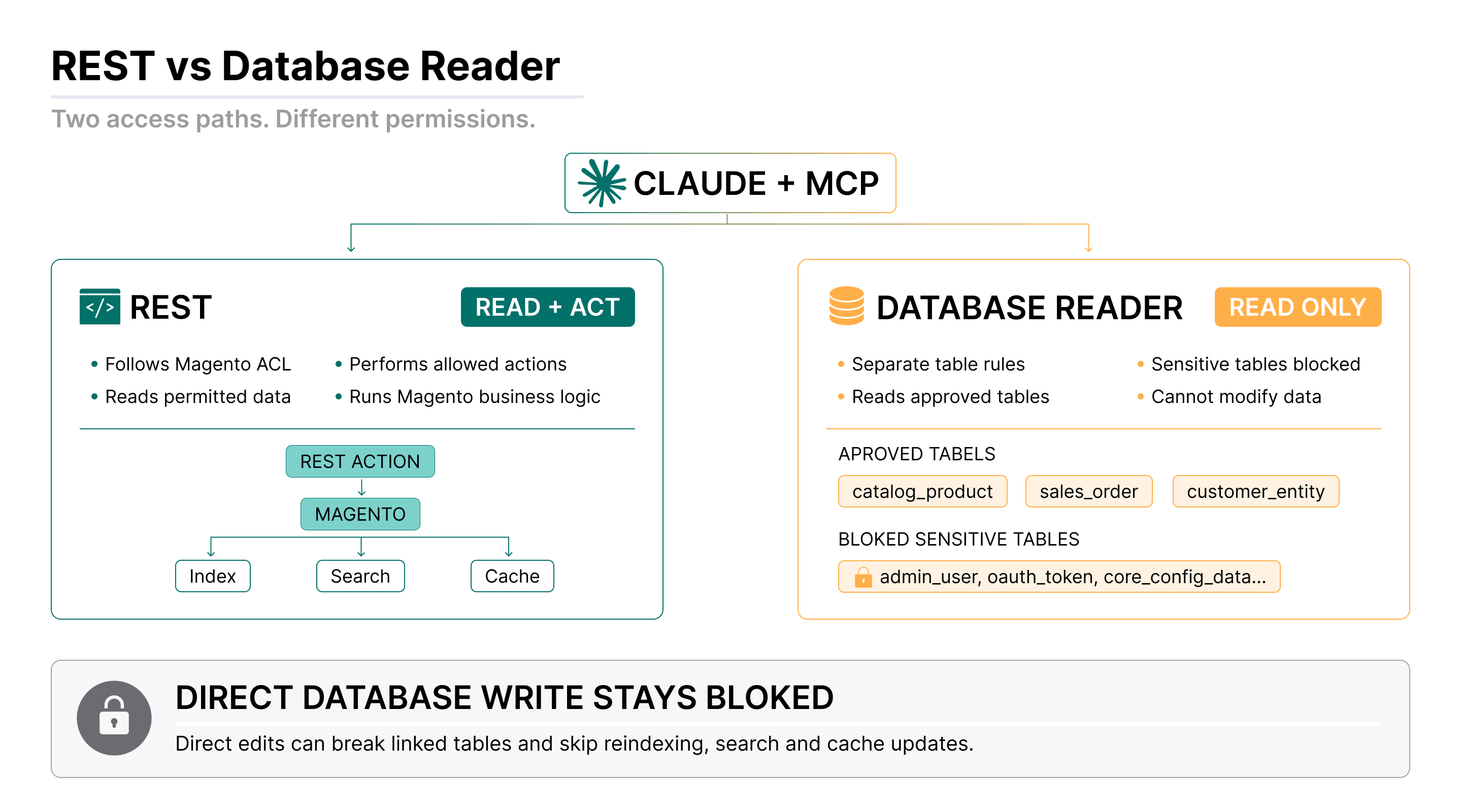
Claude works through two different tools, and visibility differs between them:
- REST API sees exactly what the access rights (ACL) allow. That is, the same thing the user Claude is connected as sees in the admin, no more.
- DBReader (reading from the database) has its own restrictions at the table level. The default rules block access to tables with sensitive data.
Customers' payment data never gets in at all. It's a separate table, closed to reading by default.
When we designed the defaults, we ran the data categories through a single question: how much this is needed for daily work. The principle is simple: an everyday request – access open; a rare one – closed; and the owner shifts the line to suit themselves when they need to.
| Data category | Default | Reasoning |
|---|---|---|
| Customer personal data | Visible, can be closed | Needed daily: view a profile, tie it to an order |
| A person's order history | Visible, can be closed | The basis of support and sales analytics |
| Cost price, margin | Visible, can be closed | Often needed for reports and decisions |
| B2B prices, customer-group prices | Visible, can be closed | Pricing work, an everyday scenario |
| Coupons and discount rules | Visible, can be closed | Regular promo operations |
| Admin activity | Closed, can be opened | Rarely needed in daily work |
| Payment and shipping configuration | Closed, can be opened | Technical zone, not an everyday request |
| Third-party API tokens | Closed, can be opened | Sensitive, rarely needed |
| Customer payment data (cards, tokens) | Closed | Separate table, closed to reading |
This isn't a rigid law, it's a sensible starting point. What's likely to be needed often we open; what's rarely needed we keep closed until you consciously decide otherwise.
One thing worth understanding up front: analytics with no customer data at all is nearly impossible. Even if you open only orders and products, personal data still sits inside the orders themselves.
Where Your Data Actually Goes
There's one more point we don't skip, because it's the honest one. When you run your store's data through Claude, it goes through an AI provider: an intermediate link appears between you and your data, and that's where it's processed. What happens to it after that is a question for the provider, not for us. Our position: it's the owner's decision, and our job as the tool vendor is to say plainly where the data goes. That part we know for sure.
What It Doesn't See: Code and Files
One common assumption is worth dispelling too. Claude via MCP has no access to the store's code or its files. All it works with is the data in the database and its general knowledge of Magento. So as a first line of diagnostics it's useful exactly where the traces of a problem sit in the database: a stuck cron, an order that was created incorrectly. But it definitely won't solve a problem that shows up in the browser, not without access to the logs and the code: it'll point you in a direction to look, no more.
A note. This is slowly changing. Reading logs was outside MCP at first, but at clients' requests we added a separate capability: read-only access to certain Magento files, mostly logs. So diagnostics through AI is slowly expanding, but it's a separate, deliberately opened capability, not "Claude sees everything."
It Inherits Your Rights, No More
So far this has been about reading. Actions are more serious, and here the main thing is to grasp one point.
Claude inherits the rights of whoever connected it. If you connect it as a full administrator, it gets the whole range of admin actions: change products, delete them, edit configuration, even delete users. This isn't a separate access for the AI. You're not sharing access, you're granting it within your own account.
What it technically can do: cancel an order, apply a discount, update products. All of that is real if the rights and the REST endpoints are there. About the only thing missing from the typical set is "send the customer an email": there's no direct endpoint for it (though if you have a helpdesk installed, an email can be written through the AI too).
Why writes go through REST, not straight into the database. The Magento database has a complex, tightly coupled structure: a change in one table has to be reflected in others. You change a product, and then reindexing kicks off, and Opensearch, the cache, and the rest of the services pick the changes up. A direct change in the database is very dangerous: it's easy to break data integrity, and the other services won't even know a change happened. That's exactly why database access through MCP is read-only, and all writes go through REST, which respects the rights and triggers the right cascade.
You Set the Criticality Line
Hence our standing advice. Letting AI write or change things on a live store is a poor idea, especially for complex tasks. If it's something critical, something that directly affects sales, check the plan first: exactly what Claude intends to do. Have it generate and show a CSV file first, for instance; you validate it, and only then ask it to write to Magento. The worst realistic scenario without that check is a mundane one: a single bulk call puts invalid information into the database across thousands of products.
And, honestly, about complex and bulk operations. What hurts most isn't the token cost, it's the cryptic REST error messages. If Claude slips somewhere, it doesn't always see where, and it starts trying different things. That can get slow and expensive. So the conclusion isn't "don't use AI for it," it's "the more bulk or sensitive the action, the more of your control it needs." Returns and refund requests (RMA), for one, shouldn't be run without a human at all.
There Is No Red Line
A logical question: are there actions you'd never allow the AI, even at a client's direct request? The honest answer: there aren't.
And that's not an oversight, it's my deliberate stance. The decisions and the responsibility rest with the person. The AI proposes – you decide. In normal use it will ask first whether it can carry out this or that action. But if someone has consciously handed all the decisions to the AI, that too is their own decision and their own risk.
Everyone's criticality line is different, and you're the one who sets it. Technically the AI can do and decide everything itself; the only question is whether it'll be done well and correctly. And responsibility for that lies not with you or the AI separately, but with you together with it.
"This Isn't My Expertise": Why That's No Excuse
So far this has been about what AI can do and who answers for its actions. But more often something else stops people: a barrier that has nothing to do with the tool's capabilities. One owner with a large catalog said, after a strong demo, a line we hear in different variations all the time: "My expertise is running the business, not configuring all this AI stuff."
What exactly is scary? Not one specific thing, but all of it at once. It's not "open a browser," it's needing to understand what, where, and how. AI's work after setup is fairly easy while the tasks are simple. But the moment a task gets complex or long (update a thousand products with intermediate files and checks), you need certain skills and an understanding of the process. Even reports have to be validated, and that's a skill too.
How much of the fear is justified? To a technical person everything looks simple; to a non-technical one even simple things can feel overcomplicated. But here's the crux: even a non-technical owner gets far more out of AI than they had before. The formula works both ways: your current skills work faster, and new ones appear. That's why the benefit from AI is never zero, it only grows along with your skills. The question isn't whether you'll gain from it, but by how much.
Honestly, about the rough edges too. The strongest path today is the terminal, and it's the least accessible to a non-technical owner: it's hard to explain how to use it. That's just the state of things for now, not something we left unfinished. Claude Desktop and web are more convenient, but they don't reach the full stack.
Where to Start Today
For all the caveats, getting in is simpler than it looks from the outside.
Install the Magento MCP server, connect it to Claude, and you're working. The connection goes through OAuth, literally a few clicks, with no manual copying of tokens into configs. Installing the module itself in Magento is within reach of an owner who manages their store's code even a little; if you have a developer, it's a few-minute task for them.
Which access level should you start from? I'll say it straight: at the start it barely matters, because without granted permission the AI can't do any harm. The first stage isn't about changes at all, it's about seeing what's possible. Give Claude general tasks: analytics, data slices, SEO. Watch how it works with your store specifically before you think about anything more complex.
About money, briefly. If you'll be working with AI daily, get a subscription rather than paying per token: for daily volume it comes out an order of magnitude cheaper, if not more.
And the main thing to take away. This is no longer a tool for technical teams and early enthusiasts, it's practical right now. The only difference is the level of technical knowledge, and therefore how strongly it multiplies you. But even at the start that multiplier is greater than one: some gain you'll get either way. So my advice is short: try it. The race is already on, and the only question is what position you're in.
FAQ
Can Claude see and use my Magento store's data on its own?
No. On its own, Claude knows nothing about a specific store. An MCP (Model Context Protocol) server is what connects Claude to Magento and gives it access to read data, build reports, and make changes when needed.
What Magento data can Claude access by default?
Claude works through two tools with different visibility. The REST API sees exactly what the connected user's access rights (ACL) allow, no more than that user sees in the admin. The database reader has its own table-level restrictions, and customer payment data sits in a separate table that's closed to reading by default.
Can Claude make changes in my Magento store, like updating products or canceling orders?
Yes, if the account it's connected as has the rights and the REST endpoints exist: it can cancel an order, apply a discount, or update products. Claude inherits the rights of whoever connected it rather than getting a separate AI access level, so writes are worth reviewing yourself, especially for bulk or critical actions.
Does Claude have access to my Magento store's code or server logs?
Not by default. Claude via MCP has no access to the store's code or files, only to the database and its general knowledge of Magento. Read-only access to certain files, mostly logs, has been added separately at clients' request, but that's a deliberately opened capability, not full code access.
How do I get started connecting Claude to a Magento store?
Install the MCP module and connect it to Claude through OAuth, a process that takes a few clicks with no manual token copying. Start with a low-risk access level, like read-only analytics, and watch how Claude works with your specific store before opening up write access.
Head of Product at Mirasvit
The Magento MCP server gives AI assistants access to your real Magento store data, so your team can ask questions and complete tasks without switching between admin grids and exports. It works with Magento 2 and Adobe Commerce and connects to ChatGPT, Claude, Gemini, or any other MCP-compatible AI client.