Sell Products in ChatGPT: Magento 2 Feed Strategy for Better Visibility
-
 Andriy Kovalenko
- E-commerce Tips & Best Practices
- Apr 22, 2026
- 11 min read
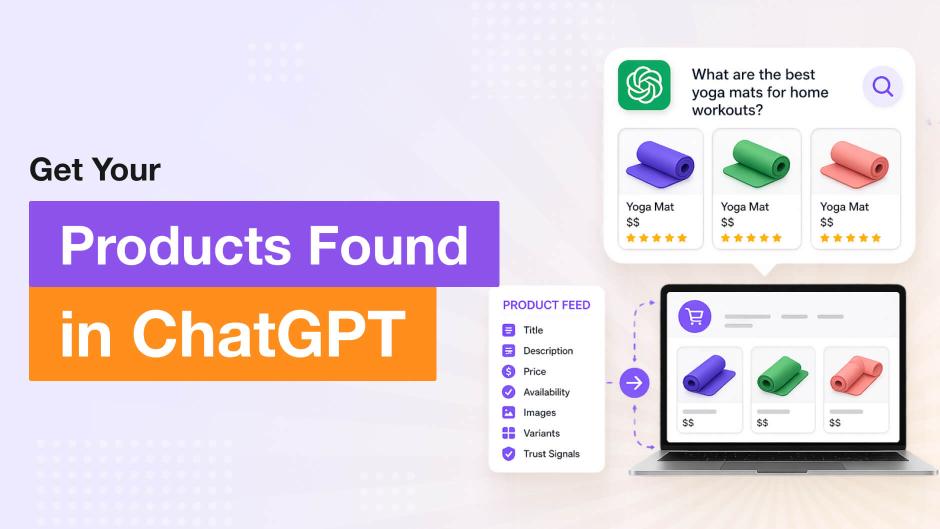
To sell products in ChatGPT, a Magento 2 store does not need a complex integration on day one. The practical starting point is a clean product feed: structured catalog data with accurate titles, descriptions, prices, availability, images, and variants that make items easier to surface and compare, and easier for shoppers to trust.
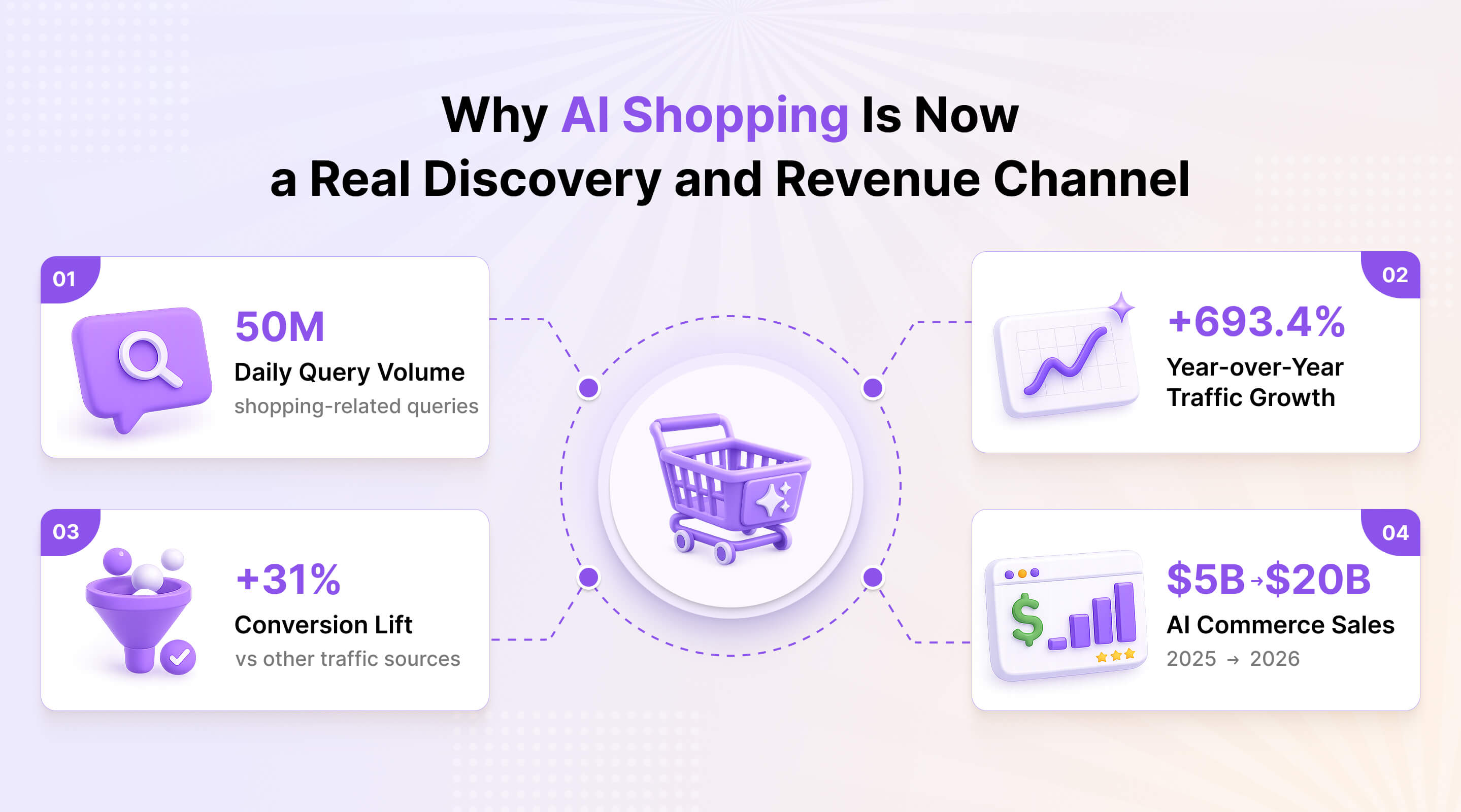
AI shopping is already large enough to treat as a real discovery channel rather than a passing experiment. ChatGPT now handles about 50 million shopping-related queries a day, and Adobe recently reported a 693.4% year-over-year increase in AI-driven traffic to retail sites.
That makes feed quality worth treating as a practical priority. U.S. e-commerce sales made through AI platforms were about $5 billion in 2025 and are projected to exceed $20 billion in 2026, which is enough to treat this channel as an emerging revenue path and start preparing the catalog before competition gets harder.
Table of Contents
- How ChatGPT Shopping Works for Customers
- What It Takes to Sell Products in ChatGPT
- Setting Up a Magento 2 Product Feed for ChatGPT
- Product Feed Optimization for Better Visibility in ChatGPT
- How to Track ChatGPT Traffic and Set the Right Expectations
- Conclusion + Quick Start Checklist
How ChatGPT Shopping Works for Customers
For shoppers, finding the right item feels closer to a guided conversation than to a standard search session. Instead of entering a short query and scanning a results page, people describe what they need, add constraints, compare options, and narrow the choice in one thread.
A request can start with "a lightweight carry-on under $150" and then narrow to "hard shell, fits cabin rules, available this week." Someone else may ask for "a quiet cordless vacuum for a small apartment" and then refine the request by battery life, weight, or price.
In that kind of flow, people are not just looking for listings. They want help with trade-offs, which is why the strongest ChatGPT product recommendations are usually the ones that make comparison easier, not the ones with the most promotional wording.
People are no longer using ChatGPT only to find links or product pages. They also use it to compare options, narrow choices, and get help with trade-offs before deciding what to buy. That shift, which echoes earlier moves toward voice search in ecommerce, matters because people may search by budget, by use case, by delivery timing, or by a specific variant such as size, color, or storage.
To return relevant options, the channel needs product data that stays clear as the request becomes more specific. That leads to the next question: what kind of catalog data actually makes items easier to surface, compare, and trust in this format.
What It Takes to Sell Products in ChatGPT
To sell through ChatGPT consistently, a store needs two things: a workable route into the channel and catalog data that stays clear enough to interpret, compare, and trust. Feeds are often the most practical starting point, but they are not the only setup path, which is why it helps to look at the main options first.
This approach tends to make the most sense for B2C e-commerce stores, brands with larger catalogs, and niches where shoppers compare multiple options before buying, such as apparel, electronics, beauty, or home goods. The more choice, attributes, and variants a catalog has, the more useful structured data becomes in conversational discovery.
Common Paths into the Channel
| Path | How it works | Best fit | What matters most |
|---|---|---|---|
| Product feeds | The store exports structured catalog data that ChatGPT can interpret and compare. | Stores that want more control over catalog quality and updates. | Clear attributes, consistent variants, clean exports, regular updates. |
| API and deeper integrations | Product and commerce data connect more directly through custom or partner-led integration work, for example via a Magento MCP server that exposes catalog and order data to AI agents. | Larger projects, custom stacks, brands with stronger technical resources. | Stable data access, reliable sync, engineering support. |
| Platform apps and partner tools | Stores use apps, plugins, or merchant tools built around a specific platform. | Teams that want a faster launch path with less custom work. | Coverage, sync quality, platform limits, ongoing maintenance. |
| Content and structured data | Product pages, schema, and catalog content help the system interpret items more accurately. | Stores that want broader discoverability before deeper integration work. | Clear copy, structured data, consistent attributes, crawlable product pages. |
For most Magento teams, feeds are still the most practical place to begin. That is why the rest of this section focuses on feed quality and on the kind of catalog data that helps ChatGPT interpret items more reliably.
Why Feed Quality Still Matters Most
Strong products, competitive prices, and good imagery are not always enough when titles, availability, or variant details are inconsistent, because weak structure makes matching less reliable from the start.
Feed quality is what turns the catalog into structured product data the channel can actually use. Instead of relying on mixed naming and incomplete fields, it passes titles, descriptions, prices, availability, images, and variant details in a more consistent form. That gives ChatGPT clearer signals for comparison and discovery.
That consistency has to show up in the basics. Product names should identify the item plainly instead of leaning on internal labels or promotional wording. Descriptions should explain what the item is and who it is for. Prices and stock status need to stay current, and variant data has to remain clean wherever size, color, storage, pack count, or similar options affect the buying decision.
The same applies to the details that help narrow the choice. Material, dimensions, compatibility, weight, delivery information, and other practical attributes often do more than generic copy because they make items easier to match, compare, and trust.
At a more technical level, that usually comes down to the feed vocabulary stores already use in systems such as Google Merchant Center, Meta Catalog, and schema.org/Product: core fields like id, title, description, link, image_link, price, and availability; product identity fields such as brand, gtin, and mpn; and variant fields like item_group_id, color, size, and material.
When these fields are passed with clear, consistent values, ChatGPT has a stronger base for interpreting and comparing items the way shoppers actually describe them.
So readiness is less about sending every possible field and more about sending the right data in a form the channel can use. Once that foundation is in place, the next step is turning it into a feed that is easy to generate, review, and keep current.
Setting Up a Magento 2 Product Feed for ChatGPT
The practical way to get started is to turn clean catalog data into a feed that can be generated, reviewed, and updated without building everything from scratch. OpenAI treats a structured product feed as the starting point for product ingestion, which is why setup begins with the feed itself rather than a deeper integration.
For a store team, the process should stay simple. In our Advanced Product Feeds module, the process can start with a ChatGPT template: open the feed section, choose the template, fill in the required basics such as Name and File name, save the configuration, and generate the feed.
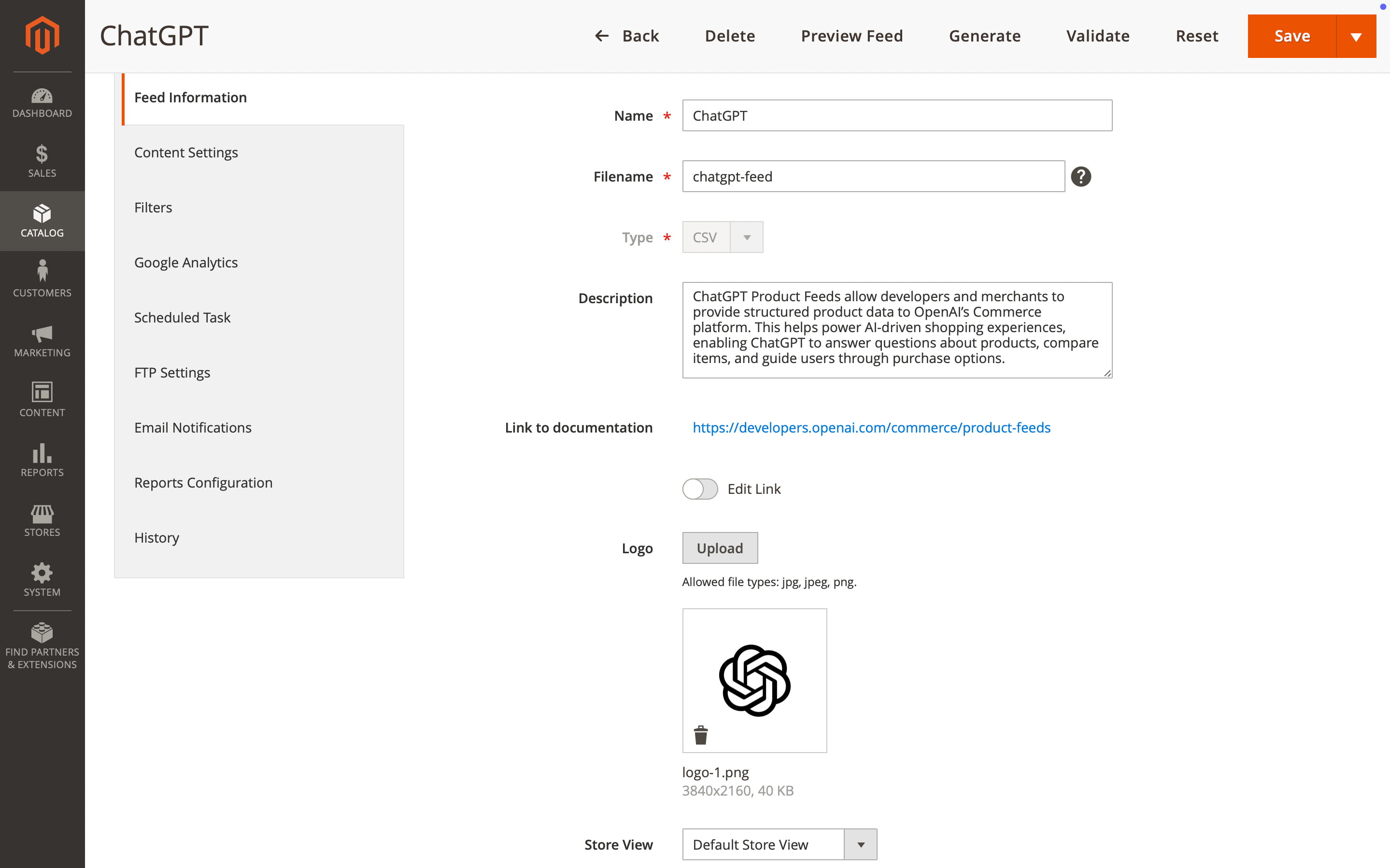
Instead of building the structure manually, the team gets a ready starting point and can move faster to what actually matters: checking whether the export reflects the catalog clearly enough for this use case.
A strong Magento 2 product feed should pass the essentials in a clean and predictable way: titles, descriptions, prices, availability, images, and variant information. The real question is not only whether the file was generated successfully, but whether the output makes items easier to interpret, compare, and surface for the right kind of request.
The first version does not need to be perfect. It is better to generate the feed, review a sample export, spot obvious gaps, and refine the structure early than to overengineer the setup from the start.
That keeps the process manageable: first get a working feed, then improve it based on a real result. In that sense, feed setup becomes a practical step toward visibility rather than a technical project in its own right.
Product Feed Optimization for Better Visibility in ChatGPT
Better visibility in ChatGPT usually comes from clearer catalog data, not from writing more. When titles, descriptions, and variant details are easier to read and compare, listings are more likely to match specific shopper intent and appear in the right context.
The strongest listings do not try to explain everything at once. They identify the item quickly, add the details that help people compare options, and keep the structure consistent across the catalog. That usually means clearer naming, more concrete descriptions, accurate prices and stock status, stronger images, and variant data that stays consistent from one item to the next.
Better structure also supports AI product discovery. The less ambiguity there is in the feed, the easier it becomes to connect catalog items with real shopper requests and make the data more useful for AI search optimization. The same structured-data thinking applies on the storefront itself — our guide on Magento product schema shows how consistent markup helps search engines interpret products more reliably.
A simple title example shows the difference.
- Before:
Women's Running Shoes Model XR200 Blue New Collection - After:
Women's Lightweight Running Shoes, Blue, Size 38–41
The second version is easier to scan and compare. It drops vague wording, focuses on useful details, and gives the item clearer context.
The same principle applies to variants.
- Before:
Blue / 128 / Pro - After:
Blue, 128GB, Pro Version
Descriptions benefit from the same approach as well.
- Before:
High-quality vacuum cleaner for modern homes with great performance and smart design. - After:
Cordless vacuum cleaner for small apartments, with up to 45 minutes of battery life and two power modes.
In each case, the stronger version gives the shopper something concrete to work with. It reduces guesswork, makes comparison easier, and helps the item appear in a context that actually matches the shopper's request.
Across the feed, that kind of clarity usually does more for visibility than extra copy or more promotional wording.
How to Track ChatGPT Traffic and Set the Right Expectations
The best way to track early results from ChatGPT is to start with traffic quality rather than perfect attribution. Referral sources, landing pages, product groups that begin receiving visits, and assisted conversions usually show progress earlier than direct last-click sales do. For a broader view of how these signals fit together, see our guide on the Magento 2 web analytics tracking stack.
What to Watch First
Compared with established search and shopping platforms, this channel is still harder to measure, so the first useful signals are usually practical ones. The clearest places to look first are:
- Referral sources
- Landing pages
- Product groups that begin receiving visits after feed updates
- Assisted conversions and product-page engagement
A better sign than raw traffic volume is when visits start reaching the items updated in the feed, or when discovery expands to product groups that previously had little visibility. That usually means the catalog has become easier to surface for relevant requests, even before revenue starts to reflect the change clearly.
Conversions still matter, just not always as a direct last click. Time on page, deeper browsing, and repeat visits can also be useful supporting signals when attribution is still limited. In that context, referral traffic from ChatGPT matters less as a vanity metric and more as an early sign that better product data is bringing in more relevant visits.
ChatGPT vs Google Shopping vs Marketplaces
It also helps to choose the right benchmark from the start, because ChatGPT does not work like Google Shopping or marketplaces. Each channel shapes discovery in a different way, which means the strongest signals of progress are different too.
| Channel | How discovery starts | What matters most |
|---|---|---|
| ChatGPT | Shoppers describe needs in natural language, refine constraints, and compare options inside one conversation. | Structured catalog data, clear attributes, consistent variants, strong product context. |
| Google Shopping | Shoppers begin with a query and review product listings on a results page. | Query matching, titles, pricing, images, feed quality, competitive visibility. |
| Marketplaces | Shoppers search inside a platform where listings compete side by side. | Reviews, ratings, price, fulfillment speed, marketplace ranking signals. |
Seen in that context, small early signals do not automatically mean the setup is weak. In a channel like this, progress often shows up first in better matching, cleaner landing patterns, and more qualified visits before it turns into a larger volume of sales.
That is why it makes more sense to watch direction and quality first, then raise expectations once the feed, product data, and traffic patterns become more stable.
Conclusion + Quick Start Checklist
For merchants who want to sell products in ChatGPT, the real advantage comes from being easier to surface, compare, and trust in a conversational commerce flow. The strongest results usually start with clear catalog data, a reliable feed, and a setup the team can keep current as products, prices, and availability change.
If you want a simple way to get started, this is the practical order to follow:
- Step 1: Review product titles, descriptions, prices, availability, images, and variant data.
- Step 2: Create a structured feed for this channel.
- Step 3: Check the output before relying on it at scale.
- Step 4: Keep the feed updated as catalog data changes.
- Step 5: Watch traffic, product visibility, and assisted conversions as early signals.
If the goal is to move faster, our Advanced Product Feeds module for Magento gives the store a more practical starting point with ready templates and simpler feed management. That makes it easier to prepare the catalog, generate the feed, and keep the setup manageable as this channel grows.
FAQ
How to sell in ChatGPT with Magento 2?
For a Magento 2 store, the practical starting point is a clean, well-structured feed. Most merchants begin by reviewing titles, descriptions, prices, availability, images, and variants, then generating the export and checking whether it reflects the catalog clearly enough for discovery. If the store already uses a Magento feed extension, that first step becomes easier to manage and maintain.
What should a Magento 2 product feed for ChatGPT include?
To show catalog items accurately, ChatGPT needs clear names, useful descriptions, current prices, stock status, images, and consistent variant details in the feed. In practice, it should function as structured product data, giving ChatGPT enough context to compare items reliably and match them to specific shopper requests.
Is a Magento ChatGPT integration required to get started?
A full integration is usually not needed at the beginning. For most teams, a structured feed is enough to prepare the catalog for discovery, while deeper technical work can wait until later. The lighter first step is to make product data easier to export, review, and keep current. Once the catalog is in good shape and the team is ready for a tighter setup, an AI integration for Magento based on the MCP standard lets ChatGPT read live store data directly instead of relying only on the feed.
How to track ChatGPT traffic in Magento 2?
The first signals worth watching are referral traffic from ChatGPT, landing pages that start receiving those visits, product groups that gain visibility after feed updates, and assisted conversions. Early progress often appears in traffic quality and discovery patterns before it shows up in larger sales numbers, so product-page engagement and repeat visits can also be useful supporting signals.
ChatGPT vs Google Shopping: what is different for product discovery?
The main difference is how people move from a request to a product. Google Shopping usually begins with a query and a results page, while ChatGPT lets people describe what they need, refine the request, compare options, and narrow the choice within one conversation. That makes it a different kind of product discovery experience, closer to guided recommendations than to standard results-page browsing.
Mirasvit Support Engineer
Promote your products and achieve higher sales by using the power of marketplaces and comparison shopping engines with magento data feed extension. You can automatically generate and deliver feeds of your product catalog to those services with Magento Product Feeds extension.
This tool is unbelievably quick to use and is also outstandingly flexible. It's compatible with all major shopping and advertising services, including Google Shopping.
Feeds go straight to Google Merchant Center through Google's API, and AI profiles can rewrite titles, map Google categories and fill in missing attributes before your catalog ever reaches a marketplace.
Simply install the module, generate your very own product feed, present your catalog to a wider audience, and boost your sales right now!
More and more shoppers ask AI assistants to find and choose products for them.
Magento 2 Agentic Commerce makes your store readable to those assistants. It publishes a UCP merchant profile, an MCP server, and llms.txt, so ChatGPT, Claude, and other agents can search your catalogue, quote your real prices, build a cart, and send the shopper to your checkout. The Agent Activity dashboard shows which orders and revenue came from agents.
Keep Learning