Mirasvit Latest Updates — April 2026
-
 Andriy Kovalenko
- Our News & Updates
- Apr 1, 2026
- 22 min read

This month, our team delivered a record 35+ new features and improvements. Much of that work continues our broader direction of making AI extensions more practical in everyday store tasks.
In AI Copilot, new built-in tools, task planning, and dedicated agents expand what the assistant can handle when a task depends on store data, documentation, or several connected steps.
eChat also reaches an important milestone and becomes available as a production-ready storefront chatbot, ready to help shoppers find products and get answers based on your catalog.
Besides that, we expanded REST API coverage in five more extensions and improved it in Help Desk MX. This makes more parts of your store easier to connect with MCP and Copilot, so workflows can reach reporting, content, email automation, affiliate management, banners, and support tickets.
Below, we look at these and other improvements in more detail and show where to configure them. Before trying the new features, make sure the relevant modules are updated to their latest versions.
Table of Contents
- AI Copilot
- AI Chatbot - eChat
- AI Agent Integration
- AI Assistant
- Advanced Reports
- Help Desk MX
- Search Ultimate
- Blog MX
- Affiliate
- Follow Up Email
- Advanced SEO Suite
- Layered Navigation
- Form Builder
- Full Page Cache Warmer
- Order Management
- Promo Banners
- RMA
AI Copilot
The AI Copilot module becomes more useful in everyday work: it can handle a wider range of inputs, work through multi-step tasks, and feel more natural in multilingual admin teams.
🔥 New built-in tools: REST API, Database Reader, DocSearch, GraphQL, manuals search, and Store Info
The assistant can now work with more than simple lookups. Along with store data, it can use APIs, search documentation and manuals, and better understand how your store is structured, including websites, store views, currencies, locale, URLs, and timezone.
You can ask for stock levels, order data, store setup details, or the right documentation and get the answer in one place instead of switching between screens.
Add your OpenAI key under Stores > Configuration > Mirasvit Extensions > AI Copilot > General Settings. Tool settings are available under Stores > Configuration > Mirasvit Extensions > MCP Tools, and access can be managed per role under System > Permissions > User Roles > [Role] > Role Resources > MCP Tools. Sensitive database areas are protected by default.
🔥 Task planning and dedicated agents
Multi-step requests no longer have to be split and checked by hand. The new planning logic lets the assistant break one task into connected steps and move through them in sequence, so a single request can cover the whole job from start to finish.
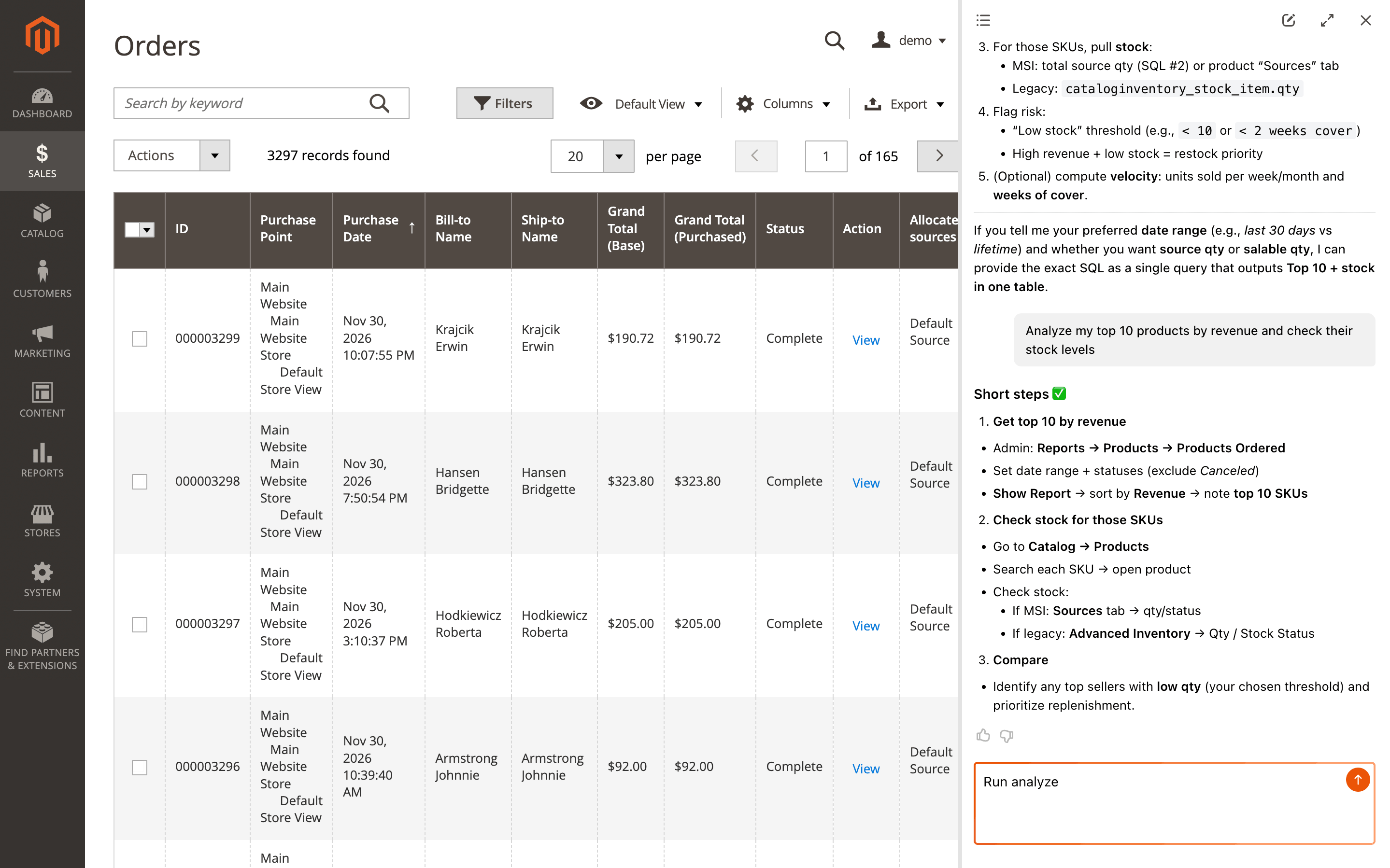
Compatible extensions also bring dedicated agents for their own areas. So a request like checking your top 10 products by revenue and then comparing their stock levels can run as one flow, while extensions such as Help Desk MX or Advanced Reports add logic tailored to their own data and actions.
Task planning works automatically. Dedicated agents appear when the related extensions are installed and updated to compatible versions.
🔥 Translations for admin and Copilot UI
This release adds translations for both the backend section of the tool and the Copilot UI, so the assistant fits more naturally into multilingual admin work.
For teams that use a non-English backend, that removes part of the language friction in daily tasks and makes the tool easier to roll out across different stores and roles.
The interface follows the admin locale automatically, so no extra configuration is needed.
AI Chatbot - eChat
🔥 Production-ready release and improved product data export
AI Chatbot - eChat extension moves from early access to a production-ready storefront chatbot. You can use it to help shoppers find products, get answers to common questions, and move through the buying journey more naturally.
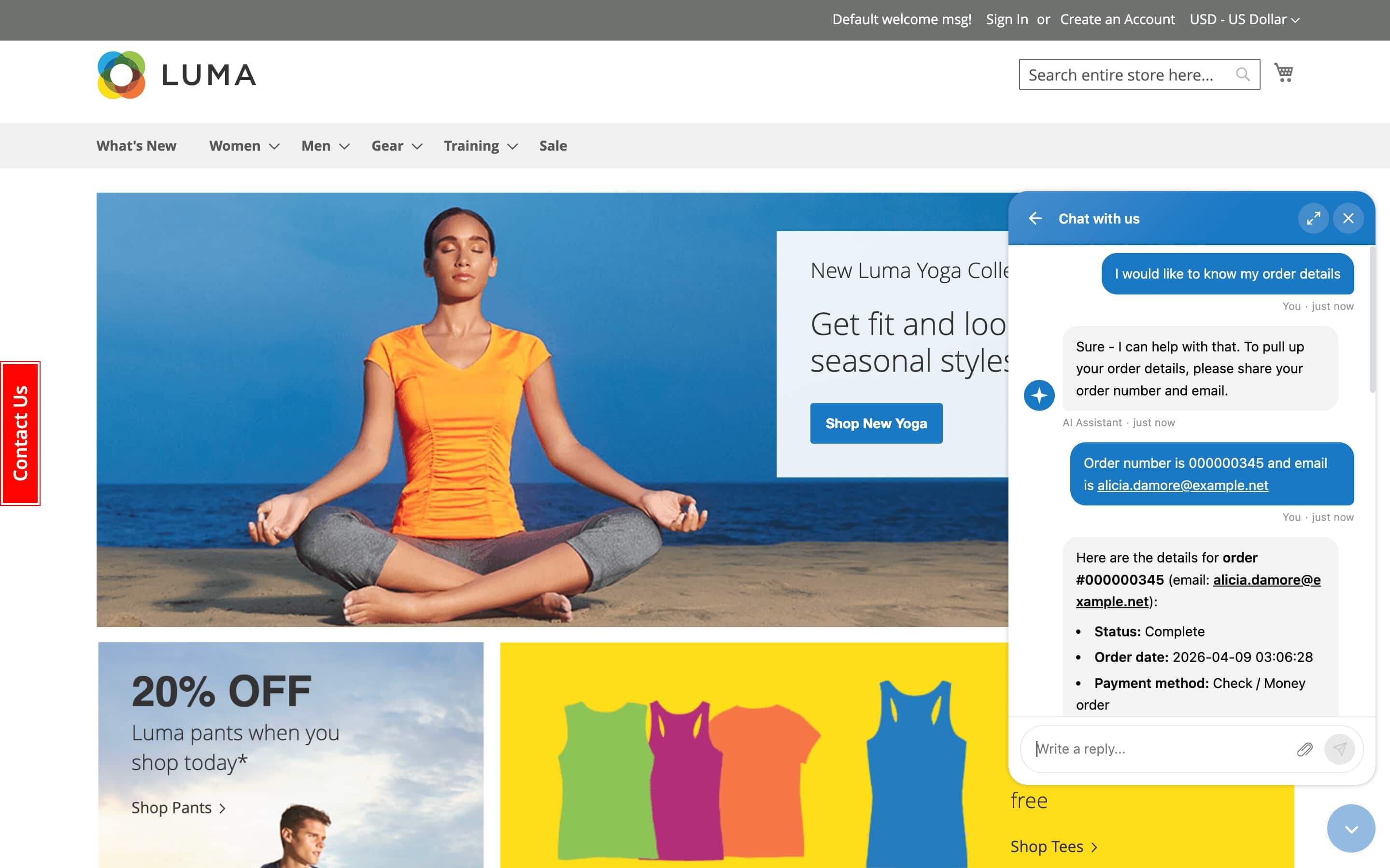
The updated product data exporter gives the chatbot more accurate and current catalog information. That means more relevant suggestions, clearer answers about your products and policies, and fewer situations where the conversation relies on outdated data.
Configure the module under Stores > Configuration > Mirasvit Extensions > eChat and add your AI provider credentials. After that, the chatbot appears on the storefront automatically.
AI Agent Integration (MCP)
🔥 Module docs and Mirasvit manuals search
The AI Agent Integration extension gives connected assistants better access to the guidance behind your Magento setup. Along with API and database tools, they can now search documentation shipped with installed modules and information available in Mirasvit manuals.
That makes answers much more reliable in real admin work. When you ask how to configure a filter, where a setting lives, or how a module behaves through REST API, the assistant can rely on actual module guidance instead of giving a generic answer.
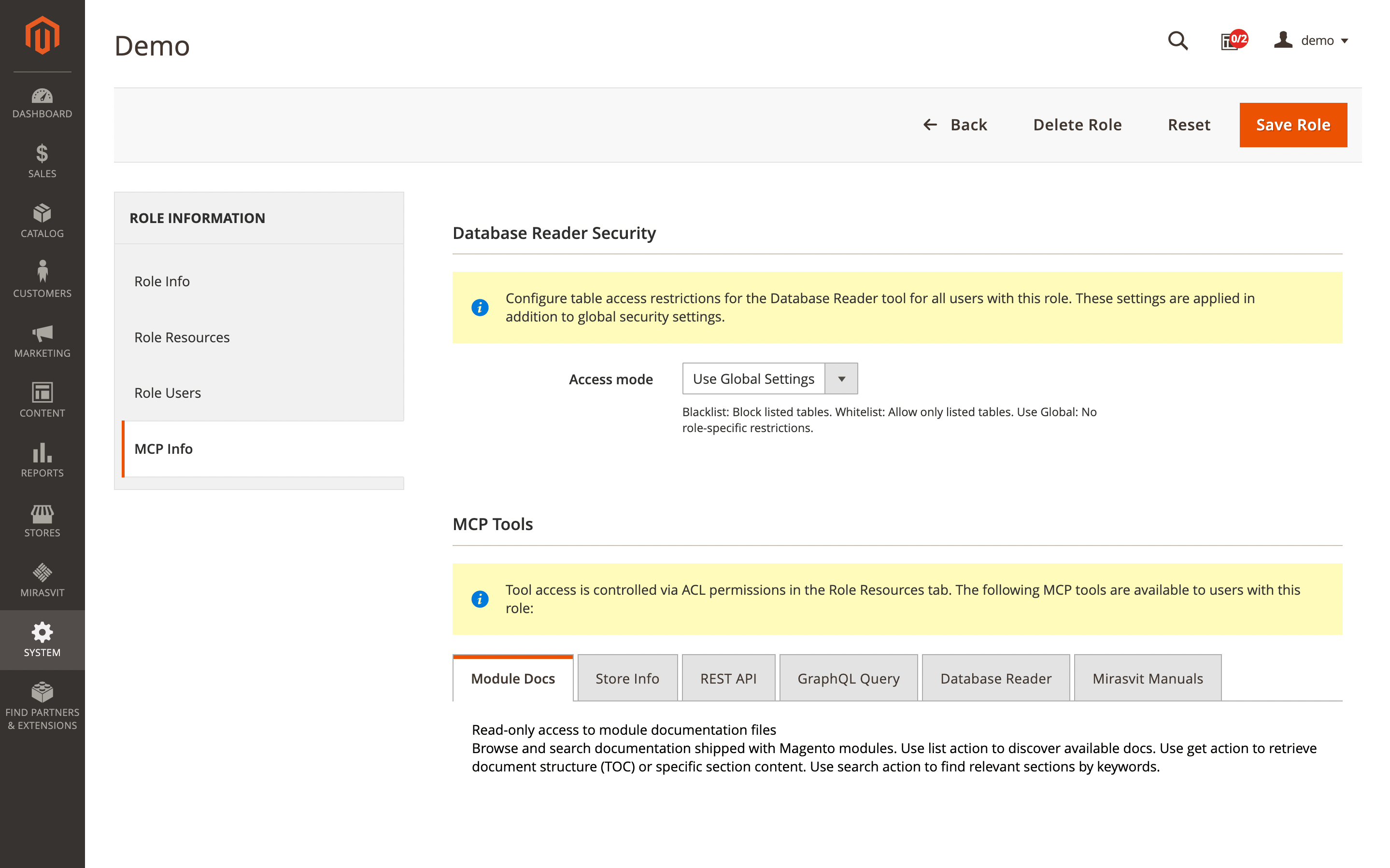
Access can be controlled under System > Permissions > User Roles > [Role] > Role Resources > MCP Tools > Module Docs.
🔥 REST API expansion across more Mirasvit extensions
REST API coverage also expanded across several extensions. New or updated endpoints are available in Advanced Reports, Affiliate, Blog MX, Follow Up Email, Promo Banners, and Help Desk MX.
With that, AI Agent Integration (MCP) and AI Copilot can work with more parts of your store, including report data, blog content, email workflows, affiliate management, banners, and support tickets. Since these integrations follow Magento's standard configuration flow, we do not repeat the same API setup steps in every module below.
AI Assistant
The AI Assistant module received several important additions in this release. Along with new prompt capabilities, the update also adds translations, so the admin side feels more natural in non-English backends.
🔥 Web search for prompts
Web search was added for individual prompts. Once Enable Web Search is turned on, the model can pull in outside context when a request depends on current or external information instead of staying only within store data.
For product copy, that may mean missing specifications or industry terms. For marketing tasks, it may mean live trends, hashtags, or competitor messaging that would otherwise require separate research outside the admin.
Open Marketing > AI Assistant > Prompts, edit the needed item, turn on Enable Web Search, and save it. This option is intended for interactive use rather than automation rules, and it increases both token usage and response time.
🔥 File uploads in popup prompts
Prompts opened in a popup window can now accept files together with the request. With Open in window enabled, you can attach PDFs, spreadsheets, images, and text files directly in the popup instead of squeezing the whole task into a short instruction.
A brand guide can shape product copy, a supplier sheet can feed a Magento description, and a CSV with updated specifications can help compare changes or refresh existing content without switching between tabs.
Set this up under Marketing > AI Assistant > Prompts. Turn on Open in window for the needed item and save it. One request accepts up to 5 files, each up to 5 MB. Supported formats include JPEG, PNG, GIF, WebP, PDF, CSV, and TXT.
🔥 Image variables for products, categories, and blog posts
The update adds image variables to prompt templates. When you use { product.image }, { product.images }, { category.image }, or { post.image }, the module sends those visuals to the AI provider together with the text request.
Instead of relying only on names and attributes, the model can work from the actual appearance of the item or page. A product photo may serve as the basis for alt text, a gallery may help build a fuller description, and category banners or featured blog images may be checked against the content they represent. Catalogs like clothing, jewelry, or furniture benefit most here, because color, texture, shape, and materials are often easier to judge from images than from product fields.
Add the needed variables under Marketing > AI Assistant > Prompts. Available options include { product.image }, { product.small_image }, { product.thumbnail }, { product.images }, { category.image }, and { post.image }. Blog post images require the Blog MX extension, and { product.images } sends the full gallery, which increases token usage.
🔥 Product Attachments integration for prompts
The AI Assistant module also gained integration with the Mirasvit Product Attachments extension. When { product.attachments } is added to a template, active files linked to the product are sent together with the text request. The same works for { category.attachments } and { page.attachments }.
Specification sheets, manuals, catalogs, and lookbooks can now be used as source material inside the same workflow. A technical PDF may feed a fuller product description, a manual may turn into a short FAQ block, and an attached category catalog may serve as the basis for marketing copy built from the actual file content.
Make sure the files are assigned through Catalog > Product Attachments, then add { product.attachments } to the template under Marketing > AI Assistant > Prompts. The selected model also needs to support the relevant file types.
Advanced Reports
In the Advanced Reports extension, the latest changes make report data easier to share, reuse, and work with through Copilot and AI Agent Integration (MCP).
🔥 REST API for reports, notifications, custom reports, and boards
A separate REST API opens a more flexible way to work with report data outside the Magento admin. You can pull analytics into external dashboards, automate recurring report delivery, or use reporting data in AI Agent Integration (MCP) and AI Copilot scenarios without opening each report manually.
This is especially useful when Magento analytics is already part of a broader reporting setup. Instead of exporting the same numbers by hand or rebuilding the same checks in several places, you can request the data programmatically and pass it into the tools your team already uses.
Set up the integration under System > Extensions > Integrations and grant the required ACL permissions for Advanced Reports resources.
🔥 Shared report downloads from the toolbar
After you create a public report link, the toolbar gives you direct access to download that report in CSV, XML, JSON, or HTML. There is no need to reopen sharing settings and copy a separate link for each format.
That becomes handy when the same report is reused in different ways. One person may need a CSV export, another workflow may rely on JSON, while HTML is easier for a quick browser review.
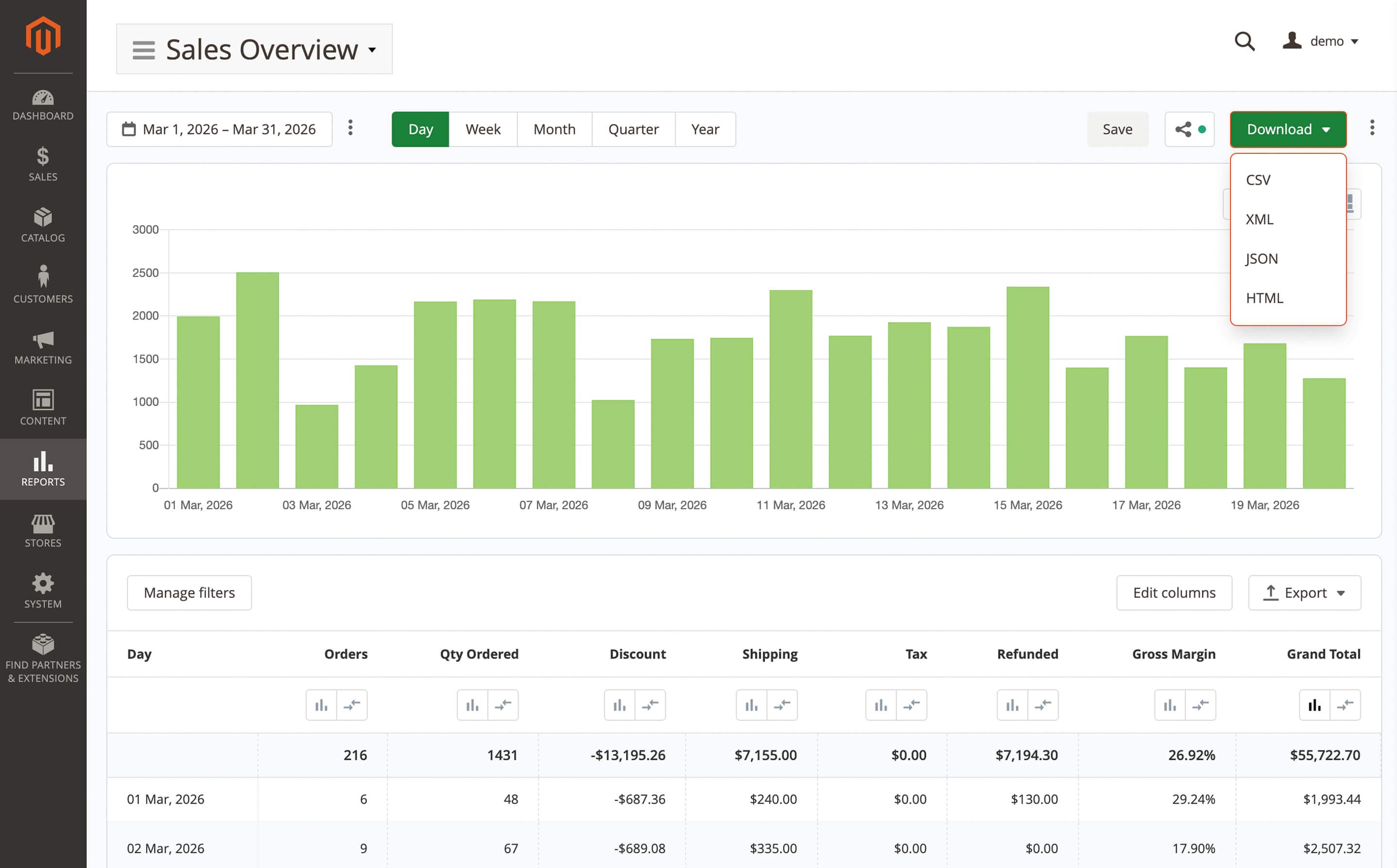
Open any report under Reports > Advanced Reports, click Share in the toolbar, and the download dropdown appears once the link is created.
🔥 Dedicated listing for shared reports
When several reports stay shared over time, keeping track of them from one place matters. A dedicated listing now shows all shared reports together, so you can disable access to outdated ones without opening them one by one.
This is useful after monthly or quarterly reviews, when old public links should no longer stay active.
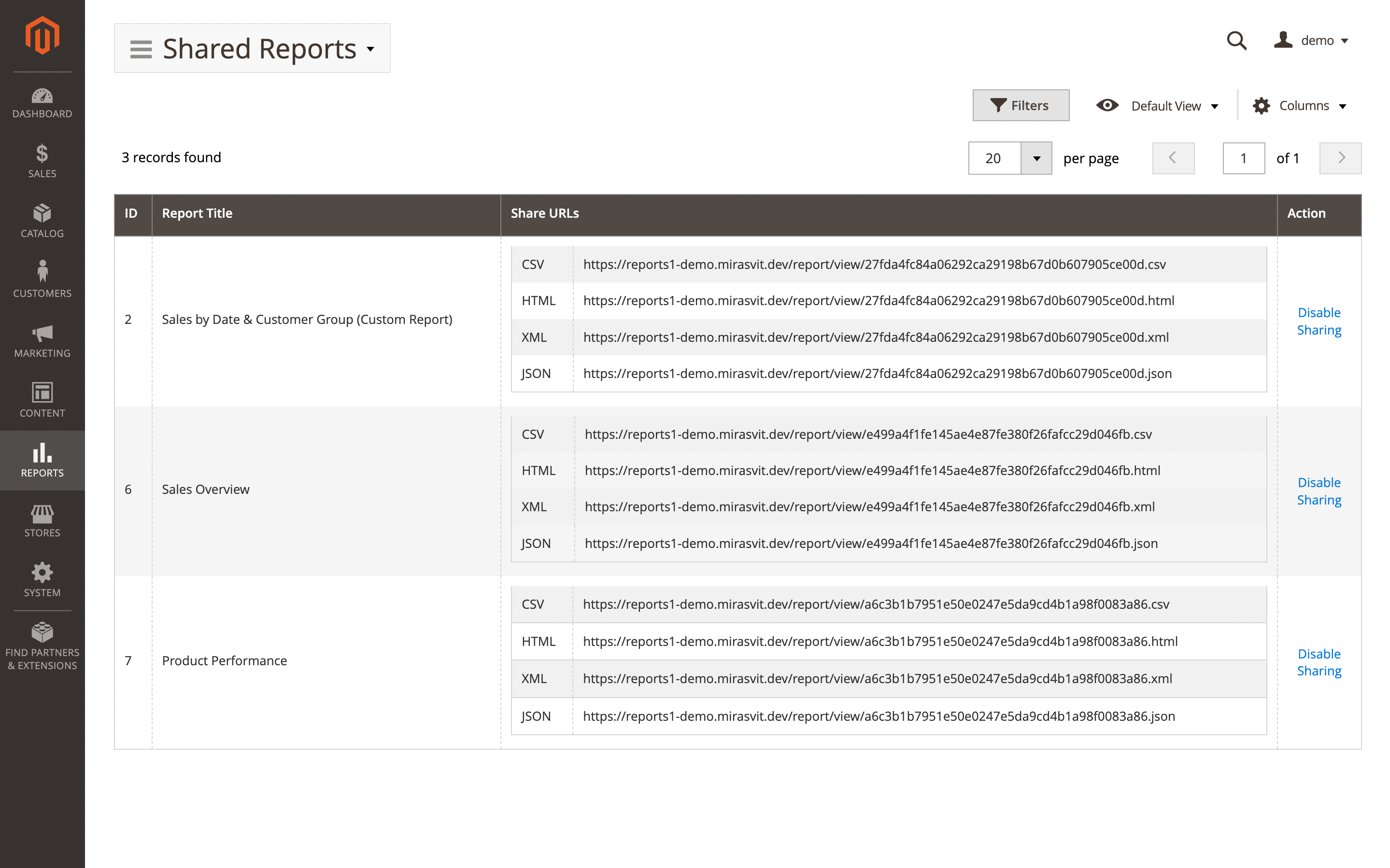
Open the shared reports listing under Reports > Advanced Reports and use the toggle for each item.
🔥 Report access through AI Copilot and MCP
You no longer have to start from the report itself when you need a number or a quick summary. With this integration, you can ask the question in plain language and get the answer based on report data.
A request like last month's revenue by category, for example, can return the needed breakdown without opening the report and building that view by hand in the admin.
The connection works automatically after the Advanced Reports, AI Copilot, and/or AI Agent Integration (MCP) extensions are installed and configured.
Help Desk MX
Several changes in the Help Desk MX module improve daily support work both for your team and for customers contacting you through the store.
🔥 Gmail OAuth2 for email gateways
Connecting Gmail to your support workflow becomes more secure and more straightforward with OAuth2 authentication for email gateways. Instead of relying on app-specific passwords, you can authorize the connection through Google's standard sign-in flow.
This makes setup cleaner and reduces workarounds when Gmail is used for support communication. It also aligns gateway configuration with Google's recommended authentication approach.
Open the email gateway settings in Help Desk MX, choose Gmail OAuth2 as the authentication method, complete the Google authorization flow, and save the gateway. This setup may also require OAuth credentials in Google Cloud Console.
🔥 More accurate quick response suggestions
Finding the right template during ticket replies takes less time with the updated quick response suggestions. More relevant options appear as agents type, so the team can choose the best match sooner and keep replies consistent across recurring support questions.
During busy support hours, that removes part of the routine work from each reply. When a customer asks about shipping times, the matching quick response is easier to spot right away, which cuts repetitive typing and helps agents answer with less delay.
Manage templates under Marketing > Helpdesk > Quick Responses. The new suggestions work automatically while agents compose replies.
🔥 Multiple file attachments in the contact form
The contact form adds support for multiple file attachments in a single submission. If a customer reports a defective product, they can send several photos at once instead of splitting the issue across follow-up messages, and you get fuller context from the start.
Turn this on under Stores > Configuration > Mirasvit Extensions > Help Desk MX by enabling Allow customer to attach files in feedback form and setting the allowed file extensions.
Search Ultimate
The Search Ultimate extension adds several improvements that make storefront search easier to scan and search analytics more complete.
🔥 Configurable keyword highlighting in results and autocomplete
Matched words in search results and autocomplete can be highlighted in a way that fits your storefront better. You can decide where highlighting should appear and adjust its background color, text color, and font weight.
When someone searches for wireless headphones, the matching words stand out right away, so it is clearer why a product appeared in the list and easier to move to the right item faster.
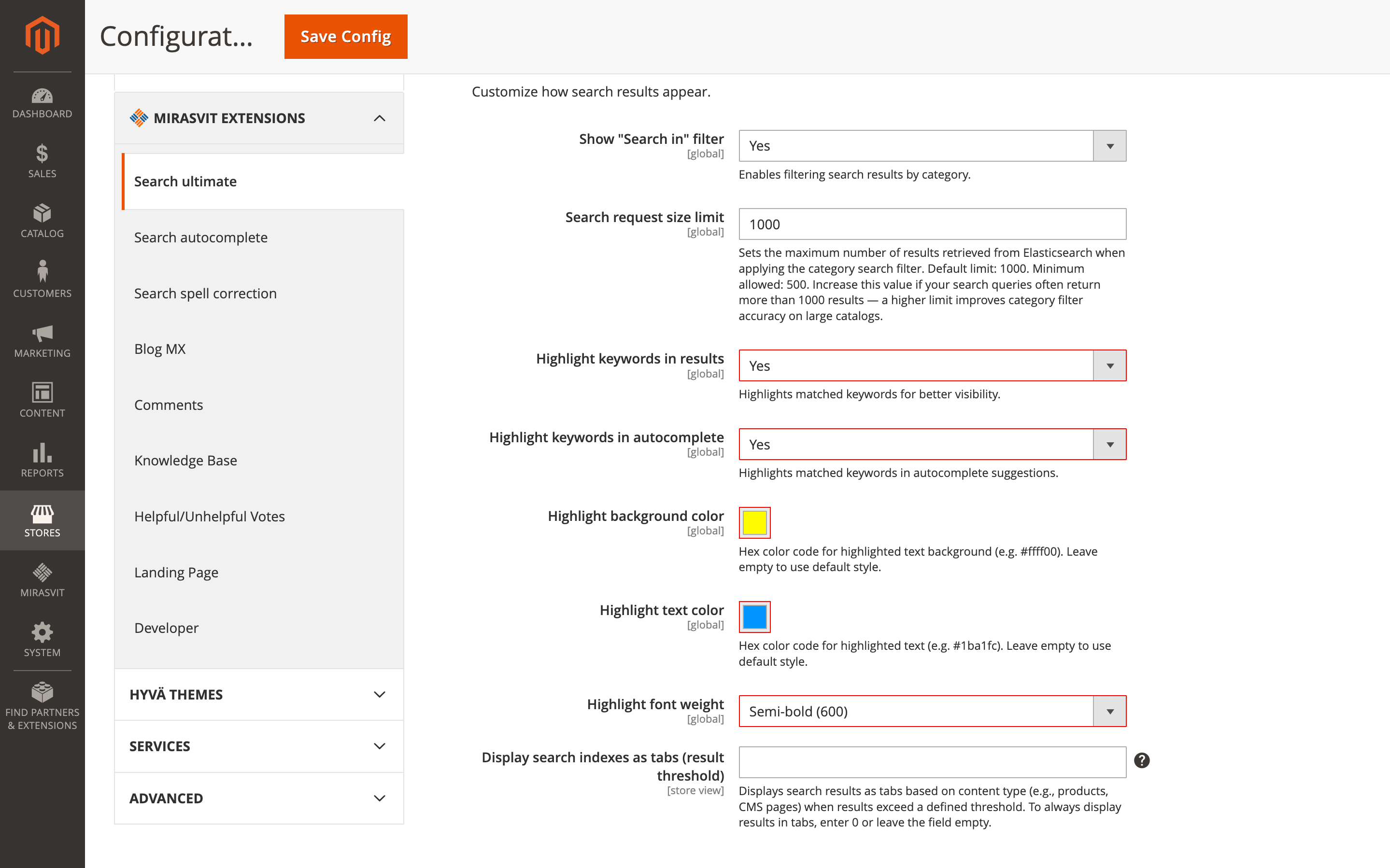
Configure this under Stores > Configuration > Mirasvit Extensions > Search Ultimate > Search results and display > Search refinements and visibility.
🔥 Prev/next pagination in Full Size autocomplete
Full Size autocomplete handles large result sets more neatly with prev/next pagination instead of a long row of page numbers. When a broad query returns many matches, navigation stays cleaner and easier to use.
A search like shirt can bring back hundreds of products, but the dropdown no longer feels overloaded with numbered links.
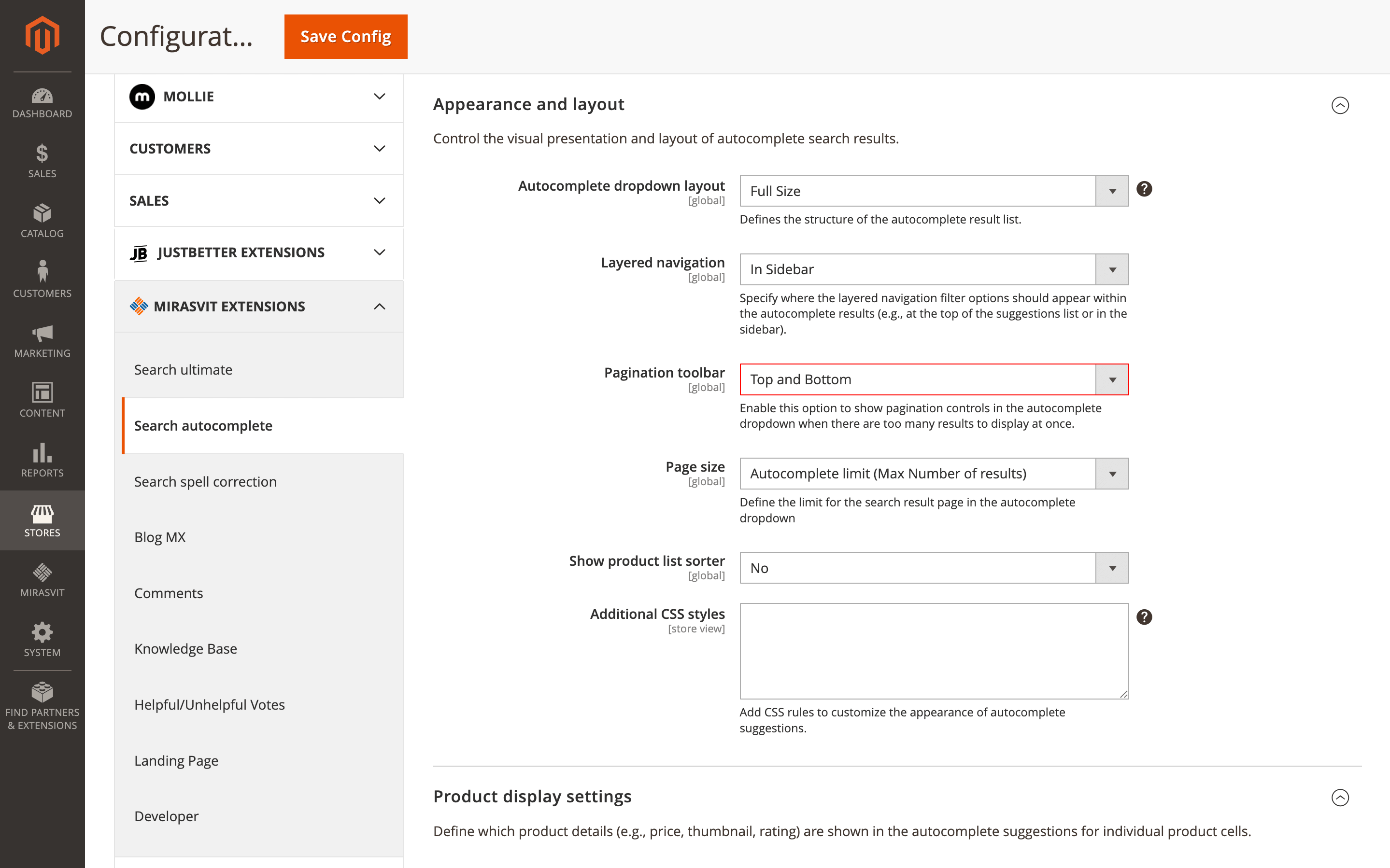
Enable Pagination toolbar and choose the Page size under Stores > Configuration > Mirasvit Extensions > Search Autocomplete > Appearance and layout. This works only in Full Size autocomplete mode.
🔥 Logging autocomplete queries in Search Terms
Queries typed into autocomplete no longer disappear from reporting when a shopper never opens the full results page. With this update, they are stored in Search Terms alongside regular search queries.
That closes an important blind spot in your analytics. Phrases used only through suggestions still show up in reports, so you can catch missing synonyms, see what shoppers try to find earlier, and notice which topics may need stronger product discovery support.
Turn on Log autocomplete search terms under Stores > Configuration > Mirasvit Extensions > Search Autocomplete > Autocomplete base configuration.
Blog MX
The Blog MX extension gets several practical improvements that keep blog pages cleaner, make content easier to manage, and refine important SEO details.
🔥 Tag limit for the Tag Cloud widget
Tag Cloud widgets stay much cleaner when you can control how many tags appear in the sidebar. Instead of turning into a long list, the widget can stay focused on the topics that matter most.
On blogs that have built up dozens of tags over time, showing only the most relevant 10 or 20 makes the page easier to scan and helps visitors move through key topics faster.
Configure this under Content > Blog MX > Layout editor or in the Tag Cloud widget settings.
🔥 Updated date on post pages
The post page now includes both the original publication date and the most recent revision date. On seasonal guides, product roundups, and other articles you return to over time, readers can immediately see that the content was refreshed after it first went live.
That visible revision mark makes the page feel more current and trustworthy, and it can also support SEO. The latest change is tracked automatically whenever the post content is updated.
🔥 Posts tab in the category edit form
A new Posts tab has been added to the category edit form. It lets you assign or remove articles from the category page itself, so there is no need to open each post one by one.
This is much easier when you build a new topic collection or reorganize older content. If you create a category like Holiday Gift Guides, you can gather all related posts in one place and adjust the list as the section grows. Go to Content > Blog MX > Categories, open or create a category, switch to the Posts tab, and assign the needed entries.
🔥 UTC timestamps and configurable description source in structured data
Structured data on blog posts becomes more precise and more flexible with this change. Post timestamps now include UTC timezone, and you can choose whether the description field should pull from the Excerpt or the Meta Description.
Search engines get clearer time information, while you get more control over which text is used in structured data.
Set the description source under Stores > Configuration > Mirasvit Extensions > Blog MX. UTC timezone is applied automatically.
Affiliate
🔥 Custom recipients for New Affiliate and New Withdrawal notifications
The Affiliate module no longer limits these notifications to the default admin inbox. New partner registrations and withdrawal requests can go straight to the people who handle them, whether that is a partner manager, someone from finance, or another responsible teammate.
Registrations can reach the person in charge of onboarding right away, while payout-related messages can land in the inbox used for withdrawals. That cuts internal forwarding and helps the right people react sooner.
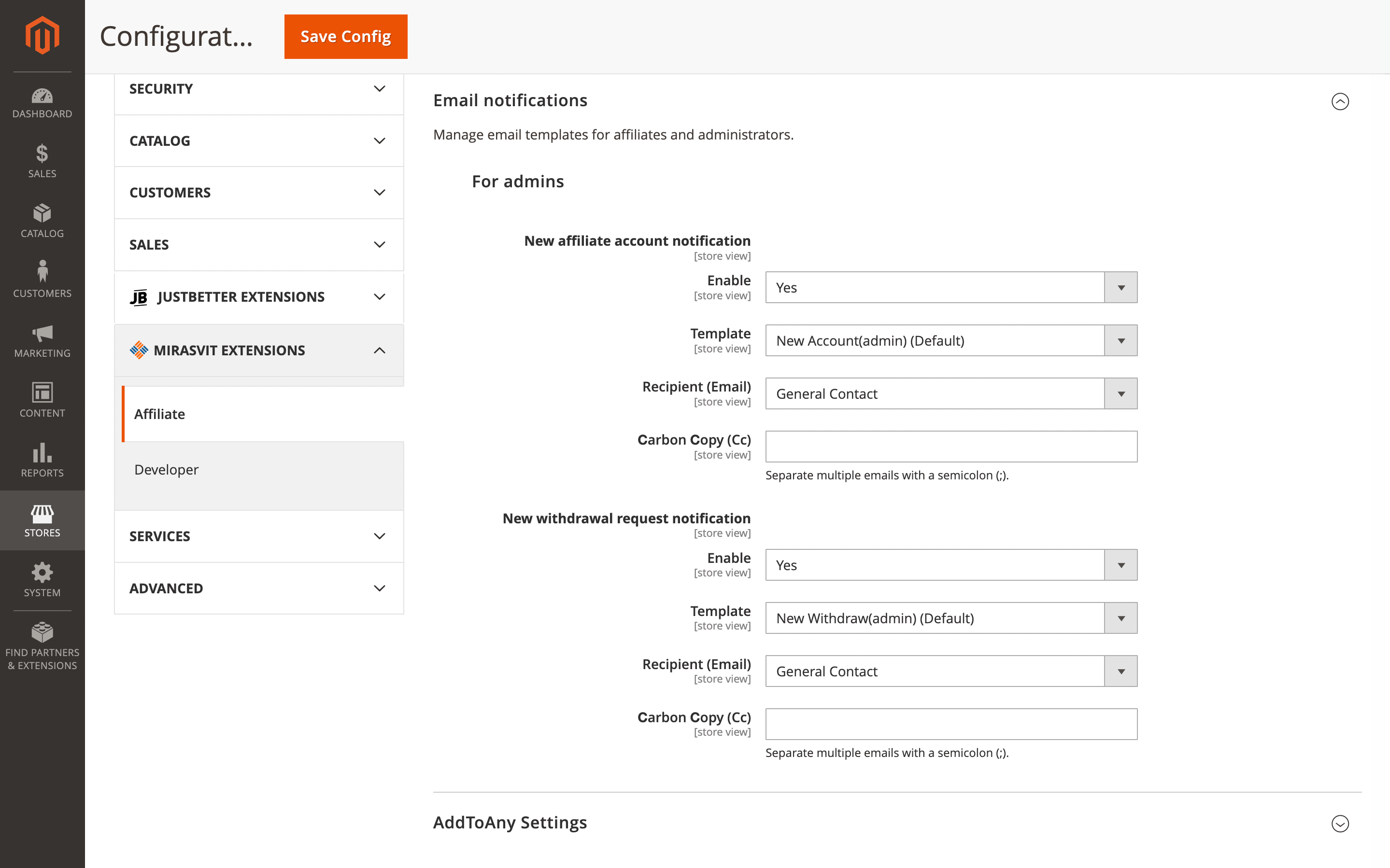
Open the module's notification settings, enter the email address or addresses for New Affiliate and New Withdrawal notifications, and save the changes.
Follow Up Email
In the Follow Up Email extension, the latest changes make unsubscribe flows more flexible and subscription preferences easier to manage.
🔥 Custom CMS redirect after email unsubscription
When a customer clicks the unsubscribe link in your email, you can choose where they land instead of sending them to a generic destination. This lets you use any CMS page for that redirect.
That screen can do more than confirm the opt-out. You can explain what the customer unsubscribed from, offer alternative subscription options, or show a branded message instead of dropping them on the homepage.
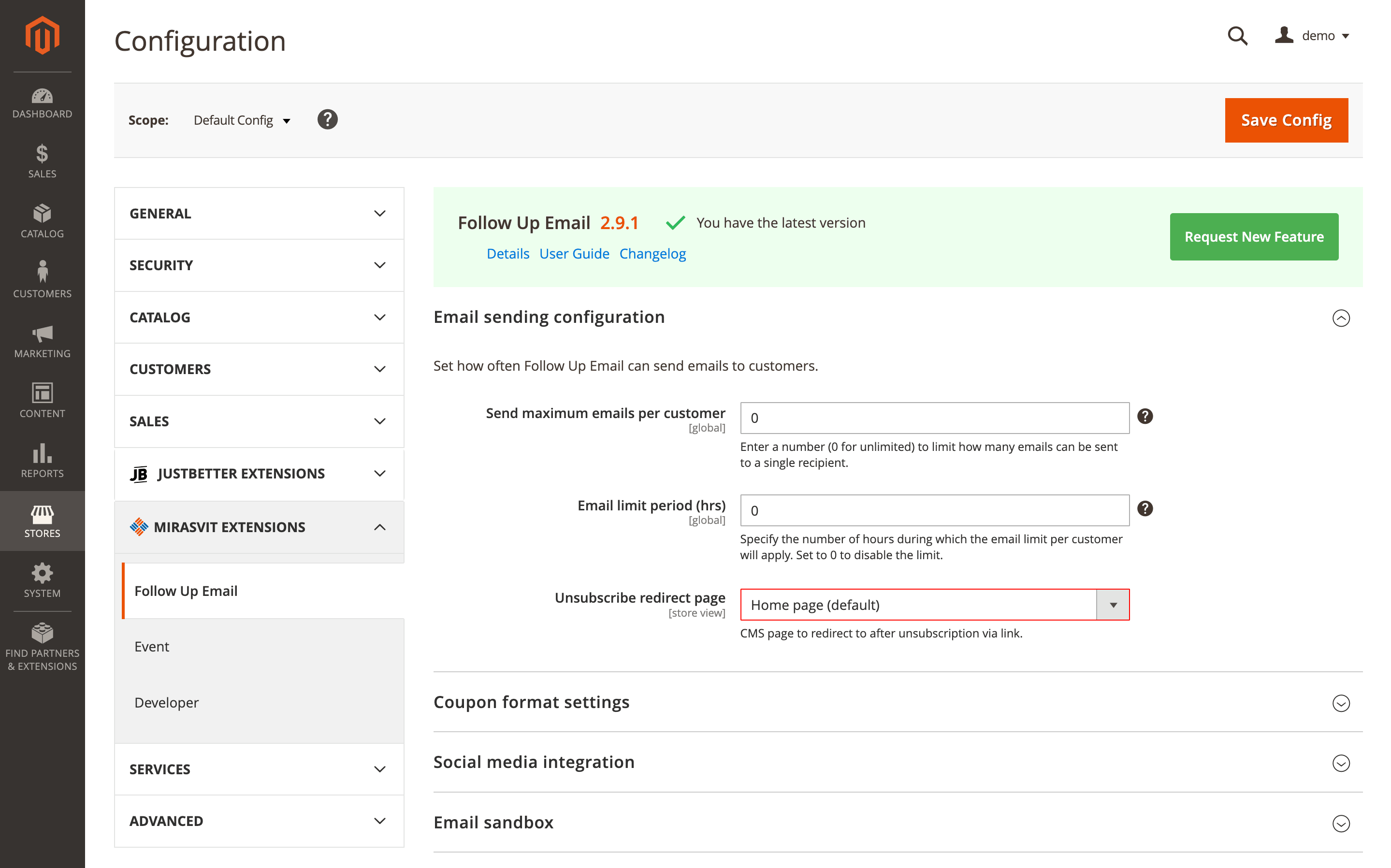
Set Unsubscribe redirect page under Stores > Configuration > Mirasvit Extensions > Follow Up Email > Email sending configuration. If needed, create the target page first under Content > Pages.
🔥 Unsubscription management page
A dedicated unsubscription management page gives customers more control over what they receive. Instead of leaving the email list completely, they can choose which messages they no longer want and keep the rest.
This works through the Get URL to manage unsubscriptions variable, { url.unsubscriptions_url }. When you place it in an email template, the link opens a separate page with checkboxes for different subscription options.
Add { url.unsubscriptions_url } to the relevant template, and the link will take customers to that management page.
Advanced SEO Suite
In the Advanced SEO Suite extension, the current work centers on product pricing in structured data and on how that pricing may appear in Google search results.
🔥 priceSpecification in the Offer schema
On product pages, structured data can now carry fuller pricing context. With priceSpecification added to the Offer schema, the markup can describe not only the current amount, but also the original list price behind a discount.
That matters when a product has both a regular price and a special price. Instead of seeing only the reduced amount, Google gets a clearer signal about the offer and the price before the discount, which can improve how sale pricing appears in search, including strikethrough scenarios where supported.
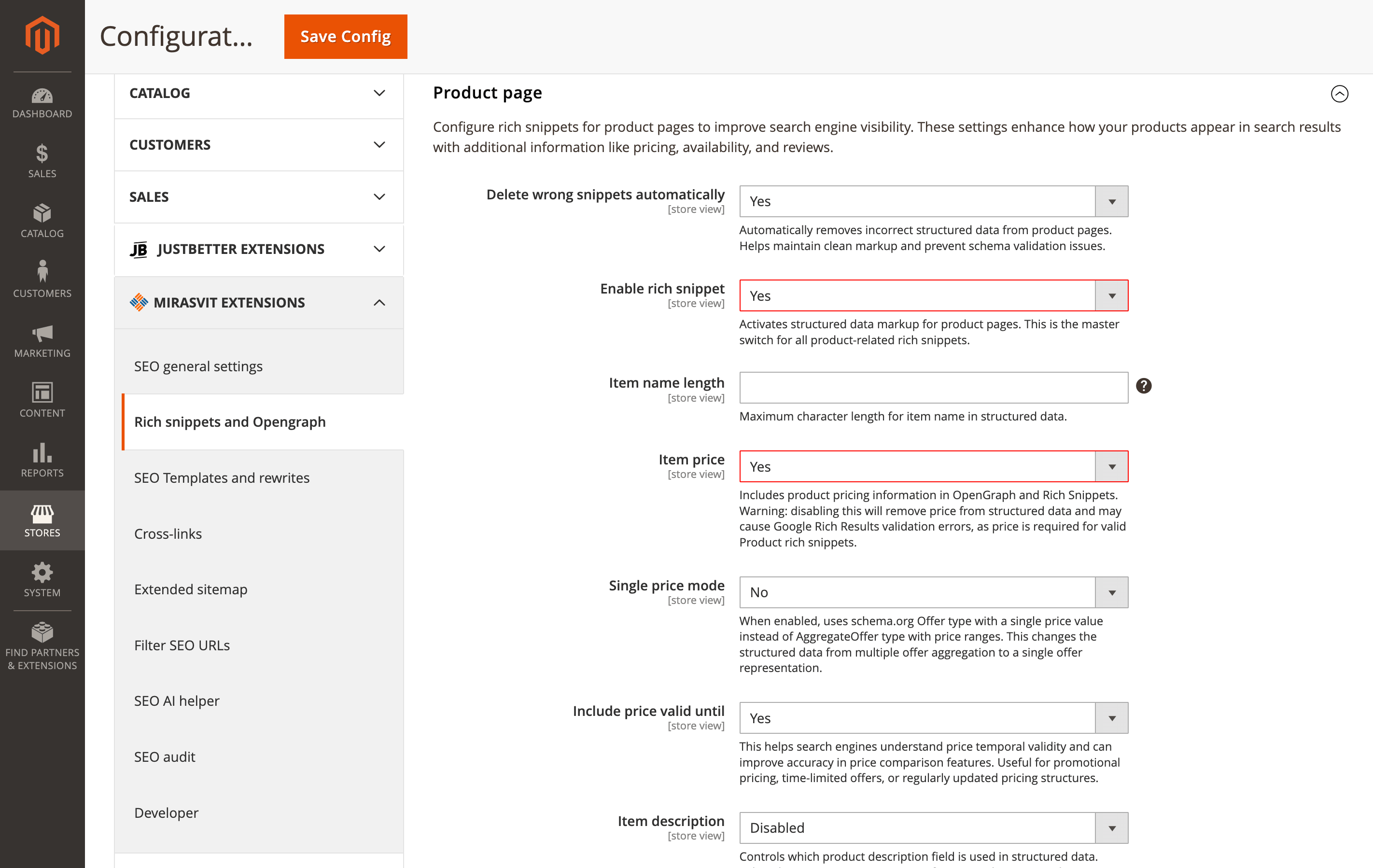
You can check this under Stores > Configuration > Rich snippets and Opengraph. In the Product page section, rich snippets should be enabled and Item price should remain turned on.
🔥 Product price exclusion from Rich Snippets
Some catalogs should not expose prices in search at all. In this update, the Item price setting finally works as intended, so price can be removed from product structured data when Google results should not mirror the pricing logic on your storefront.
This fits B2B stores that reveal prices only after login, and catalogs where amounts change too often to trust them in search.
Disable Item price under Stores > Configuration > Rich snippets and Opengraph > Product page. Google still treats price as a recommended field for Product rich results, so this option is best used when there is a clear business reason to keep pricing out of search.
Layered Navigation
In the Layered Navigation module, product names and filter labels become easier to read in the places where shoppers actually make choices.
🔥 Brand names before product names in listings and product blocks
Product names can now include the brand directly in category listings and in related, upsell, and cross-sell blocks. Instead of showing only the product title, the module can place the brand name before it, so shoppers get more context at a glance.
For catalogs with many brands, that makes browsing much clearer. A customer sees Nike Air Max 90 rather than just Air Max 90, which helps them recognize the brand faster and compare products more confidently.
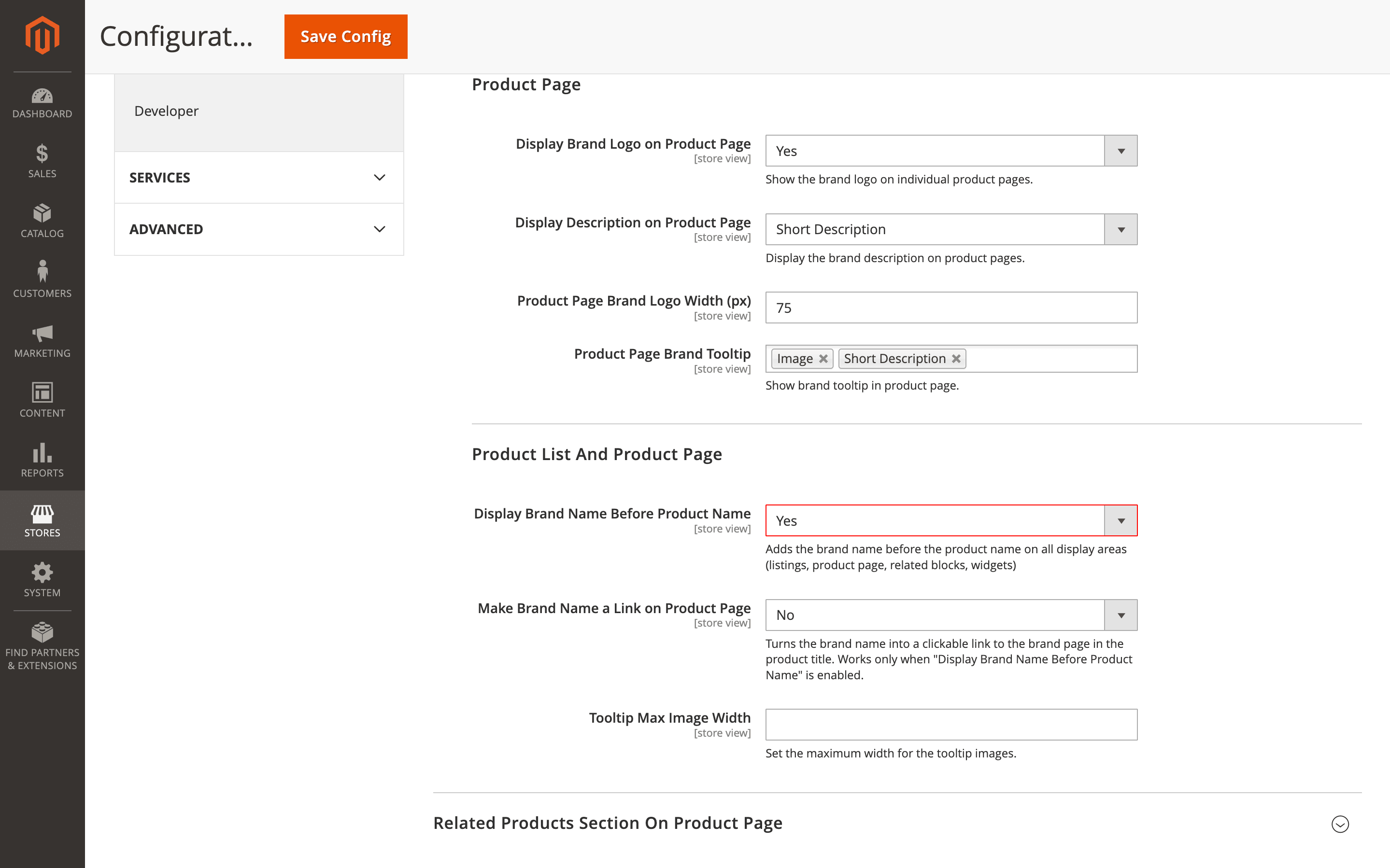
Enable Display Brand Name Before Product Name in the brand management settings. The feature works when the brand option is already configured with a mapped brand attribute.
🔥 "Label (naturally)" sorting for filter options
Numeric filter values no longer have to follow plain alphabetical order. With Label (naturally), options such as 2mm, 4mm, 6mm, 8mm, 10mm are arranged in the sequence shoppers expect.
This is especially useful for attributes like size, length, volume, or diameter, where a text-based order feels confusing.
Set this under Stores > Attributes > Product. Open the needed attribute, go to the Layered Navigation tab, choose Label (naturally) in Sort Options by, and save the attribute.
Form Builder
🔥 Store View, Created At, and Status in CSV export
The Form Builder extension expands CSV exports of form answers with three additional columns: Store View, Created At, and Status. Along with the submitted values, you get the details that help sort responses faster and see where each entry belongs.
In a multi-store setup, submissions are easier to separate by storefront, track by submission time, and review by processing status. The file becomes more useful for follow-up and reporting without extra manual cleanup after export.
Go to Content > Form Builder > Forms, open the needed form, switch to its answers, and download the CSV. The extra columns appear automatically.
Full Page Cache Warmer
🔥 TTL-aware partial status updates
In the Full Page Cache Warmer module, partial status checks no longer treat all cached pages the same. TTL values are taken into account, so pages with a still-valid cache are skipped instead of being warmed again.
If your store has thousands of cached pages, that avoids unnecessary crawling and reduces server load. A product page with a 24-hour TTL, for example, will not be revisited every hour while its cache is still valid.
The new logic works automatically with your existing cache TTL settings.
Order Management
🔥 Fixed-amount discount in order editing
The Order Management extension adds fixed-amount discounts to order editing alongside percentage-based ones. When you need to reduce a total by a specific sum, you can enter that amount directly instead of converting it into a percentage.
A $25 goodwill discount or a one-time compensation can now be applied as is, without stopping to calculate the matching percentage. That keeps the adjustment precise and makes order edits faster in customer service situations.
Open the record, select the fixed amount discount option, enter the needed value, and save the changes.
Promo Banners
🔥 Built-in Hyvä compatibility, Magento 2.4.9 support, and REST API expansion
The Promo Banners module now includes Hyvä compatibility out of the box, so you no longer need a separate third-party package for that part of the setup. The same release also adds support for Magento 2.4.9 and expands the ways you can use banner data outside the admin.
If you run a Hyvä storefront, setup becomes cleaner and easier to maintain. You can also use banner data more easily in external storefront flows when it needs to be fetched outside the admin through REST API.
After updating, remove hyva-themes/magento2-mirasvit-banner if it was installed before, because that compatibility is now built into the module itself.
RMA
The RMA extension becomes more useful when return workflows need to react to product details, not only to RMA-specific fields.
🔥 Product attribute conditions in workflow rules
Return automation can now go beyond status, reason, or customer group. Workflow rules can also use product attributes, including category, brand, weight, or custom attributes, when deciding what should happen next.
If you process very different types of returns, this helps separate them earlier in the workflow. A request for a heavy item from the Electronics category can be routed straight to a specific department, flagged with a shipping note, or moved into a different process without manual sorting.
Open the RMA workflow rules settings, create or edit a rule, add the needed product attribute conditions, define the actions, and save it.
🔥 Additional columns in the Reasons report
The Reasons report includes additional columns for more detailed return analysis. Instead of a high-level view only, you get deeper visibility into why products are being sent back and where patterns start to build up.
A quality manager can notice narrower trends earlier, such as growing Defective — Screen returns for a certain product line, and start investigating before the issue grows further.
The new columns appear automatically in the Reasons report under RMA Reports.
That wraps up our April updates. If you would like to explore more ways to improve your store, you will find them in our Magento 2 extensions.
Mirasvit Support Engineer
Magento 2 Reports Extension gives you 20 ready-to-use reports, a custom report builder, and multiple dashboards - everything Magento's default reports leave out.
Install Magento 2 Advanced Reports and take your online store's analytics to the next level!
Turn store events into email: abandoned cart reminders, review requests, win-backs, birthday greetings and order follow-ups, each triggered automatically and each reported with the revenue it brought in.
From meta tags to the sitemap, the Magento 2 SEO Extension gives you full control over every SEO-related feature in your store.
It automates the SEO work you'd otherwise do by hand - templated meta tags, rich snippets, redirects, sitemaps, cross-links and a built-in SEO audit - across every page type. That is why 2,435+ Magento stores rely on it.
A help desk built into your Magento admin. Customer emails and contact forms become tickets, routed to the right department and agent, with workflow rules, satisfaction surveys, reports and AI tools. Every ticket shows the customer's orders and earlier tickets.
Blog MX runs your blog inside Magento, with Page Builder posts, comments, and SEO checks in the admin you already use. Every post, category, author, and tag can differ per store view.
Magento 2 store loads quickly only if its pages are in the cache. Our extension automatically adds pages to the cache and thus, speeds up your store!
Whenever your customer or Google visits a page, its most recent variant will be loaded in a fraction of a second from the cache.
This extension runs an automated crawler that monitors cache status. Once the cached page is cleared, the crawler visits this page and warms up the cache for it!
Run your own affiliate program in Magento 2, without paying an affiliate network a cut of every commission. Affiliates promote your store with referral links, product links, banners, widgets and coupons, and earn per sale, click, lead or banner impression.
You set the rates by program, affiliate group and first or repeat order, see how each commission was calculated, and pay affiliates through PayPal, Skrill, your own method or store credit.
Fast, relevant store search lifts conversion rate and revenue.
It powers search for thousands of Magento stores, from catalogs of a hundred products to millions of SKUs.
The Elasticsearch extension returns relevant results within milliseconds, across products, categories, CMS pages, and 15+ other content types.
Give customers search that helps them find and buy the products they want - faster and with fewer dead ends.
AJAX layered navigation for Magento 2 with multi-select filters, price sliders and SEO-friendly filter URLs.
The same extension adds brand pages, an "All Products" page, landing pages, smart filters and infinite scroll, with Hyvä support built in.
Show promo banners anywhere in your store and let each one decide when it belongs on screen. Pick who sees it by customer group, category, product, or what is already in the cart, run it between the dates you set, and let the text fill itself in: a free shipping banner can name the exact amount a shopper still needs. Then check the grid to see how many people saw it and how many clicked.
Build contact forms, product enquiries, applications and surveys in a drag-and-drop editor, without coding. Route each submission to the right team, send the customer a copy, and keep every answer in the Magento admin with statuses, notes and CSV export.
This Magento 2 order management extension lets you fix a placed order without canceling it and re-entering everything.
Edit items, prices, taxes, discounts, the coupon, shipping and payment methods, the shipping address and customer details, even on invoiced orders: if the total goes up, the customer gets a link to pay the difference. Merge or split orders, add product, billing and shipping columns to the orders grid, tag orders by rules and set custom numbers for orders, invoices, shipments and credit memos.
AI Assistant writes the content your catalog needs, inside the Magento 2 admin: product and category descriptions, meta tags, blog posts, ticket replies, and newsletters. It works with OpenAI (ChatGPT), Anthropic (Claude), Google (Gemini), and Grok (xAI), and bulk work runs as rules you can target by conditions and test with a dry run first.
Mirasvit Copilot is a Magento 2 AI agent embedded directly in the admin panel. Ask questions, pull data, and take action using natural language. No SQL, no code, and no AI subscription for each user: one provider key covers the whole store.
The Magento MCP server gives AI assistants access to your real Magento store data, so your team can ask questions and complete tasks without switching between admin grids and exports. It works with Magento 2 and Adobe Commerce and connects to ChatGPT, Claude, Gemini, or any other MCP-compatible AI client.