Mirasvit Latest Updates — June 2026
-
 Andriy Kovalenko
- Our News & Updates
- Jun 2, 2026
- 23 min read

This month's updates focus on making everyday Magento work more reliable, easier to control, and better connected across admin, storefront, and external systems.
If post-checkout cases often turn into manual rebuilding, the Order Management extension brings a cleaner way to handle them. New merge and split actions help your team combine related purchases, separate mixed orders, and protect finalized statuses from late edits.
The Follow Up Email module moves automated campaigns closer to real customer intent. Wishlist changes, product-level cart and order events, and post-order triggers let emails react while the shopper's action still has context.
Catalog data also becomes easier to send beyond the store. In the Advanced Product Feeds extension, direct Merchant API submission reduces Google Merchant Center handoffs, while the ChatGPT feed template gives OpenAI's Commerce platform a prepared structure instead of a blank feed setup.
Below, we go through the full set of June updates, with setup notes where a setting, sync, or command is needed.
Table of Contents
- Order Management
- Follow Up Email
- Advanced Product Feeds
- Search Ultimate
- eChat
- Advanced SEO Suite
- AI Assistant
- Advanced Review
- Product Kit
- Automatic Related Products
- Knowledge Base
- AI Copilot
- Geo IP Redirect
- Blog MX
- Google Tag Manager
- Product Labels
- Affiliate
- Advanced Reports
Order Management
The Order Management extension makes complex order changes easier to handle in the admin and connect with external systems.
🔥 Merge Orders mass action
Merge Orders is a new mass action in Sales > Orders for shoppers who place several purchases close together and want one delivery.
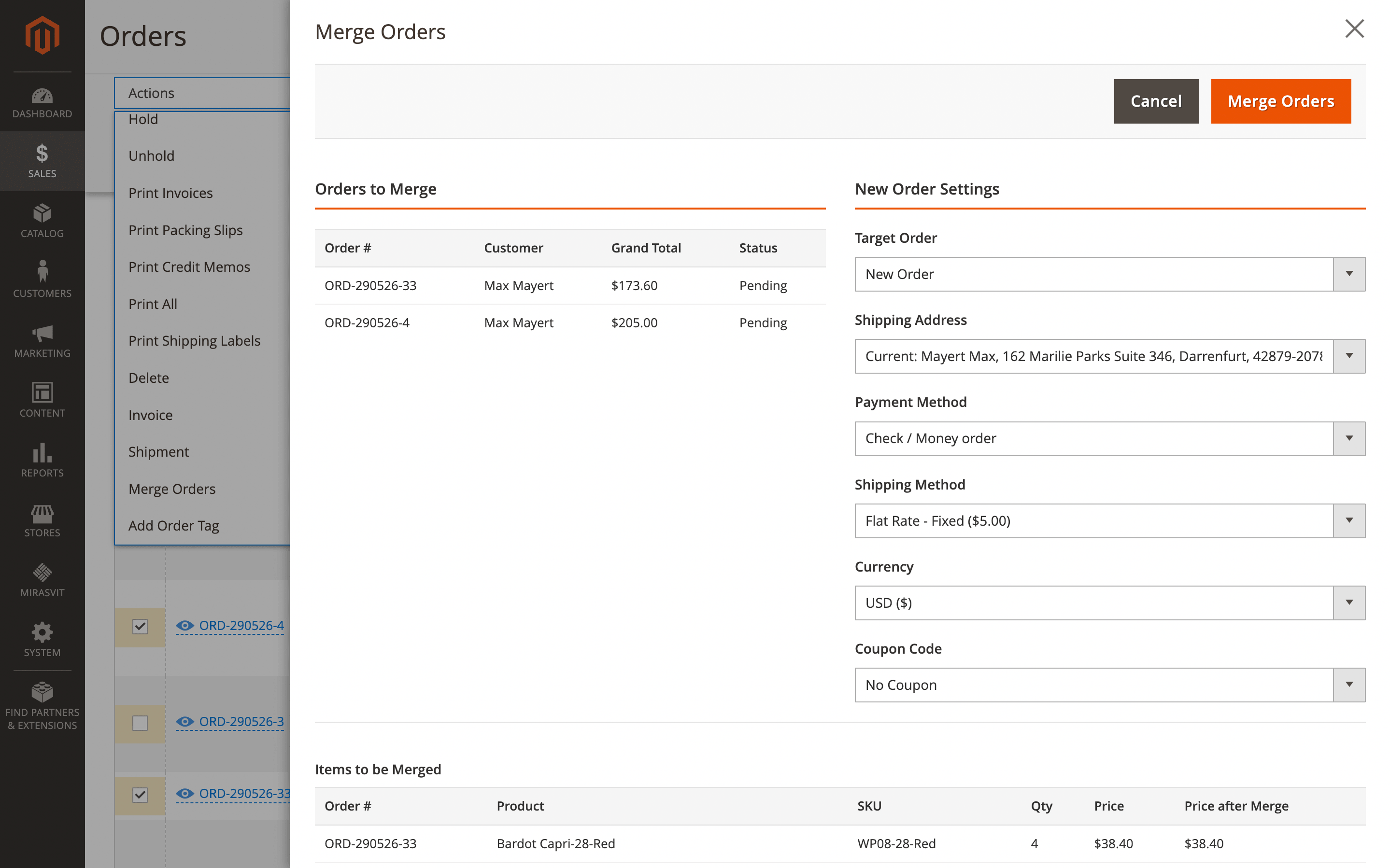
Your team reviews products and totals, then creates one combined order. Different currencies are converted automatically; the original orders are cancelled, and the timeline keeps the merge history. The admin user needs the Mass Merge Orders ACL permission, and restricted statuses can block finished orders from being merged.
🔥 Split Order action
Split Order covers the opposite case from the order view: one purchase can be separated when some items should ship earlier or move through another warehouse.
From Sales > Orders > Your_order, choose the items for each new order, preview totals, and confirm the split without rebuilding the purchase manually. The admin user needs the Mass Split Order ACL permission.
🔥 Restricted statuses for merge and split
You can define which statuses hide merge and split options, so shipped, invoiced, complete, or closed orders stay protected while editable orders remain available for corrections.
Set the lists under Stores > Configuration > Mirasvit > Order Management > Order Grid with Restricted statuses for Merge and Restricted statuses for Split.
🔥 Order Editor, Order Grid, and Order Tag REST API
REST API coverage includes Order Editor, Order Grid, and Order Tag, so connected systems can update order details, run mass actions, trigger merge or split, and manage tags without sending each task back to the admin panel.
Create a REST integration under System > Extensions > Integrations and grant the needed Order Editor, Order Grid, or Order Tag resources. Access follows Magento ACL permissions.
Follow Up Email
The Follow Up Email module adds more campaign moments to react to and makes delivery, previews, and large queues easier to manage.
🔥 RFC 8058 one-click unsubscribe headers
Every follow-up message now includes the RFC 8058 unsubscribe headers, so Gmail, Yahoo, Outlook, and other email clients can show a one-click unsubscribe option near the sender name.
For bulk senders, this protects deliverability: customers who want to leave your list get a clean exit path instead of using the spam button. Make sure your unsubscribe URL is set in Stores > Configuration > Newsletter > Subscription Options, and check DKIM, SPF, and DMARC for your sending domain.
🔥 Wishlist campaign triggers
Five wishlist moments are available as campaign triggers: back in stock, price drop, low stock, item added, and wishlist shared.
Your campaign can reach the shopper while the saved product is still relevant. A saved coat can trigger an email when the right size returns, the price changes, or only a few items are left. Create the trigger under Marketing > Email > Triggers and choose the needed wishlist event. Magento wishlist functionality must be enabled, with accurate stock and price data.
🔥 Product-level cart and order events
Two new product-level events make follow-ups more specific: Product / Added to Cart and Product / Ordered. Instead of reacting only to the whole cart or completed order, the campaign can match the exact item the customer added or bought.
Use them for care instructions, accessory suggestions, onboarding emails, or product-specific next steps. Set the trigger under Marketing > Email > Triggers, add conditions by SKU, category, or attribute, and use a deduplication window for Product / Added to Cart if needed.
🔥 Invoice, shipment, and credit memo events
Post-order events join the trigger list too: Invoice Created, Shipment Created, and Credit Memo Created. This gives you more room to shape communication after payment, delivery, or refund actions, instead of relying only on standard Magento notifications.
A refund email can include a feedback link, while a shipment message can add delivery tips and tracking details when the carrier returns them. Select the needed event under Marketing > Email > Triggers.
🔥 Indexed queues for faster delivery
Database indexes were added for queued email records, which matters most for stores with tens or hundreds of thousands of scheduled messages. Send loops spend less time scanning the queue, so large campaigns are less likely to miss their planned send windows.
Run bin/magento setup:upgrade after installing the new version to apply the database changes.
🔥 Campaign email preview
Campaign steps are easier to check before launch: an eye icon on each email card opens a rendered subject and content preview directly in Marketing > Email > Campaigns.
You can review multi-step flows without sending test emails or opening templates in separate tabs. Randomized test data is used, so no real customer records are touched. The preview is available automatically after the update.
🔥 On-demand Follow Up Email tab
Customer profiles no longer load the full email history upfront. The Follow Up Email tab opens on demand and adds sorting, filters, the subject column, and a Cancel action for pending emails.
Support can quickly check what a customer received or stop an abandoned cart reminder after the customer has already completed the order. The behavior applies automatically.
🔥 Pre-built campaign templates
Sample data includes two ready-made starting points: Wishlist Campaign and Customer Re-engagement. They give you a base for back-in-stock, price-drop, low-stock, or reactivation emails without building the whole campaign from scratch.
Install the module's sample data, then open Marketing > Email > Campaigns to review and adjust the templates. Wishlist campaigns depend on enabled Magento wishlist functionality and accurate stock and price data.
Advanced Product Feeds
Advanced Product Feeds moves more catalog delivery from manual files to direct channel submission inside Magento.
🔥 Google Merchant Center direct submission
Google Merchant Center feeds can be submitted through the Merchant API directly from Magento, without manual uploads, FTP handoffs, or separate fetch schedules.
Each feed can keep its own target countries, content language, feed label, fetch frequency, and upload trigger. Configure the connection in Stores > Configuration > Mirasvit Feed > Google Merchant Center, then enable submission for the needed feed in Catalog > Feeds. After updating, run bin/magento setup:upgrade. If the Google Merchant SDK is missing, your developer may need to install it separately.
🔥 Non-product feeds in Google Merchant Center
Merchant API submission also covers feeds beyond the main product catalog: supplemental data, local inventory, regional inventory, promotions, and product reviews.
Select the needed Content Type in the feed's Google Merchant API settings. For existing installations, run bin/magento setup:upgrade and use Import Templates in the admin to update bundled Google templates.
🔥 ChatGPT feed template
A built-in ChatGPT CSV template gives you a prepared structure for OpenAI's Commerce platform. Required product, seller, and policy fields are already mapped, so you do not start from a blank feed.
Create it under Catalog > Feeds > Add New Feed by selecting ChatGPT. An OpenAI Commerce account and a destination for the generated file are still required.
Search Ultimate
For stores where search spans several catalogs, languages, or custom themes, the Search Ultimate module brings tighter control over results, matching, and storefront feedback.
🔥 Store-root search result restriction
Multi-store catalogs can share products, but shoppers should not see results from the wrong storefront. A new restriction keeps search inside the current store view's root category tree, so a German store view does not surface products, categories, or CMS pages meant only for another region or brand.
Enable Restrict to current store root category under Stores > Configuration > Mirasvit > Search Ultimate > Multi-store and cross-store search. The option works per website or store view, stays disabled by default for existing stores, and does not require reindexing.
🔥 Wildcard mode per searchable attribute
A single wildcard rule for every searchable field can make results too loose. SKU search usually needs strict matching, while product names or descriptions can benefit from prefix or infix matches.
Each searchable attribute can have its own wildcard mode: prefix, suffix, infix, or disabled. That lets you keep SKU results clean without making name and description search too rigid.
Choose the mode on the search index edit page, then save and reindex. This works with OpenSearch or Elasticsearch.
🔥 Stricter spell-correction suggestions
Spell correction becomes stricter, so "Did you mean…?" suggestions are less likely to distract shoppers with unrelated alternatives. Corrections require stronger initial-character matches, tighter edit-distance checks, and they skip terms that already exist in the index.
Product and category attribute values also feed the spell-check dictionary, giving suggestions more store-specific context. Reindex once after updating to refresh the dictionary.
🔥 Custom elements for search term highlighting
Custom themes often move product names, brands, or short descriptions into non-standard markup. Search highlighting can now reach those extra elements through CSS selectors, not only the default product name link.
Add the selectors in Additional elements to highlight under Stores > Configuration > Mirasvit > Search Ultimate > Search results and display > Search refinements and visibility, then save and clear cache.
🔥 Category search term highlighting
Matched terms are also highlighted when shoppers search inside a category. This closes the visual gap between main search and category search, so customers can scan in-category results faster and see why a product matched their query.
The change applies automatically after the module is updated.
🔥 Arabic character normalization
Arabic search gets character normalization during both indexing and search. Different forms of the same character can match more reliably, so valid Arabic queries are less likely to miss relevant products because of spelling-form differences.
Reindex once after installing the new version. This applies to Elasticsearch-based search.
🔥 Configurable category path display
Category results can be shown with either the full path or only the final category name. Use the full path when shoppers need context, such as Men > Shoes > Sneakers, or keep only the name when a shorter result row works better.
Change Category path display in the Category search index, then save and reindex.
eChat
The eChat extension brings chatbot replies closer to real storefront data, while making guest lookups, synced content, and request handling safer.
🔥 Sale prices and price ranges in chat
Configurable, grouped, and bundle products no longer have to be answered with one parent price. Chat replies can include the cheapest variant, a from/to range, and strikethrough regular prices where relevant.
When a shopper asks about a T-shirt, jacket, or bundle, the answer better matches the product card instead of showing a number they cannot find in the catalog.
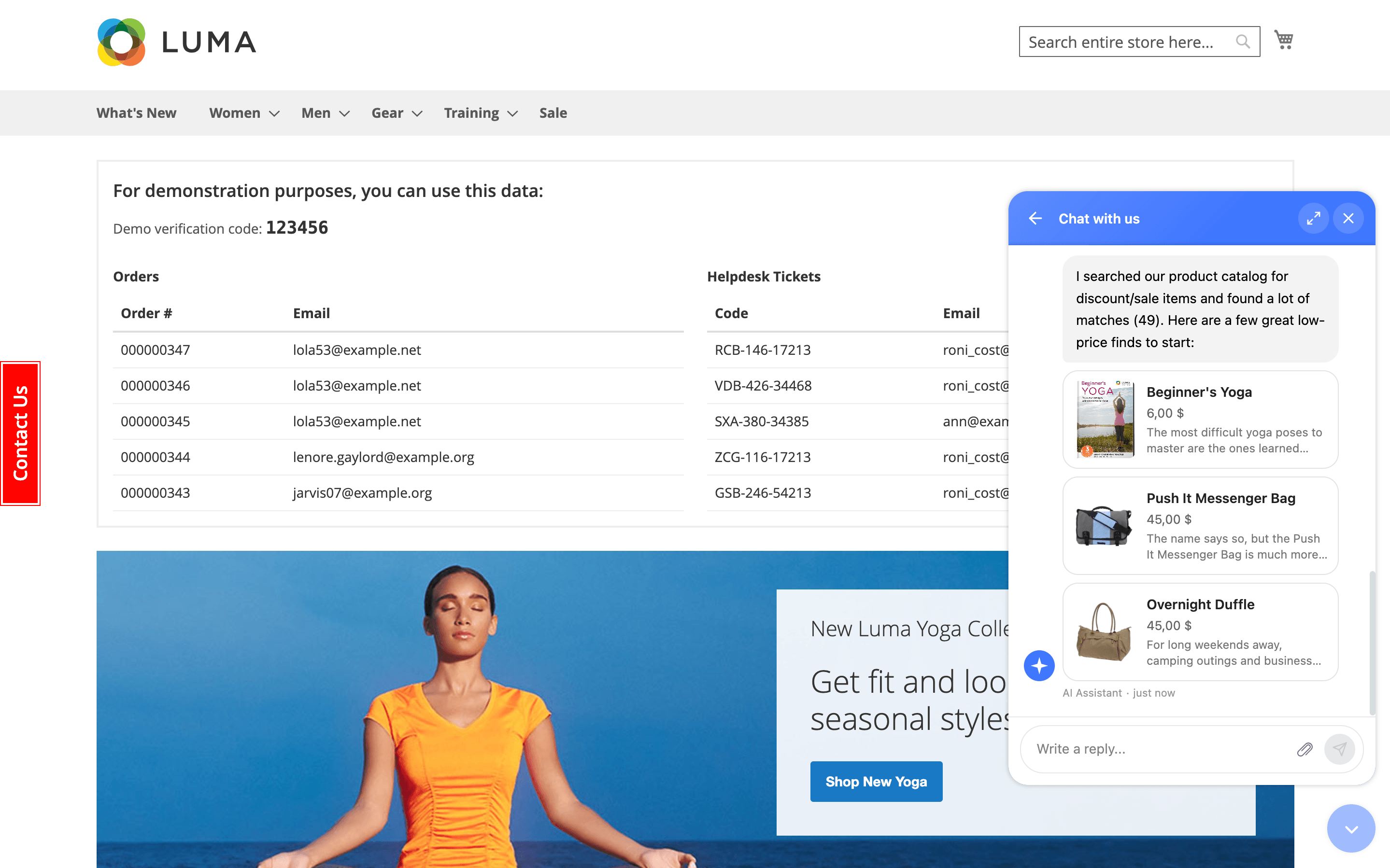
Trigger chat sync to pass these values into chat. Accuracy still depends on how prices are configured in your catalog.
🔥 Product images in chatbot replies
Chat recommendations can include product images, not only names and prices. The product export includes image URLs, so replies can show pictures together with names and prices.
A request like "show me a warm winter jacket under $200" can turn into a visual shortlist, not just a text list of options. Image URLs are picked up during product sync, as long as products have images assigned in your catalog.
🔥 Guest verification for sensitive lookups
Guest order checks get an extra protection step. Before the chatbot returns order details, invoice links, or helpdesk tickets, the visitor must confirm access with a one-time code sent to the email from the order.
Logged-in customers checking their own data skip this step, so regular self-service stays smooth. The flow works automatically for guest lookups; transactional email delivery must be working so customers receive the code.
🔥 Chatbot tool call limits
The chatbot tool endpoint is capped at 30 calls per minute per IP. Real shoppers should stay far below that limit, while scrapers, broken scripts, or runaway frontend requests receive a "Too many requests" response.
This helps protect AI token spend and PHP workers without adding admin configuration.
🔥 Multiselect attributes and category metadata
Product sync includes multiselect attributes, so the chatbot can use values like material, climate, style, or use case in product answers. A request such as “show me wool sweaters for cold weather” can rely on actual catalog data instead of missing those filters.
Category sync also sends meta title and meta description, giving category recommendations more context from the SEO copy you already wrote.
Refresh product and category data so these fields reach the chatbot. Multiselect attributes need to be configured on the product side.
🔥 Cleaned rich-text content for the chat index
Page Builder content, rich HTML, and embedded technical markup are cleaned before indexing. Directives are expanded into readable text, style and script blocks are removed, and HTML entities are decoded.
This gives the chatbot cleaner source content from product descriptions, category pages, CMS pages, knowledge base articles, and store hours, so answers are less likely to miss key information or repeat messy raw text.
The next sync uses the processed content automatically.
Advanced SEO Suite
The Advanced SEO Suite module closes technical SEO gaps that are easy to miss on larger stores.
🔥 Entity-based XML sitemaps
One mixed XML sitemap is no longer the only option for large catalogs. You can generate separate files for products, categories, CMS pages, blog posts, and other content types, while the main sitemap works as an index.
Search Console checks become clearer: if one content type starts dropping from Google's index, you can spot the affected area faster. Enable Split sitemap by entity type under Stores > Configuration > SEO > Sitemap > XML, then save and regenerate the sitemap.
🔥 Material and pattern product schema fields
Product schema gains dedicated Material and Pattern mappings. Values like fabric, finish, print, or texture can be sent as proper top-level schema.org fields instead of falling into generic properties or missing markup entirely.
Map existing Magento attributes under Stores > Configuration > SEO > Rich Snippets > Product, then save and clear cache. ProductGroup markup also includes inProductGroupWithID to keep variants tied to the parent product group.
🔥 Self-redirect validation
A self-redirect can break a page with one small admin mistake. The Redirect form now blocks rules where Request URL and Target URL are the same, and shows an error before the loop reaches the storefront.
The validation works directly in the form, with no extra setup.
AI Assistant
AI Assistant extension gives bulk content workflows better input, provider choice, batching, and cleaner output.
🔥 Existing field values in AI prompts
Automation rules can now pass the current field value into the prompt as global.input. For translations, rewrites, summaries, or description expansion, the AI receives the source text automatically instead of relying on CSV exports or manual copy-paste.
Enable Include target field value into prompt in Marketing > AI Assistant > Rules and reference { global.input } in the linked prompt.
🔥 Grok (xAI) provider
Grok is added to the provider list, so prompts are no longer limited to OpenAI, Claude, and Gemini. You can use it as the default model or select it only for specific prompts when comparing quality, cost, or style.
Add your xAI key under Stores > Configuration > Mirasvit > AI Assistant > Grok settings. For individual prompts, select Grok in Marketing > AI Assistant > Prompts. A valid xAI API key with a Grok plan is required.
🔥 Batch limit for apply-rule CLI
Large AI rules can run in controlled batches with the new --limit option. A catalog translation task, for example, can process a set number of products per run instead of one long job with unpredictable token spend.
Already processed records are skipped in later runs. Use bin/magento mirasvit:assistant:apply-rule --rule-id=<id> --limit=1000 from CLI or add it to cron.
🔥 Cleaner AI output without preambles
Built-in prompts were refined to return only the text that should be saved. Chat-style wrappers, labels, quotes, notes, or code fences are less likely to end up in product fields.
The cleaner defaults apply after the update. For older custom prompts, review the wording and add the same rule: return only the final field value.
Advanced Reviews
The Advanced Reviews module strengthens the places where reviews influence trust: search snippets, product pages, guest reviews, and moderation.
🔥 Product review JSON-LD on product pages
Product pages start sending review data to Google in schema.org/Product JSON-LD: aggregate rating and approved reviews are included when the product has at least one approved rated review.
That gives star ratings a better chance to appear in search results, while the 20-review cap keeps the markup from adding too much page weight. No setting is required; validate the output with Google's Rich Results Test.
🔥 Reviewer email capture
Guest reviews gain an email field, and logged-in customers use their account email automatically. This makes guest reviews easier to connect with real orders and gives your team a contact point when a negative or unclear review needs follow-up.
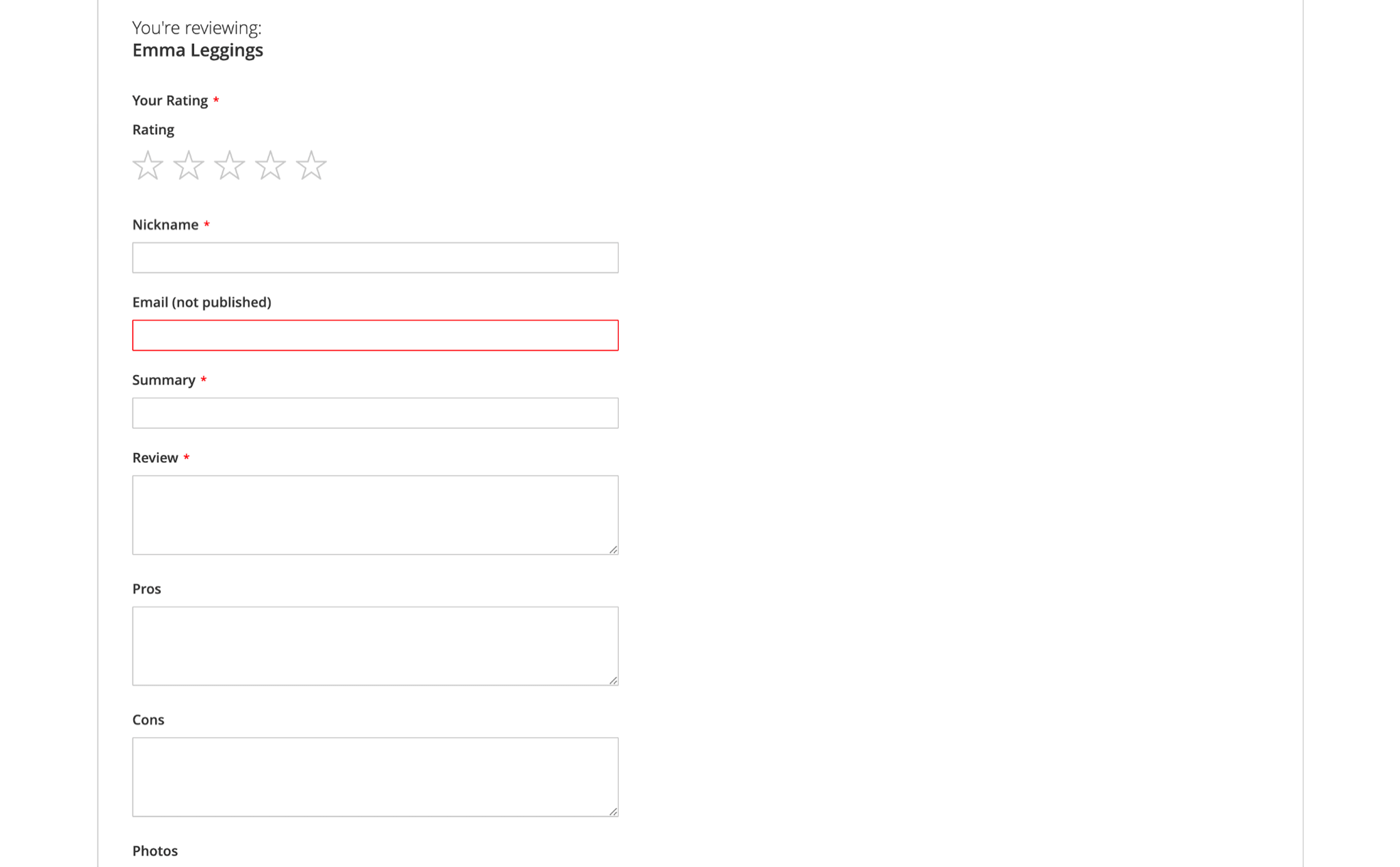
The email is also available in the admin grid for filtering and moderation. After updating, run bin/magento setup:upgrade to add the required database column and backfill emails for existing logged-in customer reviews.
🔥 Spam filtering before moderation
Spam reviews are filtered before they enter moderation. Automated submissions are silently dropped, so your team spends less time clearing bot content from the queue and more time checking real customer feedback.
The protection starts working automatically after the module update.
🔥 Photo upload limits and hints
Photo upload rules move from hidden or rigid limits to visible storefront guidance. You can set the maximum file size, define how many photos a shopper may attach, or use 0 where no limit is needed.
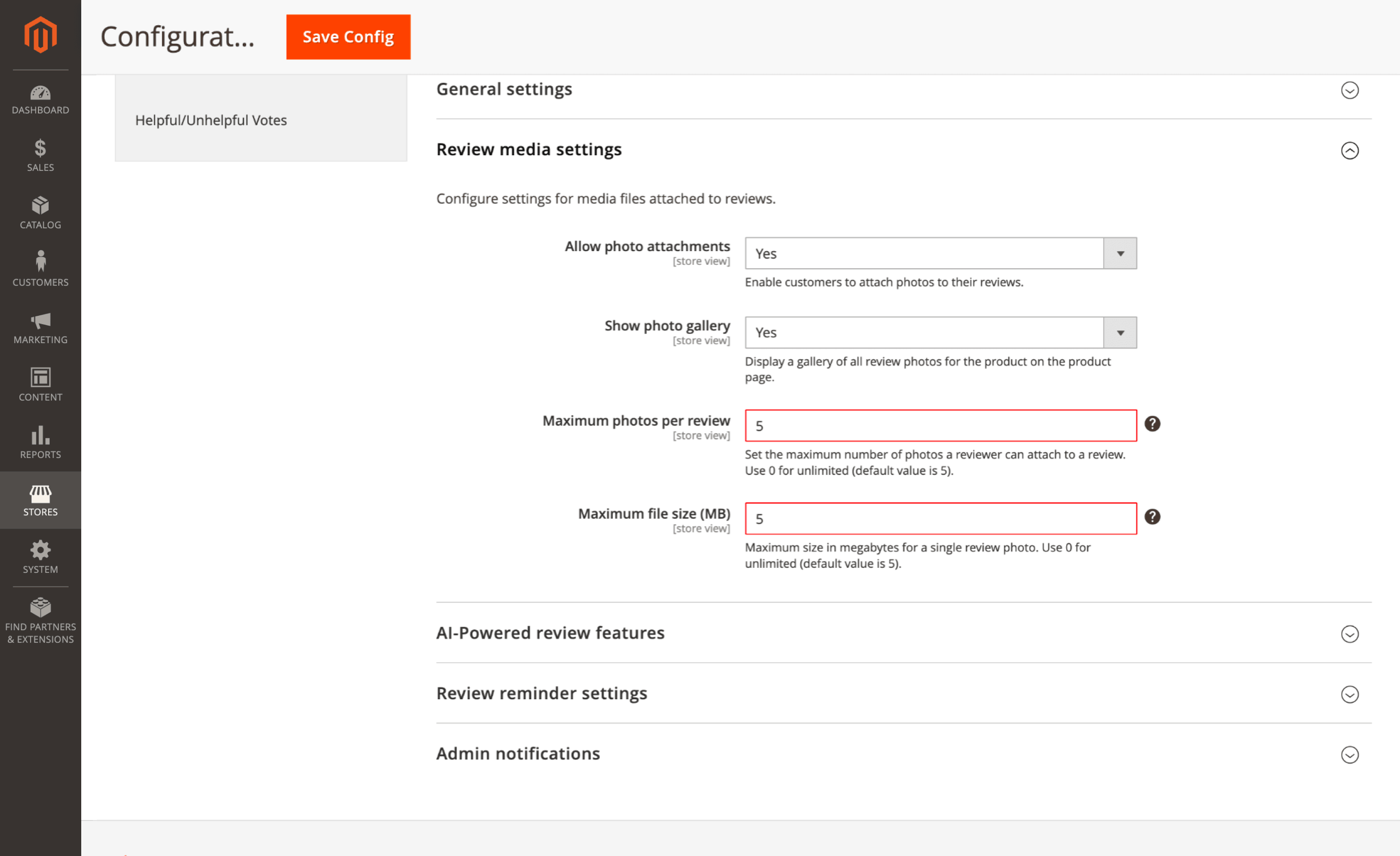
The uploader shows these limits before file selection, reducing failed uploads. Configure them under Stores > Configuration > Mirasvit > Reviews > Media with Maximum file size (MB) and Maximum photos per review.
🔥 Storefront product links in All Reviews
The Product column in the All Reviews grid now links directly to the storefront page, so moderators can check the reviewed item without copying SKUs or searching manually.
Product Kit
The Product Kit extension reduces silent kit failures before campaigns reach the storefront.
🔥 Kit health status in the grid
The Catalog > Product Kits grid adds a Health column, so broken bundles are easier to catch before launch. If a kit has an expired schedule, missing item, no primary product, or invalid combination, the grid shows a red indicator with the reason in a tooltip. Valid kits get a green mark.
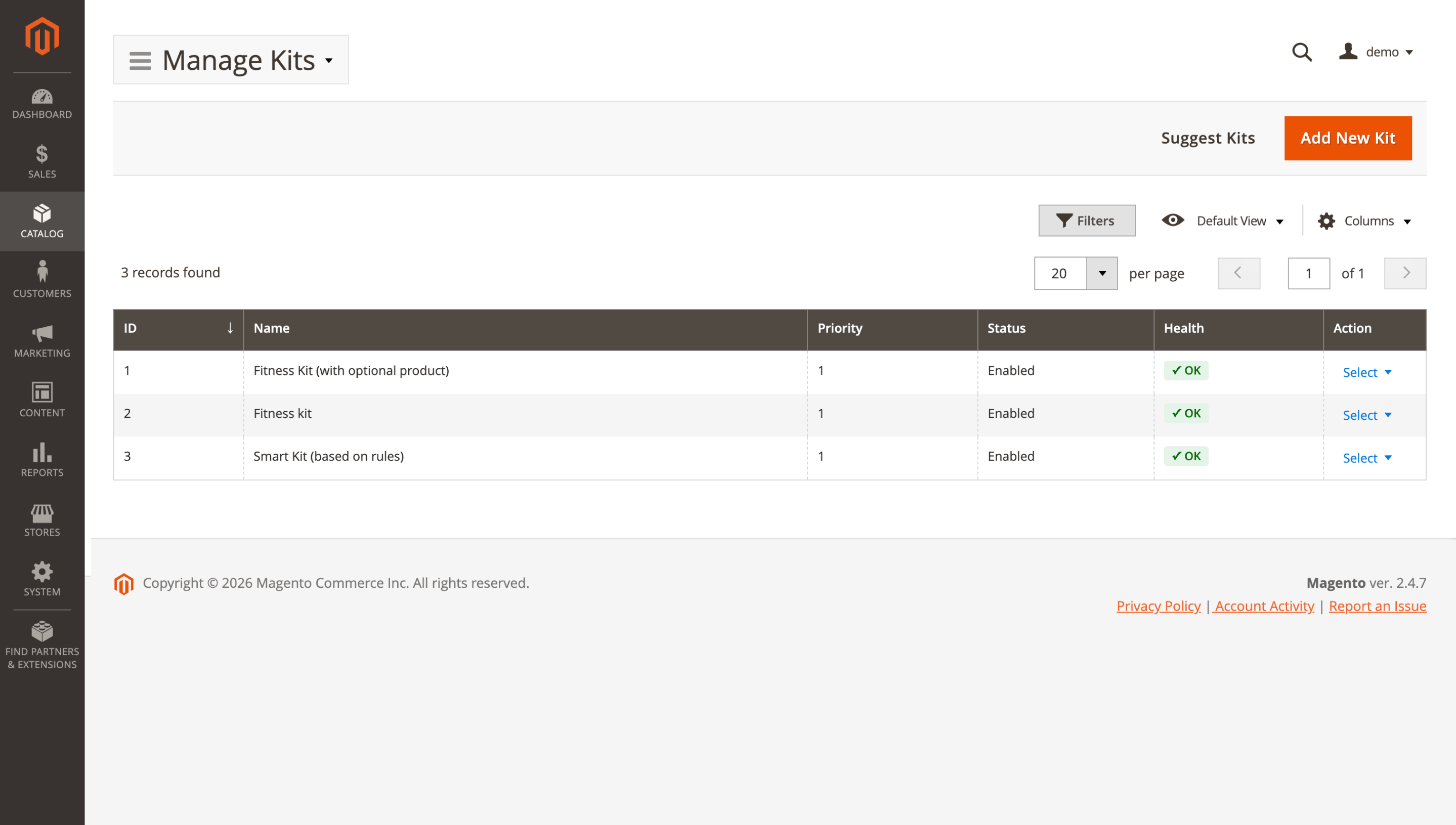
Run bin/magento setup:upgrade after updating to add the required health fields. Health refreshes every two hours by cron and on each kit save; for an immediate check, run bin/magento product_kit:health:reindex.
🔥 Optional item stock handling
A sold-out optional item no longer has to remove the whole kit from the storefront. If Allow Out Of Stock items for kit is set to No, the unavailable add-on is hidden, while the kit can stay visible when another valid combination exists.
The existing setting under Stores > Configuration > Mirasvit Extensions > Product Kit controls this behavior.
🔥 Store-view kit titles and discount labels
You can set kit titles and cart discount labels per store view, so each language or brand shows the right bundle wording. Empty fields fall back to the default value.
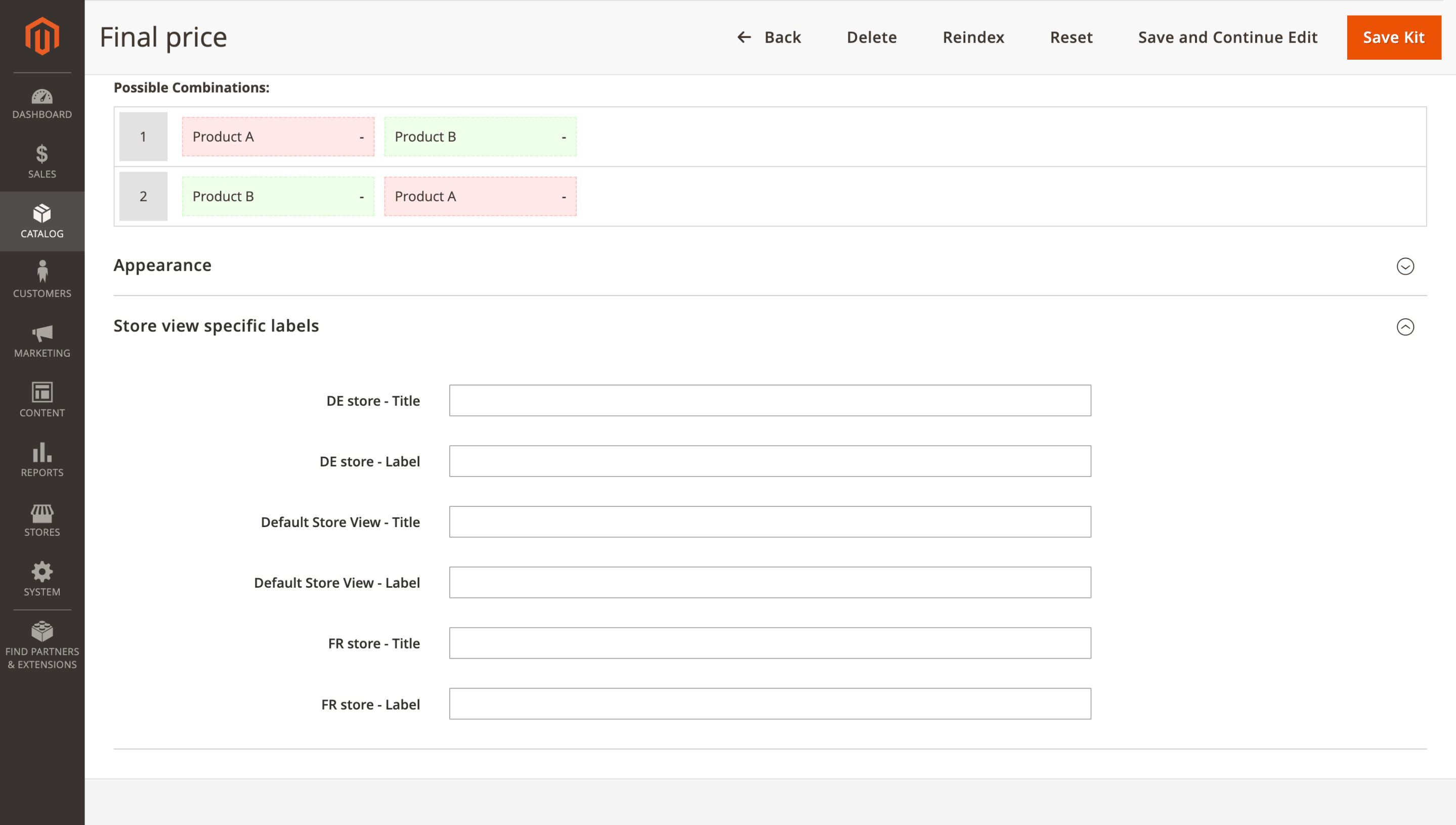
Add overrides under Catalog > Product Kits > Open_a_Kit > Store view specific labels, then save the kit. Run bin/magento setup:upgrade after updating to add the required database table.
Automatic Related Products
🔥 Recommendation blocks, rules, and analytics REST API
REST API support in the Related Products module opens blocks, selection rules, and analytics to external systems. Merchandising tools can update recommendation blocks without manual admin changes, while BI dashboards can pull clicks and conversions without CSV exports or direct database queries.
Create or update a REST integration under System > Extensions > Integrations, grant the needed Related Products ACL resources, and use the standard Magento REST API token. Endpoints are available under /V1/mst-related/blocks, /V1/mst-related/rules, and /V1/mst-related/analytics.
Knowledge Base
The Knowledge Base extension moves help content closer to storefront pages, so answers can appear where customers make product or category decisions.
🔥 Knowledge Base content in Page Builder
Knowledge Base content used to depend on the standard WYSIWYG editor, which limited layout work and often meant manual formatting. Page Builder support changes this: editors can place Knowledge Base content inside product, category, or CMS page layouts and arrange it visually.
Add the Knowledge Base content element in Page Builder, configure it, and save the page. Magento Page Builder must be enabled.
🔥 FAQ sections on storefront pages
FAQ articles can be assigned to selected products, categories, or CMS pages instead of sending shoppers to a separate help article or duplicating the same answer across page text.
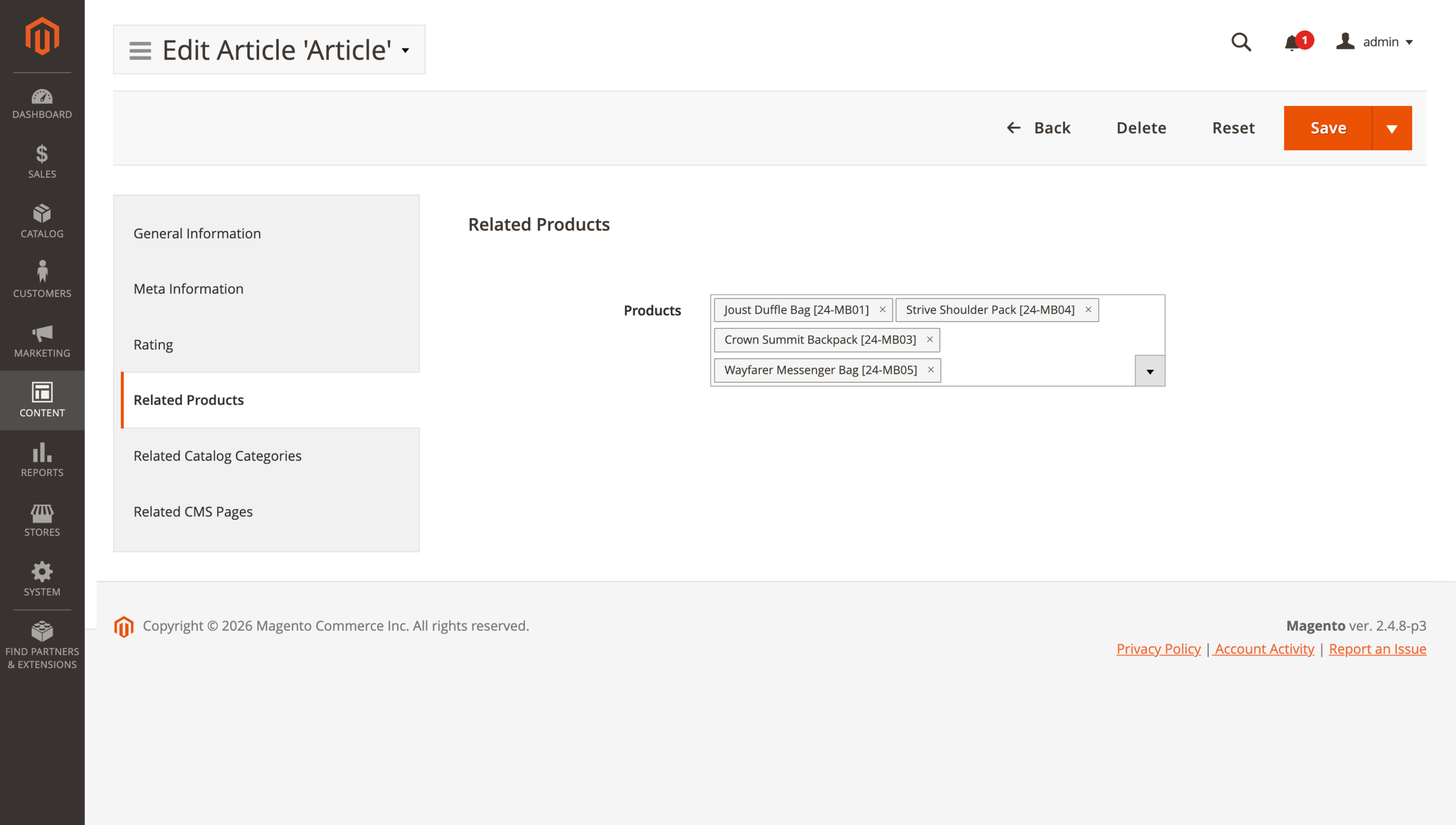
The article stays managed in Knowledge Base, while the answer appears in context, for example sizing on a product page or delivery details in a category. Open the article, select the related pages, and save. The Enable FAQ Section setting must be enabled in configuration.
AI Copilot
🔥 Currency-aware AI answers
Currency handling in AI Copilot module has been corrected for multi-currency reports and order checks. Cross-order summaries use the store's base currency, symbol, and locale, so totals are comparable instead of mixing currencies or showing raw numbers.
For example, when you ask about today's revenue, the answer stays in one base currency. When you check a single order, AI Copilot can still show what the customer paid alongside the base amount, such as €89, equivalent to $96.
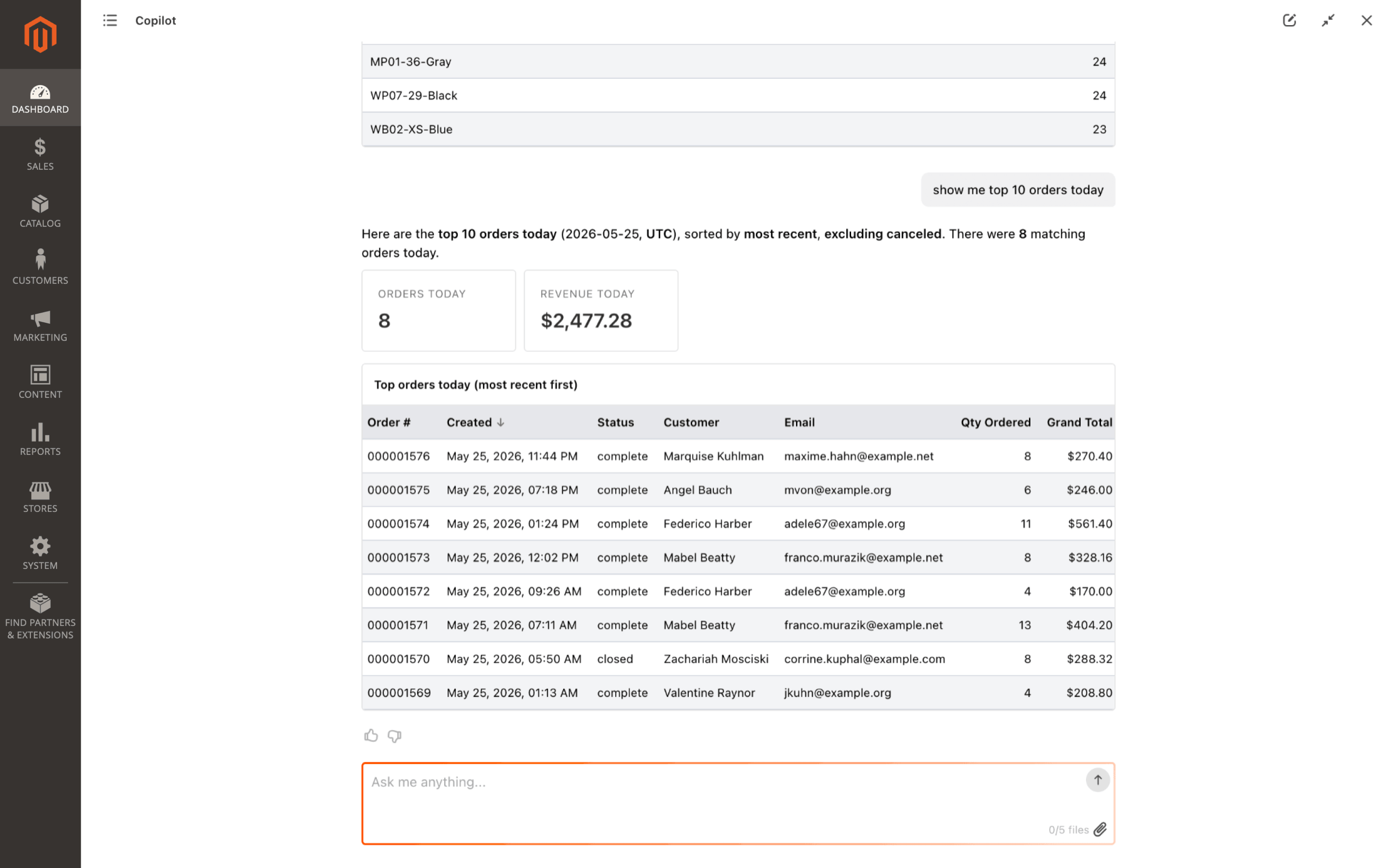
Formatting follows your existing Magento settings. Check Stores > Configuration > General > Locale Options and General > Currency Setup if the displayed currency, symbol, or locale needs adjustment.
Geo IP Redirect
🔥 Country and browser-locale rule condition
In the Geo IP Redirect extension, redirect rules gain a combined Country and Browser Locale condition. You can target a precise country-locale pair, such as Canada + fr-CA, without building extra logic around separate location and browser-language rules.
For multilingual stores, redirects become more precise: shoppers land on the store view that matches both signals, while partial matches stay outside the rule.
Set it under Stores > Configuration > Mirasvit > Geo IP > Rules. Add Country and Browser Locale in Conditions, choose the needed values, then save and clear cache. The GeoLite2 database must be installed.
Blog MX
The Blog MX module brings cleaner navigation for content-heavy blogs and gives comment threads a way to continue after readers leave the page.
🔥 Tree mode for the Category widget
The Category widget no longer has to flatten multi-level blog categories into one long sidebar list. You can switch it to a collapsible Tree mode, where parent categories stay visible and nested branches open only when needed.
For deeper blogs, this keeps navigation more compact. The optional Context filter can show only the current category branch instead of the full blog structure everywhere.
Set Display mode to Tree in the Category widget instance, enable Context filter if needed, then save and clear the page cache.
🔥 Commenter emails and reply notifications
With mirasvit/module-comment 1.2.0 or newer, comment threads become easier to continue: the form can collect commenter emails, send reply notifications, and optionally require an email from guests.
Admins also get a Comments link in the Blog MX admin menu, so moderation is easier to reach.
Update mirasvit/module-comment to 1.2.0 or newer, then open Stores > Configuration > Mirasvit > Blog MX > Comments. Choose whether guest email is required, check the reply notification template, and save.
Google Tag Manager{#gtm}
The Google Tag Manager extension cleans up tracking where small frontend workarounds can affect ad data or storefront speed.
🔥 google_business_vertical in dynamic remarketing payloads
Dynamic remarketing payloads gain a native google_business_vertical value for Google Ads. Instead of maintaining a custom JavaScript patch in GTM, your setup can use the value selected in the extension configuration.
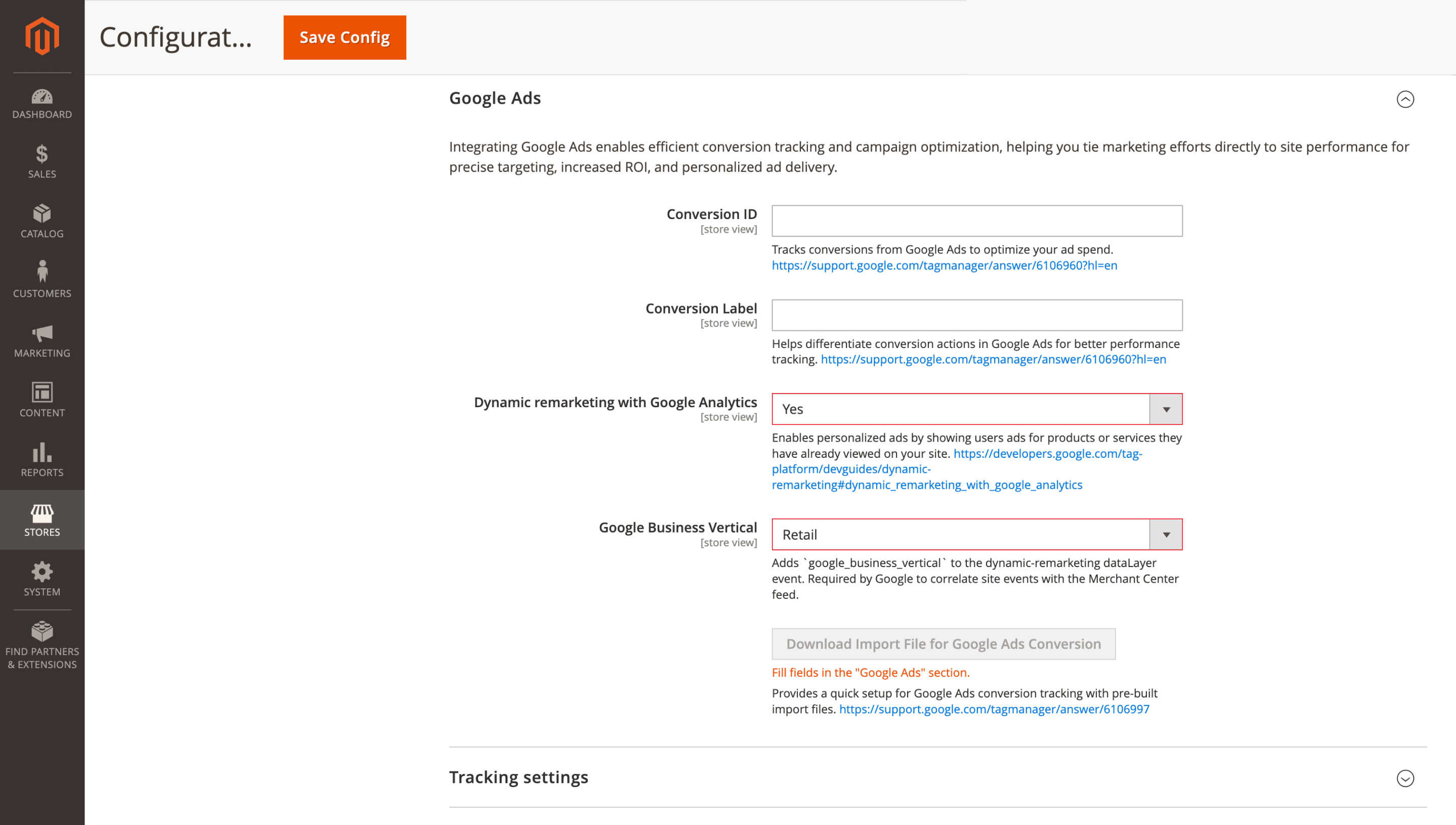
Fewer tracking workarounds means less risk after theme, container, or tag changes, and cleaner validation for Google Ads remarketing.
Select Google Business Vertical in the extension configuration. Google Ads dynamic remarketing must also be active in your GTM container.
🔥 Lighter add-to-cart tracking
Add-to-cart tracking has been lightened to avoid heavy requests during one of the most sensitive storefront actions. On high-traffic stores or slower devices, the button interaction stays smoother while GTM data remains available for analytics and ads.
Install the updated extension, and the optimized flow applies automatically.
Product Labels
Product Labels module reduces reindex-related risks that can affect visible storefront badges on large catalogs.
🔥 Visible labels during full reindex
Full label reindexing no longer creates a storefront gap while the index is being rebuilt. Active badges stay visible during the process, so shoppers do not browse product lists without Sale, New, Best Seller, or other labels that should still be shown.
For large stores, this keeps merchandising stable during long backend jobs instead of letting a full reindex temporarily remove promotional cues from the catalog.
The behavior applies automatically to full reindexes.
🔥 Full reindex overlap protection
The reindex process also handles overlapping runs more safely. If a manual full reindex starts while a scheduled cron reindex is already running, the second attempt is skipped and recorded in the logs instead of competing for the same label data.
The finished index is less likely to be corrupted by two rebuilds at once, reducing the risk of incorrect badges after maintenance.
No configuration is required.
Affiliate
🔥 External embeds for affiliate banners and referral widget
Official affiliate banners and referral widgets are easier to place outside your store domain. The Affiliate extension adds the cross-origin headers browsers need for external embeds, so partners can use the standard iframe or script snippet instead of hosting separate promo images.
After updating, use the standard banner or referral widget snippet on the partner site. No Magento-side setup is required, but the external site still needs to allow iframe or script loading
Advanced Reports
🔥 timeRange validation in REST API
The Advanced Reports module adds validation for REST API timeRange values. If a request contains an unsupported period, such as last_week instead of a supported preset, the endpoint returns a clear error instead of silently falling back to "today."
Report integrations become easier to debug: developers see the wrong parameter immediately instead of investigating empty charts or suspicious dashboard data.
Use the standard /V1/mst-reports/ REST endpoints as before. The integration needs Magento REST access with the appropriate Advanced Reports ACL permissions.
That's the full set of June updates we prepared. You can also follow the latest fixes, improvements, and release details across all our modules in the full changelog.
Mirasvit Support Engineer
Magento 2 Reports Extension gives you 20 ready-to-use reports, a custom report builder, and multiple dashboards - everything Magento's default reports leave out.
Install Magento 2 Advanced Reports and take your online store's analytics to the next level!
Promote your products and achieve higher sales by using the power of marketplaces and comparison shopping engines with magento data feed extension. You can automatically generate and deliver feeds of your product catalog to those services with Magento Product Feeds extension.
This tool is unbelievably quick to use and is also outstandingly flexible. It's compatible with all major shopping and advertising services, including Google Shopping.
Feeds go straight to Google Merchant Center through Google's API, and AI profiles can rewrite titles, map Google categories and fill in missing attributes before your catalog ever reaches a marketplace.
Simply install the module, generate your very own product feed, present your catalog to a wider audience, and boost your sales right now!
Turn store events into email: abandoned cart reminders, review requests, win-backs, birthday greetings and order follow-ups, each triggered automatically and each reported with the revenue it brought in.
From meta tags to the sitemap, the Magento 2 SEO Extension gives you full control over every SEO-related feature in your store.
It automates the SEO work you'd otherwise do by hand - templated meta tags, rich snippets, redirects, sitemaps, cross-links and a built-in SEO audit - across every page type. That is why 2,435+ Magento stores rely on it.
A knowledge base and FAQ for your Magento 2 store: articles in categories and tags, with search, ratings and SEO-friendly URLs.
Show the same answers in FAQ blocks on product, category and CMS pages, suggest them in the Help Desk contact form before a ticket is created, and give search and AI engines a page with structured data for every answer.
Product Labels adds sale, new, stock and brand labels to product images by rules and product attributes, so they appear and disappear as prices, stock and the catalog change.
Labels can show the real discount or the stock left, use one of 12 editable templates or your own image, and appear on category, search and widget listings and on the product page, on Luma and Hyvä.
Blog MX runs your blog inside Magento, with Page Builder posts, comments, and SEO checks in the admin you already use. Every post, category, author, and tag can differ per store view.
Run your own affiliate program in Magento 2, without paying an affiliate network a cut of every commission. Affiliates promote your store with referral links, product links, banners, widgets and coupons, and earn per sale, click, lead or banner impression.
You set the rates by program, affiliate group and first or repeat order, see how each commission was calculated, and pay affiliates through PayPal, Skrill, your own method or store credit.
Fast, relevant store search lifts conversion rate and revenue.
It powers search for thousands of Magento stores, from catalogs of a hundred products to millions of SKUs.
The Elasticsearch extension returns relevant results within milliseconds, across products, categories, CMS pages, and 15+ other content types.
Give customers search that helps them find and buy the products they want - faster and with fewer dead ends.
The Automatic Related Products extension fills related, up-sell and cross-sell blocks for you. It picks products by rules you set, using what your customers actually buy and view, and shows how much revenue each block brings, so you keep the blocks that sell and change the ones that don't.
Product Kits shows discounted product sets on the product page and in the cart, so shoppers add the whole kit in one click. Set a discount for each item with six discount types, and build kits by hand, by rules or from your order history.
This Magento 2 order management extension lets you fix a placed order without canceling it and re-entering everything.
Edit items, prices, taxes, discounts, the coupon, shipping and payment methods, the shipping address and customer details, even on invoiced orders: if the total goes up, the customer gets a link to pay the difference. Merge or split orders, add product, billing and shipping columns to the orders grid, tag orders by rules and set custom numbers for orders, invoices, shipments and credit memos.
Add GA4 ecommerce tracking and Google Tag Manager to your Magento 2 store without editing theme code.
The extension sends 17 GA4 events, from product list views to refunds, comes with ready GTM containers for GA4 and Google Ads, and shows every event in a built-in debug toolbar.
AI Assistant writes the content your catalog needs, inside the Magento 2 admin: product and category descriptions, meta tags, blog posts, ticket replies, and newsletters. It works with OpenAI (ChatGPT), Anthropic (Claude), Google (Gemini), and Grok (xAI), and bulk work runs as rules you can target by conditions and test with a dry run first.
Advanced Reviews adds an AI summary, photos and separate pros and cons fields to Magento 2 product reviews, and sends review request emails after each order to bring in new ones.
A Verified Buyer badge or a buyers-only rule shows shoppers which reviews to trust, and review grouping fills the review block of variants and similar products, on Luma and Hyvä.
Mirasvit Copilot is a Magento 2 AI agent embedded directly in the admin panel. Ask questions, pull data, and take action using natural language. No SQL, no code, and no AI subscription for each user: one provider key covers the whole store.