Mirasvit Latest Updates — May 2026
-
 Andriy Kovalenko
- Our News & Updates
- May 4, 2026
- 18 min read

This month's updates touch AI-assisted admin work, REST API connections, catalog filtering, customer chat, content, returns, backend search, and exports. The goal is simple: make store data easier to use, reduce manual checks, and give shoppers more accurate answers.
The highlights show this especially well. In the AI Copilot module, approved store data, documentation, and admin tools can support routine questions directly in chat, so your team spends less time moving between reports, exports, manuals, and developer requests.
The Layered Navigation extension helps reduce false clicks in filtered results. If a shopper selects Red XL and that variant is out of stock, the parent product can be hidden instead of leading them to a dead-end product page.
The eChat module gets richer product, store, and CMS data for customer-facing answers, making replies about discounts, policies, contacts, and other common questions more accurate.
Let's look at the full set of changes and how they affect your store.
Note: Some new functions work automatically, while others require admin configuration; in both cases, the first step is to update the relevant extension.
Table of Contents
- AI Copilot
- Layered Navigation
- eChat
- REST API coverage for external systems
- Affiliate
- Blog MX
- Follow Up Email
- Full Page Cache Warmer
- MCP Server (AI Agent Connector)
- Order Management
- RMA
- Backend Search (Admin Quick Search)
- Form Builder
AI Copilot
This release makes the AI Copilot module more useful as an operational assistant for Magento admins, with stronger store context, reusable workflows, richer chat input, and more flexible storefront and admin tools.
🔥 AI answers from approved store sources
Many AI requests become more valuable when the answer is tied to your actual store setup. The new toolset gives the assistant access to approved sources available to the current admin role: REST API, read-only database access, GraphQL, store information, module documentation, and manuals.
Instead of checking reports, exports, manuals, or asking a developer for a query, your team can use chat for quick operational checks: order totals, store details, configuration guidance, or other data-backed questions.
To use these tools, add your OpenAI API key in Stores > Configuration > AI Copilot, then configure access in Stores > Configuration > MCP Tools. Permissions are controlled through System > Permissions > User Roles.
🔥 Multi-step tasks with module agents
Broader admin questions often involve several connected checks, not just one quick answer. With this update, you can ask for a larger task and let the assistant break it into smaller steps, process them in sequence, and return one combined result.
For everyday analysis, this reduces the manual work between reports and admin sections. Instead of separately checking sales data and then inventory, you can ask for top products with stock levels and get the full answer in one place.
The feature works automatically. Dedicated agents appear when compatible modules, such as Help Desk MX or Advanced Reports, are installed.
🔥 Reusable prompts and slash commands
Recurring AI workflows can be turned into reusable MCP prompts, so your team does not have to rebuild the same instructions in every chat. Prompts may include slash commands, variables like {placeholder}, REST API access, and YAML definitions provided by modules.
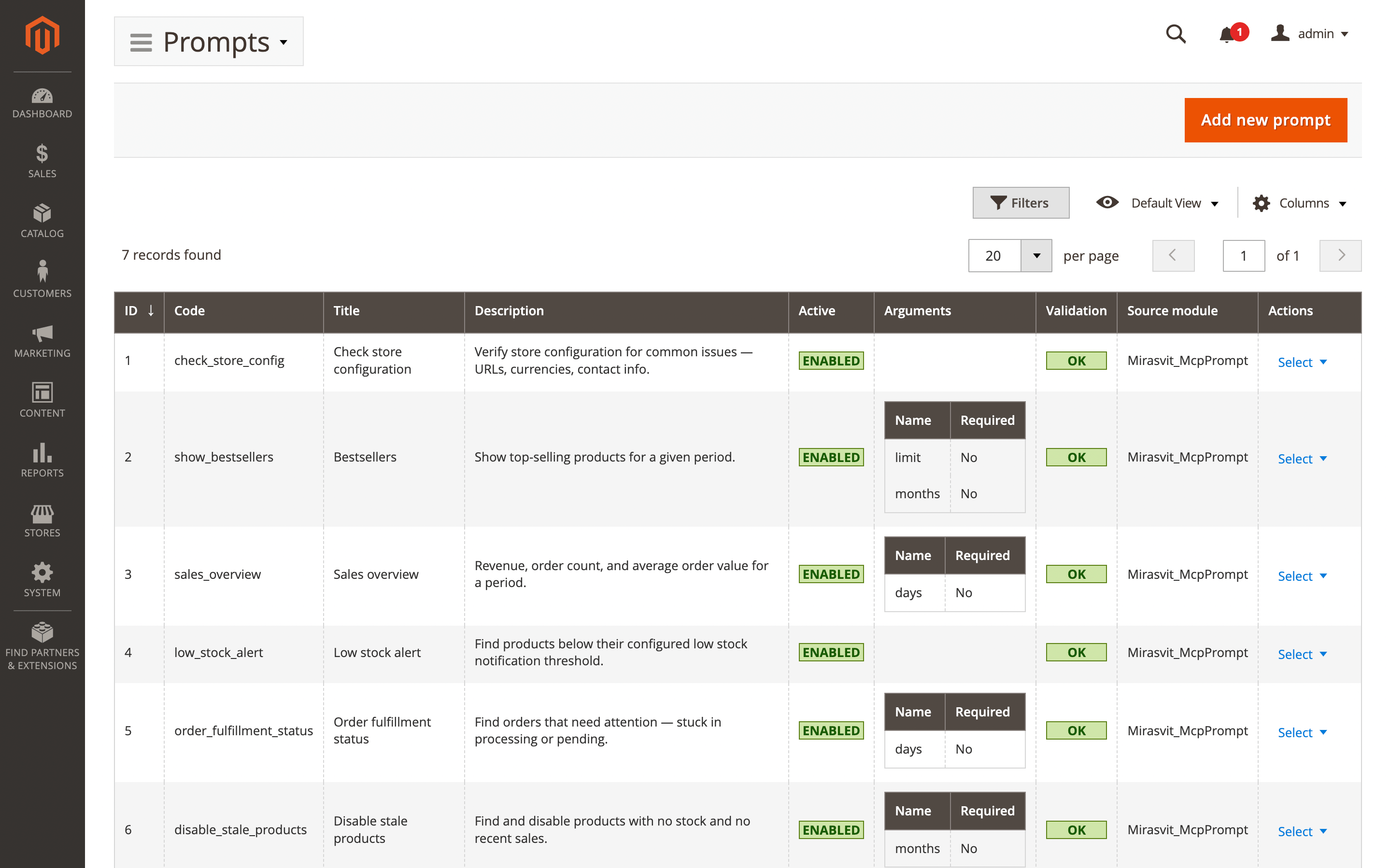
A support agent, for example, can type /refund-check and run a prepared workflow right away. This keeps repeated actions more consistent and gives your team faster access to approved prompts.
To set this up, open MCP Prompts, create a template, enable it, and use the command in chat.
🔥 File uploads and chat recovery
Some chat requests need more context than a short message can provide. You can attach up to five files, including PDF, CSV, TXT, and image formats, so the assistant works with the actual report, export, screenshot, or document behind your question.
The recovery token also keeps previous conversations available after migration. You do not have to rebuild the chat context from memory if the discussion needs to be restored later.
🔥 Branded storefront assistant widget
With this update, you get more control over how the assistant looks, introduces itself, and guides shoppers from the first message. The widget configuration panel now covers its position, colors, assistant name, welcome message, default questions, and recent conversation options.
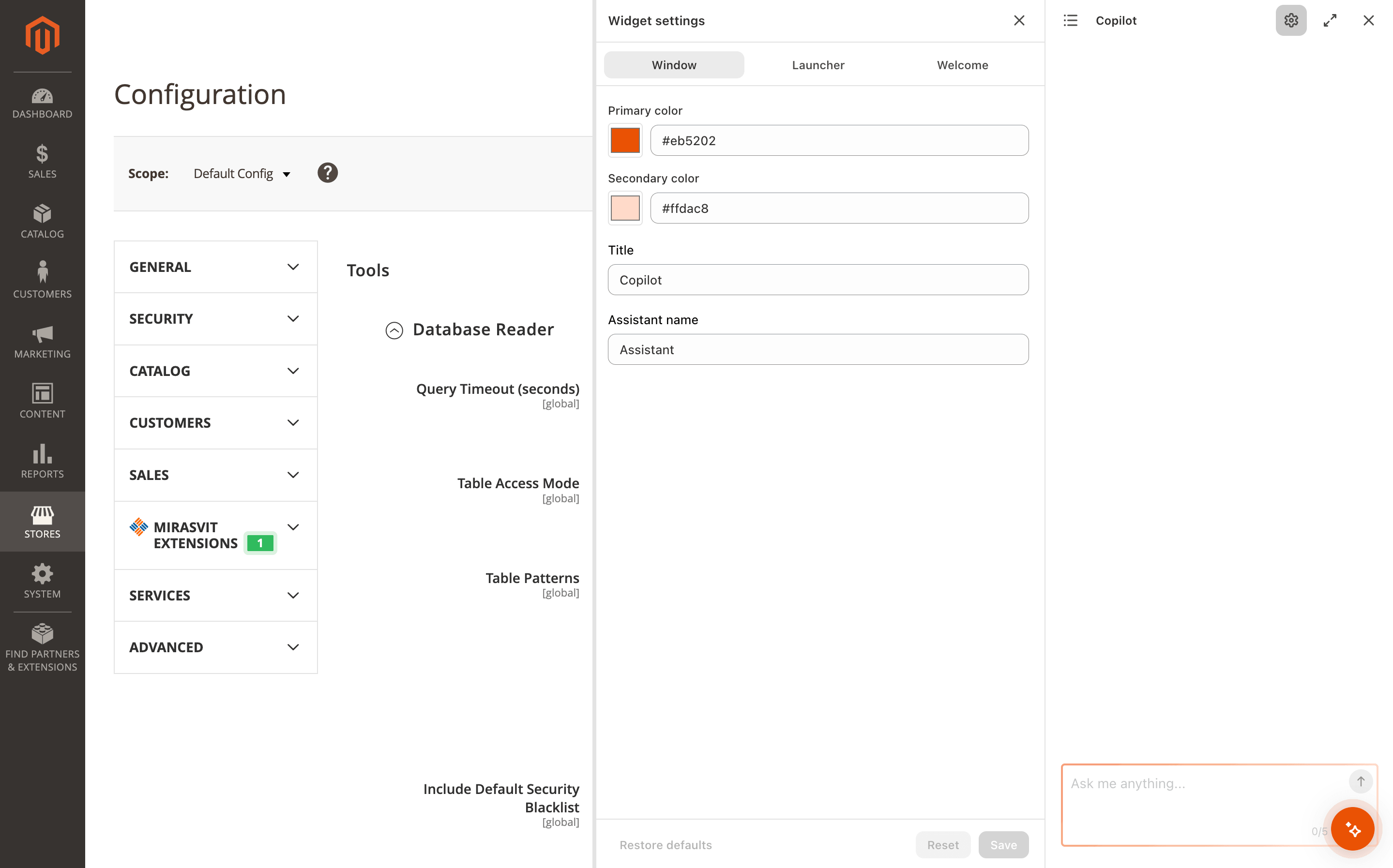
Default questions can lead visitors straight to common paths, such as product details, store policies, or order help, while the visual and text settings keep the chat closer to your brand instead of making it feel like a separate add-on.
🔥 Admin navigation and translations
The admin area is easier for your team to move through, with clearer navigation and translation support for teams that do not work only in English.
For multilingual setups, daily work with the module becomes more comfortable, especially when several admins use the same tools in different languages.
The changes apply automatically.
Layered Navigation
🔥 Stock-accurate configurable product results
Configurable products are handled more accurately in the Layered Navigation module when shoppers narrow the catalog by options such as size and color. The new setting removes the parent product from the results if the selected combination has no available child item.
If a shopper chooses Red and XL, they will not see that item when the Red XL option is out of stock, even if other colors or sizes are still available. Your catalog stays closer to what shoppers can actually buy, with fewer dead ends on product pages.
To enable it, go to Stores > Configuration > Layered Navigation, turn on Strict out-of-stock filtering, save the configuration, and run a full reindex. The option applies only to configurable products with correct stock data for child variants.
eChat
The eChat module receives richer source data for product prices, store details, and CMS content, giving the storefront assistant more reliable context for shopper questions.
🔥 Discount-aware product sync
Product records sent to the chatbot now include special_price, final_price, and msrp. Price-related replies can reflect the discounts, sale prices, and MSRP values you already configure in the catalog.
If a shopper checks whether an item is on sale, the chatbot has the needed pricing fields instead of relying on a basic product record. No extra setup is needed, but the answer depends on how product pricing is configured.
🔥 Structured store details in chat
Basic business details get a separate structured source during sync: store name, phone number, working hours, address, VAT, emails, and website.
That keeps practical answers closer to the information you manage in the admin. Questions about opening hours, contacts, or company details do not have to depend on scattered CMS text or generic assumptions.
The document is generated automatically after sync.
🔥 Richer CMS page context
CMS content is exported with more page-level details, not just the main text. The export includes the URL, meta title, meta keywords, meta description, content heading, and page content, so policy and informational pages carry more of their structure into assistant replies.
For return rules, delivery terms, warranty details, or other CMS-based topics, shoppers get answers that stay closer to the page you already publish. You do not have to prepare a separate version of the same content for chat.
This runs as part of the CMS export.
REST API coverage for external systems
More module data and actions can be used outside the admin panel, so your team can connect Magento with the tools you already use without manual exports, duplicate entry, or one-off workarounds.
The API expansion covers these modules:
- Affiliate: sync affiliate data with external CRMs, outreach tools, or custom dashboards.
- Blog MX: manage posts, categories, and tags from editorial tools, headless CMS setups, or automated publishing flows.
- Follow Up Email: bring campaign and trigger data into marketing dashboards or external automation tools.
- Help Desk MX: connect ticket data with external systems, while AI Copilot integration supports ticket summaries, response suggestions, and order lookups inside the support workflow.
- Promo Banners: deliver banners to headless storefronts or custom frontend experiences.
- RMA: the broadest coverage in this group, with admin-side management for returns, items, messages, attachments, statuses, reasons, resolutions, quick responses, custom fields, and workflow rules. Customer-side actions cover return creation, messages, items, and shipping confirmation, so return flows can also move into CRMs, ERPs, mobile apps, custom frontends, or customer portals.
To use these connections, create or update a Magento REST API integration under System > Extensions > Integrations, grant the needed ACL permissions for each module, and use standard Magento REST API authentication.
Help Desk MX AI workflows also require the AI Copilot module to be installed and configured.
Affiliate
🔥 Rich affiliate program descriptions
The description field in the Affiliate extension has moved from a plain text area to a WYSIWYG editor. When you describe an affiliate program, you can format the text, add links, and include images instead of leaving partners with a plain, hard-to-scan block.
The rich content is shown on the storefront in the affiliate account, coupon page, and programs widget. Your program details can look more structured and professional, so affiliates understand the terms, benefits, and next steps more easily.
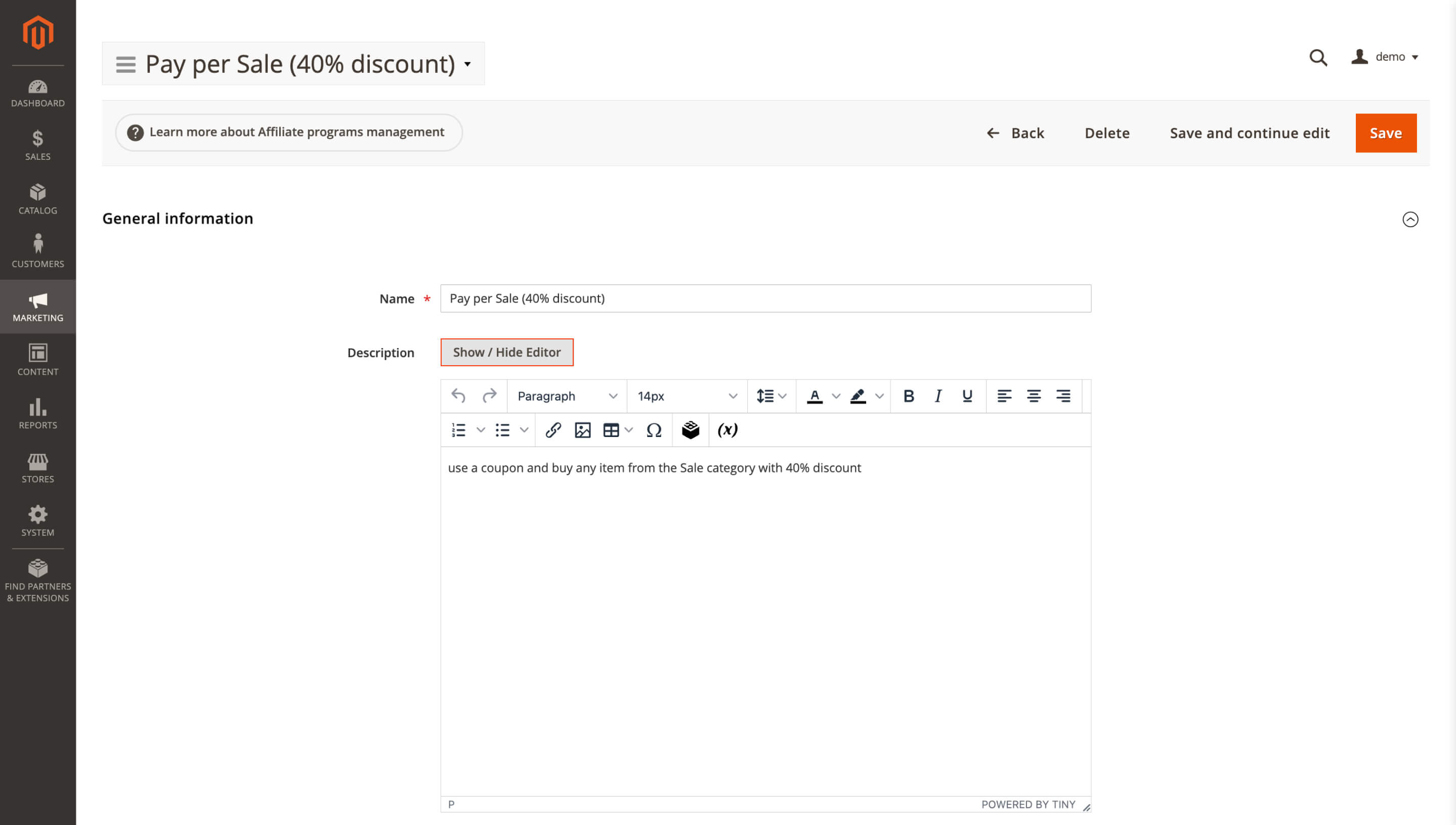
To edit a description, go to Marketing > Affiliate > Programs, open or create a program, and use the Description field. The editor depends on the global WYSIWYG setting under Stores > Settings > Configuration > General > Content Management > WYSIWYG Options.
Blog MX
The Blog MX extension received a set of content and presentation updates that make your blog easier to manage, cleaner to navigate, and clearer for search engines.
🔥 Tag Cloud display limit
Older blogs often collect more tags than a sidebar can comfortably handle. The new limit setting for the Tag Cloud widget keeps this block focused, so it does not pull attention away from the post list or main content.
Instead of showing every tag in the blog, the widget can display a shorter, curated set of topics that are more useful for navigation. This keeps the page cleaner for visitors, especially when your blog already has dozens of tags.
To configure the limit, go to Content > Blog MX > Layout editor or open the Tag Cloud widget settings, set the maximum number of tags to display, and save the configuration.
🔥 Updated date for refreshed posts
Some articles keep changing after they go live: seasonal guides get refreshed, policy pages receive new details, and SEO posts may be revised as products or search intent shift. Until now, readers only saw Published on, so a carefully maintained post could still look stale.
A separate Updated date has been added for posts that change after publication. Your readers get a clearer freshness signal, while the first release date stays unchanged.
To enable it, go to Stores > Configuration > Mirasvit Extensions > Blog MX > Display Settings and set Display last modified date to Yes.
🔥 Post assignment from category pages
Category cleanup is easier when you can work from the category itself. A new Posts tab in the edit form lets you attach or remove related articles in one place, instead of opening each article separately.
When you build a seasonal section such as Holiday Gift Guides or reorganize older blog topics, you collect the right materials directly inside the category. The workflow becomes faster and less scattered, especially for larger blogs with many existing posts.
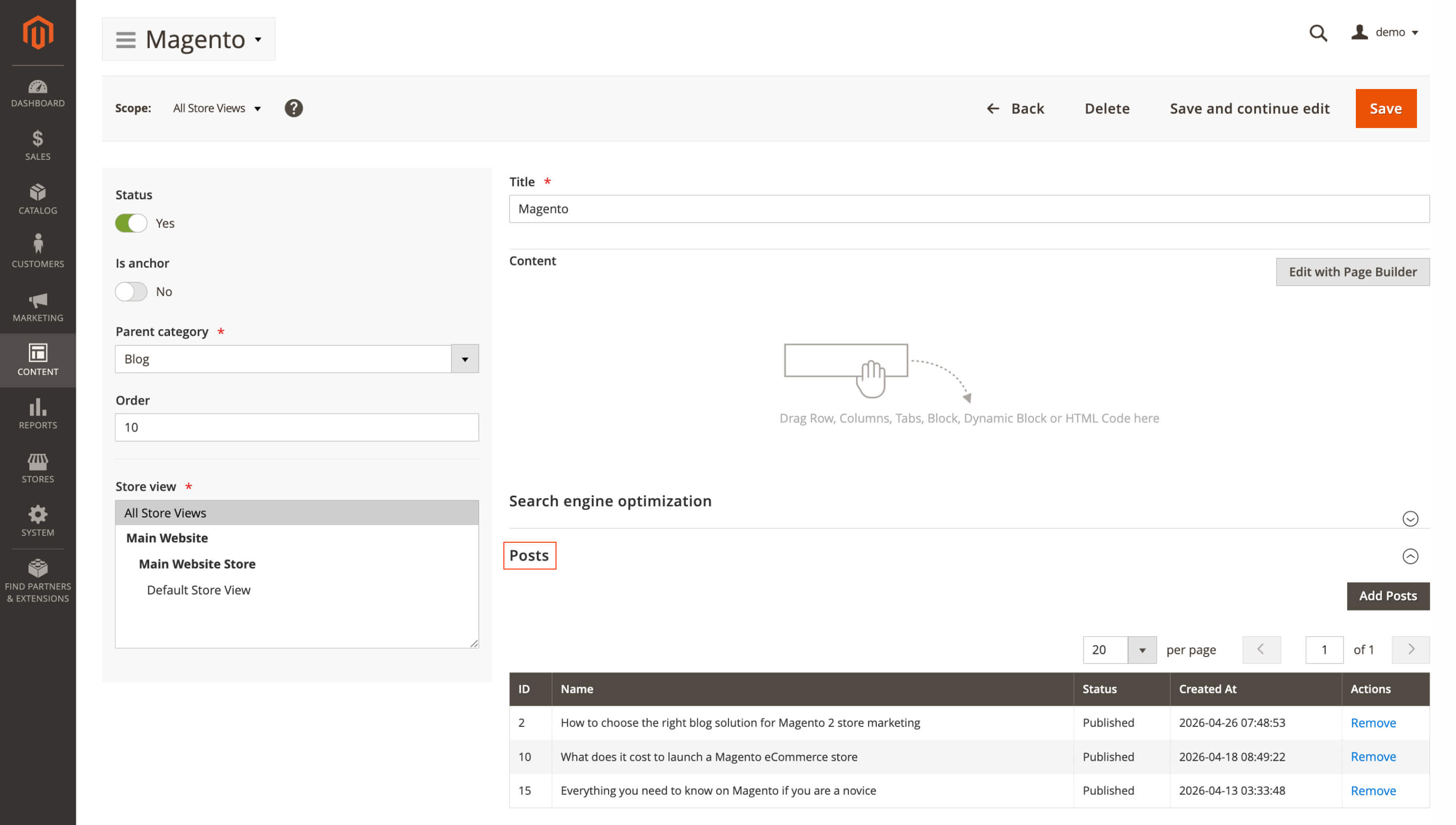
To use the tab, go to Content > Blog MX > Categories, open or create a category, switch to Posts, choose the needed articles, and save.
🔥 UTC dates and schema description source
Blog post schema received two SEO-focused refinements: dates include UTC timezone information, and the description source is no longer fixed. You can choose whether structured data should use the post Excerpt or Meta Description.
If you carefully write meta descriptions for search snippets, the same wording can now be used in schema markup for a more consistent signal to search engines. UTC timestamps also make publish and modification times clearer, without leaving room for timezone ambiguity.
To choose the description source, go to Stores > Configuration > Mirasvit Extensions > Blog MX > Structured Data Settings and select Excerpt or Meta Description. UTC timezone is applied automatically.
Follow Up Email
🔥 Selected options in abandoned cart emails
Abandoned cart emails from the Follow Up Email extension can include the exact product options a shopper selected before leaving the store. The new { item.options } Liquid variable adds details such as size, color, or other chosen options to cart item blocks.
That extra context makes the email feel more specific. Instead of reminding a shopper about a generic configurable product, you can show the variant they actually considered, which keeps the message clearer and closer to their shopping intent.
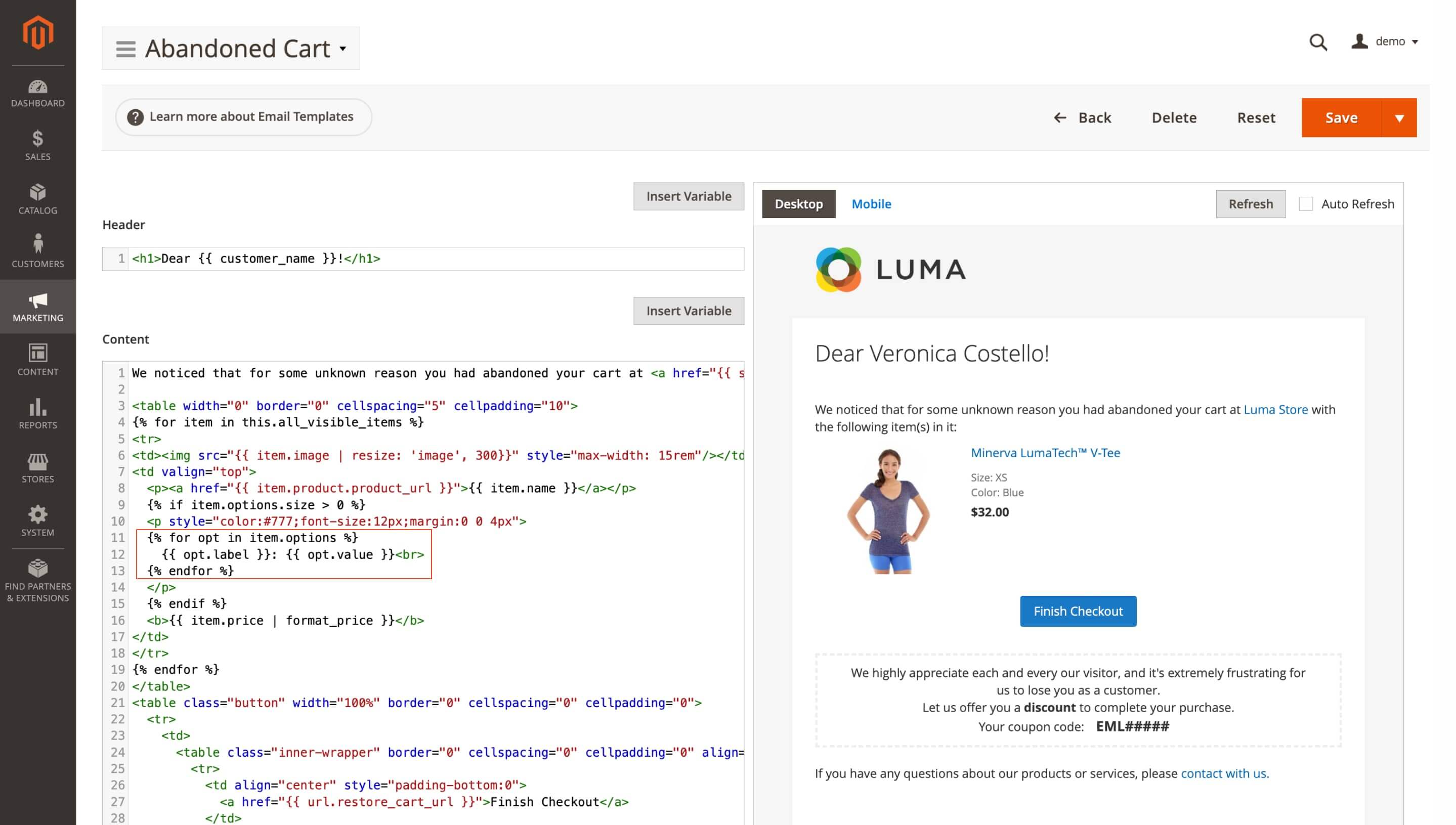
The default abandoned-cart template already includes this variable. For custom templates, add it from the Insert Variable picker or insert the snippet manually:
{% for opt in item.options %}{ opt.label }: { opt.value }{% endfor %}
The variable works for cart items that have selected options.
Full Page Cache Warmer
The Full Page Cache Warmer extension got more precise cache checks, clearer job status, and broader localization for admin work.
🔥 TTL-aware cache freshness checks
The cache warmer now checks page freshness with TTL in mind. If a cached page is still valid, it will not be marked for warming too early, and when real visitor traffic refreshes the page, the cached time is updated accordingly.
This cuts down unnecessary warming cycles. A page with a 24-hour TTL that was already refreshed by a shopper can stay fresh in the queue logic instead of being processed again before it needs attention.
The change works with your existing Magento TTL settings.
🔥 Warming job timeouts and diagnostics
When a warming job gets stuck, its status no longer stays unclear in the admin. The job is marked as timeout, and the logs show more detail about what happened during the run.
You can see whether the process timed out and check the related log context without guessing where the failure started. Detailed diagnostics depend on Magento logging being enabled.
🔥 Admin interface localization
Translation support was added for 15 admin locales, including Ukrainian, German, French, Spanish, Italian, Japanese, Polish, Portuguese, Turkish, Chinese, and others.
If your team works with different admin language settings, more module interface text follows the selected locale automatically. No extra configuration is needed beyond the admin locale settings.
MCP Server (AI Agent Connector)
The AI Agent Connector module update focuses on making external AI clients easier to set up, connect, and control from Magento.
🔥 Reusable prompt templates
Repeated AI tasks no longer have to be rebuilt from scratch. With MCP Prompts, you can prepare approved templates for common workflows, such as checking bestsellers, low-stock products, or stuck orders, and reuse them from MCP-compatible AI clients.
Templates may include variables like {placeholder}, required tools, permissions, and API access for external management. Your team gets the same prepared workflow each time, instead of rewriting instructions manually and risking small differences in repeated requests.
Create or edit templates in MCP Prompts and assign access through ACL permissions. Some prompts may depend on the tools available to the current user role.
🔥 Module documentation in AI clients
DocSearch brings module documentation into the AI client's reach. Compatible agents can search, list, and open documentation files from etc/mcp/ directories, so setup questions are answered from the materials available for your installed modules.
If someone asks how to configure layered navigation or another extension, the AI client can refer to real module docs instead of falling back on a generic Magento answer.
To allow documentation access, go to System > Permissions > User Roles > MCP Tools > Module Docs and enable the needed permissions. The tool works when modules include documentation files for MCP access.
🔥 Short /mcp endpoint
The connection URL is shorter for new AI client setups: use /mcp instead of the longer /mcp/server/handle path. Existing integrations can keep using the previous endpoint.
Under the hood, the connector also supports streamable HTTP transport, sessions, JSON-RPC notifications, and protocol version negotiation. These changes reduce client-specific setup friction when you connect tools like ChatGPT, Claude, Codex, or other MCP-compatible clients.
Use /mcp in the AI client settings when creating a new connection.
🔥 Personal Access Tokens
Personal Access Tokens (PAT) give you another authentication option for clients that do not work well with OAuth. You can generate a long-lived bearer token for an admin user and use it in tools such as ChatGPT, Codex, or CLI clients.
Each token is tied to a specific admin account and requires password confirmation before generation. Access still follows that user's permissions, so the connected client can only work within the allowed scope.
Generate the token in the admin panel, then add it to the AI client as a bearer token.
🔥 AI client connection check
Before you start debugging credentials or client settings, the MCP health check lets you confirm whether the server is available. It gives you a quick status check directly through the MCP endpoint.
Setup instructions were also expanded for multiple AI clients, including Claude, ChatGPT, Codex, and similar tools. You can find the guidance under My Account > AI Client Configuration.
🔥 Prompt shortcuts in the admin
Prompt settings are no longer buried deeper in the admin. A direct Prompts menu item and shortcut buttons for Configure Prompts and Configure Slash Commands lead your team straight to the pages used for managing AI workflows.
Translation support was also added for 15 locales. When admins work with different language settings, more interface text follows the selected locale automatically.
Order Management
🔥 Fixed-value discounts in order edits
Fixed-value discounts were added to order editing in the Order Management extension. When your support team agrees on a $25 compensation, goodwill discount, or manual correction, your admin can enter that exact amount without converting it into a percentage.
The discount stays closer to the real agreement with the customer, and there is less room for rounding errors or recalculating the order adjustment incorrectly.
Open the order, choose the fixed amount discount option while editing, enter the amount, and save the changes.
RMA
The RMA module updates focus on making return workflows easier to review, share, and organize as request volume grows.
🔥 CSV/Excel export for return requests
Monthly return reporting is easier with CSV and Excel export added to the return requests list. The file includes the details you usually need for review: request ID and number, customer name and email, company, order number, owner, status, dates, last reply, and related exchange, replacement, or credit memo references.
Instead of copying rows from the admin panel, you get a ready dataset for accounting, support workload checks, return analysis, or offline processing.
To download it, open the return requests grid and choose the available CSV or Excel export option.
🔥 Parent-child return reasons
A flat list of return reasons becomes messy once you have more than a few options. The new parent-child format groups related cases under a broader reason, such as Damaged > Broken screen or Wrong Item > Incorrect size.
Shoppers move through the return form more naturally: first the general issue, then the exact case. For your team, each request keeps both levels of context, so later analysis shows not only that an item was damaged, but what kind of damage was reported.
Set up the hierarchy in RMA > Return Reasons by creating or editing reasons and using the Parent — Child pattern. The grouped view appears only where parent-child relationships are configured.
Backend Search (Admin Quick Search)
The Admin Quick Search extension received a more flexible backend search setup, with configurable providers, field-level control, and an extra keyboard shortcut for faster lookup.
🔥 Provider settings page
A dedicated settings page was added under System > Admin Quick Search > Providers for products, orders, customers, and other searchable areas. From there, you control what appears in admin search and how those result groups are presented.
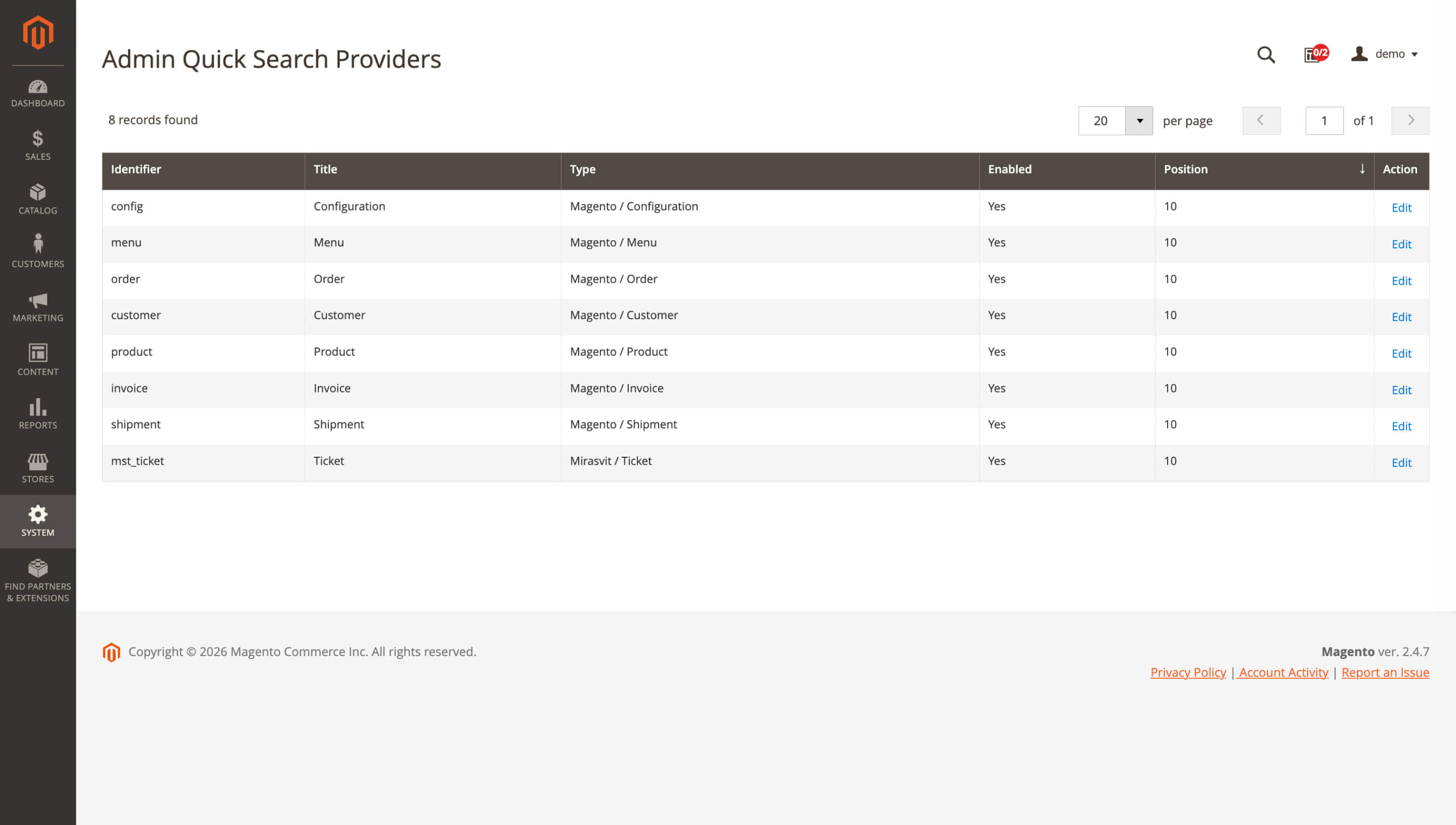
You can enable or disable each group, change the display order, rename labels, and configure which fields are indexed or shown in results. For example, orders can appear above products if your team searches them more often, or Customers can be renamed to Clients to match your internal wording.
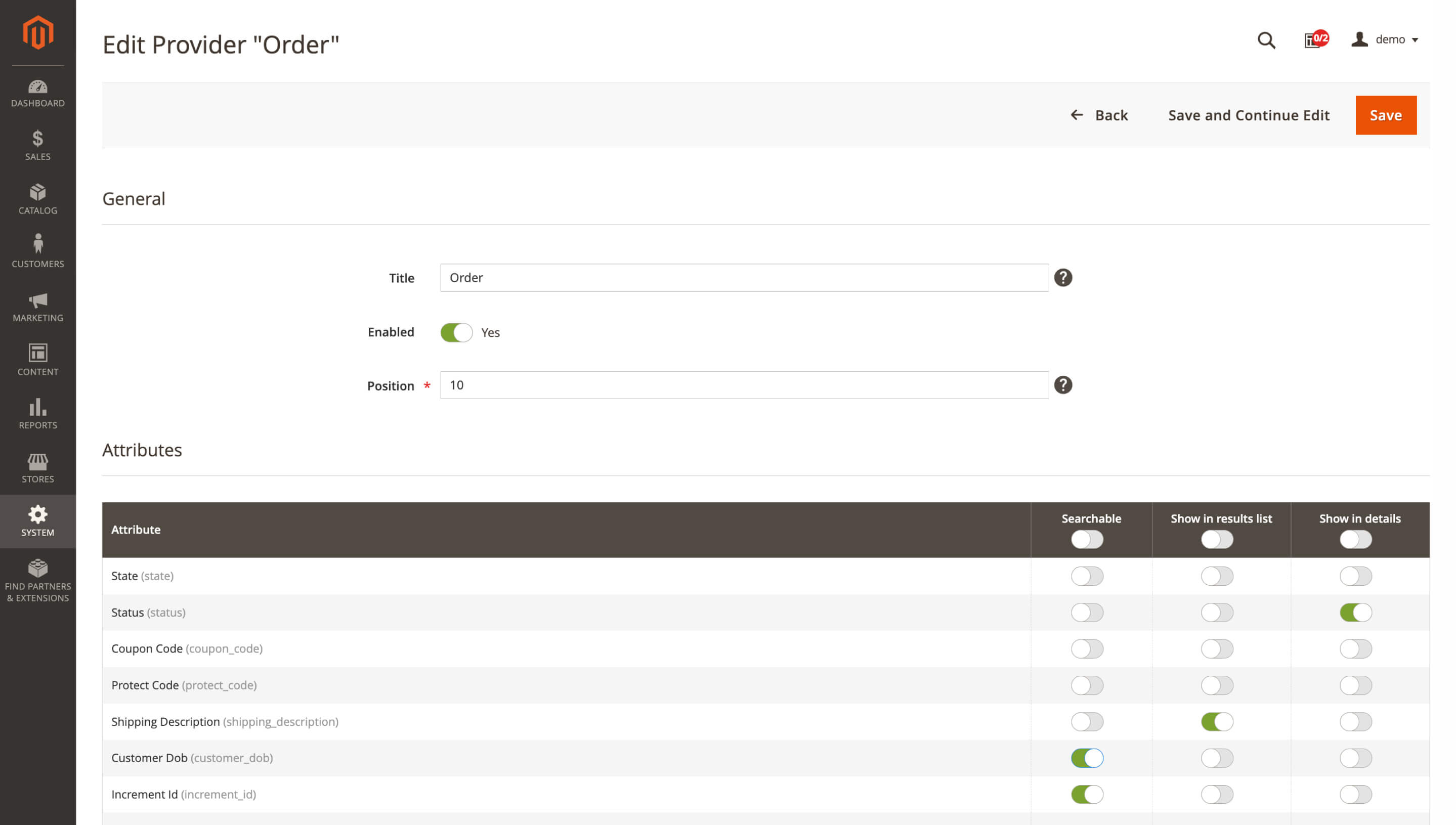
Access is controlled by ACL permissions, so only authorized admin users can manage these settings.
🔥 Search fields by provider
Each search provider can have its own field setup, so backend search is not limited to predefined searchable data or fixed result rows.
For order lookup, you can make email or shipping postcode searchable and place status or total in the preview. The result gives your admins enough context to choose the right record before they open it.
Configure the fields in System > Admin Quick Search > Providers, open the needed provider, and choose what is Searchable, what appears in the results list, and what appears in the detailed view.
🔥 Alt + S admin search shortcut
Admin search is easier to open when you are moving quickly between orders, products, customers, or other records. The added Alt + S shortcut gives you another way to call the search bar from anywhere in the admin panel.
If other shortcuts conflict with your browser or operating system, Alt + S can be the more reliable option for daily navigation. Press it, enter an order ID, SKU, customer name, or another searchable value, and jump to the needed record faster.
The shortcut works automatically alongside existing search access options. Some browser or OS-level conflicts may still depend on the user's environment.
Form Builder
🔥 Submission context in CSV exports
CSV answer exports from the Form Builder extension are more useful for review right after download. Along with submitted field values, they now include Store View, Created At, and Status.
When you open a month of form submissions, you immediately see where each answer came from, when it arrived, and whether it still needs attention. You can sort requests, check unprocessed entries, or prepare reports without adding missing context by hand.
Go to Content > Form Builder > Forms, open a form, switch to Answers, and export the CSV. The added columns appear automatically.
That wraps up our May updates. If you would like to explore more ways to improve your store, you will find them in our Magento 2 extensions.
Mirasvit Support Engineer
Turn store events into email: abandoned cart reminders, review requests, win-backs, birthday greetings and order follow-ups, each triggered automatically and each reported with the revenue it brought in.
Blog MX runs your blog inside Magento, with Page Builder posts, comments, and SEO checks in the admin you already use. Every post, category, author, and tag can differ per store view.
Magento 2 store loads quickly only if its pages are in the cache. Our extension automatically adds pages to the cache and thus, speeds up your store!
Whenever your customer or Google visits a page, its most recent variant will be loaded in a fraction of a second from the cache.
This extension runs an automated crawler that monitors cache status. Once the cached page is cleared, the crawler visits this page and warms up the cache for it!
Run your own affiliate program in Magento 2, without paying an affiliate network a cut of every commission. Affiliates promote your store with referral links, product links, banners, widgets and coupons, and earn per sale, click, lead or banner impression.
You set the rates by program, affiliate group and first or repeat order, see how each commission was calculated, and pay affiliates through PayPal, Skrill, your own method or store credit.
AJAX layered navigation for Magento 2 with multi-select filters, price sliders and SEO-friendly filter URLs.
The same extension adds brand pages, an "All Products" page, landing pages, smart filters and infinite scroll, with Hyvä support built in.
Build contact forms, product enquiries, applications and surveys in a drag-and-drop editor, without coding. Route each submission to the right team, send the customer a copy, and keep every answer in the Magento admin with statuses, notes and CSV export.
This Magento 2 order management extension lets you fix a placed order without canceling it and re-entering everything.
Edit items, prices, taxes, discounts, the coupon, shipping and payment methods, the shipping address and customer details, even on invoiced orders: if the total goes up, the customer gets a link to pay the difference. Merge or split orders, add product, billing and shipping columns to the orders grid, tag orders by rules and set custom numbers for orders, invoices, shipments and credit memos.
Admin Quick Search for Magento 2 offers a new way to navigate within the admin panel using an ultra-fast search feature.
To find something in the Magento admin, you typically have to use grid filters, which are very slow. Our solution returns results within milliseconds.
It can find almost every type of content available within your Magento admin, including orders, customers, pages, invoices, products, shipments, menu items, etc.
Search for customers by email, search for orders by address or purchased item, or find all orders of a customer – no problem. Blink, and we’ll bring the results.
Mirasvit CoPilot is a Magento 2 AI agent embedded directly in the admin panel. Ask questions, pull data, and take action using natural language. No SQL or code required.
The Magento MCP server gives AI assistants access to your real Magento store data, so your team can ask questions and complete tasks without switching between admin grids and exports. It works with Magento 2 and Adobe Commerce and connects to ChatGPT, Claude, Gemini, or any other MCP-compatible AI client.