Mirasvit Latest Updates - September 2026
-
 Andriy Kovalenko
- Our News & Updates
- Sep 1, 2026
- 14 min read

There's a lot in this month's changelog, but not all of it carries the same weight. Three modules, Advanced Reviews, Advanced Product Feeds, and eChat, each shipped the kind of release that normally takes a full quarter: onboarding rebuilt, AI woven into the core workflow, a platform-level risk closed for good. The Helpdesk MX extension landed only five changes, and two of them you need to read before they break something, not after.
Everything past those four is real too, just smaller: a filter panel that finally behaves the way you'd expect, a redirect exception that heads off a support ticket before anyone files it, one setting worth checking the moment you update. That's the order this post follows, the releases that change how your store runs, then the ones that take a few minutes each, then a closing list for anything left over.
Table of Contents
- Advanced Reviews
- Advanced Product Feeds
- eChat
- Helpdesk MX
- Layered Navigation
- Blog MX
- Geo IP Redirect
- GDPR
- Advanced SEO Suite
- Extra Payment
- Withdrawal Button
- Facebook Pixel
- Everything Else This Month
Advanced Reviews
Would you trust a product with zero reviews, if the same store sold it in eleven other colors that all had plenty? Most shoppers won't stop to reason it through; they'll just leave. The Advanced Reviews module spent its biggest release in a long while fixing exactly that, plus a database bug worth knowing about even if you never open the module's settings.
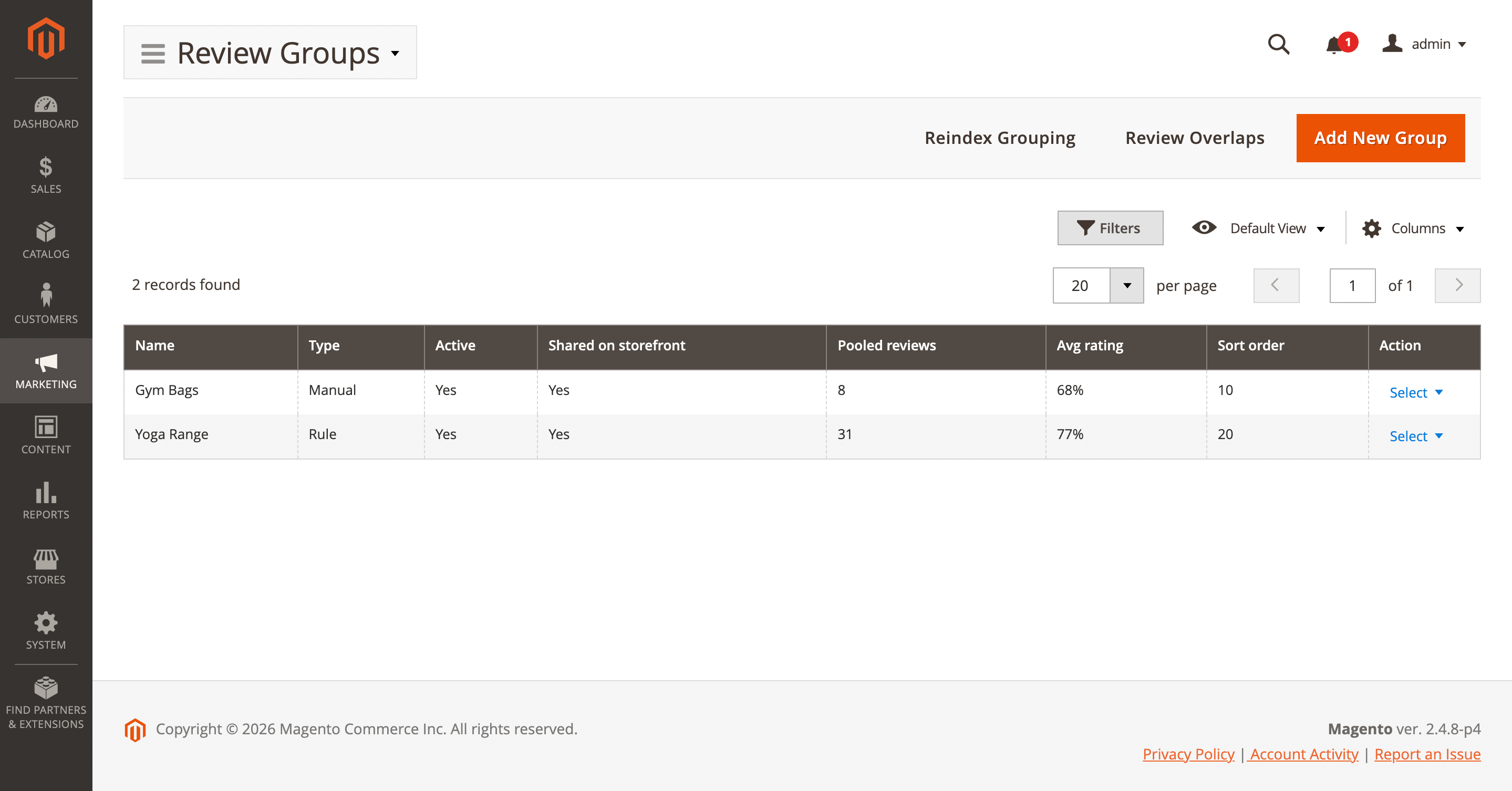
Review grouping, off by default, lets a product page pool in reviews from its configurable, grouped, or bundle relatives, or from a custom Review Group you build by hand or by attribute rule. A shirt sold in twelve colors can show the same pooled feedback on every color's page, including the one added last week with nothing of its own yet. A shopper who wants only that exact variant's reviews can still click "This product only," and every pooled review carries a line noting which product it actually came from, so nothing reads as though it belongs somewhere else.
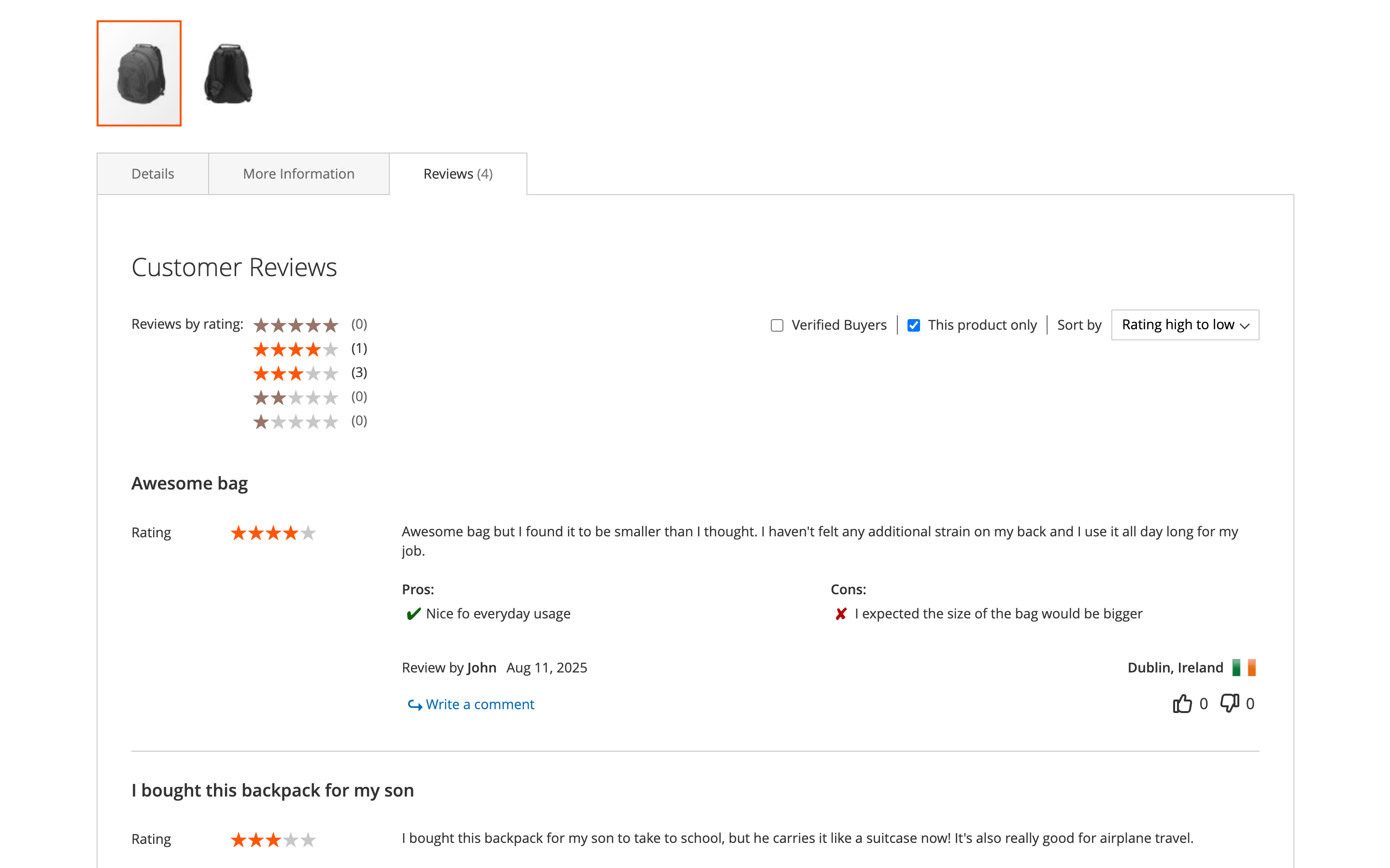
Turn it on under Stores → Configuration → Mirasvit Extensions → Advanced Reviews → Review Grouping, build custom groups under Marketing → Advanced Reviews → Review Groups, then run setup:upgrade and indexer:reindex mst_review_group.
Reviews also gained structure this month. A new tagging system lets you label them, "Fits perfectly," "Shipping complaint," and choose per tag whether it stays internal for your own sorting or goes public as a filter shoppers can click on the product page.
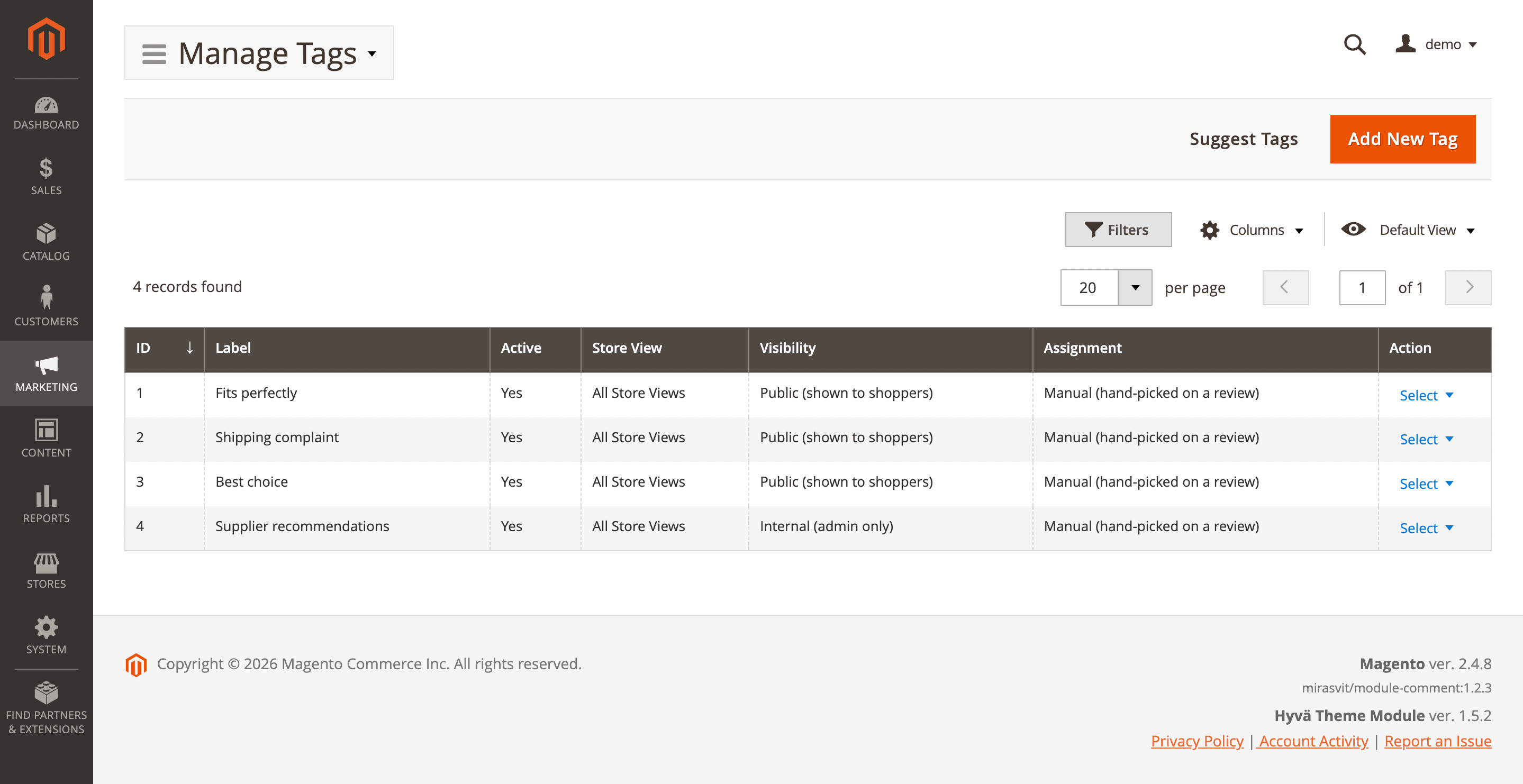
An AI mode can do the labeling itself: describe in plain language what a tag should catch, and matching reviews get tagged automatically every fifteen minutes. A spike in shipping-damage complaints surfaces on its own instead of waiting for someone to read every incoming review. Manage tags under Marketing → Advanced Reviews → Manage Tags.
One administrative change rides along with all of this. The AI provider connection (provider choice and API key) moved out of the module and into a single shared configuration for every Mirasvit extension, under Stores → Configuration → Mirasvit Extensions → Developer → AI Configuration. The module's own AI toggles stay right where they were.
An API key entered the old way won't carry over automatically. Re-enter it after updating, or auto-tagging and AI summaries will quietly report themselves as disabled with nothing else pointing at why.
One item near the bottom of the changelog deserves a second look: a missing primary key on one of the module's tables. On a store running MySQL Group Replication, that gap could take an entire database cluster offline and read-only after something as routine as a restart.
It's fixed now. Applying it just takes setup:upgrade. If clustered MySQL is your setup, don't skip this update.
Advanced Product Feeds
Merchant Center rejects a feed and rarely tells you anything useful about why. The Advanced Product Feeds extension used this release to close that gap from two directions at once: a genuinely new way to fix the data itself, and several hard blockers that were probably keeping some stores off it entirely.
The centerpiece is AI-assisted optimization. Point an AI profile at a field, and by default it fills in only what's missing there, an empty description, a blank color, leaving your catalog itself untouched; the optimized value goes into the feed output, not back onto the product page. Overwriting a value the field already has is there too, as a setting you turn on deliberately, not the default.
Titles expand to use the full 150 characters Google indexes, with color and size folded in so Google can tell variants apart. For a Google feed specifically, though, Google asks that AI-generated text ride in a structured_title field rather than title, and the extension doesn't have that field yet. Map the output there yourself in the template for now, or treat an AI-optimized title as a draft to review rather than a plug-and-forget swap.
Thin, promotional descriptions, a classic reason for disapproval, get rewritten into plain, attribute-rich text. The color, size, and material fields Merchant Center flags most often get filled in from what your catalog already knows, and Google product categories get inferred from your own category tree. Four ready-made profiles ship out of the box, and you can write your own for any field.
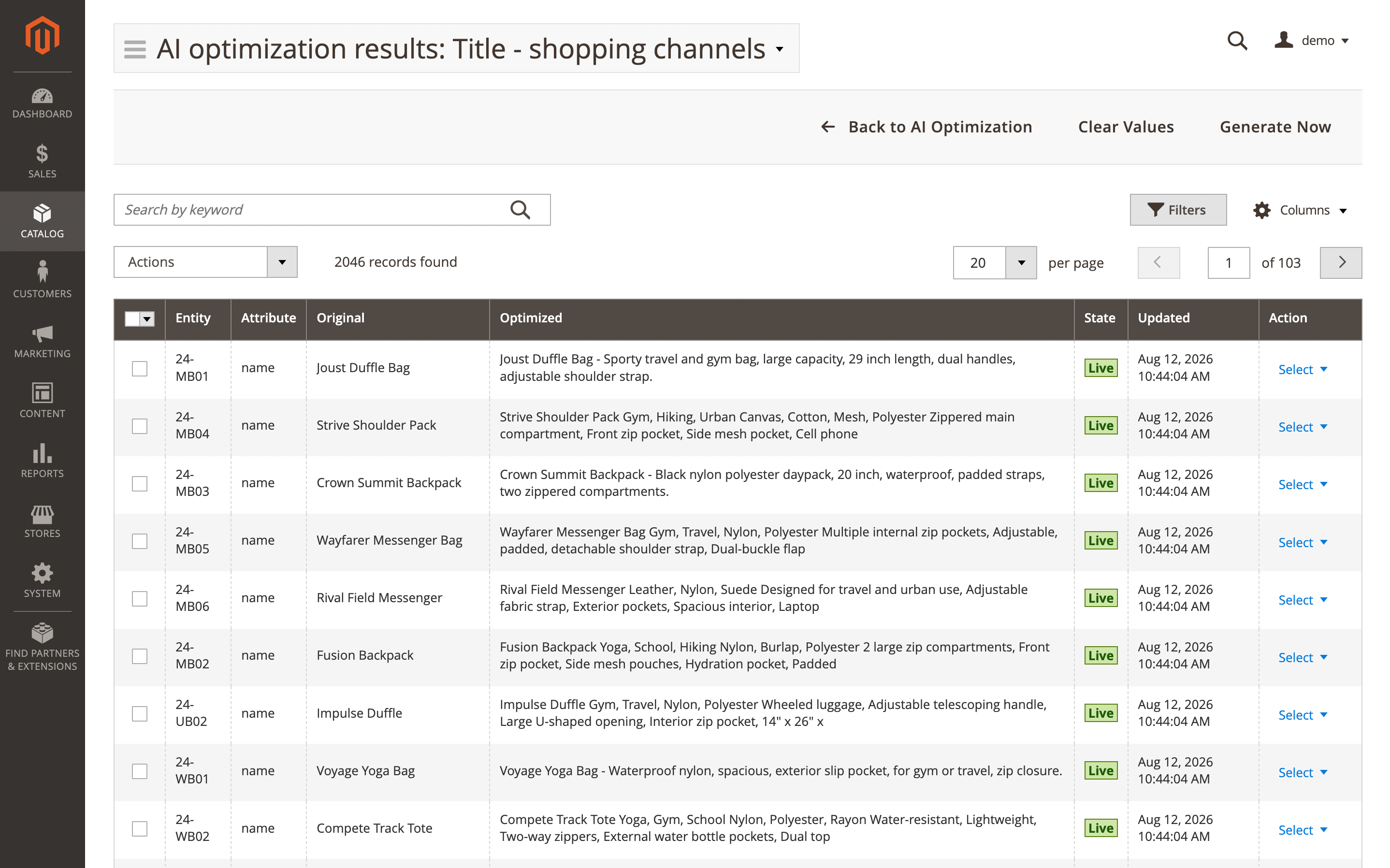
Optimization itself runs in the background, so turning it on doesn't slow down exports. Preview a profile against real products first to see the cost before committing, and an optional approval gate holds every generated value until you accept it. Configure the AI provider once under Stores → Configuration → Mirasvit Extensions → Developer → AI Configuration, shared now with every other Mirasvit module, then assign a profile to the feed.
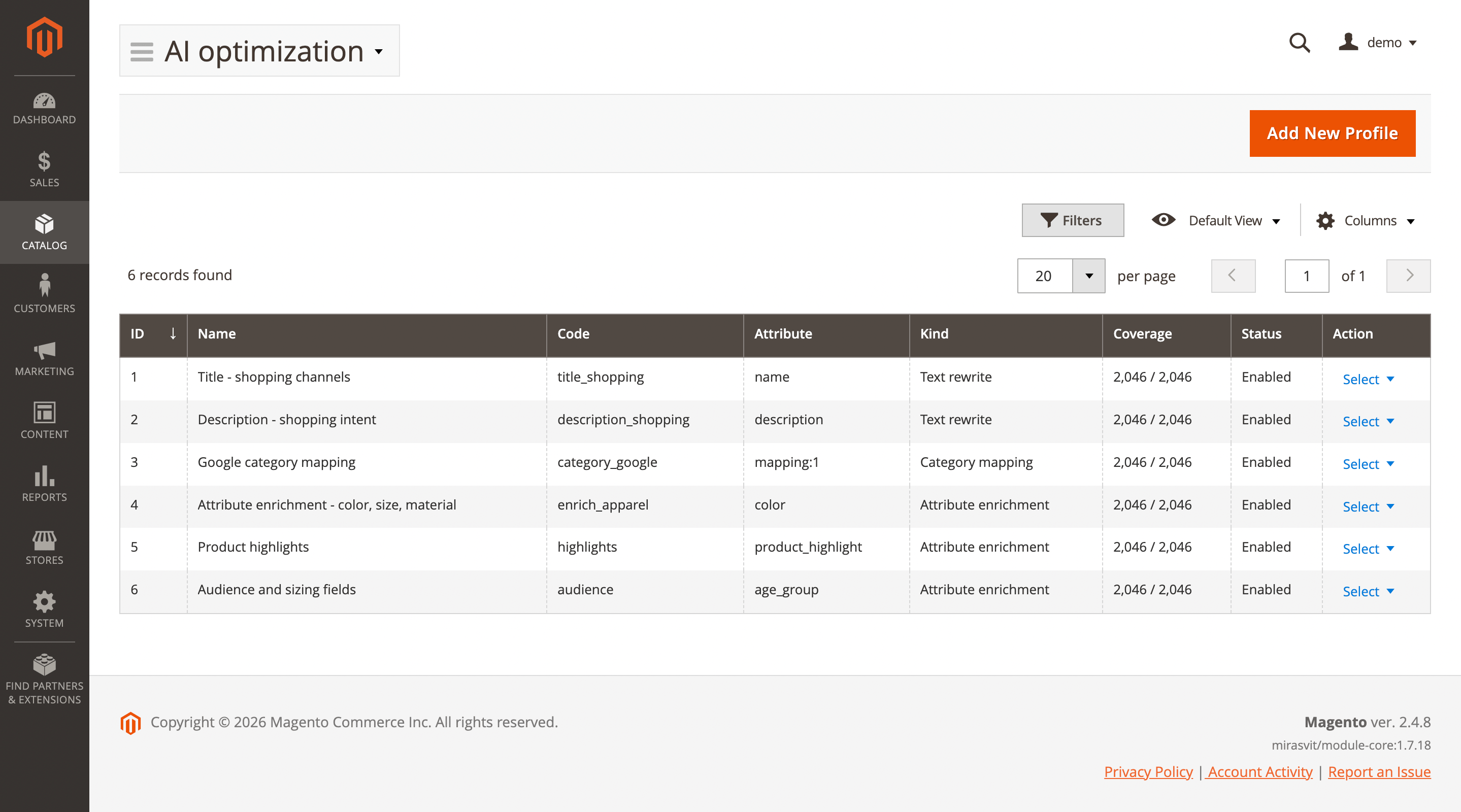
Catalogs on AWS S3 or another remote media backend get more reliable feed generation this month: logo handling, generation itself, and the public feed URL all work correctly with S3-backed media now, nothing new to configure. A new JSONL feed format lets an ingestion tool stream a catalog line by line instead of loading the whole file into memory, and a "Compress output (gzip)" switch shrinks large exports for a data warehouse or marketplace API that takes compressed input directly. Two CLI commands, mirasvit:feed:ai:optimize and mirasvit:feed:validate, let an ops team force a refresh before a campaign or gate a deployment on feed validity.
eChat
The eChat module didn't get one headline feature this month. It got rebuilt: onboarding, the AI backend, reliability, and page performance, all in the same release.
Setting it up used to mean going and getting your own OpenAI API key before you could even try the thing. That requirement is gone. A single Connect with eChat button now walks you through the whole flow, create a workspace, add this store to one you already run, or restore an earlier one, with no key to copy and paste anywhere.
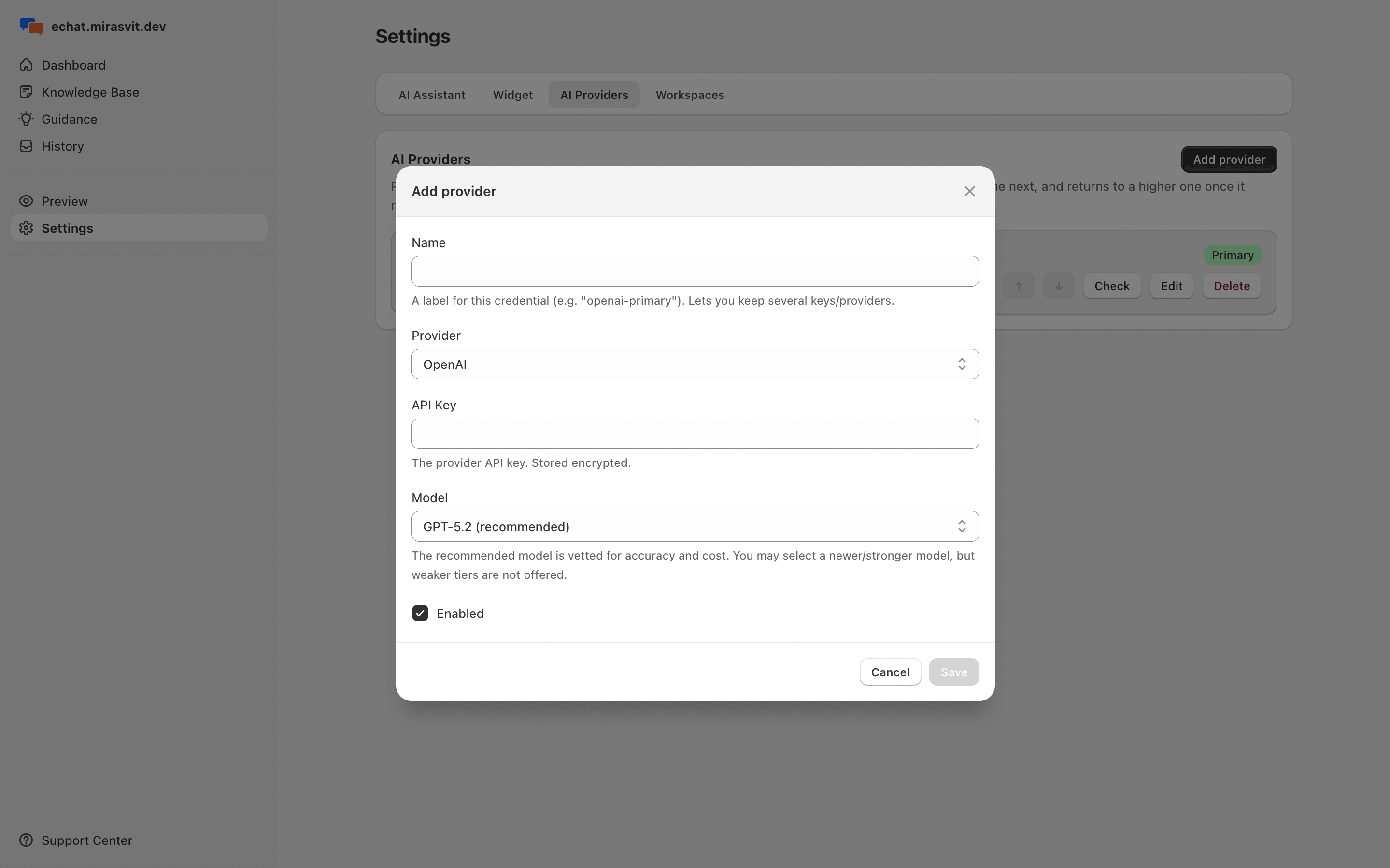
Once connected, you're not tied to OpenAI either. The backend now runs on OpenAI, Anthropic, Google, or xAI, each with its own vetted model list, and you can chain several together as a fallback under Stores → Configuration → eChat → Configure Chat → Settings → AI providers. If your primary provider hits a quota ceiling mid traffic spike, eChat switches to the next one automatically, and only emails you if every configured provider ends up unavailable.
Running several store views off one Magento install? They now share a single, clearly named eChat account instead of turning up as unrelated workspaces, and existing connections join automatically on the next sync. The widget itself got lighter too: its scripts now load in the background after the page renders, a measurable Core Web Vitals win on mobile, while live connection state, proactive messages, and the unread badge all keep working exactly as before.
Helpdesk MX
If your support inbox runs on Microsoft 365 or Exchange Online, read this section before the other four.
Microsoft has been phasing out basic authentication for mailbox access, and any store still fetching support email the old way was on a collision course with that deprecation.
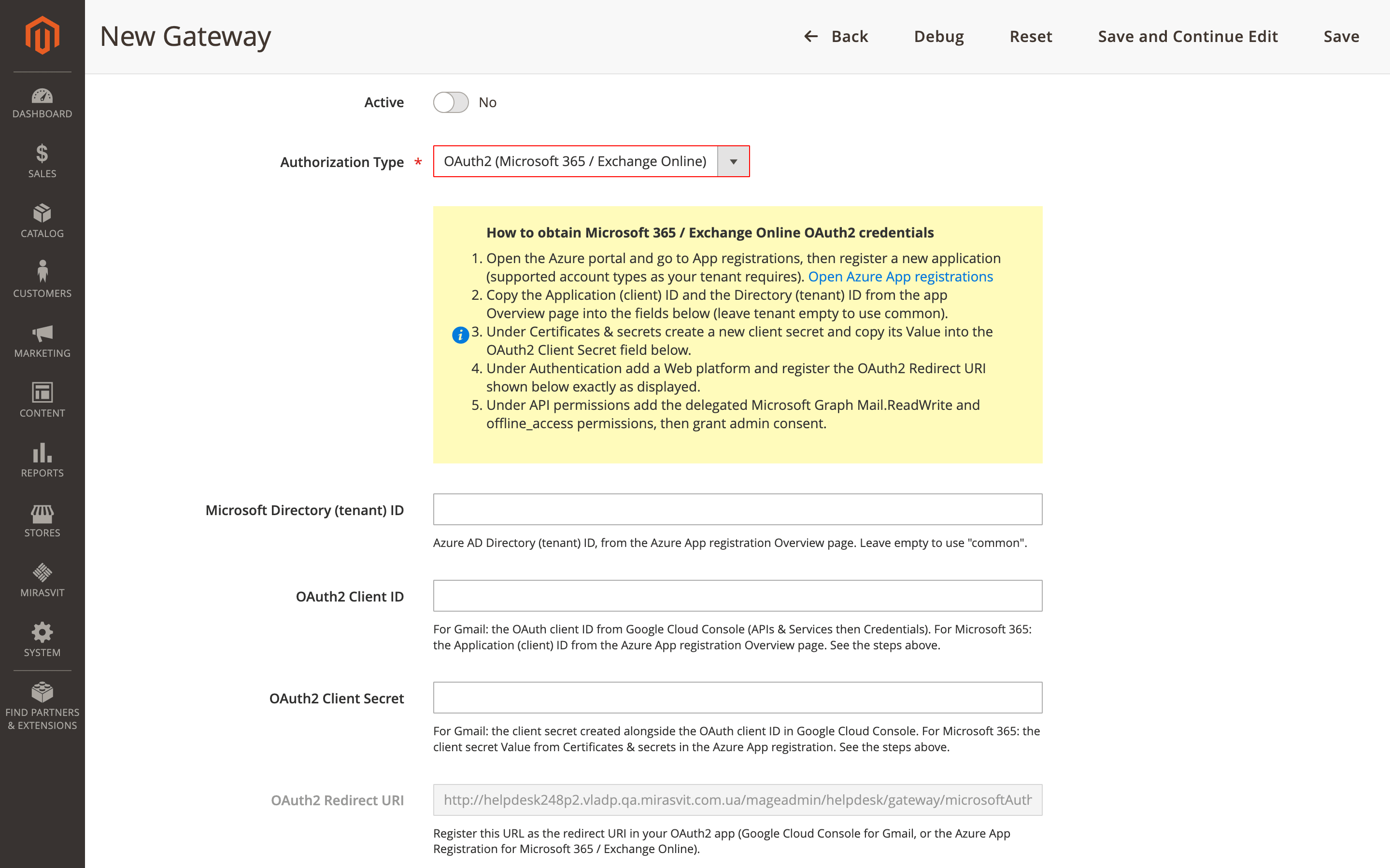
The Helpdesk MX extension now offers a dedicated Microsoft 365 / Exchange Online gateway type that connects through the modern sign-in flow instead, with step-by-step setup instructions built right into the gateway form. Under Customers → Helpdesk → Gateways, create a new gateway and pick OAuth2 (Microsoft 365 / Exchange Online) as the authorization type, then follow the prompts.
The second item is a real behavior change dressed up as a bugfix.
Ticket API requests made with a Magento Integration token now attribute replies to the customer and leave new tickets unassigned unless an owner is explicitly named; adding an internal note through the API now requires an admin token instead.
If you've built any automation on top of tickets, a chatbot, a sync script, a custom integration, check which token type it uses. One that relied on the old behavior needs an explicit owner or an admin token to keep tickets landing with the right agent.
Two smaller changes ride along with these: Contact Us and customer ticket pages both load faster now, and a new Fetch auto-replies setting, under Stores → Configuration → Helpdesk → General Settings, lets you stop out-of-office bounces from ever reaching the ticket queue in the first place.
Layered Navigation
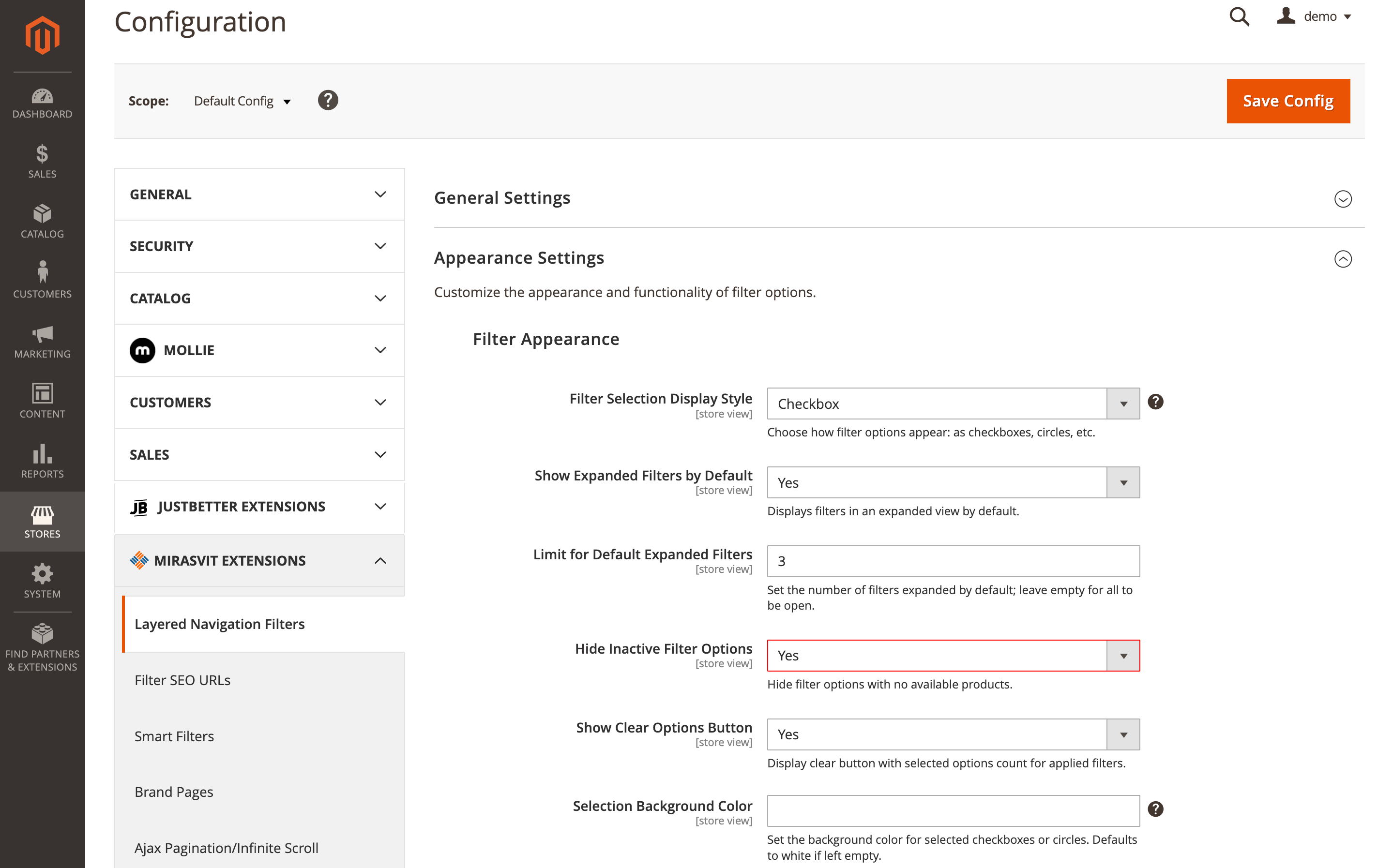
Set Hide Inactive Filter Options on and you'd expect it to work everywhere. Until now, it only did for AND-logic attributes.
The Layered Navigation module extends the same behavior to OR-logic filters: an option every product in the current listing already shares gets hidden while nothing in that filter is selected, since picking it wouldn't narrow anything down anyway. Select something, and the rest of that filter's options stay visible, recalculated against the wider set. Turn it on under Stores → Configuration → Layered Navigation Filters → Appearance Settings → Filter Appearance, it now covers both logic types automatically.
The rest of this month's work on the module is invisible by design. Filters with no matching products skip loading their full option list, grouped-filter lookups get cached for stores that don't use them, category filtering with nested categories turned off no longer pulls the entire subtree, and cold-cache filter settings load in one combined read instead of several separate ones. None of it needs configuring, and together, on a large catalog, it adds up to a noticeably faster category and search experience.
Blog MX
A blog's related-products block has always meant picking items by hand, then coming back to re-pick them whenever the assortment moved on. The Blog MX extension breaks that habit this month.
A post's Related Products source can now point straight at a catalog category instead of a fixed list. Choose one, and the block fills and reorders itself automatically as products move in and out of it, following that category's own sort settings. A "Summer Sneakers Guide" post pointed at your Summer Sneakers category just stays current on its own.
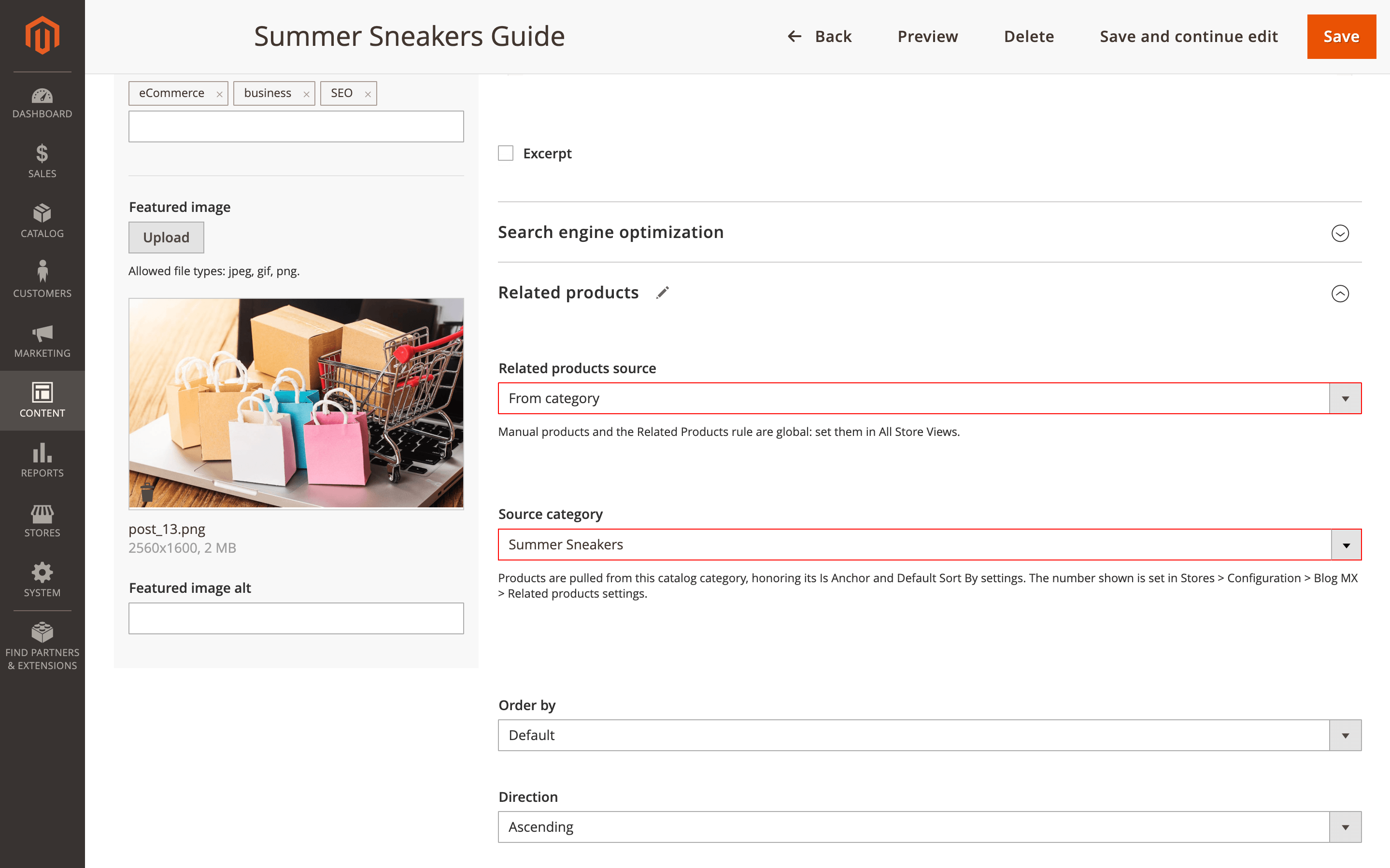
Source, sort order, and even a manual list can now differ per store view too, so a US and EU edition of the same post can each show region-appropriate picks.
Set it on the post edit page's Related Products section, and control how many products pull from a category under Stores → Configuration → Mirasvit Extensions → Blog MX → Related products settings.
Geo IP Redirect
A shopper clicks a European ad, lands on your promo page, and gets bounced straight off it by a geo-based popup meant for someone else entirely. The Geo IP Redirect module adds a way to stop that from happening.
A new Excluded URLs setting lets you list the pages, a promo landing page, a legal page, where no store switch, redirect, restriction, or popup should ever fire: one path pattern per line, with wildcards and optional per-store prefixes. Configure it under Stores → Configuration → Mirasvit Extensions → IP Geolocation Redirect → Limitations; a pattern that would match the whole site gets rejected on save, so there's no accidentally switching the module off site-wide.
Failed country lookups now get logged to var/log/mirasvit/geo-ip.log instead of leaving visitors unmatched with no trace of why, and every label, tooltip, and popup message ships translated across 15 locales.
GDPR
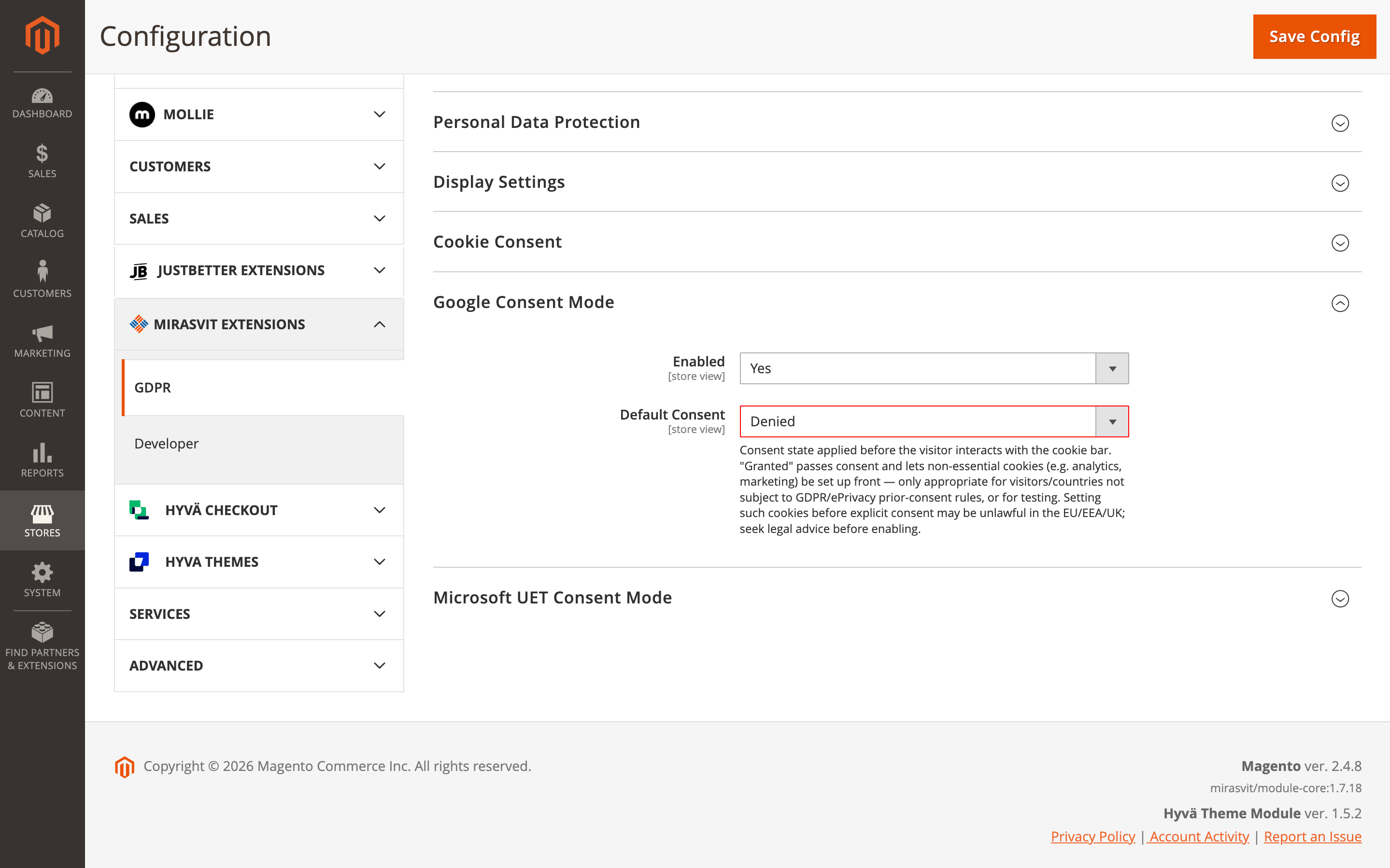
Read this one before you skim past it. The Google/Microsoft UET Default Consent setting in the GDPR extension drops from four options to two, Denied and Granted only.
If yours was set to "Custom" or "According to the Essential cookies group," it falls back to Denied automatically on update, and that's not a cosmetic simplification if you were relying on either option for ad conversion tracking.
Nothing in the logs will point at the cause, it'll just look like conversions quietly dropped. Check the setting under Stores → Configuration → Mirasvit Extensions → GDPR right after you update, not after you notice something's off.
Separately, and much smaller: the cookie-consent bar itself now runs fewer database queries per page load, a minor but store-wide speed bump since it renders on nearly every page you have.
Advanced SEO Suite
The Advanced SEO Suite module shipped one change this cycle, and it earns its place on merit alone. A new bin/magento mirasvit:seositemap:validate command checks a sitemap you've already generated for the problems generation itself never complains about: invalid XML, empty or relative URLs, an unresolved template placeholder, duplicate entries.
It prints a pass/fail summary per file with the number of URLs checked, supports --format=json for scripts, and exits non-zero when anything fails. Chain it right after mirasvit:seositemap:generate in a cron job or deployment script, and a broken sitemap gets caught before Google ever crawls it, not after your indexed-page count quietly drops and you're left guessing why.
Extra Payment
A failed invoice is the kind of thing nobody notices until reconciliation, or doesn't. When the automatic invoice after a completed payment failed to generate, the Extra Payment extension used to swallow that failure without a trace. Not anymore: a missing invoice now gets written to the log, so a payment without one turns up on a routine check instead of months later at reconciliation.
Alongside it, the item price field now rejects anything that isn't a clean number, zero or greater, both in the browser and again on save. It's less about blocking negative prices and more about a stray comma or letter no longer slipping through and silently corrupting an order total.
Withdrawal Button
One feature landed for the Withdrawal Button module this month, and it's a legal-compliance fix, not a convenience one.
EU consumer-rights law starts a customer's right-of-withdrawal clock on delivery, not on the order date. Counting from the order date, the old default, could let the window expire before a slow-shipping order had even arrived. Magento has no reliable way to confirm an order actually reached the customer, so the module counts from the closer proxy it can verify: the shipment date.
A new Shipment date setting lets you count from there instead. If you sell physical goods to EU customers, this isn't optional housekeeping. Look for it under Stores → Configuration → Mirasvit Extensions → Withdrawal Button and turn it on.
Facebook Pixel
Easy to read past this one as a compatibility footnote, but it's worth a check if Content Security Policy is part of your setup. On a store with CSP enabled and no Mirasvit Google Tag Manager module installed, the Facebook Pixel extension could fail to load. The pixel now loads correctly under CSP whether or not Tag Manager is installed, so that combination stops costing you conversion tracking.
Two new console commands, mirasvit:fbmarketing:preview and mirasvit:fbmarketing:validate, also let you preview and validate the Pixel events your store sends to Meta straight from the command line, useful for catching a misconfiguration before it skews a campaign's numbers. Full usage is in the manual.
Everything Else This Month
Nothing below needed its own section, but each of the extensions here got a real, specific fix, not filler:
- Shipping Rules: calculates rates faster at checkout when several methods are active.
- Surcharge / Additional Payment Fee: moves its lookups onto database indexes and adds a daily cleanup for abandoned-cart records.
- Improved Sorting: speeds up "Pin to Top" pages that also use layered navigation.
- Dynamic Categories: clears out duplicate category/product links before applying a new database constraint, so
setup:upgradeno longer fails on stores that had already accumulated them. - Fraud Detection & Prevent Chargeback: hardens output escaping across its admin fraud screens.
- Follow Up Email: fixes a permission check that let restricted admin roles see settings they shouldn't have; a broken unsubscribe redirect or an unresolved store on a queued email now shows up in diagnostics instead of failing silently.
That's everything we shipped this September. If your store doesn't run one of the modules above yet, that's what the full extension catalog is for.
Mirasvit Support Engineer
Promote your products and achieve higher sales by using the power of marketplaces and comparison shopping engines with magento data feed extension. You can automatically generate and deliver feeds of your product catalog to those services with Magento Product Feeds extension.
This tool is unbelievably quick to use and is also outstandingly flexible. It's compatible with all major shopping and advertising services, including Google Shopping.
Feeds go straight to Google Merchant Center through Google's API, and AI profiles can rewrite titles, map Google categories and fill in missing attributes before your catalog ever reaches a marketplace.
Simply install the module, generate your very own product feed, present your catalog to a wider audience, and boost your sales right now!
From meta tags to the sitemap, the Magento 2 SEO Extension gives you full control over every SEO-related feature in your store.
It automates the SEO work you'd otherwise do by hand - templated meta tags, rich snippets, redirects, sitemaps, cross-links and a built-in SEO audit - across every page type. That is why 2,435+ Magento stores rely on it.
A help desk built into your Magento admin. Customer emails and contact forms become tickets, routed to the right department and agent, with workflow rules, satisfaction surveys, reports and AI tools. Every ticket shows the customer's orders and earlier tickets.
Blog MX runs your blog inside Magento, with Page Builder posts, comments, and SEO checks in the admin you already use. Every post, category, author, and tag can differ per store view.
AJAX layered navigation for Magento 2 with multi-select filters, price sliders and SEO-friendly filter URLs.
The same extension adds brand pages, an "All Products" page, landing pages, smart filters and infinite scroll, with Hyvä support built in.
Show each visitor the store view and currency that fit their country, browser language or IP address.
Redirect to any page, ask before switching, or restrict access by country, while search bots and cached pages keep working as usual.
Charge customers after the order is placed. Create an extra payment linked to the original order, send the customer a link, and let them pay in the regular cart with any payment method your store offers.
Customers see their extra payments in their account, guests pay by link, and your team tracks every extra payment in one admin grid. With Mirasvit Order Management, editing an invoiced order requests the difference automatically.
Advanced Reviews adds an AI summary, photos and separate pros and cons fields to Magento 2 product reviews, and sends review request emails after each order to bring in new ones.
A Verified Buyer badge or a buyers-only rule shows shoppers which reviews to trust, and review grouping fills the review block of variants and similar products, on Luma and Hyvä.
Add the Meta Pixel to your Magento 2 store and send the same events from your server through the Conversions API, so Facebook and Instagram ads optimize on complete data.
The extension tracks 8 standard Meta events, from product views to purchase, merges browser and server copies by one event ID, and lets you check every event before you rely on it.
Since 19 June 2026, EU law requires online stores that sell to EU consumers to show a withdrawal button: a simple way for shoppers to cancel a purchase contract online.
The Withdrawal Button extension adds that function to Magento 2: the two-step cancellation flow Article 11a describes, an automatic email receipt, and an admin queue to handle every request.