SEO audit manager
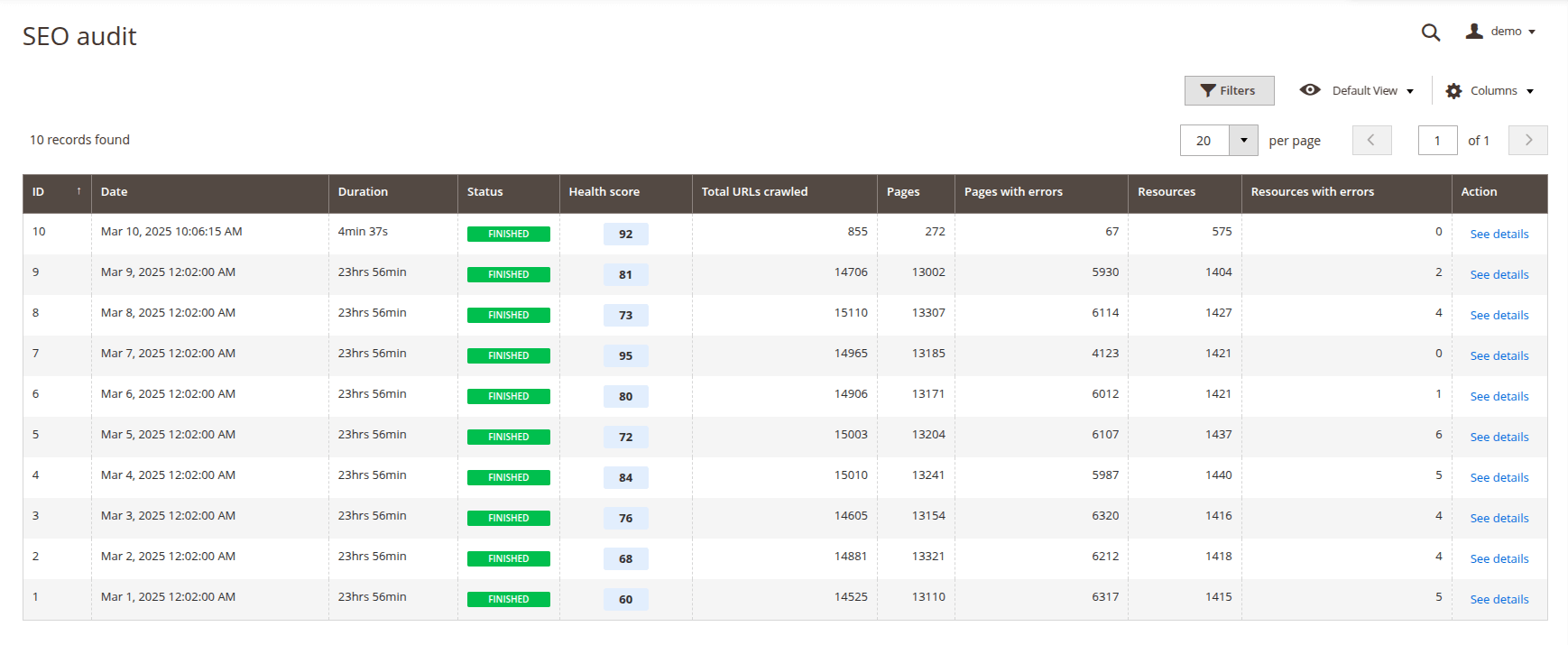
SEO audit is a built-in crawler that checks every page of your store for SEO compliance and generates reports with the website's health score and detailed information about issues on the pages. Audit runs on a daily basis, with a new audit job starting each day.
By using SEO audit reports, you can easily monitor the SEO health score of a website and improve it by addressing the reported issues.
This module provides you with the following pages placed in Marketing -> Advanced SEO Suite -> SEO Audit and allowing you to manage your website's SEO health score.
SEO audit
Displays all SEO audit jobs executed on your website
Job details
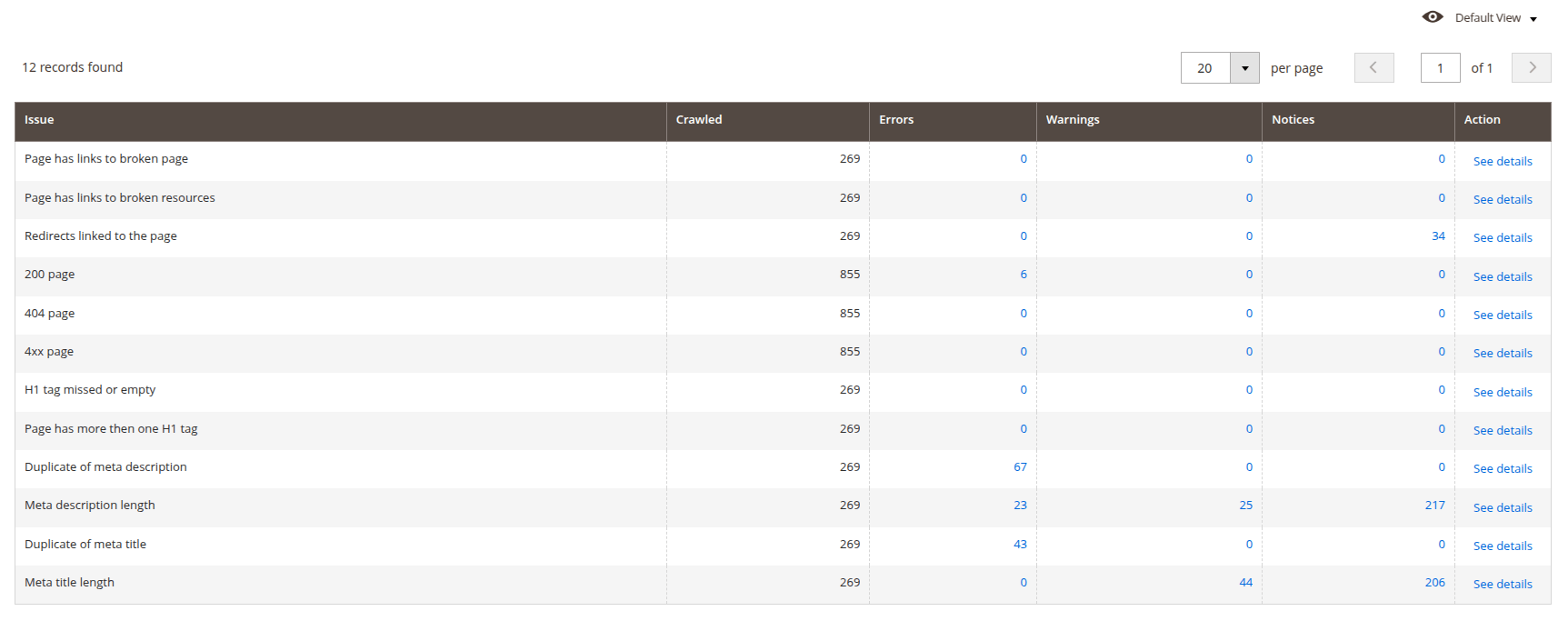
Opens when click on audit job. Displays detailed information about the selected SEO audit job: a health score summary and a checklist with aggregated results by issue type.
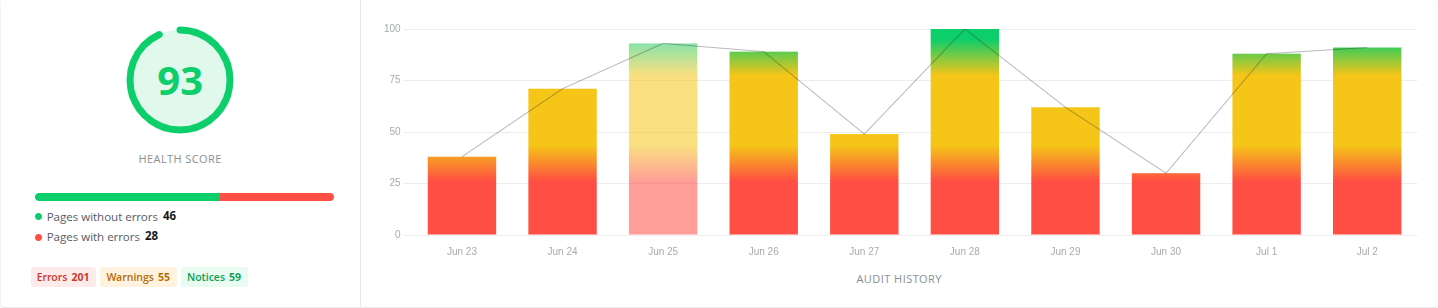
The health score summary shows:
- Health score: a ring showing the job's overall score, colored green (90-100), orange (50-89), or red (0-49) depending on the range it falls into.
- Pages with/without errors: a bar showing the proportion of crawled pages that have at least one error against pages that don't.
- Errors / Warnings / Notices: clickable tags with the total count of issues found at each severity — click one to open Issue details filtered to that severity.
- Audit history: the score for each of the last 10 audit jobs, colored green, yellow, or red for the same 90-100/50-89/0-49 ranges as the health score ring. The bar for the job currently being viewed is shown at reduced opacity so it doesn't stand out from the rest of the history.
Issue details
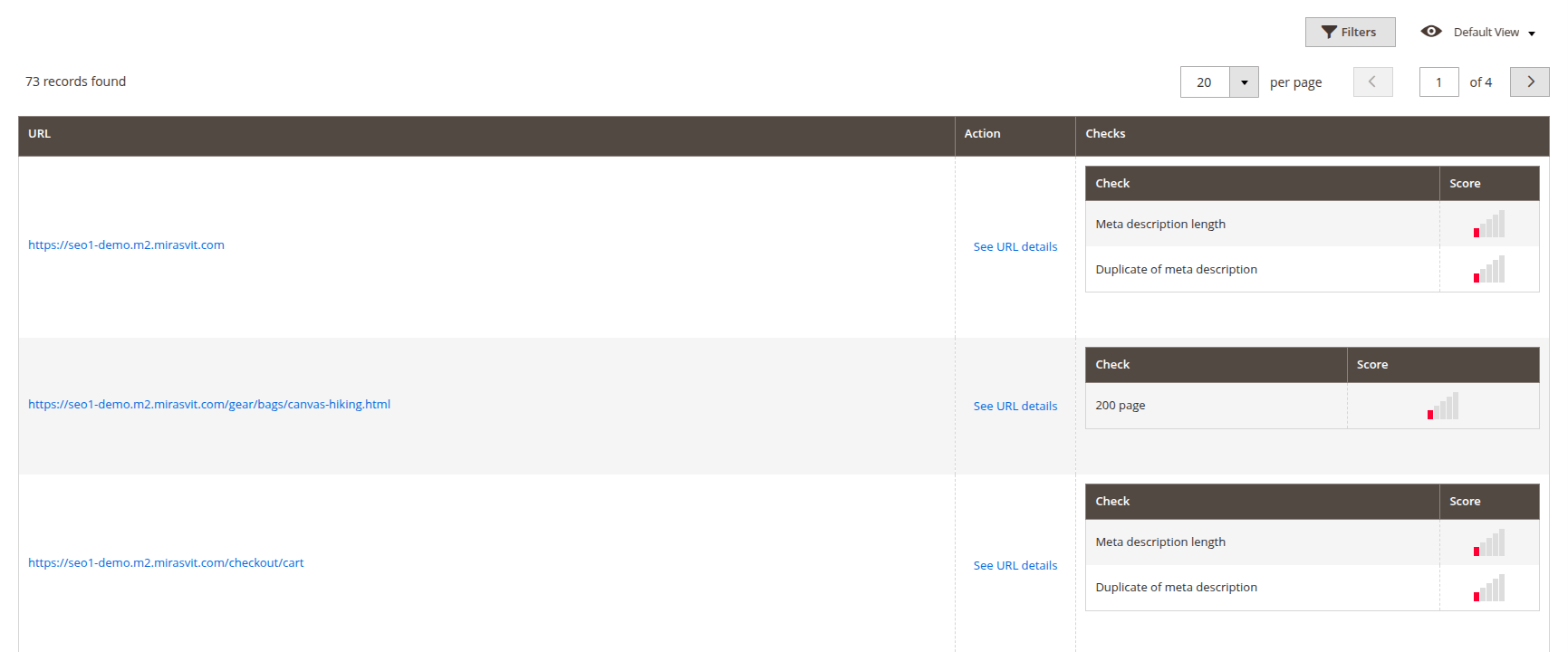
This is a dynamically generated page whose content depends on which link was visited on the Job Details page.
It always displays a list of URLs for which validations have been performed, along with links to detailed information about each URL. Additionally, this page can display a list of checks with results for each URL (if the page was accessed through the Errors, Warnings, or Notices tags on the Job details page) or details for a specific check, including its result and additional information.
URL details
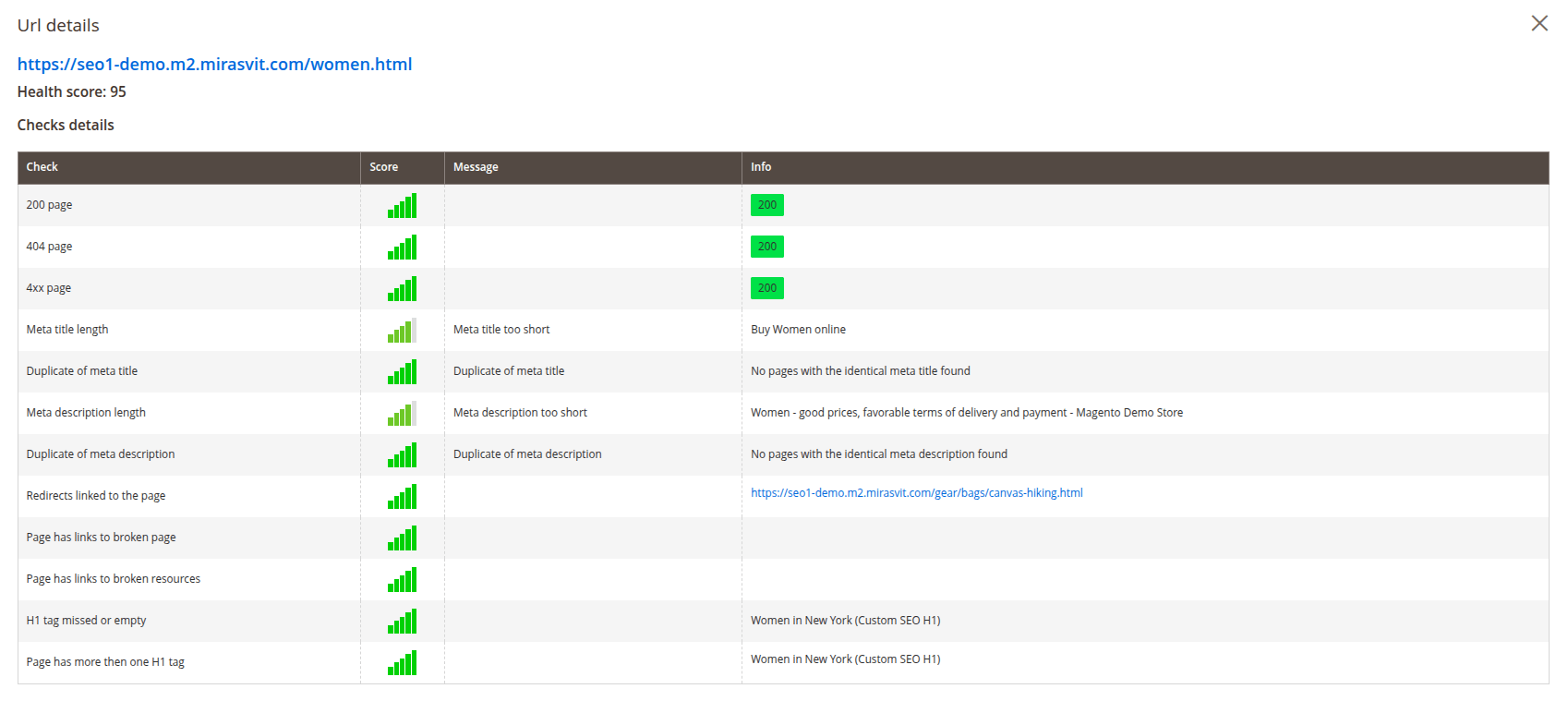
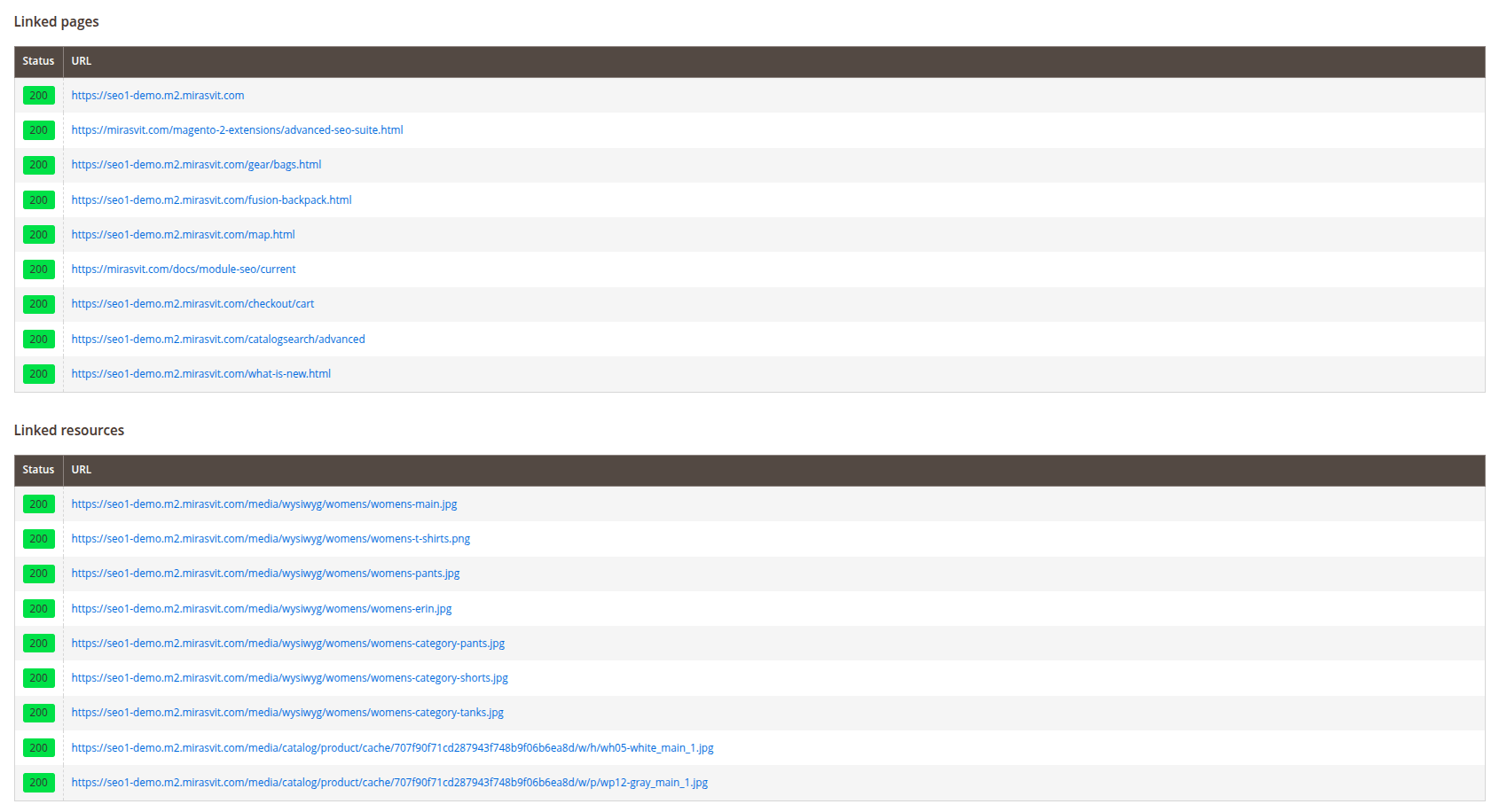
This modal windows opens if click See URL details link. It contains the health score for this URL, a list of all checks performed on this URL with additional information, and lists of pages and resources linked to this URL.
HTTP status checks
Applied to every crawled URL — pages, images, scripts, stylesheets, and other resources alike, including external links:
- 200 page: flags any URL that does not return HTTP 200.
- 404 page: flags a URL that specifically returns HTTP 404.
- 4xx page: flags a URL returning any 4xx status code (400–499).
These three overlap by design (a 404 URL fails all three) — they exist as separate checks so the Issue distribution page can filter and report on each severity independently.
Meta title and description checks
- Meta title length: scores by character count — empty is an Error; 1–20 or 71–90 characters is a mild Warning ("too short"/"too long"); 21–49 or 91+ is a stronger Warning; 50–70 characters is the sweet spot and passes.
- Duplicate of meta title: flags a page whose meta title exactly matches
another indexable crawled page's title. Pages that share the same canonical,
or that are marked
NOINDEXinrobots, are excluded from the comparison. Lists up to 20 matching URLs. - Meta description length: the same graduated scoring pattern as title length, tuned for description: empty is an Error; 1–50 or 161–200 characters is a mild Warning; 51–109 or 201+ is a stronger Warning; 110–160 characters passes.
- Duplicate of meta description: the same duplicate-detection logic as meta title, applied to descriptions.
H1 tag checks
- H1 tag is missing or empty: flags a page with no
<h1>tag on it, or whose first<h1>tag has no text. - Page has more than one H1 tag: flags a page with two or more
<h1>tags, listing the text of each one found.
Linked-page health checks
These use the crawl's parent/child link graph — which pages link to which — rather than inspecting a single page in isolation:
- Redirects linked to the page: for every linked page that the crawler found redirects (3xx) instead of resolving directly, the score drops by one point (starting from a perfect 10, floored at Error). Lists the redirecting URLs.
- Page has links to broken page: flags a page that links to another crawled page returning a 4xx status.
- Page has links to broken resources: flags a page that links to a resource (image, script, stylesheet, etc.) returning a 4xx status.
Schema (rich snippet) checks
Each crawled page's actual structured data (JSON-LD) output is checked for:
- Product schema: flags a product page whose rendered output has no
Product(orProductGroup) JSON-LD — such a page won't be eligible for Google's product rich results, even if it renders fine otherwise. - Schema quality: for every recognized schema type found on a page (Product, Organization, BreadcrumbList, Brand, WebSite, WebPage, Article, and others emitted by this extension), checks whether the properties Google requires are present and filled in.
These checks use the same criticality levels shown throughout SEO audit: Error for a real problem and Warning for something incomplete.
Canonical check
Flags any crawled page with no <link rel="canonical"> tag at all.
This check only verifies a canonical tag is present — it doesn't require it to point to any particular URL.
Thin content check
Flags product and category pages whose visible text content is short —
<script>, <style>, <nav>, <header>, and <footer> content is excluded
before counting words, so boilerplate present on every page doesn't mask a
genuinely thin product/category description. This measures what's actually
rendered on the page, regardless of which module or theme produced it — not a
specific Magento attribute — so it also catches content added via Page
Builder, custom tabs, or third-party modules.
CMS pages are not checked — a short "Thank You" or landing page isn't necessarily a problem, unlike a product or category page with little unique copy.