
Magento 2: One or more indexers are invalid
Magento 2 requires full reindex after significant changes:
- new store view/website was added
- key options in the configuration were changed
- added new attribute (search reindex is required)
- catalog price rules were changed (price and flat index are required)
- etc
After all these changes, Magento 2 require run full reindex for some or even all indexes.
Reindex via a CLI (Command Line Interface)
To run Magento 2 reindex via CLI, just follow this command:
bin/magento indexer:reindex
The output will be:
Design Config Grid index has been rebuilt successfully in 00:00:00
Customer Grid index has been rebuilt successfully in 00:00:00
Product Flat Data index has been rebuilt successfully in 00:00:02
Category Flat Data index has been rebuilt successfully in 00:00:00
Category Products index has been rebuilt successfully in 00:00:00
Product Categories index has been rebuilt successfully in 00:00:00
Product Price index has been rebuilt successfully in 00:00:03
Product EAV index has been rebuilt successfully in 00:00:02
Catalog Rule Product index has been rebuilt successfully in 00:00:02
Catalog Product Rule index has been rebuilt successfully in 00:00:00
Stock index has been rebuilt successfully in 00:00:00
Manual Reindex from the Admin Panel
Also, you can use Improved Asynchronous Re-indexing for run reindex from Magento 2 Admin Panel:
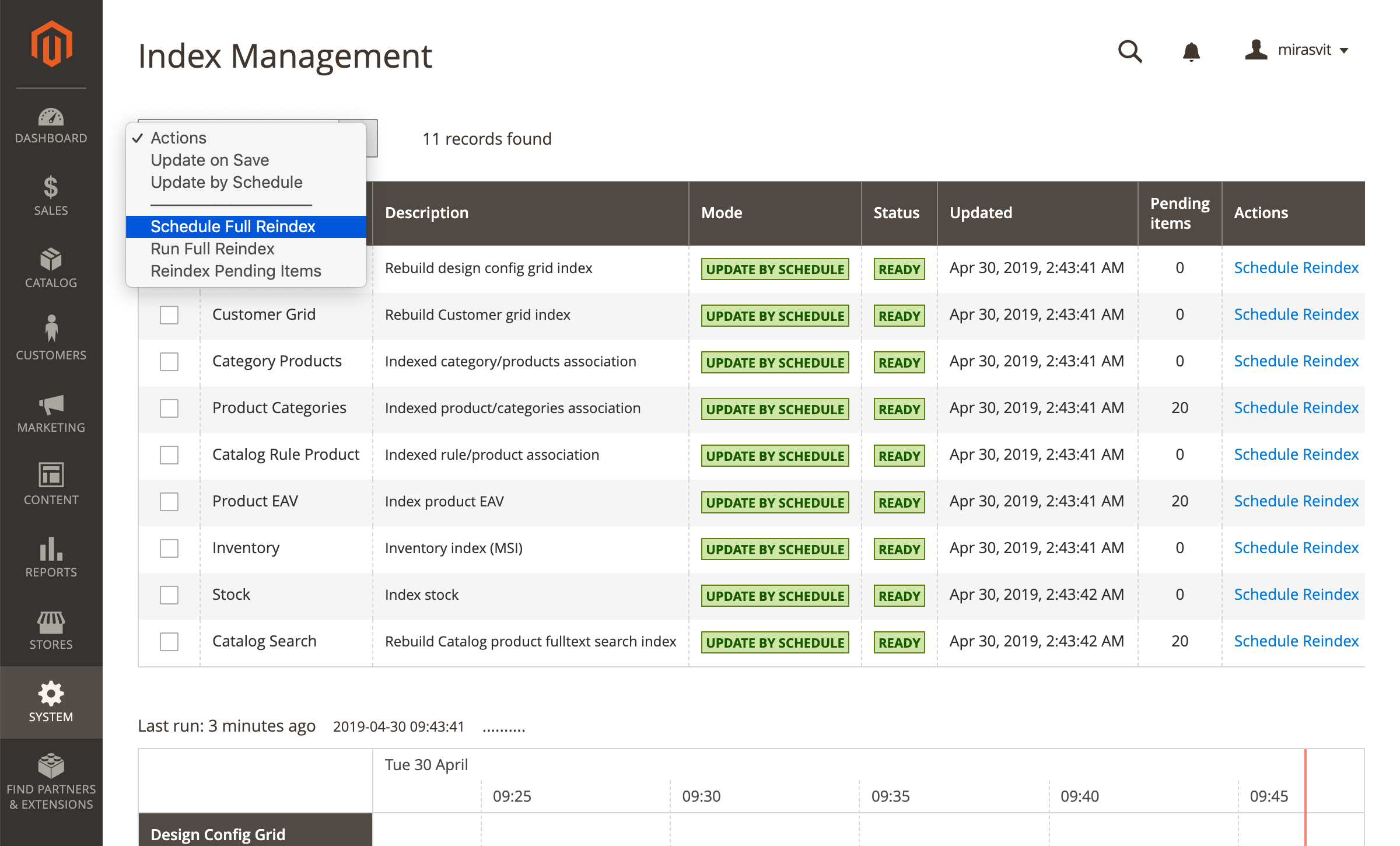
Understanding Indexers in Magento 2
Indexers in Magento 2 are background processes that transform and optimize raw store data into flat, query-friendly structures used by the storefront. For example, product prices involve complex calculations that account for tier pricing, catalog rules, customer group discounts, and tax settings. Rather than recalculating all of this on every page load, Magento pre-computes these values and stores them in index tables. The same principle applies to category assignments, product attributes, stock status, and URL rewrites. Without up-to-date indexes, your storefront may display incorrect prices, missing products, or broken category listings.
Common Causes of Invalid Indexers
Indexers become invalid whenever underlying data changes in a way that makes the current index stale. The most common triggers include bulk product imports, changes to catalog price rules, adding or modifying product attributes, creating new store views or websites, and manual edits to category assignments. Third-party extensions that modify catalog data can also invalidate indexes. In some cases, indexers may fail mid-process due to memory limits, database lock timeouts, or insufficient disk space, leaving them stuck in an invalid or processing state. If you see the "One or more indexers are invalid" message in the admin panel, it means the storefront is serving outdated data until you reindex.
Useful CLI Commands for Managing Indexers
Beyond the basic bin/magento indexer:reindex command, Magento 2 provides several other useful CLI tools for managing indexers. Use bin/magento indexer:status to see the current state of each indexer and identify which ones are invalid. The command bin/magento indexer:info lists all available indexer IDs, which you can use to reindex selectively, for example bin/magento indexer:reindex catalog_product_price to rebuild only the price index. You can also switch indexers between "Update on Save" and "Update by Schedule" modes using bin/magento indexer:set-mode schedule or bin/magento indexer:set-mode realtime. Schedule mode is generally recommended for production stores because it batches changes and processes them via cron, reducing the performance impact of frequent data updates.
Troubleshooting Reindex Failures
If reindexing fails or takes an unusually long time, there are several things to check. First, verify that your server has sufficient PHP memory by reviewing the memory_limit setting in your CLI php.ini file. Large catalogs may require 2 GB or more during a full reindex. Second, check for database lock issues by looking at your MySQL process list for long-running queries that may be blocking the indexer. Third, ensure that Magento cron jobs are running correctly, as the "Update by Schedule" mode depends on cron to process the index queue. You can verify cron status with bin/magento cron:run and by checking the cron_schedule table for recent entries. If an indexer is stuck in a "processing" state, you can reset it by running bin/magento indexer:reset followed by a fresh reindex.