
Magento 2 Shipping Restrictions Extension
Hide or disable shipping methods at checkout when a rule matches the products, cart, shipping address, customer or time of day.
Restrict by country, state, city or ZIP code, product attributes and categories, backorders and stock source, and show customers a message that explains how to unlock a method. Set separate rules per store view and customer group.
- Restrict methods by country, state, city or ZIP code
- Restrict methods for specific products and categories
- Hide express shipping for backordered items
- Schedule restrictions by day and time
- Explain restrictions with a custom message
- Reuse locations with Shipping Areas
Hide shipping methods that don't fit the order
Shipping Restrictions hides or disables a shipping method at checkout whenever a rule matches the cart, the products in it, the shipping address, the customer or the time of day. Out of the box, Magento only lets you limit a carrier to certain countries. With this extension you decide method by method: no express shipping for oversized items, no next-day delivery on Friday afternoon, no ground freight to islands.
- Restrict by country, state, city or ZIP code, including ZIP prefixes and patterns
- Restrict by product attributes, category or SKU in the cart
- Restrict by cart subtotal, weight and item quantity
- Restrict by backordered items, stock source, company and the customer's number of orders
- Restrict by day of the week and time of day
- Show customers why a method is unavailable, or hide it silently
Restrict shipping by country, state, city or ZIP code
Offer only the methods that actually reach the customer's address
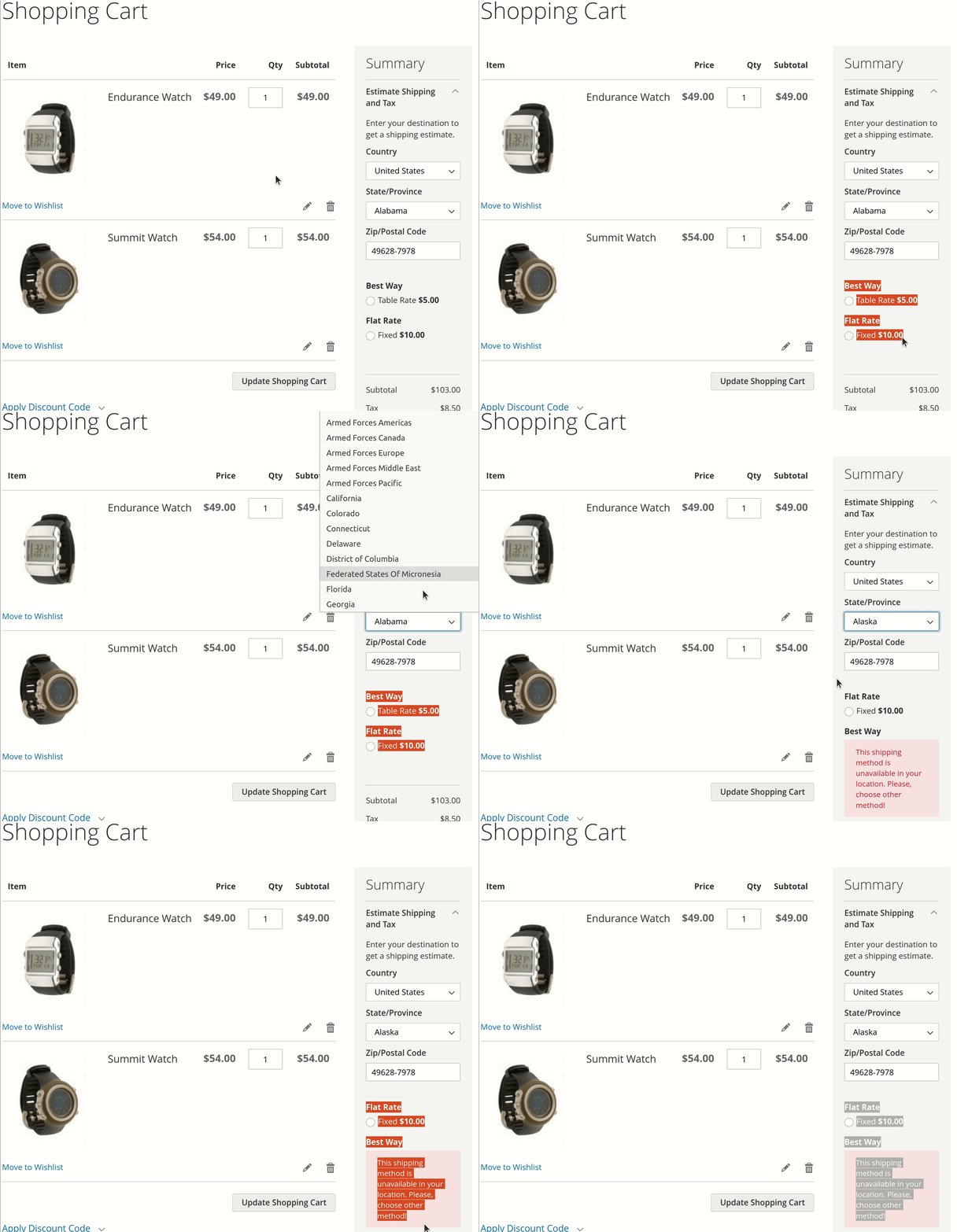
Set which shipping methods are available for each country, state or region, city and ZIP code. A ZIP condition can match an exact code, a prefix (all codes starting with "99") or a regular expression, so a whole postal range takes one line instead of hundreds.
Restrict a single method of a carrier or the whole carrier. If a rule hides every method for a region, you have effectively stopped shipping there.
For example, a florist can block slow delivery methods for cut flowers to regions where delivery takes several days, because the flowers won't survive the trip.
Restrict shipping methods for specific products
Combine product and cart conditions for any rule your business needs
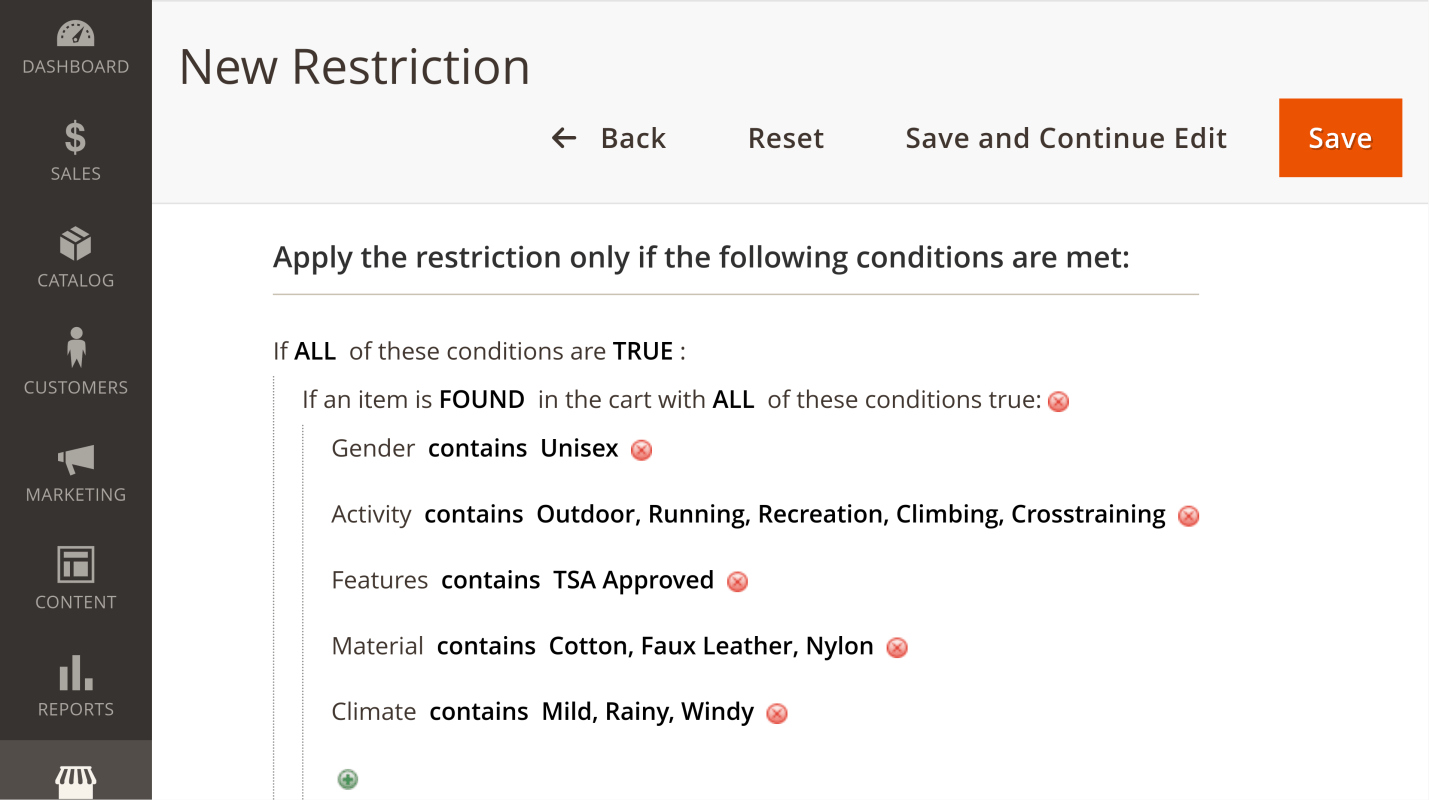
Build conditions from product attributes, categories and SKUs in the cart, and combine them with cart conditions such as subtotal, total weight and item quantity. Rules use the familiar Magento condition builder, so "if any item in the cart is in the Batteries category" or "if total weight is over 30 kg" takes a minute to set up.
This keeps fragile, perishable, high-value or regulated goods away from methods that can't handle them.
For example, li-ion batteries ship as dangerous goods and need a carrier that accepts them. Restrict every other method for carts that contain batteries. In the same way, you can block truck freight for heavy items to regions where trucks can't deliver.
Stock, backorders and repeat customers
Some restrictions depend on where the goods are and who is buying, not on the address. The extension adds conditions that Magento's own rule builder doesn't have:
- Backordered items: hide express shipping when all items, or at least one item, in the cart are on backorder.
- Stock source: with Multi-Source Inventory, offer a method only when a specific warehouse has the item in stock.
- Number of orders: treat first-time buyers and repeat customers differently, for example offer a premium delivery method only to customers with several orders.
- Company: apply a rule only when the shipping address includes a company name, which suits B2B freight methods.
Apply restrictions exactly where you need them
Restrict methods per store view, customer group and carrier
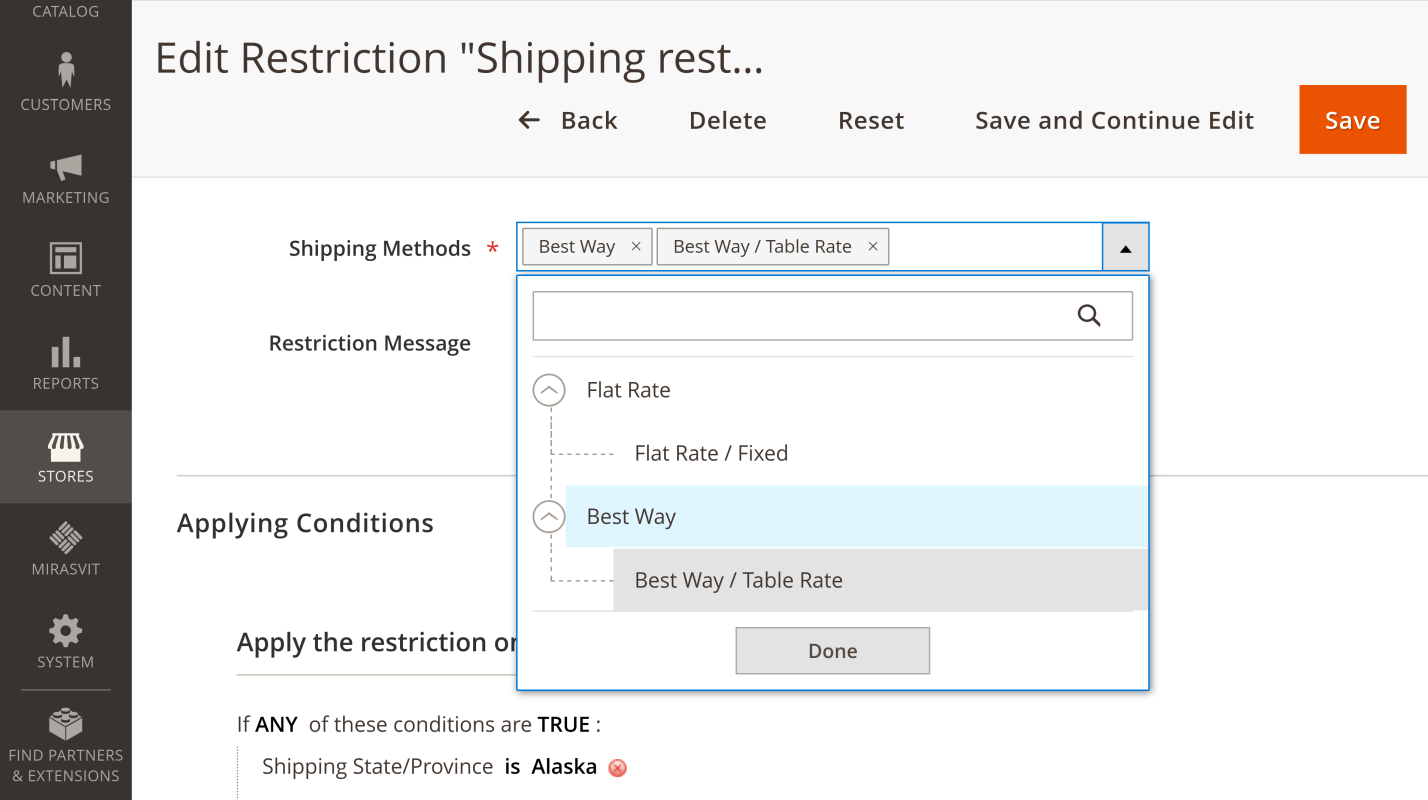
Select one or more store views and customer groups for each rule. Choose whole carriers or individual methods, several at once if needed.
Restrictions work with any carrier that returns rates to Magento, including third-party carrier modules and Shipping Table Rates. They apply on the Luma and Hyvä storefronts, including Hyvä Checkout.
Each rule also has an "Apply in admin" switch: keep it on to restrict methods for orders created in the admin, or turn it off so your staff can still choose any method.
Tell customers how to unlock a method
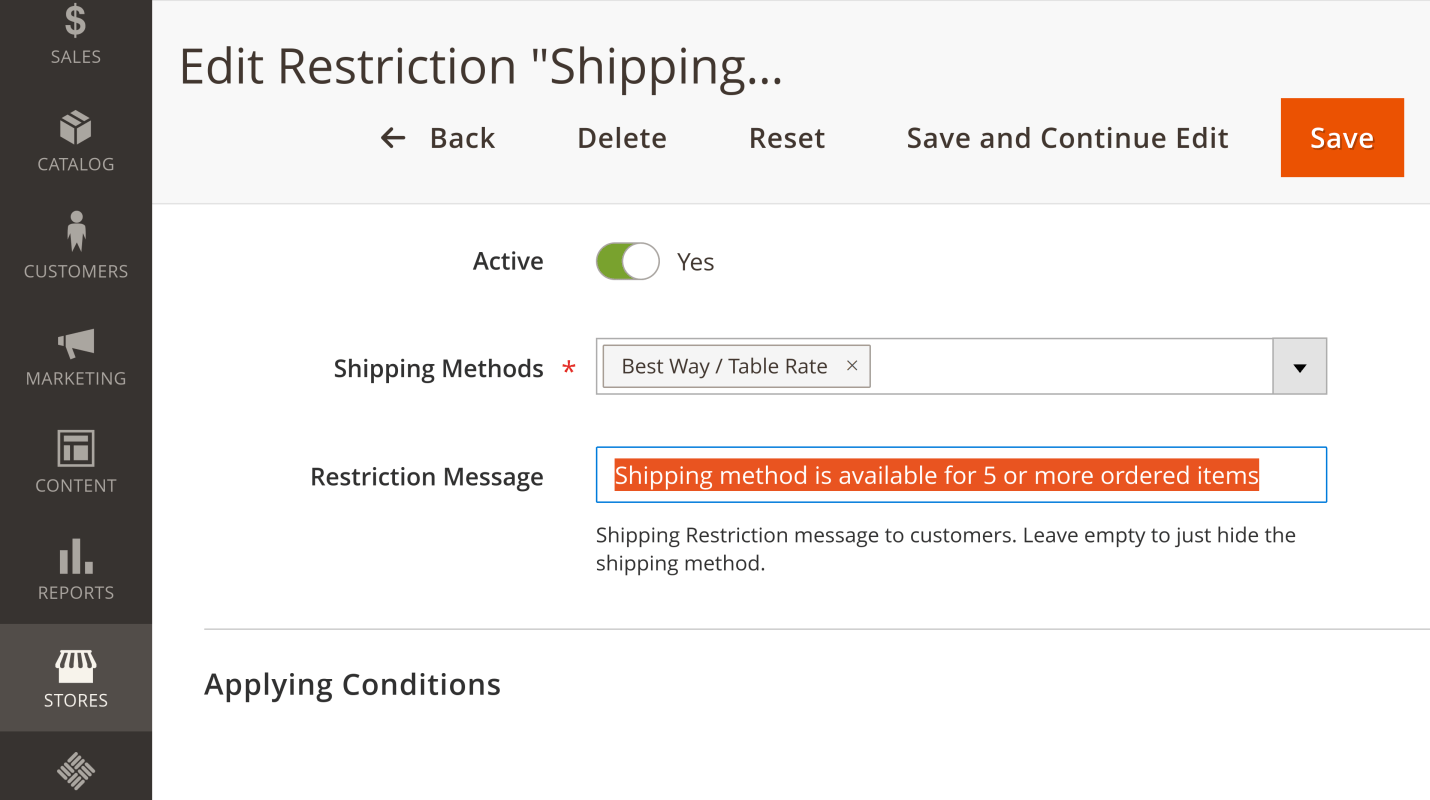
Write a message for each rule, and customers see it next to the unavailable method at checkout. Use it to say what would unlock the method, for example "Free express shipping is available for orders over $100".
The message goes through Magento's translations, so a multilingual store shows it in each store's language. Leave the message empty to hide the method silently.
Schedule restrictions by day and time
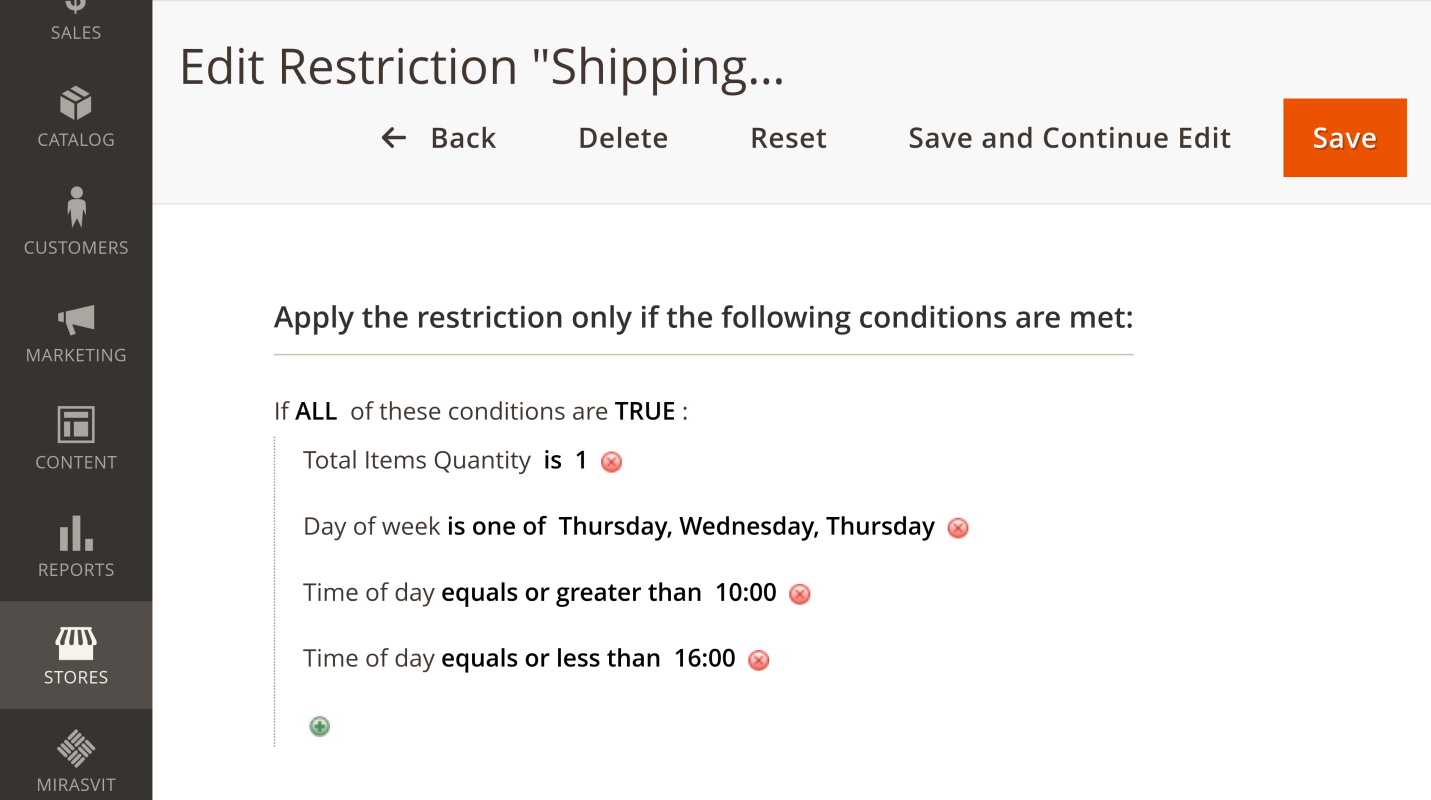
Add day-of-week and time-of-day conditions to any rule. Select one or several days and set the hours when the rule is active.
This is how you set a cut-off: hide next-day delivery from Friday to Sunday and after 3 PM on weekdays, when your warehouse can no longer ship the same day.
Reuse locations with Shipping Areas
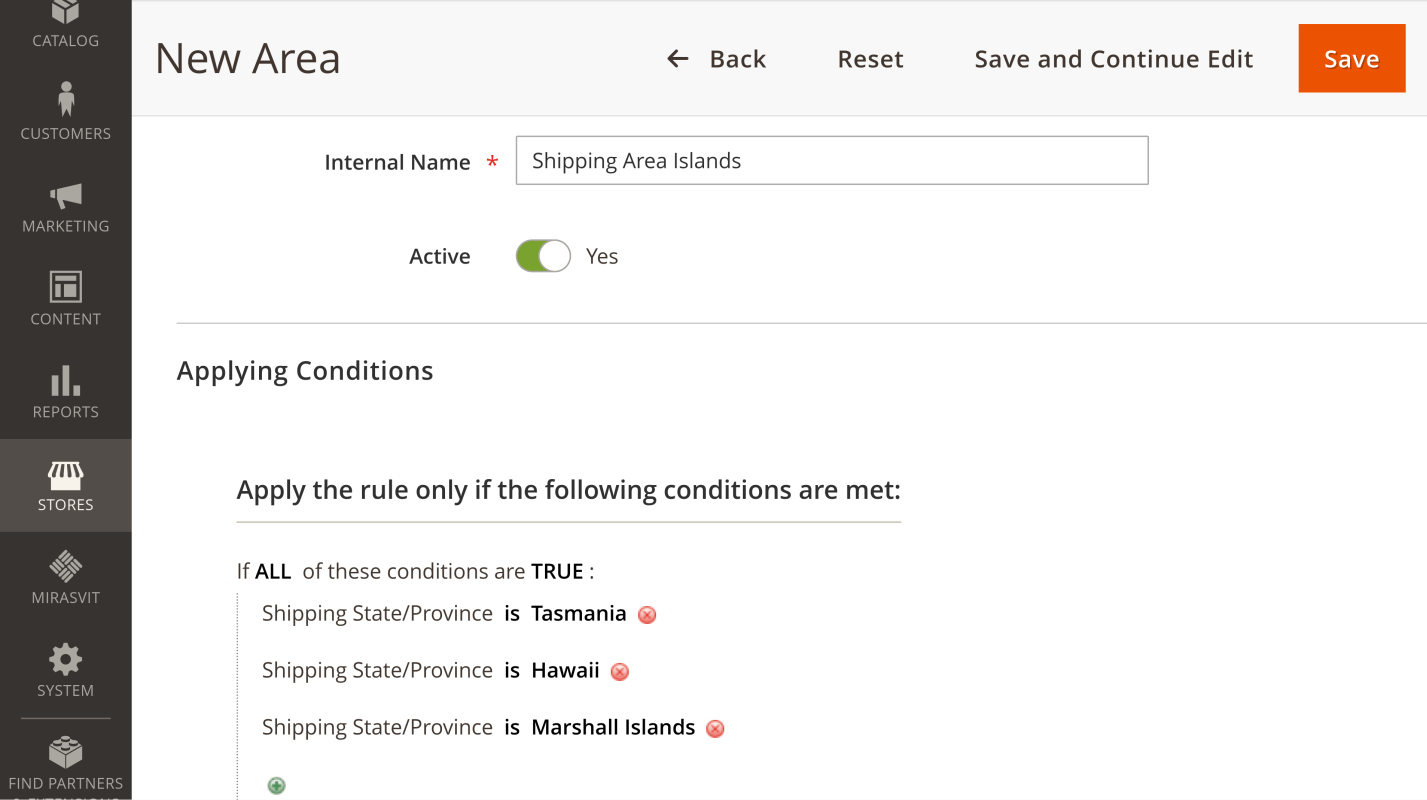
A Shipping Area is a saved set of locations: countries, states, cities and ZIP codes, with some included and others excluded. Build "Remote islands" or "Local delivery zone" once and use it as a condition in any rule instead of repeating the same list.
The same Shipping Areas work in Shipping Rules, Shipping Table Rates and Surcharge. To change shipping prices instead of hiding methods, use Shipping Rules. Setup details are in the user manual.
Full Features List
- Restrict a whole carrier or individual methods
- Conditions on product attributes, category and SKU
- Conditions on cart subtotal, weight and item quantity
- Day-of-week and time-of-day schedule
- Hide a method silently or show a message
- Translatable restriction messages
Address conditions:
- Country
- State or province
- City
- ZIP code, prefix or regular expression
- Company
- Shipping Area
Order and customer conditions:
- Backordered items (all or at least one)
- Stock source with available quantity (MSI)
- Customer's number of orders
- Payment method
- Store views and customer groups
- Apply to admin orders or skip them
Rules are straightforward to create and can be customized around the locations or conditions that apply to your business. This is especially important for companies dealing with regulatory, compliance or product-specific shipping limitations where simply allowing an order and cancelling it afterward is not acceptable.
Installation and configuration are relatively simple, and the extension does its job without unnecessarily complicating checkout.
For certain industries this is not just a convenience—it is a requirement.
I wish the notification shown when its is triggered could be customized more, but other than that, it does exactly what I need it to.
Save time by starting your support request online and we'll connect you to an expert.
Can the shipping restriction be applied to particular products?
Yes. Build the rule's conditions from product attributes, categories or SKUs in the cart, and combine several attributes to target exactly the products that need limited shipping.
Can a customer see why a shipping method is unavailable in their cart?
Yes, if the restriction rule has a message: the customer sees it next to the unavailable method at checkout. You write a separate message for each rule, or leave it empty to hide the method silently.
Can the module restrict selected shipping methods on specified days?
Yes. The extension adds day-of-week and time-of-day conditions to the standard Magento conditions. Use them to schedule a restriction, for example to hide next-day delivery on weekends or after your daily cut-off time.
Is it possible to entirely restrict shipping to certain regions?
Yes. Create a rule that hides every shipping method for that region, and customers there won't be able to select any method.
You can specify locations by country, state, city and ZIP code, including ZIP prefixes and regular expressions. Use a Shipping Area to apply the same rule to several locations.
Does it work with third-party shipping carriers and table rate modules?
Yes. The extension filters the rates of any carrier that returns them to Magento, including third-party carrier modules and Shipping Table Rates.
Can I block one product from shipping to a country and show a message?
Yes. Combine a product condition (attribute, category or SKU) with a country condition and add a message to the rule. The message text is set per rule, so write it with the product in mind: the product name isn't inserted automatically.
Do restrictions apply to orders created in the admin?
That's up to you. Each rule has an "Apply in admin" switch: on by default, so admin orders follow the same restrictions, or off, so your staff can choose any method.
Can I hide express shipping when an item is backordered?
Yes. Use the Backordered Items condition and choose whether the rule applies when all items or at least one item in the cart are on backorder.
mirasvit/module-core 2.x), so updating Core for another Mirasvit extension no longer blocks you from upgrading or keeping this one. Core 1.2 and later still works.mirasvit/module-shipping-restriction-hyva is gone: the restriction messages in the Hyvä cart shipping estimate and in the Hyvä Checkout shipping step are now part of Shipping Restrictions itself. There is no second package to find and keep in step, and on a Luma store the Hyvä part simply stays dormant. Composer removes the companion package by itself when you upgrade.Hyva_MirasvitShippingRestriction is gone, not renamed — Its templates and layouts now live inside Mirasvit_ShippingRestriction, and the extension no longer depends on hyva-themes/magento2-compat-module-fallback. You only need to act if you referenced Hyva_MirasvitShippingRestriction yourself — in a custom di.xml, a layout file, or a deployment script that enables modules by name.Hyva_MirasvitShippingRestriction::cart/shipping.phtml is now Mirasvit_ShippingRestriction::cart/shipping-hyva.phtml, and Hyva_MirasvitShippingRestriction::checkout/shipping/method-list.phtml is now Mirasvit_ShippingRestriction::checkout/shipping/method-list-hyva.phtml. Both stay Hyvä-only: Luma shows the same messages with its own Knockout templates, which did not change. An override at the old path is simply not read, with no error to say so.hyva-themes/magento2-theme-module 1.3.14 or later, and Hyvä Checkout 1.3.1 or later — The Hyvä templates now apply on every Hyvä store, not only where the companion package was installed, and they use view models those versions introduced. Composer refuses the upgrade on an older Hyvä instead of letting the cart or checkout break.bin/magento hyva:config:generate and rebuild your theme's Tailwind CSS, so the build picks up the templates from their new location.mstrate/mstrate_<id> → mstrate/mstrate<id>) to match the new underscore-free method code format introduced in Mirasvit_ShippingTable 0.2.1. Without this, restrictions targeting a Table Rates method would silently stop matching after the update.
 Andriy Kovalenko
 We are committed to being open and transparent with our customers. When you purchase our module, you automatically receive one year of free support service and free updates.
Why is this important?
- Seamless Installation and Configuration: We understand that setting up a new module can take time to configure according to your specific needs. That’s why we offer a full year of free support. Our experienced team is here to assist you with installation, configuration, and any questions you might have. We're eager to share our expertise to ensure you get the most out of your purchase.
- Stay Updated with Magento (Adobe Commerce) Releases: Magento releases new versions approximately every three months. These updates can sometimes introduce compatibility challenges. To keep your store running smoothly, we provide a year of free access to the latest versions of our modules, ensuring that you can upgrade Magento and our modules without encountering any obstacles.
- Subscription Included: Renewing your subscription ensures continued access to the latest updates and support from our team. This means you can be confident that any issues you encounter with the extension will be resolved quickly and efficiently. You can cancel your subscription at any time without any additional fees.
These are our primary. A major portion of our new clients come from referrals from our existing clients. Our professional team of developers, marketers and support staff have invested the best knowledge and experience in the field into our work, so you know you can come back to us again and again.
One year free and high quality support. We go to great lengths to provide maximum satisfaction with every module you have purchased in our store. By helping you with installation, configuration, answering your every question, we do all our best to eliminate any possible problems.
30-days money back guarantee. If you are not satisfied with our extension performance for any reason, we provide a full refund.
We constantly add new features to all our modules, and are always interested in hearing your opinion and implementing your suggested features in our future developments.
We provide an expanded user guide for every aspect of our extension, so you can find answers for all your burning questions.
You can customize extension according to your needs and requirements.
The Module is easy to install and upgrade, just follow our step-by-step user guide. Additionally, the extension is ready to use with the Hyvä theme.
No core modifications. The extension has been tested in a Magento Cloud environment and is fully compatible with it.