
Admin Bookmarks for Magento 2
Adds a bookmark bar to the Magento 2 admin. Click the star next to a page title to pin it, and the bookmark keeps the grid's filters, sort order and columns.
Each admin has a personal set of bookmarks, grouped into folders and marked with colors and icons, plus a list of recently visited pages.
- Pin any admin page with one click
- Keep grid filters, sorting and columns
- Group bookmarks into folders
- Personal bookmarks for each admin


Your most used admin pages, one click away
Admin Bookmarks adds a bookmark bar to the top of every Magento admin page, and each bookmark opens a grid with the filters you saved
- Problem: Store managers return to the same pages all day: pending orders, new customers, open returns, a low stock list. In default Magento each visit means going through the admin menu again and setting the same grid filters again.
- Solution: Click the star next to the page title and the page lands in the bookmark bar, together with its filters, sort order and columns. Next time it is one click from any admin page.
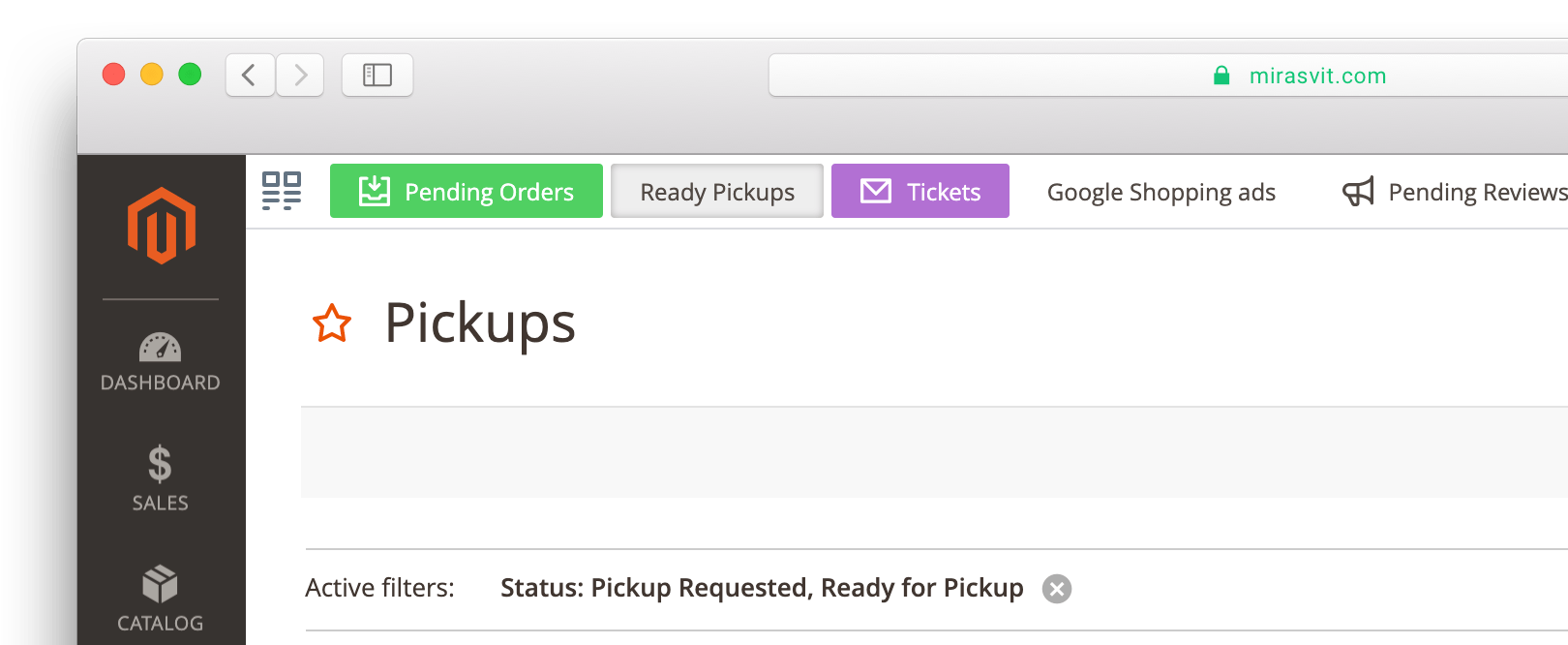
A bookmark remembers the grid, not just the page
When you bookmark a standard Magento admin grid, the extension saves its current state: active filters, sort order and visible columns. Bookmark the Orders grid filtered to Pending, and the bookmark opens exactly that list, sorted the way you left it.
Change the filters on a bookmarked page and a small indicator appears next to the star. One click updates the saved bookmark, or saves the new view as a separate bookmark, so you can keep "Pending" and "Ready to ship" side by side.
Magento's own grid views are saved per grid, so you still have to open that grid first. A bookmark opens the saved view from any admin page.
Folders and a bookmark manager

Group bookmarks into folders, for example Sales, Catalog or System, and keep the bar short. The bookmark manager shows all bookmarks and folders as a tree, where you reorder them and move them between folders with drag and drop.
One click to save
Click the star next to the page title. The bookmark appears in the bar right away, with the page name as its title.
Personal bookmarks for each admin
Every admin user has their own set of bookmarks. What one manager pins doesn't clutter the bar of another.
Title, color and icon
Right-click a bookmark to rename it, pick one of eight colors or an icon, or delete it.
Recently visited pages
The Recently visited menu at the right end of the bar lists the pages you opened, even those you never bookmarked.
Opens in a new tab when you need it
Cmd+click, Ctrl+click or middle-click a bookmark to open it in a new browser tab, the same as in your browser.
Keyboard and language support
The bar works with the keyboard and screen readers (WCAG 2.2 AA), and its interface is translated into 16 languages.
See what you opened recently
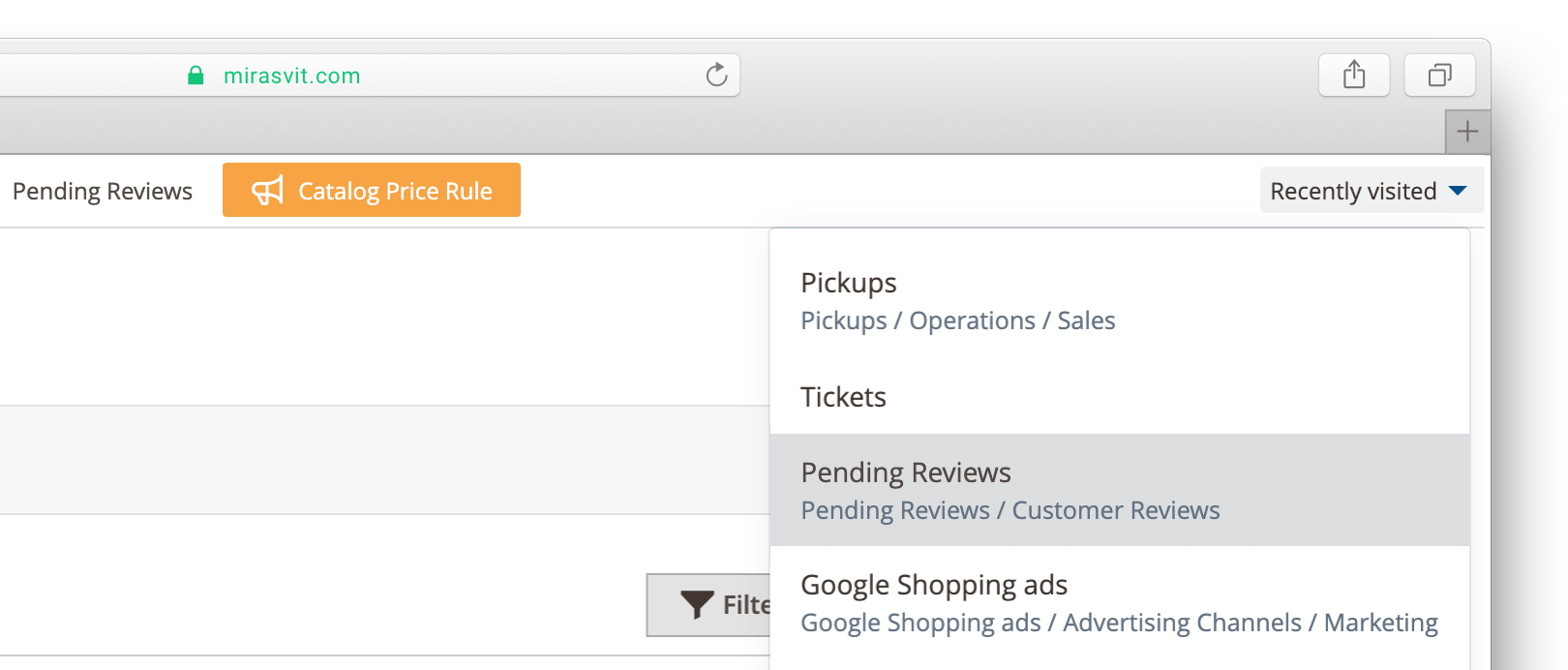
Got pulled away in the middle of a task? The Recently visited menu keeps the pages you worked on, so you can get back without searching the menu again. Background requests are not recorded, only the pages you actually opened.
Works with the rest of your admin
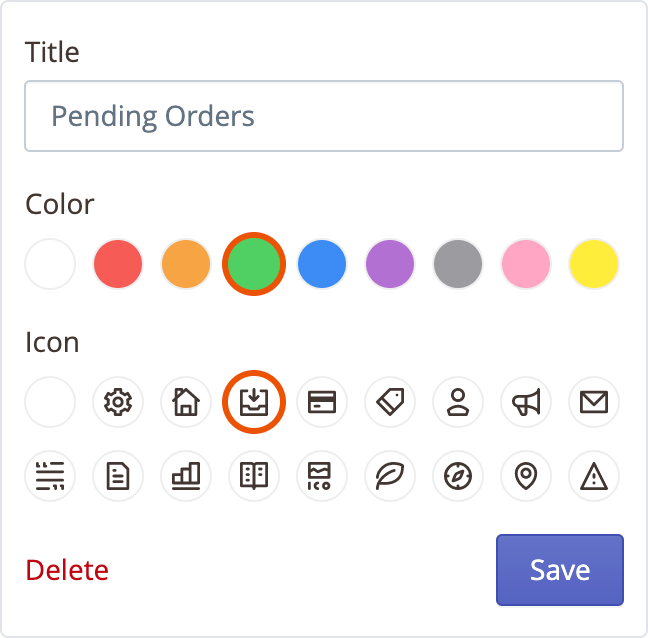
Any admin page can be bookmarked, including pages added by other extensions. Installation needs no configuration: the bookmark bar appears for every admin user after setup. See the user manual for details.
If you mostly need to find a specific order or customer rather than return to a list, Admin Quick Search finds it by number, email, phone or SKU from one search box.
Administrators can bookmark the backend pages they use regularly instead of repeatedly navigating through Magento's menus. Bookmarks can be customized visually, and each administrator can maintain their own set.
It is unobtrusive, reliable and has worked without causing problems. This is a good example of a small extension that saves time every day without adding unnecessary complexity.
This gives you a simple and easy way to create shortcuts to any area of Magento admin. Sort, organize and colorize them as needed.
Definitely simple but definitely useful.
Save time by starting your support request online and we'll connect you to an expert.
How do I add a bookmark in the Magento admin?
Open the page and click the star next to the page title. The page appears in the bookmark bar at the top of the admin right away. Right-click the bookmark to change its title, color or icon.
Does a bookmark keep my grid filters?
Yes. On standard Magento admin grids, a bookmark saves the active filters, sort order and visible columns, and restores them when you open it. If you change the filters later, click the indicator next to the star to update the bookmark or save the new view as a separate one.
How is this different from Magento's built-in grid views?
Magento saves grid views per grid, so you first open the grid and then pick the view. A bookmark opens the saved view of any grid from any admin page in one click, and you keep bookmarks for different grids in one bar.
Can I group bookmarks into folders?
Yes. Create folders in the bookmark manager and move bookmarks into them with drag and drop. The manager shows all bookmarks and folders as a tree.
Can other admins see my bookmarks?
No. Each admin user has a personal set of bookmarks and a personal list of recently visited pages. Bookmarks are not shared between admin users.
Does it need any configuration after installation?
No. After installation the bookmark bar appears for every admin user. See the user manual for installation and upgrade steps.
background-color and color on document.body, overriding Magento admin panel styles. These properties are now explicitly removed after Polaris initializes.global.scss to prevent them from affecting elements outside the bookmarker container.Blog

 Andriy Kovalenko
 Oleksandr Drok
 We are committed to being open and transparent with our customers. When you purchase our module, you automatically receive one year of free support service and free updates.
Why is this important?
- Seamless Installation and Configuration: We understand that setting up a new module can take time to configure according to your specific needs. That’s why we offer a full year of free support. Our experienced team is here to assist you with installation, configuration, and any questions you might have. We're eager to share our expertise to ensure you get the most out of your purchase.
- Stay Updated with Magento (Adobe Commerce) Releases: Magento releases new versions approximately every three months. These updates can sometimes introduce compatibility challenges. To keep your store running smoothly, we provide a year of free access to the latest versions of our modules, ensuring that you can upgrade Magento and our modules without encountering any obstacles.
- Subscription Included: Renewing your subscription ensures continued access to the latest updates and support from our team. This means you can be confident that any issues you encounter with the extension will be resolved quickly and efficiently. You can cancel your subscription at any time without any additional fees.
These are our primary. A major portion of our new clients come from referrals from our existing clients. Our professional team of developers, marketers and support staff have invested the best knowledge and experience in the field into our work, so you know you can come back to us again and again.
One year free and high quality support. We go to great lengths to provide maximum satisfaction with every module you have purchased in our store. By helping you with installation, configuration, answering your every question, we do all our best to eliminate any possible problems.
30-days money back guarantee. If you are not satisfied with our extension performance for any reason, we provide a full refund.
We constantly add new features to all our modules, and are always interested in hearing your opinion and implementing your suggested features in our future developments.
We provide an expanded user guide for every aspect of our extension, so you can find answers for all your burning questions.
You can customize extension according to your needs and requirements.
The Module is easy to install and upgrade, just follow our step-by-step user guide. Additionally, the extension is ready to use with the Hyvä theme.
No core modifications. The extension has been tested in a Magento Cloud environment and is fully compatible with it.