
How Ecommerce Site Speed Drives Conversions: Key Statistics
-
 Anton Gurtovoi
- Magento 2
- Updated: Sep 30, 2026
- 7 min read
Updated: rewritten for the current Core Web Vitals (INP and CLS), fresh speed statistics and benchmarks, plus our support team's honest take on when speed modules help - and when they can't.
A site that loads in 1 second converts 3 times better than a site that loads in 5 seconds - 2.5 times, if we're talking ecommerce specifically. That's from a 2022 Portent study, and it's the clearest argument for taking page speed seriously.
Page load speed tells you how long users wait before they can interact with a page - content, shopping carts, product configurators. Some still think a 1 or 2-second delay isn't worth worrying about. Especially with today's internet speeds. The numbers below prove otherwise: you'll see the studies that tie speed to revenue, what "fast" actually means now, and how to make your store faster.
Contents:
- What Google measures: Core Web Vitals
- Page speed and conversion rate: the statistics
- What is a good page load time for ecommerce?
- Mobile users feel slow pages first
- Slow pages lose people after the click
- How to speed up your store
- Why didn't my PageSpeed score improve?
- Automate it: speed modules for Magento
- Final thoughts
What Google measures: Core Web Vitals
Google measures page comfort with a set of metrics called Core Web Vitals. Since March 2024, there are three of them:
- LCP (Largest Contentful Paint). How long it takes for the largest element on the page to appear. Google's threshold for "good" is 2.5 seconds.
- INP (Interaction to Next Paint). How quickly the page responds to clicks and taps throughout the whole visit. It replaced FID (First Input Delay) in March 2024. Good means under 200 milliseconds.
- CLS (Cumulative Layout Shift). How much the page jumps around while loading. Good is under 0.1.
PageSpeed Insights also reports supporting metrics like FCP (First Contentful Paint) and Speed Index, but the three Core Web Vitals are what Google uses in ranking. A well-organized page with relevant content can still end up at the bottom of the first page of search results because of them.
Page speed and conversion rate: the statistics
Conductor has compiled a case study of several big sites' experiences with page speed and conversion rate. Speed optimization moved the needle every time.
In 2021, Vodafone reported increased revenue after improving its Web Vitals - specifically, the loading speed of the largest elements on its landing pages. Tests showed sales increased by 8% compared to unoptimized pages. The same year, Yelp reported a 15% increase in conversion rates after optimizing how fast the first content shows up and how quickly the page becomes fully interactive - mainly by making the site's structure lighter.
Pfizer discovered that by 2019, 15 of their websites were slow, sometimes taking more than 20 seconds to load. The company optimized its web pages, and results showed a 20% decrease in the bounce rate. That's the pattern everywhere. In 2020, Propellernet found that, on average, users are 34% more likely to convert on a quick-loading page - both on desktop and mobile.
The scale of the effect is best captured by Google and Deloitte's "Milliseconds Make Millions" study: a 0.1-second improvement in mobile site speed increased retail conversions by 8.4% and average order value by 9.2%. Speed pays.
What is a good page load time for ecommerce?
Aim to show the main content in under 2.5 seconds - that's Google's "good" threshold for LCP. Most stores don't hit it: US retail sites take about 6.3 seconds to load on mobile, more than twice the benchmark.
The cost of every extra second is measurable. Portent's data shows conversion rates drop by an average of 4.42% for each second of load time between 0 and 5 seconds, and if a store takes more than 4 seconds to load, 63% of shoppers won't wait. If your product pages render in about 2 seconds on a mid-range phone, you're already ahead of most competitors.
Mobile users feel slow pages first
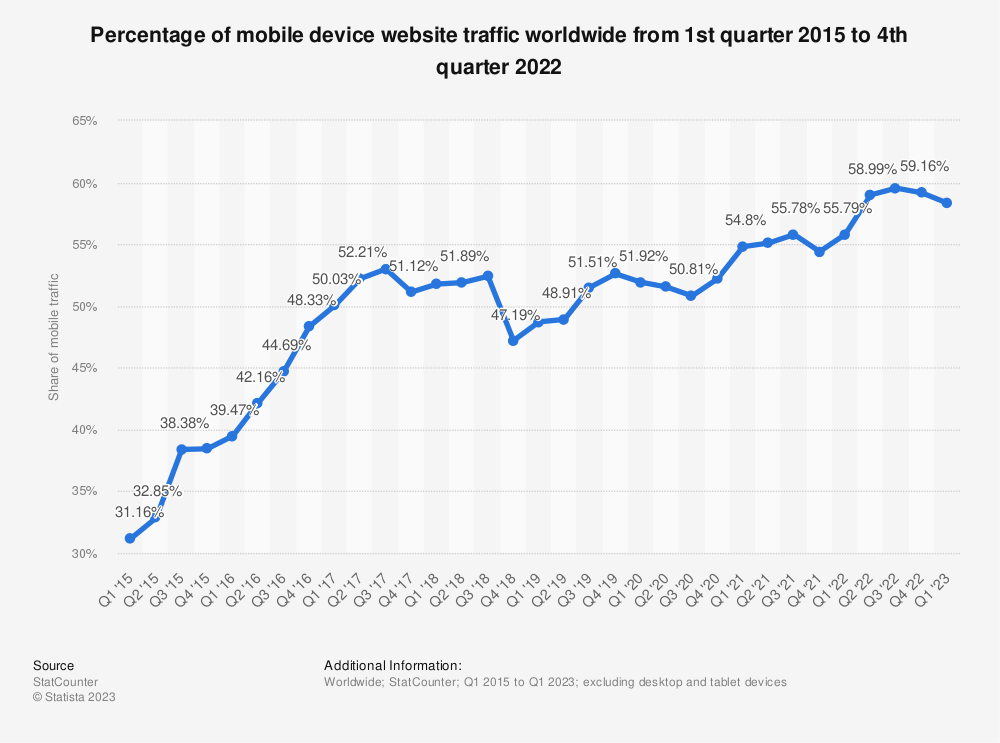
Mobile connections have improved a lot, but they still lag behind broadband - and mobile is where most of your visitors are. Mobile devices overtook desktop years ago and now account for roughly 60% of global website traffic, according to Statista.
Generally, mobile devices struggle with these elements:
- Images. High-resolution pictures, especially in JPEG or GIF format, are often the slowest part of a page.
- Embedded videos. A 720p video can slow loading to a crawl on 3G and noticeably delay it on 4G.
- CSS styles and fonts. Moving elements and custom fonts can make the page shine - and also make it show bare-bones text for the first 10 seconds of a visit.
Slow pages lose people after the click
Ranking is only half of the story. Search engines decide where your page shows up; users decide whether to stay. A store that takes seconds to load its product lists loses the customer's attention before it can show anything.
An oft-cited industry figure says 88% of customers are less likely to return after a bad experience with a site. Users go for faster, more responsive pages over good-looking but slower ones.
How to speed up your store
Start by checking your PageSpeed score - Google lets you do that for free with PageSpeed Insights. If the score is low, start with the basics. Minify your CSS, JS, and HTML files - strip unnecessary characters like comments and whitespace from the code. Then move JS and CSS from the head of the page to the footer so they load last.
Image compression is the next lever. The less the images weigh, the faster they load. Convert old JPEG, GIF, and PNG files into modern, lightweight WEBP - the format was designed specifically for the web. Mobile users will get the most value from this: heavy files are exactly what causes lag on 3G and 4G. A flexible UI layout also helps mobile users interact with your store faster.
These features can boost your page speed further:
- Lazyload. The site loads images, videos, and entire blocks only when the user scrolls to them, which speeds up the initial load.
- Infinite scroll. The fewer pages users have to reload or click through, the better. Infinite scroll eliminates the need to switch pages: visitors keep scrolling and getting new content without hurting your PageSpeed scores.
- JavaScript bundling. You don't need every JS file on every page. Bundle only the files a page needs, reducing the load on the server.
For a deeper, Magento-specific checklist, see our guides on 7 ways to improve your Magento 2 site speed and improving Magento 2 performance.
Why didn't my PageSpeed score improve?
A question we keep getting in our helpdesk: "I installed an optimization module - why didn't my Google score go up?"
In our support practice, the most common culprit is a carousel of large banners on the homepage. The banners come in different sizes, and until they load, the browser doesn't know how much space they need - so the page jumps around. That's a direct hit to CLS, and no amount of code minification will fix it.
The second typical offender is heavy external scripts: tracking, chat widgets, ad pixels. Deferring them - loading after a timeout - usually helps.
So before blaming the module (or buying one), look at what's actually on your page. The score reflects your frontend, not just your optimization stack.
Automate it: speed modules for Magento
Implementing these optimizations manually takes time and developer hours. Magento modules automate most of it. Google Page Speed Optimizer extensions compress, resize, and convert images, minify code files, and reorder how they load. Features like lazyload, infinite scroll, and cache warming often come included.
Be thoughtful: always check that the chosen module fits your Magento version. Read the reviews and FAQ, and talk to the support team.
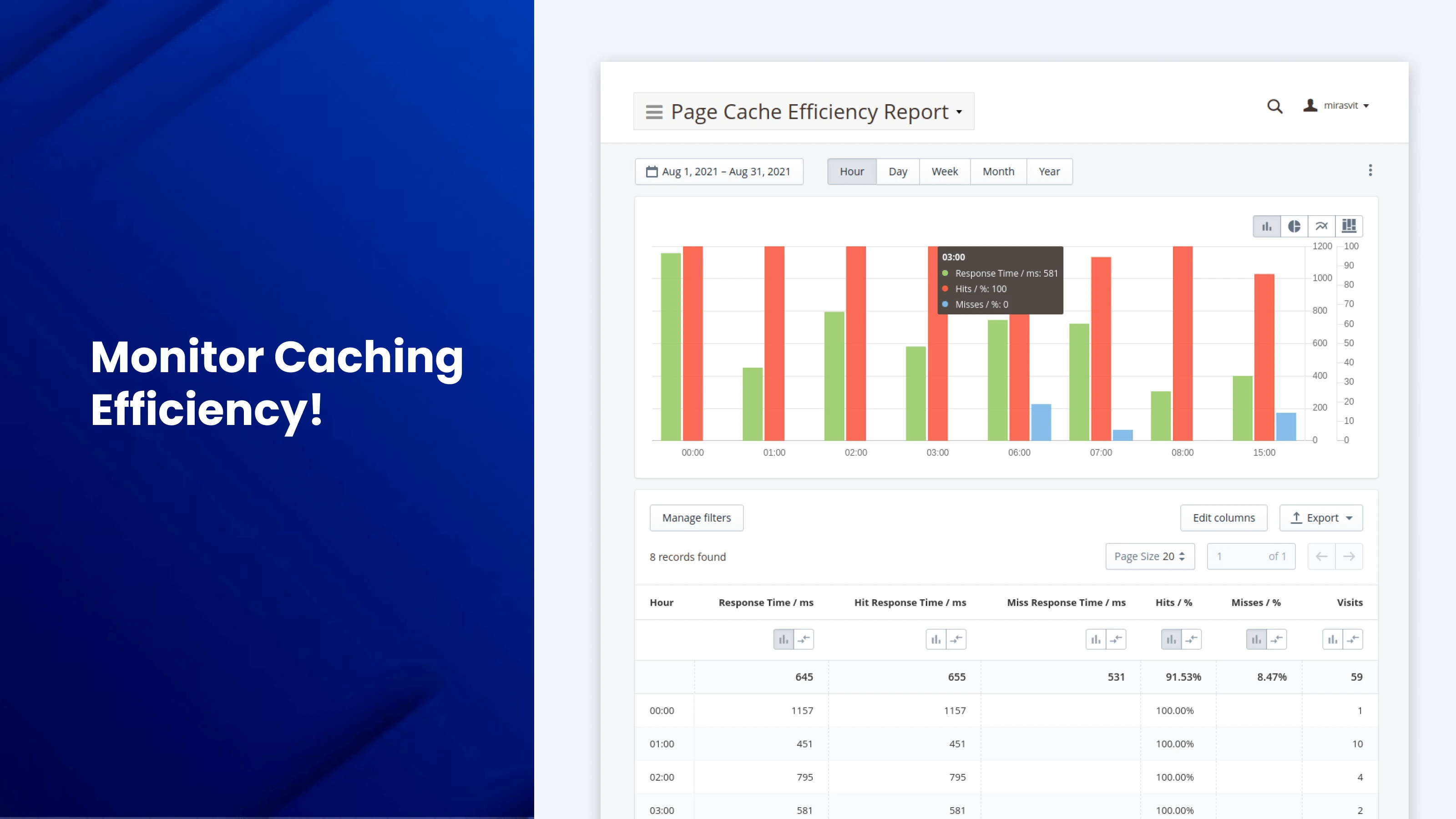
For example, PageSpeed Optimizer by Mirasvit loads fonts and videos in the background, optimizes CSS, JS, and HTML files, compresses and converts images, and applies lazy loading to pictures and iframes. It also has a built-in PageSpeed checker, so you don't have to leave the admin panel to use it.
One honest caveat from our own support team: we won't promise you numbers. The gains vary wildly from store to store - some see a dramatic jump, others barely notice a change. A module helps, but the root cause is usually the state of your frontend. If you want a dramatic effect, consider a lightweight theme - we saw it ourselves when switching to Hyva. And if your homepage is stacked with banners and animations, no module will save you until you deal with those.
Final thoughts
Page speed matters for every store: the case studies above show revenue and conversion rates going up 8-15% within a few months of optimization. A better score is always worth having - we've never seen speed work hurt a store.
But don't expect a module - ours included - to fix a heavy frontend by itself. Measure first, fix the real bottlenecks, and automate the routine parts. The free PageSpeed check takes a minute - start there.
FAQ
Does website speed really affect conversion rates?
Yes, measurably. A site that loads in 1 second converts about 2.5x better than a 5-second one in ecommerce (Portent, 2022), and Google/Deloitte measured an 8.4% conversion lift in retail from a 0.1-second improvement in mobile speed.
What is a good page load time for an ecommerce site?
Aim for the main content to appear in under 2.5 seconds - Google's "good" threshold for LCP. Most stores are slower: US retail sites average about 6.3 seconds on mobile, so hitting ~2 seconds already puts you ahead of most competitors.
Does page speed affect B2B conversion rates too?
Even more than ecommerce: in Portent's study, a 1-second B2B site converted 3x better than a 5-second one, versus 2.5x for ecommerce sites.
How do I make my ecommerce site load faster?
Compress images and convert them to WEBP, minify CSS/JS/HTML, defer non-critical and external scripts, and add lazy loading. On Magento, modules like Google Page Speed Optimizer automate all of this.
Why didn't my Google PageSpeed score improve after optimization?
In our support practice, the two most common causes are homepage banner carousels (their unknown sizes make the page jump, hurting CLS) and heavy external scripts like tracking and chat widgets. Fix those first - no optimization module can compensate for them.
Writer